Vscode-remote-release: Repeated SSH disconnects/reconnects that eventually stabilizes (large folder)
- VSCode Version: 1.37.1
- Local OS Version: macOS 10.14.6
- Remote OS Version: Debian 4.19.37-5rodete4 (in-house Google Debian distro)
- Remote Extension/Connection Type: SSH
Steps to Reproduce:
- Open workspace using "Remote - SSH" connection w/ large folder open (a remote checkout of fuchsia.googlesource.com/fuchsia, in this case)
- Connection initially succeeds, then disconnects or times out and I get into a loop of "Attempting to reconnect...". See logs.
- Eventually, after a number of disconnects/time outs and reconnects, it stabilizes and works mostly fine (at least as far as I can tell, I haven't used VSCode much yet since it's mostly unusable for me while this is unresolved)
Logs from Output > "Remote - SSH" panel on local end: https://gist.github.com/sbrocket/fc7f94588538a1de0ac7055c555d6df8
Notes:
- I work over SSH, using tmux+vim, fairly regularly and my connection is always stable, so I don't believe this is a general connection stability issue.
- Note that my SSH configuration uses (and requires) a ProxyCommand for the host I'm connecting to, which handles authentication and relaying the SSH connection through to our internal network. (But again, I use this regularly and it is stable.)
- I normally use SSH multiplexing (i.e. ControlMaster, ControlPath, etc. in the ssh config), and when VSCode disconnects/times out it also kills any connections that I have open in a separate terminal that are multiplexed over the same control socket.
- I uninstalled all extensions on the remote end, and that seemed to help it go through less disconnections, though not zero.
- The extensions panel that shows remote extensions doesn't update to say "No extensions found" (or to list the installed extensions, before I had uninstalled them) until the connection finally stabilizes.
Does this issue occur when you try this locally?: No (N/A)
Does this issue occur when you try this locally and all extensions are disabled?: No (N/A)
Happy to collect logs to help diagnose, but couldn't immediately find any more interesting logs than what was attached below from the local client.
 sbrocket
All 80 comments
Thanks for the detailed report. I think that what you are describing sounds consistent with issues like https://github.com/microsoft/vscode-remote-release/issues/1087 which are probably caused by the remote extension host getting stuck doing lots of work and not responding to messages fast enough which makes the frontend think it has lost the connection.
Not sure about
[02:24:33.275] > F0826 19:24:33.273471   61705 helper.go:233] read tcp 192.168.1.198:60832->216.239.45.151:443: read: operation timed out
[02:24:33.286] > mux_client_request_session: read from master failed: Broken pipe
guessing this is from your proxy.
Can you see what error messages are in the devtools after reconnection happens? It should be some hint as to why vscode thought it lost the connection.
How are the specs on the host? You could run code --status or just top to see if a vscode process is using all of your cpu/memory before we get disconnected.
 roblourens
on 30 Aug 2019
roblourens
on 30 Aug 2019
Yes those logs you called out are from the SSH ProxyCommand.
Console log attached. It's not clear to me if the log is indicating why VSCode thinks it lost the connection the first few times, but I'm not sure what I'm looking for. However, on the last connection attempt or two - and once it finally stabilized - I see some worrying messages about a file watcher dying.
The host specs are very high, so I doubt that's the issue (or if it is an issue then it would be an issue for most or all users). It's an HP Z840 workstation, 2x Xeon E5-2690 v4 (56 logical cores), 132GB RAM, etc.
One thing I'll mention again: The directory I have open is relatively large, since it's a checkout of Fuchsia (from fuchsia.googlesource.com), so if this is a "remote extension host is stuck doing lots of work" and failing to respond in time type issue, it's possible that the large project directory is part of the cause.
sbrocket
on 3 Sep 2019
Probably the real problem:
log.ts:173   ERR Error: [File Watcher (chokidar)] terminated unexpectedly and is restarted again...
log.ts:173   ERR Error: [File Watcher (chokidar)] terminated unexpectedly and is restarted again...
log.ts:173   ERR Error: [File Watcher (chokidar)] terminated unexpectedly and is restarted again...
log.ts:173   ERR Error: [File Watcher (chokidar)] terminated unexpectedly and is restarted again...
log.ts:173   ERR Error: [File Watcher (chokidar)] terminated unexpectedly and is restarted again...
log.ts:173   ERR Error: [File Watcher (chokidar)] failed to start after retrying for some time, giving up. Please report this as a bug report!
FYI @Tyriar, any ideas?
You could try excluding some folders with files.watcherExclude to check whether that helps.
Looks related to https://github.com/microsoft/vscode-remote-release/issues/735 and https://github.com/microsoft/vscode/issues/79152
roblourens
on 5 Sep 2019
 Tyriar
on 5 Sep 2019
Tyriar
on 5 Sep 2019
Do you have a lot of changes in your repo? Does https://code.visualstudio.com/docs/setup/linux#_visual-studio-code-is-unable-to-watch-for-file-changes-in-this-large-workspace-error-enospc help?
roblourens
on 5 Sep 2019
I already have fs.inotify.max_user_watches=524288 set from something previous. Do you mean changes as in modifications to files vs. the Git HEAD? If so, then no; it happens even with zero changes against HEAD.
I tried adding a files.watcherExclude config for my build output directory, for both "${workspaceFolder}/out/" and "/out/**" (since I wasn't sure if workspaceFolder worked there) but that didn't seem to help. I'll have to see if I can dig up whether there are any other large directories to ignore, because I still see errors about reaching the inotify limit.
I noticed some new logs in the Developer Tools console now, I'm guessing these were added in a recent update. Attaching new logs, since now you can see the reconnection attempts. Is there some way I can enable the trace logs that are referenced? I still don't see anything logged as far as a cause for most of the reconnections.
sbrocket
on 9 Sep 2019
Also, VSCode version is now 1.38.0 and the Remote - SSH extension is at 0.46.0.
sbrocket
on 9 Sep 2019
You can run the "Set Log Level" command to see some more logs but I'm not sure there will be anything useful there.
ERR Error: [File Watcher (chokidar)] Inotify limit reached (ENOSPC sure sounds like the error from my link above but sounds like you have already addressed that.
roblourens
on 10 Sep 2019
I'm coming from https://github.com/microsoft/vscode/issues/79152
Since updating to 1.38.0 on MacOS, I have the same Inotify limit reached error in the remoteagent.log every time my remote SSH disconnects, but now it just asks me to close my session instead of trying to reconnect automatically.
I also have fs.inotify.max_user_watches=524288 and put **/build/** in the files.watcherExclude setting. I don't know of any other large directories.
 bonsairobo
on 11 Sep 2019
bonsairobo
on 11 Sep 2019
I'm also affected by this.
 gbbosak
on 12 Sep 2019
gbbosak
on 12 Sep 2019
I tried Set Log Level and enabled all the levels it offered when taking the logs attached above, but it didn’t have an option for trace logs.
Yes, my inotify limit is set as high as possible. I’m not convinced that this is a problem with the file watcher. I think this is a deeper issue with how the extension is handling or monitoring disconnects. Is there some way I can gather other logs or data to support or disprove that?
There are a number of others on my team that are prospective VSCode users and who are hitting similar issues, and I’m encouraging them to chime in here (gbbosak is one). It’s also possible that there is some interaction between our SSH proxy helper and the extension.
sbrocket
on 12 Sep 2019
I experienced similar issues recently. Also working on the large Fuchsia codebase.
I notice that apparently heavy server-side operations seem to correlate with disconnects.
One thing that seems to have dramatically improved remote connection stability is removing the Microsoft C++ extension from the server and using vscode-clangd instead. I don't know much about how the Microsoft C++ extension operates in the server environment, but I do know that vscode-clangd uses the external clangd binary to do the heavy lifting.
This difference in stability might support the suspicion that server response time is related to the disconnect -- supposing that doing the heavy lifting in a separate process makes the overall server more concurrent and responsive.
How does the remote extension determine connection liveliness? Is there some sort of response timeout? If so, is it a short duration?
 eieio
on 12 Sep 2019
eieio
on 12 Sep 2019
If the remote extension host stops responding (like if some extension code is in a busy loop) then the frontend will think it disconnected. Also talking about that issue in https://github.com/microsoft/vscode-remote-release/issues/1087. @alexandrudima I saw that you had added that one to the milestone, are you planning to do anything there?
Then it seems like there is a set of users specifically seeing file watcher-related errors right before connection is lost, which seems related.
roblourens
on 15 Sep 2019
I can try to repro this in the Fuchsia repo, can anyone tell me which other extensions you are using or how the C++ extension is configured?
roblourens
on 15 Sep 2019
I personally have a c_cpp_properties.json file in the Zircon folder, and usually open that directory (I mainly work on Zircon) instead of the root Fuchsia folder. The c_cpp_properties.json file refers to include directories generated by the build process in the out/ directory at the root of the Fuchsia checkout. Many people here open the root of the Fuchsia directory, and either select a compile_commands.json file or leave it unconfigured (using fuzzy IntelliSense only). The compile_commands.json file often doesn't work particularly well with Fuchsia, so I think as far as the C++ extension goes it's more common to leave it unconfigured than it is to point it at a compile_commands.json file. This disconnect problem doesn't seem to occur as frequently when using clangd instead of the default C++ extension.
gbbosak
on 16 Sep 2019
I operate from the root of the Fuchsia repo. The only server extensions I have installed are vscode-clangd, Clang-Format, and FIDL Language Support.
I have vscode-clangd configured to use the aggregate compile_commands.json in the root directory. The aggregate file is created using the fx compdb command after a build.
eieio
on 18 Sep 2019
VS Code Server 'node' generates a lot of core dumps to a point it fills up my entire disk space rendering the VM completely unusable. Here is the stack trace:
next2020@vivija1:~/source>gdb ~/.vscode-server/bin/6ab598523be7a800d7f3eb4d92d7ab9a66069390/node core.10832
GNU gdb (GDB) Red Hat Enterprise Linux (7.2-92.el6)
Copyright (C) 2010 Free Software Foundation, Inc.
License GPLv3+: GNU GPL version 3 or later <http://gnu.org/licenses/gpl.html>
This is free software: you are free to change and redistribute it.
There is NO WARRANTY, to the extent permitted by law.  Type "show copying"
and "show warranty" for details.
This GDB was configured as "x86_64-redhat-linux-gnu".
For bug reporting instructions, please see:
<http://www.gnu.org/software/gdb/bugs/>...
Reading symbols from /home/next2020/.vscode-server/bin/6ab598523be7a800d7f3eb4d92d7ab9a66069390/node...done.
[New Thread 10832]
[New Thread 10843]
[New Thread 10835]
[New Thread 10869]
[New Thread 10836]
[New Thread 10837]
[New Thread 10838]
[New Thread 10839]
[New Thread 10866]
[New Thread 10867]
[New Thread 10868]
Reading symbols from /lib64/libdl.so.2...(no debugging symbols found)...done.
Loaded symbols for /lib64/libdl.so.2
Reading symbols from /lib64/librt.so.1...(no debugging symbols found)...done.
Loaded symbols for /lib64/librt.so.1
Reading symbols from /usr/lib64/libstdc++.so.6...(no debugging symbols found)...done.
Loaded symbols for /usr/lib64/libstdc++.so.6
Reading symbols from /lib64/libm.so.6...(no debugging symbols found)...done.
Loaded symbols for /lib64/libm.so.6
Reading symbols from /lib64/libgcc_s.so.1...(no debugging symbols found)...done.
Loaded symbols for /lib64/libgcc_s.so.1
Reading symbols from /lib64/libpthread.so.0...(no debugging symbols found)...done.
[Thread debugging using libthread_db enabled]
Loaded symbols for /lib64/libpthread.so.0
Reading symbols from /lib64/libc.so.6...(no debugging symbols found)...done.
Loaded symbols for /lib64/libc.so.6
Reading symbols from /lib64/ld-linux-x86-64.so.2...(no debugging symbols found)...done.
Loaded symbols for /lib64/ld-linux-x86-64.so.2
Core was generated by `/home/next2020/.vscode-server/bin/6ab598523be7a800d7f3eb4d92d7ab9a66069390/node'.
Program terminated with signal 6, Aborted.
#0  0x00000030e9a359d9 in raise () from /lib64/libc.so.6
Missing separate debuginfos, use: debuginfo-install glibc-2.17-55.el6.x86_64 libgcc-4.4.7-23.el6.x86_64 libstdc++-4.8.2-16.3.el6.x86_64
(gdb) where
#0  0x00000030e9a359d9 in raise () from /lib64/libc.so.6
#1  0x00000030e9a370e8 in abort () from /lib64/libc.so.6
#2  0x00000000008d20e1 in node::Abort() ()
#3  0x00000000008d211c in node::OnFatalError(char const*, char const*) ()
#4  0x0000000000b02b6e in v8::Utils::ReportOOMFailure(v8::internal::Isolate*, char const*, bool) ()
#5  0x0000000000b02da4 in v8::internal::V8::FatalProcessOutOfMemory(v8::internal::Isolate*, char const*, bool) ()
#6  0x0000000000ef02e2 in v8::internal::Heap::FatalProcessOutOfMemory(char const*) ()
#7  0x0000000000ef03e8 in v8::internal::Heap::CheckIneffectiveMarkCompact(unsigned long, double) ()
#8  0x0000000000efc512 in v8::internal::Heap::PerformGarbageCollection(v8::internal::GarbageCollector, v8::GCCallbackFlags) ()
#9  0x0000000000efce44 in v8::internal::Heap::CollectGarbage(v8::internal::AllocationSpace, v8::internal::GarbageCollectionReason, v8::GCCallbackFlags)
    ()
#10 0x0000000000effab1 in v8::internal::Heap::AllocateRawWithRetryOrFail(int, v8::internal::AllocationSpace, v8::internal::AllocationAlignment) ()
#11 0x0000000000ec8fd4 in v8::internal::Factory::NewFillerObject(int, bool, v8::internal::AllocationSpace) ()
#12 0x000000000116846e in v8::internal::Runtime_AllocateInNewSpace(int, v8::internal::Object**, v8::internal::Isolate*) ()
#13 0x00002cf2df55c01d in ?? ()
#14 0x000035c90cb026f1 in ?? ()
#15 0x00002cf2df55bf81 in ?? ()
#16 0x00007ffe73325c50 in ?? ()
#17 0x0000000000000006 in ?? ()
#18 0x00007ffe73325cb0 in ?? ()
#19 0x00002cf2df511146 in ?? ()
#20 0x0000002000000000 in ?? ()
#21 0x00002b13652e2f89 in ?? ()
#22 0x00007ffe73325c80 in ?? ()
#23 0x0000000000000013 in ?? ()
#24 0x0000000600000000 in ?? ()
#25 0x0000000000000016 in ?? ()
#26 0x00007ffe73325d30 in ?? ()
#27 0x00002cf2df5b975a in ?? ()
#28 0x0000000000000000 in ?? ()
(gdb)
My VSCode version:
Version: 1.39.2 (user setup)
Commit: 6ab598523be7a800d7f3eb4d92d7ab9a66069390
Date: 2019-10-15T15:35:18.241Z
Electron: 4.2.10
Chrome: 69.0.3497.128
Node.js: 10.11.0
V8: 6.9.427.31-electron.0
OS: Windows_NT x64 10.0.18362
 vivekvjn
on 21 Oct 2019
vivekvjn
on 21 Oct 2019
A number of us use VS Code with remote and can have up to 10-12 core dumps in a single day and all similar to what @vivekvjn listed. Each core dump is generally at least 2GB each. I hope this "little" feature can be investigated and fix soon.
 EmbeddedBacon
on 26 Oct 2019
EmbeddedBacon
on 26 Oct 2019
IMHO I think this has to do with the file watcher. Has anyone here attempted to use exclusion rules to limit what is being watched and check if that helps?
e.g.
    "files.watcherExclude": {
        "**/.git/objects/**": true,
        "**/.git/subtree-cache/**": true,
        "**/node_modules/*/**": true
    },
 alexdima
on 30 Oct 2019
alexdima
on 30 Oct 2019
@alexandrudima see my last comment
bonsairobo
on 30 Oct 2019
@bpasero Do you have any tips how to troubleshoot watcher process crashes?
alexdima
on 5 Nov 2019
Ideally try to reproduce with the watcher itself. Is this a watcher crashing locally or in the server?
 bpasero
on 5 Nov 2019
bpasero
on 5 Nov 2019
For those who are looking for a workaround to continue working (it took me half a day to find it), I don't have this issue anymore by putting a new pattern / in workplace settings - Watcher Exclude.
Go to vscode settings (ctrl + p or cmd + p), search for "watcher exclude" and "Add Pattern" /.
 marcosandri-dev
on 6 Nov 2019
marcosandri-dev
on 6 Nov 2019
Mr. @marcosandri-dev, are you referring to doing following:
    "files.watcherExclude": {
        "**/.git/objects/**": true,
        "**/.git/subtree-cache/**": true,
        "/": true,
    },
Isn't that going to exclude all files and folders from being watched?
EmbeddedBacon
on 7 Nov 2019
The * were lost, should be **/** but yeah that would exclude everything. If there is a part of the workspace tree that you are not actively working on, maybe you can just exclude that part.
roblourens
on 12 Nov 2019
Have not seen the issue since VSCode version 1.40
vivekvjn
on 2 Dec 2019
I still have this issue.
Version: 1.40.2
Commit: f359dd69833dd8800b54d458f6d37ab7c78df520
Date: 2019-11-25T14:52:45.129Z
Electron: 6.1.5
Chrome: 76.0.3809.146
Node.js: 12.4.0
V8: 7.6.303.31-electron.0
OS: Darwin x64 18.7.0
Here's what the vscode-server log says:
*
* Visual Studio Code Server
*
* Reminder: You may only use this software with Visual Studio family products,
* as described in the license https://aka.ms/vscode-remote/license
*


IP Address: 10.116.100.150
Extension host agent listening on 32811


[09:43:43] Extension host agent started.
[09:43:43] [127.0.0.1][cad68fb1][ManagementConnection] New connection established.
[09:43:43] [127.0.0.1][e933f1ea][ExtensionHostConnection] New connection established.
bash: cannot set terminal process group (-1): Inappropriate ioctl for device
bash: no job control in this shell
[09:43:43] [127.0.0.1][e933f1ea][ExtensionHostConnection] <1996> Launched Extension Host Process.
EXTHOST-STDOUT::::::::
<--- Last few GCs --->

[1996:0x43d53a0]    90528 ms: Mark-sweep 2115.7 (2126.7) -> 2063.9 (2072.4) MB, 1734.7 / 0.0 ms  (+ 0.0 ms in 24 steps since start of marking, biggest step 0.0 ms, walltime since start of marking 1744 ms) (average mu = 0.113, current mu = 0.076) allocatio[1996:0x43d53a0]    91446 ms: Mark-sweep 2065.5 (2072.4) -> 2064.7 (2071.4) MB, 819.2 / 0.0 ms  (+ 72.5 ms in 17 steps since start of marking, biggest step 14.6 ms, walltime since start of marking 918 ms) (average mu = 0.079, current mu = 0.029) allocatio

<--- JS stacktrace --->

==== JS stack trace =========================================

    0: ExitFrame [pc: 0x19fe126]
Security context: 0x0a29a671a2f1 <JSObject>
    1: /* anonymous */ [0x28ddaba545f9] [/home/user/.vscode-server/bin/f359dd69833dd8800b54d458f6d37ab7c78df520/out/vs/server/remoteExtensionHostProcess.js:~790] [pc=0x11b0511f9fd2](this=0x28ddaba54671 <Socket map = 0x1b977c4d3bf9>,0x227000b9e831 <Uint8Array map = 0x3f1b81825899>)
    2: emit [0xa29a67536f1] [events.js:~149] [pc=0x11b0511f3df5](this=0x28ddaba54...


EXTHOST-STDERR::::::::FATAL ERROR: Ineffective mark-compacts near heap limit Allocation failed - JavaScript heap out of memory

EXTHOST-STDERR:::::::: 1: 0x98edf0 node::Abort() [/home/user/.vscode-server/bin/f359dd69833dd8800b54d458f6d37ab7c78df520/node]

EXTHOST-STDERR:::::::: 2: 0x98fe56 node::OnFatalError(char const*, char const*) [/home/user/.vscode-server/bin/f359dd69833dd8800b54d458f6d37ab7c78df520/node]

EXTHOST-STDERR:::::::: 3: 0xb1552e v8::Utils::ReportOOMFailure(v8::internal::Isolate*, char const*, bool) [/home/user/.vscode-server/bin/f359dd69833dd8800b54d458f6d37ab7c78df520/node]

EXTHOST-STDERR:::::::: 4: 0xb158a9 v8::internal::V8::FatalProcessOutOfMemory(v8::internal::Isolate*, char const*, bool) [/home/user/.vscode-server/bin/f359dd69833dd8800b54d458f6d37ab7c78df520/node]

EXTHOST-STDERR:::::::: 5: 0xf20105  [/home/user/.vscode-server/bin/f359dd69833dd8800b54d458f6d37ab7c78df520/node]

EXTHOST-STDERR:::::::: 6: 0xf2aa6b v8::internal::Heap::PerformGarbageCollection(v8::internal::GarbageCollector, v8::GCCallbackFlags) [/home/user/.vscode-server/bin/f359dd69833dd8800b54d458f6d37ab7c78df520/node]

EXTHOST-STDERR:::::::: 7: 0xf2b787 v8::internal::Heap::CollectGarbage(v8::internal::AllocationSpace, v8::internal::GarbageCollectionReason, v8::GCCallbackFlags) [/home/user/.vscode-server/bin/f359dd69833dd8800b54d458f6d37ab7c78df520/node]

EXTHOST-STDERR:::::::: 8: 0xf2e225 v8::internal::Heap::AllocateRawWithRetryOrFail(int, v8::internal::AllocationType, v8::internal::AllocationAlignment) [/home/user/.vscode-server/bin/f359dd69833dd8800b54d458f6d37ab7c78df520/node]

EXTHOST-STDERR:::::::: 9: 0xef7f9b  [/home/user/.vscode-server/bin/f359dd69833dd8800b54d458f6d37ab7c78df520/node]

EXTHOST-STDERR::::::::10: 0xeff74b v8::internal::Factory::NewRawOneByteString(int, v8::internal::PretenureFlag) [/home/user/.vscode-server/bin/f359dd69833dd8800b54d458f6d37ab7c78df520/node]

EXTHOST-STDERR::::::::11: 0xeff9eb v8::internal::Factory::NewStringFromOneByte(v8::internal::Vector<unsigned char const>, v8::internal::PretenureFlag) [/home/user/.vscode-server/bin/f359dd69833dd8800b54d458f6d37ab7c78df520/node]

EXTHOST-STDERR::::::::12: 0xf0068d v8::internal::Factory::NewStringFromUtf8(v8::internal::Vector<char const>, v8::internal::PretenureFlag) [/home/user/.vscode-server/bin/f359dd69833dd8800b54d458f6d37ab7c78df520/node]

EXTHOST-STDERR::::::::13: 0xb2e749 v8::String::NewFromUtf8(v8::Isolate*, char const*, v8::NewStringType, int) [/home/user/.vscode-server/bin/f359dd69833dd8800b54d458f6d37ab7c78df520/node]

EXTHOST-STDERR::::::::14: 0xa469d0 node::StringDecoder::DecodeData(v8::Isolate*, char const*, unsigned long*) [/home/user/.vscode-server/bin/f359dd69833dd8800b54d458f6d37ab7c78df520/node]

EXTHOST-STDERR::::::::15: 0xa46b5c  [/home/user/.vscode-server/bin/f359dd69833dd8800b54d458f6d37ab7c78df520/node]

EXTHOST-STDERR::::::::16: 0x19fe126  [/home/user/.vscode-server/bin/f359dd69833dd8800b54d458f6d37ab7c78df520/node]

[09:45:16] [127.0.0.1][e933f1ea][ExtensionHostConnection] <1996> Extension Host Process exited with code: null, signal: SIGABRT.
Last EH closed, waiting before shutting down
[09:45:16] Last EH closed, waiting before shutting down
[09:45:21] [127.0.0.1][e933f1ea][ExtensionHostConnection] Unknown reconnection token.
Got delay-shutdown request while in shutdown timeout, delaying
[09:45:26] Got delay-shutdown request while in shutdown timeout, delaying
Cancelling previous shutdown timeout
[09:45:26] Cancelling previous shutdown timeout
[09:45:26] [127.0.0.1][8f302c5a][ManagementConnection] New connection established.
[09:45:26] [127.0.0.1][b7e4cd89][ExtensionHostConnection] New connection established.
[09:45:26] [127.0.0.1][b7e4cd89][ExtensionHostConnection] <2941> Launched Extension Host Process.
Error: write EPIPE
    at WriteWrap.onWriteComplete [as oncomplete] (internal/stream_base_commons.js:83:16) {
  errno: 'EPIPE',
  code: 'EPIPE',
  syscall: 'write'
}
Error: Unexpected SIGPIPE
    at process.<anonymous> (/home/user/.vscode-server/bin/f359dd69833dd8800b54d458f6d37ab7c78df520/out/bootstrap.js:5:192)
    at process.emit (events.js:200:13)
Error: Unexpected SIGPIPE
    at process.<anonymous> (/home/user/.vscode-server/bin/f359dd69833dd8800b54d458f6d37ab7c78df520/out/bootstrap.js:5:192)
    at process.emit (events.js:200:13)
[09:45:31] [127.0.0.1][cad68fb1][ManagementConnection] The client has disconnected, will wait for reconnection 3h before disposing...
Still having the issue described in #1686. Core.# files end up filling up the drive and causing a number of problems. Any way to disable these dumps?
 dav-ell
on 8 Jan 2020
dav-ell
on 8 Jan 2020
Any way to disable these dumps?
If you just want to disable the core dumps, you can set ulimit -c 0 which sets the core dump size to zero. But beware this affects all core dumps on the system.
vivekvjn
on 10 Feb 2020
Is there a way to reduce the 3h delay before disposing?
"The client has disconnected, will wait for reconnection 3h before disposing..."
 kbazzani
on 20 Feb 2020
kbazzani
on 20 Feb 2020
I used to work remotely just fine, but now that whole countries are in quarantines, our servers are overloaded, since everyone works remotely and I started to have these issues as well. Pinging my server gives me 15% packet loss and response time between 250-1500 ms. I have two remote vscode sessions and they keep disconnecting randomly.
Is it possible to trick vscode client or set a larger timeout possibly?
 ackvf
on 16 Mar 2020
ackvf
on 16 Mar 2020
The problem has evolved somehow. Previously, when I experienced client disconnects, I could just reconnect without issues. Now I experience disconnects that are not recoverable by simply reconnecting. The new remediation is to pkill -f vscode-server on my remote machine before trying to reconnect the vscode client.
I know this problem is present in the version:
Version: 1.44.0
Commit: 2aae1f26c72891c399f860409176fe435a154b13
Date: 2020-04-08T08:23:56.137Z (14 hrs ago)
BTW, I don't think that "eventually stabilizes" part of the title is accurate (anymore). This is a persistent issue for any amount of time that I work remotely.
bonsairobo
on 9 Apr 2020
This problem has started showing up again for me. I used to have it only while on a WireGuard VPN but now I am seeing it with direct connection. Using Archlinux with up to date vscode and kernel.
 gh67uyyghj
on 9 Apr 2020
gh67uyyghj
on 9 Apr 2020
This is a problem for me too! It seemed to only crop up when I moved to working on a VPN.
 natemwilson
on 17 Apr 2020
natemwilson
on 17 Apr 2020
I've been having this problem. It disconnects then I can reload the window and it goes back to normal. It seems to happen when I am doing builds of my large Angular application.
 jerrodrs
on 1 May 2020
jerrodrs
on 1 May 2020
here too. Vscode randomly disconnects with no apparent reason even if I am not working on big files or big folders.. I just have to keep it open and it disconnects. Sometimes it gets stuck when attempting to reconnect... the only way is to force quit the app.
local os: macOS mojave 10.14.6
remote os: ubuntu 19.10/20.04
 sisoe24
on 5 May 2020
sisoe24
on 5 May 2020
I have the same problem after a recent update (Update 1.45.1).
The following is the error from the .vscode-server log
local os: Windows10
remote os: centos7 (7.6.1810)
Error: write EPIPE
at WriteWrap.onWriteComplete [as oncomplete] (internal/stream_base_commons.js:83:16) {
errno: 'EPIPE',
code: 'EPIPE',
syscall: 'write'
}
Error: Unexpected SIGPIPE
at process.
at process.emit (events.js:200:13)
Error: Unexpected SIGPIPE
at process.
at process.emit (events.js:200:13)
 m2flu
on 6 Jun 2020
m2flu
on 6 Jun 2020
I am experiencing random disconnects again as well after the most recent update. When I originally experienced this issue VS Code would reconnect automatically. Now it goes directly to the reload window dialog.
Remote editing is the primary reason I use VS Code. If this continues to be an ongoing issue I'm going to look for a new editor and recommend my internal editor support team does the same. This level of frequent regression is too disruptive. I regret to be blunt, but this need more attention than it is getting.
eieio
on 9 Jun 2020
+1 to this. Is there any way we can get this issue prioritized?
gbbosak
on 9 Jun 2020
+1 this is causing some productivity issues for us
 stuffedmotion
on 24 Jun 2020
stuffedmotion
on 24 Jun 2020
Related:
On a stabilized session, try to open a large-ish file and wait till it loads. If it successfully loads, the session most often becomes extremely unreliable afterwards. Even if you close the file. Clicks on the UI won't register. Typing into the editor or integrated terminal doesn't work. Etc.
The only solution it seems it to reload the window. Which also often doesn't work if you need the Python extension (which fails to reload if the window is reloaded).
So you have to close the window entirely, open another, and reconnect to remote. Hope you made a workspace. But some reloads lead to the open files list being reset (so you lose the open files, but not the editor layout if you had it sticky). So having a workspace helps but isn't a sure win.
 munael
on 25 Jun 2020
munael
on 25 Jun 2020
I am also affected by this. Disabling plugins that do work on large sets of files make the disconnects less frequent.
Data points:
- https://github.com/dart-lang/sdk with Dart and clangd no problem.
- https://github.com/flutter/engine with Dart and clangd disconnects every 5 minutes.
- This might very well be the Dart analyzer crashing. Before working remote, I would sometimes notice that Dart analysis would have stopped working. So I hypothesise that with vscode-remote this results in a disconnect.
- https://github.com/flutter/engine with clangd no problem.
 dcharkes
on 26 Jun 2020
dcharkes
on 26 Jun 2020
started seeing this bug as well. I would sometimes disconnect even when I am idle in my home directory (no active project currently in use)
setting the log level to trace and viewing the log being populated shows nothing useful to me as to why it's happening...
[2020-07-07 08:44:09.199] [remoteagent] [trace] [File Watcher (node.js)] >> normalized [CHANGED] /home/andrest/.vscode-server/data/logs/20200707T080946/remoteagent.log
[2020-07-07 08:44:11.200] [remoteagent] [trace] [File Watcher (node.js)] [CHANGED] /home/andrest/.vscode-server/data/logs/20200707T080946/remoteagent.log
[2020-07-07 08:44:11.402] [remoteagent] [trace] [File Watcher (node.js)] >> normalized [CHANGED] /home/andrest/.vscode-server/data/logs/20200707T080946/remoteagent.log
[2020-07-07 08:44:13.404] [remoteagent] [trace] [File Watcher (node.js)] [CHANGED] /home/andrest/.vscode-server/data/logs/20200707T080946/remoteagent.log
[2020-07-07 08:44:13.605] [remoteagent] [trace] [File Watcher (node.js)] >> normalized [CHANGED] /home/andrest/.vscode-server/data/logs/20200707T080946/remoteagent.log
[2020-07-07 08:44:15.606] [remoteagent] [trace] [File Watcher (node.js)] [CHANGED] /home/andrest/.vscode-server/data/logs/20200707T080946/remoteagent.log
[2020-07-07 08:44:15.807] [remoteagent] [trace] [File Watcher (node.js)] >> normalized [CHANGED] /home/andrest/.vscode-server/data/logs/20200707T080946/remoteagent.log
[2020-07-07 08:44:17.809] [remoteagent] [trace] [File Watcher (node.js)] [CHANGED] /home/andrest/.vscode-server/data/logs/20200707T080946/remoteagent.log
[2020-07-07 08:44:18.011] [remoteagent] [trace] [File Watcher (node.js)] >> normalized [CHANGED] /home/andrest/.vscode-server/data/logs/20200707T080946/remoteagent.log
.
.
.
 tecandrew
on 7 Jul 2020
tecandrew
on 7 Jul 2020
+1 ಠ_ಠ
 jfinstrom
on 10 Jul 2020
jfinstrom
on 10 Jul 2020
Been dealing with this issue for the last week, to the point where I can't use VSCode anymore due to the amount of disconnects I'm experiencing. +1 to getting this issue looked into
 Syntaf
on 14 Jul 2020
Syntaf
on 14 Jul 2020
@Syntaf, I know this may be a consolation prize, but at our site we have found setting up VS Code to ssh keys to ease some of this pain. If a connection is dropped then VS Code will automagically reconnect without any interaction from you. You may find additional information here: https://code.visualstudio.com/docs/remote/troubleshooting
EmbeddedBacon
on 14 Jul 2020
I actually managed to fix this issue by disabling Hyper-V on my windows machine. I was running Vagrant using Hyper-V as a backend and it must have caused some connection issues. Disabling Hyper-V and using VirtualBox as my VM provider fixed these constant crashes.
Note: See the issue I linked above for my scripts on enabling/disabling Hyper-V if you need them.
Syntaf
on 14 Jul 2020
+1
I also met this issue.
Host: Ubuntu 20.04
Remote: Ubuntu 18.04
But, when i use windows for host, no problem.
Host: Windows 10
Remote: Ubuntu 18.04
 JunhwanPark
on 21 Jul 2020
JunhwanPark
on 21 Jul 2020
+1.
 ranjithkumar007
on 28 Jul 2020
ranjithkumar007
on 28 Jul 2020
I am getting code --status as Unable to open X display.
 kmoza
on 4 Aug 2020
kmoza
on 4 Aug 2020
One thing we rely on to detect disconnection is that a message is being exchanged every 5 seconds. So, even if you are idle, we send a "I'm alive" message from each side to the other side. The problem is that an extension could freeze the nodejs event loop for >20s. If that happens, then the server side is not able to send its "I'm alive" message to the client side and the client side believes it has lost connection to the server, while the connection is there from an OS point of view, it's just that an extension with performance problems freezes or enters into a very long computation on the extension host process main thread.
So if you ever encounter such problems, please try to disable some of the remote extensions, it might be that they freeze the event loop. In a desktop environment, this is also equally problematic, it's just in the local case we don't show a large dialog "in your face" when an extension freezes up the extension host event loop.
alexdima
on 4 Sep 2020
After reboot of the server (CentOS 7), this has gone.
m2flu
on 7 Sep 2020
So if you ever encounter such problems, please try to disable some of the remote extensions,
This is 100% the case. This only happens (for me) with really large files. I have one ungodly monolith I have to open and it is impossible to work in because of disconnects. Every time in my case intelephense does a syntax scan etc POOF!.
Is there a way to extend this timeout? Maybe a workspace setting I can set for that project?
jfinstrom
on 8 Sep 2020
It's impossible to work using vscode remotely. In my case the connection doesn't stabilize. Ssh disconnects all the time. On the other hand, I can have a stable connection through terminal. I don't know, but this problem is not new.
 michaeloc
on 9 Sep 2020
michaeloc
on 9 Sep 2020
File size doesn't matter for me. After rebooting the server, it has gone.
m2flu
on 9 Sep 2020
@jfinstrom This indicates that intelephense executes heavy code on the extension host process. We ask our extensions to spawn additional processes in order to do heavy lifting. If you look at our process tree, you will see that any extension we write that needs to do heavy lifting spawns additional processes in order to avoid doing such heavy lifting in the extension host process. Please reach out directly to the extension and point out that for a certain file they freeze the event loop for over 20 seconds.
@michaeloc Yes, this is not a new problem. Any extension that decides to do heavy lifting on the extension host process gives a horrible experience. In the VS Code local case, it will block any suggestions, git operations, etc. In the VS Code remote case, we show a dialog "in your face" when this happens. You are correct, we have a stable connection to the remote machine, but because of the freezing of the extension host event loop we think the connection was interrupted because we don't receive our keep alive messages anymore, since the process is busy executing some extension code. The strategy here is to identify which extension is causing this and get the extension fixed.
@m2flu Rebooting indicates that there might be lingering processes on the server. Could you please do a ps or something to identify if something is executing after VS Code has disconnected?
alexdima
on 9 Sep 2020
@alexdima I want to show you something, but after reboot I don't see the problem.
If I see the problem again, then I will post the result.
m2flu
on 10 Sep 2020
Found an interesting solution. When it tries to reconnect every few seconds, I would write some dummy characters in another file and hit save. The reconnection notification does not pop up again...
 PureHyd
on 14 Sep 2020
PureHyd
on 14 Sep 2020
I'm having the same situation here (as @jfinstrom ), when I click on a large file (300Mb) I got disconnected, even after I try to reconnect it is impossible to work, each minute it asks to reconnect.
Actually, I have found the solution for myself.
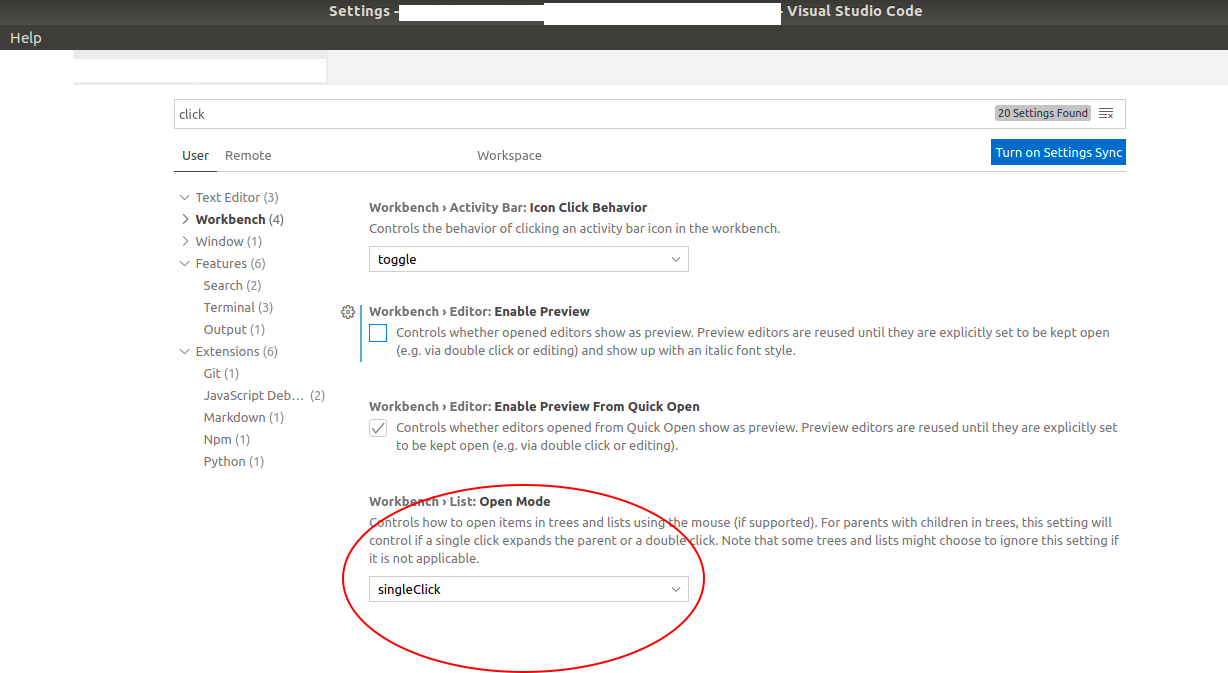
 volodymyrkepsha
on 1 Oct 2020
volodymyrkepsha
on 1 Oct 2020
@volodymyrkepsha What extensions have you have installed remotely? Is any one of them perhaps running when you open such a file? What file type do you open?
alexdima
on 1 Oct 2020
@alexdima
I installed the visual code on my local Ubuntu machine (with additional Remote-SSH extension).
As a remote server there is also an Ubuntu.
I doubt that there multiple instances running.
The file is the weights for a neural net so I guess it is binary file (*.pth extension).
The main thing here is that I didn't want to open it at all. I just wanted to select it so I can copy the absolute path (with a short cut), but each time when I'm selecting any file in working directory, the file opens in editor. It is quite strange default option for Open Mode.
But I found the solution which totally works for me. Now the connection is stable.
volodymyrkepsha
on 1 Oct 2020
After reboot, connection was stable for a while, then reconnection repeats again.
The followings were shown even the user has not been connected via vscode for several days.
ps auwx | grep vscode
root 5898 0.0 0.0 112712 984 pts/7 S+ 17:01 0:00 grep --color=auto vscode
user 28392 0.0 0.1 920200 48596 ? Sl Oct22 0:00 /home/user/.vscode-server/extensions/ms-vscode.cpptools-1.1.0-insiders2/debugAdapters/mono.linux-x86_64 --config /home/user/.vscode-server/extensions/ms-vscode.cpptools-1.1.0-insiders2/debugAdapters/framework/config.linux /home/user/.vscode-server/extensions/ms-vscode.cpptools-1.1.0-insiders2/debugAdapters/bin/OpenDebugAD7.exe
I killed the process.
How can I fix this?
m2flu
on 26 Oct 2020
This appears to be a leaking process from the C++ extension. Could you please create an issue directly against them at https://github.com/Microsoft/vscode-cpptools/issues
alexdima
on 27 Oct 2020
@alexdima I don't think so. No cpp extention was installed during the incident. Python and Anaconda and git extensions were though.
 jaepil-choi
on 28 Oct 2020
jaepil-choi
on 28 Oct 2020
Unfortunately, I gave up to use vscode to data science remotely! If one day the vscode were stable like jupyter notebook, I will be glad to return!
michaeloc
on 28 Oct 2020
Found an interesting solution. When it tries to reconnect every few seconds, I would write some dummy characters in another file and hit save. The reconnection notification does not pop up again...
This works for me.
 s1998
on 3 Nov 2020
s1998
on 3 Nov 2020
There is another leaking process.
user 8551 0.0 0.1 221720 62756 ? S Nov05 0:01 /data/apps/anaconda3/envs/py36tf/bin/python /home/user/.vscode-server/extensions/ms-python.python-2020.10.332292344/pythonFiles/pyvsc-run-isolated.py vscode_datascience_helpers.daemon --daemon-module=vscode_datascience_helpers.jupyter_daemon -v
user 8552 0.0 0.2 377128 71072 ? Sl Nov05 1:24 /data/apps/anaconda3/envs/py36tf/bin/python /home/user/.vscode-server/extensions/ms-python.python-2020.10.332292344/pythonFiles/pyvsc-run-isolated.py vscode_datascience_helpers.daemon --daemon-module=vscode_datascience_helpers.jupyter_daemon -v
m2flu
on 6 Nov 2020
@m2flu Could you please report the leaking anaconda process directly against the python extension at https://github.com/Microsoft/vscode-python/issues ?
alexdima
on 11 Nov 2020
I'm running this version:
Version: 1.51.1 (user setup)
Commit: e5a624b788d92b8d34d1392e4c4d9789406efe8f
Date: 2020-11-10T23:34:32.027Z
Electron: 9.3.3
Chrome: 83.0.4103.122
Node.js: 12.14.1
V8: 8.3.110.13-electron.0
OS: Windows_NT x64 10.0.18363
Extensions: Remote and Python, I've removed everything else.
Up until a few days ago vscode was pretty stable but now I keep getting the reconnect messages. Not much info on the debug console but when I check the network usage in task manager I can see that the ssh.exe process on the client produces a heavy network traffic. I'm running ssh via a proxy and map a few ports locally but I don't think these cause the issue. My guess is that vscode itself or some of the extension produce so much traffic that the ssh tunnel gets clogged which leads to a time-out. Just being able to increase the time-out would solve this problem.
I don't really understand what's going on with this issue. It keeps coming back and can ruin many days of thousands of developers. A tiny setting that changes the time-out would at least help us work around the problem.
....
I decided to downgrade to the october version which still worked a week ago.
Version: 1.50.1 (user setup)
Commit: d2e414d9e4239a252d1ab117bd7067f125afd80a
Date: 2020-10-13T15:06:15.712Z
Electron: 9.2.1
Chrome: 83.0.4103.122
Node.js: 12.14.1
V8: 8.3.110.13-electron.0
OS: Windows_NT x64 10.0.18363
Remote extension: 0.55.0
Python extension: 2020.10.3322922344 (on both the remote and local, remote is centos 7.2)
No other extension is running, and it just keeps disconnecting. I would try without the python extension but I use vs code specifically for debugging python.
...
Update: I've managed to get it working by thoroughly checking the logs. Turned out the newer versions of the python extension
run zmq on the server which is distributed as a binary with dependencies on relatively recent version of libstdc++.so.6. You only have those versions on CentOS7 if you build gcc from source but you can copy it from under an anaconda environment where it's usually installed. Another issue was with the python language server which vscode was trying to download in the background but it failed for some reason. I downloaded the nuget package manually to the remote linux machine and after uncompressing it under ~/.vscode-server/extensions ... it started working. I guess the heavy network traffic was caused by extremely long error messages going up and down the wire.
 dobos
on 16 Nov 2020
dobos
on 16 Nov 2020
I think 3rd part extensions are not the cause of the problem, since I disabled them all. And I've also tried to disable file watching since my working dir is large. But the disconnections always show up even in the above "clean environment".
My vscode version:
Version: 1.51.1 (user setup)
Commit: e5a624b788d92b8d34d1392e4c4d9789406efe8f
Date: 2020-11-10T23:34:32.027Z
Electron: 9.3.3
Chrome: 83.0.4103.122
Node.js: 12.14.1
V8: 8.3.110.13-electron.0
OS: Windows_NT x64 10.0.19042
Here is my error log,
*
* Visual Studio Code Server
*
* Reminder: You may only use this software with Visual Studio family products,
* as described in the license https://aka.ms/vscode-remote/license
*


IP Address: ****
IP Address: ****
IP Address: ****
Extension host agent listening on ****


[15:56:29] Extension host agent started.
[15:56:30] [127.0.0.1][daac512a][ManagementConnection] New connection established.
[15:56:30] [127.0.0.1][1964ba30][ExtensionHostConnection] New connection established.
[15:56:31] Listing 0 persistent terminals, 0 total terminals
gpg-agent: a gpg-agent is already running - not starting a new one
[15:56:32] [127.0.0.1][1964ba30][ExtensionHostConnection] <22473> Launched Extension Host Process.
[15:58:53] [127.0.0.1][daac512a][ManagementConnection] The client has disconnected, will wait for reconnection 3h before disposing...
Error: Unexpected SIGPIPE
    at process.<anonymous> (/data/home/v-kunyan/.vscode-server/bin/e5a624b788d92b8d34d1392e4c4d9789406efe8f/out/bootstrap.js:5:377)
    at process.emit (events.js:223:5)
[16:05:35] [127.0.0.1][daac512a][ManagementConnection] Another client has connected, will shorten the wait for reconnection 5m before disposing...
[16:05:35] [127.0.0.1][d1f1f592][ManagementConnection] New connection established.
[16:05:35] [127.0.0.1][e8dd10d3][ExtensionHostConnection] New connection established.
[16:05:35] [127.0.0.1][e8dd10d3][ExtensionHostConnection] <17719> Launched Extension Host Process.
[16:05:35] Listing 1 persistent terminals, 1 total terminals
[16:05:39] Replaying 604 chars and 1 size events.
[16:07:58] [127.0.0.1][d1f1f592][ManagementConnection] The client has disconnected, will wait for reconnection 3h before disposing...
Error: Unexpected SIGPIPE
    at process.<anonymous> (/data/home/v-kunyan/.vscode-server/bin/e5a624b788d92b8d34d1392e4c4d9789406efe8f/out/bootstrap.js:5:377)
    at process.emit (events.js:223:5)
[16:10:35] [127.0.0.1][daac512a][ManagementConnection] The reconnection short grace time of 5m has expired, so the connection will be disposed.
[16:10:36] [127.0.0.1][1964ba30][ExtensionHostConnection] <22473> Extension Host Process exited with code: 0, signal: null.
 naykun
on 20 Nov 2020
naykun
on 20 Nov 2020
Having the same issue, noticed that each time it reconnected, some processes were generated by VSCode, such as sleep 180, hope it can help. No remote extensions installed, I've excluded all the large directories, and no error info under the LogLevel=trace as well.
Remote environment:
OS: Debian x64
CPU Arch: ARM64
Local environment:
Version: 1.52.0-insider (system setup)
Commit: caf01baa45b9816e2e1d8a2de22b40cf89459c03
Date: 2020-11-20T07:41:44.570Z
Electron: 9.3.3
Chrome: 83.0.4103.122
Node.js: 12.14.1
V8: 8.3.110.13-electron.0
OS: Windows_NT x64 10.0.19042
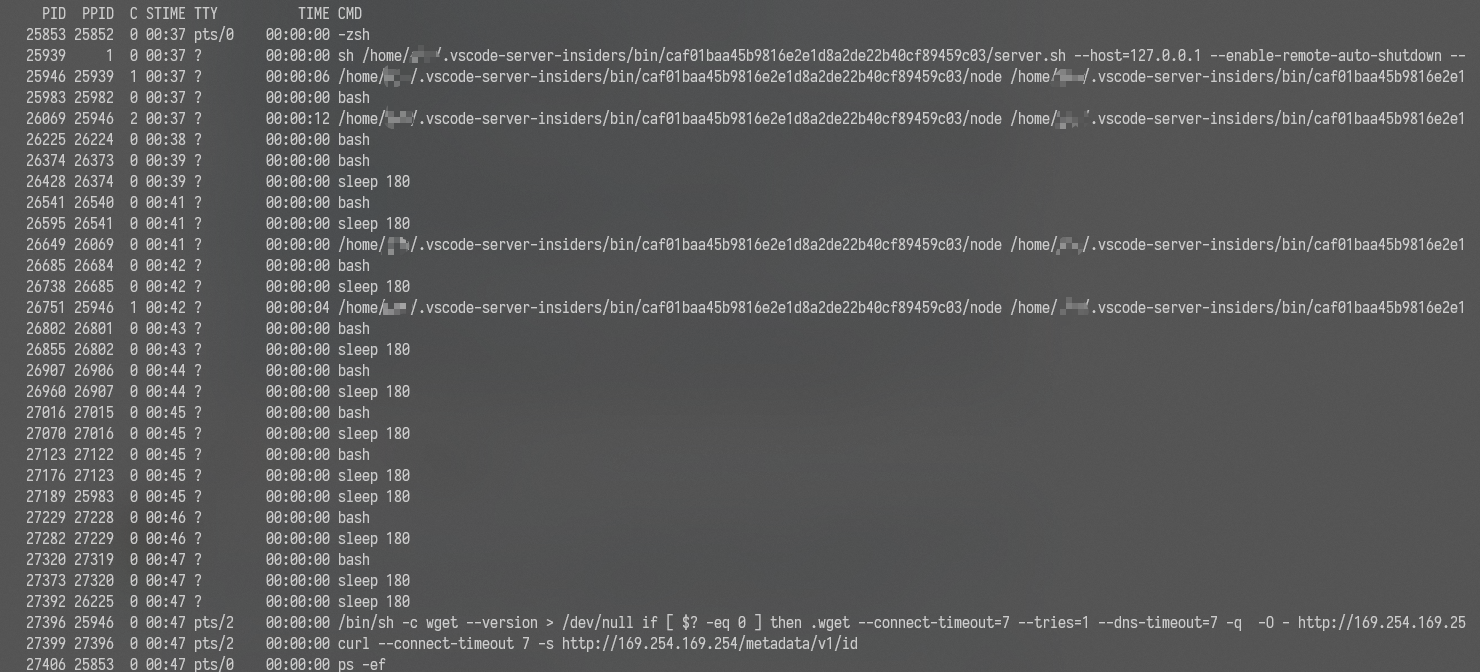
 jin-qin
on 21 Nov 2020
jin-qin
on 21 Nov 2020
I have the same issue, keeps disconnecting me randomly without any interaction
 beescuit
on 21 Nov 2020
beescuit
on 21 Nov 2020
Update: I've managed to get it working by thoroughly checking the logs. Turned out the newer versions of the python extension
run zmq on the server which is distributed as a binary with dependencies on relatively recent version of libstdc++.so.6. You only have those versions on CentOS7 if you build gcc from source but you can copy it from under an anaconda environment where it's usually installed. Another issue was with the python language server which vscode was trying to download in the background but it failed for some reason. I downloaded the nuget package manually to the remote linux machine and after uncompressing it under ~/.vscode-server/extensions ... it started working. I guess the heavy network traffic was caused by extremely long error messages going up and down the wire.
@dobos I'm sorry about your wasted time, but kudos for figuring out it was the python extension! Can you please create an issue with the python extension to explain that they should just show an error on CentOS7 rather than the current behavior. They might not be aware that they stopped working on CentOS7.
@naykun Your server log is not particularly revealing. It is showing that the server had a client, the client disconnected and then another client connection to the server. So it does not really narrow down things to help explain why the connection was closed or why the connection timed out.
@jin-qin What are the leaking processes? Could you please find out the full command line for the processes with /.vscode-server-insiders/ in their path? What extensions do you have installed remotely?
@beescuit What extensions do you have installed remotely?
alexdima
on 4 Dec 2020
@alexdima Yes, the log doesn't show enough info about why disconnection happens. But I've checked all logs carefully and only this piece of message are related to the breakdown. What can I do to get a more detailed log and help target the problem?
naykun
on 5 Dec 2020
I also have the same issue, keeps disconnecting me randomly without any interaction
 ivallesp
on 9 Dec 2020
ivallesp
on 9 Dec 2020
It happens the same to me. I realized it disconnects more frequently when the file is big.
 fernandorovai
on 9 Dec 2020
fernandorovai
on 9 Dec 2020
"I downloaded the nuget package manually to the remote linux machine and after uncompressing it under ~/.vscode-server/extensions ... it started working."
@dobos Can you post the link to these packages where we can download them?
 imperialguy
on 11 Dec 2020
imperialguy
on 11 Dec 2020
There's a ton of processes running in the background, it keeps disconnecting frequently and constantly. This remote-ssh extension and python extension are both turning out to be an absolute pain in the neck. It adds to the development time, not the other way around.
The people maintaining these two extensions must: a.) reduce the number of 'vscode' processes running on the target machine; b.) get python extension to work properly with the remote interpreter. Otherwise, this whole thing will be useless. It's much better to just use Liclipse with pydevd.
imperialguy
on 11 Dec 2020
Guys, this reconnect loop issue comes around every month or so due to different errors here and there. Right now I cannot even copy and paste a command between two terminal opened side by side. What I'm seeing is the network traffic of one of the underlying ssh processes goes high and then the reconnect happens in a few seconds. The result is then almost always an infinite reconnect loop. There seems to be no way to figure out what is actually causing the high ssh traffic but it must be some kind of file download or error dump because the process on the other side of the ssh channel is always bash.
The issue started to happen with the 2020 november version (I turned off automatic updates), but since I couldn't figure out what was going wrong I'm on the latest of everything now and the issues persist. I've clean-installed everything on both the windows client and the linux remote server. I'm accessing the remote server via an ssh proxy running on a linux gateway machine. This might slow things down a little bit but it's usually fine, the error must be somewhere else. The install is pretty vanilla, I've removed all extensions except remote SSH. The reconnect happens even if I want to press enter in a remote ssh bash session to the dev server.
Please provide a troubleshooting guide to find the underlying issues that cause the reconnects of remote ssh.
I could resolve the issue but I don't understand why it affected the remote connection. It turned out to be integrated terminal connected to a bash session on the remote server. Whenever I pasted a longer line into the terminal that required a line break, it hung and cause the remote connection to reconnect repeatedly. I fiddled with the terminal settings and it went away.
These are the settings that work:
    "terminal.explorerKind": "external",
    "terminal.integrated.rendererType": "canvas",
    "terminal.integrated.serverSpawn": false
I guess the first one is the key.
One more comment. It turned out that the reason behind the frequent timeout issue coming back unexpectedly is netflix. Apparently, my neighbors watch a lot of tv during the holidays. Now this is another reason to allow longer timeouts. The whole point of using vscode remote is that the editor itself is very responsive compared to other remote solutions (remote desktop, particularly, or even vim in an ssh terminal). I don't care if I have to wait for some background task to complete once in a while (and I'm definitely willing to wait more than 5 seconds) but I do care about editor responsiveness when it come to writing code. Now I had to revert back to RDP to my office PC which has a fast connection to the server I'm using with vscode and the reconnect issue went away.
dobos
on 28 Dec 2020
"I downloaded the nuget package manually to the remote linux machine and after uncompressing it under ~/.vscode-server/extensions ... it started working."
@dobos Can you post the link to these packages where we can download them?
I don't remember what those packages were but I found the URLs in the server log file. I guess this error is not typical and the nuget servers were glitching during install.
dobos
on 29 Dec 2020
Related issues
 asyncx
·
3Comments
asyncx
·
3Comments
 jeffreyyjp
·
3Comments
jeffreyyjp
·
3Comments
 sulume
·
3Comments
sulume
·
3Comments
 gulshan
·
3Comments
gulshan
·
3Comments
 Yvand
·
3Comments
Yvand
·
3Comments
Most helpful comment
I used to work remotely just fine, but now that whole countries are in quarantines, our servers are overloaded, since everyone works remotely and I started to have these issues as well. Pinging my server gives me 15% packet loss and response time between 250-1500 ms. I have two remote vscode sessions and they keep disconnecting randomly.
Is it possible to trick vscode client or set a larger timeout possibly?