Vscode-remote-release: Latest insiders build breaks remote ssh ( Failed to parse remote port from server output)
Using SSH-Remote to an Ubuntu 18.04 host is suddenly failing after reload.
killed all server-side instances and moved the .vscode-server-insiders folder to force a new install and still the issue persists.
Version: 1.38.0-insider (user setup)
Commit: 366e1b275cf01e2d50e96083dede553de608b078
Date: 2019-08-22T10:53:16.884Z
Electron: 4.2.9
Chrome: 69.0.3497.128
Node.js: 10.11.0
V8: 6.9.427.31-electron.0
OS: Windows_NT x64 10.0.17763
Steps to reproduce:
open a remote ssh session to an Ubuntu 18.04 server. (it probably is not Ubuntu-specific but I have no others to test right now)
Here is the log from my failing attempt to open a previous workspace.
[18:47:47.508] [email protected]
[18:47:47.508] win32 x64
[18:47:47.512] SSH Resolver called for "ssh-remote+hostname", attempt 1
[18:47:47.512] SSH Resolver called for host: hostname
[18:47:47.512] Setting up SSH remote "hostname"
[18:47:47.577] Using commit id "366e1b275cf01e2d50e96083dede553de608b078" and quality "insider" for server
[18:47:47.584] Testing ssh with ssh -V
[18:47:48.298] ssh exited with code: 0
[18:47:48.298] Got stderr from ssh: OpenSSH_for_Windows_7.7p1, LibreSSL 2.6.5
[18:47:48.299] Running script with connection command: ssh -o ClearAllForwardings=true hostname bash
[18:47:48.310] Install and start server if needed
[18:47:49.361] >
[18:47:49.361] Got some output, clearing connection timeout
[18:47:51.025] > warning: agent returned different signature type ssh-rsa (expected rsa-sha2-512)
[18:47:51.251] >
> Running remote connection script
> Acquiring lock on /home/neil/.vscode-server-insiders/bin/366e1b275cf01e2d50e96083dede553de608b078/vscode-remote-lock.366e1b275cf01e2d50e96083dede553de608b078
>
[18:47:51.842] > Installing to /home/neil/.vscode-server-insiders/bin/366e1b275cf01e2d50e96083dede553de608b078...
> Downloading with wget
>
[18:47:52.860] > Download complete
[18:47:52.885] >
>
[18:47:53.277] > SSH_CONNECTION=fe80::4ca5:6b5d:dad0:537d%eno1 41508 fe80::2d8:61ff:fe4f:244e%eno1 22
> LANG=en_US.UTF-8
> XDG_SESSION_ID=844
> USER=neil
> PWD=/home/neil
> HOME=/home/neil
> SSH_CLIENT=fe80::4ca5:6b5d:dad0:537d%eno1 41508 22
> MAIL=/var/mail/neil
> SHELL=/bin/bash
> SHLVL=2
> VSCODE_AGENT_FOLDER=/home/neil/.vscode-server-insiders
> LOGNAME=neil
> DBUS_SESSION_BUS_ADDRESS=unix:path=/run/user/1003/bus
> XDG_RUNTIME_DIR=/run/user/1003
> PATH=/usr/local/sbin:/usr/local/bin:/usr/sbin:/usr/bin:/sbin:/bin:/usr/games:/usr/local/games
> _=/usr/bin/printenv
> OLDPWD=/home/neil/.vscode-server-insiders/bin/366e1b275cf01e2d50e96083dede553de608b078
> Starting server...
> Waiting for server log...
>
[18:47:53.793] >
> *
> * Reminder: You may only use this software with Visual Studio family products,
> * as described in the license (https://go.microsoft.com/fwlink/?linkid=2077057)
> *
>
> 895de801-5f08-4c79-b6f7-0d6ed2d4c9c7==35711====ubuntu==
>
[18:47:55.061] "install" terminal command done
[18:47:55.061] Install terminal quit with output: 895de801-5f08-4c79-b6f7-0d6ed2d4c9c7==35711====ubuntu==
[18:47:55.061] Received install output: 895de801-5f08-4c79-b6f7-0d6ed2d4c9c7==35711====ubuntu==
[18:47:55.061] Failed to parse remote port from server output: 895de801-5f08-4c79-b6f7-0d6ed2d4c9c7==35711====ubuntu==
[18:47:55.061]
[18:47:55.062] TELEMETRY: {"eventName":"resolver","properties":{"outcome":"failure","reason":"UnparsableOutput"},"measures":{"resolveAttempts":1,"retries":1}}
[18:47:55.062] ------
 nhorlock
All 23 comments
(Experimental duplicate detection)
Thanks for submitting this issue. Please also check if it is already covered by an existing one, like:
- Remote-SSH: Fail to connect to remote server (#78563)
- Cannot connect to my host or remove services running on my host (#76627)
- Remote SSH not working as of v1.37.0 (release) and 1.38.0-insider (#79123)
- opening remote workspace failing after latest update (#76467)
- Could not establish SSH connection to remote using Remote - SSH (#76534)
![vscodebot[bot] picture](https://avatars2.githubusercontent.com/in/2406?v=4&s=40) vscodebot[bot]
on 22 Aug 2019
vscodebot[bot]
on 22 Aug 2019
Same exact problem here
 dixonqmg
on 22 Aug 2019
dixonqmg
on 22 Aug 2019
Same problem on Mac.
Version: 1.38.0-insider
Commit: 366e1b275cf01e2d50e96083dede553de608b078
Date: 2019-08-22T10:49:36.487Z
Electron: 4.2.9
Chrome: 69.0.3497.128
Node.js: 10.11.0
V8: 6.9.427.31-electron.0
OS: Darwin x64 17.7.0
 fzqneo
on 22 Aug 2019
fzqneo
on 22 Aug 2019
Same problem on mac, latest version of insider
 oviava
on 22 Aug 2019
oviava
on 22 Aug 2019
Experiencing the same on Windows 10 machine and Mac.
 kidinstinct
on 22 Aug 2019
kidinstinct
on 22 Aug 2019
It works with stable vscode right?
 roblourens
on 23 Aug 2019
roblourens
on 23 Aug 2019
I see it, fix on the way.
roblourens
on 23 Aug 2019
I think you've answered the question but yes, it works with stable and it worked with the previous insiders build, I was working away, noticed the "update" on the cog in the corner and clicked refresh, only to bring the whole thing down around my ears ;-)
Thanks for the quick investigation.
nhorlock
on 23 Aug 2019
The same problem on Windows 10 Home Edition
 jduleba
on 23 Aug 2019
jduleba
on 23 Aug 2019
Failed to parse remote port from server output:
 ArkIv
on 23 Aug 2019
ArkIv
on 23 Aug 2019
Ok the nightly build is patched and 0.45.6 is on the way which has a patch as well.
roblourens
on 23 Aug 2019
Thanks for the quick fix.
I use remote - ssh against a raspbian, insider is my only option.
 xbtsw
on 23 Aug 2019
xbtsw
on 23 Aug 2019
What do I need to do?
To install the patch, and where?
I always updated automatically ...
windows 10
1.38.0-insider (user setup)
4454769affdb83e84721305835b300e943ca0d61
ArkIv
on 23 Aug 2019
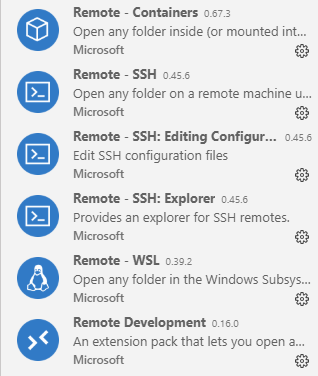
Just find the ssh extension in the extensions viewlet and make sure it is updated to 0.45.6. Run "Check for extension updates" if it has not found the update yet.
roblourens
on 23 Aug 2019
Yes! Everything works, thank you.
ArkIv
on 23 Aug 2019
Still not working, everything updated to 0.45.6. Has been working before.
 dreamflasher
on 27 Aug 2019
dreamflasher
on 27 Aug 2019
Please fix this problem.
Vscode stable version
Version: 1.37.1 (user setup)
Commit: f06011ac164ae4dc8e753a3fe7f9549844d15e35
Date: 2019-08-15T16:17:55.855Z
Electron: 4.2.7
Chrome: 69.0.3497.128
Node.js: 10.11.0
V8: 6.9.427.31-electron.0
OS: Windows_NT x64 10.0.18362
Dev tool logs


update
Following insider version remote ssh is running well
Version: 1.38.0-insider
Commit: 8cd00a7935eabef4aad0b0130b1d46daca0a47aa
Date: 2019-08-27T06:13:54.903Z
Electron: 4.2.9
Chrome: 69.0.3497.128
Node.js: 10.11.0
V8: 6.9.427.31-electron.0
OS: Windows_NT x64 10.0.18362
 iamwwc
on 28 Aug 2019
iamwwc
on 28 Aug 2019
I have solved this problem by chance.
Just remove all contents of your settings.json 😥
iamwwc
on 28 Aug 2019
Another solution is to set remote.SSH.showLoginTerminal to false works like charm or just remove(comment) it.
    "gitlens.views.search.location": "gitlens",
    //"remote.SSH.showLoginTerminal": true,
    "sync.forceUpload": true,
    "update.enableWindowsBackgroundUpdates": false
I tried both, but neither works for me.
dreamflasher
on 28 Aug 2019
Please open a new issue with details
roblourens
on 29 Aug 2019
Is verification just checking that you can connect to an SSH remote? If so, verified with Windows to Ubuntu 18.04.
 alexr00
on 30 Aug 2019
alexr00
on 30 Aug 2019
Yes, it was broken for everyone when the server stopped writing the webview server port.
roblourens
on 30 Aug 2019
Related issues
 asyncx
·
3Comments
asyncx
·
3Comments
 Arunselvan-AS
·
3Comments
Arunselvan-AS
·
3Comments
 Yvand
·
3Comments
Yvand
·
3Comments
 jkoritzinsky
·
3Comments
jkoritzinsky
·
3Comments
 grzegorz-silarski
·
3Comments
grzegorz-silarski
·
3Comments
Most helpful comment
I see it, fix on the way.