Vscode-remote-release: Cannot find runtime 'npm' (or node) on PATH. Make sure to have 'npm' installed
This error started happening around August 3rd, 2019 after an update.
- VSCode Version:
Version: 1.37.0-insider (system setup)
Commit: 5e08ee01b7daee99cdda2456f19d77e715fb8762
Date: 2019-08-05T21:18:05.921Z
Electron: 4.2.7
Chrome: 69.0.3497.128
Node.js: 10.11.0
V8: 6.9.427.31-electron.0
OS: Windows_NT x64 10.0.18362
- Local OS Version:
Windows 10 Pro
Version 1903
OS Build: 18362.239
- Remote OS Version:
Distributor ID: Ubuntu
Description:    Ubuntu 18.04.1 LTS
Release:        18.04
Codename:       bionic
- Remote Extension/Connection Type: SSH/Docker/WSL
WSL
Steps to Reproduce:
- Open a node JS project
- Use the following launch configuration:
        {
            "type": "node",
            "request": "launch",
            "name": "Launch via NPM",
            "runtimeExecutable": "npm",
            "outputCapture": "std",
            "windows": {
                "runtimeExecutable": "npm",
            },
            "runtimeArgs": [
                "run-script",
                "debug",
            ],
            "protocol": "inspector",
            "port": 32408,
            "skipFiles": [
                "<node_internals>/**",
                "node_modules/**"
            ]
        },
- Observe the error:
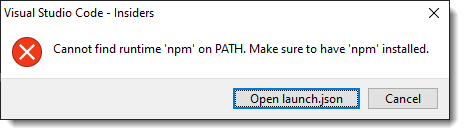
"Cannot find runtime 'npm' on PATH. Make sure to have 'npm' installed"
Same happens for normal node launch configurations except that it complains about node not being found.
My PATH in the shell where I'm launching code-insiders from is:
/home/craiger/.local/bin:/home/craiger/bin:/home/craiger/.local/bin:/home/craiger/.nvm/versions/node/v8.15.1/bin:/usr/local/sbin:/usr/local/bin:/usr/sbin:/usr/bin:/sbin:/bin:/usr/games:/usr/local/games:/c/ProgramData/DockerDesktop/version-bin:/c/Program Files/Docker/Docker/Resources/bin:/c/Program Files (x86)/Intel/Intel(R) Management Engine Components/iCLS:/c/Program Files/Intel/Intel(R) Management Engine Components/iCLS:/c/Windows/system32:/c/Windows:/c/Windows/System32/Wbem:/c/Windows/System32/WindowsPowerShell/v1.0:/c/Windows/System32/OpenSSH:/c/Program Files (x86)/Intel/Intel(R) Management Engine Components/DAL:/c/Program Files/Intel/Intel(R) Management Engine Components/DAL:/c/Program Files (x86)/Intel/Intel(R) Management Engine Components/IPT:/c/Program Files/Intel/Intel(R) Management Engine Components/IPT:/c/Program Files (x86)/NVIDIA Corporation/PhysX/Common:/c/Program Files/NVIDIA Corporation/NVIDIA NvDLISR:/c/Program Files (x86)/Airtame:/c/Program Files/Microsoft VS Code/bin:/c/Program Files/Microsoft VS Code Insiders/bin:/c/WINDOWS/system32:/c/WINDOWS:/c/WINDOWS/System32/Wbem:/c/WINDOWS/System32/WindowsPowerShell/v1.0:/c/WINDOWS/System32/OpenSSH:/c/ProgramData/chocolatey/bin:/c/Program Files/Git/cmd:/c/Users/craiger/AppData/Local/Microsoft/WindowsApps:/c/Users/craiger/AppData/Local/hyper/app-3.0.2/resources/bin:/c/Program Files/JetBrains/IntelliJ IDEA 2019.1.2/bin:/snap/bin
I have confirmed that /home/craiger/.nvm/versions/node/v8.15.1/bin does indeed have npm there.
 $ ls -a /home/craiger/.nvm/versions/node/v8.15.1/bin
.  ..  functions  functions-emulator  http-echo-server  node  npm  npx  redis-commander  serverless  sls  slss
 ctataryn
>All comments
This was caused after installing the GitLens extension. This also causes VSCode's WSL Remote extension to "time out" connecting to WSL.
Disabling GitLens solved my problem
ctataryn
on 9 Aug 2019
👍2
🎉1
Was this page helpful?
0 / 5 - 0 ratings
Related issues
 tianomagdaong
·
3Comments
tianomagdaong
·
3Comments
 jkoritzinsky
·
3Comments
jkoritzinsky
·
3Comments
 asyncx
·
3Comments
asyncx
·
3Comments
 Arunselvan-AS
·
3Comments
Arunselvan-AS
·
3Comments
 JacksonKearl
·
3Comments
JacksonKearl
·
3Comments
Most helpful comment
This was caused after installing the GitLens extension. This also causes VSCode's WSL Remote extension to "time out" connecting to WSL.
Disabling GitLens solved my problem