Vscode-remote-release: [Remote-SSH] Orphan processes
I recently was testing out vscode remote and had the server grind to a halt with high CPU/MEM load. Killing the vscode processes resolved the issue.
- VSCode Version: Version: 1.34.0-insider
Commit: daf71423252a707b8e396e8afa8102b717f8213b
Date: 2019-05-07T05:14:45.885Z
Electron: 3.1.8
Chrome: 66.0.3359.181
Node.js: 10.2.0
V8: 6.6.346.32
- Local OS Version: Linux x64 4.15.0-48-generic
- Remote OS Version: Ubuntu 16.04
- Remote Extension/Connection Type: SSH
Steps to Reproduce:
Connect to remote server and edit a number of files.
The culprit:
0 R ziploop 22026 21991 41 80 0 - 590824 - 17:26 ? 00:14:05 /home/ziploop/.vscode-remote/bin/daf71423252a707b8e396e8afa8102b717f8213b/node /home/ziploop/.vscode-remote/bin/daf71423252a707b8e396e8afa8102b717f8213b/extensions/node_modules/typescript/lib/tsserver.js --useInferredProjectPerProjectRoot --enableTelemetry --cancellationPipeName /tmp/vscode-typescript/tscancellation-0a3e356465fc0cc59a9c.tmp* --locale en --noGetErrOnBackgroundUpdate --validateDefaultNpmLocation
 PID USER      PR  NI    VIRT    RES    SHR S  %CPU %MEM     TIME+ COMMAND
22026 ziploop   20   0 2355648 1.420g  25356 S 207.7 18.9  30:55.19 node
22226 ziploop   20   0  952464  63504  24164 S   0.0  0.8   0:02.75 node
22001 ziploop   20   0 1193272  40144  24184 S   0.0  0.5   0:00.73 node
21991 ziploop   20   0 1481068  77948  27796 S   0.0  1.0   0:13.21 node
21929 ziploop   20   0 1288672  55648  26212 S   0.0  0.7   0:01.31 node
21922 ziploop   20   0    4504    704    632 S   0.0  0.0   0:00.00 sh
Closing vscode does not exit these processes and the CPU usage stays high.
Does this issue occur when you try this locally?: No
Does this issue occur when you try this locally and all extensions are disabled?: No
Had some conversation in #203 as well
 williamtstanley
All 8 comments
The run-away process is not the VS Code server but the TypeScript language server. This means, that what you see more related to your JavaScript/TypeScript files rather than that your run remotely.
Either way, if anything bad happens on your server, you can get it back into a reasonable state by running Remote – SSH: Kill VS Code Server on Host...
 kieferrm
on 9 May 2019
kieferrm
on 9 May 2019
I am probably just being stupid but how exactly do I run Remote – SSH: Kill VS Code Server on Host... ?
williamtstanley
on 9 May 2019
F1 ->Remote – SSH: Kill VS Code Server on Host...
 psolyca
on 10 May 2019
psolyca
on 10 May 2019
The run-away process is not the VS Code server but the TypeScript language server. This means, that what you see more related to your JavaScript/TypeScript files rather than that your run remotely.
Either way, if anything bad happens on your server, you can get it back into a reasonable state by running
Remote – SSH: Kill VS Code Server on Host...
I'm having the exact same issues as OP. Running VS Code on Windows with SSH to Ubuntu inside a VM. After each connection with the remote VS code adds a lot of new processes (25!!) on the remote but never kills them on exit. Resulting in a quickly crashing VM and therefor lost of SSH connection obviously. I'm not using Typescript btw, but I do run extensions on remote.
I hope having to manually kill the ssh connection with 'Remote-SSH: Kill VS Code Server on Host' everytime before want to close a connection and connect to another server, or before we exit VS Code
will not be the definite workflow. That would be pretty error prone and not very user friendly.
If VS Code could run that command for us on exit, or if let's say we connect to a different remote in the same window (so want to close a current connection if it's there), is there something preventing VS Code from running that action on these moments, like quiting VS Code, closing the SSH Tunnel panel or making a new connection in the same window?
 Friksel
on 20 Jun 2019
Friksel
on 20 Jun 2019
I have a similar issue, using remote-ssh between a Linux station and a remote Linux server. When opening a remote session, 13 processes are created (excluding root and sshd). After exiting, there are still 6 processes left.
/lib/systemd/systemd --user
(sd-pam)
bash
.../server.sh
.../node
sleep 180
Using ms-python extension, vscode version 1.38.0
 dthonon
on 10 Sep 2019
dthonon
on 10 Sep 2019
I have a similar issue. Using VS Code Remote SSH on a Ubuntu machine.
I have a create-react-app project.
I have no extensions installed on the remote server.
I have limited the locally installed extensions to the minimum.
The issue only happens when I keep editing files for some minutes /half an hour. The CPU on the remote server suddenly spikes, goes up to 100% and then the connection is lost and can't be reestablished.
Logging the top 10 CPU Usage processes frequently, I can see they are mostly vs code related, e.g.:
%CPU %MEM ARGS Fri Apr 10 13:28:38 UTC 2020
0.2 0.0 [kworker/0:1]
0.3 0.4 /sbin/init
0.4 2.3 /home/ubuntu/.vscode-server/bin/2aae1f26c72891c399f860409176fe435a154b13/node
0.7 0.0 /usr/sbin/sshd
1.0 6.6 /home/ubuntu/.vscode-server/bin/2aae1f26c72891c399f860409176fe435a154b13/node
3.0 6.6 /home/ubuntu/.vscode-server/bin/2aae1f26c72891c399f860409176fe435a154b13/node
3.7 0.0 [kswapd0]
4.0 0.7 sshd:
7.3 7.3 /home/ubuntu/.vscode-server/bin/2aae1f26c72891c399f860409176fe435a154b13/node
40.6 17.1 /home/ubuntu/.vscode-server/bin/2aae1f26c72891c399f860409176fe435a154b13/node --max-old-space-size=3072 /home/ubuntu/.vscode-server/bin/2aae1f26c72891c399f860409176fe435a154b13/extensions/node_modules/typescript/lib/tsserver.js
This is one of the last log lines before the server is unreachable.
The issue does NOT occur when VS Code is connected, but I am not editing files.
Any suggestions how to workaround/solve that issue?
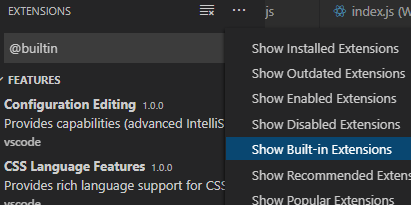
EDIT: I could solve my issue by deactivating the built-in extension typescript and javascript language features
 flolege
on 11 Apr 2020
flolege
on 11 Apr 2020
Facing the same issue, many cpptools and cpptools-srv remain running on the remote.
EDIT: I could solve my issue by deactivating the built-in extension typescript and javascript language features
How did you deactivate this extension? It is not listed for me and I couldn't find anything in Settings.
 p3732
on 29 May 2020
p3732
on 29 May 2020
flolege
on 29 May 2020
Related issues
 jkoritzinsky
·
3Comments
jkoritzinsky
·
3Comments
 robertlugg
·
3Comments
robertlugg
·
3Comments
 Arunselvan-AS
·
3Comments
Arunselvan-AS
·
3Comments
 6XAM
·
3Comments
6XAM
·
3Comments
 grzegorz-silarski
·
3Comments
grzegorz-silarski
·
3Comments
Most helpful comment
F1->Remote – SSH: Kill VS Code Server on Host...