Vscode-remote-release: SSH Keeps saying "attempting to reconnect"
Issue Type: Bug
I can connect to a remote server via ssh clients, but very often it keeps coming up and says "Attempting to reconnect." It will typically reconnect after 10 to 15 seconds. Any ideas on how I could get more logs or details to see what is going on?
Extension version: 0.36.0
VS Code version: Code - Insiders 1.34.0-insider (daf71423252a707b8e396e8afa8102b717f8213b, 2019-05-06T22:08:08.969Z)
OS version: Windows_NT x64 10.0.17763
Fetching remote diagnostics for 'dev-container+633a5c55736572735c636c696e746f6e2e6d696c6c735c446f63756d656e74735c5265706f735c7673636f64652d6465762d636f6e7461696e6572735c636f6e7461696e6572735c707974686f6e2d33' timed out.
Remote OS version: Linux x64 4.15.12-ethos96
System Info
|Item|Value|
|---|---|
|CPUs|Intel(R) Core(TM) i7-8700K CPU @ 3.70GHz (12 x 3696)|
|GPU Status|2d_canvas: enabled
checker_imaging: disabled_off
flash_3d: enabled
flash_stage3d: enabled
flash_stage3d_baseline: enabled
gpu_compositing: enabled
multiple_raster_threads: enabled_on
native_gpu_memory_buffers: disabled_software
rasterization: enabled
surface_synchronization: enabled_on
video_decode: enabled
webgl: enabled
webgl2: enabled|
|Load (avg)|undefined|
|Memory (System)|31.91GB (22.52GB free)|
|Process Argv||
|Screen Reader|no|
|VM|0%|
Fetching remote diagnostics for 'dev-container+633a5c55736572735c636c696e746f6e2e6d696c6c735c446f63756d656e74735c5265706f735c7673636f64652d6465762d636f6e7461696e6572735c636f6e7461696e6572735c707974686f6e2d33' timed out.
|Item|Value|
|---|---|
|Remote|SSH: mine-b1-arm|
|OS|Linux x64 4.15.12-ethos96|
|CPUs|Intel(R) Celeron(R) CPU G3900 @ 2.80GHz (2 x 2800)|
|Memory (System)|7.75GB (6.74GB free)|
|VM|0%|
 clintonm9
All 51 comments
Can you attach the output shown in the 'Output' panel at the bottom, when switching to Remote-SSH.
 egamma
on 9 May 2019
egamma
on 9 May 2019
I've the same problem using Linux version too, over an openvpn and ADSL as connection.
Connecting to the same server from LAN and Windows version works fine.
Upload bandwidth related?
 skarcha
on 9 May 2019
skarcha
on 9 May 2019
I do not see anything in the Output panel. The Terminal panel says Connected to SSH Host - Please do not close this terminal.
I do notice that I have 30 of these in the process list on the linux server:
bash -c echo -e 'Connected to SSH Host - Please do not close this terminal' && sleep infinity
Each time it reconnects the number increases.
Is there logging on the linux server I could look at?
clintonm9
on 9 May 2019
I have an "Attempting to reconnect..." forever. Never connects again:

And this is the REMOTE-SSH sidebar:

skarcha
on 9 May 2019
Version: 1.34.0-insider
Commit: 693a13cd32c5be798051edc0cb43e1e39fc456d9
Date: 2019-05-09T05:14:02.502Z
Electron: 3.1.8
Chrome: 66.0.3359.181
Node.js: 10.2.0
V8: 6.6.346.32
OS: Linux x64 4.15.0-48-generic snap
skarcha
on 9 May 2019
I am seeing the exact same issue. VS Code connects and starts to do its thing, then approx. 10 seconds later it goes into a reconnect mode.
Seems to be specific with certain Linux hosts as I try with one and everything works as expected but a different Linux host has this issue. They are both running Ubuntu 18.04.2 LTS.
Here is the output I am able to capture before it disappears:
"install" terminal command done
Received install output: c907c682-3386-4941-995e-806ffe2d8e7a==37287==
Server is listening on port 37287
Spawning tunnel with: ssh nimbus -N -L localhost:5559:localhost:37287
Spawned SSH tunnel between local port 5559 and remote port 37287
Waiting for ssh tunnel to be ready
Tunneling remote port 37287 to local port 5559
Resolving "ssh-remote+nimbus" to "localhost:5559", attempt: 1
 gknowd
on 10 May 2019
gknowd
on 10 May 2019
All, what extensions have you installed on the servers that show the disconnect behavior?
 kieferrm
on 10 May 2019
kieferrm
on 10 May 2019
@kieferrm Interesting... It's related to extensions!
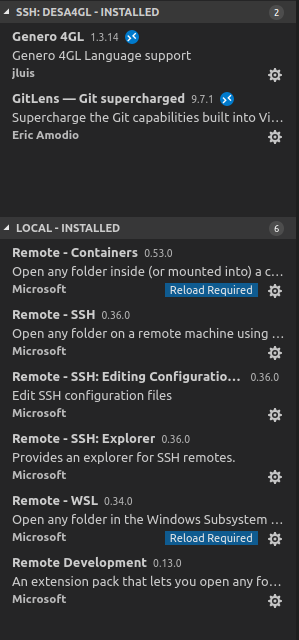
I'm using two extensions only: GitLens and our own private extension installed from .vsix. If I disable it, the connection is never lost. But works fine in the same LAN. It only fails when I connect using openvpn from my ADSL at home.
Hope this helps. Anything we can do to trace the problem with the extension?
skarcha
on 10 May 2019
I can have zero installed extensions installed on the remote server and it still does the same. I am on the same LAN.
clintonm9
on 10 May 2019
I'm having a similar same issue but over SSH to a local VM, so it's very unlikely it's a network issue in my case.
Same output as gknowd - nothing that actually says "disconnected".
On the remote side, a different process situation to clintonm9: there's a single server.sh instance with a couple of child processes, but it looks like there is one sshd process for each time it has reconnected (it's at 9 reconnections if I'm interpreting Resolving "ssh-remote+localhost" to "localhost:1048", attempt: 9
correctly, and there are nine sshd instances, so probably not a coincidence!).
These extensions:
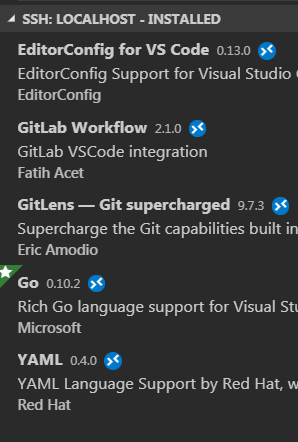
- VSCode Version: 1.34.20 d6aa8ea
- Local OS Version: Win 7
- Remote OS Version: Ubuntu 18.04.2
It's not consistent, and I haven't worked out a pattern of when it happens. I think it's bursty - if I get one disconnection it seems likely there will be another shortly after.
 mykter
on 14 May 2019
mykter
on 14 May 2019
Don't know if this helps, but...
ssh executed by local code:
ssh desa4gl -N -L localhost:9573:localhost:44687
Last lines of output of strace attached to this process:
getpid()                                = 10279
getpid()                                = 10279
clock_gettime(CLOCK_BOOTTIME, {tv_sec=1561, tv_nsec=990147271}) = 0
clock_gettime(CLOCK_BOOTTIME, {tv_sec=1561, tv_nsec=990276399}) = 0
select(9, [3<TCP:[192.168.198.42:37652->192.168.1.222:22]> 4<TCPv6:[::1:9573]> 5<TCP:[127.0.0.1:9573]> 6<TCP:[127.0.0.1:9573->127.0.0.1:48352]> 7<TCP:[127.0.0.1:9573->127.0.0.1:48334]> 8<TCP:[127.0.0.1:9573->127.0.0.1:48336]>], [3<TCP:[192.168.198.42:37652->192.168.1.222:22]>], NULL, NULL) = 1 (in [6])
clock_gettime(CLOCK_BOOTTIME, {tv_sec=1562, tv_nsec=291179314}) = 0
read(6<TCP:[127.0.0.1:9573->127.0.0.1:48352]>, "\5\0\0\0\0\0\0\0\0\0\0\0\0", 16384) = 13
clock_gettime(CLOCK_BOOTTIME, {tv_sec=1562, tv_nsec=291557361}) = 0
clock_gettime(CLOCK_BOOTTIME, {tv_sec=1562, tv_nsec=291650648}) = 0
select(9, [3<TCP:[192.168.198.42:37652->192.168.1.222:22]> 4<TCPv6:[::1:9573]> 5<TCP:[127.0.0.1:9573]> 6<TCP:[127.0.0.1:9573->127.0.0.1:48352]> 7<TCP:[127.0.0.1:9573->127.0.0.1:48334]> 8<TCP:[127.0.0.1:9573->127.0.0.1:48336]>], [3<TCP:[192.168.198.42:37652->192.168.1.222:22]>], NULL, NULL) = ? ERESTARTNOHAND (To be restarted if no handler)
--- SIGTERM {si_signo=SIGTERM, si_code=SI_USER, si_pid=10226, si_uid=1000} ---
rt_sigreturn({mask=[]})                 = -1 EINTR (Interrupted system call)
rt_sigaction(SIGWINCH, NULL, {sa_handler=0x56057a6a1290, sa_mask=[], sa_flags=SA_RESTORER, sa_restorer=0x7f5a4be21f20}, 8) = 0
rt_sigaction(SIGWINCH, {sa_handler=SIG_DFL, sa_mask=[], sa_flags=SA_RESTORER, sa_restorer=0x7f5a4be21f20}, NULL, 8) = 0
getpid()                                = 10279
write(3<TCP:[192.168.198.42:37652->192.168.1.222:22]>, "\327\237\373}\204\24\375\270o\35\343\245\235\365`p\361\250\264\357\3026g\6\225P\2438\223\374\237<\215\350cS|\357\350\347 B7\33.\274!\32\206+\263\n\n\334\251\240\246\250\0027\231}\35\273\"!O~Q%\372\244)F\207$KQ\217*p\n\tQ\347?\35et^\264\250t\237\325\270\360\261q\31"..., 32916) = 32916
close(4<TCPv6:[::1:9573]>)              = 0
close(4)                                = -1 EBADF (Bad file descriptor)
close(4)                                = -1 EBADF (Bad file descriptor)
close(5<TCP:[127.0.0.1:9573]>)          = 0
close(5)                                = -1 EBADF (Bad file descriptor)
close(5)                                = -1 EBADF (Bad file descriptor)
close(6<TCP:[127.0.0.1:9573->127.0.0.1:48352]>) = 0
close(6)                                = -1 EBADF (Bad file descriptor)
close(6)                                = -1 EBADF (Bad file descriptor)
close(7<TCP:[127.0.0.1:9573->127.0.0.1:48334]>) = 0
close(7)                                = -1 EBADF (Bad file descriptor)
close(7)                                = -1 EBADF (Bad file descriptor)
close(8<TCP:[127.0.0.1:9573->127.0.0.1:48336]>) = 0
close(8)                                = -1 EBADF (Bad file descriptor)
close(8)                                = -1 EBADF (Bad file descriptor)
munmap(0x7f5a49c26000, 2351104)         = 0
ioctl(0<UNIX:[88950->88949]>, TCGETS, 0x7ffcf4611370) = -1 ENOTTY (Inappropriate ioctl for device)
fcntl(0<UNIX:[88950->88949]>, F_GETFL)  = 0x2 (flags O_RDWR)
ioctl(1<UNIX:[88952->88951]>, TCGETS, 0x7ffcf4611370) = -1 ENOTTY (Inappropriate ioctl for device)
fcntl(1<UNIX:[88952->88951]>, F_GETFL)  = 0x2 (flags O_RDWR)
ioctl(2<UNIX:[88954->88953]>, TCGETS, 0x7ffcf4611370) = -1 ENOTTY (Inappropriate ioctl for device)
fcntl(2<UNIX:[88954->88953]>, F_GETFL)  = 0x2 (flags O_RDWR)
close(3<TCP:[192.168.198.42:37652->192.168.1.222:22]>) = 0
exit_group(0)                           = ?
+++ exited with 0 +++
Two code processes still keep running on local machine, consuming CPU. I could paste some strace output of them if you need it.
skarcha
on 16 May 2019
More info. Just tested using Code Windows version and works fine.
skarcha
on 16 May 2019
Is there a way to get a log on the remote or local workstation so we can help debug this issue?
clintonm9
on 16 May 2019
Is there a way to get a log on the remote or local workstation so we can help debug this issue?
just happened to me as well. No extensions installed except for remote-ssh.
Logs
Remote - SSH
SSH Resolver called for "ssh-remote+devbox"
SSH Resolver called for host: devbox
Setting up SSH remote "devbox"
Using commit id "e83e24a0c9225becd7341e56952177a20d5d4629" and quality "insider" for server
Install and start server if needed
> bash: no job control in this shell
> Found existing installation...
> Found running server...
>
> *
> * Reminder: You may only use this software with Visual Studio family products,
> * as described in the license (https://go.microsoft.com/fwlink/?linkid=2077057)
> *
>
> 479f2645-aac9-48c1-a411-074a772fccfa==41317==
"install" terminal command done
Received install output: 479f2645-aac9-48c1-a411-074a772fccfa==41317==
Server is listening on port 41317
Spawning tunnel with: ssh  devbox -N -L localhost:21407:localhost:41317
Spawned SSH tunnel between local port 21407 and remote port 41317
Waiting for ssh tunnel to be ready
Tunneling remote port 41317 to local port 21407
Resolving "ssh-remote+devbox" to "localhost:21407", attempt: 1
SSH Resolver called for "ssh-remote+devbox"
SSH Resolver called for host: devbox
Setting up SSH remote "devbox"
Using commit id "e83e24a0c9225becd7341e56952177a20d5d4629" and quality "insider" for server
Install and start server if needed
> ssh: connect to host 13.57.254.210 port 22: Operation timed out
"install" terminal command done
Received install output: ssh: connect to host 13.57.254.210 port 22: Operation timed out
The operation timed out
SSH Resolver called for "ssh-remote+devbox"
SSH Resolver called for host: devbox
Setting up SSH remote "devbox"
Using commit id "e83e24a0c9225becd7341e56952177a20d5d4629" and quality "insider" for server
Install and start server if needed
> ssh: connect to host 13.57.254.210 port 22: Operation timed out
"install" terminal command done
Received install output: ssh: connect to host 13.57.254.210 port 22: Operation timed out
The operation timed out
SSH Resolver called for "ssh-remote+devbox"
SSH Resolver called for host: devbox
Setting up SSH remote "devbox"
Using commit id "e83e24a0c9225becd7341e56952177a20d5d4629" and quality "insider" for server
Install and start server if needed
> ssh: connect to host 13.57.254.210 port 22: Operation timed out
"install" terminal command done
Received install output: ssh: connect to host 13.57.254.210 port 22: Operation timed out
The operation timed out
SSH Resolver called for "ssh-remote+devbox"
SSH Resolver called for host: devbox
Setting up SSH remote "devbox"
Using commit id "e83e24a0c9225becd7341e56952177a20d5d4629" and quality "insider" for server
Install and start server if needed
> ssh: connect to host 13.57.254.210 port 22: Operation timed out
"install" terminal command done
Received install output: ssh: connect to host 13.57.254.210 port 22: Operation timed out
The operation timed out
SSH Resolver called for "ssh-remote+devbox"
SSH Resolver called for host: devbox
Setting up SSH remote "devbox"
Using commit id "e83e24a0c9225becd7341e56952177a20d5d4629" and quality "insider" for server
Install and start server if needed
> ssh: connect to host 13.57.254.210 port 22: Operation timed out
"install" terminal command done
Received install output: ssh: connect to host 13.57.254.210 port 22: Operation timed out
The operation timed out
SSH Resolver called for "ssh-remote+devbox"
SSH Resolver called for host: devbox
Setting up SSH remote "devbox"
Using commit id "e83e24a0c9225becd7341e56952177a20d5d4629" and quality "insider" for server
Install and start server if needed
> ssh: connect to host 13.57.254.210 port 22: Operation timed out
"install" terminal command done
Received install output: ssh: connect to host 13.57.254.210 port 22: Operation timed out
The operation timed out

Remote host is an AWS instance (1 gb mem)
 jitcoder
on 17 May 2019
jitcoder
on 17 May 2019
Additional info:
Just tried to connect to the box using terminal, w.e. happened murdered the box.
I'm wondering if 8 gb hdd, 1 cpu 1 gb mem is not enough for the processes or something?
(this was a brand new instance with nothing installed on it except for nvm)
Update:
I rebooted the box, still couldn't connect, after a while I tried again and am able to connect to the box and insiders was also able to connect.
I'm going to start monitoring htop on the box
Screenshot from htop while running debugger

jitcoder
on 17 May 2019
i do have this same issue of seeing attempting to reconnect .
My case is that if i am connected from one instance of vscode-insiders the terminal works . Then after a few hours or so an attempting to reconnect comes(Then i have to exit the instance and start again because it wont reconnect again). If i have two instances of vscode-insiders and handling different folders with both instances (i am not able to use the terminal on the second instance(only terminal not usable but file system and edits still happening in files until attempt to reconnect comes) but the first instance is currently working fine and the second instancce sometimes within 5 mins shows attempting to reconnect and then needs to be closed because it wont reconnect).
I am using an aws instance.(60 gb memory and 1 gpu) .
Extensions installed(All the remote development pack (wsl and containers included)
OS : WIndows 10 1809
Nothing in the output console(in the tasks tab). And just one line in terminal (Tab named ssh terminal has output - "Connected to SSH Host - Please do not close this terminal"
Update - now (both when two instances are active or one) - both showed attempting to reconnect within an hour)
Another Update - (The drop down on the output window shows the (Remot-SSH tab) only if the connection to the server is active and working correctly . The moment the terminal stops working the (Remote-SSH tabs vanishes so no way to read the log) and file system is still working (edits are possible but the terminal stops and after sometime an infinite attemting to reconnect dialog comes then the only option is to close and start that vscode-insiders instance again.)
 raghavk92
on 21 May 2019
raghavk92
on 21 May 2019
Some logs:
Log (Main):
[2019-05-21 17:39:15.463] [main] [info] update#setState idle
[2019-05-21 17:39:43.415] [main] [info] Received resolved authority ssh-remote+desa4gl
[2019-05-21 17:39:45.466] [main] [info] update#setState checking for updates
[2019-05-21 17:39:45.469] [main] [info] update#setState idle
[2019-05-21 17:39:47.623] [main] [info] Resolving authority ssh-remote+desa4gl
[2019-05-21 17:39:54.607] [main] [error] [uncaught exception in main]: Error: handshake timeout
[2019-05-21 17:39:54.608] [main] [error] Error: handshake timeout
    at Timeout.setTimeout [as _onTimeout] (/snap/code-insiders/151/usr/share/code-insiders/resources/app/out/vs/code/electron-main/main.js:286:864)
    at ontimeout (timers.js:427:11)
    at tryOnTimeout (timers.js:289:5)
    at listOnTimeout (timers.js:252:5)
    at Timer.processTimers (timers.js:212:10)
[2019-05-21 17:39:54.609] [main] [error] [uncaught exception in main]: Error: handshake timeout
[2019-05-21 17:39:54.609] [main] [error] Error: handshake timeout
    at Timeout.setTimeout [as _onTimeout] (/snap/code-insiders/151/usr/share/code-insiders/resources/app/out/vs/code/electron-main/main.js:286:864)
    at ontimeout (timers.js:427:11)
    at tryOnTimeout (timers.js:289:5)
    at listOnTimeout (timers.js:252:5)
    at Timer.processTimers (timers.js:212:10)
Log (Shared):
[2019-05-21 17:39:19.414] [sharedprocess] [info] main {"machineId":"ff869c6112118a2853ccaa968172c7e4a4156d77cd7ea8b2440bd4106ee61ba2"}
[2019-05-21 17:39:19.579] [sharedprocess] [info] Scanned user extensions: 7
[2019-05-21 17:39:19.620] [sharedprocess] [info] Scanned system extensions: 72
[2019-05-21 17:39:19.690] [sharedprocess] [info] Scanned user extensions: 7
[2019-05-21 17:39:19.692] [sharedprocess] [info] Scanned user extensions: 7
[2019-05-21 17:39:19.748] [sharedprocess] [info] Scanned system extensions: 72
[2019-05-21 17:39:19.754] [sharedprocess] [info] Scanned system extensions: 72
[2019-05-21 17:39:19.827] [sharedprocess] [info] Scanned user extensions: 7
[2019-05-21 17:39:19.848] [sharedprocess] [info] Scanned system extensions: 72
[2019-05-21 17:39:21.347] [sharedprocess] [info] Scanned user extensions: 7
[2019-05-21 17:39:38.572] [sharedprocess] [info] Scanned user extensions: 7
[2019-05-21 17:39:38.576] [sharedprocess] [info] Scanned user extensions: 7
[2019-05-21 17:39:38.580] [sharedprocess] [info] Scanned user extensions: 7
[2019-05-21 17:39:38.663] [sharedprocess] [info] Scanned system extensions: 72
[2019-05-21 17:39:38.668] [sharedprocess] [info] Scanned system extensions: 72
[2019-05-21 17:39:38.673] [sharedprocess] [info] Scanned system extensions: 72
[2019-05-21 17:39:38.756] [sharedprocess] [info] Scanned user extensions: 7
[2019-05-21 17:39:38.778] [sharedprocess] [info] Scanned system extensions: 72
[2019-05-21 17:39:40.842] [sharedprocess] [info] Scanned user extensions: 7
[2019-05-21 17:39:59.448] [sharedprocess] [info] Starting to clean up unused language packs.
[2019-05-21 17:40:03.641] [sharedprocess] [info] Scanned user extensions: 7
[2019-05-21 17:40:03.643] [sharedprocess] [info] Scanned user extensions: 7
[2019-05-21 17:40:03.648] [sharedprocess] [info] Scanned user extensions: 7
[2019-05-21 17:40:03.697] [sharedprocess] [info] Scanned system extensions: 72
[2019-05-21 17:40:03.702] [sharedprocess] [info] Scanned system extensions: 72
[2019-05-21 17:40:03.897] [sharedprocess] [info] Scanned user extensions: 7
[2019-05-21 17:40:03.920] [sharedprocess] [info] Scanned system extensions: 72
Log (Window):
[2019-05-21 17:39:37.149] [renderer1] [error] The connection timed out: Error: The connection timed out
    at e.<anonymous> (file:///snap/code-insiders/151/usr/share/code-insiders/resources/app/out/vs/workbench/workbench.main.js:3267:139)
    at Generator.next (<anonymous>)
    at r (file:///snap/code-insiders/151/usr/share/code-insiders/resources/app/out/vs/workbench/workbench.main.js:34:454)
    at process._tickCallback (internal/process/next_tick.js:68:7)
[2019-05-21 17:39:54.610] [renderer1] [error] handshake timeout: Error: handshake timeout
    at Timeout.setTimeout [as _onTimeout] (/snap/code-insiders/151/usr/share/code-insiders/resources/app/out/vs/code/electron-main/main.js:286:864)
    at ontimeout (timers.js:427:11)
    at tryOnTimeout (timers.js:289:5)
    at listOnTimeout (timers.js:252:5)
    at Timer.processTimers (timers.js:212:10)
//fyi @alexandrudima if you have additional insights.
egamma
on 22 May 2019
Ok, more logs. Now "Developers console":
workbench.main.js:3312 [Extension Host] debugger listening on port 17993
workbench.main.js:1405  WARN Workbench did not finish loading in 10 seconds, that might be a problem that should be reported.
workbench.main.js:1406   ERR handshake timeout: Error: handshake timeout
    at Timeout.setTimeout [as _onTimeout] (/snap/code-insiders/157/usr/share/code-insiders/resources/app/out/vs/code/electron-main/main.js:292:632)
    at ontimeout (timers.js:427:11)
    at tryOnTimeout (timers.js:289:5)
    at listOnTimeout (timers.js:252:5)
    at Timer.processTimers (timers.js:212:10)
workbench.main.js:5043 GET vscode-remote://ssh-remote%2Bdesa4gl/home/aperez/.vscode-remote/bin/84deb302d7e9ea991a1d0edfd4b4261143f659ff/extensions/git/resources/icons/dark/open-change.svg 0 ()
doLayout @ workbench.main.js:5043
dimension.layoutScheduled.layoutScheduled.T.scheduleAtNextAnimationFrame @ workbench.main.js:5042
execute @ workbench.main.js:146
n @ workbench.main.js:147
requestAnimationFrame (async)
n @ workbench.main.js:147
t.scheduleAtNextAnimationFrame @ workbench.main.js:147
layout @ workbench.main.js:5042
updateEditorActionsToolbar @ workbench.main.js:5031
_register.extensionService.onDidRegisterExtensions @ workbench.main.js:5015
fire @ workbench.main.js:77
_releaseBarrier @ workbench.main.js:3181
(anonymous) @ workbench.main.js:3181
r @ workbench.main.js:34
_tickCallback @ internal/process/next_tick.js:68
workbench.main.js:5043 GET vscode-remote://ssh-remote%2Bdesa4gl/home/aperez/.vscode-remote/extensions/eamodio.gitlens-9.8.1/images/gitlens-activitybar.svg 0 ()
doLayout @ workbench.main.js:5043
dimension.layoutScheduled.layoutScheduled.T.scheduleAtNextAnimationFrame @ workbench.main.js:5042
execute @ workbench.main.js:146
n @ workbench.main.js:147
requestAnimationFrame (async)
n @ workbench.main.js:147
t.scheduleAtNextAnimationFrame @ workbench.main.js:147
layout @ workbench.main.js:5042
updateEditorActionsToolbar @ workbench.main.js:5031
_register.extensionService.onDidRegisterExtensions @ workbench.main.js:5015
fire @ workbench.main.js:77
_releaseBarrier @ workbench.main.js:3181
(anonymous) @ workbench.main.js:3181
r @ workbench.main.js:34
_tickCallback @ internal/process/next_tick.js:68
workbench.main.js:1552 An error occured while trying to reconnect:
(anonymous) @ workbench.main.js:1552
a @ workbench.main.js:34
Promise.then (async)
l @ workbench.main.js:34
r @ workbench.main.js:34
Promise.then (async)
l @ workbench.main.js:34
r @ workbench.main.js:34
Promise.then (async)
l @ workbench.main.js:34
(anonymous) @ workbench.main.js:34
n @ workbench.main.js:34
_runReconnectingLoop @ workbench.main.js:1550
(anonymous) @ workbench.main.js:1550
(anonymous) @ workbench.main.js:34
n @ workbench.main.js:34
_beginReconnecting @ workbench.main.js:1550
_register.i.onSocketTimeout @ workbench.main.js:1550
fire @ workbench.main.js:77
a @ workbench.main.js:322
e @ workbench.main.js:322
fire @ workbench.main.js:77
_recvAckCheck @ workbench.main.js:332
t._outgoingAckTimeout.setTimeout @ workbench.main.js:332
setTimeout (async)
_recvAckCheck @ workbench.main.js:332
send @ workbench.main.js:331
_createExtHostInitData.then.e @ workbench.main.js:3284
_tickCallback @ internal/process/next_tick.js:68
Promise.then (async)
t.onMessage.i @ workbench.main.js:3284
fire @ workbench.main.js:77
a @ workbench.main.js:322
e @ workbench.main.js:322
fire @ workbench.main.js:77
_receiveMessage @ workbench.main.js:331
S._socketDisposables.push._socketReader.onMessage.e @ workbench.main.js:328
fire @ workbench.main.js:77
acceptChunk @ workbench.main.js:325
_register._socket.onData.e @ workbench.main.js:324
t @ workbench.main.js:333
emit @ events.js:182
addChunk @ _stream_readable.js:279
readableAddChunk @ _stream_readable.js:264
Readable.push @ _stream_readable.js:219
onread @ net.js:636
workbench.main.js:1552 Error: handshake timeout
    at setTimeout (workbench.main.js:1547)
(anonymous) @ workbench.main.js:1552
a @ workbench.main.js:34
Promise.then (async)
l @ workbench.main.js:34
r @ workbench.main.js:34
Promise.then (async)
l @ workbench.main.js:34
r @ workbench.main.js:34
Promise.then (async)
l @ workbench.main.js:34
(anonymous) @ workbench.main.js:34
n @ workbench.main.js:34
_runReconnectingLoop @ workbench.main.js:1550
(anonymous) @ workbench.main.js:1550
(anonymous) @ workbench.main.js:34
n @ workbench.main.js:34
_beginReconnecting @ workbench.main.js:1550
_register.i.onSocketTimeout @ workbench.main.js:1550
fire @ workbench.main.js:77
a @ workbench.main.js:322
e @ workbench.main.js:322
fire @ workbench.main.js:77
_recvAckCheck @ workbench.main.js:332
t._outgoingAckTimeout.setTimeout @ workbench.main.js:332
setTimeout (async)
_recvAckCheck @ workbench.main.js:332
send @ workbench.main.js:331
_createExtHostInitData.then.e @ workbench.main.js:3284
_tickCallback @ internal/process/next_tick.js:68
Promise.then (async)
t.onMessage.i @ workbench.main.js:3284
fire @ workbench.main.js:77
a @ workbench.main.js:322
e @ workbench.main.js:322
fire @ workbench.main.js:77
_receiveMessage @ workbench.main.js:331
S._socketDisposables.push._socketReader.onMessage.e @ workbench.main.js:328
fire @ workbench.main.js:77
acceptChunk @ workbench.main.js:325
_register._socket.onData.e @ workbench.main.js:324
t @ workbench.main.js:333
emit @ events.js:182
addChunk @ _stream_readable.js:279
readableAddChunk @ _stream_readable.js:264
Readable.push @ _stream_readable.js:219
onread @ net.js:636
workbench.main.js:3182 Extension host terminated unexpectedly. Code:  0  Signal:  null
_onExtensionHostCrashed @ workbench.main.js:3182
_onExtensionHostCrashed @ workbench.main.js:3887
_onExtensionHostCrashOrExit @ workbench.main.js:3182
e.onDidExit @ workbench.main.js:3182
fire @ workbench.main.js:77
_onExtHostConnectionLost @ workbench.main.js:3285
t.onClose @ workbench.main.js:3284
fire @ workbench.main.js:77
a @ workbench.main.js:322
e @ workbench.main.js:322
fire @ workbench.main.js:77
acceptDisconnect @ workbench.main.js:330
(anonymous) @ workbench.main.js:1552
a @ workbench.main.js:34
Promise.then (async)
l @ workbench.main.js:34
r @ workbench.main.js:34
Promise.then (async)
l @ workbench.main.js:34
r @ workbench.main.js:34
Promise.then (async)
l @ workbench.main.js:34
(anonymous) @ workbench.main.js:34
n @ workbench.main.js:34
_runReconnectingLoop @ workbench.main.js:1550
(anonymous) @ workbench.main.js:1550
(anonymous) @ workbench.main.js:34
n @ workbench.main.js:34
_beginReconnecting @ workbench.main.js:1550
_register.i.onSocketTimeout @ workbench.main.js:1550
fire @ workbench.main.js:77
a @ workbench.main.js:322
e @ workbench.main.js:322
fire @ workbench.main.js:77
_recvAckCheck @ workbench.main.js:332
t._outgoingAckTimeout.setTimeout @ workbench.main.js:332
setTimeout (async)
_recvAckCheck @ workbench.main.js:332
send @ workbench.main.js:331
_createExtHostInitData.then.e @ workbench.main.js:3284
_tickCallback @ internal/process/next_tick.js:68
Promise.then (async)
t.onMessage.i @ workbench.main.js:3284
fire @ workbench.main.js:77
a @ workbench.main.js:322
e @ workbench.main.js:322
fire @ workbench.main.js:77
_receiveMessage @ workbench.main.js:331
S._socketDisposables.push._socketReader.onMessage.e @ workbench.main.js:328
fire @ workbench.main.js:77
acceptChunk @ workbench.main.js:325
_register._socket.onData.e @ workbench.main.js:324
t @ workbench.main.js:333
emit @ events.js:182
addChunk @ _stream_readable.js:279
readableAddChunk @ _stream_readable.js:264
Readable.push @ _stream_readable.js:219
onread @ net.js:636
I am having the same issue, it works fine on one machine but doesn't on the other one. It manages to connect, if I am lucky I can even list the files, but soon after the connection is lost.
 mrharicot
on 30 May 2019
mrharicot
on 30 May 2019
I am facing similar issues. It used to work fine earlier.
 indraforyou
on 7 Jun 2019
indraforyou
on 7 Jun 2019
SOLVED, or at least, mitigated.
I've spent a few hours investigating this/my issue and I finally found that the problem is related to a "too big" extension context.
According to this page, there are four options to store data. Our extension saves data with ExtensionContext.workspaceState() that in _low level_ is a sqlite db with a table used as a key-value storage. We are storing about 2.4MB of data in this database.
As I've learned investigating how is working all the remote development stuff, on the server side is the _globalStorage_, but the _workspaceStorage_ are "linked" to the client, so the database we are using is located in the Code client side.
When you open Code and connect to the server, it tries to activate the extension BUT to activate the extension it need the context, that is located at the client side, so the client need to send all the 2.4MB data to the server. If you are on LAN or has a good upload bandwidth, there is no problem to send that amount of data in a few seconds, but if your upload bandwidth is low (I've about 800Kbps), it took too much time to send the data and before it finishes, there are a timeout and all crashes.
I solved it compressing the data before storing it in _workspaceStorage_. I don't know why _workspaceStorage_ is not located in server as _globalStorage_, that should help a lot.
@egamma @alexandrudima @kieferrm I hope this helps to improve the remote development with Code. Thanks for your time and work.
skarcha
on 8 Jun 2019
Facing the same problem. Can we just have the option to set SSH timeout values?
 dynos01
on 9 Jun 2019
dynos01
on 9 Jun 2019
@skarcha So is this problem caused by the low bandwidth.? This happened to me these days.
 kangkang59812
on 11 Jun 2019
kangkang59812
on 11 Jun 2019
@kangkang59812 Yes., if you are using an extension that has a context with a big data size. With "big data size" I mean so big that your Code client need more than about 30 seconds to send it.
skarcha
on 11 Jun 2019
I suspect transfer size / bandwidth isn't the sole cause: I reliably have these symptoms when connecting to a "remote" virtual guest from the host (I haven't measured it, but imagine the bandwidth is 100s mb/s).
mykter
on 11 Jun 2019
@skarcha thanks for figuring that out. I thought this issue was that the reconnection dialog is periodically showing up when it should not be, but it sounds like you are failing to connect at all in the first place?
 roblourens
on 12 Jun 2019
roblourens
on 12 Jun 2019
@roblourens Maybe, as others suggest, there are more than one issue here. In my case, I connect fine, the other extension installed (GitLens) works fine. No problem.
Our extension (is private, sorry) is activated by language, so when I open a file of this language the extension is activated by Code. As I think it works, the extension constructor need the context that is stored in the Code client so the client start to send this data to the server. If this data is too big, the timeout period to activate the extension (is it exists?) elapsed and Code thinks that the connection is lost.
skarcha
on 12 Jun 2019
Ok. Then in your case does it manage to reconnect later or does it never reconnect?
roblourens
on 12 Jun 2019
Never reconnect. I posted a few screenshots.
skarcha
on 12 Jun 2019
I'm also seeing this same problem. With no extensions I am able to connect just fine and stay connected. Once I install certain extensions I get stuck in an endless 'Attempting to reconnect' cycle that never successfully connects again. Contrary to others, it doesn't seem to be strictly tied to extension size. Here are the extensions I have installed:
$ du -sh * | sort -hr
74M ms-python.python-2019.5.18875
44M james-yu.latex-workshop-7.0.2
28M redhat.vscode-yaml-0.4.1
12M ban.spellright-3.0.38                    # this one breaks Remote-SSH
9.0M    yzhang.markdown-all-in-one-2.3.1
5.5M    davidanson.vscode-markdownlint-0.27.0
4.6M    eamodio.gitlens-9.8.2
1.7M    ikuyadeu.r-1.1.0
68K ms-python.anaconda-extension-pack-1.0.1
Only the "Spell Right" extension causes me to get stuck in the endless "Attempting to reconnect..." loop. The only way to resolve the endless loop is to manually delete the offending extension directory on my remote server.
In my case, as a workaround, I've been able to install a single extension at a time, reload VS Code, test functionality of extension (some appear to only load on-demand) and if it still works, move on to the next extension.
 magic-lantern
on 14 Jun 2019
magic-lantern
on 14 Jun 2019
@magic-lantern this is about the size of the extension's stored state, not the extension files which are already on the host. But that's interesting, can you open another issue for that? Or if it's related to your other issue, bring it up there. I can connect fine with that extension installed.
roblourens
on 14 Jun 2019
@magic-lantern regarding spellright, that is apparently a known issue with a fix open on the extension's side: https://github.com/bartosz-antosik/vscode-spellright/issues/279
I was able to reproduce it and it's not a good experience...
roblourens
on 14 Jun 2019
Having the same/similiar problems.
Sometimes it does reconnect but then virtual environments no longer work.
I can neither select them when pressing ctrl + shift + p nor in the lower left corner. Even though I have a python file opened.
 sleighsoft
on 14 Jun 2019
sleighsoft
on 14 Jun 2019
@roblourens Excellent sleuthing on your part! At this point, my specific case does look like a spellright issue that they need to address.
For this extension, it does seem like better error messages would help end users like myself understand the problem. Being stuck in an "Attempting to reconnect..." cycle doesn't give users anything to report/troubleshoot other then finding this issue with its many posts and potentially different sources or error.
magic-lantern
on 14 Jun 2019
So i found something when i open a folder it works perfectly & i can manage the files. Whenever i open a python file and the python extensions start loading immediately in a few minutes there is attempting to reconnect which never reconnects.
raghavk92
on 17 Jun 2019
I'd faced with this problem too i think this problem stem from one of installed extensions installed on WSL because when i move my "extensions" directory locating in ~/.vscode-server to another place my remote vscode comes alive.
 rainyman2012
on 21 Jun 2019
rainyman2012
on 21 Jun 2019
What I noticed is that this can happen when the server is running low on memory.
The OS seems to swap out vscode and it will stop working with the aforementioned error message.
sleighsoft
on 25 Jun 2019
I had the same problem but it was a problem when the hard disk was full.
 hmyeong
on 25 Jun 2019
hmyeong
on 25 Jun 2019
I've reviewed all six of the logs from Developer: Show Logs, and nothing stands out as correlating with disconnects. In particular I don't get the "timeout" error messages that skarcha had. After/as it reconnects I get:
[main] [info] Resolving authority ssh-remote+hostname
_Possibly_ correlated with the disconnects is:
[remoteagent] [info] ==> Received a management connection
But it's hard to tell - they definitely also crop up without disconnects.
Nothing appears in the developer console.
After upping my log level to Trace from Info, the only output that appears to be correlated with the disconnects is the Window log. Here is the relevant bit, with a caveat that the times don't _quite_ seem to sync up: as far as I could tell, the windows saying "going to reconnect in 5s" popped up at about 10:20:21
[2019-07-09 10:20:28.245] [renderer1] [trace] IPty#kill
[2019-07-09 10:20:28.245] [renderer1] [debug] Terminal process exit (id: 8) with code 0
[2019-07-09 10:20:28.245] [renderer1] [debug] Terminal process exit (id: 8) state 5
[2019-07-09 10:20:28.245] [renderer1] [trace] terminalInstance#dispose (id: 8)
[2019-07-09 10:20:29.254] [renderer1] [trace] terminalInstance#ctor (id: 9) {"name":"SSH Tunnel","executable":"cmd.exe","args":"/c (type \"
... more connecting logs, followed by ...
[2019-07-09 10:20:29.802] [renderer1] [debug] Terminal process ready (shellProcessId: 10832
This looks like the first four messages are a log of the remote connection being disconnected, but I can't explain the time discrepancy.
mykter
on 5 Jul 2019
one more thing.
I have two open window with remote-ssh:
1) LAN: vscode <---> Ubuntu 18.04.2 LTS (connection lost a few times per hour)
Linux version 4.18.0-25-generic (buildd@lgw01-amd64-033) (gcc version 7.4.0 (Ubuntu 7.4.0-1ubuntu1~18.04.1)) #26~18.04.1-Ubuntu SMP Thu Jun 27 07:28:31 UTC 2019
Extension: Python
2) WAN: vscode <---> Nginx tcp proxy 443 to 22 <---> Debian GNU/Linux 9.9 (stretch) (uptime more than 6 hours, no connection lost)
Linux version 4.9.0-9-amd64 ([email protected]) (gcc version 6.3.0 20170516 (Debian 6.3.0-18+deb9u1) ) #1 SMP Debian 4.9.168-1+deb9u2 (2019-05-13)
Extension: GO
vscode:
Version: 1.36.0 (user setup)
Commit: 0f3794b38477eea13fb47fbe15a42798e6129338
Date: 2019-07-03T13:25:46.372Z
Electron: 4.2.5
Chrome: 69.0.3497.128
Node.js: 10.11.0
V8: 6.9.427.31-electron.0
OS: Windows_NT x64 10.0.18362
 tonic12
on 5 Jul 2019
tonic12
on 5 Jul 2019
My instance has just entered a slightly different form of this to what I usually get: it's now stuck in a cycle of permanently saying "attempting to reconnect in 30 seconds..". Every thirty seconds I get messages similar to those I shared a couple of comments up.
Because it was more reliable, I could play around a little more. Interestingly, the connection is still active! I can edit files, use the remote terminal, talk to the remote language server. On reflection I don't think I've noticed symptoms of actually being disconnected before either (though as the message only lasts 5 seconds and I usually wait for it, I could be wrong). So it's possible the title of this issue is more accurate than I realised, and it truly is just a problem with VSCode _thinking_ it's been disconnected.
(I stopped the cycle by reloading the window.)
mykter
on 9 Jul 2019
CONFIRMED SOLUTION
I had the exact same problem... So I tried setting ServerAliveInterval and ServerAliveCountMax in my SSH config file (OpenSSH from windows). Then I opened 3 windows - VSCode, DOS window using SSH, and Putty.
As soon as I tried to open a folder via VSCode and put the network under load - All three windows disconnected from SSH server.
That's when I thought it was network related (Good Ole Time Warner YUK).
So I tried reconfiguring my router - Turning on DMZ straight to my PC, disabling bandwidth control and priority, etc. Nothing worked.
I ran a speed test and saw that Time Warner had an upload speed of .5 (thats right folks... POINT FIVE)!
The confirmed solution on my end was a poor network connection:
Turned on Verizon phone and enabled hotspot.
Connected to hotspot.
All is well.
Theory Confirmation
Considering that folks within this thread have said their issue comes and goes - And I believe one guy was on DSL. This goes hand in hand with network woes.
So I believe my theory and solution may assist many of you.
For others exp this issue... I would recommend:
1) Quickly enabling hotspot on your phone - Connect to that and see if it fixes issue. - At least now you can work without troubleshooting.
2) Long term - I would make sure you specify your ServerAliveInterval and ServerAliveCountMax settings inside a custom SSH config file for your client.
3) Call your INet provider and share a few GB of your mind with them.
Good luck guys.... I hope this solution helps get some of you up and running.
 FarvaTechnology
on 10 Jul 2019
FarvaTechnology
on 10 Jul 2019
An attempt to summarise the experiences of different people in this thread:
- network bandwidth / reliability (farvatechnology)
- local vscode being swapped out? (sleighsoft)
- full hard disk (on the remote end?) (hmyeong)
- a spellright extension remote bug (magic-lantern)
- a private extension with too large an extension context (skarcha)
- a remote host-specific issue (gknowd, mrharicot)
- a dead remote host (killed by vscode?) (jitcoder)
- phantom disconnects (mykter)
With one exception the logs don't point to what the cause is, despite some very different sources of the issue. Is there a way to extract any additional logs, perhaps from the remote end after a disconnect?
@alexandrudima @egamma I see the "needs-more-info" label is still on this issue - what can people experiencing this issue do to help?
mykter
on 16 Jul 2019
Farva-No log confirmations here. Only environmental evaluations.
Internet - I DID confirm that our internet speed change impacted drops.
Switching to LTE 4G from slow cable connection GREATLY improves
performance.
This has been confirmed repeatedly. As the laptop has automatically
switched to WiFi of slow inet... And its painfully obvious when this
happens.
Memory - There have been some concerns over memory.
I have noticed that if too many apps are open and PC is hitting swap...
That ssh drops can occur more often.
I haven't seen any stats on this... But have noticed some correlation.
On Tue, Jul 16, 2019, 7:48 AM Michael Macnair notifications@github.com
wrote:
An attempt to summarise the experiences of different people in this thread:
- network bandwidth / reliability (farvatechnology
https://github.com/microsoft/vscode-remote-release/issues#issuecomment-509900455
)- local vscode being swapped out? (sleighsoft
https://github.com/microsoft/vscode-remote-release/issues#issuecomment-505371251
)- full hard disk (on the remote end?) (hmyeong
https://github.com/microsoft/vscode-remote-release/issues#issuecomment-505404326
)- a spellright extension remote bug
https://github.com/bartosz-antosik/vscode-spellright/issues/279 (
magic-lantern
https://github.com/microsoft/vscode-remote-release/issues#issuecomment-501924495
)- a private extension with too large an extension context (skarcha
https://github.com/microsoft/vscode-remote-release/issues#issuecomment-500065833
)- a remote host-specific issue (gknowd
https://github.com/microsoft/vscode-remote-release/issues#issuecomment-491336322,
mrharicot
https://github.com/microsoft/vscode-remote-release/issues#issuecomment-497471515
)- a dead remote host (killed by vscode?) (jitcoder
https://github.com/microsoft/vscode-remote-release/issues#issuecomment-493280994
)- phantom disconnects (mykter
https://github.com/microsoft/vscode-remote-release/issues#issuecomment-509720916
)With one exception
https://github.com/microsoft/vscode-remote-release/issues#issuecomment-494446808
the logs don't point to what the cause is, despite some very different
sources of the issue. Is there a way to extract any additional logs,
perhaps from the remote end after a disconnect?@alexandrudima https://github.com/alexandrudima @egamma
https://github.com/egamma is there any additional info that would be
useful from people experiencing this issue?—
You are receiving this because you commented.
Reply to this email directly, view it on GitHub
https://github.com/microsoft/vscode-remote-release/issues/246?email_source=notifications&email_token=AKPZBMKDMZHO2EV2WN5TQVDP7WYQ5A5CNFSM4HLVS2BKYY3PNVWWK3TUL52HS4DFVREXG43VMVBW63LNMVXHJKTDN5WW2ZLOORPWSZGOD2AS66A#issuecomment-511782776,
or mute the thread
https://github.com/notifications/unsubscribe-auth/AKPZBMO2UMIWZYJHG3N4QKLP7WYQ5ANCNFSM4HLVS2BA
.
FarvaTechnology
on 16 Jul 2019
Like you say, this issue covers a lot of different issues and is very old and there have been many changes in the meantime. I'm going to close this and ask that anyone experiencing issues open a new issue and I'll get to them as I can.
if you have network issues @FarvaTechnology then yes you will see disconnections, that would be this working as designed 😁
roblourens
on 19 Jul 2019
✔ Had the same issue with remote on WSL, and the issue was indeed the Spell Right extension - disabling/uninstalling it fixed the connection error.
 cfe84
on 31 Jul 2019
cfe84
on 31 Jul 2019
I had the same problem, and disabling some of the extensions worked for me. Also some host machines / VM instances don't have enough resources to handle all the extensions you might have installed on your local development machine. So be careful while choosing which extensions to install on your host machine / VM instance.
 kryptonian41
on 12 Aug 2019
kryptonian41
on 12 Aug 2019
I had the same problem, for me I noticed that on the remote machine the Remote-SSH plugin had a lot of processes running and when I killed them everything started working for me again without the disconnect hiccups.
$ ps aux | grep vscode
ec2-user  1951  0.0  4.6 863180 46468 ?        Sl   Aug28   0:08 /home/ec2-user/.vscode-server/bin/f06011ac164ae4dc8e753a3fe7f9549844d15e35/node /home/ec2-user/.vscode-server/bin/f06011ac164ae4dc8e753a3fe7f9549844d15e35/out/vs/server/main.js --enable-remote-auto-shutdown --port=0
ec2-user  2406  0.2  6.6 909692 66500 ?        Sl   Aug28   0:42 /home/ec2-user/.vscode-server/bin/f06011ac164ae4dc8e753a3fe7f9549844d15e35/node /home/ec2-user/.vscode-server/bin/f06011ac164ae4dc8e753a3fe7f9549844d15e35/out/bootstrap-fork --type=extensionHost --uriTransformerPath=/home/ec2-user/.vscode-server/bin/f06011ac164ae4dc8e753a3fe7f9549844d15e35/out/vs/server/uriTransformer.js
ec2-user  4223  0.0  2.2 575364 22416 ?        Sl   00:56   0:01 /home/ec2-user/.vscode-server/bin/f06011ac164ae4dc8e753a3fe7f9549844d15e35/node /home/ec2-user/.vscode-server/bin/f06011ac164ae4dc8e753a3fe7f9549844d15e35/extensions/json-language-features/server/dist/jsonServerMain --node-ipc --clientProcessId=2406
ec2-user  9678  0.0  5.7 611344 57448 ?        Sl   04:29   0:00 /home/ec2-user/.vscode-server/bin/f06011ac164ae4dc8e753a3fe7f9549844d15e35/node /home/ec2-user/.vscode-server/bin/f06011ac164ae4dc8e753a3fe7f9549844d15e35/extensions/node_modules/typescript/lib/tsserver.js --syntaxOnly --useInferredProjectPerProjectRoot --disableAutomaticTypingAcquisition --cancellationPipeName /tmp/vscode-typescript1000/277600762caf8d62ea8d/tscancellation-0dcae850d248a5997338.tmp* --locale en --noGetErrOnBackgroundUpdate --validateDefaultNpmLocation
ec2-user  9679  2.3 20.7 791432 209448 ?       Sl   04:29   0:16 /home/ec2-user/.vscode-server/bin/f06011ac164ae4dc8e753a3fe7f9549844d15e35/node /home/ec2-user/.vscode-server/bin/f06011ac164ae4dc8e753a3fe7f9549844d15e35/extensions/node_modules/typescript/lib/tsserver.js --useInferredProjectPerProjectRoot --enableTelemetry --cancellationPipeName /tmp/vscode-typescript1000/277600762caf8d62ea8d/tscancellation-8b41fc1b8ed98d138134.tmp* --locale en --noGetErrOnBackgroundUpdate --validateDefaultNpmLocation
ec2-user  9698  0.7  4.8 655672 49128 ?        Sl   04:29   0:05 /home/ec2-user/.vscode-server/bin/f06011ac164ae4dc8e753a3fe7f9549844d15e35/node /home/ec2-user/.vscode-server/bin/f06011ac164ae4dc8e753a3fe7f9549844d15e35/extensions/node_modules/typescript/lib/typingsInstaller.js --globalTypingsCacheLocation /home/ec2-user/.cache/typescript/3.5 --enableTelemetry --typesMapLocation /home/ec2-user/.vscode-server/bin/f06011ac164ae4dc8e753a3fe7f9549844d15e35/extensions/node_modules/typescript/lib/typesMap.json --validateDefaultNpmLocation
ec2-user 10503  0.7  3.3 883932 33812 ?        Sl   04:37   0:01 /home/ec2-user/.vscode-server/bin/f06011ac164ae4dc8e753a3fe7f9549844d15e35/node /home/ec2-user/.vscode-server/bin/f06011ac164ae4dc8e753a3fe7f9549844d15e35/out/bootstrap-fork --type=extensionHost --uriTransformerPath=/home/ec2-user/.vscode-server/bin/f06011ac164ae4dc8e753a3fe7f9549844d15e35/out/vs/server/uriTransformer.js
ec2-user 10574  0.2  5.5 617488 55852 ?        Sl   04:37   0:00 /home/ec2-user/.vscode-server/bin/f06011ac164ae4dc8e753a3fe7f9549844d15e35/node /home/ec2-user/.vscode-server/bin/f06011ac164ae4dc8e753a3fe7f9549844d15e35/extensions/node_modules/typescript/lib/tsserver.js --syntaxOnly --useInferredProjectPerProjectRoot --disableAutomaticTypingAcquisition --cancellationPipeName /tmp/vscode-typescript1000/339b53c8a4a19b2df23d/tscancellation-174e53805c0c3fb4ac1e.tmp* --locale en --noGetErrOnBackgroundUpdate --validateDefaultNpmLocation
ec2-user 10578  2.8 16.1 744840 162192 ?       Sl   04:37   0:06 /home/ec2-user/.vscode-server/bin/f06011ac164ae4dc8e753a3fe7f9549844d15e35/node /home/ec2-user/.vscode-server/bin/f06011ac164ae4dc8e753a3fe7f9549844d15e35/extensions/node_modules/typescript/lib/tsserver.js --useInferredProjectPerProjectRoot --enableTelemetry --cancellationPipeName /tmp/vscode-typescript1000/339b53c8a4a19b2df23d/tscancellation-5a5d610aab32fced0b1e.tmp* --locale en --noGetErrOnBackgroundUpdate --validateDefaultNpmLocation
ec2-user 10742  1.5  5.5 640824 55980 ?        Sl   04:37   0:03 /home/ec2-user/.vscode-server/bin/f06011ac164ae4dc8e753a3fe7f9549844d15e35/node /home/ec2-user/.vscode-server/bin/f06011ac164ae4dc8e753a3fe7f9549844d15e35/extensions/node_modules/typescript/lib/typingsInstaller.js --globalTypingsCacheLocation /home/ec2-user/.cache/typescript/3.5 --enableTelemetry --typesMapLocation /home/ec2-user/.vscode-server/bin/f06011ac164ae4dc8e753a3fe7f9549844d15e35/extensions/node_modules/typescript/lib/typesMap.json --validateDefaultNpmLocation
Hope this helps someone.
 thorpep138
on 29 Aug 2019
thorpep138
on 29 Aug 2019
On my side the windows ssh-agent is the cause of this timeouts - ie when running ansible in vscode terminal with windows ssh-agent forwarding = on in vscode settings vscode is try to reconnect in about 10 seconds after start ansible playbook
Also if me checked this ansible playbook in just _windows openssh hostname_ session it not timed out but execution of playbook is very slow because of many host in ansible inventory. On each try to login to host from that inventory windows spawn one more ssh-agent copy. And it very slow process- ie 1 fork per second not more.
But If me try to use putty pagent as ssh-agent _plink hostname_ session with agent forward is lightning fast.
I think that cause of all the above timeouts is that windows ssh-agent forking is very slow.
Hope this helps to investigate more of this issue
 alexign
on 1 Sep 2019
alexign
on 1 Sep 2019
I had the same problem, for me I noticed that on the remote machine the Remote-SSH plugin had a lot of processes running and when I killed them everything started working for me again without the disconnect hiccups.
$ ps aux | grep vscode
ec2-user 1951 0.0 4.6 863180 46468 ? Sl Aug28 0:08 /home/ec2-user/.vscode-server/bin/f06011ac164ae4dc8e753a3fe7f9549844d15e35/node /home/ec2-user/.vscode-server/bin/f06011ac164ae4dc8e753a3fe7f9549844d15e35/out/vs/server/main.js --enable-remote-auto-shutdown --port=0 ec2-user 2406 0.2 6.6 909692 66500 ? Sl Aug28 0:42 /home/ec2-user/.vscode-server/bin/f06011ac164ae4dc8e753a3fe7f9549844d15e35/node /home/ec2-user/.vscode-server/bin/f06011ac164ae4dc8e753a3fe7f9549844d15e35/out/bootstrap-fork --type=extensionHost --uriTransformerPath=/home/ec2-user/.vscode-server/bin/f06011ac164ae4dc8e753a3fe7f9549844d15e35/out/vs/server/uriTransformer.js ec2-user 4223 0.0 2.2 575364 22416 ? Sl 00:56 0:01 /home/ec2-user/.vscode-server/bin/f06011ac164ae4dc8e753a3fe7f9549844d15e35/node /home/ec2-user/.vscode-server/bin/f06011ac164ae4dc8e753a3fe7f9549844d15e35/extensions/json-language-features/server/dist/jsonServerMain --node-ipc --clientProcessId=2406 ec2-user 9678 0.0 5.7 611344 57448 ? Sl 04:29 0:00 /home/ec2-user/.vscode-server/bin/f06011ac164ae4dc8e753a3fe7f9549844d15e35/node /home/ec2-user/.vscode-server/bin/f06011ac164ae4dc8e753a3fe7f9549844d15e35/extensions/node_modules/typescript/lib/tsserver.js --syntaxOnly --useInferredProjectPerProjectRoot --disableAutomaticTypingAcquisition --cancellationPipeName /tmp/vscode-typescript1000/277600762caf8d62ea8d/tscancellation-0dcae850d248a5997338.tmp* --locale en --noGetErrOnBackgroundUpdate --validateDefaultNpmLocation ec2-user 9679 2.3 20.7 791432 209448 ? Sl 04:29 0:16 /home/ec2-user/.vscode-server/bin/f06011ac164ae4dc8e753a3fe7f9549844d15e35/node /home/ec2-user/.vscode-server/bin/f06011ac164ae4dc8e753a3fe7f9549844d15e35/extensions/node_modules/typescript/lib/tsserver.js --useInferredProjectPerProjectRoot --enableTelemetry --cancellationPipeName /tmp/vscode-typescript1000/277600762caf8d62ea8d/tscancellation-8b41fc1b8ed98d138134.tmp* --locale en --noGetErrOnBackgroundUpdate --validateDefaultNpmLocation ec2-user 9698 0.7 4.8 655672 49128 ? Sl 04:29 0:05 /home/ec2-user/.vscode-server/bin/f06011ac164ae4dc8e753a3fe7f9549844d15e35/node /home/ec2-user/.vscode-server/bin/f06011ac164ae4dc8e753a3fe7f9549844d15e35/extensions/node_modules/typescript/lib/typingsInstaller.js --globalTypingsCacheLocation /home/ec2-user/.cache/typescript/3.5 --enableTelemetry --typesMapLocation /home/ec2-user/.vscode-server/bin/f06011ac164ae4dc8e753a3fe7f9549844d15e35/extensions/node_modules/typescript/lib/typesMap.json --validateDefaultNpmLocation ec2-user 10503 0.7 3.3 883932 33812 ? Sl 04:37 0:01 /home/ec2-user/.vscode-server/bin/f06011ac164ae4dc8e753a3fe7f9549844d15e35/node /home/ec2-user/.vscode-server/bin/f06011ac164ae4dc8e753a3fe7f9549844d15e35/out/bootstrap-fork --type=extensionHost --uriTransformerPath=/home/ec2-user/.vscode-server/bin/f06011ac164ae4dc8e753a3fe7f9549844d15e35/out/vs/server/uriTransformer.js ec2-user 10574 0.2 5.5 617488 55852 ? Sl 04:37 0:00 /home/ec2-user/.vscode-server/bin/f06011ac164ae4dc8e753a3fe7f9549844d15e35/node /home/ec2-user/.vscode-server/bin/f06011ac164ae4dc8e753a3fe7f9549844d15e35/extensions/node_modules/typescript/lib/tsserver.js --syntaxOnly --useInferredProjectPerProjectRoot --disableAutomaticTypingAcquisition --cancellationPipeName /tmp/vscode-typescript1000/339b53c8a4a19b2df23d/tscancellation-174e53805c0c3fb4ac1e.tmp* --locale en --noGetErrOnBackgroundUpdate --validateDefaultNpmLocation ec2-user 10578 2.8 16.1 744840 162192 ? Sl 04:37 0:06 /home/ec2-user/.vscode-server/bin/f06011ac164ae4dc8e753a3fe7f9549844d15e35/node /home/ec2-user/.vscode-server/bin/f06011ac164ae4dc8e753a3fe7f9549844d15e35/extensions/node_modules/typescript/lib/tsserver.js --useInferredProjectPerProjectRoot --enableTelemetry --cancellationPipeName /tmp/vscode-typescript1000/339b53c8a4a19b2df23d/tscancellation-5a5d610aab32fced0b1e.tmp* --locale en --noGetErrOnBackgroundUpdate --validateDefaultNpmLocation ec2-user 10742 1.5 5.5 640824 55980 ? Sl 04:37 0:03 /home/ec2-user/.vscode-server/bin/f06011ac164ae4dc8e753a3fe7f9549844d15e35/node /home/ec2-user/.vscode-server/bin/f06011ac164ae4dc8e753a3fe7f9549844d15e35/extensions/node_modules/typescript/lib/typingsInstaller.js --globalTypingsCacheLocation /home/ec2-user/.cache/typescript/3.5 --enableTelemetry --typesMapLocation /home/ec2-user/.vscode-server/bin/f06011ac164ae4dc8e753a3fe7f9549844d15e35/extensions/node_modules/typescript/lib/typesMap.json --validateDefaultNpmLocationHope this helps someone.
On my ubuntu 1804 remote session for vscode i got this:
`>
[00:08:52.957] > warning: agent returned different signature type ssh-rsa (expected rsa-sha2-512)
[00:08:53.239] > kill: usage: kill [-s sigspec | -n signum | -sigspec] pid | jobspec ... or kill
-l [sigspec]
[00:08:53.264] > kill: usage: kill [-s sigspec | -n signum | -sigspec] pid | jobspec ... or kill
-l [sigspec][00:08:53.636] "Kill VS Code Server" terminal command done`
I think that is why sometime on my host i also have orphaned vscode server processes
alexign
on 1 Sep 2019
Related issues
 6XAM
·
3Comments
6XAM
·
3Comments
 asyncx
·
3Comments
asyncx
·
3Comments
 gulshan
·
3Comments
gulshan
·
3Comments
 grzegorz-silarski
·
3Comments
grzegorz-silarski
·
3Comments
 nphmuller
·
3Comments
nphmuller
·
3Comments
Most helpful comment
I suspect transfer size / bandwidth isn't the sole cause: I reliably have these symptoms when connecting to a "remote" virtual guest from the host (I haven't measured it, but imagine the bandwidth is 100s mb/s).