Vscode-react-native: Error whewn trying to debug expo with the recommended debug config -> "Cannot find module 'glob'"
🐛 What is the bug? How can we reproduce it?
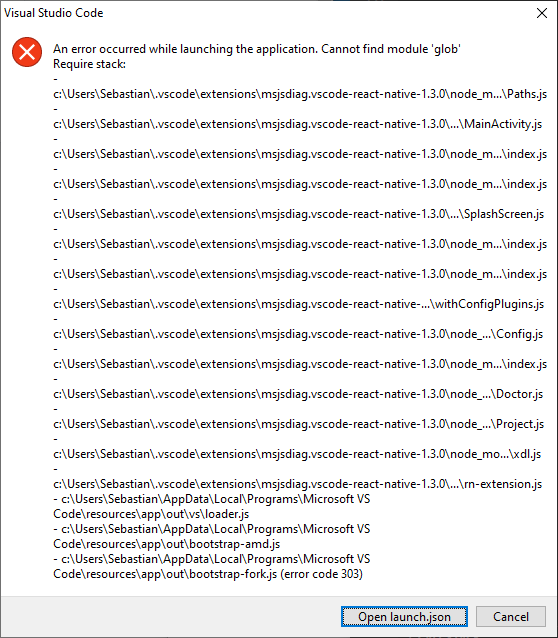
I cannot debug expo with the recommended debug config. Instead I get a popup saying "Cannot find module 'glob'".
Steps to reproduce:
- Setup a expo app with expo 40.0.0
- Configure debug as described here https://github.com/microsoft/vscode-react-native#expo-applications
- Click "Start debugging"
I tried reinstalling the latest version of node, installing glob locally as well as globally. Nothing helped. I also tried the same on a fresh PC and got the same result.
Without the debugger the application itself is running fine.
Expected behavior
This should allow me to debug the expo app in VS Code.
Debug output
Debug Console
[Info] Prewarming bundle cache. This may take a while ...

[Info] Building and running application.

[Error] Error: Cannot find module 'glob'
Require stack:
- c:\Users\Sebastian\.vscode\extensions\msjsdiag.vscode-react-native-1.3.0\node_modules\@expo\configure-splash-screen\build\android\Paths.js
- c:\Users\Sebastian\.vscode\extensions\msjsdiag.vscode-react-native-1.3.0\node_modules\@expo\configure-splash-screen\build\android\MainActivity.js
- c:\Users\Sebastian\.vscode\extensions\msjsdiag.vscode-react-native-1.3.0\node_modules\@expo\configure-splash-screen\build\android\index.js
- c:\Users\Sebastian\.vscode\extensions\msjsdiag.vscode-react-native-1.3.0\node_modules\@expo\configure-splash-screen\build\index.js
- c:\Users\Sebastian\.vscode\extensions\msjsdiag.vscode-react-native-1.3.0\node_modules\@expo\config-plugins\build\android\SplashScreen.js
- c:\Users\Sebastian\.vscode\extensions\msjsdiag.vscode-react-native-1.3.0\node_modules\@expo\config-plugins\build\android\index.js
- c:\Users\Sebastian\.vscode\extensions\msjsdiag.vscode-react-native-1.3.0\node_modules\@expo\config-plugins\build\index.js
- c:\Users\Sebastian\.vscode\extensions\msjsdiag.vscode-react-native-1.3.0\node_modules\@expo\config\build\plugins\withConfigPlugins.js
- c:\Users\Sebastian\.vscode\extensions\msjsdiag.vscode-react-native-1.3.0\node_modules\@expo\config\build\Config.js
- c:\Users\Sebastian\.vscode\extensions\msjsdiag.vscode-react-native-1.3.0\node_modules\@expo\config\build\index.js
- c:\Users\Sebastian\.vscode\extensions\msjsdiag.vscode-react-native-1.3.0\node_modules\@expo\xdl\build\project\Doctor.js
- c:\Users\Sebastian\.vscode\extensions\msjsdiag.vscode-react-native-1.3.0\node_modules\@expo\xdl\build\Project.js
- c:\Users\Sebastian\.vscode\extensions\msjsdiag.vscode-react-native-1.3.0\node_modules\@expo\xdl\build\xdl.js
- c:\Users\Sebastian\.vscode\extensions\msjsdiag.vscode-react-native-1.3.0\dist\rn-extension.js
- c:\Users\Sebastian\AppData\Local\Programs\Microsoft VS Code\resources\app\out\vs\loader.js
- c:\Users\Sebastian\AppData\Local\Programs\Microsoft VS Code\resources\app\out\bootstrap-amd.js
- c:\Users\Sebastian\AppData\Local\Programs\Microsoft VS Code\resources\app\out\bootstrap-fork.js

[Info] Es wird sichergestellt, dass Ihr Projekt die richtigen Abhängigkeiten für Expo verwendet. Dieser Vorgang kann etwas Zeit in Anspruch nehmen...

Es wird überprüft, ob es sich um eine Expo-App handelt......
[Info] Der Paketerstellungs-Manager wird bereits ausgeführt.

[Info] Prewarming bundle cache. This may take a while ...

[Info] Building and running application.

[Error] Error: Cannot find module 'glob'
Require stack:
- c:\Users\Sebastian\.vscode\extensions\msjsdiag.vscode-react-native-1.3.0\node_modules\@expo\configure-splash-screen\build\android\Paths.js
- c:\Users\Sebastian\.vscode\extensions\msjsdiag.vscode-react-native-1.3.0\node_modules\@expo\configure-splash-screen\build\android\MainActivity.js
- c:\Users\Sebastian\.vscode\extensions\msjsdiag.vscode-react-native-1.3.0\node_modules\@expo\configure-splash-screen\build\android\index.js
- c:\Users\Sebastian\.vscode\extensions\msjsdiag.vscode-react-native-1.3.0\node_modules\@expo\configure-splash-screen\build\index.js
- c:\Users\Sebastian\.vscode\extensions\msjsdiag.vscode-react-native-1.3.0\node_modules\@expo\config-plugins\build\android\SplashScreen.js
- c:\Users\Sebastian\.vscode\extensions\msjsdiag.vscode-react-native-1.3.0\node_modules\@expo\config-plugins\build\android\index.js
- c:\Users\Sebastian\.vscode\extensions\msjsdiag.vscode-react-native-1.3.0\node_modules\@expo\config-plugins\build\index.js
- c:\Users\Sebastian\.vscode\extensions\msjsdiag.vscode-react-native-1.3.0\node_modules\@expo\config\build\plugins\withConfigPlugins.js
- c:\Users\Sebastian\.vscode\extensions\msjsdiag.vscode-react-native-1.3.0\node_modules\@expo\config\build\Config.js
- c:\Users\Sebastian\.vscode\extensions\msjsdiag.vscode-react-native-1.3.0\node_modules\@expo\config\build\index.js
- c:\Users\Sebastian\.vscode\extensions\msjsdiag.vscode-react-native-1.3.0\node_modules\@expo\xdl\build\project\Doctor.js
- c:\Users\Sebastian\.vscode\extensions\msjsdiag.vscode-react-native-1.3.0\node_modules\@expo\xdl\build\Project.js
- c:\Users\Sebastian\.vscode\extensions\msjsdiag.vscode-react-native-1.3.0\node_modules\@expo\xdl\build\xdl.js
- c:\Users\Sebastian\.vscode\extensions\msjsdiag.vscode-react-native-1.3.0\dist\rn-extension.js
- c:\Users\Sebastian\AppData\Local\Programs\Microsoft VS Code\resources\app\out\vs\loader.js
- c:\Users\Sebastian\AppData\Local\Programs\Microsoft VS Code\resources\app\out\bootstrap-amd.js
- c:\Users\Sebastian\AppData\Local\Programs\Microsoft VS Code\resources\app\out\bootstrap-fork.js

info Starting custom debugger by executing:, echo A debugger is not needed:  "c:\Users\Sebastian\Documents\coachweasel\code\frontend-mobile"
[Info] Es wird sichergestellt, dass Ihr Projekt die richtigen Abhängigkeiten für Expo verwendet. Dieser Vorgang kann etwas Zeit in Anspruch nehmen...

Es wird überprüft, ob es sich um eine Expo-App handelt......
[Info] Der Paketerstellungs-Manager wird bereits ausgeführt.

[Info] Prewarming bundle cache. This may take a while ...

[Info] Building and running application.

[Error] Error: Cannot find module 'glob'
Require stack:
- c:\Users\Sebastian\.vscode\extensions\msjsdiag.vscode-react-native-1.3.0\node_modules\@expo\configure-splash-screen\build\android\Paths.js
- c:\Users\Sebastian\.vscode\extensions\msjsdiag.vscode-react-native-1.3.0\node_modules\@expo\configure-splash-screen\build\android\MainActivity.js
- c:\Users\Sebastian\.vscode\extensions\msjsdiag.vscode-react-native-1.3.0\node_modules\@expo\configure-splash-screen\build\android\index.js
- c:\Users\Sebastian\.vscode\extensions\msjsdiag.vscode-react-native-1.3.0\node_modules\@expo\configure-splash-screen\build\index.js
- c:\Users\Sebastian\.vscode\extensions\msjsdiag.vscode-react-native-1.3.0\node_modules\@expo\config-plugins\build\android\SplashScreen.js
- c:\Users\Sebastian\.vscode\extensions\msjsdiag.vscode-react-native-1.3.0\node_modules\@expo\config-plugins\build\android\index.js
- c:\Users\Sebastian\.vscode\extensions\msjsdiag.vscode-react-native-1.3.0\node_modules\@expo\config-plugins\build\index.js
- c:\Users\Sebastian\.vscode\extensions\msjsdiag.vscode-react-native-1.3.0\node_modules\@expo\config\build\plugins\withConfigPlugins.js
- c:\Users\Sebastian\.vscode\extensions\msjsdiag.vscode-react-native-1.3.0\node_modules\@expo\config\build\Config.js
- c:\Users\Sebastian\.vscode\extensions\msjsdiag.vscode-react-native-1.3.0\node_modules\@expo\config\build\index.js
- c:\Users\Sebastian\.vscode\extensions\msjsdiag.vscode-react-native-1.3.0\node_modules\@expo\xdl\build\project\Doctor.js
- c:\Users\Sebastian\.vscode\extensions\msjsdiag.vscode-react-native-1.3.0\node_modules\@expo\xdl\build\Project.js
- c:\Users\Sebastian\.vscode\extensions\msjsdiag.vscode-react-native-1.3.0\node_modules\@expo\xdl\build\xdl.js
- c:\Users\Sebastian\.vscode\extensions\msjsdiag.vscode-react-native-1.3.0\dist\rn-extension.js
- c:\Users\Sebastian\AppData\Local\Programs\Microsoft VS Code\resources\app\out\vs\loader.js
- c:\Users\Sebastian\AppData\Local\Programs\Microsoft VS Code\resources\app\out\bootstrap-amd.js
- c:\Users\Sebastian\AppData\Local\Programs\Microsoft VS Code\resources\app\out\bootstrap-fork.js
Developer Tools console
DevTools failed to load SourceMap: Could not load content for https://ticino.blob.core.windows.net/sourcemaps/ea3859d4ba2f3e577a159bc91e3074c5d85c0523/node_modules/windows-process-tree/lib/index.js.map: Unknown error
Environment
Please tell us about your system and your project:
I am using windows 10 and expo
Didn't find any issues with the project!
envinfo:
System:
    OS: Windows 10 10.0.18363
    CPU: (32) x64 AMD Ryzen 9 3950X 16-Core Processor
    Memory: 109.84 GB / 127.92 GB
  Binaries:
    Node: 14.15.4 - C:\Program Files\nodejs\node.EXE
    Yarn: 1.22.10 - ~\AppData\Roaming\npm\yarn.CMD
    npm: 6.14.10 - C:\Program Files\nodejs\npm.CMD
  Managers:
    pip3: 20.2.3 - C:\Python39\Scripts\pip3.EXE
  Utilities:
    CMake: 3.18.1 - C:\Program Files\CMake\bin\cmake.EXE
    Git: 2.27.0. - C:\Program Files\Git\cmd\git.EXE
  IDEs:
    Android Studio: Version  4.0.0.0 AI-193.6911.18.40.6514223
    VSCode: 1.52.1 - C:\Users\Sebastian\AppData\Local\Programs\Microsoft VS Code\bin\code.CMD
  Languages:
    Bash: 4.4.19 - C:\Windows\system32\bash.EXE
    Perl: 5.30.2 - C:\rtools40\usr\bin\perl.EXE
    Python: 3.9.1 - C:\Python39\python.EXE
  Databases:
    MongoDB: 4.2.3 - C:\Program Files\MongoDB\Server\4.2\bin\mongo.EXE
    SQLite: 3.28.0 - C:\Users\Sebastian\AppData\Local\Android\Sdk\platform-tools\sqlite3.EXE
  Browsers:
    Edge: 44.18362.449.0
    Internet Explorer: 11.0.18362.1
- React Native Tools extension version: v1.3.0
- Expo SDK version (if applicable): 40.0.0
 SparseSpeculator
All 8 comments
Hi @SparseSpeculator and thank you for contacting us. It looks like expo/xdl lib installed to work with expo cannot install gulp on its own. For now there is a workaround for this problem. You should install glob locally for the extension:
- Open
msjsdiag.vscode-react-native-x.x.xextension folder in the terminal.
- Windows:
%USERPROFILE%\.vscode\extensions - macOS:
~/.vscode/extensions - Linux:
~/.vscode/extensions
- Windows:
- Execute
npm install glob - Restart VS Code
At the moment we are investigating this problem. We will let you know when we resolve the issue.
 JiglioNero
on 2 Feb 2021
JiglioNero
on 2 Feb 2021
That worked! Thank you for helping, and helping so quickly! :)
SparseSpeculator
on 2 Feb 2021
Hi,
I have the same error but I'm running on MacOS Catalina.
I can confirm the workaround works for my config too.
 mogarick
on 2 Feb 2021
mogarick
on 2 Feb 2021
Ran into the same issue on Windows 10 with Expo SDK 40.
Tried suggested fix then got this.
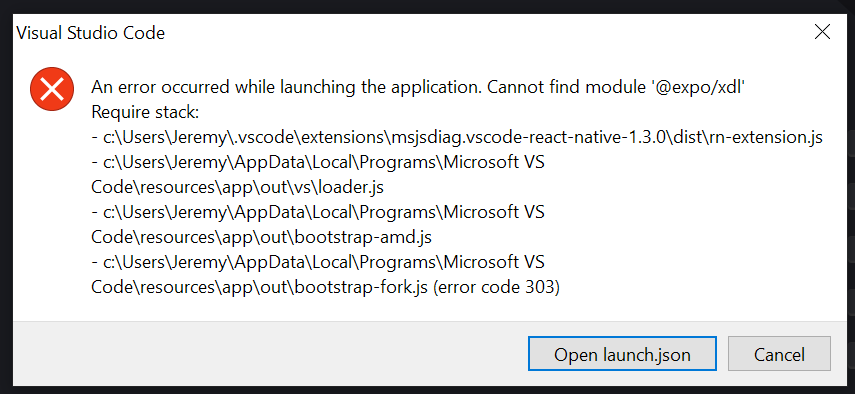
installed npm install @expo/xdl by hand just like glob and back in business. 👍
 GollyJer
on 5 Feb 2021
GollyJer
on 5 Feb 2021
We found out that this issue occurred due to the recent update of @expo/configure-splash-screen package to version 0.3.3. This version of the module uses the glob package, but it was not added to the dependencies of this module. At the moment this problem has been fixed in version 0.3.4. But since the latest @expo/xdl v59.0.22 package is still using the 0.3.3 version of @expo/configure-splash-screen package, the error still persists. We believe that it will be fixed when a new version of @expo/xdl is published.
With respect to the error
Ran into the same issue on Windows 10 with Expo SDK 40.
Tried suggested fix then got this.

we propose the following workaround for this problem. The package @expo/xdl v59.0.17 works fine with the extension, so we recommend to install in manully to the extension in case of the error:
Open
msjsdiag.vscode-react-native-x.x.xextension folder in the terminal.- Windows: %USERPROFILE%.vscode\extensions
- macOS: ~/.vscode/extensions
- Linux: ~/.vscode/extensions
Execute npm uninstall @expo/xdl
- Execute npm install @expo/[email protected]
- Restart VS Code
We will monitor this issue and notify you when problem is fixed.
JiglioNero
on 5 Feb 2021
We found out that this issue occurred due to the recent update of
@expo/configure-splash-screenpackage to version0.3.3. This version of the module uses theglobpackage, but it was not added to the dependencies of this module. At the moment this problem has been fixed in version0.3.4. But since the latest @expo/xdl v59.0.22 package is still using the0.3.3version of@expo/configure-splash-screenpackage, the error still persists. We believe that it will be fixed when a new version of @expo/xdl is published.
With respect to the errorRan into the same issue on Windows 10 with Expo SDK 40.
Tried suggested fix then got this.we propose the following workaround for this problem. The package
@expo/xdl v59.0.17works fine with the extension, so we recommend to install in manully to the extension in case of the error:
Open
msjsdiag.vscode-react-native-x.x.xextension folder in the terminal.
- Windows: %USERPROFILE%.vscode\extensions
- macOS: ~/.vscode/extensions
- Linux: ~/.vscode/extensions
- Execute npm uninstall @expo/xdl
- Execute npm install @expo/[email protected]
- Restart VS Code
We will monitor this issue and notify you when problem is fixed.
This worked for me. Thank you!
 feslima
on 18 Feb 2021
feslima
on 18 Feb 2021
Hi everyone, Expo has released @expo/xdl v59.0.23 package with the fix for this issue. Now @expo/xdl contains glob package in its subdependencies, so it should be installed with the root package automatically.
We tested the new version of the package and the extension could install and import it without problems. So it seems that the issue is not reproduced anymore.
You can also check this fix by updating @expo/xdl package. The easiest way to do this on your side is to reinstall the extension. After that the extension will automatically download the latest version of @expo/xdl package.
Steps to check the fix:
- Uninstall the extension
- Close VS Code
- Open VS Code
- Install the extension
- Run
Debug in Exponentdebugging scenario
 RedMickey
on 22 Feb 2021
RedMickey
on 22 Feb 2021
The issue has been fixed in @expo/xdl v59.0.23 package and now it is no longer reproducible, so we close this issue.
JiglioNero
on 25 Feb 2021
Related issues
 vsccarl
·
3Comments
vsccarl
·
3Comments
 buddhamangler
·
5Comments
buddhamangler
·
5Comments
 tavrez
·
4Comments
tavrez
·
4Comments
 kralcifer-ms
·
4Comments
kralcifer-ms
·
4Comments
 dimitarnestorov
·
4Comments
dimitarnestorov
·
4Comments
Most helpful comment
Hi @SparseSpeculator and thank you for contacting us. It looks like
expo/xdllib installed to work with expo cannot install gulp on its own. For now there is a workaround for this problem. You should install glob locally for the extension:msjsdiag.vscode-react-native-x.x.xextension folder in the terminal.%USERPROFILE%\.vscode\extensions~/.vscode/extensions~/.vscode/extensionsnpm install globAt the moment we are investigating this problem. We will let you know when we resolve the issue.