Vscode-react-native: [Bug] iOS Direct Debugging: Delete: Entry, ":RCTDevMenu:executorClass", Does Not Exist
🐛 What is the bug? How can we reproduce it?
I'm not sure whether this is a bug or misconfiguration from my side, but I'm not being able to run the following configuration:
{
   "name": "Debug Direct iOS - Experimental",
   "cwd": "${workspaceFolder}",
   "type": "reactnativedirect",
   "request": "launch",
   "platform": "ios",
   "port": 9221,
   "scheme": "IPFS-Demo-iOS-Debug"
}
While the app launches in the simulator, the debugger doesn't start in VSCode. I believe the error that is returned has its origin at the following line: https://github.com/microsoft/vscode-react-native/blob/4dfc9ffdec1cdd7d033000fe778fbe6574e31917/src/extension/ios/iOSDebugModeManager.ts#L42
The plist file in question
/Users/acostalima/Library/Developer/CoreSimulator/Devices/44557BD4-FC45-4E17-99A6-FB5B46A0C08E/data/Containers/Data/Application/D7A633DC-3E76-41AF-8D14-FDFAAE99DFD3/Library/Preferences/io.ipfs.reactnative.demo.plist
does exist, but the look up key :RCTDevMenu:executorClass does not and I wasn't yet able to figure out why.
Expected behavior
Successful start up of a direct debugging session on iOS.
Debug output
Debug Console
N/A
React Native output channel
[Error] Error: Error while executing command '/usr/libexec/PlistBuddy -c 'Delete :RCTDevMenu:executorClass' '/Users/acostalima/Library/Developer/CoreSimulator/Devices/44557BD4-FC45-4E17-99A6-FB5B46A0C08E/data/Containers/Data/Application/DD2E7902-1F09-4463-AE03-DA3156497853/Library/Preferences/io.ipfs.reactnative.demo.plist'': Command failed: /usr/libexec/PlistBuddy -c 'Delete :RCTDevMenu:executorClass' '/Users/acostalima/Library/Developer/CoreSimulator/Devices/44557BD4-FC45-4E17-99A6-FB5B46A0C08E/data/Containers/Data/Application/DD2E7902-1F09-4463-AE03-DA3156497853/Library/Preferences/io.ipfs.reactnative.demo.plist'
Delete: Entry, ":RCTDevMenu:executorClass", Does Not Exist
Developer Tools console
N/A
Environment
Please tell us about your system and your project:
npx react-native doctorornpx expo doctorif your project is using Expo:
Common
 ✓ Node.js
 ✓ npm
 ✓ Watchman - Used for watching changes in the filesystem when in development mode

Android
 ✖ JDK
   - Version found: 1.8.0_201
   - Version supported: >= 8
 ✓ Android Studio - Required for building and installing your app on Android
 ✖ Android SDK - Required for building and installing your app on Android
   - Versions found: 28.0.3
   - Version supported: 29.0.2
 ✓ ANDROID_HOME

iOS
 ✓ Xcode - Required for building and installing your app on iOS
 ✓ CocoaPods - Required for installing iOS dependencies
 ✓ ios-deploy - Required for installing your app on a physical device with the CLI
envinfo:
System:
    OS: macOS 10.15.6
    CPU: (4) x64 Intel(R) Core(TM) i7-7567U CPU @ 3.50GHz
    Memory: 512.19 MB / 16.00 GB
    Shell: 5.7.1 - /bin/zsh
  Binaries:
    Node: 14.7.0 - /usr/local/bin/node
    Yarn: 1.15.2 - /usr/local/bin/yarn
    npm: 6.14.7 - /usr/local/bin/npm
    Watchman: 4.9.0 - /usr/local/bin/watchman
  Managers:
    CocoaPods: 1.9.1 - /usr/local/bin/pod
    Homebrew: 2.5.2 - /usr/local/bin/brew
    pip3: 20.1.1 - /usr/local/bin/pip3
    RubyGems: 3.0.3 - /usr/bin/gem
  Utilities:
    Make: 3.81 - /usr/bin/make
    GCC: 4.2.1 - /usr/bin/gcc
    Git: 2.18.0 - /usr/local/bin/git
    Clang: 1100.0.33.17 - /usr/bin/clang
    Subversion: 1.10.4 - /usr/bin/svn
    FFmpeg: 4.3.1 - /usr/local/bin/ffmpeg
  Servers:
    Apache: 2.4.41 - /usr/sbin/apachectl
  Virtualization:
    Docker: 19.03.12 - /usr/local/bin/docker
  SDKs:
    iOS SDK:
      Platforms: iOS 13.2, DriverKit 19.0, macOS 10.15, tvOS 13.2, watchOS 6.1
    Android SDK:
      API Levels: 25, 28
      Build Tools: 28.0.3
      System Images: android-28 | Google Play Intel x86 Atom
  IDEs:
    Android Studio: 3.5 AI-191.8026.42.35.6010548
    Nano: 2.0.6 - /usr/bin/nano
    VSCode: 1.49.1 - /usr/local/bin/code
    Vim: 8.1 - /usr/bin/vim
    Xcode: 11.3.1/11C504 - /usr/bin/xcodebuild
  Languages:
    Bash: 3.2.57 - /bin/bash
    Java: 1.8.0_201 - /usr/bin/javac
    Perl: 5.18.4 - /usr/bin/perl
    PHP: 7.3.11 - /usr/bin/php
    Protoc: 3.13.0 - /usr/local/bin/protoc
    Python: 3.8.5 - /usr/local/opt/python@3/libexec/bin/python
    Python3: 3.8.5 - /usr/local/bin/python3
    Ruby: 2.6.3 - /usr/bin/ruby
  Databases:
    SQLite: 3.28.0 - /usr/bin/sqlite3
  Browsers:
    Chrome: 85.0.4183.121
    Firefox: 77.0.1
    Safari: 13.1.2
- React Native Tools extension version: 1.0.0
 acostalima
All 13 comments
Hi @acostalima , thanks for your feedback. It would be very helpful if you could provide us a demo application and a scenario to reproduce this error.
 JiglioNero
on 30 Sep 2020
JiglioNero
on 30 Sep 2020
Sure! You can find the app at https://github.com/ipfs-shipyard/react-native-ipfs-demo.
The repro is actually quite simple. Using the debug configuration I pointed out above, simply fire up the debugger in VSCode. A few seconds after the app is compiled, the error will be displayed in a popup window.
acostalima
on 1 Oct 2020
Hi @acostalima . We tested your demo application, but we could not to reproduce your exact error, despite this we faced a similar error and fixed it. Also, after the build of the application is completed, it is not installed on the device, despite the fact that the message about successful installation is displayed in the console. This scenario is repeated both using the extension and using the standard react-native-cli via the react-native run-ios --device --scheme IPFS-Demo-iOS-Debug command and doesn’t seem to be not an extension problem.
Please test your application by installing the extension with the patch from this archive as indicated in the instruction and let us know how it works for you.
P.S. Currently Direct debugging for iOS won’t work with simulators, because ios-webkit-debug-proxy used for Direct debugging scenarios doesn’t currently support them.
JiglioNero
on 5 Oct 2020
Also, after the build of the application is completed, it is not installed on the device, despite the fact that the message about successful installation is displayed in the console.
That's odd as ios-deploy is a dependency, although as an optional one. Thanks for pointing this out.
P.S. Currently Direct debugging for iOS won’t work with simulators, because ios-webkit-debug-proxy used for Direct debugging scenarios doesn’t currently support them.
@JiglioNero my bad here. I'll test with an actual device and come back to you soon.
Please test your application by installing the extension with the patch from this archive as indicated in the instruction and let us know how it works for you.
Will do. Thanks for your support!
acostalima
on 6 Oct 2020
Hi @acostalima , have you tested the fix? Does it work for you?
JiglioNero
on 8 Oct 2020
@JiglioNero not yet, sorry. I don't have an iPhone in my possession at the moment. I'll get back to you next week!
acostalima
on 8 Oct 2020
Hi @acostalima , just pinging on this. The fix we offered you is already merged into master, so you can try it as it's already released in the new version of React Native Tools (Preview). Let us know if there are any problems with it
JiglioNero
on 14 Oct 2020
@acostalima React Native Tools v1.1.0 with a fix for that just have been released. Please try it out and let us know if it works for you.
 SounD120
on 15 Oct 2020
SounD120
on 15 Oct 2020
Hi @acostalima I am closing this issue due to inactivity. Feel free to reopen if needed.
SounD120
on 23 Oct 2020
hey, i am getting same error with react native tool version 1.2.0.
could you please look into it.
 bijaykanshinew
on 29 Dec 2020
bijaykanshinew
on 29 Dec 2020
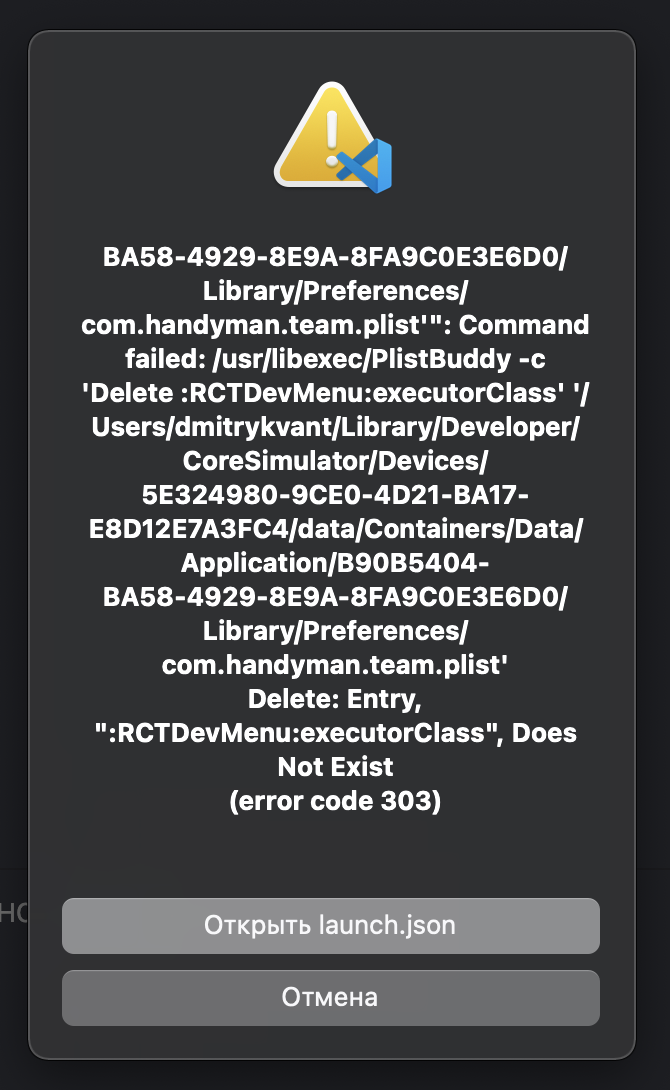
any news i have similar bag
 DmitryKvant
on 22 Jan 2021
DmitryKvant
on 22 Jan 2021
that happen bcs i selected direct mode
DmitryKvant
on 22 Jan 2021
Hi @DmitryKvant and thanks for reaching us.
Could you please tell us if you are trying to debug an iOS application on a simulator in direct mode? If so, for now the extension supports direct debugging only on real devices, due to issues with ios-webkit-debug-proxy util, which is used to communicate with an iOS device. It seems that our documentation doesn't take into account this issue, we'll update it.
If the issue persists on a real device, could you please create a new issue for your specific case and describe your problem using our issue template?
 RedMickey
on 22 Jan 2021
RedMickey
on 22 Jan 2021
Related issues
 Gabemb
·
4Comments
Gabemb
·
4Comments
 dimitarnestorov
·
4Comments
dimitarnestorov
·
4Comments
 kralcifer-ms
·
4Comments
SounD120
·
4Comments
kralcifer-ms
·
4Comments
SounD120
·
4Comments
 kevinnguy
·
3Comments
kevinnguy
·
3Comments