Vscode-react-native: Unknown named module: "../../src/methods/node.js"
Actual Behavior
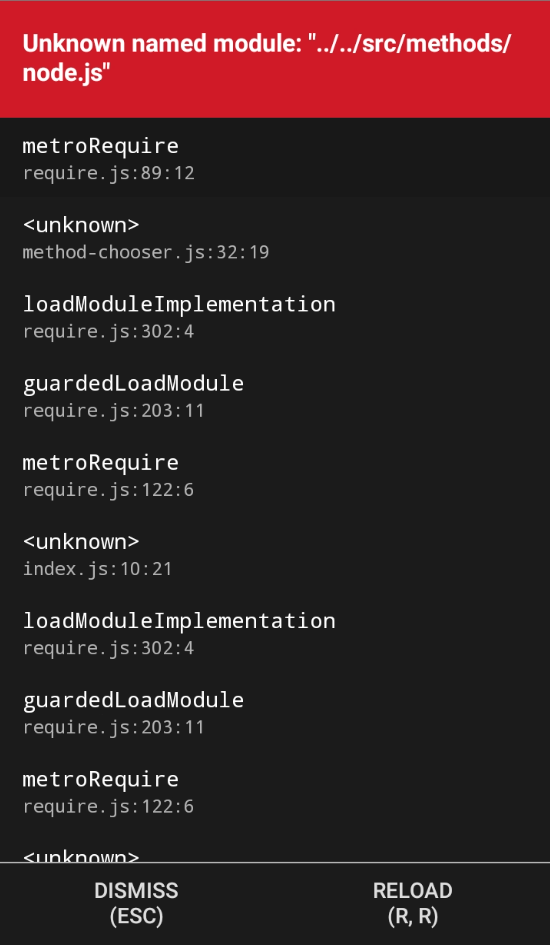
Debug does not start, instead I get this
Expected Behavior
For debug to work
Software versions
- React-Native VS Code extension version: 6.7.46
- VSCode version: 1.37.1
- OS platform and version: Manjaro Deepin (Arch Linux) x64
- NodeJS version: 10.16.0
- React Native version: 0.60.5
- Expo SDK version (include if relevant): Not using Expo
Outputs (Include if relevant)

OS: linux x64
Adapter node: v10.11.0 x64
vscode-chrome-debug-core: 6.7.46
Starting debugger app worker.
Established a connection with the Proxy (Packager) to the React Native application
Debugger worker loaded runtime on port 13277
Unknown named module: "../../src/methods/node.js"
Module AppRegistry is not a registered callable module (calling runApplication)
- Output of the React-Native output channel (View -> Toggle Output -> Select React-Native in ListBox):
Empty
- Output of the Developer Tools console (Help -> Toggle Developer Tools -> Select Console tab):
[Extension Host] debugger listening on port 41432
workbench.main.js:sourcemap:3348 [xabikos.JavaScriptSnippets]: Unknown language in `contributes.JavaScriptSnippets.language`. Provided value: vue
_logMessageInConsole @ workbench.main.js:sourcemap:3348
workbench.main.js:sourcemap:242 [Extension Host] recovered 76 export records from cache 586c4be8e3714c3a8803e99414e5641589189960.json
workbench.main.js:sourcemap:242 [Extension Host] rejected promise not handled within 1 second: TypeError: Cannot read property 'isGitRepository' of undefined
t.log @ workbench.main.js:sourcemap:242
workbench.main.js:sourcemap:242 [Extension Host] stack trace: TypeError: Cannot read property 'isGitRepository' of undefined    at changedFiles (/home/myuser/.vscode/extensions/capaj.vscode-exports-autocomplete-0.5.4/lib/git-changed-files.js:4:14) at require.exec.fs.readFile.then (/home/myuser/.vscode/extensions/capaj.vscode-exports-autocomplete-0.5.4/lib/exports-map.js:50:9)
t.log @ workbench.main.js:sourcemap:242
workbench.main.js:sourcemap:3414 [[object Object]]Cannot read property 'isGitRepository' of undefined
$onExtensionRuntimeError @ workbench.main.js:sourcemap:3414
workbench.main.js:sourcemap:3414 TypeError: Cannot read property 'isGitRepository' of undefined
    at changedFiles (/home/myuser/.vscode/extensions/capaj.vscode-exports-autocomplete-0.5.4/lib/git-changed-files.js:4)
    at require.exec.fs.readFile.then (/home/myuser/.vscode/extensions/capaj.vscode-exports-autocomplete-0.5.4/lib/exports-map.js:50)
$onExtensionRuntimeError @ workbench.main.js:sourcemap:3414
workbench.main.js:sourcemap:242 [Extension Host] rejected promise not handled within 1 second: Error: ENOENT: no such file or directory, open '/home/myuser/Sites/Tests/igniteAndross/node_modules/jsc-android/index.js'
t.log @ workbench.main.js:sourcemap:242
workbench.main.js:sourcemap:242 [Extension Host] stack trace: Error: ENOENT: no such file or directory, open '/home/myuser/Sites/Tests/igniteAndross/node_modules/jsc-android/index.js'
t.log @ workbench.main.js:sourcemap:242
workbench.main.js:sourcemap:1449   ERR ENOENT: no such file or directory, open '/home/myuser/Sites/Tests/igniteAndross/node_modules/jsc-android/index.js': Error: ENOENT: no such file or directory, open '/home/myuser/Sites/Tests/igniteAndross/node_modules/jsc-android/index.js'
workbench.main.js:sourcemap:242 [Extension Host] rejected promise not handled within 1 second: Error: ENOENT: no such file or directory, open '/home/myuser/Sites/Tests/igniteAndross/node_modules/react-native-linear-gradient/index'
t.log @ workbench.main.js:sourcemap:242
workbench.main.js:sourcemap:242 [Extension Host] stack trace: Error: ENOENT: no such file or directory, open '/home/myuser/Sites/Tests/igniteAndross/node_modules/react-native-linear-gradient/index'
t.log @ workbench.main.js:sourcemap:242
workbench.main.js:sourcemap:1449   ERR ENOENT: no such file or directory, open '/home/myuser/Sites/Tests/igniteAndross/node_modules/react-native-linear-gradient/index': Error: ENOENT: no such file or directory, open '/home/myuser/Sites/Tests/igniteAndross/node_modules/react-native-linear-gradient/index'
workbench.main.js:sourcemap:242 [Extension Host] rejected promise not handled within 1 second: Error: ENOENT: no such file or directory, open '/home/myuser/Sites/Tests/igniteAndross/node_modules/react-native-modal-translucent/index.js'
t.log @ workbench.main.js:sourcemap:242
workbench.main.js:sourcemap:242 [Extension Host] stack trace: Error: ENOENT: no such file or directory, open '/home/myuser/Sites/Tests/igniteAndross/node_modules/react-native-modal-translucent/index.js'
t.log @ workbench.main.js:sourcemap:242
workbench.main.js:sourcemap:1449   ERR ENOENT: no such file or directory, open '/home/myuser/Sites/Tests/igniteAndross/node_modules/react-native-modal-translucent/index.js': Error: ENOENT: no such file or directory, open '/home/myuser/Sites/Tests/igniteAndross/node_modules/react-native-modal-translucent/index.js'
workbench.main.js:sourcemap:242 [Extension Host] rejected promise not handled within 1 second: Error: ENOENT: no such file or directory, open '/home/myuser/Sites/Tests/igniteAndross/node_modules/react-native-screens/src/screens'
t.log @ workbench.main.js:sourcemap:242
workbench.main.js:sourcemap:242 [Extension Host] stack trace: Error: ENOENT: no such file or directory, open '/home/myuser/Sites/Tests/igniteAndross/node_modules/react-native-screens/src/screens'
t.log @ workbench.main.js:sourcemap:242
workbench.main.js:sourcemap:1449   ERR ENOENT: no such file or directory, open '/home/myuser/Sites/Tests/igniteAndross/node_modules/react-native-screens/src/screens': Error: ENOENT: no such file or directory, open '/home/myuser/Sites/Tests/igniteAndross/node_modules/react-native-screens/src/screens'
workbench.main.js:sourcemap:242 [Extension Host] No editors associated with document: /home/myuser/Sites/Tests/igniteAndross/jsconfig.json
t.log @ workbench.main.js:sourcemap:242
workbench.main.js:sourcemap:242 [Extension Host] No editors associated with document: /opt/visual-studio-code/resources/app/extensions/javascript/schemas/jsconfig.schema.json
t.log @ workbench.main.js:sourcemap:242
workbench.main.js:sourcemap:1449   ERR An unknown error occurred. Please consult the log for more details.
workbench.main.js:sourcemap:242 [Extension Host] (node:2642) [DEP0022] DeprecationWarning: os.tmpDir() is deprecated. Use os.tmpdir() instead.
I have been working on and upgrading this project since RN 0.56 or something, so the issue might be there. On a new project the debug functionality works well so I'm fairly certain there is nothing wrong with my install.
Any help or tip at this point would be most helpful, I am at my wits' end.
Thank you.
 Unforgiven-wanda
All 18 comments
Hi @Unforgiven-wanda and thanks for reaching us. Could you please try to run the app using react-native run-android without using the extension at all and let us know if issue is still persists?
 ruslan-bikkinin
on 26 Aug 2019
ruslan-bikkinin
on 26 Aug 2019
Running the app using react-native run-android runs fine. Trying to debug using Chrome also runs fine. However trying the "Attach to Packager" method results in the error mentioned above.
Same thing when using "Debug Android" available in VsCode.
Unforgiven-wanda
on 26 Aug 2019
Hi @Unforgiven-wanda . Could you please share a demo application where this behavior is reproduced? Also you can try to clear your caches and to run debugging again. You can use the following instruction:
- Clear watchman watches:
watchman watch-del-all, - Delete node_modules:
rm -rf node_modulesand runyarn install, - Reset Metro's cache:
yarn start --reset-cache, - Remove the cache:
rm -rf /tmp/metro-*
Please let us know if this helps.
 SounD120
on 26 Aug 2019
SounD120
on 26 Aug 2019
After some more digging I think the issue may come from a module called broadcast-channel that is a dependency of RxDB. I'll continue investigating and update this issue accordingly.
Also clearing the cache and reinstalling did not help.
Unforgiven-wanda
on 26 Aug 2019
Author of broadcast-channel here.
To reduce bundle-size, broadcast-channel does a require() call only when the node-platform is detected. See here. I tested this with multiple bundlers but it seems like vscode does the resolution different.
 pubkey
on 26 Aug 2019
pubkey
on 26 Aug 2019
Hi @pubkey , @Unforgiven-wanda . Thanks for help. I proposed a fix for that. Could you please try it? To do that please do the following:
- Download and unzip compiled extension VSIX from
fix-node-process-finding
branch: vscode-react-native-0.11.0.vsix.zip - Uninstall extension
- Restart VS Code
- Click
Extensions -> ... -> Install from VSIX...and select downloaded VSIX
Please let us know if this works for you.
SounD120
on 27 Aug 2019
Hello again and thank you for taking the time.
With your patched version of the plugin I am no longer getting the above error but a new one instead:
(node:14871) [DEP0005] DeprecationWarning: Buffer() is deprecated due to security and usability issues. Please use the Buffer.alloc(), Buffer.allocUnsafe(), or Buffer.from() methods instead.
Here is the complete log.
OS: linux x64
Adapter node: v10.11.0 x64
vscode-chrome-debug-core: 6.7.46
Starting debugger app worker.
Established a connection with the Proxy (Packager) to the React Native application
Debugger worker loaded runtime on port 26664
Require cycle: node_modules/pouchdb-utils/lib/index-browser.js -> node_modules/pouchdb-utils/lib/index-browser.js

Require cycles are allowed, but can result in uninitialized values. Consider refactoring to remove the need for a cycle.
Require cycle: node_modules/rxdb/dist/lib/rx-error.js -> node_modules/rxdb/dist/lib/util.js -> node_modules/rxdb/dist/lib/rx-error.js

Require cycles are allowed, but can result in uninitialized values. Consider refactoring to remove the need for a cycle.
Require cycle: node_modules/rxdb/dist/lib/rx-error.js -> node_modules/rxdb/dist/lib/overwritable.js -> node_modules/rxdb/dist/lib/rx-error.js

Require cycles are allowed, but can result in uninitialized values. Consider refactoring to remove the need for a cycle.
Warning: Async Storage has been extracted from react-native core and will be removed in a future release. It can now be installed and imported from '@react-native-community/async-storage' instead of 'react-native'. See https://github.com/react-native-community/react-native-async-storage
Require cycle: App/Components/Stateless/index.js -> App/Components/Stateless/ListItem.js -> App/Components/Stateless/index.js

Require cycles are allowed, but can result in uninitialized values. Consider refactoring to remove the need for a cycle.
Require cycle: node_modules/async/internal/wrapAsync.js -> node_modules/async/asyncify.js -> node_modules/async/internal/wrapAsync.js

Require cycles are allowed, but can result in uninitialized values. Consider refactoring to remove the need for a cycle.
Running application "igniteAndross" with appParams: {"rootTag":11}. __DEV__ === true, development-level warning are ON, performance optimizations are OFF
DatabaseService: creating database..
DatabaseService: created database
DatabaseService: create collections
DatabaseService: sync
(node:14871) [DEP0005] DeprecationWarning: Buffer() is deprecated due to security and usability issues. Please use the Buffer.alloc(), Buffer.allocUnsafe(), or Buffer.from() methods instead.
As an aside I have tested the debugging tool of Webstorm (Had a trial lying around) and it works fine.
Debugging in the browser also works fine.
Unforgiven-wanda
on 27 Aug 2019
@Unforgiven-wanda Could you please provide a demo application so we could reproduce the behavior you described?
SounD120
on 27 Aug 2019
On it.
Unforgiven-wanda
on 27 Aug 2019
Here it is. This is literally the project I'm working on at the moment, simply expunged of anything sensitive (which is 99% of the codebase) still I managed to reproduce the issue on it.
Again, thank you for taking the time.
Unforgiven-wanda
on 27 Aug 2019
Hi @Unforgiven-wanda . I was able to reproduce the behavior you described and proposed a fix. Could you please try patched version and let us know how it works for you? You can install it using the instruction above.
vscode-react-native-0.11.0.vsix.zip
SounD120
on 28 Aug 2019
Hi again @SounD120
I'm still encountering the same buffer error mentioned above with this new version.
Unforgiven-wanda
on 28 Aug 2019
@Unforgiven-wanda Are you doing something inside your app so this error shows up?
SounD120
on 28 Aug 2019
Aside from including the RxDB? Not much no.
The errors also shows up in the bare project I linked above. It has literally a single view with styles and initializes the RxDB database, that's it.
Unforgiven-wanda
on 28 Aug 2019
@Unforgiven-wanda Could you please also make sure that the latest version was installed correctly?
To do that please do the following:
- Uninstall extension (when clicked VS Code will mark it for deletion, but will not delete until you restart VS Code)
- Restart VS Code
- Click
Extensions(at this point all the extensions marked for deletion are deleted and you can install a new version) - Click
... - Click
Install from VSIX...and select downloaded VSIX
SounD120
on 28 Aug 2019
Ah yes, you are right, it works now.
Sorry, I had not realized you need a complete restart of VsCode, as opposed to simply reloading the window. My apologies.
The whole thing works fine now. Many thanks for your efforts.
Will this be merged into a future version of this plugin?
Unforgiven-wanda
on 28 Aug 2019
@Unforgiven-wanda Glad to hear that. Sure. It will be released as part of the new version of the extension.
SounD120
on 29 Aug 2019
Then I'm closing this issue. Thank you!
Unforgiven-wanda
on 29 Aug 2019
Related issues
 bugproof
·
5Comments
bugproof
·
5Comments
 kevinnguy
·
3Comments
kevinnguy
·
3Comments
 tavrez
·
4Comments
tavrez
·
4Comments
 vladimir-kotikov
·
5Comments
vladimir-kotikov
·
5Comments
 molant
·
3Comments
molant
·
3Comments