Vscode-react-native: Debugger ignoring scheme argument
Actual Behavior
- Debugger does not use scheme in executable path. Instead it uses the "inferred scheme", which leads to the executable not being found.
The app builds and launches correctly.
My launch config:
        {
            "name": "Helper iOS - Simulator",
            "program": "${workspaceRoot}/.vscode/launchReactNative.js",
            "type": "reactnative",
            "request": "launch",
            "platform": "ios",
            "sourceMaps": true,
            "outDir": "${workspaceRoot}/.vscode/.react",
            "runArguments": [ "--scheme", "DebugHelper", "--simulator" ],
        },
Expected Behavior
- Debugger uses correct executable path
Software versions
- React-Native VS Code extension version: 0.9.2
- VSCode version: 1.33.1
- OS platform and version: macOS 10.14.4
- NodeJS version: 11.13.0
- React Native version: 0.59.5
- Expo SDK version (include if relevant): n/a
Outputs (Include if relevant)
- Output of the React Native tab:
[Info] Starting Packager

┌──────────────────────────────────────────────────────────────────────────────┐
│                                                                              │
│  Running Metro Bundler on port 8081.                                         │
│                                                                              │
│  Keep Metro running while developing on any JS projects. Feel free to        │
│  close this tab and run your own Metro instance if you prefer.               │
│                                                                              │
│  https://github.com/facebook/react-native                                    │
│                                                                              │
└──────────────────────────────────────────────────────────────────────────────┘

Looking for JS files in
   /Users/tony/Source/next/next-client

Loading dependency graph, done.
[Info] Packager started.

[Info] Prewarming bundle cache. This may take a while ...

[Info] About to get: http://localhost:8081/index.bundle?platform=ios

 BUNDLE  [ios, dev] ./index.js ▓▓▓▓▓▓▓▓▓▓▓▓▓▓▓▓ 100.0% (612/612), done.

::ffff:127.0.0.1 - - [27/Apr/2019:15:17:37 +0000] "GET /index.bundle?platform=ios HTTP/1.1" 200 4492405 "-" "-"
[Warning] The Bundle Cache was prewarmed.

[Info] Building and running application.

[Error] Error: Could not found executable in /Users/tony/Source/next/next-client/ios/build/Next/Build/Products/Debug-iphonesimulator (error code 403)
- Output of Debug Console:
OS: darwin x64
Adapter node: v10.2.0 x64
vscode-chrome-debug-core: 6.7.46
Could not debug. Could not found executable in /Users/tony/Source/next/next-client/ios/build/Next/Build/Products/Debug-iphonesimulator (error code 403)
- Output of the React Native - Run ios tab:
[Info] Starting React Native Packager.

info Found Xcode workspace Next.xcworkspace
info Building using "xcodebuild -workspace Next.xcworkspace -configuration Debug -scheme DebugHelper -destination id=33BE2562-836C-4C5E-A45C-EE21F832EFC5 -derivedDataPath build/DebugHelper"
> Running script 'Copy Firebase Config File'
> Running script 'Bundle React Native code and images'
> Running script 'Run Fabric'
> Build Succeeded
info Installing build/DebugHelper/Build/Products/Debug-iphonesimulator/NextHelper.app
info Launching com.nextforce.helper2.debug
com.nextforce.helper2.debug: 37515
 phatmann
All 20 comments
Hi @phatmann and thanks for questioning. Please, try to use scheme parameter instead of runArguments and let us know if it helps.
 ruslan-bikkinin
on 29 Apr 2019
ruslan-bikkinin
on 29 Apr 2019
If I use the following launch configuration everything works as expected:
{
"name": "Helper iOS - Simulator",
"program": "${workspaceRoot}/.vscode/launchReactNative.js",
"type": "reactnative",
"request": "launch",
"platform": "ios",
"sourceMaps": true,
"outDir": "${workspaceRoot}/.vscode/.react",
"scheme": "DebugHelper",
"runArguments": [ "--scheme", "DebugHelper", "--simulator" ]
}
That is, I have to use the scheme parameter to get debugging to work and the "--scheme" runArgument to get building and launching to work. This does not seem like good behavior, and the scheme parameter is not documented as far as I know. You should not close this issue until the situation is improved; i.e. this is at the very least documented. I am willing to submit a PR to fix this, but I would need to understand whether the scheme parameter or runArgument is the preferred approach.
phatmann
on 29 Apr 2019
@phatmann scheme parameter is documented within extension:
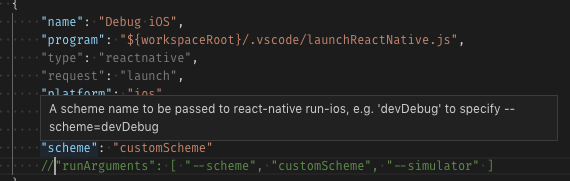
And you don't need to use "runArguments": [ "--scheme", "DebugHelper"] and 'scheme": "DebugHelper" together to make it work - all you need is scheme parameter only.
Seems to be that especially for scheme parameter extension doesn't check that runArguments already has a --scheme parameter. I'll take a look and make a fix if needed and, also, double-check other parameters for similar problem.
ruslan-bikkinin
on 29 Apr 2019
If I take out --scheme argument my app does not launch and build properly. It tries to use the "inferred scheme", which is the project name.
I just looked at the extension documentation and I did not see what you posted above. Where is this located?
phatmann
on 29 Apr 2019
I just looked the debugging docs. They say
Once you have set up a launch.json file with default configurations, you can modify these configurations, or add new ones to the list. You can use other fields in these configurations as well. For example, you can modify the target field to specify the simulator you want to target for iOS debugging or the device using the one from output of adb devices command for Android debugging.
I suppose this implies you can use "scheme", but it would be good to be more explicit.
If you look at this issue, there is a brief mention of using the "scheme" launch option or runArguments in one of the comments, but the doc update makes no mention of this.
It might be best if the default launch config had the "scheme" option in it.
So, to recap, there are two issues:
- The "scheme" launch option is not properly documented
- The "scheme" launch option does not work properly; i.e. it requires --scheme argument as well.
phatmann
on 29 Apr 2019
To illustrate that "scheme" launch option does not work properly, I used the following launch config:
{
"name": "Helper iOS - Simulator",
"program": "${workspaceRoot}/.vscode/launchReactNative.js",
"type": "reactnative",
"request": "launch",
"platform": "ios",
"sourceMaps": true,
"outDir": "${workspaceRoot}/.vscode/.react",
"scheme": "DebugHelper",
"runArguments": [ "--simulator" ]
}
I get the following output in React Native - Run ios tab:
[Info] Attaching to running React Native packager
info Found Xcode workspace Next.xcworkspace
info Building using "xcodebuild -workspace Next.xcworkspace -configuration Debug -scheme Next -destination id=33BE2562-836C-4C5E-A45C-EE21F832EFC5 -derivedDataPath build/Next"
error Failed to build iOS project. We ran "xcodebuild" command but it exited with error code 65. To debug build logs further, consider building your app with Xcode.app, by opening Next.xcworkspace
xcodebuild: error: The workspace named "Next" does not contain a scheme named "Next". The "-list" option can be used to find the names of the schemes in the workspace.
@phatmann I've made a fix for it #995, could you please try it? To do that you need to do the following:
- Download and unzip compiled extension VSIX from my branch: vscode-react-native-0.9.2.vsix.zip
- Uninstall extension
- Restart VS Code
- Click
Extensions -> ... -> Install from VSIX...and select downloaded VSIX
ruslan-bikkinin
on 1 May 2019
The fix does not work. I used this launch configuration:
{
"name": "Helper iOS - Simulator",
"program": "${workspaceRoot}/.vscode/launchReactNative.js",
"type": "reactnative",
"request": "launch",
"platform": "ios",
"sourceMaps": true,
"outDir": "${workspaceRoot}/.vscode/.react",
"scheme": "DebugHelper",
"runArguments": [ "--simulator" ]
},
and got this output in React Native - Run ios tab:
[Info] Starting React Native Packager.
info Found Xcode workspace Next.xcworkspace
info Launching iPhone X (iOS 12.2)...
info Building using "xcodebuild -workspace Next.xcworkspace -configuration Debug -scheme Next -destination id=33BE2562-836C-4C5E-A45C-EE21F832EFC5 -derivedDataPath build/Next"
error Failed to build iOS project. We ran "xcodebuild" command but it exited with error code 65. To debug build logs further, consider building your app with Xcode.app, by opening Next.xcworkspace
xcodebuild: error: The workspace named "Next" does not contain a scheme named "Next". The "-list" option can be used to find the names of the schemes in the workspace.
@phatmann could you please share with me demo application then? All I need is a basic skeleton with configured schemes.
ruslan-bikkinin
on 2 May 2019
I found the issue. To reproduce:
- In your React Native iOS project (let's call it "Sample"), rename the "Sample" scheme to "MyScheme".
- In your launch configuration, add:
"scheme": "MyScheme",
"runArguments": ["--simulator"],
Debug the app using Debug iOS configuration. You will see the following error in React Native - Run ios tab:
xcodebuild: error: The project named "Sample" does not contain a scheme named "Sample". The "-list" option can be used to find the names of the schemes in the project.
If you remove the "runArguments" property, then everything works as expected. So it is the presence of runArguments that causes this issue.
In this case the workaround is easy: remove the "runArguments" property. But this won't work if you want to use the "--device" option. Or can "device" be passed as a property as well? Is "runArguments" deprecated?
phatmann
on 2 May 2019
@phatmann Thanks for the details, if you want to run application on iOS simulator, you can add property target in your debug configuration in launch.json:
"target": "simulator"
If you'll use runArguments, it will override all other configuration parameters, that's why scheme parameter is not works in this case. You can find instructions here. Please let us know if you have any questions.

 SounD120
on 6 May 2019
SounD120
on 6 May 2019
Thanks for the info. The docs say
If you want to use custom scheme for your application you can either pass it as part of runArguments parameter arguments or set scheme configuration parameter as shown below
But if I use this launch configuration:
{
"name": "Helper iOS - Simulator",
"program": "${workspaceRoot}/.vscode/launchReactNative.js",
"type": "reactnative",
"request": "launch",
"platform": "ios",
"sourceMaps": true,
"outDir": "${workspaceRoot}/.vscode/.react",
"runArguments": [ "--scheme", "DebugHelper", "--simulator" ]
},
I get this error in React Native:
[Error] Error: Could not found executable in /Users/tony/Source/next/next-client/ios/build/Next/Build/Products/Debug-iphonesimulator (error code 403)
That is, it is using "Next" scheme instead of "DebugHelper" scheme. This is happening using #995 fix branch.
Also note another problem this causes: if you need to use an option in runArguments besides scheme and target, there is no way to do so if you need to use a custom scheme.
phatmann
on 6 May 2019
Also there seems to be insufficient documentation for the target property. The docs say:
you can modify the target field to specify the simulator you want to target for iOS debugging or the device using the one from output of adb devices command for Android debugging.
It does not mention that you can pass "simulator" for the target, nor does it say how to choose any hardware device or a specific hardware device.
phatmann
on 6 May 2019
@phatmann Yeah I agree with you about documentaion, so we are going to update documentation and add there all debug configuration parameters. We have an issue for that: #994.
With respect to the scheme issue, I performed such testing for #995 fix branch:
- Create fresh RN 0.59.5 app
- Open XCode project
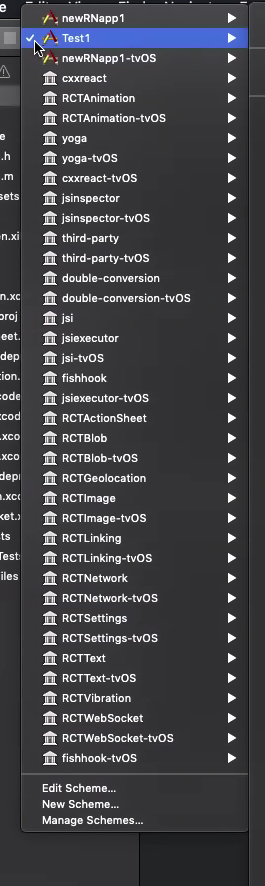
- Duplicate new scheme
Test1from the basic scheme callednewRNapp1(shown on an image below) - Execute
Debug iOSdebug scenario with such configurations:
1)
{
"name": "Debug iOS",
"program": "${workspaceRoot}/.vscode/launchReactNative.js",
"type": "reactnative",
"request": "launch",
"platform": "ios",
"sourceMaps": true,
"outDir": "${workspaceRoot}/.vscode/.react",
"runArguments": ["--scheme", "Test1", "--simulator"]
}
2)
{
"name": "Debug iOS",
"program": "${workspaceRoot}/.vscode/launchReactNative.js",
"type": "reactnative",
"request": "launch",
"platform": "ios",
"sourceMaps": true,
"outDir": "${workspaceRoot}/.vscode/.react",
"scheme": "Test1",
"target": "simulator"
}
Also I tried both simulator and device targets as an runArguments arg and using target variable, both are working for me. React Native: Run ios outputs begins with such lines in my case:
[Info] Starting React Native Packager.
[Info] Attaching to running React Native packager
info Found Xcode project newRNapp1.xcodeproj
info Building using "xcodebuild -project newRNapp1.xcodeproj -configuration Debug -scheme Test1 -destination id=<id cutted> -derivedDataPath build/Test1"
info User defaults from command line:
info IDEDerivedDataPathOverride = /Users/admin/Desktop/Projects/newRNapp1/ios/build/Test1
and ends with such lines:
info ** BUILD SUCCEEDED **
info Installing build/Test1/Build/Products/Debug-iphonesimulator/newRNapp1.app
info Launching org.reactjs.native.example.newRNapp1
org.reactjs.native.example.newRNapp1: 51334
Could you please send a demo application with configured XCode schemes, so I can reproduce the behavior you described above?
SounD120
on 7 May 2019
Here is the Sample project:
Run yarn install on it.
Use this launch config:
{
"name": "Debug iOS",
"program": "${workspaceRoot}/.vscode/launchReactNative.js",
"type": "reactnative",
"request": "launch",
"platform": "ios",
"sourceMaps": true,
"outDir": "${workspaceRoot}/.vscode/.react",
"runArguments": ["--scheme", "MyScheme", "--simulator"]
}
You will see this error in React Native tab:
[Error] Error: Could not found executable in /Users/tony/Source/SchemeSample/ios/build/SchemeSample/Build/Products/Debug-iphonesimulator (error code 403)
BTW the error message should be "Could not _find_ executable".
phatmann
on 8 May 2019
Hi @phatmann , finally I was able to reproduce the behaviour you described, so I proposed a fix for that into #995. Could you please try it? For do that you need to do the following:
- Download and unzip compiled extension VSIX from
ios-fix-scheme-issues
branch: vscode-react-native-0.9.2.vsix.zip - Uninstall extension
- Restart VS Code
- Click
Extensions -> ... -> Install from VSIX...and select downloaded VSIX
Please let us know if this works for you.
SounD120
on 13 May 2019
The fix works perfectly!
phatmann
on 13 May 2019
@phatmann Glad to hear it. This fix will be released as the part of new extension version.
SounD120
on 13 May 2019
I know this issue is closed, but until documentation per #994 is done, perhaps you could tell me how to use target launch configuration property to debug on a connected device? I would like to stop using runArguments if possible.
phatmann
on 13 May 2019
@phatmann Sure. target may accept simulator, device or concrete id of device or simulator as parameters, for example iPhone 5s for call iPhone 5s simulator. So you can use such configuration instead of runArguments:
        {
            "name": "Debug iOS",
            "program": "${workspaceRoot}/.vscode/launchReactNative.js",
            "type": "reactnative",
            "request": "launch",
            "platform": "ios",
            "sourceMaps": true,
            "outDir": "${workspaceRoot}/.vscode/.react",
            "scheme": "MyScheme",
            "target": "device"
        }
Please let us know if you have any questions.
SounD120
on 13 May 2019
Related issues
 molant
·
3Comments
molant
·
3Comments
 kralcifer-ms
·
4Comments
kralcifer-ms
·
4Comments
 vladimir-kotikov
·
5Comments
vladimir-kotikov
·
5Comments
 kevinnguy
·
3Comments
kevinnguy
·
3Comments
 webda2l
·
3Comments
webda2l
·
3Comments
Most helpful comment
@phatmann Sure.
targetmay acceptsimulator,deviceor concrete id of device or simulator as parameters, for exampleiPhone 5sfor call iPhone 5s simulator. So you can use such configuration instead of runArguments:Please let us know if you have any questions.