Vscode-r: VS Code outline not working
I followed the instructions on this site in order to start using VS Code with R. Several features work, but a couple do not.
I only get things to show up in the outline if I include 4 asterisks after.
# This shows up ####

# This does not show up
Also, the code folding works based on indentation, but not based on using asterisks to identify sections/subsections.
Tips?
 Dee-L
Dee-L
All 5 comments
This is intended behavior for R document which is actually implemented by https://github.com/REditorSupport/languageserver/pull/163, just like RStudio.
Since # starts a comment line in R code, regarding all comment lines as code sections is obviously not ideal.
For R markdown documents, the code sections could be more flexible, as implemented by https://github.com/REditorSupport/languageserver/pull/186.
 renkun-ken
on 30 Jul 2020
renkun-ken
on 30 Jul 2020
Also, the code folding works based on indentation, but not based on using asterisks to identify sections/subsections.
If you are using the latest development version of languageserver, it should provide folding ranges based on multi-line expression blocks and code sections.
renkun-ken
on 30 Jul 2020
Aha! I did not notice in your blog post that the "sections" part was a .Rmd file rather than a .R file.
Thank you for the clarification and very fast response, 👍
Is there somewhere you can point me to learn more about how to use the Document/Workspace symbols features? The .gif on the linked blogpost (your blogpost, ;) ) looks very promising, but none of the functions or variables I define show up in the outline of .R files nor do they seem to be searchable in VS Code in the way that appears in your .gif.
Dee-L
on 30 Jul 2020
Is there somewhere you can point me to learn more about how to use the Document/Workspace symbols features?
You could take a look at Help -> Keyboard shortcuts reference, and you need
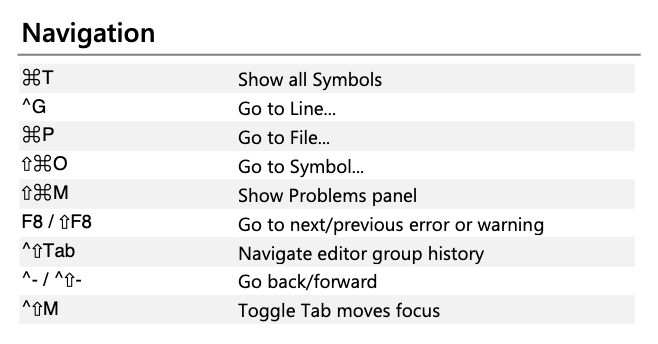
"Go to Symbol.." shows document symbol, and "Show all Symbols" shows workspace symbols (all symbols in workspace).
but none of the functions or variables I define show up in the outline of .R files
The CRAN version only regard functions as symbols. Therefore your function definition should show up in the document outline. If not, please raise an issue at languageserver so we could take a closer look.
To show all symbols in top-level assignment expressions, you need to run the following to install the latest development version of languageserver.
devtools::install_github("REditorSupport/languageserver")
and reload your vscode and the symbols should show up. The all-symbol feature is implemented at https://github.com/REditorSupport/languageserver/pull/295, which is not released to CRAN yet.
renkun-ken
on 30 Jul 2020
Woot woot! Your tips were spot on, :).
Thanks!
Dee-L
on 30 Jul 2020
Related issues
 Victsz
·
5Comments
Victsz
·
5Comments
 albert-ying
·
5Comments
albert-ying
·
5Comments
 bdeshon
·
3Comments
bdeshon
·
3Comments
 MaTo04
·
5Comments
MaTo04
·
5Comments
 Kalaschnik
·
4Comments
Kalaschnik
·
4Comments