Vscode-pull-request-github: After installing, I don't see the PR panel, not prompted to login, as if nothing happened
- Extension version: 0.1.2
- VSCode Version: 1.27.1
- OS: OS X High Sierra 10.13.4
Steps to Reproduce:
- Go to extensions tab.
- Install GitHub Pull Requests extension.
- Reload VS Code.
- Go to SCM.
Result:
- All that's available is the Sourec Control Providers and the Changes under it.
Expected:
- The Pull Request panel is shown there as well.
 JonathanGes
All 24 comments
@JonathanGes Thanks for reporting!
I assume you have a repository open with some remote that points to GitHub, correct?
Can you include the log that's in the output panel, seen by selected Github Pull Request from the dropdown?
 RMacfarlane
on 11 Sep 2018
RMacfarlane
on 11 Sep 2018
having this issue as well on Windows, I do have remotes in github, the output does not show any errors.
 ricard0ff
on 11 Sep 2018
ricard0ff
on 11 Sep 2018
Could you share the output of git remote -v? I want to make sure that there's no issue in parsing them.
Even though there's no error in the logs, they should give some indication of what code was reached
RMacfarlane
on 11 Sep 2018
Having the same problem. Output of git remote -v:
origin  github.com:sourcegraph/codeintellify (fetch)
origin  github.com:sourcegraph/codeintellify (push)
In the output panel I see
```
Looking for git repository
git symbolic-ref --short HEAD
git rev-parse master
git rev-parse --symbolic-full-name master@{u}
git rev-list --left-right master...refs/remotes/origin/master
git for-each-ref --format %(refname) %(objectname) --sort -committerdate
git remote --verbose
Git repository found, initializing review manager and pr tree view.
git config --local --get branch.master.github-pr-owner-number
Review> no matching pull request metadata found for current branch master```
 felixfbecker
on 11 Sep 2018
felixfbecker
on 11 Sep 2018
@JonathanGes Thanks for reporting!
I assume you have a repository open with some remote that points to GitHub, correct?
Can you include the log that's in the output panel, seen by selectedGithub Pull Requestfrom the dropdown?
Looking for git repository
> git symbolic-ref --short HEAD
> git rev-parse HEAD
> git for-each-ref --format %(refname) %(objectname) --sort -committerdate
> git remote --verbose
Git repository found, initializing review manager and pr tree view.
For some, this might also be just UX problem. At least I was wondering why I don't have that PR panel but it was just at the very bottom of the Source Control tab. Maybe if that accordion component would not render closed items to bottom it would be easier to spot! :)
I actually found it by accident when clicking the item that has Changes in it which collapsed that item and magically the PR item appeared below it! (it was of course visible all the time, just at the bottom and I missed it)
 jamonkko
on 11 Sep 2018
jamonkko
on 11 Sep 2018
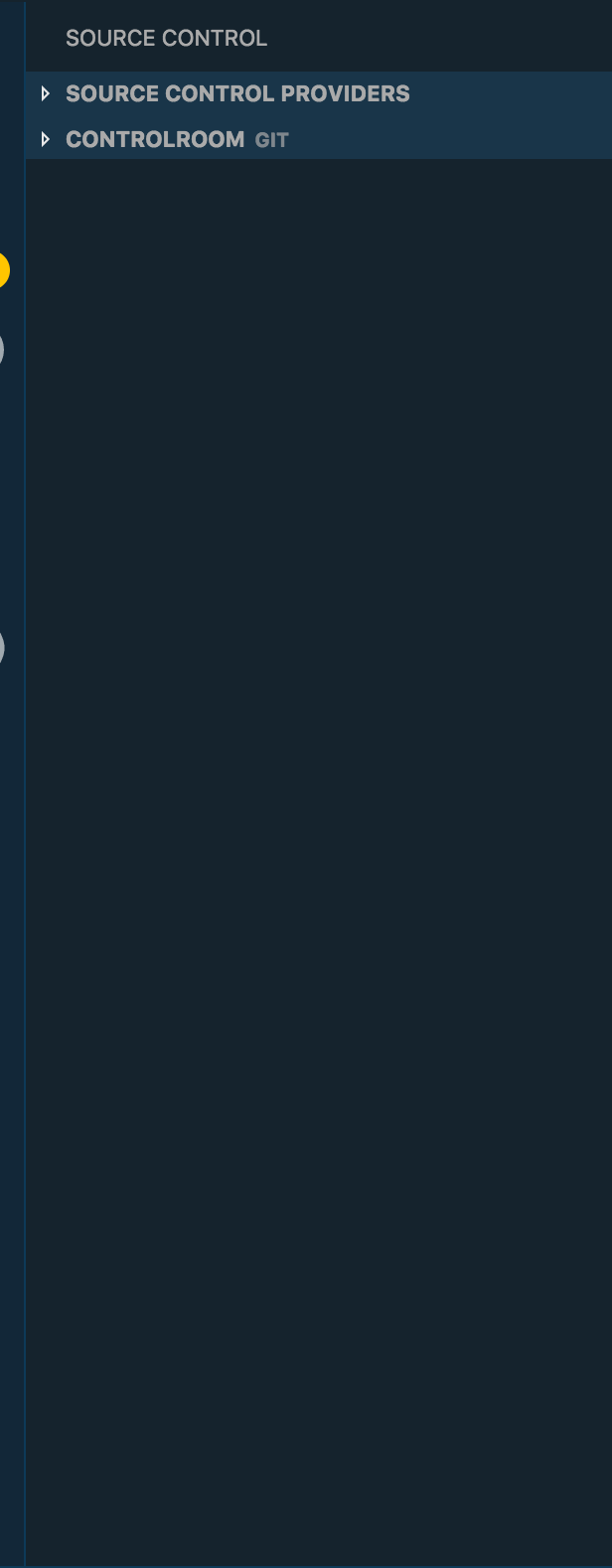
Doesn't seem to be the same issue (unless i'm missing something):
JonathanGes
on 11 Sep 2018
I have a repro using the remote @felixfbecker provided. Thanks! We're not handling remotes of that format correctly. If you append @git to the beginning so that it's [email protected]:sourcegraph/codeintellify, the panel should show up
RMacfarlane
on 11 Sep 2018
Would this solve it for this case as well?
Jonathans-MacBook-Pro:ControlRoom jonathangescheit$ git remote -v
origin  https://[email protected]/Wibbitz/ControlRoom.git (fetch)
origin  https://[email protected]/Wibbitz/ControlRoom.git (push)
Where do i edit it? (Perhaps it was created this way because of Tower Git)
JonathanGes
on 11 Sep 2018
You can run git remote remove origin and then git remote add origin https://github.com/Wibbitz/ControlRoom.git to change it. I'll have a fix soon
RMacfarlane
on 11 Sep 2018
Or just git remote set-url origin.
felixfbecker
on 11 Sep 2018
Still doesn't seem to work for me.
Removed the JonathanGes@ prefix, uninstalled, reloaded, installed, reloaded. Still the same.
Jonathans-MacBook-Pro:ControlRoom jonathangescheit$ git remote -v
origin  https://github.com/Wibbitz/ControlRoom.git (fetch)
origin  https://github.com/Wibbitz/ControlRoom.git (push)
Looking for git repository
> git symbolic-ref --short HEAD
> git rev-parse HEAD
> git for-each-ref --format %(refname) %(objectname) --sort -committerdate
> git remote --verbose
Git repository found, initializing review manager and pr tree view.
@RMacfarlane
PS C:\Users\rsFF\Documents\Projects\mouldy> git remote
origin
upstream
PS C:\Users\rsFF\Documents\Projects\mouldy> git remote -v
origin  [email protected]:ricard0ff/mouldy.git (fetch)
origin  [email protected]:ricard0ff/mouldy.git (push)
upstream        [email protected]:ricard0ff/mouldy.git (fetch)
upstream        [email protected]:ricard0ff/mouldy.git (push)

> git remote --verbose
> git checkout -q master
> git status -z -u
> git symbolic-ref --short HEAD
> git rev-parse master
> git rev-parse --symbolic-full-name master@{u}
> git rev-list --left-right master...refs/remotes/upstream/master
> git for-each-ref --format %(refname) %(objectname) --sort -committerdate
> git remote --verbose
> git checkout -q test_bash
> git status -z -u
> git symbolic-ref --short HEAD
> git rev-parse test_bash
> git rev-parse --symbolic-full-name test_bash@{u}
> git rev-list --left-right test_bash...refs/remotes/origin/test_bash
> git for-each-ref --format %(refname) %(objectname) --sort -committerdate
> git remote --verbose
@JonathanGes Do you have a workspace with multiple folders open, i.e. are there multiple folders listed under Source Control Providers in the viewlet?
RMacfarlane
on 12 Sep 2018
@RMacfarlane Yes 👍
JonathanGes
on 12 Sep 2018
@RMacfarlane Is there a workaround when there's multiple folders open? Thanks!
JonathanGes
on 13 Sep 2018
@RMacfarlane this along with the others were closed, so whats the fix for our case, just have one folder open at a time?
ricard0ff
on 13 Sep 2018
We haven't yet added support for multiple folders (tracked here: https://github.com/Microsoft/vscode-pull-request-github/issues/386). The extension currently only looks at the first folder, so if this has no GitHub remotes, nothing would be shown. Opening one folder at a time is a workaround, we'll work on the support for multiple soon. Sorry for the inconvenience!
RMacfarlane
on 13 Sep 2018
I got the similar issue that Github Pull Requst Tab not even show up.
here is the screenshot for the PR in web

I am on windows 7 using gitbash in VSCode terminal
VSCode: 1.28.0
Github Pull Request extension: 0.1.7
we are using github on-premises AKA github enterprise
YYang@NB-DTP-320 MINGW64 /c/Code/ng/Web/NetBrainNGClient/src/NetBrainNG (7.1b)
$ git remote -v
origin  https://git.netbraintech.com/dev/ng.git (fetch)
origin  https://git.netbraintech.com/dev/ng.git (push)
In my Output tab, I got this
Looking for git repository
> git symbolic-ref --short HEAD
> git rev-parse 7.1b
> git rev-parse --symbolic-full-name 7.1b@{u}
> git rev-list --left-right 7.1b...refs/remotes/origin/7.1b
> git for-each-ref --format %(refname) %(objectname) --sort -committerdate
> git remote --verbose
Git repository found, initializing review manager and pr tree view.
No GitHub remotes found
> git config --local --get branch.7.1b.github-pr-owner-number
Review> no matching pull request metadata found for current branch 7.1b
 btkfrank
on 9 Oct 2018
btkfrank
on 9 Oct 2018
I too have similar issue. I had multiple folders, but I can see that they have been fixed. Even though I removed them and tested just with one. I cloned with Git Desktop and by command line - same result.
VSCode: 1.28.2
Extension: 0.2.1
GitHub: 2.14.5 Enterprise
PS C:\Users\user\Documents\GitHub\Repo> git remote
origin
PS C:\Users\user\Documents\GitHub\Repo> git remote -v
origin  https://github.domain.com/Name/Repo.git (fetch)
origin  https://github.domain.com/Name/Repo.git (push)
As for the response on pull:
> git pull --tags -r origin master
From https://github.domain.com/Name/Repo
 * branch            master     -> FETCH_HEAD
> git status -z -u
> git symbolic-ref --short HEAD
> git rev-parse master
> git rev-parse --symbolic-full-name master@{u}
> git rev-list --left-right master...refs/remotes/origin/master
> git for-each-ref --format %(refname) %(objectname) --sort -committerdate
> git remote --verbose
 stoinov
on 29 Oct 2018
stoinov
on 29 Oct 2018
Same problem. Pull Request panel not shown
 adieldar
on 20 Nov 2018
adieldar
on 20 Nov 2018
Same in 2019.
 danielmrussell
on 18 Sep 2019
danielmrussell
on 18 Sep 2019
@danielmrussell Can you please open a new issue and include the following information
- Version of VSCode and if this is the official VSCode build or VSCodium, arch linux community build, etc.
- Version of the extension
- Result of running
git remote -vin the folder you currently have open - Anything in the output channel of the extension (Choose "GitHub Pull Requests" from dropdown on the output panel)
RMacfarlane
on 18 Sep 2019
I discovered that it's due to the setting "Show in SCM," which older
documentation that dominates search results on Google do not mention and
assume that's how it's done by default.
On Wed, Sep 18, 2019 at 9:34 AM Rachel Macfarlane notifications@github.com
wrote:
@danielmrussell https://github.com/danielmrussell Can you please open a
new issue and include the following information
- Version of VSCode and if this is the official VSCode build or
VSCodium, arch linux community build, etc.- Version of the extension
- Result of running git remote -v in the folder you currently have
open- Anything in the output channel of the extension (Choose "GitHub
Pull Requests" from dropdown on the output panel)—
You are receiving this because you were mentioned.
Reply to this email directly, view it on GitHub
https://github.com/microsoft/vscode-pull-request-github/issues/418?email_source=notifications&email_token=AJ52TEQ2EKKTX2MKYFAQ6LDQKJJ7XA5CNFSM4FUOT3YKYY3PNVWWK3TUL52HS4DFVREXG43VMVBW63LNMVXHJKTDN5WW2ZLOORPWSZGOD7AVQCQ#issuecomment-532764682,
or mute the thread
https://github.com/notifications/unsubscribe-auth/AJ52TESYFE5YKVPKDJCMLG3QKJJ7XANCNFSM4FUOT3YA
.
danielmrussell
on 21 Sep 2019
Related issues
 Jonnokc
·
3Comments
Jonnokc
·
3Comments
 erihanse
·
4Comments
erihanse
·
4Comments
 Tyriar
·
3Comments
Tyriar
·
3Comments
 adrinjalali
·
4Comments
adrinjalali
·
4Comments
 dbaeumer
·
4Comments
dbaeumer
·
4Comments
Most helpful comment
Having the same problem. Output of
git remote -v:In the output panel I see
```
Looking for git repository