Vscode-project-manager: Repeated project listings
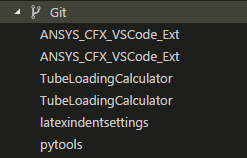
For some reason, the project listing are being doubled in the tree. They refer to the same repo in the same file location, it just shows up twice.
 jrwrigh
All 3 comments
I've figured out why it does this (I think).
I think it found it twice on it's directory search. So I had C:\Directory and C:\Directory\SubDirectory mapped in the projectManager.git.baseFolders and the repeated repos were in C:\Directory\SubDirectory\{said repos}.
That being said, I feel like it wouldn't be a bad idea for there to be some extra logic to prevent a repo from being reported twice.
jrwrigh
on 28 Apr 2018
Hi @u2berggeist ,
It already checks for _duplicate_ projects, but only between different kind of projects (Git, SVN, etc). Sorry, but I don't see the point in adding C:\Directory and C:\Directory\SubDirectory for the same setting, because it detects every subdirectory, for each folder that you add.
So, in this case, you should simply remove C:\Directory\SubDirectory from your settings, and you will not see duplicates anymore.
Hope this helps.
 alefragnani
on 28 Apr 2018
alefragnani
on 28 Apr 2018
That's fair. I go back and forth between computers a lot (using settings-sync), so I had both C:\Directory and C:\Directory\SubDirectory in there to be more "robust" in making sure the different repo paths would all get checked.
jrwrigh
on 30 Apr 2018
Related issues
 aliusmiles
·
4Comments
aliusmiles
·
4Comments
 blackjid
·
3Comments
blackjid
·
3Comments
 johnbillion
·
3Comments
johnbillion
·
3Comments
 glambert
·
3Comments
glambert
·
3Comments
 ngryman
·
4Comments
ngryman
·
4Comments
Most helpful comment
That's fair. I go back and forth between computers a lot (using settings-sync), so I had both
C:\DirectoryandC:\Directory\SubDirectoryin there to be more "robust" in making sure the different repo paths would all get checked.