Vscode-powershell: Powershell ISE vscode theme with Cascadia Font italics and code / text readability issue
Issue:
Combination of vscode-powershell PowerShell ISE theme + Terminal Preview v1.9.1445.0 + Cascadia Code font
https://github.com/microsoft/terminal/releases/tag/v1.9.1445.0
https://github.com/microsoft/cascadia-code
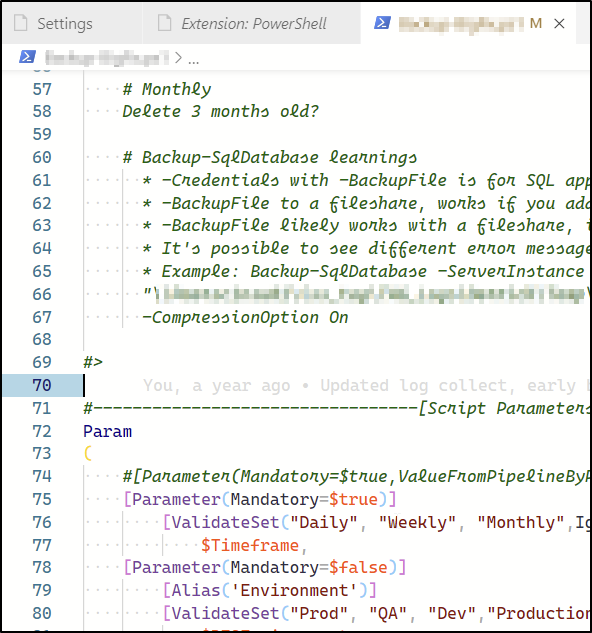
When Cascadia was released back in ~2019, I found that having the Italics specific .TTF file installed made the Powershell ISE Theme text somewhat unreadable such as in code comments (image below). I found removing the Italics .TTF file worked fine, and just leaving the standard Cascadia.ttf worked well as I believe the system would just not render Italics text with Cascadia.
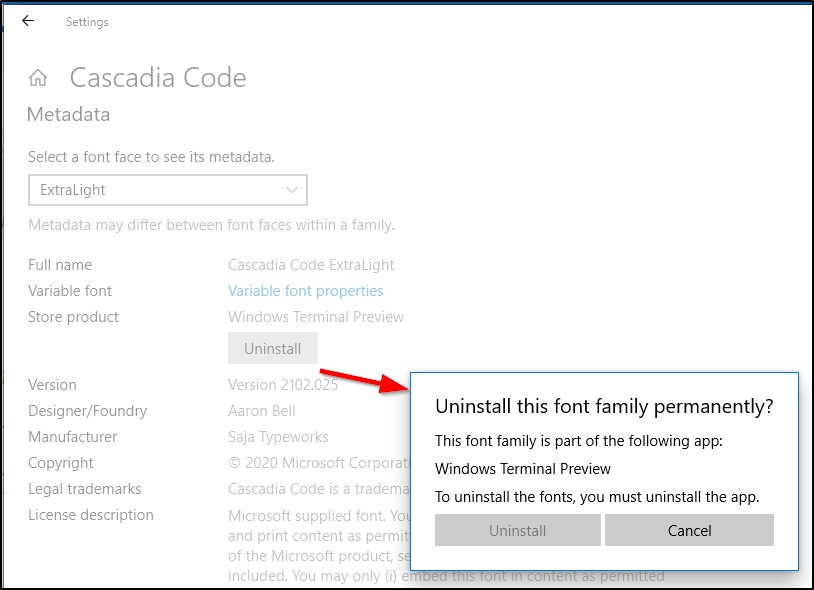
Fast forward to yesterday when Terminal Preview v1.9.1445.0 was released. This release is the first time Microsoft included the Italics .TTF where previously it was just the regular text .TTF (image below). As this font is required by Terminal Preview, it cannot be uninstalled, and my work around no longer works.

Question:
Can the PowerShell ISE Theme be updated to solve this or is there a custom profile code snippet that can be added to vscode settings to override this behavior? (such as render comments as regular text, not Italics?
 therealderrickd
All 2 comments
So...the "readability" issue here I think is that Cascadia Code's italic fonset isn't very readable (in apparently your and also my opinion). Looking at your screenshot I thought for a minute we were for some reason having foreign letters rendered, because the 's' and 'l' are not what I would have expected even in italics. However, it _is_ Cascadia Code's italic fontset (and as the authors of said font, they have every right to produce a flowery italics, which I think it could be very pretty, I just personally wouldn't use it in for programming).
So all that said, my recommendation would be to switch fonts and maybe open an issue with Cascadia Code or at least in someway file your feedback about its readability. I can personally recommend Hack font as a fontset designed for development environments with "No frills. No gimmicks."
I just updated my Cascadia Code font to see and wow, yes I don't want to use those italics either. I found that adding this to settings.json disabled the italic face for comments (and shows you how to disable it for other syntax as well):
    "editor.tokenColorCustomizations": {
        "comments": {"fontStyle": ""}
    }
 andschwa
on 27 May 2021
andschwa
on 27 May 2021
@andschwa thanks for your feedback.
Yes, agreed the "readability" is lacking. I found it surprising, given the code friendly marketing push behind it from Cascadia and Terminal. And we're not alone.....
https://github.com/microsoft/cascadia-code/issues/468
https://github.com/microsoft/terminal/issues/10231
I'll take a look at the Hack font and also sharing I use Consolas font sometimes as well.
Your code worked perfect in settings.json.
Thanks for your help and suggestions.
therealderrickd
on 28 May 2021
Related issues
 TheDanishDynamo
·
3Comments
TheDanishDynamo
·
3Comments
 itfranck
·
3Comments
itfranck
·
3Comments
 MiYanni
·
3Comments
MiYanni
·
3Comments
 rs38
·
4Comments
rs38
·
4Comments
 pcgeek86
·
4Comments
pcgeek86
·
4Comments
Most helpful comment
So...the "readability" issue here I think is that Cascadia Code's italic fonset isn't very readable (in apparently your and also my opinion). Looking at your screenshot I thought for a minute we were for some reason having foreign letters rendered, because the 's' and 'l' are not what I would have expected even in italics. However, it _is_ Cascadia Code's italic fontset (and as the authors of said font, they have every right to produce a flowery italics, which I think it could be very pretty, I just personally wouldn't use it in for programming).
So all that said, my recommendation would be to switch fonts and maybe open an issue with Cascadia Code or at least in someway file your feedback about its readability. I can personally recommend Hack font as a fontset designed for development environments with "No frills. No gimmicks."
I just updated my Cascadia Code font to see and wow, yes I don't want to use those italics either. I found that adding this to
settings.jsondisabled the italic face for comments (and shows you how to disable it for other syntax as well):