Vscode-powershell: Extension overrides other theme color settings
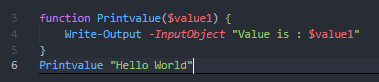
It seems that the addition of the semantic highlighting is overriding theme preferences. In the attached example, you can see that parameters and function names are given color, when previously they were not (something I preferred). Is here a way to disable this feature? This extension was not set as my primary theme.

 timothyscottsmith
All 2 comments
Closing, found the setting to be per theme. Once the theme maker opts-in to allowing semantic highlighting, users can disable it in settings.json. Sorry, I was not able to immediately find this information.
"editor.semanticTokenColorCustomizations": {
        "[One Dark Pro]": {
            "enabled": false
        }
    }
timothyscottsmith
on 1 Mar 2021
Thanks for following up @timothyscottsmith, and no need to apologise. This information may help other users
 rjmholt
on 1 Mar 2021
rjmholt
on 1 Mar 2021
Related issues
 keposet
·
3Comments
keposet
·
3Comments
 rkeithhill
·
3Comments
rkeithhill
·
3Comments
 inthemedium
·
3Comments
inthemedium
·
3Comments
 bgelens
·
3Comments
bgelens
·
3Comments
 pcgeek86
·
4Comments
pcgeek86
·
4Comments
Most helpful comment
Closing, found the setting to be per theme. Once the theme maker opts-in to allowing semantic highlighting, users can disable it in settings.json. Sorry, I was not able to immediately find this information.
"editor.semanticTokenColorCustomizations": {
        "[One Dark Pro]": {
            "enabled": false
        }
    }