Vscode-powershell: PowerShell Integrated Console does't start: Running the contributed command: 'PowerShell.ShowSessionMenu' failed.
Issue Description
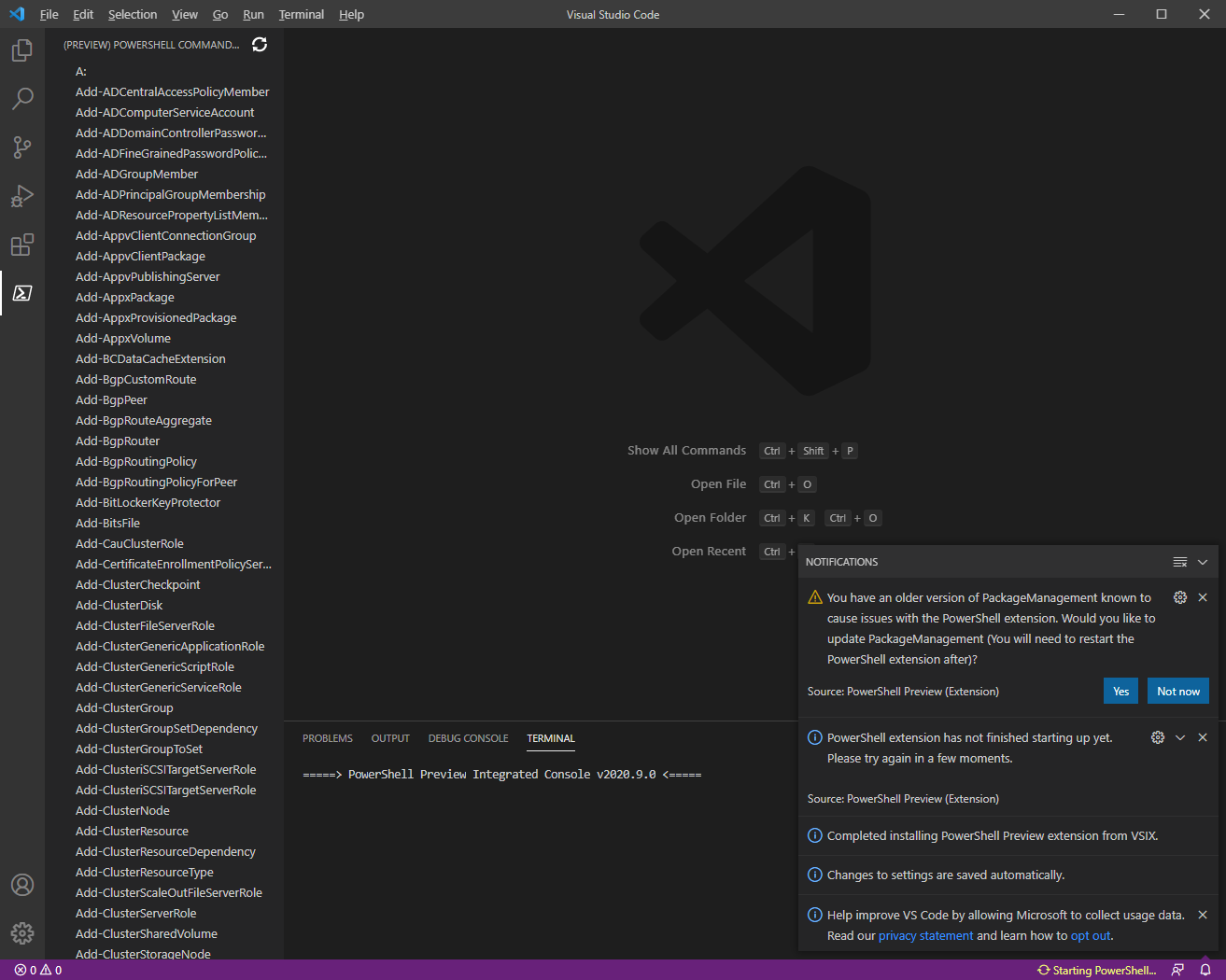
The PowerShell Integrated Console does not start at all. The problem occurs with every single start of VS Code on my system. So I didn't manage to get the PowerShell Integrated Console running once. There is a notification saying:
Running the contributed command: 'PowerShell.ShowSessionMenu' failed.
Screenshot

I have test the PowerShell and the PowerShell Preview extension seperatly and the problem occurs with both.
This is a fresh portable installation of Visual Studio Code with (only) the PowerShell extension. Although I have also tested the global installation of Visual Studio Code on my Windows system. I deleted the directories %USERPROFILE%\AppData\Roaming\Code and %USERPROFILE%\.vscode in advance to reset VS Code. The results were the same as with the portable version.
I have added all required and some extra information down below according to the template. Please tell me if I can provide any more useful information!
Attached Logs
.\VSCode-win32-x64-1.53.2\data\extensions\ms-vscode.powershell-2020.6.0\logs\1613468378-ed04d92c-7e5f-45a0-bfa3-6a2d61483c0c1613468364188:
EditorServices.log
StartEditorServices.log
vscode-powershell.log
Output of the PowerShell Integrated Console in Visual Studio Code:
Environment Information
Visual Studio Code
| Name | Version |
| --- | --- |
| Operating System | Windows_NT x64 10.0.17763 |
| VSCode | 1.53.2|
| PowerShell Extension Version | 2020.6.0 |
Installation directory (portable mode)
|- VSCode-win32-x64-1.53.2
|   |- Code.exe
|   |- data
|   |   |- user-data
|   |   |   |- ...
|   |   |- extensions
|   |   |   |- ...
|   |- ...
PowerShell Information
|Name|Value|
|---|---|
|PSVersion|5.1.17763.1490|
|PSEdition|Desktop|
|PSCompatibleVersions|1.0 2.0 3.0 4.0 5.0 5.1.17763.1490|
|BuildVersion|10.0.17763.1490|
|CLRVersion|4.0.30319.42000|
|WSManStackVersion|3.0|
|PSRemotingProtocolVersion|2.3|
|SerializationVersion|1.1.0.1|
Visual Studio Code Extensions
Tested with both, the PowerShell and the PowerShell Preview extension seperatly.
Test 1
|Extension|Author|Version|
|---|---|---|
|powershell|ms-vscode|2020.6.0|
Test 2
|Extension|Author|Version|
|---|---|---|
|powershell-preview|ms-vscode|2020.9.0|
 theCoffeeProject
All 22 comments
I just noticed that somebody created an issue about the exact same problem right before me (#3186), but I hope the additional information I provided is still useful.
theCoffeeProject
on 16 Feb 2021
I have found I can temporarily resolve the issue on my system by deleting the contents of the following directory, then it will work once:
%AppData%\Code - Insiders\User\workspaceStorage
If I close VS Code or kill the terminal, I need to clear that directory again. For anyone else with this issue, it is a temporary workaround at least.
 GuruGarrett
on 16 Feb 2021
GuruGarrett
on 16 Feb 2021
I can repro this locally, so I'll try to get this sorted out.
 andschwa
on 16 Feb 2021
andschwa
on 16 Feb 2021
@GuruGarrett Can you confirm that this repros with the latest preview extension? I'm trying to repro it under the debugger (and so with the preview extension) and haven't seen it yet. About to try installing the preview instead of building it.
Edit: Nevermind, repro'd fairly quickly with the preview. Now just to get it to happen with the debugger.
andschwa
on 17 Feb 2021
@GuruGarrett and @theCoffeeProject, can you please try to repro with the extension I've zipped and attached to this comment? It's built off the latest master, which means it has a few package updates since the most recent preview extension. I can't seem to repro with this build, which explains why I couldn't repro under the debugger (I was launching with this freshly built package). I installed it manually (so removing the debugger from the equation) and still couldn't repro. 🤞
Uninstall your current PowerShell extension, unzip this, and then install the VSIX within it via code --install-extension .\PowerShell-insiders.vsix.
andschwa
on 17 Feb 2021
Thanks for your fast response in trying to solve this.
I get an error with that build of the extension saying could not start language service. The (slightly redacted) logs it displays are below.
2/16/2021 8:39:13 PM [NORMAL] - Visual Studio Code v1.54.0-insider 64-bit
2/16/2021 8:39:13 PM [NORMAL] - PowerShell Preview Extension v2020.9.0
2/16/2021 8:39:13 PM [NORMAL] - Operating System: Windows 64-bit
2/16/2021 8:39:13 PM [NORMAL] - Language server starting --
2/16/2021 8:39:13 PM [NORMAL] -     PowerShell executable: C:\WINDOWS\System32\WindowsPowerShell\v1.0\powershell.exe
2/16/2021 8:39:13 PM [NORMAL] -     PowerShell args: -NoProfile -NonInteractive -ExecutionPolicy Bypass -Command Import-Module 'c:\Users\redacted\.vscode-insiders\extensions\ms-vscode.powershell-preview-2020.9.0\modules\PowerShellEditorServices\PowerShellEditorServices.psd1'; Start-EditorServices -HostName 'Visual Studio Code Host' -HostProfileId 'Microsoft.VSCode' -HostVersion '2020.9.0' -AdditionalModules @('PowerShellEditorServices.VSCode') -BundledModulesPath 'c:\Users\redacted\.vscode-insiders\extensions\ms-vscode.powershell-preview-2020.9.0\modules' -EnableConsoleRepl -StartupBanner '=====> PowerShell Preview Integrated Console v2020.9.0 <=====
' -LogLevel 'Normal' -LogPath 'c:\Users\redacted\.vscode-insiders\extensions\ms-vscode.powershell-preview-2020.9.0\logs\1613529553-5a5819fd-c90a-44da-b858-ff85bfaf85711613529551509\EditorServices.log' -SessionDetailsPath 'c:\Users\redacted\.vscode-insiders\extensions\ms-vscode.powershell-preview-2020.9.0\sessions\PSES-VSCode-25012-829905' -FeatureFlags @()
2/16/2021 8:39:13 PM [NORMAL] -     PowerShell Editor Services args: Import-Module 'c:\Users\redacted\.vscode-insiders\extensions\ms-vscode.powershell-preview-2020.9.0\modules\PowerShellEditorServices\PowerShellEditorServices.psd1'; Start-EditorServices -HostName 'Visual Studio Code Host' -HostProfileId 'Microsoft.VSCode' -HostVersion '2020.9.0' -AdditionalModules @('PowerShellEditorServices.VSCode') -BundledModulesPath 'c:\Users\redacted\.vscode-insiders\extensions\ms-vscode.powershell-preview-2020.9.0\modules' -EnableConsoleRepl -StartupBanner '=====> PowerShell Preview Integrated Console v2020.9.0 <=====
' -LogLevel 'Normal' -LogPath 'c:\Users\redacted\.vscode-insiders\extensions\ms-vscode.powershell-preview-2020.9.0\logs\1613529553-5a5819fd-c90a-44da-b858-ff85bfaf85711613529551509\EditorServices.log' -SessionDetailsPath 'c:\Users\redacted\.vscode-insiders\extensions\ms-vscode.powershell-preview-2020.9.0\sessions\PSES-VSCode-25012-829905' -FeatureFlags @()
2/16/2021 8:39:13 PM [NORMAL] - powershell.exe started.
2/16/2021 8:39:13 PM [NORMAL] - Waiting for session file
2/16/2021 8:39:15 PM [NORMAL] - Session file found
2/16/2021 8:39:15 PM [NORMAL] - Registering terminal close callback
2/16/2021 8:39:15 PM [NORMAL] - Registering terminal PID log callback
2/16/2021 8:39:15 PM [NORMAL] - powershell.exe PID: 14224
2/16/2021 8:39:15 PM [NORMAL] - Language server started.
2/16/2021 8:39:15 PM [NORMAL] - {"status":"started","languageServiceTransport":"NamedPipe","languageServicePipeName":"\\\\.\\pipe\\PSES_x1js0zil.wyy","debugServiceTransport":"NamedPipe","debugServicePipeName":"\\\\.\\pipe\\PSES_pcyuj5yi.fm2"}
2/16/2021 8:39:15 PM [NORMAL] - Connecting to language service on pipe \\.\pipe\PSES_x1js0zil.wyy...
2/16/2021 8:39:15 PM [NORMAL] - Language service connected.
2/16/2021 8:39:15 PM [ERROR] - Could not start language service:
2/16/2021 8:39:15 PM [ERROR] - Error: Connection to server got closed. Server will not be restarted.
Let me know if there is any other information or logs you need me to provide.
GuruGarrett
on 17 Feb 2021
I have found I can temporarily resolve the issue on my system by deleting the contents of the following directory, then it will work once:
%AppData%\Code - Insiders\User\workspaceStorage
Clearing the VSCode-win32-x64-1.53.2\data\user-data\User\workspaceStorage directory doesn't have any effect on my system.
I had tested the problem with a completely fresh installation of Visual Studio Code already. According to this there was no user-data saved before the first run anyways. For me the PowerShell Integrated Console still did not start.
@GuruGarrett Can you confirm that this repros with the latest preview extension?
I have tested with both, the PowerShell and the PowerShell Preview extension and the problem occured with every single start of VS Code on my system. So I didn't manage to get the PowerShell Integrated Console running at all.
@GuruGarrett and @theCoffeeProject, can you please try to repro with the extension I've zipped and attached to this comment?
I have installed your version of the extension but unfortunately the problem is still there. It looks the same as before.
Screenshot
theCoffeeProject
on 17 Feb 2021
@GuruGarrett I'm not sure why your language server didn't start there, but at least it looks like ShowSessionMenu worked? Here's my output:
2/17/2021 9:53:24 AM [NORMAL] - Visual Studio Code v1.53.2 64-bit
2/17/2021 9:53:24 AM [NORMAL] - PowerShell Preview Extension v2020.9.0
2/17/2021 9:53:24 AM [NORMAL] - Operating System: Windows 64-bit
2/17/2021 9:53:24 AM [NORMAL] - Language server starting --
2/17/2021 9:53:24 AM [NORMAL] -     PowerShell executable: C:\Program Files\PowerShell\7\pwsh.exe
2/17/2021 9:53:24 AM [NORMAL] -     PowerShell args: -NoProfile -NonInteractive -ExecutionPolicy Bypass -Command Import-Module 'c:\Users\andschwa\.vscode\extensions\ms-vscode.powershell-preview-2020.9.0\modules\PowerShellEditorServices\PowerShellEditorServices.psd1'; Start-EditorServices -HostName 'Visual Studio Code Host' -HostProfileId 'Microsoft.VSCode' -HostVersion '2020.9.0' -AdditionalModules @('PowerShellEditorServices.VSCode') -BundledModulesPath 'c:\Users\andschwa\.vscode\extensions\ms-vscode.powershell-preview-2020.9.0\modules' -EnableConsoleRepl -StartupBanner '=====> PowerShell Preview Integrated Console v2020.9.0 <=====
' -LogLevel 'Normal' -LogPath 'c:\Users\andschwa\.vscode\extensions\ms-vscode.powershell-preview-2020.9.0\logs\1613584404-3784f7d0-ef18-4d92-a669-a4d510df85a81613584389408\EditorServices.log' -SessionDetailsPath 'c:\Users\andschwa\.vscode\extensions\ms-vscode.powershell-preview-2020.9.0\sessions\PSES-VSCode-9568-836061' -FeatureFlags @()
2/17/2021 9:53:24 AM [NORMAL] -     PowerShell Editor Services args: Import-Module 'c:\Users\andschwa\.vscode\extensions\ms-vscode.powershell-preview-2020.9.0\modules\PowerShellEditorServices\PowerShellEditorServices.psd1'; Start-EditorServices -HostName 'Visual Studio Code Host' -HostProfileId 'Microsoft.VSCode' -HostVersion '2020.9.0' -AdditionalModules @('PowerShellEditorServices.VSCode') -BundledModulesPath 'c:\Users\andschwa\.vscode\extensions\ms-vscode.powershell-preview-2020.9.0\modules' -EnableConsoleRepl -StartupBanner '=====> PowerShell Preview Integrated Console v2020.9.0 <=====
' -LogLevel 'Normal' -LogPath 'c:\Users\andschwa\.vscode\extensions\ms-vscode.powershell-preview-2020.9.0\logs\1613584404-3784f7d0-ef18-4d92-a669-a4d510df85a81613584389408\EditorServices.log' -SessionDetailsPath 'c:\Users\andschwa\.vscode\extensions\ms-vscode.powershell-preview-2020.9.0\sessions\PSES-VSCode-9568-836061' -FeatureFlags @()
2/17/2021 9:53:24 AM [NORMAL] - pwsh.exe started.
2/17/2021 9:53:24 AM [NORMAL] - Waiting for session file
2/17/2021 9:53:26 AM [NORMAL] - Session file found
2/17/2021 9:53:26 AM [NORMAL] - Registering terminal close callback
2/17/2021 9:53:26 AM [NORMAL] - Registering terminal PID log callback
2/17/2021 9:53:26 AM [NORMAL] - pwsh.exe PID: 12972
2/17/2021 9:53:26 AM [NORMAL] - Language server started.
2/17/2021 9:53:26 AM [NORMAL] - {"status":"started","languageServiceTransport":"NamedPipe","languageServicePipeName":"\\\\.\\pipe\\PSES_dizl1ulm.w2b","debugServiceTransport":"NamedPipe","debugServicePipeName":"\\\\.\\pipe\\PSES_cmuayv05.pfn"}
2/17/2021 9:53:26 AM [NORMAL] - Connecting to language service on pipe \\.\pipe\PSES_dizl1ulm.w2b...
2/17/2021 9:53:26 AM [NORMAL] - Language service connected.
I have tested with both, the PowerShell and the PowerShell Preview extension and the problem occured with every single start of VS Code on my system. So I didn't manage to get the PowerShell Integrated Console running at all.
Thanks @theCoffeeProject for confirming. I'm curious, with the master build of the extension I posted, I don't see "Running the contributed command: 'PowerShell.ShowSessionMenu' failed." in your screenshot, it looks more like it's hanging. Do you see the same error message?
I _think_ from our three tests, the master build doesn't repro "Running the contributed command: 'PowerShell.ShowSessionMenu' failed." but it's obviously still not working right for the both of you.
andschwa
on 17 Feb 2021
I just noticed that both of you are using PowerShell 5 (i.e. desktop PowerShell bundled with Windows) whereas I'm using PowerShell 7.1.2. Let me switch over to PowerShell 5 and see if this repros better.
andschwa
on 17 Feb 2021
As soon as I can fully manage Office 365 with PowerShell 7, I will switch.
GuruGarrett
on 17 Feb 2021
I'm currently testing builds of the extension with the latest tag of PowerShellEditorServices, instead of building it off master too. With an older version of the language server, I'm much more able to repro the integrated console not starting.
Any chance either of you see something like this:
=====> PowerShell Preview Integrated Console v2020.9.0 <=====

Exception encountered starting EditorServices. Exception logged in C:\Users\andschwa\src\PowerShellEditorServices\src\PowerShellEditorServices.Hosting\Commands\StartEditorServicesCommand.cs on line 248 in EndProcessing:
System.IO.FileNotFoundException: Could not load file or assembly 'MediatR, Version=8.0.1.0, Culture=neutral, PublicKeyToken=bb9a41a5e8aaa7e2'. The system cannot find the file specified.
File name: 'MediatR, Version=8.0.1.0, Culture=neutral, PublicKeyToken=bb9a41a5e8aaa7e2'
   at Microsoft.PowerShell.EditorServices.Server.PsesLanguageServer.<StartAsync>b__14_0(LanguageServerOptions options)
   at OmniSharp.Extensions.LanguageServer.Server.LanguageServer.From(Action`1 optionsAction, IServiceProvider outerServiceProvider, CancellationToken cancellationToken)
   at OmniSharp.Extensions.LanguageServer.Server.LanguageServer.From(Action`1 optionsAction)
   at Microsoft.PowerShell.EditorServices.Server.PsesLanguageServer.StartAsync() in C:\Users\andschwa\src\PowerShellEditorServices\src\PowerShellEditorServices\Server\PsesLanguageServer.cs:line 61
   at Microsoft.PowerShell.EditorServices.Hosting.EditorServicesRunner.CreateEditorServicesAndRunUntilShutdown() in C:\Users\andschwa\src\PowerShellEditorServices\src\PowerShellEditorServices.Hosting\Internal\EditorServicesRunner.cs:line 130
   at Microsoft.PowerShell.EditorServices.Commands.StartEditorServicesCommand.EndProcessing() in C:\Users\andschwa\src\PowerShellEditorServices\src\PowerShellEditorServices.Hosting\Commands\StartEditorServicesCommand.cs:line 243

== Press any key to close terminal ==
Or like this:
Exception encountered starting EditorServices. Exception logged in C:\Users\andschwa\src\PowerShellEditorServices\src\PowerShellEditorServices.Hosting\Commands\StartEditorServicesCommand.cs on line 248 in EndProcessing:
System.TypeLoadException: Method 'get_Id' in type 'Microsoft.PowerShell.EditorServices.Handlers.PsesCodeLensHandlers' from assembly 'Microsoft.PowerShell.EditorServices, Version=2.3.0.0, Culture=neutral, PublicKeyToken=null' does not have an implementation.
   at Microsoft.PowerShell.EditorServices.Server.PsesLanguageServer.<StartAsync>b__14_0(LanguageServerOptions options)
   at OmniSharp.Extensions.LanguageServer.Server.LanguageServer.From(Action`1 optionsAction, IServiceProvider outerServiceProvider, CancellationToken cancellationToken)
   at OmniSharp.Extensions.LanguageServer.Server.LanguageServer.From(Action`1 optionsAction)
   at Microsoft.PowerShell.EditorServices.Server.PsesLanguageServer.<StartAsync>d__14.MoveNext()
--- End of stack trace from previous location where exception was thrown ---
   at System.Runtime.ExceptionServices.ExceptionDispatchInfo.Throw()
   at System.Runtime.CompilerServices.TaskAwaiter.HandleNonSuccessAndDebuggerNotification(Task task)
   at System.Runtime.CompilerServices.ConfiguredTaskAwaitable.ConfiguredTaskAwaiter.GetResult()
   at Microsoft.PowerShell.EditorServices.Hosting.EditorServicesRunner.<CreateEditorServicesAndRunUntilShutdown>d__9.MoveNext()
--- End of stack trace from previous location where exception was thrown ---
   at System.Runtime.ExceptionServices.ExceptionDispatchInfo.Throw()
   at System.Runtime.CompilerServices.TaskAwaiter.HandleNonSuccessAndDebuggerNotification(Task task)
   at System.Runtime.CompilerServices.TaskAwaiter.GetResult()
   at Microsoft.PowerShell.EditorServices.Commands.StartEditorServicesCommand.EndProcessing()
Specifically at startup, in the terminal window?
andschwa
on 17 Feb 2021
No I don't see anything like that in the terminal.
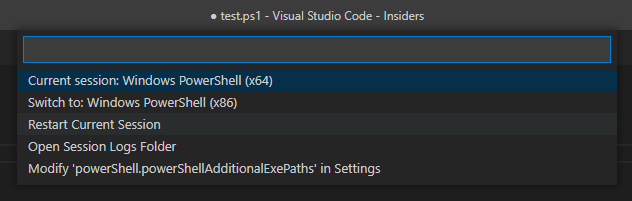
I have found that today I can select the "restart current session" option, and then it seems to load/work after that.
GuruGarrett
on 17 Feb 2021
@theCoffeeProject Can you try choosing "Restasrt Current Session" like @GuruGarrett did to see if it works after that?
andschwa
on 18 Feb 2021
Can folks give this a try with the latest release?
andschwa
on 27 Feb 2021
Using the PowerShell extension version 2021.2.2, I get this error on startup:
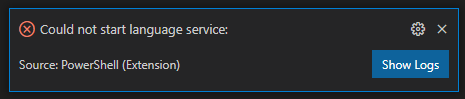
The logs show this:
3/1/2021 9:41:25 AM [NORMAL] - Visual Studio Code v1.54.0-insider 64-bit
3/1/2021 9:41:25 AM [NORMAL] - PowerShell Extension v2021.2.2
3/1/2021 9:41:25 AM [NORMAL] - Operating System: Windows 64-bit
3/1/2021 9:41:25 AM [NORMAL] - Language server starting --
3/1/2021 9:41:25 AM [NORMAL] - PowerShell executable: C:\WINDOWS\System32\WindowsPowerShell\v1.0\powershell.exe
3/1/2021 9:41:25 AM [NORMAL] - PowerShell args: -NoProfile -NonInteractive -ExecutionPolicy Bypass -Command Import-Module 'c:\Users\redacted.vscode-insiders\extensions\ms-vscode.powershell-2021.2.2\modules\PowerShellEditorServices\PowerShellEditorServices.psd1'; Start-EditorServices -HostName 'Visual Studio Code Host' -HostProfileId 'Microsoft.VSCode' -HostVersion '2021.2.2' -AdditionalModules @('PowerShellEditorServices.VSCode') -BundledModulesPath 'c:\Users\redacted.vscode-insiders\extensions\ms-vscode.powershell-2021.2.2\modules' -EnableConsoleRepl -StartupBanner '=====> PowerShell Integrated Console v2021.2.2 <=====
' -LogLevel 'Normal' -LogPath 'c:\Users\redacted.vscode-insiders\extensions\ms-vscode.powershell-2021.2.2\logs\1614613285-5dd7b40f-931e-4f21-a544-01f46b4697681614613282003\EditorServices.log' -SessionDetailsPath 'c:\Users\redacted.vscode-insiders\extensions\ms-vscode.powershell-2021.2.2\sessions\PSES-VSCode-30000-252700' -FeatureFlags @()
3/1/2021 9:41:25 AM [NORMAL] - PowerShell Editor Services args: Import-Module 'c:\Users\redacted.vscode-insiders\extensions\ms-vscode.powershell-2021.2.2\modules\PowerShellEditorServices\PowerShellEditorServices.psd1'; Start-EditorServices -HostName 'Visual Studio Code Host' -HostProfileId 'Microsoft.VSCode' -HostVersion '2021.2.2' -AdditionalModules @('PowerShellEditorServices.VSCode') -BundledModulesPath 'c:\Users\redacted.vscode-insiders\extensions\ms-vscode.powershell-2021.2.2\modules' -EnableConsoleRepl -StartupBanner '=====> PowerShell Integrated Console v2021.2.2 <=====
' -LogLevel 'Normal' -LogPath 'c:\Users\redacted.vscode-insiders\extensions\ms-vscode.powershell-2021.2.2\logs\1614613285-5dd7b40f-931e-4f21-a544-01f46b4697681614613282003\EditorServices.log' -SessionDetailsPath 'c:\Users\redacted.vscode-insiders\extensions\ms-vscode.powershell-2021.2.2\sessions\PSES-VSCode-30000-252700' -FeatureFlags @()
3/1/2021 9:41:25 AM [NORMAL] - powershell.exe started.
3/1/2021 9:41:25 AM [NORMAL] - Waiting for session file
3/1/2021 9:41:27 AM [NORMAL] - Session file found
3/1/2021 9:41:27 AM [NORMAL] - Registering terminal close callback
3/1/2021 9:41:27 AM [NORMAL] - Registering terminal PID log callback
3/1/2021 9:41:27 AM [NORMAL] - powershell.exe PID: 23568
3/1/2021 9:41:27 AM [NORMAL] - Language server started.
3/1/2021 9:41:27 AM [NORMAL] - {"status":"started","languageServiceTransport":"NamedPipe","languageServicePipeName":"\\.\pipe\PSES_4n4fplqs.zo2","debugServiceTransport":"NamedPipe","debugServicePipeName":"\\.\pipe\PSES_cgptlsov.gpu"}
3/1/2021 9:41:27 AM [NORMAL] - Connecting to language service on pipe \.\pipe\PSES_4n4fplqs.zo2...
3/1/2021 9:41:27 AM [NORMAL] - Language service connected.
3/1/2021 9:41:29 AM [ERROR] - Could not start language service:
3/1/2021 9:41:29 AM [ERROR] - Error: Connection to server got closed. Server will not be restarted.
GuruGarrett
on 1 Mar 2021
Using the PowerShell preview extension version 2021.2.1, I get the same thing.
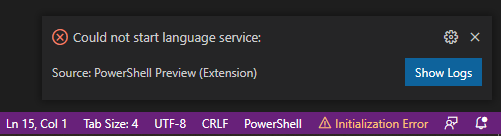
Logs:
3/1/2021 9:46:29 AM [NORMAL] - Visual Studio Code v1.54.0-insider 64-bit
3/1/2021 9:46:29 AM [NORMAL] - PowerShell Preview Extension v2021.2.1
3/1/2021 9:46:29 AM [NORMAL] - Operating System: Windows 64-bit
3/1/2021 9:46:29 AM [NORMAL] - Language server starting --
3/1/2021 9:46:29 AM [NORMAL] - PowerShell executable: C:\WINDOWS\System32\WindowsPowerShell\v1.0\powershell.exe
3/1/2021 9:46:29 AM [NORMAL] - PowerShell args: -NoProfile -NonInteractive -ExecutionPolicy Bypass -Command Import-Module 'c:\Users\redacted.vscode-insiders\extensions\ms-vscode.powershell-preview-2021.2.1\modules\PowerShellEditorServices\PowerShellEditorServices.psd1'; Start-EditorServices -HostName 'Visual Studio Code Host' -HostProfileId 'Microsoft.VSCode' -HostVersion '2021.2.1' -AdditionalModules @('PowerShellEditorServices.VSCode') -BundledModulesPath 'c:\Users\redacted.vscode-insiders\extensions\ms-vscode.powershell-preview-2021.2.1\modules' -EnableConsoleRepl -StartupBanner '=====> PowerShell Preview Integrated Console v2021.2.1 <=====
' -LogLevel 'Normal' -LogPath 'c:\Users\redacted.vscode-insiders\extensions\ms-vscode.powershell-preview-2021.2.1\logs\1614613589-c0fff0ac-8348-40fb-954a-8dd03045f8d71614613586203\EditorServices.log' -SessionDetailsPath 'c:\Users\redacted.vscode-insiders\extensions\ms-vscode.powershell-preview-2021.2.1\sessions\PSES-VSCode-29800-205810' -FeatureFlags @()
3/1/2021 9:46:29 AM [NORMAL] - PowerShell Editor Services args: Import-Module 'c:\Users\redacted.vscode-insiders\extensions\ms-vscode.powershell-preview-2021.2.1\modules\PowerShellEditorServices\PowerShellEditorServices.psd1'; Start-EditorServices -HostName 'Visual Studio Code Host' -HostProfileId 'Microsoft.VSCode' -HostVersion '2021.2.1' -AdditionalModules @('PowerShellEditorServices.VSCode') -BundledModulesPath 'c:\Users\redacted.vscode-insiders\extensions\ms-vscode.powershell-preview-2021.2.1\modules' -EnableConsoleRepl -StartupBanner '=====> PowerShell Preview Integrated Console v2021.2.1 <=====
' -LogLevel 'Normal' -LogPath 'c:\Users\redacted.vscode-insiders\extensions\ms-vscode.powershell-preview-2021.2.1\logs\1614613589-c0fff0ac-8348-40fb-954a-8dd03045f8d71614613586203\EditorServices.log' -SessionDetailsPath 'c:\Users\redacted.vscode-insiders\extensions\ms-vscode.powershell-preview-2021.2.1\sessions\PSES-VSCode-29800-205810' -FeatureFlags @()
3/1/2021 9:46:29 AM [NORMAL] - powershell.exe started.
3/1/2021 9:46:29 AM [NORMAL] - Waiting for session file
3/1/2021 9:46:31 AM [NORMAL] - Session file found
3/1/2021 9:46:31 AM [NORMAL] - Registering terminal close callback
3/1/2021 9:46:31 AM [NORMAL] - Registering terminal PID log callback
3/1/2021 9:46:31 AM [NORMAL] - powershell.exe PID: 29788
3/1/2021 9:46:31 AM [NORMAL] - Language server started.
3/1/2021 9:46:31 AM [NORMAL] - {"status":"started","languageServiceTransport":"NamedPipe","languageServicePipeName":"\\.\pipe\PSES_zpn0k2mj.l2a","debugServiceTransport":"NamedPipe","debugServicePipeName":"\\.\pipe\PSES_wlkriwoe.kb3"}
3/1/2021 9:46:31 AM [NORMAL] - Connecting to language service on pipe \.\pipe\PSES_zpn0k2mj.l2a...
3/1/2021 9:46:31 AM [NORMAL] - Language service connected.
3/1/2021 9:46:32 AM [ERROR] - Could not start language service:
3/1/2021 9:46:32 AM [ERROR] - Error: Connection to server got closed. Server will not be restarted.
GuruGarrett
on 1 Mar 2021
Also, I did a full uninstall, manually deleted leftover files, and did a fresh install of VS Code. Only installed the PowerShell Preview Extension. Didn't restore any of my previous settings or anything. I immediately get the same error about not being able to start language services. ☹
GuruGarrett
on 1 Mar 2021
Also, the restart current session thing only sort of works in that it doesn't produce an error, but also PowerShell extension features such as IntelliSense do not work.
GuruGarrett
on 1 Mar 2021
@GuruGarrett thanks for opening the issue and trying out the latest version. Sometimes an is issue caused by a system configuration like group policy or execution policy. Do you have anything like:
- A group policy configuration
- Antivirus
- Another form of system lockdown or restriction
 SydneyhSmith
on 2 Mar 2021
SydneyhSmith
on 2 Mar 2021
Yes, unfortunately there are many restrictions and security tools on my system, and I have no visibility into them or ability to have them disabled for troubleshooting. ☹
At any rate, I got rid of the Insiders version of VS Code and found that for some reason the "regular" VS Code seems to be working just fine for me, along with the "regular" PowerShell extension. So I'm just going to stick with that for now.
Thanks!
GuruGarrett
on 2 Mar 2021
@GuruGarrett As it stands, the regular PowerShell extension is currently the most up-to-date. I'm glad to hear your issues are resolved now: Preview extension and Insider editor builds are inherently going to be buggy, and in the meanwhile we got the Stable (regular) extension updated!
@theCoffeeProject How about you? Is this still reproducing with clean installs of the latest stable extension and VS Code editor?
For now I'm going to mark this resolved, but please let me know if you have a fresh repro!
andschwa
on 16 Mar 2021
Related issues
 borisimple
·
3Comments
borisimple
·
3Comments
 daviwil
·
4Comments
daviwil
·
4Comments
 rkeithhill
·
3Comments
rkeithhill
·
3Comments
 guidooliveira
·
3Comments
guidooliveira
·
3Comments
 timoline
·
3Comments
timoline
·
3Comments
Most helpful comment
I have found I can temporarily resolve the issue on my system by deleting the contents of the following directory, then it will work once:
%AppData%\Code - Insiders\User\workspaceStorage
If I close VS Code or kill the terminal, I need to clear that directory again. For anyone else with this issue, it is a temporary workaround at least.