Vscode-powershell: else: The term 'else' is not recognized as a name of a cmdlet, function, script file, or executable program.
Issue Description
I am experiencing a problem with...
else is not recognized as a name of a cmdlet, function, script file, or executable program when using the "Format Document" feature.
Format Document (creates the error)
$x = 5
if ($x -eq 5) {
    "x = 5"
}
else {
    "x not equal 5"
}
Manual edit (now works)
$x = 5
if ($x -eq 5) {
    "x = 5"
}else {
    "x not equal 5"
}
BOTH of these work when run from PowerShell ISE or running the code via a normal powershell console.
vscode for some reason does not like else being on a new line.
This behaviour is the same for Windows PowerShell 5.2 and PowerShell 7.1.0
I use Format Document for all my scripts and I've never run into this issue with 'else' previously so do not know if this is a new bug introduced recently??
Environment Information
Visual Studio Code
| Name | Version |
| --- | --- |
| Operating System | Windows_NT x64 10.0.14393 |
| VSCode | 1.51.1|
| PowerShell Extension Version | 2020.6.0 |
PowerShell Information
|Name|Value|
|---|---|
|PSVersion|7.1.0|
|PSEdition|Core|
|GitCommitId|7.1.0|
|OS|Microsoft Windows 10.0.14393|
|Platform|Win32NT|
|PSCompatibleVersions|1.0 2.0 3.0 4.0 5.0 5.1.10032.0 6.0.0 6.1.0 6.2.0 7.0.0 7.1.0|
|PSRemotingProtocolVersion|2.3|
|SerializationVersion|1.1.0.1|
|WSManStackVersion|3.0|
Visual Studio Code Extensions
Visual Studio Code Extensions(Click to Expand)
|Extension|Author|Version|
|---|---|---|
|better-comments|aaron-bond|2.1.0|
|powershell|ms-vscode|2020.6.0|
|vscode-icons|vscode-icons-team|11.0.0|
|vscode-theme-onedark|akamud|2.2.2|
 Guyver1wales
All 12 comments
I use Format Document for all my scripts and I've never run into this issue with 'else' previously so do not know if this is a new bug introduced recently??
There hasn't been a new release in several months, so unless you just upgraded it seems unlikely.
There is a known issue with formatting where it seems to race the extension's file system abstraction, discussed in https://github.com/PowerShell/vscode-powershell/issues/2569. I suspect this is the same issue -- which also explains why you might not have hit it before.
 rjmholt
on 10 Dec 2020
rjmholt
on 10 Dec 2020
One remaining question -- the first script snippet you posted is valid and runs as I expect (PowerShell allows you to hang the else):

Are you seeing the parse error on that particular script?
rjmholt
on 10 Dec 2020
executing code snippet directly in vscode after Ctrl+A to select all and then F8:
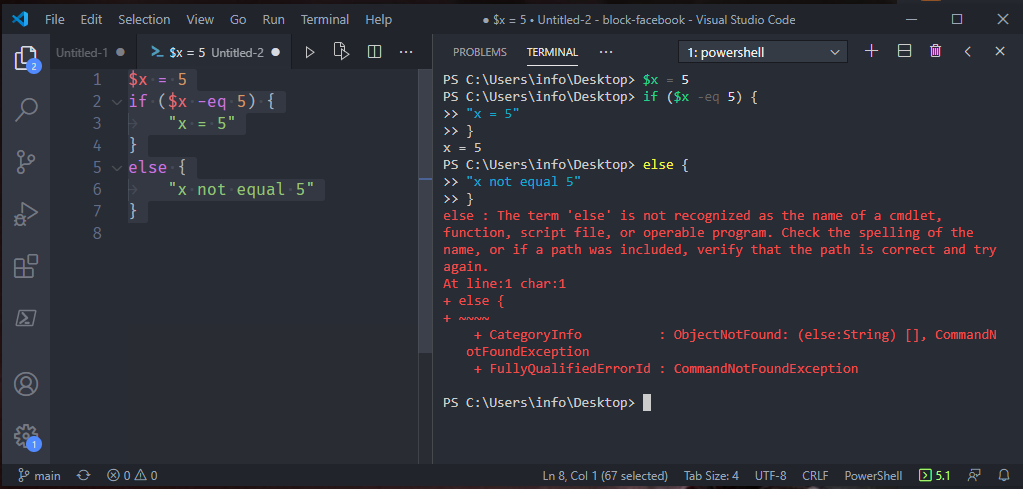
Guyver1wales
on 11 Dec 2020
Can you report the output of gmo PSReadLine in the integrated console?
rjmholt
on 11 Dec 2020
dont have an integrated console??:

11/12/2020 17:30:23 [NORMAL] - Visual Studio Code v1.52.0 64-bit
11/12/2020 17:30:23 [NORMAL] - PowerShell Extension v2020.6.0
11/12/2020 17:30:23 [NORMAL] - Operating System: Windows 64-bit
11/12/2020 17:30:23 [NORMAL] - Language server starting --
11/12/2020 17:30:23 [NORMAL] -     PowerShell executable: C:\Windows\System32\WindowsPowerShell\v1.0\powershell.exe
11/12/2020 17:30:23 [NORMAL] -     PowerShell args: -NoProfile -NonInteractive -ExecutionPolicy Bypass -Command Import-Module 'c:\Users\info\.vscode\extensions\ms-vscode.powershell-2020.6.0\modules\PowerShellEditorServices\PowerShellEditorServices.psd1'; Start-EditorServices -HostName 'Visual Studio Code Host' -HostProfileId 'Microsoft.VSCode' -HostVersion '2020.6.0' -AdditionalModules @('PowerShellEditorServices.VSCode') -BundledModulesPath 'c:\Users\info\.vscode\extensions\ms-vscode.powershell-2020.6.0\modules' -EnableConsoleRepl -StartupBanner "=====> PowerShell Integrated Console v2020.6.0 <=====
" -LogLevel 'Normal' -LogPath 'c:\Users\info\.vscode\extensions\ms-vscode.powershell-2020.6.0\logs\1607707823-9179b68b-e59b-487d-8ea1-10cc4a86bf6d1607707820242\EditorServices.log' -SessionDetailsPath 'c:\Users\info\.vscode\extensions\ms-vscode.powershell-2020.6.0\sessions\PSES-VSCode-17620-598828' -FeatureFlags @()
11/12/2020 17:30:23 [NORMAL] -     PowerShell Editor Services args: Import-Module 'c:\Users\info\.vscode\extensions\ms-vscode.powershell-2020.6.0\modules\PowerShellEditorServices\PowerShellEditorServices.psd1'; Start-EditorServices -HostName 'Visual Studio Code Host' -HostProfileId 'Microsoft.VSCode' -HostVersion '2020.6.0' -AdditionalModules @('PowerShellEditorServices.VSCode') -BundledModulesPath 'c:\Users\info\.vscode\extensions\ms-vscode.powershell-2020.6.0\modules' -EnableConsoleRepl -StartupBanner "=====> PowerShell Integrated Console v2020.6.0 <=====
" -LogLevel 'Normal' -LogPath 'c:\Users\info\.vscode\extensions\ms-vscode.powershell-2020.6.0\logs\1607707823-9179b68b-e59b-487d-8ea1-10cc4a86bf6d1607707820242\EditorServices.log' -SessionDetailsPath 'c:\Users\info\.vscode\extensions\ms-vscode.powershell-2020.6.0\sessions\PSES-VSCode-17620-598828' -FeatureFlags @()
11/12/2020 17:30:23 [NORMAL] - powershell.exe started.
11/12/2020 17:30:23 [NORMAL] - Waiting for session file
11/12/2020 17:30:27 [NORMAL] - Session file found
11/12/2020 17:30:27 [NORMAL] - Registering terminal close callback
11/12/2020 17:30:27 [NORMAL] - Registering terminal PID log callback
11/12/2020 17:30:27 [NORMAL] - powershell.exe PID: 4692
11/12/2020 17:30:27 [NORMAL] - Language server started.
11/12/2020 17:30:27 [NORMAL] - {"status":"started","languageServiceTransport":"NamedPipe","languageServicePipeName":"\\\\.\\pipe\\PSES_tvus514c.das","debugServiceTransport":"NamedPipe","debugServicePipeName":"\\\\.\\pipe\\PSES_dsc2g1xr.jes"}
11/12/2020 17:30:27 [NORMAL] - Connecting to language service on pipe \\.\pipe\PSES_tvus514c.das...
11/12/2020 17:30:27 [NORMAL] - Language service connected.
11/12/2020 17:30:29 [WARNING] - Invalid Version: null
**11/12/2020 17:30:33 [NORMAL] - PSIC is not active terminal. Running in active terminal using 'runSelectedText'**
So I uninstalled the PowerShell extension and reinstalled it and its now working as expected.

closed vscode and opened it again and the integrated terminal is gone and the issue returns
Guyver1wales
on 11 Dec 2020
this is my settings.json
{
    "workbench.colorTheme": "Atom One Dark",
    "window.zoomLevel": 0,
    "files.trimTrailingWhitespace": true,
    "files.trimFinalNewlines": true,
    "files.autoSave": "off",
    "files.associations": {
        "*.ps1": "powershell"
    },
    "files.defaultLanguage": "powershell",
    "editor.rulers": [
        115
    ],
    "editor.mouseWheelZoom": true,
    "editor.minimap.enabled": false,
    "editor.renderWhitespace": "all",
    "editor.renderControlCharacters": true,
    "editor.wordWrap": "wordWrapColumn",
    "editor.formatOnType": true,
    "editor.formatOnPaste": true,
    "editor.tabSize": 4,
    "editor.minimap.maxColumn": 115,
    "editor.tabCompletion": "on",
    "editor.insertSpaces": false,
    "editor.detectIndentation": false,
    "editor.wordWrapColumn": 115,
    "terminal.integrated.fontFamily": "Consolas",
    "terminal.integrated.fontSize": 14,
    "terminal.integrated.lineHeight": 1,
    "terminal.integrated.rendererType": "dom",
    "emmet.triggerExpansionOnTab": true,
    "powershell.enableProfileLoading": true,
    "powershell.integratedConsole.focusConsoleOnExecute": true,
    "powershell.integratedConsole.showOnStartup": false,
    "powershell.codeFormatting.pipelineIndentationStyle": "IncreaseIndentationAfterEveryPipeline",
    "powershell.codeFormatting.autoCorrectAliases": true,
    "powershell.codeFormatting.useCorrectCasing": true,
    "editor.fontFamily": "Fira Code",
    "editor.fontSize": 16,
    "editor.codeActionsOnSave": null,
    "git.enableSmartCommit": true,
    "git.autofetch": true,
    "powershell.powerShellDefaultVersion": "Windows PowerShell (x64)"
}
PART FIXED:
I had "powershell.integratedConsole.showOnStartup": false,
changed it to "powershell.integratedConsole.showOnStartup": true, and the issue is now resolved in the sense that it now works as long as the terminal is running the PS Integrated Console:

If I change the console to powershell it fails again:

Guyver1wales
on 11 Dec 2020
That's because pressing F8 when dealing with "not the PowerShell Integrated Console" just throws the text in the editor into the terminal window.
With the "PowerShell Integrated Console", we do something differently (sending a message behind the scenes with the full script to make sure the full script gets run). We can do this because it's "Integrated".
I'm not sure what can really be done about this behavior unless PSReadLine supported Paste Bracketing:
https://github.com/PowerShell/PSReadLine/issues/1471
 TylerLeonhardt
on 11 Dec 2020
TylerLeonhardt
on 11 Dec 2020
That's because pressing F8 when dealing with "not the PowerShell Integrated Console" just throws the text in the editor into the terminal window.
With the "PowerShell Integrated Console", we do something differently (sending a message behind the scenes with the full script to make sure the full script gets run). We can do this because it's "Integrated".
I'm not sure what can really be done about this behavior unless PSReadLine supported Paste Bracketing:
PowerShell/PSReadLine#1471
Thanks for the clarification Tyler. At least I know going forward to use the integrated console and I now understand a bit better what it does in the background. 👍
Guyver1wales
on 11 Dec 2020
Be sure to give that PSReadLine issue a like :)
TylerLeonhardt
on 11 Dec 2020
Be sure to give that PSReadLine issue a like :)
done 👍
Guyver1wales
on 11 Dec 2020
Related issues
 nathan-alden-hp
·
3Comments
nathan-alden-hp
·
3Comments
 pcgeek86
·
4Comments
pcgeek86
·
4Comments
 daviwil
·
3Comments
daviwil
·
3Comments
 rkeithhill
·
3Comments
rkeithhill
·
3Comments
 GQnzo
·
3Comments
GQnzo
·
3Comments
Most helpful comment
That's because pressing F8 when dealing with "not the PowerShell Integrated Console" just throws the text in the editor into the terminal window.
With the "PowerShell Integrated Console", we do something differently (sending a message behind the scenes with the full script to make sure the full script gets run). We can do this because it's "Integrated".
I'm not sure what can really be done about this behavior unless PSReadLine supported Paste Bracketing:
https://github.com/PowerShell/PSReadLine/issues/1471