Vscode-powershell: "Run selection" does nothing
Issue Type: Bug
I have an open Workspace in Visual Code and select a specific PowerShell Script.
Then I select the function incl. "get-teamviewerdevices" to run the function.
Right click and select "Run selection" or hitting F8 to test the function does nothing.
My next step was to close the Workspace and open the same PowerShell Script on the same place with a right click "Open in Code" and try again.
Now it works as expected?!
Any ideas or suggestions?
[string]$accessToken = "<token>"
[string]$tvApiVersion = '<apiversion>'
[string]$tvApiBaseUrl = '<URL>'


function Get-TeamViewerDevices {

    [CmdletBinding(DefaultParameterSetName = "Policy", SupportsShouldProcess = $true)]
    param(

        [Parameter(ParameterSetName = 'Policy', Mandatory = $false)]
        [ValidateSet('None', 'Inherit')]
        [string] $Policy = 'Inherit',

        [Parameter(ParameterSetName = 'SpecificPolicy', Mandatory = $true)]
        [string] $PolicyId

    )
    function ConvertTo-TeamViewerRestError {
        param([parameter(ValueFromPipeline)]$err)
        try { return ($err | Out-String | ConvertFrom-Json) }
        catch { return $err }
    }

    function Invoke-TeamViewerRestMethod {
        # Using `Invoke-WebRequest` instead of `Invoke-RestMethod`:
        # There is a known issue for PUT and DELETE operations to hang on Windows Server 2012.
        [Net.ServicePointManager]::SecurityProtocol = [Net.SecurityProtocolType]::Tls -bor [Net.SecurityProtocolType]::Tls11 -bor [Net.SecurityProtocolType]::Tls12
        try { return ((Invoke-WebRequest -UseBasicParsing @args).Content | ConvertFrom-Json) }
        catch [System.Net.WebException] {
            $stream = $_.Exception.Response.GetResponseStream()
            $reader = New-Object System.IO.StreamReader($stream)
            $reader.BaseStream.Position = 0
            Throw ($reader.ReadToEnd() | ConvertTo-TeamViewerRestError)
        }
    }
    function Get-TeamViewerDevice($accessToken, $groupId) {
        if ($groupId) { $body = @{ groupid = $groupId } }
        return Invoke-TeamViewerRestMethod -Uri "$tvApiBaseUrl/api/$tvApiVersion/devices" `
            -Method Get -Headers @{authorization = "Bearer $accessToken"} -Body $body
    }

    try {

        $script:devices = (Get-TeamViewerDevice -accessToken $accessToken)
        $script:currentdevice = $devices.devices -match $env:COMPUTERNAME

    } catch {

        Write-Host "No connection with >URL< possible!"

    }

}

get-teamviewerdevices

#$assignedFalse = $devices.devices | Select-Object -Property Alias, last_seen, assigned_to | where-object {$_.assigned_to -like "*false*"}
#$lastSeen = $devices.devices | Select-Object -Property Alias, last_seen, assigned_to
$online = $devices.devices | Select-Object -Property Alias, groupid, Online_state, assigned_to | Where-Object {$_.online_state -like "*online*" -and $_.assigned_to -like "*false*"}

foreach ($client in $online) {

    $GroupID = $client.groupid
    if ($env:PROCESSOR_ARCHITECTURE -eq "AMD64") {

        if (Test-Path -Path ${env:ProgramFiles(x86)}\TeamViewer\Teamviewer.exe) {

            Invoke-Command -ComputerName $client.alias -ScriptBlock {Start-Process -FilePath ${env:ProgramFiles(x86)}\TeamViewer\TeamViewer.exe -ArgumentList "assign --api-token >token< --group-id $GroupID";Write-Host "Der Client"$client.alias"in der Gruppe"$GroupID" wurde neu zugewiesen.[64]"}
        }

    } else {

        if (Test-Path -Path $env:ProgramFiles\Teamviewer\TeamViewer.exe) {

            Invoke-Command -ComputerName $client.alias -ScriptBlock {Start-Process -FilePath $env:ProgramFiles\TeamViewer\TeamViewer.exe -ArgumentList "assign --api-token >token< --group-id $GroupID";Write-Host "Der Client"$client.alias"in der Gruppe"$GroupID" wurde neu zugewiesen.[32]"}
        }


    }
}
Extension version: 2020.6.0
VS Code version: Code 1.51.1 (e5a624b788d92b8d34d1392e4c4d9789406efe8f, 2020-11-10T23:34:32.027Z)
OS version: Windows_NT x64 10.0.18363
 pilgi3
All 18 comments
Thanks @pilgi3 when you do this step "I have an open Workspace in Visual Code and select a specific PowerShell Script." is there any indication that the PowerShell extension has started up? For example is the integrated console visible? Thanks!
 SydneyhSmith
on 1 Dec 2020
SydneyhSmith
on 1 Dec 2020
Thanks for the reply @SydneyhSmith
If I opening Visual Code there is already a workspace open on the left side. I am waiting like 10 seconds and the PowersShell extension get loaded at the bottom.
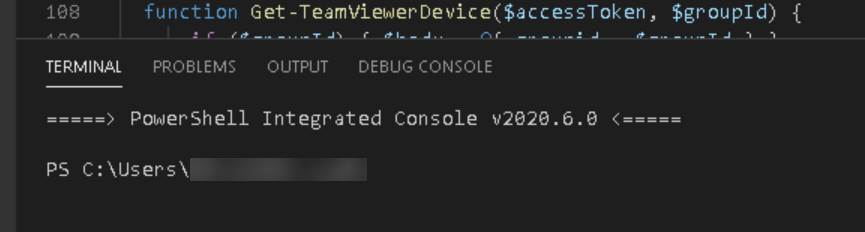
Now I could see there is a different in the Terminals.
(network) workspace open:

No workpace open:
pilgi3
on 2 Dec 2020
Thanks @pilgi3 the screenshots are super helpful--looks like this issue is likely that we arent properly handling network file share,
it would be really helpful if you could also attach the logs--instructions for how to do that are here ....thanks!
SydneyhSmith
on 3 Dec 2020
I have reproduce the issue right now.
with_workspace_logs.zip
without_workspace_logs.zip
The zip file "without_workspace" contains the log, when I open the ps1 file alone without an open workspace (F8 works)
The other zip file contains the logfiles with open workspace and open the ps1 file right in the workspace (F8 does nothing).
I have done this on my own device.
Usually I am working with Visual Studio Code on a Server 2016 but could not find the logs, because there is no .vscode in the user profile :/ .
But on my own windows device there I have the same issue no worry!
pilgi3
on 4 Dec 2020
Thanks @pilgi3 looking at your logs, we are wondering if it is the $ in the path that could be causing the issue, would you be able to try renaming the path without the $ and let us know if this helps? Thanks!
SydneyhSmith
on 10 Dec 2020
Thank you @SydneyhSmith but this is impossible, because it is a productive system. But I will create a new share and test with this hidden share.
pilgi3
on 11 Dec 2020
@SydneyhSmith
I have created a new $share on another device with an usb drive.
The F8 or run selection is working as expected.
This are the logfiles.
NewDollarShare_works.zip
pilgi3
on 21 Dec 2020
This issue is being closed as inactive, if this issue is still occurring it will be re-opened
![msftbot[bot] picture](https://avatars.githubusercontent.com/in/26612?v=4&s=40) msftbot[bot]
on 4 Jan 2021
msftbot[bot]
on 4 Jan 2021
@SydneyhSmith do you have any news for me?
pilgi3
on 11 Jan 2021
Could somebody check please and reopen the issue?
It is not fixed!
pilgi3
on 22 Jan 2021
Hello! @SydneyhSmith
The issues still exist in the version 2021.2.2.
Any news for me?
It is a little bit of annoying that this issue was closed!
pilgi3
on 26 Feb 2021
@pilgi3 we need a reproduction of the issue in order to work on it, and you haven't given us one. If you are able to reproduce the issue and send us the logs, we can reopen the issue.
 rjmholt
on 26 Feb 2021
rjmholt
on 26 Feb 2021
@rjmholt Here are the log files. Thank you!
Logs_05-03-2021.zip
pilgi3
on 5 Mar 2021
Ok the logs don't seem to capture a "Run selection" request -- were the logs you captured from a session where you experienced the issue? We should also take a look at the payload logs.
rjmholt
on 5 Mar 2021
Yes the log files are from an affected device.
I will do again and provide the payload logs as well!
pilgi3
on 8 Mar 2021
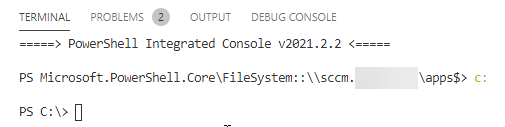
I tried to capture the issue again.
Did not work:

Works:
diag_WORKS_LocalC_09_03_2021.zip
diag_WORKS_NOT_DollarShare_09_03_2021.zip
payload_NOT_WORKS_09_03_2021.txt
pilgi3
on 9 Mar 2021
Thanks for all of the information @pilgi3 unfortunately we are still having some trouble diagnosing and reproducing the issue so our next work item how we can add in additional logging and better error handling in async cases
SydneyhSmith
on 9 Mar 2021
@SydneyhSmith
Thank you!
If you need more informations please let me know.
pilgi3
on 10 Mar 2021
Related issues
 timoline
·
3Comments
timoline
·
3Comments
 rs38
·
4Comments
rs38
·
4Comments
 bgelens
·
3Comments
bgelens
·
3Comments
 GQnzo
·
3Comments
GQnzo
·
3Comments
 itfranck
·
3Comments
itfranck
·
3Comments