Vscode-powershell: Always visible progress notifications when running a subshell from PowerShell terminal
System Details
❯ & {"### VSCode version: $(code -v)"; "`n### VSCode extensions:`n$(code --list-extensions --show-versions | Out-String)"; "`n### PSES version: $($pseditor.EditorServicesVersion)"; "`n### PowerShell version:`n$($PSVersionTable | Out-String)"}
### VSCode version: 1.49.1 58bb7b2331731bf72587010e943852e13e6fd3cf x64

### VSCode extensions:
[email protected]
[email protected]
[email protected]
[email protected]
[email protected]
[email protected]
[email protected]
[email protected]
[email protected]
[email protected]
[email protected]
[email protected]
[email protected]
[email protected]
[email protected]
[email protected]
[email protected]
[email protected]
[email protected]
[email protected]
[email protected]
[email protected]
[email protected]
[email protected]
[email protected]
[email protected]
[email protected]
[email protected]
[email protected]
[email protected]
[email protected]
[email protected]
[email protected]
[email protected]
[email protected]
[email protected]
[email protected]
[email protected]
[email protected]
[email protected]
[email protected]
[email protected]
[email protected]
[email protected]
[email protected]
[email protected]
[email protected]
[email protected]
[email protected]


### PSES version:

### PowerShell version:

Name                           Value
----                           -----
PSVersion                      5.1.19041.1
PSEdition                      Desktop
PSCompatibleVersions           {1.0, 2.0, 3.0, 4.0...}
BuildVersion                   10.0.19041.1
CLRVersion                     4.0.30319.42000
WSManStackVersion              3.0
PSRemotingProtocolVersion      2.3
SerializationVersion           1.1.0.1
Issue Description
Steps to reproduce:
- Open a PowerShell terminal
- Type "powershell", "wsl", or something else
- Now your terminal is responsive and waiting for user feedback, so ...
Expected Behaviour
... I would expect the PS item in the bottom bar of VS Code to display any "idle" state ...
Actual Behaviour
... Instead, it shows all the time a loading icon, which can be quite confusing because I already nest some subshells the whole day, and the whole time, a "busy" state is displayed in the bottom bar.
I think this behavior should be changed. Would it be possible to detect whether the process is waiting for the stdin, and if yes, disable the loading icon?
 LinqLover
All 9 comments
Thanks @LinqLover for opening the issue...want to make sure I understand what you are seeing screenshots/GIFs or recordings would be super helpful
 SydneyhSmith
on 6 Oct 2020
SydneyhSmith
on 6 Oct 2020
Of course, here is a screencast:
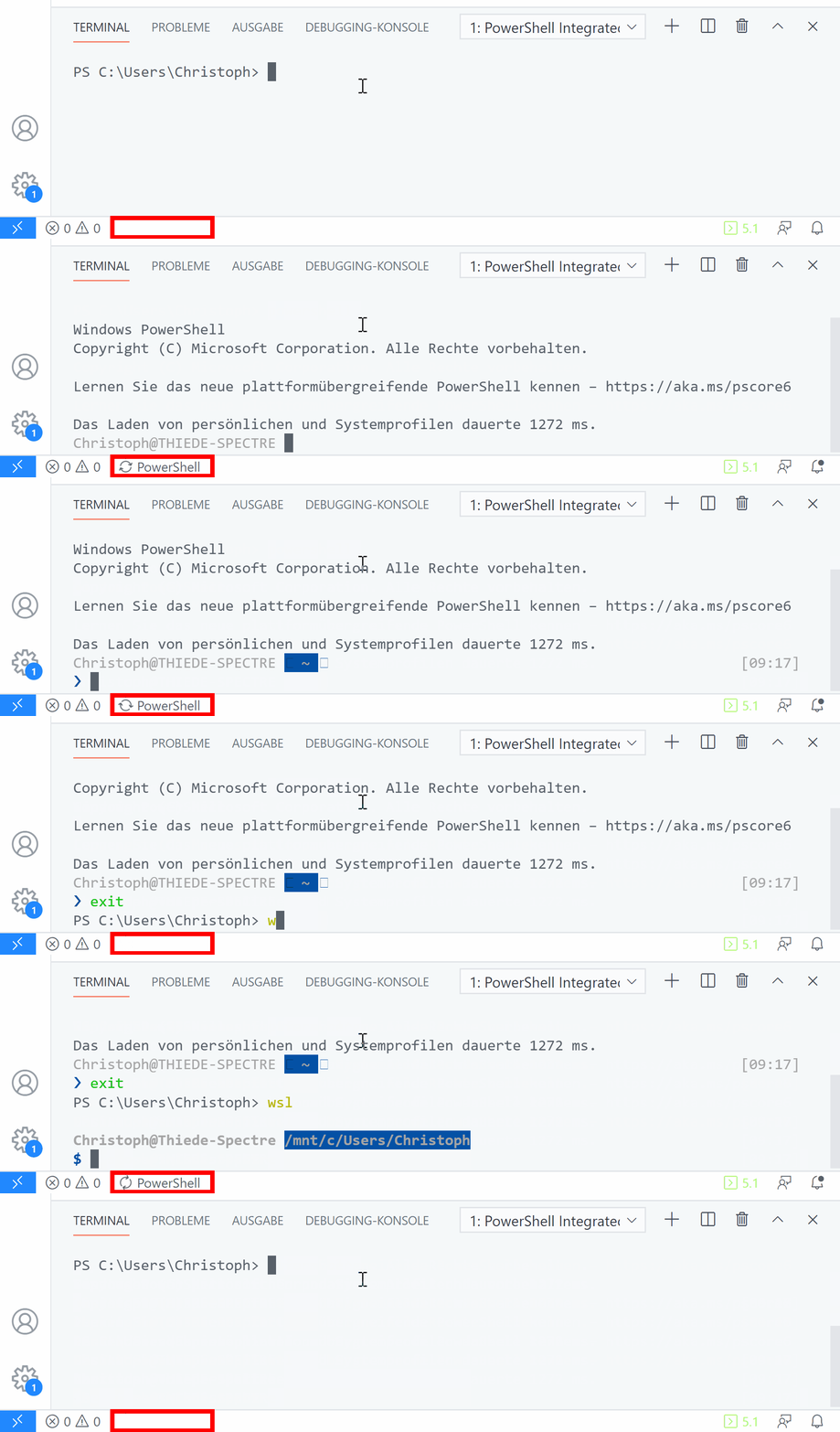
Sorry for the German text when starting the PowerShell, it only shows the usual welcome message.
LinqLover
on 6 Oct 2020
When in a nested shell, the original PowerShell instance is busy waiting for that process to exit. That original instance is the only one that the extension has any visibility into, and it's where all language services run.
Part of why it's important to keep the status the way it is currently is that folks may not expect intellisense and such to stop working when entering a nested shell.
 SeeminglyScience
on 6 Oct 2020
SeeminglyScience
on 6 Oct 2020
Hm, maybe this issue should be treated as a feature request rather than as a bug report. Is there really no way to detect from the extension whether the running process is blocked and waiting for stdin or whether the opposite is the case?
folks may not expect intellisense and such to stop working when entering a nested shell.
Could you explain this more in detail? How is IntelliSense related to the PowerShell console?
LinqLover
on 6 Oct 2020
Hm, maybe this issue should be treated as a feature request rather than as a bug report. Is there really no way to detect from the extension whether the running process is blocked and waiting for stdin or whether the opposite is the case?
It can't really be done arbitrarily after process start is the problem. The PSIC launched with a custom host that sets up the hooks for the extension.
Could you explain this more in detail? How is IntelliSense related to the PowerShell console?
The PowerShell extension shares state with that console, similar to how the ISE works. If you set a variable interactively in the shell, it'll show up in intellisense. Import a module interactively, it shows up. Dot source a script, see it's state. That kinda thing.
VSCode (and all other editors afaik) get their intellisense directly from the PowerShell engine's tab completion API. In order to do that and share state with the interactive console, the responsiveness of editor features is directly tied to whether the shared instance is busy.
SeeminglyScience
on 6 Oct 2020
Thanks for the explanation. Why isn't a second instance of the ISE used for the terminal? Then we could turn off the busy bar for the terminal instance only.
LinqLover
on 6 Oct 2020
Thanks for the explanation. Why isn't a second instance of the ISE used for the terminal? Then we could turn off the busy bar for the terminal instance only.
That would break the sharing of the session state. If you're looking for just another terminal, you can add one from the drop down, you can even specify which shell to launch in vscode configuration.
 corbob
on 6 Oct 2020
corbob
on 6 Oct 2020
That's probably the best solution, thanks for the help!
LinqLover
on 6 Oct 2020
@SeeminglyScience and @corbob are on the money.
Basically if you start a native command, it becomes a subprocess. That command might be powershell.exe running interactively or it might be chkdsk.exe performing a long-running disk check non-interactively.
From the point of view of the parent process (the integrated console), there's no difference. Both subprocesses have access to stdio and may or may not use it. It doesn't get signaled to say "this subprocess is interactive". It just gets all the output the subprocess sends to stdout, and a signal when it terminates, along with the exit code.
And in all cases, the subprocess synchronously blocks PowerShell's pipeline thread, meaning the integrated console is busy. We've talked a few times about decoupling them, but then you lose all the ability to supplement the completions in the editor from the console, like with Register-ArgumentCompleter etc.
 rjmholt
on 6 Oct 2020
rjmholt
on 6 Oct 2020
Related issues
 guidooliveira
·
3Comments
guidooliveira
·
3Comments
 GQnzo
·
3Comments
GQnzo
·
3Comments
 pcgeek86
·
4Comments
pcgeek86
·
4Comments
 bgelens
·
3Comments
bgelens
·
3Comments
 nathan-alden-hp
·
3Comments
nathan-alden-hp
·
3Comments
Most helpful comment
@SeeminglyScience and @corbob are on the money.
Basically if you start a native command, it becomes a subprocess. That command might be
powershell.exerunning interactively or it might bechkdsk.exeperforming a long-running disk check non-interactively.From the point of view of the parent process (the integrated console), there's no difference. Both subprocesses have access to stdio and may or may not use it. It doesn't get signaled to say "this subprocess is interactive". It just gets all the output the subprocess sends to stdout, and a signal when it terminates, along with the exit code.
And in all cases, the subprocess synchronously blocks PowerShell's pipeline thread, meaning the integrated console is busy. We've talked a few times about decoupling them, but then you lose all the ability to supplement the completions in the editor from the console, like with
Register-ArgumentCompleteretc.