Vscode-powershell: Add MRU to argument prompt when debugging a PowerShell script
Summary of the new feature
When one debugs a PowerShell script with the "PowerShell Launch Current File w/Args Prompt" configuration:
        {
            "type": "PowerShell",
            "request": "launch",
            "name": "PowerShell Launch Current File w/Args Prompt",
            "script": "${file}",
            "args": [
                "${command:SpecifyScriptArgs}"
            ],
            "cwd": "${file}"
        },
the input field is pre-filled with the most recent arguments input on the previous debug session.
It would be useful to have a list of most recently used argument lists, so that one could easily test the same script with several sets of arguments.
Proposed technical implementation details (optional)
The list should be sorted by most-recently used argument list.
 sba923
All 9 comments
I realize this change probably needs to be done in VScode itself, not in the extension. Correct?
sba923
on 31 Jul 2020
IIRC that UI and last input feature is provided by VSCode and not the extension. You might want to raise this issue in the https://github.com/microsoft/vscode project.
 rkeithhill
on 31 Jul 2020
rkeithhill
on 31 Jul 2020
IIRC that UI and last input feature is provided by VSCode and not the extension. You might want to raise this issue in the https://github.com/microsoft/vscode project.
I'm on my way... but who actually implements SpecifyScriptArgs?
sba923
on 31 Jul 2020
@rkeithhill we implement SpecifyScriptArgs:
 TylerLeonhardt
on 31 Jul 2020
TylerLeonhardt
on 31 Jul 2020
Sigh, sad thing is that I implemented that feature 2 years ago according to Git. 🤷♂️
rkeithhill
on 31 Jul 2020
So? Back to square one... The VScode guys have closed the issues there 'cos it's extension related... 😝
sba923
on 31 Jul 2020
Back to square one...
No no, we have the feature request here now and we've recognised we own the code for it
 rjmholt
on 31 Jul 2020
rjmholt
on 31 Jul 2020
We use VSCode's showInputBox() method which allows you to enter arbitrary text but AFAICT it doesn't support any sort of dropdown with canned input. Then there's showQuickPick which shows a dropdown list of items to pick from but does not allow for arbitrary text entry. Is there a "dropdown combo" input box that I'm missing in the API?
FWIW if I could find the appropriate VSCode API for this style of input control, the implementation would likely be very simple.
rkeithhill
on 31 Jul 2020
The way I see VSCode handle this today is to first pop a quickPick box:
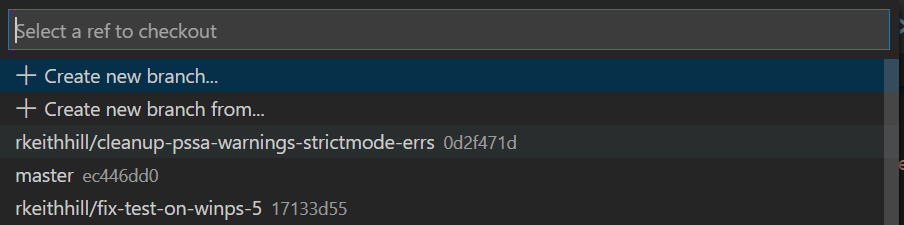
Which includes an item to specify a new value e.g. + Create new branch... which when clicked pops an inputBox:

If that is the only way to implement this then I would not be in favor of doing so as it makes the common case harder.
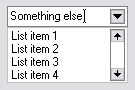
That said, I can't believe VSCode doesn't provide the equivalent of a Combobox
rkeithhill
on 1 Aug 2020
Related issues
 daviwil
·
3Comments
daviwil
·
3Comments
 nathan-alden-hp
·
3Comments
nathan-alden-hp
·
3Comments
 timoline
·
3Comments
timoline
·
3Comments
 GQnzo
·
3Comments
GQnzo
·
3Comments
 borisimple
·
3Comments
borisimple
·
3Comments