Vscode-powershell: Inputting long values with Read-Host eventually triggers an exception
System Details
System Details Output
### VSCode version: 1.47.2 17299e413d5590b14ab0340ea477cdd86ff13daf x64

### VSCode extensions:
[email protected]

### Modules
I have PSReadLine 2.1.0 beta2 and it's checked in the extension settings

### PSES version: 2.2.0.0

### PowerShell version:

Name                           Value
----                           -----
PSVersion                      7.0.3
PSEdition                      Core
GitCommitId                    7.0.3
OS                             Microsoft Windows 10.0.19041
Platform                       Win32NT
PSCompatibleVersions           {1.0, 2.0, 3.0, 4.0…}
PSRemotingProtocolVersion      2.3
SerializationVersion           1.1.0.1
WSManStackVersion              3.0
Issue Description
Typing or pasting long values and submitting to Read-Host prompts eventually trigger a System.ArgumentOutOfRangeException
System.Exception: Prompt failed, check inner exception for details
 ---> System.ArgumentOutOfRangeException: The value must be greater than or equal to zero and less than the console's buffer size in that dimension. (Parameter 'top')
Actual value was 45.
This is related to #702
Expected Behaviour
The behavior should be consistent / no exception thrown
Actual Behaviour
I've observed that visually once the console output fills up the exception will be thrown on the next Read-Host try. Here's a screencap I took. The first 2 runs of the script are fine but the 3rd throws the exception. If afterwards I run Clear-Host and try again it does not throw the exception. If I run Clear-Host before each script run (or include Clear-Host at the top of my script) I can consistently get it to behave correctly.

I also tried (instead of pasting values) seeing what would happen if I manually typed long values that wrap. It required me to do this many times until the height of the console output reached whatever height value this is -- then the exception occurred.

 compelx
All 5 comments
Are you able to post the full stack trace from the exception you're seeing in the GIF?
 rjmholt
on 24 Jul 2020
rjmholt
on 24 Jul 2020
Sure thing. I reran using this pasted value and it eventually triggered this exception.
Input value
123456789123456789123456789123456789123456789123456789123456789123456789123456789123456789123456789123456789123456789123456789123456789123456789123456789123456789123456789123456789123456789123456789123456789123456789123456789123456789123456789123456789123456789123456789123456789123456789123456789123456789123456789123456789123456789123456789123456789123456789123456789123456789123456789123456789123456789123456789123456789123456789123456789123456789123456789123456789123456789123456789123456789123456789123456789123456789123456789123456789123456789123456789
Exception
System.Exception: Prompt failed, check inner exception for details
 ---> System.ArgumentOutOfRangeException: The value must be greater than or equal to zero and less than the console's buffer size in that dimension. (Parameter 'top')
Actual value was 31.
   at System.ConsolePal.SetCursorPosition(Int32 left, Int32 top)
   at Microsoft.PowerShell.EditorServices.Services.PowerShellContext.ConsoleReadLine.InsertInput(StringBuilder inputLine, Int32 promptStartCol, Int32 promptStartRow, String insertedInput, Int32 cursorIndex, Int32 insertIndex, Int32 replaceLength, Int32 finalCursorIndex) in D:\a\1\s\src\PowerShellEditorServices\Services\PowerShellContext\Console\ConsoleReadLine.cs:line 585
   at Microsoft.PowerShell.EditorServices.Services.PowerShellContext.ConsoleReadLine.InvokeLegacyReadLineAsync(Boolean isCommandLine, CancellationToken cancellationToken) in D:\a\1\s\src\PowerShellEditorServices\Services\PowerShellContext\Console\ConsoleReadLine.cs:line 492
   at Microsoft.PowerShell.EditorServices.Services.PowerShellContext.PSReadLinePromptContext.InvokeReadLineAsync(Boolean isCommandLine, CancellationToken cancellationToken) in D:\a\1\s\src\PowerShellEditorServices\Services\PowerShellContext\Session\PSReadLinePromptContext.cs:line 141
   at Microsoft.PowerShell.EditorServices.Services.PowerShellContextService.InvokeReadLineAsync(Boolean isCommandLine, CancellationToken cancellationToken) in D:\a\1\s\src\PowerShellEditorServices\Services\PowerShellContext\PowerShellContextService.cs:line 1180
   at Microsoft.PowerShell.EditorServices.Services.PowerShellContext.TerminalInputPromptHandler.ReadInputStringAsync(CancellationToken cancellationToken) in D:\a\1\s\src\PowerShellEditorServices\Services\PowerShellContext\Console\TerminalInputPromptHandler.cs:line 58
   at Microsoft.PowerShell.EditorServices.Services.PowerShellContext.InputPromptHandler.StartPromptLoopAsync(CancellationToken cancellationToken) in D:\a\1\s\src\PowerShellEditorServices\Services\PowerShellContext\Console\InputPromptHandler.cs:line 261
   --- End of inner exception stack trace ---
   at Microsoft.PowerShell.EditorServices.Services.PowerShellContext.EditorServicesPSHostUserInterface.WaitForPromptCompletion[TResult](Task`1 promptTask, String promptFunctionName, CancellationTokenSource cancellationToken) in D:\a\1\s\src\PowerShellEditorServices\Services\PowerShellContext\Session\Host\EditorServicesPSHostUserInterface.cs:line 959
   at Microsoft.PowerShell.EditorServices.Services.PowerShellContext.EditorServicesPSHostUserInterface.Prompt(String promptCaption, String promptMessage, Collection`1 fieldDescriptions) in D:\a\1\s\src\PowerShellEditorServices\Services\PowerShellContext\Session\Host\EditorServicesPSHostUserInterface.cs:line 294
   at System.Management.Automation.Internal.Host.InternalHostUserInterface.Prompt(String caption, String message, Collection`1 descriptions)
   at Microsoft.PowerShell.Commands.ReadHostCommand.BeginProcessing()
   at System.Management.Automation.Cmdlet.DoBeginProcessing()
   at System.Management.Automation.CommandProcessorBase.DoBegin()
at <ScriptBlock>, C:\temp\test.ps1: line 2
I'm curious if you can repro this by trying in PowerShell itself.
Can you also send us your PowerShell specific vscode settings?
 TylerLeonhardt
on 25 Jul 2020
TylerLeonhardt
on 25 Jul 2020
So just to be safe I did a fresh install on a new box that I hadnt ever used vscode on.
Installed latest VSCode
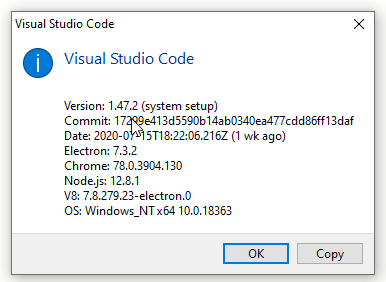
Installed the PowerShell Preview extension
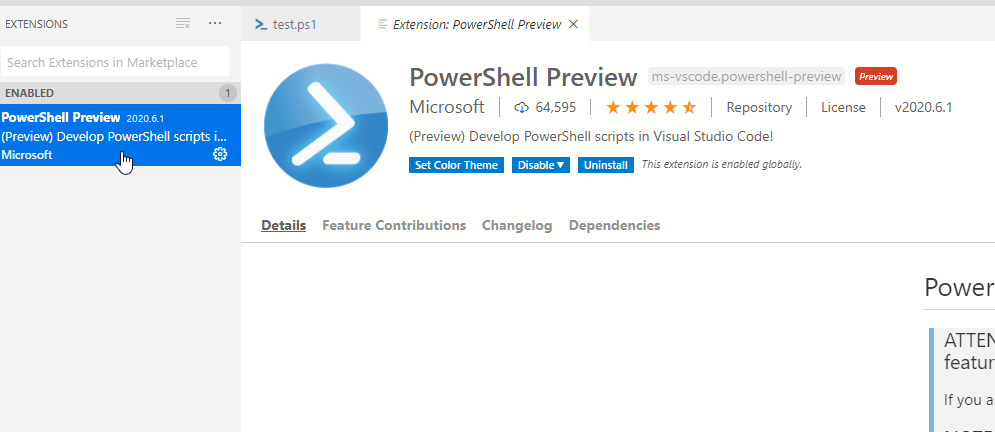
Then installed PowerShell 7 via https://github.com/PowerShell/PowerShell/releases/download/v7.0.3/PowerShell-7.0.3-win-x64.msi
No settings touched (other than the ISE theme prompt that comes up during install of the preview extension)
Trying this script and using this input in VSCode, regardless if im running PowerShell 7 or switch over to PowerShell 5, will trigger the exception after a few tries.
Script
try {
    $x = Read-Host -Prompt "Enter a long value"
    Write-Host $x
}
catch {
    Write-Host "----------------------------------------------------------------------------------------------------" -ForegroundColor Red
    Write-Host $_.Exception -ForegroundColor Red
    Write-Host $_.ScriptStackTrace -ForegroundColor Red
    Write-Host "----------------------------------------------------------------------------------------------------" -ForegroundColor Red

    throw $_
}
Input
123456789123456789123456789123456789123456789123456789123456789123456789123456789123456789123456789123456789123456789123456789123456789123456789123456789123456789123456789123456789123456789123456789123456789123456789123456789123456789123456789123456789123456789123456789123456789123456789123456789123456789123456789123456789123456789123456789123456789123456789123456789123456789123456789123456789123456789123456789123456789123456789123456789123456789123456789123456789123456789123456789123456789123456789123456789123456789123456789123456789123456789123456789
Exception
----------------------------------------------------------------------------------------------------
System.Exception: Prompt failed, check inner exception for details
 ---> System.ArgumentOutOfRangeException: The value must be greater than or equal to zero and less than the console's buffer size in that dimension. (Parameter 'top')
Actual value was 26.
   at System.ConsolePal.SetCursorPosition(Int32 left, Int32 top)
   at Microsoft.PowerShell.EditorServices.Services.PowerShellContext.ConsoleReadLine.InsertInput(StringBuilder inputLine, Int32 promptStartCol, Int32 promptStartRow, String insertedInput, Int32 cursorIndex, Int32 insertIndex, Int32 replaceLength, Int32 finalCursorIndex) in D:\a\1\s\src\PowerShellEditorServices\Services\PowerShellContext\Console\ConsoleReadLine.cs:line 585
   at Microsoft.PowerShell.EditorServices.Services.PowerShellContext.ConsoleReadLine.InvokeLegacyReadLineAsync(Boolean isCommandLine, CancellationToken cancellationToken) in D:\a\1\s\src\PowerShellEditorServices\Services\PowerShellContext\Console\ConsoleReadLine.cs:line 492
   at Microsoft.PowerShell.EditorServices.Services.PowerShellContext.PSReadLinePromptContext.InvokeReadLineAsync(Boolean isCommandLine, CancellationToken cancellationToken) in D:\a\1\s\src\PowerShellEditorServices\Services\PowerShellContext\Session\PSReadLinePromptContext.cs:line 141
   at Microsoft.PowerShell.EditorServices.Services.PowerShellContextService.InvokeReadLineAsync(Boolean isCommandLine, CancellationToken cancellationToken) in D:\a\1\s\src\PowerShellEditorServices\Services\PowerShellContext\PowerShellContextService.cs:line 1180
   at Microsoft.PowerShell.EditorServices.Services.PowerShellContext.TerminalInputPromptHandler.ReadInputStringAsync(CancellationToken cancellationToken) in D:\a\1\s\src\PowerShellEditorServices\Services\PowerShellContext\Console\TerminalInputPromptHandler.cs:line 58
   at Microsoft.PowerShell.EditorServices.Services.PowerShellContext.InputPromptHandler.StartPromptLoopAsync(CancellationToken cancellationToken) in D:\a\1\s\src\PowerShellEditorServices\Services\PowerShellContext\Console\InputPromptHandler.cs:line 261
   --- End of inner exception stack trace ---
   at Microsoft.PowerShell.EditorServices.Services.PowerShellContext.EditorServicesPSHostUserInterface.WaitForPromptCompletion[TResult](Task`1 promptTask, String promptFunctionName, CancellationTokenSource cancellationToken) in D:\a\1\s\src\PowerShellEditorServices\Services\PowerShellContext\Session\Host\EditorServicesPSHostUserInterface.cs:line 959
   at Microsoft.PowerShell.EditorServices.Services.PowerShellContext.EditorServicesPSHostUserInterface.Prompt(String promptCaption, String promptMessage, Collection`1 fieldDescriptions) in D:\a\1\s\src\PowerShellEditorServices\Services\PowerShellContext\Session\Host\EditorServicesPSHostUserInterface.cs:line 294
   at System.Management.Automation.Internal.Host.InternalHostUserInterface.Prompt(String caption, String message, Collection`1 descriptions)
   at Microsoft.PowerShell.Commands.ReadHostCommand.BeginProcessing()
   at System.Management.Automation.Cmdlet.DoBeginProcessing()
   at System.Management.Automation.CommandProcessorBase.DoBegin()
at <ScriptBlock>, C:\temp\test.ps1: line 2
----------------------------------------------------------------------------------------------------
Read-Host: C:\temp\test.ps1:2:10
Line |
   2 |      $x = Read-Host -Prompt "Enter a long value"
     |           ~~~~~~~~~~~~~~~~~~~~~~~~~~~~~~~~~~~~~~
     | Prompt failed, check inner exception for details
If I try this outside of VSCode, just by launching the terminal normally I can't get it to throw the exception -- it works fine.

compelx
on 25 Jul 2020
Thanks @compelx looking at your stack trace, it looks like Read-Host is calling into a legacy version of our PSReadLine experience in the integrated terminal, we hope that we can resolve this as a part of the work happening in https://github.com/PowerShell/PowerShellEditorServices/issues/1295
 SydneyhSmith
on 28 Jul 2020
SydneyhSmith
on 28 Jul 2020
Related issues
 rs38
·
4Comments
rs38
·
4Comments
 AWahlqvist
·
3Comments
AWahlqvist
·
3Comments
 timoline
·
3Comments
timoline
·
3Comments
 itfranck
·
3Comments
itfranck
·
3Comments
 CJHarmath
·
3Comments
CJHarmath
·
3Comments