Vscode-powershell: Unable to run scripts with integrated PowerShell Console in VSCode 1.47.1
Since upgrading to v1.47.1 of VSCode, I can't run PS scripts using the built in console. Hitting F5 does nothing, and attempting to run a line of code using F8 gives an error: "command 'PowerShell.RunSelection' not found"
I also notice that the version of PS is not displayed in the bottom-right.

I suspect this has to do with the latest CVE patch.
https://portal.msrc.microsoft.com/en-us/security-guidance/advisory/CVE-2020-1416
My question is, am I doing it wrong? Or is this a bug that needs to be corrected? In my scenario, I have a regular (non-admin) account I use to login to my workstation. Depending on the PowerShell task/script, I may need to run VSCode as my secondary (admin) account (with elevated rights). To do that, I'll first run powershell.exe 'As Different User', authenticate with my secondary admin account, then run VSCode as admin (Start-Process code.exe -Verb RunAs) to get into an elevated session.
 jlapchuk
All 22 comments
I have this problem too when i am running vscode as admin. I works when running as my normal loggedon non admin user
 soerenlambaek
on 16 Jul 2020
soerenlambaek
on 16 Jul 2020
Might be the CVE, But running on a system that does not have the CVE installed yet and have a very similar error. PS was working fine before installing but after installing getting.
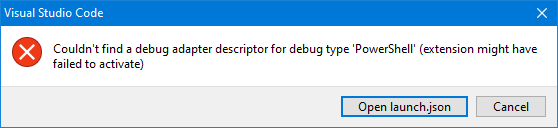
Have some personal computers that I tested and with fully patched they are working fine with the latest release. Just my company assigned assets have the issue.
Tested on my company desktop and has the same issue.
On my company laptop rolled VS Code back to V 1.46 PowerShell started working again as expected.
Does the CVE need to be installed with 1.47?
Is the PowerShell version a requirement?
My personal machines are running v7 but my company are on 5.1
 beowulf005
on 16 Jul 2020
beowulf005
on 16 Jul 2020
I am able to reproduce this issue in 1.47 with both stable and preview extensions, but insiders (1.48) does not appear to have the issue with preview extension.
To be clear: I am only able to reproduce by creating a secondary account on my computer, and running elevated in that account as opposed to merely running elevated. I'd wager a guess that the issue would occur when just running as the different user, but since I have a user based install, I have to elevate it in order to access the files to run.
 corbob
on 16 Jul 2020
corbob
on 16 Jul 2020
Yeah, to clarify, I'm running a per-system install of VSCode. I can confirm, installing the Insiders version of VSCode (1.48.0-insider), also does not exhibit the problem, not sure if this version already contains the CVE patch.
jlapchuk
on 16 Jul 2020
Also to clarify. Per-system install and company requires separate accounts for user and admin. So launching VS Code as administrator.
beowulf005
on 16 Jul 2020
+1Per-system install and company requires separate accounts for user and admin. So launching VS Code as administrator.
 vall3yv
on 16 Jul 2020
vall3yv
on 16 Jul 2020
Thanks everyone, sorry to hear that you are hitting this it would be really helpful if you could also attach the logs--instructions for how to do that are here , it would also be great if you could see if you are able to open a terminal in VSCode

 SydneyhSmith
on 16 Jul 2020
SydneyhSmith
on 16 Jul 2020
Hey @SydneyhSmith it appears when enabling the Diagnostic logging no log files are being produced within the folder you mentioned? I see logs from this AM but nothing from when i opened and closed several times just now. When using the keyboard shortcut to open the folder (mentioned in the link you sent) i get the following error, any ideas? Just to note i am launching as a local admin account from a standard user account as mentioned above.

C:\Users\ADMINUSER\.vscode\extensions\ms-vscode.powershell-2020.6.0\logs\1594739523-e1096e54-2415-4ade-be03-f243d8f4b2521594739520990
vall3yv
on 16 Jul 2020
I'm seeing the same on my end as well. I can hit the + icon to start a new PowerShell terminal, and I can run commands. I enabled diagnostic logging, but when i try to open the logs folder from within vscode, I get the same error as above. Manually browsing to the logs directory shows no new logs generated since upgrading to v1.47.1

jlapchuk
on 16 Jul 2020
So odd... it doesn't seem like the PowerShell extension is being loaded... If you open the command pallet, can you run "Toggle Developer Tools" and give us the output?
 TylerLeonhardt
on 16 Jul 2020
TylerLeonhardt
on 16 Jul 2020
Seeing this in the console of the developer tools
abstractExtensionService.ts:415 [ms-vscode.powershell]: Command `workbench.action.debug.start` appears multiple times in the `commands` section.
abstractExtensionService.ts:415 [ms-vscode.powershell]: Command `workbench.action.closePanel` appears multiple times in the `commands` section.
abstractExtensionService.ts:415 [ms-vscode.powershell]: Command `workbench.action.positionPanelLeft` appears multiple times in the `commands` section.
abstractExtensionService.ts:415 [ms-vscode.powershell]: Command `workbench.action.positionPanelBottom` appears multiple times in the `commands` section.
abstractExtensionService.ts:411 Activating extension 'ms-vscode.powershell' failed: The "path" argument must be of type string. Received type undefined.
_logMessageInConsole @ abstractExtensionService.ts:411
so the top 4 are fine but that last one is very odd... I'm very suspicious of that CVE too, although it's hard to pinpoint where the problem is from that error message...
Have you tried with today's insider build? I might ask you to wait for tomorrow's to see if that puts insider in a bad state too.
If it does, I need to chat with the vscode team on what changed.
TylerLeonhardt
on 16 Jul 2020
I have the same problem here.

As for your information.. I also start vscode with another user with elevated rights.
 kjabbes
on 17 Jul 2020
kjabbes
on 17 Jul 2020
Actually this is an issue by "design" and also strongly related to the Security Fix CVE in 1.47.1. Its not just a side effect.
The security fix addresses the security related issue that we take advantage in general by the Powershell Integrated Console.
The fix removed the ability to execute arbitrary code in higher priviliged context when loaded by a plugin to avoid modified plugins with malcicious code. So the "2: Intergrated Powershell Console" did not get started with higher priviledges and you can not run the code there.
As workaround you can install the version 1.47.0. This is the version before the CVE get applied.
The PG should think of this security coliding architectural design.
We as user rely technically on the ability to execute the code we script in VSC in a context where Powershell is not blocking use (Full language mode).
 JoergWu
on 17 Jul 2020
JoergWu
on 17 Jul 2020
Has anyone tried the latest insider build? Does it still work?
TylerLeonhardt
on 17 Jul 2020
I just installed the latest insiders version, confirmed it still works when running as admin and launching with my secondary account.
Version: 1.48.0-insider (system setup)
Commit: ff6b1c5984a4c2116a06318f07e871a4169fdb1b
Date: 2020-07-17T13:18:36.126Z
Electron: 8.3.3
Chrome: 80.0.3987.165
Node.js: 12.13.0
V8: 8.0.426.27-electron.0
OS: Windows_NT x64 10.0.18363
jlapchuk
on 17 Jul 2020
The date says today... it's very possible that we just need to wait for the next stable release... Let's see how insiders does over the next few days. Also, lets see how stable does in the next patch release.
TylerLeonhardt
on 17 Jul 2020
@SydneyhSmith - do you still need logs?
+1 reproducible for me, running as different user w/ more permissions in a work/enterprise environment.

 OranguTech
on 17 Jul 2020
OranguTech
on 17 Jul 2020
Also, I wonder if this might point to a needed UI change? If an extension fails to load on startup, I would expect to see a warning somewhere besides just the troubleshooting logs.
OranguTech
on 17 Jul 2020
This appears to be a dupe of https://github.com/microsoft/vscode/issues/102642
TylerLeonhardt
on 17 Jul 2020
Also, I wonder if this might point to a needed UI change? If an extension fails to load on startup, I would expect to see a warning somewhere besides just the troubleshooting logs.
This might be a good thing to look into. As far as I can tell, the extension is loading, but the language services aren't loading. Perhaps somewhere in the language service startup it could pop a message if it failed. Currently anything the relies on the language service checks and pops a message at that point, but definitely knowing before you get to that point would be helpful.
corbob
on 18 Jul 2020
Looks like the fix will be out shortly see-- https://github.com/microsoft/vscode/issues/102642#issuecomment-661376039
SydneyhSmith
on 21 Jul 2020
Related issues
 lukegriffith
·
3Comments
lukegriffith
·
3Comments
 GQnzo
·
3Comments
GQnzo
·
3Comments
 rkeithhill
·
3Comments
rkeithhill
·
3Comments
 MiYanni
·
3Comments
MiYanni
·
3Comments
 rs38
·
4Comments
rs38
·
4Comments