Vscode-powershell: PSReadLine cannot be started Preview extension MacOS
System Details
System Details Output
### VSCode version: 1.44.0 2aae1f26c72891c399f860409176fe435a154b13 x64

### VSCode extensions:
[email protected]
[email protected]
[email protected]
[email protected]
[email protected]
[email protected]
[email protected]
[email protected]
[email protected]
[email protected]
[email protected]
[email protected]
[email protected]
[email protected]
[email protected]
[email protected]
[email protected]
[email protected]
[email protected]
[email protected]
[email protected]
[email protected]
[email protected]
[email protected]
[email protected]
[email protected]
[email protected]
[email protected]
[email protected]
[email protected]
[email protected]
[email protected]
[email protected]
[email protected]
[email protected]
[email protected]
[email protected]
[email protected]
[email protected]
[email protected]
[email protected]
[email protected]
[email protected]
[email protected]
[email protected]


### PSES version: 2.1.0.0

### PowerShell version:

Name                           Value
----                           -----
PSVersion                      7.1.0-preview.1
PSEdition                      Core
GitCommitId                    7.1.0-preview.1
OS                             Darwin 19.4.0 Darwin Kernel Version 19.4.0: Wed Mar  4 22:28:40 PST 2020; root:xnu-6153.101.6~15/RELEASE_X86_64
Platform                       Unix
PSCompatibleVersions           {1.0, 2.0, 3.0, 4.0…}
PSRemotingProtocolVersion      2.3
SerializationVersion           1.1.0.1
WSManStackVersion              3.0
Issue Description
Enabling verbose editorservice log level raises this warning:
2020-04-09 08:37:49.496 +02:00 [WRN] PSReadLine unable to be loaded: Unable to find type [Microsoft.PowerShell.PSConsoleReadLine,Microsoft.PowerShell.PSReadLine2, Version=2.0.0.0, Culture=neutral, PublicKeyToken=null].
I noticed as my keybindings stopped working (ctrl+r, etc) and coloring was not working anymore
Expected Behaviour
Should load
Actual Behaviour
Did not load
Attached Logs
1586414642-3e699a5d-aec5-4539-a3ab-3246af6d72241586413989494.zip
 bgelens
All 10 comments
I have same issue on Windows. After upgrade PSReadLine doesn't work anymore.
 PrzemyslawKlys
on 9 Apr 2020
PrzemyslawKlys
on 9 Apr 2020
Looks like the assembly version changed...
https://github.com/PowerShell/PSReadLine/blob/master/PSReadLine/PSReadLine.csproj#L7
I'll get a fix out and try to push a preview today. In the meantime, you can downgrade the version of PSReadLine to 2.0.0 to be unblocked.
 TylerLeonhardt
on 9 Apr 2020
TylerLeonhardt
on 9 Apr 2020
@TylerLeonhardt PSReadline 2.1.0-beta1 is shipped with the preview extension. Downgrade would be difficult :)

bgelens
on 9 Apr 2020
If you install the 2.0.0 version of PSReadLine, it'll come _ahead_ of that path in the PSModulePath so it should work.
TylerLeonhardt
on 9 Apr 2020
I tried that already but it doesn't work like that apparently. This is from a fresh vs code session after uninstalling 2.1.0-beta1
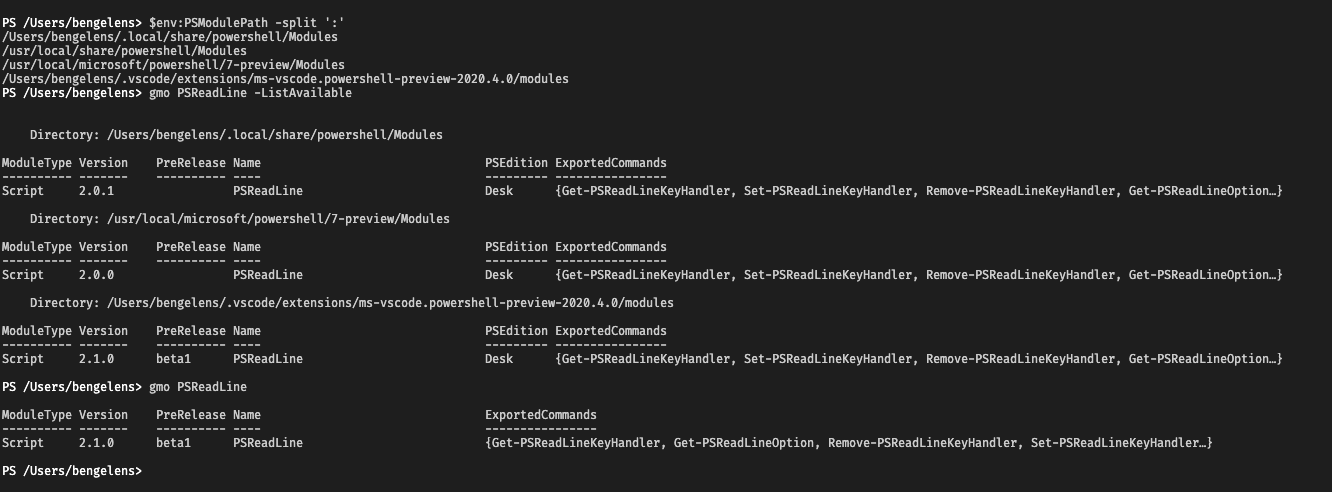
2020-04-09 16:12:27.160 +02:00 [WRN] PSReadLine unable to be loaded: Unable to find type [Microsoft.PowerShell.PSConsoleReadLine,Microsoft.PowerShell.PSReadLine2, Version=2.0.0.0, Culture=neutral, PublicKeyToken=null].
bgelens
on 9 Apr 2020
Looks like you still have 2.0.1 in the first position. The assembly version in 2.0.1 was changed:
https://github.com/PowerShell/PSReadLine/blob/v2.0.1/PSReadLine/PSReadLine.csproj#L7
You need to grab 2.0.0 specifically to get it working, for now.
TylerLeonhardt
on 9 Apr 2020
As you can see in the screenshot, it is still loading 2.1.0-beta1 even though I don't have it in my own path anymore.
Still I did as you asked and removed 2.0.1. The extension is still loading 2.1.0-beta1 though. See integrated terminal output:
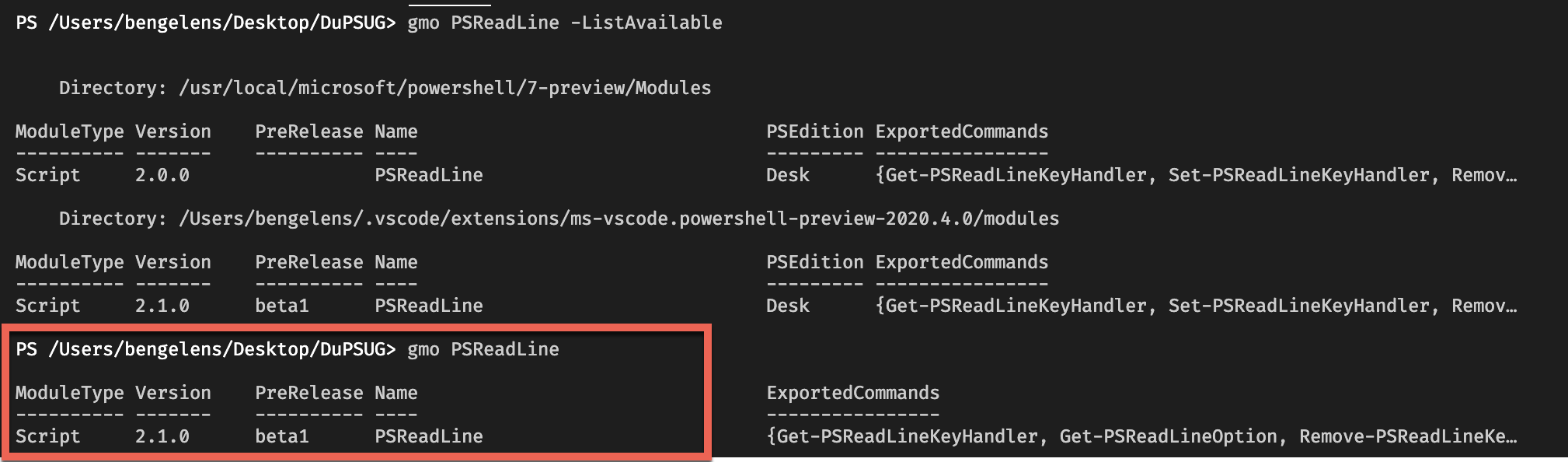
The read square shows the currently loaded psreadline. So the workaround does not work. (Which is another issue on it's own?)
This is from the editorservices log:
2020-04-09 19:32:37.615 +02:00 [WRN] PSReadLine unable to be loaded: Unable to find type [Microsoft.PowerShell.PSConsoleReadLine,Microsoft.PowerShell.PSReadLine2, Version=2.0.0.0, Culture=neutral, PublicKeyToken=null].
Ah I guess we sort by version... Well, you can delete that folder and things will work again. I have a PR out to fix this.
TylerLeonhardt
on 9 Apr 2020
Thanks @TylerLeonhardt! Looking forward to the next preview release :)
bgelens
on 9 Apr 2020
@TylerLeonhardt The workaround not working is indeed caused by sorting: https://github.com/PowerShell/PowerShellEditorServices/blob/master/src/PowerShellEditorServices/Services/PowerShellContext/Session/PSReadLinePromptContext.cs#L36
bgelens
on 9 Apr 2020
Related issues
 guidooliveira
·
3Comments
guidooliveira
·
3Comments
 keposet
·
3Comments
keposet
·
3Comments
 MiYanni
·
3Comments
MiYanni
·
3Comments
 itfranck
·
3Comments
itfranck
·
3Comments
 rs38
·
4Comments
rs38
·
4Comments