Vscode-powershell: .NET Global Tool Startup Issue
Issue Type: Bug
Just opening vscode.
Extension crashes.
Added the log after looking at the powershell extension logs tab.
Trying to debug any powershell file will trigger the same messages.
Extension version: 2020.3.0
VS Code version: Code 1.43.0 (78a4c91400152c0f27ba4d363eb56d2835f9903a, 2020-03-09T19:47:57.235Z)
OS version: Windows_NT x64 10.0.18363
System Info
|Item|Value|
|---|---|
|CPUs|Intel(R) Core(TM) i7-8650U CPU @ 1.90GHz (8 x 2112)|
|GPU Status|2d_canvas: enabled
flash_3d: enabled
flash_stage3d: enabled
flash_stage3d_baseline: enabled
gpu_compositing: enabled
multiple_raster_threads: enabled_on
oop_rasterization: disabled_off
protected_video_decode: enabled
rasterization: enabled
skia_renderer: disabled_off_ok
video_decode: enabled
viz_display_compositor: enabled_on
viz_hit_test_surface_layer: disabled_off_ok
webgl: enabled
webgl2: enabled|
|Load (avg)|undefined|
|Memory (System)|15.93GB (7.29GB free)|
|Process Argv||
|Screen Reader|no|
|VM|0%|
Adding logs:
3/10/2020 2:39:31 PM [NORMAL] - Visual Studio Code v1.43.0 64-bit
3/10/2020 2:39:31 PM [NORMAL] - PowerShell Extension v2020.3.0
3/10/2020 2:39:31 PM [NORMAL] - Operating System: Windows 64-bit
3/10/2020 2:39:31 PM [NORMAL] - Language server starting --
3/10/2020 2:39:31 PM [NORMAL] -     PowerShell executable: C:\Users\dogrinsh\.dotnet\tools\pwsh.exe
3/10/2020 2:39:31 PM [NORMAL] -     PowerShell args: -NoProfile -NonInteractive -ExecutionPolicy Bypass -Command Import-Module 'c:\Users\dogrinsh\.vscode\extensions\ms-vscode.powershell-2020.3.0\modules\PowerShellEditorServices\PowerShellEditorServices.psd1'; Start-EditorServices -HostName 'Visual Studio Code Host' -HostProfileId 'Microsoft.VSCode' -HostVersion '2020.3.0' -AdditionalModules @('PowerShellEditorServices.VSCode') -BundledModulesPath 'c:\Users\dogrinsh\.vscode\extensions\ms-vscode.powershell-2020.3.0\modules' -EnableConsoleRepl -LogLevel 'Normal' -LogPath 'c:\Users\dogrinsh\.vscode\extensions\ms-vscode.powershell-2020.3.0\logs\1583843971-b11e15e1-0da4-4a8c-8176-b9dd440e65411583843968301\EditorServices.log' -SessionDetailsPath 'c:\Users\dogrinsh\.vscode\extensions\ms-vscode.powershell-2020.3.0\sessions\PSES-VSCode-14608-115415' -FeatureFlags @()
3/10/2020 2:39:31 PM [NORMAL] -     PowerShell Editor Services args: Import-Module 'c:\Users\dogrinsh\.vscode\extensions\ms-vscode.powershell-2020.3.0\modules\PowerShellEditorServices\PowerShellEditorServices.psd1'; Start-EditorServices -HostName 'Visual Studio Code Host' -HostProfileId 'Microsoft.VSCode' -HostVersion '2020.3.0' -AdditionalModules @('PowerShellEditorServices.VSCode') -BundledModulesPath 'c:\Users\dogrinsh\.vscode\extensions\ms-vscode.powershell-2020.3.0\modules' -EnableConsoleRepl -LogLevel 'Normal' -LogPath 'c:\Users\dogrinsh\.vscode\extensions\ms-vscode.powershell-2020.3.0\logs\1583843971-b11e15e1-0da4-4a8c-8176-b9dd440e65411583843968301\EditorServices.log' -SessionDetailsPath 'c:\Users\dogrinsh\.vscode\extensions\ms-vscode.powershell-2020.3.0\sessions\PSES-VSCode-14608-115415' -FeatureFlags @()
3/10/2020 2:39:31 PM [NORMAL] - pwsh.exe started.
3/10/2020 2:39:31 PM [NORMAL] - Waiting for session file
3/10/2020 2:41:31 PM [NORMAL] - Error occurred retrieving session file
3/10/2020 2:41:31 PM [NORMAL] - Language server startup failed.
3/10/2020 2:41:31 PM [ERROR] - The language service could not be started:
3/10/2020 2:41:31 PM [ERROR] - Timed out waiting for session file to appear.
 dorgrin6
All 34 comments
I'm not sure why but the extension is trying to load powershell core (pwsh.exe) rather than powershell.exe.
my config file looks like this:
{
"window.zoomLevel": 1,
"diffEditor.ignoreTrimWhitespace": false,
"git.autofetch": true,
"git.enableSmartCommit": true,
"editor.fontFamily": "'Cascadia Code',Consolas, 'Courier New', monospace",
"editor.fontLigatures": true
}
Removing the font settings does not help.
Tried disabling all other extensions.
dorgrin6
on 10 Mar 2020
@dorgrin6 , I just deleted my pwsh.exe and it booted up fine. Obviously, that's not a good long term solution if you still want to have powershell core, but it will get you moving.
 James-Pickett
on 10 Mar 2020
James-Pickett
on 10 Mar 2020
@dorgrin6 were there any other logs, like StartEditorServices.log?
I'm not sure why but the extension is trying to load powershell core (pwsh.exe) rather than powershell.exe.
By default, if you have pwsh.exe installed, the extension will look for that first. You can change this by setting the PowerShell Default Version or clicking on the little version icon in the bottom right and selecting the PowerShell you want from the drop down.
 rjmholt
on 10 Mar 2020
rjmholt
on 10 Mar 2020
Oh you might need to set the log level to Diagnostic in the settings
rjmholt
on 10 Mar 2020
@dorgrin6 what version of the .NET global tool are you using? to find this run:
C:\Users\dogrinsh\.dotnet\tools\pwsh.exe -v
 SydneyhSmith
on 11 Mar 2020
SydneyhSmith
on 11 Mar 2020
I'm seeing this on Ubuntu 18.04 as well.
Same versions of vscode and and extension as OP.
PSVersion: 6.2.3.
 alfredmyers
on 11 Mar 2020
alfredmyers
on 11 Mar 2020
This is https://github.com/PowerShell/vscode-powershell/issues/2158.
Older versions of the PowerShell dotnet global tool have a bug in them where arguments are not processed properly, breaking our startup invocation.
Please update your PowerShell version to 7 to enable this, or install a non-global tool PowerShell installation and configure the PowerShell extension to use it like:
"powershell.powerShellDefaultVersion": "PowerShell (x64)"
I did update to PowerShell 7, and the issue still existed. Here is the workaround that worked for me:
- Exit VS Code
- Rename C:\Program Files\PowerShell to C:\Program Files\PowerShell_
- Open VS Code and wait for PS terminal to start. It should start v 5.1 now.
- Click on the PS version icon (bottom right), and Switch to: Windows PowerShell (x86)
- Once loaded, click on the icon again and Switch to: Windows PowerShell (x64)
- Rename back C:\Program Files\PowerShell to C:\Program Files\PowerShell
Now, when I start VC Code it runs powershell.exe in the terminal and does not hung.
 dgancho
on 12 Mar 2020
dgancho
on 12 Mar 2020
@dgancho can you share any information about the crash you were seeing?
rjmholt
on 12 Mar 2020
I did not look into logs, and nothing crashed, it was just hanging at
=====> PowerShell Integrated Console <=====
I realized this was pwsh.exe, so above steps were to force it load from powershell.exe.
Let me know if want any further info while I ma at my desktop right now
dgancho
on 12 Mar 2020
I think the .NET global tool is significantly slower than the MSI so it might be that you didn't wait long enough, possibly.
 TylerLeonhardt
on 12 Mar 2020
TylerLeonhardt
on 12 Mar 2020
I did leave it for hours :) And can repro again by switching back to PowerShell (x64). It never loads

dgancho
on 12 Mar 2020
Thanks for the info! Can you also attach the logs here so we can get a better idea of what's going on?
TylerLeonhardt
on 12 Mar 2020
Thanks @rjmholt .
Updating to PowerShell 7 did the trick for me:
dotnet tool update powershell -g
@TylerLeonhardt
I think the .NET global tool is significantly slower than the MSI so it might be that you didn't wait long enough, possibly.
Can you elaborate on that?
Is it slower at installation time or at invocation time?
If it is slower at invocation time, then those sensitive to performance may want to choose among the other installation methods described in the docs referenced from Installing various versions of PowerShell
alfredmyers
on 12 Mar 2020
Significantly was an exaggeration. 😅
The MSI bits are optimized for Windows because it can only ever be installed on Windows.
The .NET global tool contains stuff that truly runs on every platform and so it doesn't have such optimizations.
You can see the difference at startup but not usually anywhere else.
TylerLeonhardt
on 12 Mar 2020
@dgancho I think you're seeing a different problem. We're currently tracking the non-specific startup issues in https://github.com/PowerShell/vscode-powershell/issues/2526, and keeping this one focused on .NET global tool issues.
Is it slower at installation time or at invocation time?
It's slower to start up because it can't be cross-genned. This means it must be interpreted a slower way from .NET IL when it starts. This might impact the extension's startup time and if it exceeds the startup timeout, the extension will fail.
However, once it's running and "warm", the JIT will have done at runtime what crossgen does ahead of time, and you'll see the same performance.
Anyway this is all because the .NET global tool has to be platform independent. Platform-specific installations don't have this requirement.
rjmholt
on 12 Mar 2020
@TylerLeonhardt I attach 2 sets of Diagnostic logs (same machine)
v5.1: when "powershell.powerShellDefaultVersion": "Windows PowerShell (x64)"
and
v7.0: when "powershell.powerShellDefaultVersion": "PowerShell (x64)"
dotnet tool update powershell -g did not help. The issue persists and is reproable every time when I switch to v7.0.
dgancho
on 13 Mar 2020
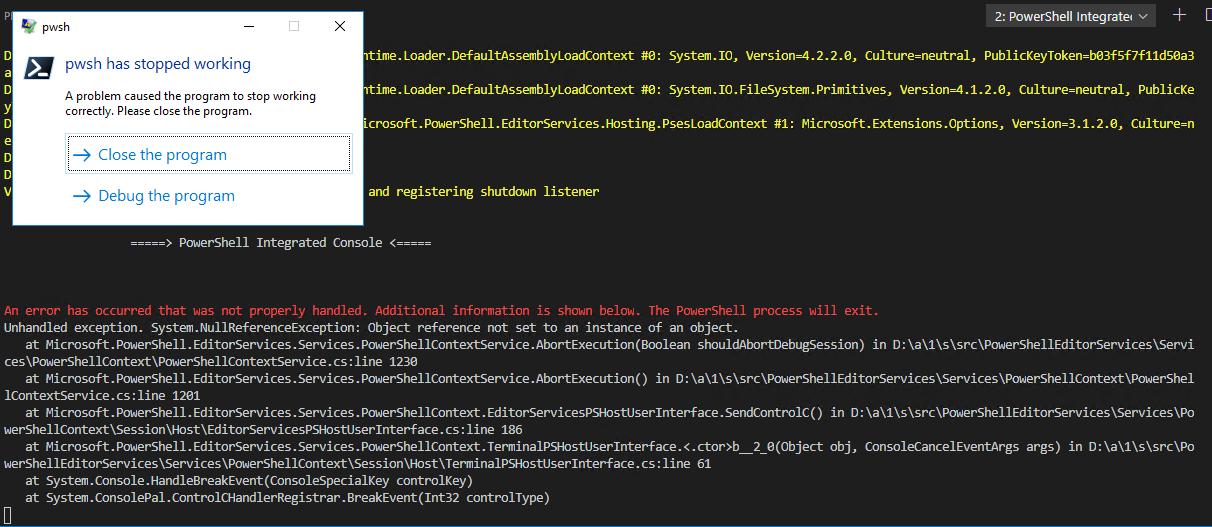
And here is the crash, if I Ctrl+C in the _hanging_ Terminal:

dgancho
on 13 Mar 2020
Can you all give the PowerShell Preview extension a try? We just did a release of it.
Don't forget to disable the regular PowerShell extension for VS Code when you enable the PowerShell Preview extension for VS Code
TylerLeonhardt
on 13 Mar 2020
Just did, same thing same exception, logs attached
v7.0-ext_preview.zip
dgancho
on 13 Mar 2020
@dgancho I'm migrating your issue to https://github.com/PowerShell/vscode-powershell/issues/2554, since it's unrelated to the .NET global tool startup crash
rjmholt
on 13 Mar 2020
This issue has been marked as duplicate and has not had any activity for 1 day. It has been closed for housekeeping purposes.
![msftbot[bot] picture](https://avatars.githubusercontent.com/in/26612?v=4&s=40) msftbot[bot]
on 24 Mar 2020
msftbot[bot]
on 24 Mar 2020
@dgancho I'm migrating your issue to #2554, since it's unrelated to the .NET global tool startup crash
This creates a circular reference for the issue.
 MyITGuy
on 14 Apr 2020
MyITGuy
on 14 Apr 2020
This creates a circular reference for the issue.
@dgancho's issue was not this issue. This issue is https://github.com/PowerShell/vscode-powershell/issues/2158.
rjmholt
on 15 Apr 2020
I recently upgraded from 1.39.2 to 1.44.2 and had this exact issue. I uninstalled 1.44.2 and reinstalled 1.39.2 and all is well again. Seems to be version specific. I only use VS Code for Powershell, so will stick with what works until this is resolved.
 woodknot
on 18 Apr 2020
woodknot
on 18 Apr 2020
I should note that VSCode's version should have no effect on this issue; the extension has its own releases independent of VSCode. Any behavioural difference you're seeing is very likely due to some other factor that has changed
rjmholt
on 29 Apr 2020
I am having the same issue. I do not have PS Core or 7 installed, but can't get the PS extension to start. VS code versions are as follows:
Version: 1.46.0 (system setup)
Commit: a5d1cc28bb5da32ec67e86cc50f84c67cc690321
Date: 2020-06-10T09:03:20.462Z
Electron: 7.3.1
Chrome: 78.0.3904.130
Node.js: 12.8.1
V8: 7.8.279.23-electron.0
OS: Windows_NT x64 6.3.9600
11/06/2020 11:53:47 [NORMAL] - powershell.exe started.
11/06/2020 11:53:47 [NORMAL] - Waiting for session file
11/06/2020 11:55:47 [NORMAL] - Error occurred retrieving session file:
Timed out waiting for session file to appear.
11/06/2020 11:55:47 [NORMAL] - Language server startup failed.
11/06/2020 11:55:47 [ERROR] - The language service could not be started:
11/06/2020 11:55:47 [ERROR] - Timed out waiting for session file to appear.
Happy to supply more logs in requested.
 ssolomon
on 11 Jun 2020
ssolomon
on 11 Jun 2020
Issue Description
I am having the same issue while using PowerShell Extension v2020.6.0
_However, downgrading to *PowerShell Extension v2020.4.0 works, so for now I am using this extension version._*
Attached Logs
6/13/2020 2:28:18 PM [NORMAL] - Visual Studio Code v1.44.0 64-bit
6/13/2020 2:28:18 PM [NORMAL] - PowerShell Extension v2020.6.0
6/13/2020 2:28:18 PM [NORMAL] - Operating System: Windows 64-bit
6/13/2020 2:28:18 PM [NORMAL] -
WARNING: In development mode but PowerShellEditorServices dev module path cannot be found (or has not been built yet): c:\Users\username\.vscode-oss\extensions\PowerShellEditorServices\module

6/13/2020 2:28:18 PM [NORMAL] - Language server starting --
6/13/2020 2:28:18 PM [NORMAL] -     PowerShell executable: C:\Program Files\PowerShell\6\pwsh.exe
6/13/2020 2:28:18 PM [NORMAL] -     PowerShell args: -NoProfile -NonInteractive -ExecutionPolicy Bypass -Command Import-Module 'c:\Users\username\.vscode-oss\extensions\ms-vscode.powershell-2020.6.0\modules\PowerShellEditorServices\PowerShellEditorServices.psd1'; Start-EditorServices -HostName 'Visual Studio Code Host' -HostProfileId 'Microsoft.VSCode' -HostVersion '2020.6.0' -AdditionalModules @('PowerShellEditorServices.VSCode') -BundledModulesPath 'c:\Users\username\.vscode-oss\extensions\ms-vscode.powershell-2020.6.0\modules' -EnableConsoleRepl -StartupBanner "=====> PowerShell Integrated Console v2020.6.0 <=====
" -LogLevel 'Normal' -LogPath 'c:\Users\username\.vscode-oss\extensions\ms-vscode.powershell-2020.6.0\logs\1592038698-someValue.sessionId\EditorServices.log' -SessionDetailsPath 'c:\Users\username\.vscode-oss\extensions\ms-vscode.powershell-2020.6.0\sessions\PSES-VSCode-17304-353107' -FeatureFlags @()
6/13/2020 2:28:18 PM [NORMAL] -     PowerShell Editor Services args: Import-Module 'c:\Users\username\.vscode-oss\extensions\ms-vscode.powershell-2020.6.0\modules\PowerShellEditorServices\PowerShellEditorServices.psd1'; Start-EditorServices -HostName 'Visual Studio Code Host' -HostProfileId 'Microsoft.VSCode' -HostVersion '2020.6.0' -AdditionalModules @('PowerShellEditorServices.VSCode') -BundledModulesPath 'c:\Users\username\.vscode-oss\extensions\ms-vscode.powershell-2020.6.0\modules' -EnableConsoleRepl -StartupBanner "=====> PowerShell Integrated Console v2020.6.0 <=====
" -LogLevel 'Normal' -LogPath 'c:\Users\username\.vscode-oss\extensions\ms-vscode.powershell-2020.6.0\logs\1592038698-someValue.sessionId\EditorServices.log' -SessionDetailsPath 'c:\Users\username\.vscode-oss\extensions\ms-vscode.powershell-2020.6.0\sessions\PSES-VSCode-17304-353107' -FeatureFlags @()
6/13/2020 2:28:18 PM [NORMAL] - pwsh.exe started.
6/13/2020 2:28:18 PM [NORMAL] - Waiting for session file
6/13/2020 2:28:20 PM [NORMAL] - Session file found
6/13/2020 2:28:20 PM [NORMAL] - Registering terminal close callback
6/13/2020 2:28:20 PM [NORMAL] - Registering terminal PID log callback
6/13/2020 2:28:20 PM [NORMAL] - pwsh.exe PID: 30300
6/13/2020 2:28:20 PM [NORMAL] - Language server started.
6/13/2020 2:28:20 PM [NORMAL] - {"status":"started","languageServiceTransport":"NamedPipe","languageServicePipeName":"\\\\.\\pipe\\PSES_5bunfc4r.jbr","debugServiceTransport":"NamedPipe","debugServicePipeName":"\\\\.\\pipe\\PSES_ydveun12.1ao"}
6/13/2020 2:28:20 PM [NORMAL] - Connecting to language service on pipe \\.\pipe\PSES_5bunfc4r.jbr...
6/13/2020 2:28:20 PM [NORMAL] - Language service connected.
PowerShell Integrated Console hung up like this :
=====> PowerShell Integrated Console v2020.6.0 <=====
Environment Information
Visual Studio Code
| Name | Version |
| --- | --- |
| Operating System | Windows_NT x64 10.0.19536 |
| VSCode | 1.44.0|
| PowerShell Extension Version | 2020.6.0 |
PowerShell Information
|Name|Value|
|---|---|
|PSVersion|6.2.3|
|PSEdition|Core|
|GitCommitId|6.2.3|
|OS|Microsoft Windows 10.0.19536 |
|Platform|Win32NT|
|PSCompatibleVersions|1.0 2.0 3.0 4.0 5.0 5.1.10032.0 6.2.3|
|PSRemotingProtocolVersion|2.3|
|SerializationVersion|1.1.0.1|
|WSManStackVersion|3.0|
 geekwhocodes
on 13 Jun 2020
geekwhocodes
on 13 Jun 2020
@geekwhocodes does this issue reproduce with PowerShell 7?
SydneyhSmith
on 18 Jun 2020
It works with PowerShell 7 (I have 7.0.2 version installed).
geekwhocodes
on 19 Jun 2020
I experience the issue where the extension fails to start while I am using powershell core 7.0.3.
I see in the logs of the startup failure that the following command is being executed:
pwsh -NoProfile -NonInteractive -ExecutionPolicy Bypass -Command Import-Module 'c:\Users\chris.vscode\extensions\ms-vscode.powershell-2020.6.0\modules\PowerShellEditorServices\PowerShellEditorServices.psd1'; Start-EditorServices -HostName 'Visual Studio Code Host' -HostProfileId 'Microsoft.VSCode' -HostVersion '2020.6.0' -AdditionalModules @('PowerShellEditorServices.VSCode') -BundledModulesPath 'c:\Users\chris.vscode\extensions\ms-vscode.powershell-2020.6.0\modules' -EnableConsoleRepl -StartupBanner "=====> PowerShell Integrated Console v2020.6.0 <=====" -LogLevel 'Normal' -LogPath 'c:\Users\chris.vscode\extensions\ms-vscode.powershell-2020.6.0\logs1596649054-223a0350-ce4f-42b1-840d-553b9a42438c1596649053672\EditorServices.log' -SessionDetailsPath 'c:\Users\chris.vscode\extensions\ms-vscode.powershell-2020.6.0\sessions\PSES-VSCode-1204-384313' -FeatureFlags @()
If I attempt to execute this command in a command shell, I get this:
ParserError:
Line |
   1 |  … tartupBanner =====> PowerShell Integrated Console v2020.6.0 <===== -L …
     |                                                                ~
     | The '<' operator is reserved for future use.
I don't know much about powershell but I think the parser looks for commands inside double quotes but not in single quotes, so I think the StartupBanner string should be in single quotes. I could not find the source file that issues the command, so I couldn't fix it.
However, I found:
"C:\Users\chris.vscode\extensions\ms-vscode.powershell-2020.6.0\package.json"
And in it:
"powershell.integratedConsole.suppressStartupBanner": {
                    "type": "boolean",
                    "default": false,
                    "description": "Do not show the Powershell Integrated Console banner on launch"
                },
I changed this to "true" to hopefully make the app not send the -StartupBanner command at all. It appears to work!
 cda-1
on 5 Aug 2020
cda-1
on 5 Aug 2020
@cda-1 that issue is fixed in the preview extension by https://github.com/PowerShell/vscode-powershell/pull/2788. The next stable release will also contain the fix
rjmholt
on 5 Aug 2020
Please ignore the last link, copy paste error.
 chughesvf
on 13 Oct 2020
chughesvf
on 13 Oct 2020
Related issues
 nathan-alden-hp
·
3Comments
nathan-alden-hp
·
3Comments
 inthemedium
·
3Comments
inthemedium
·
3Comments
 GQnzo
·
3Comments
GQnzo
·
3Comments
 CJHarmath
·
3Comments
CJHarmath
·
3Comments
 AWahlqvist
·
3Comments
AWahlqvist
·
3Comments
Most helpful comment
Issue Description
I am having the same issue while using PowerShell Extension v2020.6.0
_However, downgrading to *PowerShell Extension v2020.4.0 works, so for now I am using this extension version._*
Attached Logs
PowerShell Integrated Console hung up like this :
=====> PowerShell Integrated Console v2020.6.0 <=====
Environment Information
Visual Studio Code
| Name | Version |
| --- | --- |
| Operating System | Windows_NT x64 10.0.19536 |
| VSCode | 1.44.0|
| PowerShell Extension Version | 2020.6.0 |
PowerShell Information
|Name|Value|
|---|---|
|PSVersion|6.2.3|
|PSEdition|Core|
|GitCommitId|6.2.3|
|OS|Microsoft Windows 10.0.19536 |
|Platform|Win32NT|
|PSCompatibleVersions|1.0 2.0 3.0 4.0 5.0 5.1.10032.0 6.2.3|
|PSRemotingProtocolVersion|2.3|
|SerializationVersion|1.1.0.1|
|WSManStackVersion|3.0|