Vscode-powershell: Interactive Console Stops Responding
System Details
System Details Output
### VSCode version: 1.42.1 c47d83b293181d9be64f27ff093689e8e7aed054 x64

### VSCode extensions:
[email protected]
[email protected]
[email protected]
[email protected]
[email protected]
[email protected]
[email protected]
[email protected]
[email protected]
[email protected]
[email protected]
[email protected]


### PSES version: 2.0.0.0

### PowerShell version:

Name                           Value
----                           -----
PSVersion                      5.1.18362.628
PSEdition                      Desktop
PSCompatibleVersions           {1.0, 2.0, 3.0, 4.0...}
BuildVersion                   10.0.18362.628
CLRVersion                     4.0.30319.42000
WSManStackVersion              3.0
PSRemotingProtocolVersion      2.3
SerializationVersion           1.1.0.1
Issue Description
The PowerShell Interactive Console no longer accepts keystrokes sometimes. It's very hit or miss but has happened to me a couple of times today.
Expected Behaviour
The interactive console continues to function.
Actual Behaviour
Typing doesn't have any effect on the interactive console.
https://recordit.co/Ral9dac8RT
Attached Logs
Follow the instructions in the troubleshooting docs
about capturing and sending logs.
 adamdriscoll
All 31 comments
This has happened to me too on 2020.3.0.
 rkeithhill
on 6 Mar 2020
rkeithhill
on 6 Mar 2020
Have either of you been using the Preview extension? Curious if you ever saw that behavior then.
You could still try the PowerShell Preview extension which is currently slightly behind Stable...
I want to try and narrow down when this problem started happening.
 TylerLeonhardt
on 6 Mar 2020
TylerLeonhardt
on 6 Mar 2020
I wasn't using the preview extension day-to-day. I installed it a couple of times but ran into issues so I was on the previous stable. So this is the first I'm seeing this behavior.
I can try the preview to see if I see it there.
adamdriscoll
on 7 Mar 2020
I just ran into this again. This time, I realized something was wrong when I couldn't start the debugger. The terminal is also stuck. Here's my log. I have diagnostic logging enabled but I don't see any diagnostic level stuff so I'm not sure what's up with that.
3/7/2020 8:34:03 AM [NORMAL] - Visual Studio Code v1.42.1 64-bit
3/7/2020 8:34:03 AM [NORMAL] - PowerShell Extension v2020.3.0
3/7/2020 8:34:03 AM [NORMAL] - Operating System: Windows 64-bit
3/7/2020 8:34:03 AM [NORMAL] - Language server starting --
3/7/2020 8:34:03 AM [NORMAL] - PowerShell executable: C:\WINDOWS\System32\WindowsPowerShell\v1.0\powershell.exe
3/7/2020 8:34:03 AM [NORMAL] - PowerShell args: -NoProfile -NonInteractive -ExecutionPolicy Bypass -Command Import-Module 'c:\Users\adamr\.vscode\extensions\ms-vscode.powershell-2020.3.0\modules\PowerShellEditorServices\PowerShellEditorServices.psd1'; Start-EditorServices -HostName 'Visual Studio Code Host' -HostProfileId 'Microsoft.VSCode' -HostVersion '2020.3.0' -AdditionalModules @('PowerShellEditorServices.VSCode') -BundledModulesPath 'c:\Users\adamr\.vscode\extensions\ms-vscode.powershell-2020.3.0\modules' -EnableConsoleRepl -LogLevel 'Diagnostic' -LogPath 'c:\Users\adamr\.vscode\extensions\ms-vscode.powershell-2020.3.0\logs\1583595243-bfa2bad5-5c6f-4411-99a2-3754bd34d4c01583595231974\EditorServices.log' -SessionDetailsPath 'c:\Users\adamr\.vscode\extensions\ms-vscode.powershell-2020.3.0\sessions\PSES-VSCode-19380-591224' -FeatureFlags @()
3/7/2020 8:34:03 AM [NORMAL] - PowerShell Editor Services args: Import-Module 'c:\Users\adamr\.vscode\extensions\ms-vscode.powershell-2020.3.0\modules\PowerShellEditorServices\PowerShellEditorServices.psd1'; Start-EditorServices -HostName 'Visual Studio Code Host' -HostProfileId 'Microsoft.VSCode' -HostVersion '2020.3.0' -AdditionalModules @('PowerShellEditorServices.VSCode') -BundledModulesPath 'c:\Users\adamr\.vscode\extensions\ms-vscode.powershell-2020.3.0\modules' -EnableConsoleRepl -LogLevel 'Diagnostic' -LogPath 'c:\Users\adamr\.vscode\extensions\ms-vscode.powershell-2020.3.0\logs\1583595243-bfa2bad5-5c6f-4411-99a2-3754bd34d4c01583595231974\EditorServices.log' -SessionDetailsPath 'c:\Users\adamr\.vscode\extensions\ms-vscode.powershell-2020.3.0\sessions\PSES-VSCode-19380-591224' -FeatureFlags @()
3/7/2020 8:34:03 AM [NORMAL] - powershell.exe started.
3/7/2020 8:34:03 AM [NORMAL] - Waiting for session file
3/7/2020 8:34:07 AM [NORMAL] - Session file found
3/7/2020 8:34:07 AM [NORMAL] - Registering terminal close callback
3/7/2020 8:34:07 AM [NORMAL] - Registering terminal PID log callback
3/7/2020 8:34:07 AM [NORMAL] - powershell.exe PID: 23240
3/7/2020 8:34:07 AM [NORMAL] - Language server started.
3/7/2020 8:34:07 AM [NORMAL] - {"status":"started","languageServiceTransport":"NamedPipe","languageServicePipeName":"\\\\.\\pipe\\PSES_0v4lvglr.tej","debugServiceTransport":"NamedPipe","debugServicePipeName":"\\\\.\\pipe\\PSES_eosq4etr.e3y"}
3/7/2020 8:34:07 AM [NORMAL] - Connecting to language service on pipe \\.\pipe\PSES_0v4lvglr.tej...
3/7/2020 8:34:07 AM [NORMAL] - Language service connected.
3/7/2020 8:34:10 AM [WARNING] - Invalid Version: null
The last warning there was like 15 minutes before I actually encountered the problem.
adamdriscoll
on 7 Mar 2020
Here's the editor service log.
adamdriscoll
on 7 Mar 2020
@adamdriscoll what PackageManagement version do you have installed? Can you try updating it past 1.4.5 and see if this continues?
 rjmholt
on 11 Mar 2020
rjmholt
on 11 Mar 2020
I have 1.4.6 installed (with a bunch of others, apparently)
PS F:\universal-automation\src\installer> get-module packagemanagement -list
Directory: C:\Users\adamr\Documents\WindowsPowerShell\Modules
ModuleType Version Name ExportedCommands
---------- ------- ---- ----------------
Script 1.4.6 PackageManagement {Find-Package, Get-Package, Get-PackageProvider, Get-PackageSource...}
Script 1.3.1 PackageManagement {Find-Package, Get-Package, Get-PackageProvider, Get-PackageSource...}
Script 1.1.7.2 PackageManagement {Find-Package, Get-Package, Get-PackageProvider, Get-PackageSource...}
Directory: C:\Program Files\WindowsPowerShell\Modules
ModuleType Version Name ExportedCommands
---------- ------- ---- ----------------
Script 1.2.4 PackageManagement {Find-Package, Get-Package, Get-PackageProvider, Get-PackageSource...}
Script 1.2.3 PackageManagement {Find-Package, Get-Package, Get-PackageProvider, Get-PackageSource...}
Script 1.1.7.0 PackageManagement {Find-Package, Get-Package, Get-PackageProvider, Get-PackageSource...}
Binary 1.0.0.1 PackageManagement {Find-Package, Get-Package, Get-PackageProvider, Get-PackageSource...}
If you run import-module PackageManagement -passthru in the integrated console it should tell you which is being used there
rjmholt
on 12 Mar 2020
It's using 1.4.6
import-module PackageManagement -passthru


ModuleType Version    Name                                ExportedCommands
---------- -------    ----                                ----------------
Script     1.4.6      PackageManagement                   {Find-Package, Find-PackageProvider, Get-Package, Get-PackageProvider...}
Same issue here with version 1.0.0.1 of PackageManagement
Several days the console is unusable and F8 and F5 also not working. Need to reload window.
import-module PackageManagement -passthru

ModuleType Version    Name                                ExportedCommands
---------- -------    ----                                ----------------
Binary     1.0.0.1    PackageManagement                   {Find-Package, Find-PackageProvider, Get-Package, Get-PackageProvider...}
 bvbeek
on 12 Mar 2020
bvbeek
on 12 Mar 2020
Same issue here with version 1.0.0.1 of PackageManagement
@bvbeek you'll need to upgrade PackageManagement. Older versions of it have an issue that cause deadlocks when working in PSES. We spent some time looking into it and it wasn't possible to mitigate from PSES; instead @SeeminglyScience fixed the underlying issue in PackageManagement.
Beyond that though it does sound like there's another issue in the extension somewhere, but we haven't been able to reproduce it yet or collect enough information to have an inkling of why it's occurring.
rjmholt
on 12 Mar 2020
From @adamdriscoll's logs:
[Error - 8:35:18 AM] Failed to handle notification completionItem/resolve - System.Management.Automation.PSInvalidOperationException: The pipeline was not run because a pipeline is already running. Pipelines cannot be run concurrently.
   at System.Management.Automation.Runspaces.PipelineBase.DoConcurrentCheck(Boolean syncCall, Object syncObject, Boolean isInLock)
   at System.Management.Automation.Runspaces.RunspaceBase.DoConcurrentCheckAndAddToRunningPipelines(PipelineBase pipeline, Boolean syncCall)
   at System.Management.Automation.Runspaces.PipelineBase.CoreInvoke(IEnumerable input, Boolean syncCall)
   at System.Management.Automation.Runspaces.PipelineBase.Invoke(IEnumerable input)
   at System.Management.Automation.PowerShell.Worker.ConstructPipelineAndDoWork(Runspace rs, Boolean performSyncInvoke)
   at System.Management.Automation.PowerShell.Worker.CreateRunspaceIfNeededAndDoWork(Runspace rsToUse, Boolean isSync)
   at System.Management.Automation.PowerShell.CoreInvokeHelper[TInput,TOutput](PSDataCollection`1 input, PSDataCollection`1 output, PSInvocationSettings settings)
   at System.Management.Automation.PowerShell.CoreInvoke[TInput,TOutput](PSDataCollection`1 input, PSDataCollection`1 output, PSInvocationSettings settings)
   at System.Management.Automation.PowerShell.Invoke[T](IEnumerable input, PSInvocationSettings settings)
   at System.Threading.Tasks.Task`1.InnerInvoke()
   at System.Threading.Tasks.Task.Execute()
--- End of stack trace from previous location where exception was thrown ---
   at System.Runtime.ExceptionServices.ExceptionDispatchInfo.Throw()
   at System.Runtime.CompilerServices.TaskAwaiter.HandleNonSuccessAndDebuggerNotification(Task task)
   at Microsoft.PowerShell.EditorServices.Services.PowerShellContextService.<ExecuteCommandAsync>d__89`1.MoveNext()
--- End of stack trace from previous location where exception was thrown ---
   at System.Runtime.ExceptionServices.ExceptionDispatchInfo.Throw()
   at Microsoft.PowerShell.EditorServices.Services.PowerShellContextService.<ExecuteCommandAsync>d__89`1.MoveNext()
--- End of stack trace from previous location where exception was thrown ---
   at System.Runtime.ExceptionServices.ExceptionDispatchInfo.Throw()
   at Microsoft.PowerShell.EditorServices.Services.PowerShellContextService.<ExecuteCommandAsync>d__89`1.MoveNext()
--- End of stack trace from previous location where exception was thrown ---
   at System.Runtime.ExceptionServices.ExceptionDispatchInfo.Throw()
   at System.Runtime.CompilerServices.TaskAwaiter.HandleNonSuccessAndDebuggerNotification(Task task)
   at Microsoft.PowerShell.EditorServices.Services.PowerShellContext.CommandHelpers.<GetCommandSynopsisAsync>d__3.MoveNext()
--- End of stack trace from previous location where exception was thrown ---
   at System.Runtime.ExceptionServices.ExceptionDispatchInfo.Throw()
   at System.Runtime.CompilerServices.TaskAwaiter.HandleNonSuccessAndDebuggerNotification(Task task)
   at Microsoft.PowerShell.EditorServices.Handlers.CompletionHandler.<Handle>d__14.MoveNext()
--- End of stack trace from previous location where exception was thrown ---
   at System.Runtime.ExceptionServices.ExceptionDispatchInfo.Throw()
   at System.Runtime.CompilerServices.TaskAwaiter.HandleNonSuccessAndDebuggerNotification(Task task)
   at OmniSharp.Extensions.LanguageServer.Server.Pipelines.ResolveCommandPipeline`2.<Handle>d__5.MoveNext()
--- End of stack trace from previous location where exception was thrown ---
   at System.Runtime.ExceptionServices.ExceptionDispatchInfo.Throw()
   at System.Runtime.CompilerServices.TaskAwaiter.HandleNonSuccessAndDebuggerNotification(Task task)
   at MediatR.Pipeline.RequestPostProcessorBehavior`2.<Handle>d__2.MoveNext()
--- End of stack trace from previous location where exception was thrown ---
   at System.Runtime.ExceptionServices.ExceptionDispatchInfo.Throw()
   at System.Runtime.CompilerServices.TaskAwaiter.HandleNonSuccessAndDebuggerNotification(Task task)
   at MediatR.Pipeline.RequestPreProcessorBehavior`2.<Handle>d__2.MoveNext()
--- End of stack trace from previous location where exception was thrown ---
   at System.Runtime.ExceptionServices.ExceptionDispatchInfo.Throw()
   at System.Runtime.CompilerServices.TaskAwaiter.HandleNonSuccessAndDebuggerNotification(Task task)
   at OmniSharp.Extensions.JsonRpc.RequestRouterBase`1.<RouteRequest>d__6.MoveNext()
[Info  - 8:35:18 AM] Finished: Routing Request (354) completionItem/resolve in 15ms
[Error - 8:35:18 AM] Request completionItem/resolve failed.
  Message: Internal Error - System.Management.Automation.PSInvalidOperationException: The pipeline was not run because a pipeline is already running. Pipelines cannot be run concurrently.
   at System.Management.Automation.Runspaces.PipelineBase.DoConcurrentCheck(Boolean syncCall, Object syncObject, Boolean isInLock)
   at System.Management.Automation.Runspaces.RunspaceBase.DoConcurrentCheckAndAddToRunningPipelines(PipelineBase pipeline, Boolean syncCall)
   at System.Management.Automation.Runspaces.PipelineBase.CoreInvoke(IEnumerable input, Boolean syncCall)
   at System.Management.Automation.Runspaces.PipelineBase.Invoke(IEnumerable input)
   at System.Management.Automation.PowerShell.Worker.ConstructPipelineAndDoWork(Runspace rs, Boolean performSyncInvoke)
   at System.Management.Automation.PowerShell.Worker.CreateRunspaceIfNeededAndDoWork(Runspace rsToUse, Boolean isSync)
   at System.Management.Automation.PowerShell.CoreInvokeHelper[TInput,TOutput](PSDataCollection`1 input, PSDataCollection`1 output, PSInvocationSettings settings)
   at System.Management.Automation.PowerShell.CoreInvoke[TInput,TOutput](PSDataCollection`1 input, PSDataCollection`1 output, PSInvocationSettings settings)
   at System.Management.Automation.PowerShell.Invoke[T](IEnumerable input, PSInvocationSettings settings)
   at System.Threading.Tasks.Task`1.InnerInvoke()
   at System.Threading.Tasks.Task.Execute()
--- End of stack trace from previous location where exception was thrown ---
   at System.Runtime.ExceptionServices.ExceptionDispatchInfo.Throw()
   at System.Runtime.CompilerServices.TaskAwaiter.HandleNonSuccessAndDebuggerNotification(Task task)
   at Microsoft.PowerShell.EditorServices.Services.PowerShellContextService.<ExecuteCommandAsync>d__89`1.MoveNext()
--- End of stack trace from previous location where exception was thrown ---
   at System.Runtime.ExceptionServices.ExceptionDispatchInfo.Throw()
   at Microsoft.PowerShell.EditorServices.Services.PowerShellContextService.<ExecuteCommandAsync>d__89`1.MoveNext()
--- End of stack trace from previous location where exception was thrown ---
   at System.Runtime.ExceptionServices.ExceptionDispatchInfo.Throw()
   at Microsoft.PowerShell.EditorServices.Services.PowerShellContextService.<ExecuteCommandAsync>d__89`1.MoveNext()
--- End of stack trace from previous location where exception was thrown ---
   at System.Runtime.ExceptionServices.ExceptionDispatchInfo.Throw()
   at System.Runtime.CompilerServices.TaskAwaiter.HandleNonSuccessAndDebuggerNotification(Task task)
   at Microsoft.PowerShell.EditorServices.Services.PowerShellContext.CommandHelpers.<GetCommandSynopsisAsync>d__3.MoveNext()
--- End of stack trace from previous location where exception was thrown ---
   at System.Runtime.ExceptionServices.ExceptionDispatchInfo.Throw()
   at System.Runtime.CompilerServices.TaskAwaiter.HandleNonSuccessAndDebuggerNotification(Task task)
   at Microsoft.PowerShell.EditorServices.Handlers.CompletionHandler.<Handle>d__14.MoveNext()
--- End of stack trace from previous location where exception was thrown ---
   at System.Runtime.ExceptionServices.ExceptionDispatchInfo.Throw()
   at System.Runtime.CompilerServices.TaskAwaiter.HandleNonSuccessAndDebuggerNotification(Task task)
   at OmniSharp.Extensions.LanguageServer.Server.Pipelines.ResolveCommandPipeline`2.<Handle>d__5.MoveNext()
--- End of stack trace from previous location where exception was thrown ---
   at System.Runtime.ExceptionServices.ExceptionDispatchInfo.Throw()
   at System.Runtime.CompilerServices.TaskAwaiter.HandleNonSuccessAndDebuggerNotification(Task task)
   at MediatR.Pipeline.RequestPostProcessorBehavior`2.<Handle>d__2.MoveNext()
--- End of stack trace from previous location where exception was thrown ---
   at System.Runtime.ExceptionServices.ExceptionDispatchInfo.Throw()
   at System.Runtime.CompilerServices.TaskAwaiter.HandleNonSuccessAndDebuggerNotification(Task task)
   at MediatR.Pipeline.RequestPreProcessorBehavior`2.<Handle>d__2.MoveNext()
--- End of stack trace from previous location where exception was thrown ---
   at System.Runtime.ExceptionServices.ExceptionDispatchInfo.Throw()
   at System.Runtime.CompilerServices.TaskAwaiter.HandleNonSuccessAndDebuggerNotification(Task task)
   at OmniSharp.Extensions.JsonRpc.RequestRouterBase`1.<RouteRequest>d__6.MoveNext()
  Code: -32602
[Info  - 8:35:18 AM]
There are about 300 of those in his logs. Also a result of the signatureHelp message.
``
[Error - 8:42:11 AM] Failed to handle notification textDocument/signatureHelp - System.Management.Automation.InvalidPowerShellStateException: The state of the current PowerShell instance is not valid for this operation.
   at System.Management.Automation.PowerShell.AssertChangesAreAccepted()
   at System.Management.Automation.PowerShell.set_Commands(PSCommand value)
   at Microsoft.PowerShell.EditorServices.Services.PowerShellContextService.<ExecuteCommandAsync>d__89
1.MoveNext()
--- End of stack trace from previous location where exception was thrown ---
at System.Runtime.ExceptionServices.ExceptionDispatchInfo.Throw()
at Microsoft.PowerShell.EditorServices.Services.PowerShellContextService.1.MoveNext()
--- End of stack trace from previous location where exception was thrown ---
at System.Runtime.ExceptionServices.ExceptionDispatchInfo.Throw()
at System.Runtime.CompilerServices.TaskAwaiter.HandleNonSuccessAndDebuggerNotification(Task task)
at Microsoft.PowerShell.EditorServices.Services.PowerShellContext.CommandHelpers.<GetCommandInfoAsync>d__2.MoveNext()
--- End of stack trace from previous location where exception was thrown ---
at System.Runtime.ExceptionServices.ExceptionDispatchInfo.Throw()
at System.Runtime.CompilerServices.TaskAwaiter.HandleNonSuccessAndDebuggerNotification(Task task)
at Microsoft.PowerShell.EditorServices.Services.SymbolsService.<FindParameterSetsInFileAsync>d__18.MoveNext()
--- End of stack trace from previous location where exception was thrown ---
at System.Runtime.ExceptionServices.ExceptionDispatchInfo.Throw()
at System.Runtime.CompilerServices.TaskAwaiter.HandleNonSuccessAndDebuggerNotification(Task task)
at Microsoft.PowerShell.EditorServices.Handlers.SignatureHelpHandler.<Handle>d__9.MoveNext()
--- End of stack trace from previous location where exception was thrown ---
at System.Runtime.ExceptionServices.ExceptionDispatchInfo.Throw()
at System.Runtime.CompilerServices.TaskAwaiter.HandleNonSuccessAndDebuggerNotification(Task task)
at OmniSharp.Extensions.LanguageServer.Server.Pipelines.ResolveCommandPipeline2.
--- End of stack trace from previous location where exception was thrown ---
at System.Runtime.ExceptionServices.ExceptionDispatchInfo.Throw()
at System.Runtime.CompilerServices.TaskAwaiter.HandleNonSuccessAndDebuggerNotification(Task task)
at MediatR.Pipeline.RequestPostProcessorBehavior2.<Handle>d__2.MoveNext()
--- End of stack trace from previous location where exception was thrown ---
at System.Runtime.ExceptionServices.ExceptionDispatchInfo.Throw()
at System.Runtime.CompilerServices.TaskAwaiter.HandleNonSuccessAndDebuggerNotification(Task task)
at MediatR.Pipeline.RequestPreProcessorBehavior2.
--- End of stack trace from previous location where exception was thrown ---
at System.Runtime.ExceptionServices.ExceptionDispatchInfo.Throw()
at System.Runtime.CompilerServices.TaskAwaiter.HandleNonSuccessAndDebuggerNotification(Task task)
at OmniSharp.Extensions.JsonRpc.RequestRouterBase1.<RouteRequest>d__6.MoveNext()
[Info - 8:42:11 AM] Finished: Routing Request (1038) textDocument/signatureHelp in 1ms
[Error - 8:42:11 AM] Request textDocument/signatureHelp failed.
Message: Internal Error - System.Management.Automation.InvalidPowerShellStateException: The state of the current PowerShell instance is not valid for this operation.
at System.Management.Automation.PowerShell.AssertChangesAreAccepted()
at System.Management.Automation.PowerShell.set_Commands(PSCommand value)
at Microsoft.PowerShell.EditorServices.Services.PowerShellContextService.<ExecuteCommandAsync>d__891.MoveNext()
--- End of stack trace from previous location where exception was thrown ---
at System.Runtime.ExceptionServices.ExceptionDispatchInfo.Throw()
at Microsoft.PowerShell.EditorServices.Services.PowerShellContextService.1.MoveNext()
--- End of stack trace from previous location where exception was thrown ---
at System.Runtime.ExceptionServices.ExceptionDispatchInfo.Throw()
at System.Runtime.CompilerServices.TaskAwaiter.HandleNonSuccessAndDebuggerNotification(Task task)
at Microsoft.PowerShell.EditorServices.Services.PowerShellContext.CommandHelpers.<GetCommandInfoAsync>d__2.MoveNext()
--- End of stack trace from previous location where exception was thrown ---
at System.Runtime.ExceptionServices.ExceptionDispatchInfo.Throw()
at System.Runtime.CompilerServices.TaskAwaiter.HandleNonSuccessAndDebuggerNotification(Task task)
at Microsoft.PowerShell.EditorServices.Services.SymbolsService.<FindParameterSetsInFileAsync>d__18.MoveNext()
--- End of stack trace from previous location where exception was thrown ---
at System.Runtime.ExceptionServices.ExceptionDispatchInfo.Throw()
at System.Runtime.CompilerServices.TaskAwaiter.HandleNonSuccessAndDebuggerNotification(Task task)
at Microsoft.PowerShell.EditorServices.Handlers.SignatureHelpHandler.<Handle>d__9.MoveNext()
--- End of stack trace from previous location where exception was thrown ---
at System.Runtime.ExceptionServices.ExceptionDispatchInfo.Throw()
at System.Runtime.CompilerServices.TaskAwaiter.HandleNonSuccessAndDebuggerNotification(Task task)
at OmniSharp.Extensions.LanguageServer.Server.Pipelines.ResolveCommandPipeline2.
--- End of stack trace from previous location where exception was thrown ---
at System.Runtime.ExceptionServices.ExceptionDispatchInfo.Throw()
at System.Runtime.CompilerServices.TaskAwaiter.HandleNonSuccessAndDebuggerNotification(Task task)
at MediatR.Pipeline.RequestPostProcessorBehavior2.<Handle>d__2.MoveNext()
--- End of stack trace from previous location where exception was thrown ---
at System.Runtime.ExceptionServices.ExceptionDispatchInfo.Throw()
at System.Runtime.CompilerServices.TaskAwaiter.HandleNonSuccessAndDebuggerNotification(Task task)
at MediatR.Pipeline.RequestPreProcessorBehavior2.
--- End of stack trace from previous location where exception was thrown ---
at System.Runtime.ExceptionServices.ExceptionDispatchInfo.Throw()
at System.Runtime.CompilerServices.TaskAwaiter.HandleNonSuccessAndDebuggerNotification(Task task)
at OmniSharp.Extensions.JsonRpc.RequestRouterBase`1.
Code: -32602
TylerLeonhardt
on 12 Mar 2020
Can you all give the PowerShell Preview extension a try? We just did a release of it.
Don't forget to disable the regular PowerShell extension for VS Code when you enable the PowerShell Preview extension for VS Code
TylerLeonhardt
on 13 Mar 2020
Installed. I've got logging and all that jazz enabled and will upload anything relevant when\if I run into the issue.
adamdriscoll
on 13 Mar 2020
Installed and testing right now
bvbeek
on 13 Mar 2020
If anything, we've added more logging which will help us diagnose better
TylerLeonhardt
on 13 Mar 2020
So I still haven't run into the issue where everything locks up. That said, I have just run into an issue where I can no longer start the debugger and IntelliSense doesn't work.
Checking on the logs, I noticed this.
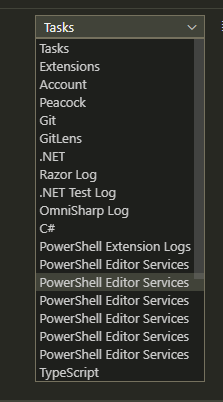
They pretty much all end the same:
[Info  - 11:41:52 AM] Execution completed successfully.
[Info  - 11:41:52 AM] Attempting to execute command(s):


            [System.Diagnostics.DebuggerHidden()]
            [System.Diagnostics.DebuggerStepThrough()]
            param()
            return [Microsoft.PowerShell.PSConsoleReadLine, Microsoft.PowerShell.PSReadLine2, Version=2.0.0.0, Culture=neutral, PublicKeyToken=null]::ReadLine(
                $Host.Runspace,
                $ExecutionContext,
                $args[0]) System.Threading.CancellationToken

[Info  - 11:41:52 AM] Execution abort requested...
[Error - 11:42:24 AM] Connection to server got closed. Server will not be restarted.
I have killed the PS Session and started a new one more than once but it doesn't seem to solve the issue.
adamdriscoll
on 13 Mar 2020
I must have a magical file because now I can debug it once and it always gets into the state where it can no longer debug.
adamdriscoll
on 13 Mar 2020
@adamdriscoll Can you type in the integrated console? What happens when you type a command and hit enter? Does it invoke the command or hang?
 SeeminglyScience
on 13 Mar 2020
SeeminglyScience
on 13 Mar 2020
I am also experiencing this exact issue. With extension PowerShell extension version 2020.3.0.
Like @bvbeek I have the same module version for PackageManagement.
get-module packagemanagement -list


    Directory: C:\Program Files\WindowsPowerShell\Modules


ModuleType Version    Name                                ExportedCommands
---------- -------    ----                                ----------------
Binary     1.0.0.1    PackageManagement                   {Find-Package, Get-Package, Get-PackageProvider, Get-PackageSource...}
I have installed the preview version and will report back if the issue still persists.
 dbrennand
on 17 Mar 2020
dbrennand
on 17 Mar 2020
Sigh. I am experiencing the same issue with the preview extension 😢
EDIT: Debug logs sent.
dbrennand
on 17 Mar 2020
@dbrennand thanks for the additional logs, version 1.0.0.1 of PackageManagement will still give you this issue, to update to the latest version where this is resolved please run Install-Module PackageManagement -Force -AllowClobber thanks!
 SydneyhSmith
on 17 Mar 2020
SydneyhSmith
on 17 Mar 2020
Oh that was the solution? I didn't realise. I have updated the module as you say. I now have:
ModuleType Version    Name                                ExportedCommands
---------- -------    ----                                ----------------
Script     1.4.6      PackageManagement                   {Find-Package, Get-Package, Get-PackageProvider, Get-PackageSource...}
Binary     1.0.0.1    PackageManagement                   {Find-Package, Get-Package, Get-PackageProvider, Get-PackageSource...}
Do I need to uninstall the Binary type?
dbrennand
on 18 Mar 2020
Install-Module PackageManagement -Force -AllowClobber
Update-Module PackageMangement

WARNING: The version '1.4.6' of module 'PackageManagement' is currently in use. Retry the operation after closing the applications.
Update-Module : Module 'PackageMangement' was not updated because no valid module was found in the module directory. Verify that the module is located in the folder specified by $env:PSModulePath.
At line:2 char:1
+ Update-Module PackageMangement
+ ~~~~~~~~~~~~~~~~~~~~~~~~~~~~~~
    + CategoryInfo          : InvalidOperation: (PackageMangement:String) [Write-Error], WriteErrorException
    + FullyQualifiedErrorId : ModuleNotInstalledOnThisMachine,Update-Module
You don't need to update anything after you have 1.4.6. Do you still see the lack of response in the integrated console after you upgraded PackageManagement?
TylerLeonhardt
on 19 Mar 2020
@TylerLeonhardt I had that error message too, without 1.4.6 installed. No idea why, but I had to install it manually.
SeeminglyScience
on 19 Mar 2020
Updating PackageManagement is tricky... but it looks like @bvbeek and @dbrennand have 1.4.6 now so I'm curious if the issue persists.
TylerLeonhardt
on 19 Mar 2020
Install-Module PackageManagement -Force -AllowClobber
Update-Module PackageMangement

WARNING: The version '1.4.6' of module 'PackageManagement' is currently in use. Retry the operation after closing the applications.
Update-Module : Module 'PackageMangement' was not updated because no valid module was found in the module directory. Verify that the module is located in the folder specified by $env:PSModulePath.
At line:2 char:1
+ Update-Module PackageMangement
+ ~~~~~~~~~~~~~~~~~~~~~~~~~~~~~~
    + CategoryInfo          : InvalidOperation: (PackageMangement:String) [Write-Error], WriteErrorException
    + FullyQualifiedErrorId : ModuleNotInstalledOnThisMachine,Update-Module
@TylerLeonhardt I mean this one. I was getting that warning from Install-Module PackageManagement -Force -AllowClobber.
Like I was getting a warning saying 1.4.6 is in use without having 1.4.6 installed.
@bvbeek when you run Import-Module PackageManagement -PassThru what version do you get?
SeeminglyScience
on 19 Mar 2020
Import-Module PackageManagement -PassThru

ModuleType Version    Name                                ExportedCommands
---------- -------    ----                                ----------------
Script     1.4.6      PackageManagement                   {Find-Package, Find-PackageProvider, Get-Package, Get-PackageProvider...}
Since I have installed PackageManagement 1.4.6, I am no longer experiencing the issue. Using latest stable extension 2020.3.0.
dbrennand
on 20 Mar 2020
Related issues
 lukegriffith
·
3Comments
rkeithhill
·
3Comments
lukegriffith
·
3Comments
rkeithhill
·
3Comments
 itfranck
·
3Comments
itfranck
·
3Comments
 Line40
·
3Comments
Line40
·
3Comments
 daviwil
·
3Comments
daviwil
·
3Comments
Most helpful comment
It's using 1.4.6