Vscode-powershell: The Language Service Could not be started
The extension wont even load so I can't get the PSVersion.
Everything was working fine until the update of the powershell extension.
Issue Description
The Language Service Could not be started
3/6/2020 8:24:21 AM [NORMAL] - Visual Studio Code v1.42.1 64-bit
3/6/2020 8:24:21 AM [NORMAL] - PowerShell Extension v2020.3.0
3/6/2020 8:24:21 AM [NORMAL] - Operating System: Windows 64-bit
3/6/2020 8:24:21 AM [NORMAL] - Language server starting --
3/6/2020 8:24:21 AM [NORMAL] -     PowerShell executable: C:\WINDOWS\System32\WindowsPowerShell\v1.0\powershell.exe
3/6/2020 8:24:21 AM [NORMAL] -     PowerShell args: -NoProfile -NonInteractive -ExecutionPolicy Bypass -Command Import-Module 'c:\Users\xxxxx\.vscode\extensions\ms-vscode.powershell-2020.3.0\modules\PowerShellEditorServices\PowerShellEditorServices.psd1'; Start-EditorServices -HostName 'Visual Studio Code Host' -HostProfileId 'Microsoft.VSCode' -HostVersion '2020.3.0' -AdditionalModules @('PowerShellEditorServices.VSCode') -BundledModulesPath 'c:\Users\xxxx\.vscode\extensions\ms-vscode.powershell-2020.3.0\modules' -EnableConsoleRepl -LogLevel 'Normal' -LogPath 'c:\Users\xxxxxx\.vscode\extensions\ms-vscode.powershell-2020.3.0\logs\1583504661-d29ecc6e-241c-4f6d-a6ef-96dc719a4e801583504610369\EditorServices.log' -SessionDetailsPath 'c:\Users\xxxxxx\.vscode\extensions\ms-vscode.powershell-2020.3.0\sessions\PSES-VSCode-16792-972902' -FeatureFlags @()
3/6/2020 8:24:21 AM [NORMAL] -     PowerShell Editor Services args: Import-Module 'c:\Users\xxxxx\.vscode\extensions\ms-vscode.powershell-2020.3.0\modules\PowerShellEditorServices\PowerShellEditorServices.psd1'; Start-EditorServices -HostName 'Visual Studio Code Host' -HostProfileId 'Microsoft.VSCode' -HostVersion '2020.3.0' -AdditionalModules @('PowerShellEditorServices.VSCode') -BundledModulesPath 'c:\Users\xxxxx\.vscode\extensions\ms-vscode.powershell-2020.3.0\modules' -EnableConsoleRepl -LogLevel 'Normal' -LogPath 'c:\Users\michael.hagedorn\.vscode\extensions\ms-vscode.powershell-2020.3.0\logs\1583504661-d29ecc6e-241c-4f6d-a6ef-96dc719a4e801583504610369\EditorServices.log' -SessionDetailsPath 'c:\Users\xxxxx\.vscode\extensions\ms-vscode.powershell-2020.3.0\sessions\PSES-VSCode-16792-972902' -FeatureFlags @()
3/6/2020 8:24:21 AM [NORMAL] - powershell.exe started.
3/6/2020 8:24:21 AM [NORMAL] - Waiting for session file
3/6/2020 8:26:21 AM [NORMAL] - Error occurred retrieving session file
3/6/2020 8:26:21 AM [NORMAL] - Language server startup failed.
3/6/2020 8:26:21 AM [ERROR] - The language service could not be started:
3/6/2020 8:26:21 AM [ERROR] - Timed out waiting for session file to appear.
Name                           Value
----                           -----
PSVersion                      5.1.18362.628
PSEdition                      Desktop
PSCompatibleVersions           {1.0, 2.0, 3.0, 4.0...}
BuildVersion                   10.0.18362.628
CLRVersion                     4.0.30319.42000
WSManStackVersion              3.0
PSRemotingProtocolVersion      2.3
SerializationVersion           1.1.0.1
 spidey323
All 105 comments
Everything was working fine until the update of the powershell extension.
This is at least a reasonable sign that it's some we might be able to fix. We've seen other issues like this where an OS update causes issues.
It looks like this is a session file issue but we don't log enough information to discern the problem. It might be available in VSCode's own logs (try the Developer: Show Logs option and pick Extension Host) or possibly in the developer tools console (available in the help menu -- looks like Chrome's dev tools console). Alternatively, if you install this build it should log the relevant information in the same log as the one you posted:
 rjmholt
on 6 Mar 2020
rjmholt
on 6 Mar 2020
I'm glad it looks fixable. I've tried uninstalling/re-installing several times. Looks like it happened with the update for March. (I even tried installing an older version. Appreciate your help.
Here's the log output from the above command:
[2020-03-06 13:56:12.488] [exthost] [info] extension host started
[2020-03-06 13:56:12.544] [exthost] [info] ExtensionService#_doActivateExtension vscode.debug-auto-launch {"startup":true,"extensionId":{"value":"vscode.debug-auto-launch","_lower":"vscode.debug-auto-launch"},"activationEvent":"*"}
[2020-03-06 13:56:12.545] [exthost] [info] ExtensionService#loadCommonJSModule file:///c:/Program Files/Microsoft VS Code/resources/app/extensions/debug-auto-launch/dist/extension
[2020-03-06 13:56:12.554] [exthost] [info] ExtensionService#_doActivateExtension vscode.emmet {"startup":true,"extensionId":{"value":"vscode.emmet","_lower":"vscode.emmet"},"activationEvent":"*"}
[2020-03-06 13:56:12.555] [exthost] [info] ExtensionService#loadCommonJSModule file:///c:/Program Files/Microsoft VS Code/resources/app/extensions/emmet/dist/extension
[2020-03-06 13:56:12.588] [exthost] [info] ExtensionService#_doActivateExtension vscode.git {"startup":true,"extensionId":{"value":"vscode.git","_lower":"vscode.git"},"activationEvent":"*"}
[2020-03-06 13:56:12.588] [exthost] [info] ExtensionService#loadCommonJSModule file:///c:/Program Files/Microsoft VS Code/resources/app/extensions/git/dist/main
[2020-03-06 13:56:12.634] [exthost] [info] ExtensionService#_doActivateExtension vscode.merge-conflict {"startup":true,"extensionId":{"value":"vscode.merge-conflict","_lower":"vscode.merge-conflict"},"activationEvent":"*"}
[2020-03-06 13:56:12.634] [exthost] [info] ExtensionService#loadCommonJSModule file:///c:/Program Files/Microsoft VS Code/resources/app/extensions/merge-conflict/dist/extension
[2020-03-06 13:56:12.641] [exthost] [info] ExtensionService#_doActivateExtension vscode.search-result {"startup":true,"extensionId":{"value":"vscode.search-result","_lower":"vscode.search-result"},"activationEvent":"*"}
[2020-03-06 13:56:12.641] [exthost] [info] ExtensionService#loadCommonJSModule file:///c:/Program Files/Microsoft VS Code/resources/app/extensions/search-result/dist/extension.js
[2020-03-06 13:56:12.645] [exthost] [info] ExtensionService#_doActivateExtension vscode.vscode-account {"startup":true,"extensionId":{"value":"vscode.vscode-account","_lower":"vscode.vscode-account"},"activationEvent":"*"}
[2020-03-06 13:56:12.645] [exthost] [info] ExtensionService#loadCommonJSModule file:///c:/Program Files/Microsoft VS Code/resources/app/extensions/vscode-account/dist/extension.js
[2020-03-06 13:56:12.651] [exthost] [info] eager extensions activated
The application hangs as soon as I install the powershell ext so I have to keep it disabled. -FYI
spidey323
on 6 Mar 2020

spidey323
on 6 Mar 2020
Here's the log output from the above command:
Hmmm, I don't see anything of use in there (unfortunately VSCode's own logs are quite opaque).
Could you try installing the (zipped) VSIX I linked above? Can do it like this:
expand-archive ./psvsix.zip ./psext.vsix
code --install-extension ./psext.vsix
You'll then need to disable the PowerShell extension (because the VSIX is a "PowerShell Preview" extension) and restart VSCode.
Hopefully that will log the reason for startup failure.
The hang you're seeing may well be https://github.com/PowerShell/vscode-powershell/issues/2377, which is a VSCode bug we're still waiting on a fix for.
rjmholt
on 6 Mar 2020
I dont see the link. The hang is more when the extension is trying to be loaded, that's what happens.
Please let me know how to get the VSIX. I need to get up and running asap. thanks
spidey323
on 6 Mar 2020
I've already tried the Powershell preview ext and get the same behavior.
spidey323
on 6 Mar 2020
The link is in this comment: https://github.com/PowerShell/vscode-powershell/issues/2526#issuecomment-595916638
 TylerLeonhardt
on 6 Mar 2020
rjmholt
on 6 Mar 2020
TylerLeonhardt
on 6 Mar 2020
rjmholt
on 6 Mar 2020
I started seeing the same issue today, possibly right after VSCode autoupdated. If I run the launch command from a regular command prompt here's the error I get;
Import-Module : The module manifest 'C:\Users\ad_jcphilli\.vscode\extensions\ms-vscode.powershell-2020.3.0\modules\Powe
rShellEditorServices\PowerShellEditorServices.psd1' could not be processed because it is not a valid Windows
PowerShell restricted language file. Remove the elements that are not permitted by the restricted language:
At C:\Users\ad_jcphilli\.vscode\extensions\ms-vscode.powershell-2020.3.0\modules\PowerShellEditorServices\PowerShellEdi
torServices.psd1:12 char:18
+ RootModule = if ($PSEdition -eq 'Core')
+                  ~~~~~~~~~~
A variable that cannot be referenced in restricted language mode or a Data section is being referenced. Variables that
can be referenced include the following: $PSCulture, $PSUICulture, $true, $false, and  $null.
At line:1 char:1
+ Import-Module 'c:\Users\ad_jcphilli\.vscode\extensions\ms-vscode.powershell-2020 ...
+ ~~~~~~~~~~~~~~~~~~~~~~~~~~~~~~~~~~~~~~~~~~~~~~~~~~~~~~~~~~~~~~~~~~~~~~~~~~~~~~~~
    + CategoryInfo          : ResourceUnavailable: (C:\Users\ad_jcp...orServices.psd1:String) [Import-Module], Missing
   MemberException
    + FullyQualifiedErrorId : Modules_InvalidManifest,Microsoft.PowerShell.Commands.ImportModuleCommand

Start-EditorServices : The term 'Start-EditorServices' is not recognized as the name of a cmdlet, function, script
file, or operable program. Check the spelling of the name, or if a path was included, verify that the path is correct
and try again.
At line:1 char:151
+ ... ervices.psd1'; Start-EditorServices -HostName 'Visual Studio Code Host' -HostPro ...
+                    ~~~~~~~~~~~~~~~~~~~~
    + CategoryInfo          : ObjectNotFound: (Start-EditorServices:String) [], CommandNotFoundException
    + FullyQualifiedErrorId : CommandNotFoundException
 happywino
on 7 Mar 2020
happywino
on 7 Mar 2020
@rjmholt Where do I place the psvsix.zip so code can unzip and install?
spidey323
on 7 Mar 2020
After a little more investigation I think the issue might be the use of $PSEdition in .vscode\extensions\ms-vscode.powershell-2020.3.0\modules\PowerShellEditorServices\PowerShellEditorServices.psd1
According to this source;
By default, only the following variables are permitted in RestrictedLanguage mode:
$PSCulture
$PSUICulture
$True
$False
$Null
Module manifests, which use RestrictedLanguage mode, permit the following additional variables as well:
$PSScriptRoot
$PSEdition (in PowerShell Core)
$EnabledExperimentalFeatures (in PowerShell Core)
I am not using PowerShell Core;
Name Value
---- -----
PSVersion 4.0
WSManStackVersion 3.0
SerializationVersion 1.1.0.1
CLRVersion 4.0.30319.42000
BuildVersion 6.3.9600.19170
PSCompatibleVersions {1.0, 2.0, 3.0, 4.0}
PSRemotingProtocolVersion 2.2
That said, when I change line 12 of the psd1 from
RootModule = if ($PSEdition -eq 'Core')
    {
        'bin/Core/Microsoft.PowerShell.EditorServices.Hosting.dll'
    }
    else
    {
        'bin/Desktop/Microsoft.PowerShell.EditorServices.Hosting.dll'
    }
to
RootModule = 'bin/Desktop/Microsoft.PowerShell.EditorServices.Hosting.dll'
I don't see the error but the terminal window displays the text below but never finishes loading.
=====> PowerShell Integrated Console <=====
Where do I place the psvsix.zip so code can unzip and install?
@spidey323 You need to unzip it yourself and then install the VSIX in code or through PowerShell.
Try running this in PowerShell:
expand-archive ./psvsix.zip ./psext.vsix
code --install-extension ./psext.vsix
PSVersion 4.0
@happywino you're using PowerShell 4, which the PowerShell extension no longer supports.
Even changing the manifest, PSES won't load properly because PSReadLine does not support PowerShell 4.
The $PSEdition variable in manifests is permitted from PS 5.1.
rjmholt
on 7 Mar 2020
Ouch, so what version of the extension should I install and use given I
have no control of the powershell version installed on my environment?
On Fri, Mar 6, 2020, 4:52 PM Robert Holt notifications@github.com wrote:
PSVersion 4.0
@happywino https://github.com/happywino you're using PowerShell 4,
which the PowerShell extension no longer supports
https://github.com/PowerShell/vscode-powershell/issues/1310—
You are receiving this because you were mentioned.
Reply to this email directly, view it on GitHub
https://github.com/PowerShell/vscode-powershell/issues/2526?email_source=notifications&email_token=ADRA3LTFZKMO7VINL2R4V2DRGGLEBA5CNFSM4LDF2SYKYY3PNVWWK3TUL52HS4DFVREXG43VMVBW63LNMVXHJKTDN5WW2ZLOORPWSZGOEODJQYI#issuecomment-596023393,
or unsubscribe
https://github.com/notifications/unsubscribe-auth/ADRA3LWRYSKTVFOY2JZPZITRGGLEBANCNFSM4LDF2SYA
.
happywino
on 7 Mar 2020
In the extensions pane click on the gear:

Then click "Install another version..."
and choose the one right before the last one.
That said...
I would highly recommend pushing on those that do have control to upgrade to Windows PowerShell 5.1 (in-place upgrade)...
or better yet, go get PowerShell 7 which is a side-by-side install with Windows PowerShell and has the best experience with the vscode extension.
TylerLeonhardt
on 7 Mar 2020
Guys, I noticed that the PowerShell extension was giving an error when opening a .ps1 file, so I uninstalled it, closed vscode and tried to install again, I couldn't, now it's not possible to install, see the generated log.
VSIXInstaller_0b284ba3-a28e-4f61-a104-2a0db64c4bd2.log

 lzocateli00
on 8 Mar 2020
lzocateli00
on 8 Mar 2020
@rjmholt : This appears to be an issue. Do we wait for a fix or what's the next action plan?
spidey323
on 8 Mar 2020
Can you also attach the logs for the PowerShell extension here so we can get a better idea of what's going on?
Please make sure you enable Diagnostic logging:
"powershell.developer.editorServicesLogLevel": "Diagnostic"
1583783706-7a4eb4ff-6b52-4f10-809c-1f499e45a07d1583783704111.zip
I too can reproduce this although there isn't much in the logs despite turning on the diagnostic logging.
 mmascolino
on 9 Mar 2020
mmascolino
on 9 Mar 2020
and tried to install again, I couldn't, now it's not possible to install, see the generated log.
@lincolnzocateli those logs look like something Visual Studio might create, which is where the VSIX tries to install itself if you double click on it. How are you installing the PowerShell extension? The best way is to find it in the VSCode marketplace and install it directly by clicking on the install button
rjmholt
on 9 Mar 2020
@mmascolino that does match the OP's log issue.
Can you try installing this VSIX (you will need to unzip it and then install it into VSCode, disable the PowerShell extension and make sure that one is picked up as powershell-preview) and collecting the logs from that?
rjmholt
on 9 Mar 2020
@spidey323
Do we wait for a fix or what's the next action plan?
We currently need more information to reproduce this issue. Without that information, we're unable to fix it, since we haven't been able to reproduce this issue in our environments.
If you're able to install this VSIX and send the same logs to us again, that would help us resolve this issue.
rjmholt
on 9 Mar 2020
I think this is https://github.com/PowerShell/vscode-powershell/issues/2538. Going to use that issue, since there's good info in there
rjmholt
on 10 Mar 2020
@mmascolino after looking at your logs in https://github.com/PowerShell/vscode-powershell/issues/2538#issuecomment-597321559, I can't see any errors there. But it looks like the startup times out before the session file is written (which is pretty strange, since it waits for two minutes and then the session file is written 20 seconds later).
Is there some kind of antivirus or similar on your system?
rjmholt
on 11 Mar 2020
There is definitely standard issue corporate America AV software running
mmascolino
on 11 Mar 2020
Ok, sounds like the startup is just too slow. We might be able to increase the timeout
rjmholt
on 11 Mar 2020
Is there something I should be investigating? Is there any good reason why the startup might be taking so long?
mmascolino
on 12 Mar 2020
Is there any good reason why the startup might be taking so long?
We've certainly seen some AV programs interrupt startup and seriously impact the time it takes.
If you can give this VSIX a try, it has an extended startup time:
psvsix.zip
You'll need to:
- Disable the PowerShell extension
- Expand the archive
code --install-extension ./psvsix/PowerShell-insiders.vsix- Restart VSCode
rjmholt
on 12 Mar 2020
Can you all give the PowerShell Preview extension a try? We just did a release of it.
Don't forget to disable the regular PowerShell extension for VS Code when you enable the PowerShell Preview extension for VS Code
TylerLeonhardt
on 13 Mar 2020
@TylerLeonhardt I tried the PS preview and have the same behavior....locks at STARTING POWERSHELL
spidey323
on 16 Mar 2020
Thanks, we also need the logs. We added more logging to the Preview to give us a better sense of what's happening... hopefully.
Can you also attach the logs here so we can get a better idea of what's going on?
TylerLeonhardt
on 16 Mar 2020
@TylerLeonhardt Here's the logs with Diagnostics on. Not much to show except it's hung on waiting for the session file.
vscode-powershell.log
spidey323
on 16 Mar 2020
Were there any other logs? I'm looking for this file specifically:
c:\Users\xxxxxx.vscode\extensions\ms-vscode.powershell-preview-2020.3.0\logs\1584378651-ff8765eb-75ea-4228-85b8-5f95be8eba611584378639511\EditorServices.log
TylerLeonhardt
on 16 Mar 2020
I triggered this again with the Preview Extension and the EditorServices.log and StartEditorServices.log files are 0 byte.
mmascolino
on 16 Mar 2020
@mmascolino have you tried these steps before?:
https://docs.microsoft.com/en-us/powershell/scripting/components/vscode/using-vscode?view=powershell-7#installing-the-powershell-extension-on-restricted-systems
Does that help at all?
TylerLeonhardt
on 16 Mar 2020
I hadn't...I've been successfully using the released version of this Extension since early 2019 if not earlier.
I just tried that and got the same results with the same 0-byte log files.
I'd be happy to hop on a Teams screenshare/call with you if that helps matter.
mmascolino
on 16 Mar 2020
@TylerLeonhardt I dont have the EditorServices.LOG...only the vscode-powershell.log I attached.
What's next steps as it seems others are having the same issue?
spidey323
on 16 Mar 2020
This same issue has crushed my ability to use Powershell at all in VS Code. Hope it gets sorted soon. Tried the preview and same issue. For the time being, I have had to completely use another PC.
 Vegas588
on 16 Mar 2020
Vegas588
on 16 Mar 2020
@Vegas588 Same here. I've been trying to send logs and appears to be a wide spread issue as this has been working for over a YEAR without problems UNTIL the new Powershell Ext was pushed for 3/2020.
spidey323
on 16 Mar 2020
The last version of the stable extension was a complete overhaul of the extension. To narrow it down to one particular change is hard.
I'd be happy to hop on a Teams screenshare/call with you if that helps matter.
@mmascolino I may take you up on that offer...
My current suspicion is that Windows PowerShell is loading an old assembly from the GAC...
Can you folks try 3 more things for me?
- In a regular PowerShell console, lets try running what vscode-powershell runs to see if any additional info shows up:
Open Windows PowerShell:
Import-Module "$HOME\.vscode\extensions\ms-vscode.powershell-preview-2020.3.0\modules\PowerShellEditorServices\PowerShellEditorServices.psd1"
Start-EditorServices -HostName 'Visual Studio Code Host' -HostProfileId 'Microsoft.VSCode' -HostVersion '2020.3.0' -AdditionalModules @('PowerShellEditorServices.VSCode') -BundledModulesPath "$HOME\.vscode\extensions\ms-vscode.powershell-preview-2020.3.0\modules" -EnableConsoleRepl -LogLevel 'Diagnostic' -LogPath "$HOME\.vscode\extensions\ms-vscode.powershell-preview-2020.3.0\logs\1584378651-ff8765eb-75ea-4228-85b8-5f95be8eba611584378639512\EditorServices.log" -SessionDetailsPath "$HOME\.vscode\extensions\ms-vscode.powershell-preview-2020.3.0\sessions\PSES-VSCode-$PID-383180" -FeatureFlags @()
Then give me the logs that are here:
"$HOME\.vscode\extensions\ms-vscode.powershell-preview-2020.3.0\logs\1584378651-ff8765eb-75ea-4228-85b8-5f95be8eba611584378639512\"
NOTE: This will hang expecting a client (like VS Code) to connect to it... that's expected. If it prints out anything, in the console, I want it.
Download PowerShell 7 and make sure the setting
"powershell.powerShellDefaultVersion"is not defined in your settings. Then try to load the extension. If this works, then my current suspicion looks good because PS7 doesn't load stuff from the GAC.Revert to the old version of the extension... To verify you're not totally broken:
Open the extension pane, search for PowerShell, click the gear...
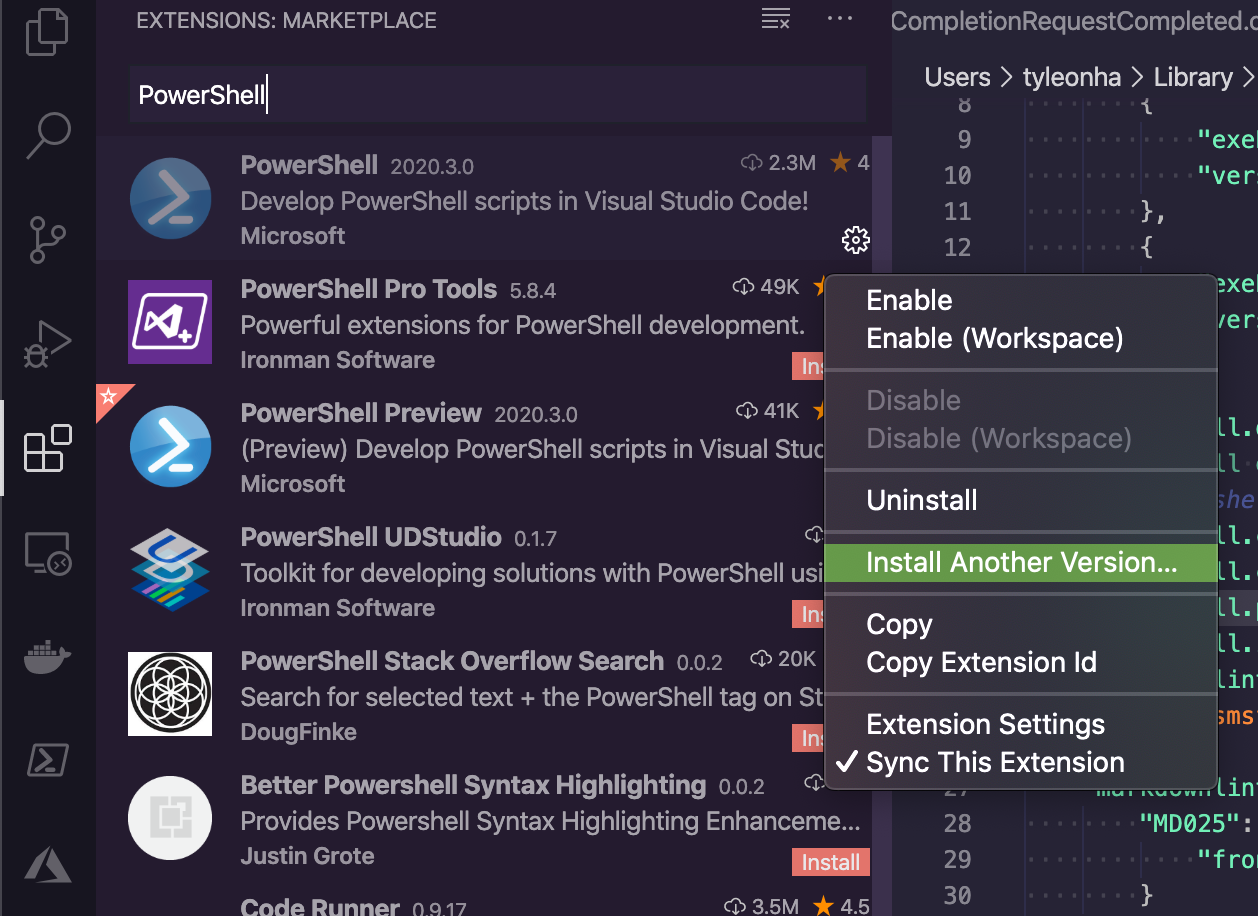
"Install Another Version..." -> 2020.1.0
Let me know how all of those go...
TylerLeonhardt
on 16 Mar 2020
@TylerLeonhardt How can I send these files to you in a secure manner?
Vegas588
on 17 Mar 2020
Email vscode-powershell [at] microsoft.com
For future reference, that email is mentioned in the log docs.
It's usually better to add logs to GitHub as there are a couple community members who are maintainers of this repo as well, but if you have security concerns, that will go to only Microsoft employees.
TylerLeonhardt
on 17 Mar 2020
I went through these steps and indeed installing PS7 works. So, looks like we have a plan to get it corrected.
Vegas588
on 17 Mar 2020
installing PS7 worked for me as well! Glad to be back up and coding! Thanks @TylerLeonhardt
spidey323
on 17 Mar 2020
Ok. That seems to confirm my suspicion...
Still. I need to figure out why we have a problem with Windows PowerShell...
Did any of you try Option 3? If not, can you give it a try? (keep in mind that I'm asking for you to get an older version of the _PowerShell_ extension and not the _PowerShell Preview_ extension)
Do those steps above... Then it will probably load PS7 first, but you can change it back to 5.1 by:
- opening the command pallet (ctrl+shift+p)
- Typing
PowerShell: Show Session Menuhit ENTER - Choose Windows PowerShell from the list
Once you go back to the latest version of the extension in order to get your work done, make sure you delete the "powershell.powershellDefaultVersion" setting.
TylerLeonhardt
on 17 Mar 2020
I also really really really want to see the results of Option 1 from all of you. That'd be most helpful.
TylerLeonhardt
on 17 Mar 2020
Also, this would be really helpful... if you can consistantly repro the problem using Windows PowerShell, can you please enable fusion logs and when the issue reoccurs, send those through to us?
You'll need to set a registry key for this.
This would be the most helpful thing for us to figure out the issue. Thank you all so much for your patience 🙏
TylerLeonhardt
on 17 Mar 2020
Step 1 resulted in just an EditorServices.log and StartEditorServices.log file that are both 0 byte. The console log is as follows:
DEBUG: Logging started
DEBUG: Beginning EndProcessing block
VERBOSE: Removing PSReadLine
VERBOSE: Removed PSReadLine
DEBUG: Creating host configuration
DEBUG: Determining REPL kind
DEBUG: REPL configured as PSReadLine
DEBUG: Configuring LSP transport
DEBUG: Configuring debug transport
DEBUG: Session file writer created
VERBOSE: Adding AssemblyResolve event handler for dependency loading
VERBOSE: Loading EditorServices
DEBUG: Logging host information
DEBUG:
PID: 78404
VERBOSE:
== Build Details ==
- Editor Services version: <development-build>
- Build origin:            Development
- Build time:              3/6/2020 11:06:40 AM
VERBOSE:
== Host Startup Configuration Details ==
 - Host name:                 Visual Studio Code Host
 - Host version:              2020.3.0
 - Host profile ID:           Microsoft.VSCode
 - PowerShell host type:      System.Management.Automation.Internal.Host.InternalHost

 - REPL setting:              PSReadLine
 - Session details path:
C:\Users\mascolino.mm\.vscode\extensions\ms-vscode.powershell-preview-2020.3.0\sessions\PSES-VSCode-78404-383180
 - Bundled modules path:      C:\Users\mascolino.mm\.vscode\extensions\ms-vscode.powershell-preview-2020.3.0\modules
 - Additional modules:        PowerShellEditorServices.VSCode
 - Feature flags:

 - Log path:
C:\Users\mascolino.mm\.vscode\extensions\ms-vscode.powershell-preview-2020.3.0\logs\1584378651-ff8765eb-75ea-4228-85b8-
5f95be8eba611584378639512\EditorServices.log
 - Minimum log level:         Diagnostic

 - Profile paths:
   + AllUsersAllHosts:       C:\Windows\System32\WindowsPowerShell\v1.0\profile.ps1
   + AllUsersCurrentHost:    C:\Windows\System32\WindowsPowerShell\v1.0\Microsoft.VSCode_profile.ps1
   + CurrentUserAllHosts:    C:\Users\mascolino.mm\Documents\WindowsPowerShell\profile.ps1
   + CurrentUserCurrentHost: C:\Users\mascolino.mm\Documents\WindowsPowerShell\Microsoft.VSCode_profile.ps1
DEBUG: Loaded Microsoft.PowerShell.Commands.Diagnostics, Version=3.0.0.0, Culture=neutral,
PublicKeyToken=31bf3856ad364e35
DEBUG: Loaded Microsoft.PowerShell.Commands.Management, Version=3.0.0.0, Culture=neutral,
PublicKeyToken=31bf3856ad364e35
DEBUG: Loaded Microsoft.WSMan.Management, Version=3.0.0.0, Culture=neutral, PublicKeyToken=31bf3856ad364e35
DEBUG: Assembly resolve event fired for Microsoft.PowerShell.Security.resources, Version=3.0.0.0, Culture=en-US,
PublicKeyToken=31bf3856ad364e35
DEBUG: Assembly resolve event fired for Microsoft.PowerShell.Security.resources, Version=3.0.0.0, Culture=en-US,
PublicKeyToken=31bf3856ad364e35
DEBUG: Assembly resolve event fired for Microsoft.WSMan.Management.resources, Version=3.0.0.0, Culture=en-US,
PublicKeyToken=31bf3856ad364e35
DEBUG: Assembly resolve event fired for Microsoft.WSMan.Management.resources, Version=3.0.0.0, Culture=en-US,
PublicKeyToken=31bf3856ad364e35
VERBOSE:
== Console Details ==
 - Console input encoding: OEM United States
 - Console output encoding: OEM United States
 - PowerShell output encoding: US-ASCII
VERBOSE:
== PowerShell Details ==
- PowerShell version: 5.1.18362.628
- Language mode:      FullLanguage
DEBUG: Loaded System.Runtime.InteropServices.RuntimeInformation, Version=4.0.0.0, Culture=neutral,
PublicKeyToken=b03f5f7f11d50a3a
VERBOSE:
== Environment Details ==
 - OS description: Microsoft Windows 10.0.18363
 - OS architecture: X64
 - Process bitness: 64
DEBUG: Checking that .NET Framework version is at least 4.6.1
VERBOSE: .NET registry version: 528040
DEBUG: Checking that PSES is running in FullLanguage mode
DEBUG: Assembly resolve event fired for Microsoft.WSMan.Management.resources, Version=3.0.0.0, Culture=en-US,
PublicKeyToken=31bf3856ad364e35
DEBUG: Assembly resolve event fired for Microsoft.WSMan.Management.resources, Version=3.0.0.0, Culture=en-US,
PublicKeyToken=31bf3856ad364e35
VERBOSE: Updated PSModulePath to: 'C:\Users\mascolino.mm\Documents\WindowsPowerShell\Modules;C:\Program
Files\WindowsPowerShell\Modules;C:\WINDOWS\system32\WindowsPowerShell\v1.0\Modules;C:\Program Files (x86)\Microsoft
Azure Information
Protection\Powershell;C:\Users\mascolino.mm\.vscode\extensions\ms-vscode.powershell-preview-2020.3.0\modules'
DEBUG: Validating configuration
VERBOSE: Loading PowerShell Editor Services
DEBUG: Assembly resolve event fired for Microsoft.PowerShell.EditorServices, Version=2.1.0.0, Culture=neutral,
PublicKeyToken=null
DEBUG: Loading Microsoft.PowerShell.EditorServices, Version=2.1.0.0, Culture=neutral, PublicKeyToken=null from PSES
dependency dir into LoadFrom context
DEBUG: Loaded Microsoft.PowerShell.EditorServices, Version=2.1.0.0, Culture=neutral, PublicKeyToken=null
DEBUG: Loaded netstandard, Version=2.0.0.0, Culture=neutral, PublicKeyToken=cc7b13ffcd2ddd51
VERBOSE: Starting EditorServices
DEBUG: Loaded Microsoft.Extensions.Logging.Abstractions, Version=3.1.2.0, Culture=neutral,
PublicKeyToken=adb9793829ddae60
DEBUG: Loaded Serilog, Version=2.0.0.0, Culture=neutral, PublicKeyToken=24c2f752a8e58a10
DEBUG: Loaded Serilog.Sinks.Async, Version=1.4.0.0, Culture=neutral, PublicKeyToken=24c2f752a8e58a10
DEBUG: Loaded Microsoft.Extensions.Logging, Version=3.1.2.0, Culture=neutral, PublicKeyToken=adb9793829ddae60
DEBUG: Assembly resolve event fired for Microsoft.Extensions.Logging.Abstractions, Version=3.1.0.0, Culture=neutral,
PublicKeyToken=adb9793829ddae60
DEBUG: Loading Microsoft.Extensions.Logging.Abstractions, Version=3.1.0.0, Culture=neutral,
PublicKeyToken=adb9793829ddae60 from PSES dependency dir into LoadFrom context
DEBUG: Loaded Serilog.Extensions.Logging, Version=2.0.0.0, Culture=neutral, PublicKeyToken=24c2f752a8e58a10
DEBUG: Assembly resolve event fired for Microsoft.Extensions.Logging.Abstractions, Version=2.0.0.0, Culture=neutral,
PublicKeyToken=adb9793829ddae60
DEBUG: Loading Microsoft.Extensions.Logging.Abstractions, Version=2.0.0.0, Culture=neutral,
PublicKeyToken=adb9793829ddae60 from PSES dependency dir into LoadFrom context
DEBUG: Loaded Serilog.Sinks.File, Version=2.0.0.0, Culture=neutral, PublicKeyToken=24c2f752a8e58a10
DEBUG: Loaded System.Runtime, Version=4.0.0.0, Culture=neutral, PublicKeyToken=b03f5f7f11d50a3a
DEBUG: Loaded System.Text.Encoding, Version=4.0.0.0, Culture=neutral, PublicKeyToken=b03f5f7f11d50a3a
DEBUG: Loaded System.IO, Version=4.0.0.0, Culture=neutral, PublicKeyToken=b03f5f7f11d50a3a
DEBUG: Loaded System.IO.FileSystem, Version=4.0.0.0, Culture=neutral, PublicKeyToken=b03f5f7f11d50a3a
DEBUG: Loaded System.Runtime.Extensions, Version=4.0.0.0, Culture=neutral, PublicKeyToken=b03f5f7f11d50a3a
DEBUG: Loaded System.IO.FileSystem.Primitives, Version=4.0.0.0, Culture=neutral, PublicKeyToken=b03f5f7f11d50a3a
DEBUG: Loaded System.Text.Encoding.Extensions, Version=4.0.0.0, Culture=neutral, PublicKeyToken=b03f5f7f11d50a3a
DEBUG: Assembly resolve event fired for Microsoft.Extensions.Options, Version=3.1.0.0, Culture=neutral,
PublicKeyToken=adb9793829ddae60
DEBUG: Loading Microsoft.Extensions.Options, Version=3.1.0.0, Culture=neutral, PublicKeyToken=adb9793829ddae60 from
PSES dependency dir into LoadFrom context
DEBUG: Loaded Microsoft.Extensions.Options, Version=3.1.2.0, Culture=neutral, PublicKeyToken=adb9793829ddae60
DEBUG: Assembly resolve event fired for Microsoft.Extensions.Logging, Version=2.0.0.0, Culture=neutral,
PublicKeyToken=adb9793829ddae60
DEBUG: Loading Microsoft.Extensions.Logging, Version=2.0.0.0, Culture=neutral, PublicKeyToken=adb9793829ddae60 from
PSES dependency dir into LoadFrom context
DEBUG: Loaded System.Threading, Version=4.0.0.0, Culture=neutral, PublicKeyToken=b03f5f7f11d50a3a
DEBUG: Creating/running editor services
DEBUG: Creating startup info object
VERBOSE: Starting server, deregistering host logger and registering shutdown listener


                  =====> PowerShell Integrated Console <=====
Thanks @mmascolino. It seems like some folks get content in the logs and others don't...
Ok... I would really like those fusion logs. I need more information, unfortunately.
TylerLeonhardt
on 18 Mar 2020
I will have some time this afternoon to repeat this with the fusion logs enabled.
mmascolino
on 18 Mar 2020
Here you go the EditorServices & StartEditorServices logs didn't populate until I killed the powershell process
mmascolino-ps-and-fusion-logs.zip
mmascolino
on 19 Mar 2020
I had the same problem. Was using powershell 5.1. Updating to 7 fixed it for me. After installing powershell 7 preview, I had to add this to my settings.json
"terminal.integrated.shell.windows": "C:\\Program Files\\PowerShell\\7-preview\\pwsh.exe",
    "powershell.powerShellAdditionalExePaths": [
        {
            "exePath": "C:\\Program Files\\PowerShell\\7-preview/pwsh.exe",
            "versionName": "Powershell 7-preview"
        }
    ],
    "powershell.powerShellDefaultVersion": "Powershell 7-preview"
 pmozbert
on 28 Mar 2020
pmozbert
on 28 Mar 2020
For those of you on Windows PowerShell that see this issue, can you please send me your event logs for Windows PowerShell? I wonder if that has anything important... ALSO If you see the issue & you have an anti-virus, can you please check the logs of your AV for anything suspicious?
Thanks for your patience... this has been very hard to troubleshoot without a repro on my end.
TylerLeonhardt
on 2 Apr 2020
Beginning with the 2020.3.2 Powershell module upgrade, I frequently get the following Window Not Responding dialog when starting a PowerShell Session. I do not have delays with 2020.2.0.
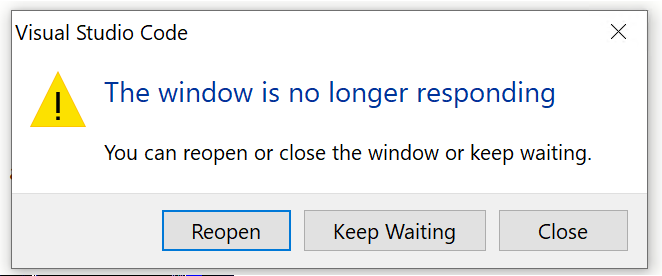
In general I get the Window Not Responding dialog when opening a 5.1 session, or changing from 7.0 to 5.1. I have rarely had the problem opening 7.0, but it has happened.
The hang is while the extension is "Waiting for session file". There seems to be a two-minute timeout, and if the session file is not found within that time the window hangs indefinitely. Sometimes the session file is found within the two minutes and I can continue working.
I reproduced that problem by rebooting, then starting up VS Code with the Preview edition of the PowerShell extension 2020.3.2. A ps1 file was open from a previous session, and Windows PowerShell 5.1 started with a delay dialog. I switched to PoweShellCore 7.0 without problem then back to 5.1 with another delay.
The logs are attached, including Fusion logs and Powershell event logs. I had diagnostic/verbose turned on.
I have this situation on two corporate (university actually) workstations on a domain with MS antivirus, MalwareBytes and Avecto. Avecto is configured to run VS Code elevated, along with all subprocesses. The Avecto event log entries are also attached.
I do not have this issue on a laptop off the domain without Avecto.
I'd be very happy to see the 2 minute timeout extended to 4 minutes. While the delay is annoying, having to restart VS Code (sometimes forcibly) when the timeout is exceeded is far worse.
EDIT: The delayed or failed PowerShell startups while waiting for session file seems limited to the x64 version of Windows PowerShell 5.1. I can start the x86 PowerShell 5.1 with a very minimal delay in startup, as well as PowerShell Core 7.0.
EDIT: The symptoms seem the same after upgrading Preview v 2020.4.1
 EdCallahan
on 8 Apr 2020
EdCallahan
on 8 Apr 2020
@EdCallahan thanks for the additional information it looks like the issue you are hitting is actually #2377
 SydneyhSmith
on 9 Apr 2020
SydneyhSmith
on 9 Apr 2020
Thanks for the response @SydneyhSmith. I don't think so though. It doesn't matter if I am restarting a session, changing to a new session with a new version of PowerShell, or starting VS Code from scratch. The "Wait For Session File" times out when starting Windows PowerShell x64 5.1, every time. Sometimes the 2 minute limit is exceeded. There is a delay but typically not a time-out when starting a Windows PowerShell x86 5.1 session. I can start PowerShell Core 7.0 sessions typically without a problem.
It is not specific to a restart. Also, it is a new problem with 2020.3.0 and I don't have it with earlier versions.
I get the error in the original post of this thread when it fails:
4/10/2020 9:30:12 AM [NORMAL] - powershell.exe started.
4/10/2020 9:30:12 AM [NORMAL] - Waiting for session file
4/10/2020 9:32:13 AM [NORMAL] - Error occurred retrieving session file:
Timed out waiting for session file to appear.
4/10/2020 9:32:13 AM [NORMAL] - Language server startup failed.
4/10/2020 9:32:13 AM [ERROR] - The language service could not be started:
4/10/2020 9:32:13 AM [ERROR] - Timed out waiting for session file to appear.
EdCallahan
on 9 Apr 2020
@EdCallahan if you think it's that 2min isn't enough, can you try these steps:
- open the following file:
~\.vscode\extensions\ms-vscode.powershell-2020.4.0\out\src\utils.js
or if you have preview:
~\.vscode\extensions\ms-vscode.powershell-preview-2020.4.2\out\src\utils.js
search for innerTryFunc(60, 2000); in that file.
change it to: innerTryFunc(120, 2000); which will try to connect an additional 60 times every 2 seconds.
Let me know how it goes. If this is something we need to extend, we can do that... though frankly I'm curious _why_ it's so slow.
TylerLeonhardt
on 21 Apr 2020
I had the same issue. @TylerLeonhardt wrote:
In the extensions pane click on the gear:
Then click "Install another version..."and choose the one right before the last one.
That said...
I would highly recommend pushing on those that do have control to upgrade to Windows PowerShell 5.1 (in-place upgrade)...
or better yet, go get PowerShell 7 which is a side-by-side install with Windows PowerShell and has the best experience with the vscode extension.
I was able to workaround the issue by following the procedure, installed PowerShell 7, and picked 2020.1.0 (2020.3.0 did not work either). My VS code version is 1.44.2.
 kykenor
on 21 Apr 2020
kykenor
on 21 Apr 2020
putting this here again so people see it:
For those of you on Windows PowerShell that see this issue, can you please send me your event logs for Windows PowerShell? I wonder if that has anything important... ALSO If you see the issue & you have an anti-virus, can you please check the logs of your AV for anything suspicious?
Thanks for your patience... this has been very hard to troubleshoot without a repro on my end.
TylerLeonhardt
on 21 Apr 2020
putting this here again so people see it:
For those of you on Windows PowerShell that see this issue, can you please send me your event logs for Windows PowerShell? I wonder if that has anything important... ALSO If you see the issue & you have an anti-virus, can you please check the logs of your AV for anything suspicious?
Thanks for your patience... this has been very hard to troubleshoot without a repro on my end.
Let me know if there is any more I can provide than at https://github.com/PowerShell/vscode-powershell/issues/2526#issuecomment-611122644, or if I can provide it in a more convenient format.
EdCallahan
on 21 Apr 2020
Hey @EdCallahan did you see my comment here https://github.com/PowerShell/vscode-powershell/issues/2526#issuecomment-616882721
@EdCallahan if you think it's that 2min isn't enough, can you try these steps:
- open the following file:
~\.vscode\extensions\ms-vscode.powershell-2020.4.0\out\src\utils.jsor if you have preview:
~\.vscode\extensions\ms-vscode.powershell-preview-2020.4.2\out\src\utils.jssearch for
innerTryFunc(60, 2000);in that file.change it to:
innerTryFunc(120, 2000);which will try to connect an additional 60 times every 2 seconds.Let me know how it goes. If this is something we need to extend, we can do that... though frankly I'm curious _why_ it's so slow.
TylerLeonhardt
on 21 Apr 2020
@EdCallahan if you think it's that 2min isn't enough, can you try these steps:
- open the following file:
~\.vscode\extensions\ms-vscode.powershell-2020.4.0\out\src\utils.jsor if you have preview:
~\.vscode\extensions\ms-vscode.powershell-preview-2020.4.2\out\src\utils.jssearch for
innerTryFunc(60, 2000);in that file.change it to:
innerTryFunc(120, 2000);which will try to connect an additional 60 times every 2 seconds.Let me know how it goes. If this is something we need to extend, we can do that... though frankly I'm curious _why_ it's so slow.
Thanks @TylerLeonhardt for showing me that, that does indeed work. I think we agree that figuring out why the wait is so long would be better, but this does help.
When the timeout is exceeded, sometimes I get a notification that the service would not start. But sometimes I don't get that notice, and I get the "This window is no longer responding" dialog every minute forever, until I select "Close" and restart code. Not sure if the error handling could be tightened up?
Thanks for persevering on this problem!
EdCallahan
on 21 Apr 2020
Thanks everyone, while we investigate the start-up performance we will include a higher timeout, and a warning when it is taking longer than usual (with a warning that anti-virus could potentially be effecting startup)
SydneyhSmith
on 21 Apr 2020
I wonder if the common denominator for this startup issue is Avecto/BeyondTrust instead of antivirus. I am intrigued that that startup time for x64 PowerShell is much longer than x86 (v5.1 each). I notice in task manager that Avecto CPU usage shoots up when opening x64, not so for x86. Avecto is very busy during the time we're waiting for the session file, and calms down after.
Attached are module logs for a startup under each type of PowerShell. Also included are the Avecto entries from the Application event log, the entries in the Windows PowerShell log and the Microsoft-Windows-PowerShell/Operational log. Entries for the period between the Session File created and session file found are included.
x86: session file created 17:17:37 and found 17:17:41
x64: session file created 17:55:43 and found 17:57:06
I am not finding any Defender antivirus or errors in the Application log during these periods.
As much as I've stared at these logs, I can't figure out what the root problem is.
EdCallahan
on 22 Apr 2020
How do you classify Avecto/BeyondTrust? What kind of software would you call those? We don't use either of those here.
TylerLeonhardt
on 22 Apr 2020
Beyond Trust Privilege Management - guys, this could be the common link for this issue. My corporate laptop has this installed. How would I classify it? Hard to say. It enforces least privilege on endpoints, so it's security related, but not the same as an AV solution.
Vegas588
on 22 Apr 2020
Here as well: https://github.com/PowerShell/vscode-powershell/issues/2638#issuecomment-617627659
It is used to lock down workstations. In the implementation here I am prevented from elevated/administrator rights, so I can't install or run some control panel apps, etc, without jumping through some hoops.
powershell.exe is whitelisted in my system though.
I have the same startup issue if I use the System or User installer for VS Code.
EdCallahan
on 22 Apr 2020
I've got a PR out that ups the time out and warns after 30s that "privilege enforcement software" can cause slowness.
I think this is good enough to _close_ this issue while we still have other issues around start up performance.
I'd highly recommend giving feedback to these pieces of software that slow it down. Only my machine, the extension takes 3 seconds to start up. 2-3min absolutely wild.
TylerLeonhardt
on 22 Apr 2020
I don't know how to broker this issue between Microsoft and BeyondTrust. My University has issued a support ticket to them, but if they say it is an MS problem, and MS says it's a BeyondTrust issue, then Code simply stays broken for a not-insignificant number of enterprise users. I do hope this gets fleshed out, I've about expended all my abilities to get to the root of it, and remain mystified.
Thanks for your efforts here!
EdCallahan
on 22 Apr 2020
I think if we can understand why BeyondTrust is stalling the startup of Windows PowerShell then we might be able to work around it. The missing piece of the puzzle is why does BeyondTrust slow down our process startup when it doesn't seem to affect powershell.exe startups on the same machine. If we can understand that, we might be able to work around it or register ourselves with it. We'd definitely be willing to work with them to alleviate the issue.
rjmholt
on 23 Apr 2020
The missing piece of the puzzle is why does BeyondTrust slow down our process startup when it doesn't seem to affect
powershell.exestartups on the same machine.
Is this accurate? Can someone like @EdCallahan confirm that?
TylerLeonhardt
on 23 Apr 2020
@TylerLeonhardt That's accurate, powershell.exe runs just fine on my affected machines. powershell.exe x64 and x86 both. The command:
C:\WINDOWS\System32\WindowsPowerShell\v1.0\powershell.exe -NoProfile -NonInteractive -ExecutionPolicy Bypass -Command Import-Module 'c:\Users\EVCallahan\.vscode\extensions\ms-vscode.powershell-preview-2020.4.2\modules\PowerShellEditorServices\PowerShellEditorServices.psd1'; Start-EditorServices -HostName 'Visual Studio Code Host' -HostProfileId 'Microsoft.VSCode' -HostVersion '2020.4.2' -AdditionalModules @('PowerShellEditorServices.VSCode') -BundledModulesPath 'c:\Users\EVCallahan\.vscode\extensions\ms-vscode.powershell-preview-2020.4.2\modules' -EnableConsoleRepl -LogLevel 'Diagnostic' -LogPath 'c:\Users\EVCallahan\.vscode\extensions\ms-vscode.powershell-preview-2020.4.2\logs\1587509743-5b80404f-606c-4259-a745-f47e828ce1cd1587509738349\EditorServices.log' -SessionDetailsPath 'c:\Users\EVCallahan\.vscode\extensions\ms-vscode.powershell-preview-2020.4.2\sessions\PSES-VSCode-2128-237720' -FeatureFlags @()
runs just fine, and if I run it in SysWow64 it runs fine as well.
I get to the "Waiting for session file" step quite quickly, it's what happens during that wait where the problem lies. I don't understand what is happening behind the scenes at that time, or what is creating that session file.
EdCallahan
on 23 Apr 2020
I get to the "Waiting for session file" step quite quickly, it's what happens during that wait where the problem lies. I don't understand what is happening behind the scenes at that time, or what is creating that session file.
PowerShell Editor Services (the server process started with the invocation above) creates the session file to communicate back to the client that it's ready to accept connections (the client must start the process, but because of the integrated console we have to use something other than stdio to communicate with it and the server has to own the transport, meaning it must create it). Those connections are made over named pipe. So the sequence of events is:
- Client starts server
- Server creates named pipes and starts listening
- Server writes session file
- Client sees session file and starts sending LSP messages over the named pipes
The server is doing pretty much all the heavy lifting there.
I'm not sure which step a program like BeyondTrust doesn't like about that though. If you can procdump the powershell.exe running a PowerShell extension startup on your machine that might provide some details as to where it's stuck, but I've looked over a few of those when we've investigated those before and they didn't seem to tell us much. Might be worth it anyway, especially now that we've started to see what the commonality is among those affected by the issue.
rjmholt
on 23 Apr 2020
In the PowerShell extension, there are 2 processes involved:
VS Code (aka the client)
PowerShell Editor Services (aka the server)
VS Code starts up PowerShell Editor Services (btw this is what supplies the PowerShell Integrated Console) and waits until it (PSES) creates a session file in a well known location.
Once PSES creates the file, it waits until VS Code reads the file and connects to the named pipe details that are inside the session file.
So if you're running that command outside of VS Code, nothing will happen because it's waiting for VS Code to connect to it.
What might be nice is to turn on Diagnostic logs and just watch what takes a long time ("I noticed it took a while between these 2 log statements").
Another thing that privilege enforcement might care about is DLLs loaded _into_ PowerShell... Which we do in order to run PowerShell Editor Services... But I'm just shooting in the dark with that theory.
TylerLeonhardt
on 23 Apr 2020
seriously. I would be willing to do a remote session if that will make it easier than going back and forth with messages.
Vegas588
on 23 Apr 2020
@TylerLeonhardt, @rjmholt Thanks for those descriptions of the process, makes perfect sense.
The delay comes prior to the powershell.exe call above at https://github.com/PowerShell/vscode-powershell/issues/2526#issuecomment-618404127. It is taking the client a long time before it attempts to start the server, but once the client issues the powershell.exe command to start the server the server is started right away, and the session file is created quickly and the client finds it and deletes it immediately.
Looking at the x64 log files at https://github.com/PowerShell/vscode-powershell/issues/2526#issuecomment-617466497, the process to start the powershell extension is at 17:55:43. This is when then log files says "waiting for session file". But, looking at the Avecto logs we can see that the powershell.exe command is not kicked off until 5:57:04. The "session file found" is issued two seconds later.
What is happening before the powershell.exe command? Avecto is logging a couple commands from code.exe first:
C:\WINDOWS\system32\conhost.exe --headless --width 80 --height 24 --signal 0x8e4 --server 0x8e0
C:/windows/system32/windowspowershell/v1.0/powershell.exe -Command [System.Security.Principal.WindowsIdentity]::GetCurrent().Name
C:/windows/system32/icacls.exe C:\Users\EVCALL~1\AppData\Local\Temp\appInsights-nodeAIF-444c3af9-8e69-4462-ab49-4191e6ad1916 /grant *S-1-5-32-544:(OI)(CI)F /grant WINONA\EVCallahan:(OI)(CI)F
VS Code is shown as the parent process of each. There aren't any error messages.
Also, there do not seem to be timestamps in the StartEditorServices.log file. That would be a nice addition if possible.
EDIT: the last two commands mentioned above from the Avecto log, the WindowsIdentity one and the icacls.exe one, are not present in the x86 run that completes quickly. However, if I turn telemetry off those two lines disappear from Avecto logs when starting x64 powershell, and startup time is still poor. Interesting they are not found in x86 runs, but maybe meaningless.
EdCallahan
on 23 Apr 2020
Here's the relevant code:
It turns out in fact that powershell.exe is started before we claim to wait for the session file; it's started on line 109 and we log waiting for the session file on line 126.
rjmholt
on 24 Apr 2020
Using Process Explorer I can indeed see that PowerShell command to startup the server issued pretty quickly, right after conhost.exe runs. It's odd, but the event isn't logged by Process Monitor until much later, just before the session file is found.
EDIT: In Process Monitor the Process Start for the powershell.exe process is logged after a delay, but it is picking up a series of "Process Profiling" events before then, starting right after "waiting for session file".
EdCallahan
on 24 Apr 2020
@EdCallahan can you see if powershell.exe starts slowly in VS Code's integrated terminal (aka not the PowerShell Integrated Console... but just a regular shell in VS Code)
Just hit the plus sign in the terminal pane:
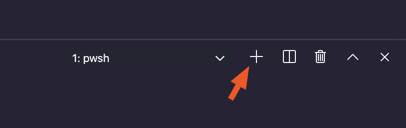
and if the left thing says powershell.exe, you're good. If it says something else, hit that drop down and change the default shell to Windows PowerShell and see what happens then.
My theory I wanna test is that Avecto could be getting confused with VS Code opening powershell.exe and that this isn't scoped to the PowerShell extension.
TylerLeonhardt
on 24 Apr 2020
That starts up very quickly @TylerLeonhardt. I hit that plus sign and I get a new powershell.exe terminal almost instantly.
EdCallahan
on 24 Apr 2020
I guess what we know is that the PowerShell extension is doing it's job, and when createTerminal() is executed the request to the operating system to startup powershell.exe for it to create the server is submitted promptly.
And once powershell.exe starts executing it does so promptly.
There is a delay between the operating system being asked to startup powershell.exe and the operating system actually doing so. One has to suspect Avecto is the culprit there, although not certain.
At any rate, this doesn't seem to be the PowerShell extension's problem. Maybe there's a different way to start the server? But I expect you are using best practice there.
Let me know if I'm missing something. I'll let you guys know when I hear from BeyondTrust, I hope they take the interest in this you guys have. Thanks for your work @TylerLeonhardt and @rjmholt.
EdCallahan
on 25 Apr 2020
Yeah so the difference between the "+" button and our server is that we are providing extra parameters to the call to powershell.exe (you can see it in the log)... Of all the parameters we specify, the most notable I think is -Command with the command we run to start the server.
My guess is that Avecto sees that we're using -Command and tries to analyze it to make sure the command we are asking to run isn't malicious... That mixed with the fact that the parent process is VS Code and not simply Conhost.exe could also be tripping it up.
This is my best guess given what we know.
I hope BeyondTrust looks into this because I think you're right, I don't know what else we could do at our layer.
You could try downloading and trying PowerShell 7 to see if it's any better (it could be. It's generally faster).
If they come back and have any sort of action item on us, please don't hesitate to reach out!
TylerLeonhardt
on 26 Apr 2020
Yeah in fact to simplify our startup, we at one point converted the startup command to use a base-64 encoded string (which powershell.exe supports natively for exactly that usecase). A number of users reported that they were suddenly unable to start the extension, all because base64 was treated as malicious by various security scanners... So now we only do that on non-Windows.
One other thought that strikes me is that these scanners only see the process startup arguments and probably get ruffled by syntactic elements indicating a full program in the command string (a cmdlet, a semicolon, etc) as well as the input being longer than some value.
We do still have a startup script that we keep around to simplify startup for other LSP clients. We don't use it for the extension now, since it's faster to call a cmdlet directly. But I wonder if a scanner cares less about a script...
rjmholt
on 27 Apr 2020
@rjmholt Any chance I could get that start up script to try against my "likely" Avecto problem?
 joshfria
on 7 May 2020
joshfria
on 7 May 2020
@joshfria could you please open an issue tracking the configurability of the start-up process...unfortunately right now we dont have a good script for you to try as a number of other things have come up....we marked this issue as closed because we have implemented a workaround which allows for a longer start-up time.
SydneyhSmith
on 14 May 2020
@joshfria the script is shipped with the extension still, at ~/.vscode*/extensions/ms-vscode.powershell*/modules/PowerShellEditorServices/Start-EditorServices.ps1. The issue is that the extension client is written not to use it now; it's designed for other clients to use (like the vim one).
I could build you a VSIX with the invocation changed to use the script, but I can't sign it. Would that be useful?
rjmholt
on 14 May 2020
Another Avecto DefendPoint victim here. Same issue. I'm going to make a bunch of noise here and see if I can get someone to rattle Avecto's cage and push for a fix.
 richardm1
on 21 May 2020
richardm1
on 21 May 2020
Another Avecto DefendPoint victim here. Same issue. I'm going to make a bunch of noise here and see if I can get someone to rattle Avecto's cage and push for a fix.
I've run some troubleshooting for Avecto and they remoted into my machine late last week to investigate. Hoping to have a resolution from them yet this week, or at least a plan. They think it's something in the rules, but I suspect the problem is deeper than that.
Creating a rule that elevates code.exe and all subprocesses helps a lot, but does not fix the problem. However with that rule in place x64 powershell starts in under two minutes on my machine, without it powershell basically won't start at all.
EdCallahan
on 21 May 2020
@EdCallahan would you happen to have a ticket number with the Avecto folks? I'm having a hard time getting traction here so I'd like to hand my people a ready-made support call -- they're giving me a hard time when I ask them to escalate to somebody who has Avecto's phone number. :-(
richardm1
on 28 May 2020
@EdCallahan would you happen to have a ticket number with the Avecto folks? I'm having a hard time getting traction here so I'd like to hand my people a ready-made support call -- they're giving me a hard time when I ask them to escalate to somebody who has Avecto's phone number. :-(
@richardm1 Yes: CS0879827
I'm disappointed I haven't heard back from them yet. There were some lost communications at first, and a switch in who was handling the ticket. And I was away for a week. But the guy I finally worked with when he remoted into my machine seemed very competent, and was going to reproduce the problem on a test box. I haven't heard if he succeeded or not, or if there's been headway in finding a solution. I will report here when I hear something.
EdCallahan
on 28 May 2020
Adding a link to a comment made in another issue in case it might be helpful for users here:
https://github.com/PowerShell/vscode-powershell/issues/2014#issuecomment-634549913
SydneyhSmith
on 28 May 2020
@rjmholt @richardm1 @TylerLeonhardt @tastrsks
Avecto/BeyondTrust got back to me yesterday. Creating a workstyle that allows code.exe and all subprocesses to execute, either passive or with added admin rights, typically gets my powershell server to start within two minutes. Avecto experimented with our policy set and found if we moved that workstyle farther up to be processed before some other workstyles, that delay was down to 20 seconds.
This solution seems specific to our policy set, and to me does not resolve the problem. I've pushed back on Avecto for a better solution.
Powershell 5.1 x86 and Powershell 7 seem unaffected. But in a corporate environment where developers are afflicted with BeyondTrust/Avecto Privilege Guard, I'm not sure VS Code is a viable platform for 5.1 x64 development. Getting the corporate security team to experiment with the Avecto policies to get things running, let alone get BeyondTrust to dig into them, is beyond most developers.
EdCallahan
on 29 May 2020
Thanks @EdCallahan that is really helpful information, I think in order for us to move forward we likely need to better understand BeyondTrust/Avecto....we'd be happy to follow up with your support contacts there...if you are interested in following up with us send an email to [email protected] and we will figure out what the next steps are....thanks!
SydneyhSmith
on 2 Jun 2020
BeyondTrust recommended I update to version 5.6.126, and similarly to what was reported at #2014 (comment)] I got dramatically better results. I did continue to have sporadic lockups starting PowerShell 5.1 x64 servers, and sometimes x86 as well. However, reordering my workstyles combined with upgrading seems to have fixed things. Although I haven't worked under this configuration for long.
@SydneyhSmith, I passed on that email address to BeyondTrust.
EdCallahan
on 3 Jun 2020
I've spoken with one of my company's Avecto SMEs and apparently there is a memory leak, that's been present in the client since November, so we can't upgrade at the moment.
I've tried setting the extension to x86, with no luck. Is there anything from VSCode / extension side that we can do, whilst we wait for Avecto?
Thanks.
 arcotek-ltd
on 23 Jun 2020
arcotek-ltd
on 23 Jun 2020
I have the same problem with Powershell language service on VSCode.
In fact I detect that on my SharePoint Server, If I remove the "add-pssnapin Microsoft.sharePoint.Powershell" from profile.ps1, the Powershell Language service can start.
Does it mean it's not possible to mix add-pssnapin in profile and use powershell language service in the same time ?
We need the add-pssnapin in profile to use Custom Powershell and load automatically Microsoft.sharePoint.Powershell add-in when opening Powershell console
 portanoo
on 20 Jul 2020
portanoo
on 20 Jul 2020
I had a same issue (Avecto on business laptop) and last night found a solution.
I installed latest PS7 and in VSC under "Configure PowerShell language based settings" I changed the path to use pwsh:
"terminal.integrated.shell.windows": "C:\Program Files\PowerShell\7\pwsh.exe"
It is a bit leggy but it works.
 tsunami28
on 23 Jul 2020
tsunami28
on 23 Jul 2020
Visual Studio Code v1.54.1 64-bit
3/6/2021 4:47:38 PM [ERROR] - Could not start language service:
3/6/2021 4:47:38 PM [ERROR] - Error: Connection to server got closed. Server will not be restarted.
Same thing has happened again.
 JoeBrunsTR
on 6 Mar 2021
JoeBrunsTR
on 6 Mar 2021
Same for me
 kihtov23
on 9 Mar 2021
kihtov23
on 9 Mar 2021
And for me
Edit:
For me it started after Visual Studio 2019 update to 16.9.0 and Visual Code automatic update to 1.54.1 and after the update of the Powershell Extension to 2021.2.2 (I think the update was from v2021.2.1-preview).
So not really an idea what caused this issue.
The issue started yesterday and also continued today after a reboot of my machine.
For what it's worth and maybe it can help narrowing down the issue:
I somehow managed to get rid of it by executing the following command:
Import-Module $HOME.vscode\extensions\ms-vscode.powershell*\modules\PowerShellEditorServices\PowerShellEditorServices.psd1
which I found here:
https://community.idera.com/database-tools/powershell/powertips/b/tips/posts/fixing-vscode-powershell-issues-part-1
I use Powershell 5.1 and 7.1.2 side by side and applied the above for both versions and both elevated and non elevated.
I didn't get a prompt at all, but after applying it, the error was gone.
 ZonderP
on 9 Mar 2021
ZonderP
on 9 Mar 2021
I've got this same error message. It looks like it's not liking PowerShell 5.1 somehow.
 AkosBatorfi
on 9 Mar 2021
AkosBatorfi
on 9 Mar 2021
@JoeBrunsTR @kihtov23 @ZonderP @AkosBatorfi
Thanks for your reports. Please note that "The Language Service Could not be started" is a generic message indicating the extension could not communicate with the language server. This particular GitHub issue was closed last year as it was a different bug report, and the issue with the Visual Studio Code 1.54 update is actually #3227. Please use caution in commenting on old, closed issues; most likely you need to find an existing open issue, or open a new issue. The good news is that the issue with VS Code has been resolved https://github.com/microsoft/vscode/issues/117649 and will be in the next VS Code release.
 andschwa
on 9 Mar 2021
andschwa
on 9 Mar 2021
I have recently been experiencing the same thing. I am a daily, professional user of VS code and the PS extension, and since monday last week (10 days ago) it stopped working. I have tried reinstalling both VS code and the PS extension, and downdraded the extension to a previous version to no avail.
However, whenright-klicking on the PS status in the bottom right corner and selecting "Restart current session", it starts up nicely in PS 5.1.
 Mike-Remoni
on 17 Mar 2021
Mike-Remoni
on 17 Mar 2021
@h4tt3n Please see the comment above yours, thanks! https://github.com/PowerShell/vscode-powershell/issues/2526#issuecomment-794373673
andschwa
on 17 Mar 2021
Related issues
 lukegriffith
·
3Comments
lukegriffith
·
3Comments
 nathan-alden-hp
·
3Comments
nathan-alden-hp
·
3Comments
 pcgeek86
·
4Comments
pcgeek86
·
4Comments
 AWahlqvist
·
3Comments
AWahlqvist
·
3Comments
 TheDanishDynamo
·
3Comments
TheDanishDynamo
·
3Comments
Most helpful comment
I had a same issue (Avecto on business laptop) and last night found a solution.
I installed latest PS7 and in VSC under "Configure PowerShell language based settings" I changed the path to use pwsh:
"terminal.integrated.shell.windows": "C:\Program Files\PowerShell\7\pwsh.exe"
It is a bit leggy but it works.