Vscode-powershell: Unfolding not always possible
Issue Description
Since the last update of the PowerShell Preview extension there is an issue with unfolding certain code blocks. When refactoring some code you will see that pressing CTRL + 0 will collapse all regions but sometimes it's no longer possible to expand the regions by clicking on the arrow in front of the collapsed code. When doing this nothing is unfolding and after 10 to 15 seconds it does unfold sometimes, but not always.
It's pretty hard to replicate this as it happens randomly but quite often. Usually I run a Pester test script to test a script and then when I come back the folding becomes an issue.
System Details
VSCode version:
1.43.0-insider d1c48c103cabc6e729f59787c0b9c86fb3d39e73 x64
VSCode extensions:
Angular.[email protected]
dbaeumer.[email protected]
EditorConfig.[email protected]
eg2.[email protected]
esbenp.[email protected]
humao.[email protected]
johnpapa.[email protected]
johnpapa.[email protected]
johnpapa.[email protected]
johnpapa.[email protected]
mikestead.[email protected]
ms-azuretools.[email protected]
ms-vscode.[email protected]
ms-vscode.[email protected]
msjsdiag.[email protected]
msjsdiag.[email protected]
nrwl.[email protected]
PKief.[email protected]
streetsidesoftware.[email protected]
xabikos.[email protected]
PSES version: 2.0.0.0
PowerShell version:
Name Value
---- -----
PSVersion 5.1.14393.3471
PSEdition Desktop
PSCompatibleVersions {1.0, 2.0, 3.0, 4.0...}
BuildVersion 10.0.14393.3471
CLRVersion 4.0.30319.42000
WSManStackVersion 3.0
PSRemotingProtocolVersion 2.3
SerializationVersion 1.1.0.1
 DarkLite1
All 44 comments
@DarkLite1 is there anything in the logs suggesting an error?
 rjmholt
on 3 Mar 2020
rjmholt
on 3 Mar 2020
Also a sample script that you've seen this with would be very helpful.
 TylerLeonhardt
on 3 Mar 2020
TylerLeonhardt
on 3 Mar 2020
I knew this question was coming ;) It's just very hard to consistently reproduce, but it happens quite often as in every 2 times after refactoring code.
I've add some test code in attachment. When both files are open and you are in the file `Set permissions.Tests.ps1 and press F5 to execute it, everything goes fine. Than you refactor something in the production file or the test file, press CTRL + 0 or try to unfold a specific section and it will fail 1 out of 3 times. What's also not working is formatting code after refactoring, copy/pasting a pester it clause for example. When you do that and press ALT + CTRL + F nothing is happening for a while.
I hope you guys (or girls) see something I can't see. Thanks anyhow for looking into this and sorry for not being able to be more precise.
DarkLite1
on 4 Mar 2020
Figured out how to reproduce this:
- Open the file
Testie.ps1in attachment - Collapse all by using
CTRL + KandCTRL + 0 - Open the top comment section of the file and add some random text in the comments or simply change the e-mail address in the last line
AUTHOR [email protected] - Try to click on the arrow before
Process{to unfold it
Notice that unfolding that section is impossible

DarkLite1
on 5 Mar 2020
I can confirm this is something that started in the last release ([email protected]).
But it's not an unfolding problem, it's everything the extension do hang for a long time.
To reproduce do the steps @DarkLite1 provided in his last post.
Add to step 4 more things like F8 on some line and hover over a variable to get the intelligence tooltip.
The unfold will not work, the F8 will not execute and the tooltip will say "Loading..."
Then wait for ~1 minute, it will suddenly unfold, Run the F8 and show the tooltip info.
BTW is 2020.3.0 already on the way? Or can this be fix before that?
 ili101
on 5 Mar 2020
ili101
on 5 Mar 2020
Does it work if you go into the console and press Ctrl+C?
rjmholt
on 5 Mar 2020
Does it work if you go into the console and press
Ctrl+C doesn't seems to effect this.
ili101
on 5 Mar 2020
@DarkLite1 could you post your example as text?
rjmholt
on 5 Mar 2020
I can confirm this. My observation is that extension spends a lot of time to analyze PS Script Analyzer along with my customized settings for it.
 ghost
on 5 Mar 2020
ghost
on 5 Mar 2020
My observation is that extension spends a lot of time to analyze PS Script Analyzer along with my customized settings for it.
Can you expand on this? How did you observe this? Does it seem to be interacting with folding?
rjmholt
on 5 Mar 2020
@rjmholt It's simple:
- Launch VSCode
- Load ps1 script which has functions/foldable regions
- Immediately start clicking multiple times at the fold 'arrow', folding/unfolding is not possible
- In the background, Powershell interactive console is starting and with it, PSSctiptAnalyzer starts to analyze code
- When PSSctiptAnalyzer display list of problems at "Problems" tab, folding/unfolding is possible again
Hope that this helps.
ghost
on 5 Mar 2020
When PSSctiptAnalyzer display list of problems at "Problems" tab, folding/unfolding is possible again
It sounds a bit like the folding just isn't ready because the extension is still starting.
If you edit a script, does folding then take a while again?
rjmholt
on 5 Mar 2020
I see 2020.3.0 stable is out (you probably should also update the preview extension to the same version as stable so everyone that on it will also be on 2020.3.0 and not stay behind)
Tested on it and it looks like it still happening but the freezes is shorter.
I can reproduce if I open a network folder with a lot of powershell files and do the same test, but locally or opening a network folder without many files it's almost unnoticeable.
Is something in PSSctiptAnalyzer maybe scans the entire open folder on every change?
ili101
on 5 Mar 2020
(you probably should also update the preview extension to the same version as stable so everyone that on it will also be on 2020.3.0 and not stay behind
Releasing takes a little while and we all work on several things, so we'll probably do a preview release in the coming week or so. Not our preferred choice, but it will only happen once since there will be no more fork.
I can reproduce if I open a network folder with a lot of powershell files and do the same test
Ok so it sounds like a file performance issue where we're looking through too many files. Are these files PowerShell files?
Is something in PSSctiptAnalyzer maybe scans the entire open folder on every change?
With every change:
- The backend representation of the file is modified (in case you haven't saved it)
- PSSA runs
- Things like the reference code lens run
It's not really a simple question of cutting things out unfortunately, but we should be able to sift through and see where we're touching the file system.
We currently don't control how PSSA operates either and it does some PowerShell stuff that looks at modules.
We're investing in work to make PSSA easier to integrate though. But it's big work.
rjmholt
on 5 Mar 2020
Adding @glennsarti in case he has any thoughts considering he contributed the folding feature.
@TylerLeonhardt seems to remember that file filtering may have stopped working at some point, Glenn do you recall that?
 SydneyhSmith
on 5 Mar 2020
SydneyhSmith
on 5 Mar 2020
My PR out will re-enable a feature Glenn added and allow anything set in the following settings to be automatically ignored when looking for symbols (used in folding and references):
files.exclude
search.exclude
TylerLeonhardt
on 6 Mar 2020
Adding @glennsarti in case he has any thoughts considering he contributed the folding feature.
Unfolding is not dependant on the Language Server. That's all client side. As comment above, it can be a perf issue on generating the folding regions.
TylerLeonhardt seems to remember that file filtering may have stopped working at some point
IIRC yeah that code didn't make to 2.0 and I didn't have time to migrate it as there was no unit testing running at the point * glares at Tyler and Rob *
However there should not be any reason for those two features to be related. Folding only happens for a specified file. There are no file traversals.
Ref - https://microsoft.github.io/language-server-protocol/specifications/specification-current/#textDocument_foldingRange
What _may_ be happening is a thread locking issue or a single-threaded problem where the folding range request is blocked by a long running traversal operation?
 glennsarti
on 6 Mar 2020
glennsarti
on 6 Mar 2020
Although I don't understand this: Seems odd to create a logger on the Folding Handler in an unrelated class.
glennsarti
on 6 Mar 2020
Seems odd to create a logger on the Folding Handler in an unrelated class.
typos!
TylerLeonhardt
on 6 Mar 2020
What may be happening is a thread locking issue or a single-threaded problem where the folding range request is blocked by a long running traversal operation?
Right. My guess is that since Folding and references both needs symbols to be calculated first, the Folding lag is due to that.
TylerLeonhardt
on 6 Mar 2020
Seems odd to create a logger on the Folding Handler in an unrelated class.
typos!
I made a typo or you did?

glennsarti
on 6 Mar 2020
What may be happening is a thread locking issue or a single-threaded problem where the folding range request is blocked by a long running traversal operation?
Right. My guess is that since Folding and references both needs symbols to be calculated first, the Folding lag is due to that.
Nope. Folding doesn't use the AST and therefore no symbols, it uses the tokeniser
But I think I know what you're getting at.
The FoldingRangeHandler gets the scriptfile (Although the script is set at document open/edit time)
The ScriptFile constructor calls SetFileContents (https://github.com/PowerShell/PowerShellEditorServices/blob/c005ef7c4a/src/PowerShellEditorServices/Services/TextDocument/ScriptFile.cs#L174) which calls ParseFileContents (https://github.com/PowerShell/PowerShellEditorServices/blob/c005ef7c4a/src/PowerShellEditorServices/Services/TextDocument/ScriptFile.cs#L557) which then reads the file, tokenises and parses it.
This is all serial (not async) in the constructor 😥
It could be a timing bug in the Workspace service due to - https://github.com/PowerShell/PowerShellEditorServices/blob/master/src/PowerShellEditorServices/Services/TextDocument/Handlers/FoldingRangeHandler.cs#L51
Also the FoldingRangeProvider uses workspace.tryGetfile method which (according to the docs) will NOT hit the filesystem if it has already been loaded. As VSCode will only (should?) send a folding request for files that are open in the editor, the FoldingRangeProvider should never cause filesystem access.
The Folder seems far too simple (as in it has a very simple scope - Get tokens, iterate over tokens, spit out an array) and has no direct ties to Document Symbols. There's something else going on outside of the folder.
Questions
- Should parsing be async? or lazy loaded? or another constructor signature?
Is there a magic thread-pool being used here? e.g. is the ThreadPool set at max 1 thread?
Should this issue be moved to PowerShellEditorServices project?
Does the LanguageServer spin up a a thread per client request? i.e. does request order matter. PSES debug logs should help here. Also note (https://github.com/PowerShell/PowerShellEditorServices/blob/65bcbb1765/src/PowerShellEditorServices/Services/Workspace/WorkspaceService.cs#L153) should show us which files are being read when.
e.g. is Symbol Request THEN Folding slow
but Folding THEN Symbol Request fast?
glennsarti
on 6 Mar 2020
I made a typo or you did?
me
TylerLeonhardt
on 6 Mar 2020
When PSSctiptAnalyzer display list of problems at "Problems" tab, folding/unfolding is possible again
It sounds a bit like the folding just isn't ready because the extension is still starting.
If you edit a script, does folding then take a while again?
No. After an initial 'pause time' when folding is impossible, editing script doesn't cause this issue again.
ghost
on 6 Mar 2020
@DarkLite1 could you post your example as text?
The example is in this zip file.
On a side note, as mentioned by others, it's not only the folding/unfolding that isn't working. Other features like selecting text and pressing F8 to get it executed or simply pressing CTRL + C to cancel the ongoing action (whatever that is) doesn't work either.
DarkLite1
on 6 Mar 2020
When PSSctiptAnalyzer display list of problems at "Problems" tab, folding/unfolding is possible again
It sounds a bit like the folding just isn't ready because the extension is still starting.
If you edit a script, does folding then take a while again?
Yes, even after running the script multiple times the issue remains. There's a delay in functionality which makes working in the editor impossible. The only way around this is to kill PSIC and restart it and even then you have to wait very long.
Food for thought: Even if there is only 1 file open in the editor the issue appears. You have to know, that just like @rkeithhill mentioned in another issue, I also have plenty of other folders open in the workspace that contain s ton of files. Should the PSscriptAnalyzer not focus solely on the file that is currently open in the editor? This goes for all other extensions and tools too.
DarkLite1
on 6 Mar 2020
Should the PSscriptAnalyzer not focus solely on the file that is currently open in the editor?
It does. But rules in PSScriptAnalyzer ask for context from PowerShell for things like aliases. That's something that (1) we have no control over in our code and (2) PSSA users would consider breaking if it changed.
You have to know, that just like @rkeithhill mentioned in another issue, I also have plenty of other folders open in the workspace that contain s ton of files.
It sounds like this is a performance issue caused by looking at too many files, especially on network shares. We'll do our best to make this an area of investigation. I'm currently busy working in other areas though (one being improving PSSA), so I can't give a good time frame.
Unfortunately there are going to be limits to what we can do; PowerShell is not designed for static analysis, so getting things like references depends on module queries and other file-system-intensive things. Sitting on top of that (and being forced to route all context through a single thread, since extension users expect things like completions based on things defined in the console) means that we're only going to be able to improve this with some heuristics that cut things out.
I think @TylerLeonhardt has already addressed one of these in https://github.com/PowerShell/vscode-powershell/pull/2524, and hopefully we can take it from there.
One thing that might help us is if there's an example of a large code workspace we could use to profile and work out where the performance issues lie.
rjmholt
on 6 Mar 2020
It sounds like this is a performance issue caused by looking at too many files, especially on network shares. We'll do our best to make this an area of investigation. I'm currently busy working in other areas though (one being improving PSSA), so I can't give a good time frame.
Thank you for the reply. But just to be clear, there are no network shares open in my workspace. All files are on the local drive. Also, this issue is only appearing since the upgrading to the latest PowerShell preview extension.
DarkLite1
on 9 Mar 2020
I have spent an hour trying to pinpoint the cause of the problem, it looks like the number of files in your VSCode open folder dose not effect the problem but the number of subfolders do.
@DarkLite1 how many subfolders do you have?
I can see that with 10,000 subfolders locally it freezes for ~30 seconds and on a network share with 3000 subfolders it freezes for a minute +
ili101
on 9 Mar 2020
This is very good data @ili101. Thank you for taking the time to provide this
TylerLeonhardt
on 9 Mar 2020
@ili101 thanks for your help in figuring this out, Really appreciate it.
In my workspace there are 3 open folders, the maximum depth of these folders is usually Prod\scriptName\scriptFile.ps1 and Prod\scriptName\scriptFile.tests.ps1. So the levels are not very deep,, same logic for the modules folder. All these files and folders, as said, are to be found on a local drive on the server, no network files present. Modules are on the C:\ drive and the others are on the T:\ drive.
@(
    'T:\Test\bob\PowerShell',
    'T:\Prod',
    'C:\Program Files\WindowsPowerShell\Modules'

).ForEach({
        $Folder = Get-ChildItem -Recurse -Path $_ -Directory
        $File = Get-ChildItem -Recurse -Path $_ -File

        [PSCustomObject]@{Path = $_; Folders = $Folder.Count; Files = $File.Count}
}) | fl
Returns:
Path    : T:\Test\bob\PowerShell
Folders : 8
Files   : 36

Path    : T:\Prod
Folders : 109
Files   : 355

Path    : C:\Program Files\WindowsPowerShell\Modules
Folders : 192
Files   : 1298
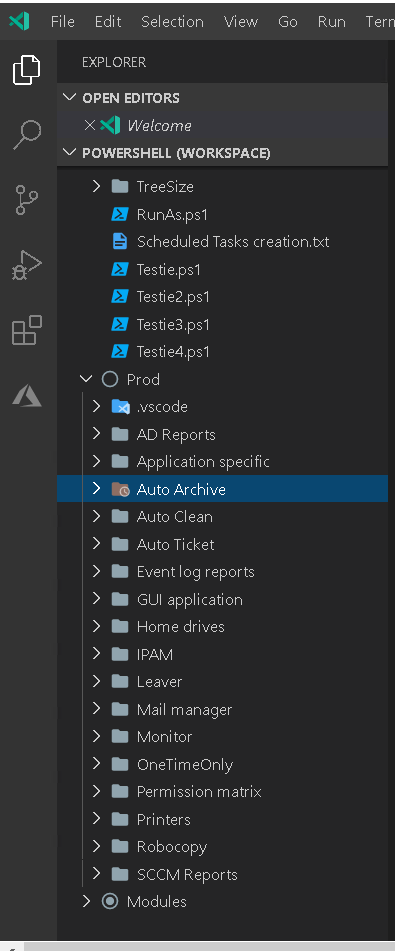
DarkLite1
on 10 Mar 2020
I made something to help reproduce.
I don't know if this the same source of the problem that @DarkLite1 have as he works locally and with not that meany folders but it could be the same thing maybe amplified by some factor.
- Download this GenerateExample2518.ps1.txt, remove the ".txt" and save to a folder where you want the test to be created.
- Run with PowerShell:

It will generate a test folder with a test file and subfolders. - Open the "Test2518" folder in VSCode.
- Open "TestMe.ps1"
- Test as before by changing stuff then folding, hovering to get popup, F8 etc.
Locally on SSD it freezes for me from 5-30 seconds.
On network share it freezes for longer then I was willing to wait (:
So it happens when you have many subfolders and only if you have a function defined in your script.
Hope this helps
ili101
on 10 Mar 2020
Can you all give the PowerShell Preview extension a try? We just did a release of it.
Don't forget to disable the regular PowerShell extension for VS Code when you enable the PowerShell Preview extension for VS Code
TylerLeonhardt
on 13 Mar 2020
@TylerLeonhardt Tested ili101 example, the issue still happens - for a short moment, folding and unfolding is not possible.
ghost
on 13 Mar 2020
After some testing here are my findings:
- Doing my own test with the
Testie.ps1file that consistently failed for me and @ili101 is fixed in the extension2020.3.0. - Doing @ili101 's test with his folder and sub folders is also fixed.
- Doing @ili101 's test with more sub folders, like say
1..100000fails big time. Folding and unfolding is just stalled/frozen.
So in short, @ili101 is correct. It all depends on the quantity of sub folders you have.
Keep in mind that when there are plenty of sub folders like for modules, or if you share PowerShell files with node.js files, where node can have a bazillion node_modules sub folders the problem is big time. That's why I believe my problem is now gone because I split the workspaces one for node and one for PowerShell.This way there are less sub folders in the PowerShell vs-code workspace which seemed to fix my findings.
DarkLite1
on 18 Mar 2020
Just tested on v2020.4.0 from yesterday. This version have nice performance optimizations but the core problem is still there.
I don't understand the need to iterate over all of the sub folders (files not effecting this) on every edit to the file and strangely only when you have function Test-TheBug { } in the file, if it have a legitimate purpose ok but I don't see why will it do that?
ili101
on 16 Apr 2020
@ili101 thanks for your response could you please open a new issue with an ask for better performance for finding references of functions..thanks!
SydneyhSmith
on 16 Apr 2020
@SydneyhSmith why is a new ticket needed when the core problem is still there?
DarkLite1
on 17 Apr 2020
That's fair @DarkLite1.
@ili101 @DarkLite1 could you try disabling CodeLens to see if that helps at all:
"editor.codeLens": true
TylerLeonhardt
on 18 Apr 2020
Hi @TylerLeonhardt
With "editor.codeLens": false there is no issue so it's something in there (At last I know I can tern it off when opening this big folder now)
Edit: With the 10,000 folders it locks for a minute on every edit.
I then change the test to create 10,000 ps1 files with "Test-TheBug" instead of the folders, with the files it locks for a minute once at load, detects all 10,000 references and then works without any problems.
So with files it locks once to scans the references then manage to update the references on the fly without impacting performance, but with the folders it locks on every change continually
ili101
on 18 Apr 2020
This is because CodeLens triggers on every edit - vscode controls this.
And it recursively looking at the filesystem to generate references - we control this.
Some concerns:
- We don't know if something outside of VS Code put new files there that we haven't seen yet.
- If you change something in your current file, that could potentially change the reference count and would need it to be re-computed.
There's room for improvement here for sure. We could use a combination of file system watchers and caches to possibly increase perf here.
I wonder if this is why TypeScript doesn't have CodeLens on by default 🤔too many node_modules folders... and a very computational operation...
TylerLeonhardt
on 18 Apr 2020
I encountered another issue that might be related to this. When I rename a folder in vs code and there are lots of node.js projects in those folders the renaming cannot happen. The system just keeps on waiting and errors out.
Back to this topic, it might be related as I am using the PowerShell Preview extension. I think a file watcher would be a really great idea. It's then only fired when a single file is CRUD. That might fix the issue.
DarkLite1
on 18 Apr 2020
But keep in mind, that'll be tricky to implement because we can't keep too much in memory otherwise... #1613
TylerLeonhardt
on 18 Apr 2020
so I don't think we're cancelling CodeLens requests at the moment (VS Code tells us to cancel them, but we need to implement what cancelling means)... Can you attach the logs here (and the payload logs!).
I want to see how many times VS Code says to cancel CodeLens requests. If there are a lot, then we can implement cancelation (by doing something with the cancellation token here) that will help with performance.
TylerLeonhardt
on 18 Apr 2020
Related issues
 Line40
·
3Comments
Line40
·
3Comments
 borisimple
·
3Comments
borisimple
·
3Comments
 lukegriffith
·
3Comments
lukegriffith
·
3Comments
 rkeithhill
·
3Comments
rkeithhill
·
3Comments
 AWahlqvist
·
3Comments
AWahlqvist
·
3Comments
Most helpful comment
I made something to help reproduce.
I don't know if this the same source of the problem that @DarkLite1 have as he works locally and with not that meany folders but it could be the same thing maybe amplified by some factor.
It will generate a test folder with a test file and subfolders.
Locally on SSD it freezes for me from 5-30 seconds.
On network share it freezes for longer then I was willing to wait (:
So it happens when you have many subfolders and only if you have a function defined in your script.
Hope this helps