Vscode-powershell: Script fails to run on second run
On request of @TylerLeonhardt in #2175 I am creating this as a separate issue.
Description
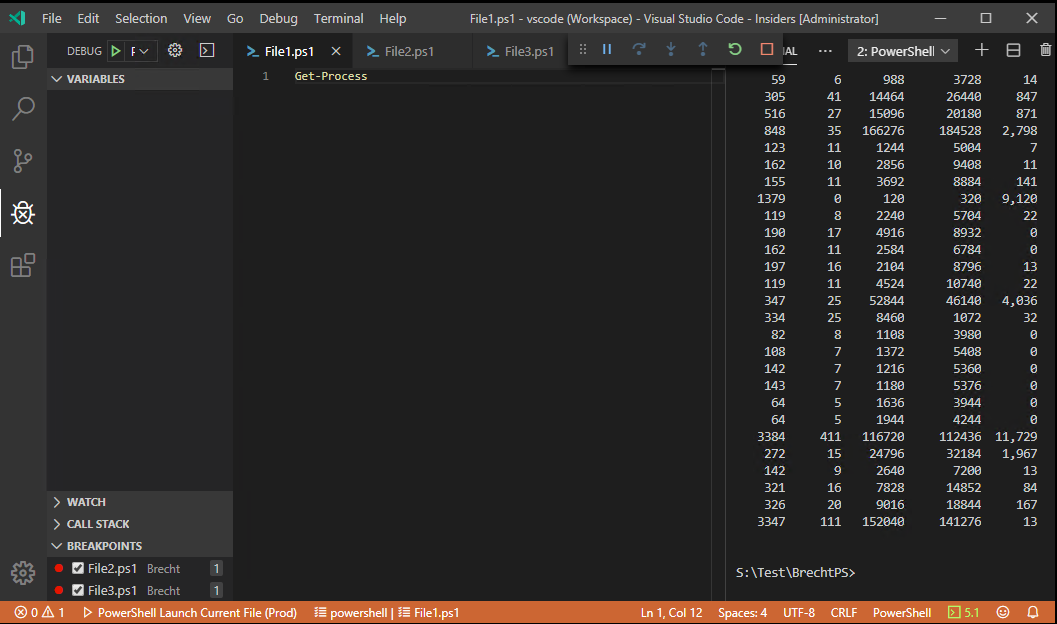
When breakpoints are set in at least two other open files, the current open file (which does not contain a breakpoint) can only be executed once. Upon a second execution vscode-insders freezes.
Steps to reproduce the issue:
- Create 3 files:
File1.ps1contains code with no breakpoint (Ex.Get-Process)
File2.ps1contains code with a breakpoint (Ex.Start-Sleep -Seconds 1, breakpoint line 1)
File3.ps1contains code with a breakpoint (Ex.Start-Sleep -Seconds 1, breakpoint line 1) - When all 3 files are open in the editor pane and
File1.ps1is focused pressF5
Notice thatGet-Processis executed correctly and all processes are retrieved - Press
F5again and notice thatGet-Processis not executed, an orange bar is displayed at the bottom and the debug panel to stop debugging is floating at the top but doesn't respond to any clicks and stays there.
Workarounds:
- Close and reopen
vscode-insidersto have one other successful run - Remove all breakpoints in all other files
System details
@rjmholt I hope you can simulate this properly now. I'm currently using PowerShell Preview 2019.11.0 and vscode-insiders:
Version: 1.41.0-insider (user setup)
Commit: 4934a6f487b9ed6b99b900ae0710c7b452792e20
Date: 2019-11-20T05:25:39.619Z
Electron: 6.1.4
Chrome: 76.0.3809.146
Node.js: 12.4.0
V8: 7.6.303.31-electron.0
OS: Windows_NT x64 6.2.9200
 DarkLite1
All 11 comments
This was driving me nuts! I didn't get to even run a script once. But after removing all breakpoints on all files debugging actually starts to debug now.
Thanks!
 JamesLear92
on 21 Nov 2019
JamesLear92
on 21 Nov 2019
@DarkLite1 thanks for opening this-- @TylerLeonhardt has a repro and is actively working on this
 SydneyhSmith
on 21 Nov 2019
SydneyhSmith
on 21 Nov 2019
For those of you having the issue, would you mind testing out this version? It should fix the issue.
Let me know if you need help installing it.
 TylerLeonhardt
on 22 Nov 2019
TylerLeonhardt
on 22 Nov 2019
@TylerLeonhardt was just about to open a related issue for pester test debugging. Here's the repro and logs

I'll test and check.
 JustinGrote
on 22 Nov 2019
JustinGrote
on 22 Nov 2019
1574440280-681c2e52-1b1b-4349-8442-7913617615f01574440221069.zip
@TylerLeonhardt didn't seem to fix my issue FYI.
EDIT: Note I just have to restart the powershell session to get it working again, don't have to do a whole reload window.
EDIT2: Seems to be a bit inconsistent actually, right now it's working fine and not hanging, hmm...
EDIT3: Timeout issue maybe? Seems to happen if I leave it alone for a while. If I do a bunch in rapid succession they seem to work fine. Trying to get it consistent.
Name: PowerShell Preview
Id: ms-vscode.powershell-preview
Description: (Preview) Develop PowerShell scripts in Visual Studio Code!
Version: 2019.11.1
Publisher: Microsoft
Updated logs using your vsix:

JustinGrote
on 22 Nov 2019
hmm @JustinGrote this could be specific to Pester debugging. I'll do some digging.
I do want to check to make sure @DarkLite1's issue (with regular non-Pester debugging) is fixed with that change I made.
TylerLeonhardt
on 25 Nov 2019
@TylerLeonhardt thanks for the effort but no, sadly it's still not working with your updated extension. What I can see is that the code is now executed 2 to 5 times without any issue, but after x tries of hitting F5 it gets stuck again.
On top of this my example is the most simplified version. Because I also noticed it running other files like Pester test files as indicated by @JustinGrote.
DarkLite1
on 25 Nov 2019
Thanks @DarkLite1 - I'll try to replicate your environment to see if I can repro.
TylerLeonhardt
on 25 Nov 2019
@SeeminglyScience has a fix out for this. @SeeminglyScience if you wanna provide a test vsix for these folks, feel free to upload one.
TylerLeonhardt
on 26 Nov 2019
@TylerLeonhardt I dumped the artifacts from the build: https://dev.azure.com/powershell/PowerShellEditorServices/_build/results?buildId=39793 into my extensions module folder, and @SeeminglyScience's fix so far seems to be working for me. I ran it thru about 10-15 times and looking good so far. I'll stress test it tomorrow during development.
JustinGrote
on 26 Nov 2019
Closing as the PR to fix this issue has been merged: https://github.com/PowerShell/PowerShellEditorServices/pull/1117
SydneyhSmith
on 26 Nov 2019
Related issues
 inthemedium
·
3Comments
inthemedium
·
3Comments
 GQnzo
·
3Comments
GQnzo
·
3Comments
 rs38
·
4Comments
rs38
·
4Comments
 rkeithhill
·
3Comments
rkeithhill
·
3Comments
 bgelens
·
3Comments
bgelens
·
3Comments
Most helpful comment
@TylerLeonhardt I dumped the artifacts from the build: https://dev.azure.com/powershell/PowerShellEditorServices/_build/results?buildId=39793 into my extensions module folder, and @SeeminglyScience's fix so far seems to be working for me. I ran it thru about 10-15 times and looking good so far. I'll stress test it tomorrow during development.