Vscode-powershell: Microsoft.Extensions.DependencyInjection.Abstractions.dll already loaded due to Omnisharp dependencies
I'm running 2019.11.1 (the out of band fix for the @ problem #2274 ) and cannot import Az.Resources anymore as a dll is already loaded. It still imports fine outside of the integrated terminal so I'm curious if something changed in this release that might cause this?
PSVersion
Name                           Value
----                           -----
PSVersion                      7.0.0-preview.5
PSEdition                      Core
GitCommitId                    7.0.0-preview.5
OS                             Darwin 19.0.0 Darwin Kernel Version 19.0.0: Thu Oct 17 16:17:15 PDT 2019; root:xnu-6153.41.3~29/RELEASE_X86_64
Platform                       Unix
PSCompatibleVersions           {1.0, 2.0, 3.0, 4.0…}
PSRemotingProtocolVersion      2.3
SerializationVersion           1.1.0.1
WSManStackVersion              3.0
Loaded Modules:
ModuleType Version    PreRelease Name                                ExportedCommands
---------- -------    ---------- ----                                ----------------
Manifest   7.0.0.0               Microsoft.PowerShell.Management     {Add-Content, Clear-Content, Clear-Item, Clear-ItemProperty…}
Manifest   7.0.0.0               Microsoft.PowerShell.Security       {ConvertFrom-SecureString, ConvertTo-SecureString, Get-Credential, Get-ExecutionPolicy…}
Manifest   7.0.0.0               Microsoft.PowerShell.Utility        {Add-Member, Add-Type, Clear-Variable, Compare-Object…}
Script     2.0.325               oh-my-posh                          {Get-ComputerName, Get-Drive, Get-FullPath, Get-ShortPath…}
Script     0.7.3                 posh-git                            {Add-PoshGitToProfile, Add-SshKey, Enable-GitColors, Expand-GitCommand…}
Script     0.2.0                 PowerShellEditorServices.Commands   {ConvertFrom-ScriptExtent, ConvertTo-ScriptExtent, Find-Ast, Get-Token…}
Binary     0.2.0                 PowerShellEditorServices.VSCode     {Close-VSCodeHtmlContentView, New-VSCodeHtmlContentView, Set-VSCodeHtmlContentView, Show-VSCodeHtmlContentView…}
Script     2.0.0      beta5      PSReadLine                          {Get-PSReadLineKeyHandler, Get-PSReadLineOption, Remove-PSReadLineKeyHandler, Set-PSReadLineKeyHandler…}
Trying to load Az.Resources
[1;32mException : [0m
[1;32mMessage : [0mAssembly with same name is already loaded
[1;32mTargetSite : [0m
[1;32mName : [0mBind_LoadAssemblies
[1;32mDeclaringType : [0mSystem.Management.Automation.Runspaces.InitialSessionState
[1;32mMemberType : [0mMethod
[1;32mModule : [0mSystem.Management.Automation.dll
[1;32mStackTrace : [0m
at System.Management.Automation.Runspaces.InitialSessionState.Bind_LoadAssemblies(ExecutionContext context)
at System.Management.Automation.Runspaces.InitialSessionState.Bind(ExecutionContext context, Boolean updateOnly, PSModuleInfo module, Boolean noClobber, Boolean local, Boolean setLocation)
at Microsoft.PowerShell.Commands.ModuleCmdletBase.LoadModuleManifest(String moduleManifestPath, ExternalScriptInfo manifestScriptInfo, Hashtable data, Hashtable localizedData, ManifestProcessingFlags manifestProcessingFlags, Version minimumVersion, Version maximumVersion, Version requiredVersion, Nullable`1 requiredModuleGuid, ImportModuleOptions& options, Boolean& containedErrors)
[1;32mSource : [0mSystem.Management.Automation
[1;32mHResult : [0m-2146232799
[1;32mCategoryInfo : [0mInvalidOperation: (:) [Import-Module], FileLoadException
[1;32mFullyQualifiedErrorId : [0mFormatXmlUpdateException,Microsoft.PowerShell.Commands.ImportModuleCommand
[1;32mInvocationInfo : [0m
[1;32mMyCommand : [0mImport-Module
[1;32mScriptLineNumber : [0m1
[1;32mOffsetInLine : [0m1
[1;32mHistoryId : [0m20
[1;32mLine : [0mipmo az.resources
[1;32mPositionMessage : [0mAt line:1 char:1
+ ipmo az.resources
+ ~~~~~~~~~~~~~~~~~
[1;32mInvocationName : [0mipmo
[1;32mCommandOrigin : [0mInternal
[1;32mScriptStackTrace : [0mat <ScriptBlock>, <No file>: line 1
 bgelens
All 57 comments
@bgelens are you able to drill into the error? Like $error[0].Exception.InnerException | fl -f * type of thing? If there's an indicator of what assembly isn't loading that would help.
@PrzemyslawKlys raised that there might be an issue with the layout of that VSIX, so it might be an issue with how I built it.
 rjmholt
on 7 Nov 2019
rjmholt
on 7 Nov 2019
There is no InnerException 🤷♂ I removed the vsix installed version and moved back to 2019.11.0 preview and I have the same issue.
Switching to non-preview and the import is successful. I'll see if I can find some more info
bgelens
on 7 Nov 2019
moved back to 2019.11.0 preview and I have the same issue.
Hmmm ok that's definitely a problem. What does the lowest level error look like under fl * -f?
rjmholt
on 7 Nov 2019
Removing these from Az.Resources Manifest RequiredAssemblies allows for the import
'.\Microsoft.Extensions.Caching.Abstractions.dll',
'.\Microsoft.Extensions.Caching.Memory.dll',
'.\Microsoft.Extensions.DependencyInjection.Abstractions.dll',
'.\Microsoft.Extensions.Options.dll',
'.\Microsoft.Extensions.Primitives.dll',
Still trying to pinpoint the exact dll's.. I removed 1 by 1 already but that didn't work so it's a combination
bgelens
on 7 Nov 2019
Looks like it's Primitives + DI.Abstractions -- the Omnisharp LSP library depends on them.
We'll need to investigate a workaround for the dependency hell issue. We've already discussed pushing the LSP work into another thread or process in a different issue, but that was also deemed to be too breaking due to argument completers and static class bits not working.
rjmholt
on 7 Nov 2019
I've pinpointed to these 2:
- Microsoft.Extensions.DependencyInjection.Abstractions.dll
- Microsoft.Extensions.Options.dll
Leaving in Primitives will not block the import
I need to move off preview as I'm working with the Az modules every day. LMK if I can assist in debugging / previewing fixes
bgelens
on 7 Nov 2019
Just discussed this with @daxian-dbw. It's a hard problem to solve, but we think we might be able to fix it in this case:
- Move O# and its dependencies out of the same dir as PSES.dll
- Create a fresh assembly load context and load O# into it
- We add an assembly load event at the earliest possible point when PSES starts up (before it pulls in O#) so that when PSES goes to load O# we redirect to the custom asm load context
rjmholt
on 7 Nov 2019
Ok this is a bit more complicated because of needing to support multiple .NET runtimes.
Playing with it a bit I think we need:
- A new assembly that provides a binary entrypoint for Start-EditorServices (dovetails nicely with turning Start-EditorServices into a binary module).
- In Windows PowerShell this loads EditorServices into a new AppDomain
- In PowerShell 7 this loads EditorServices into a new AssemblyLoadContext
- In PowerShell 6 there's nothing we can do unfortunately (but PowerShell 7 will be what you want anyway)
rjmholt
on 8 Nov 2019
@rjmholt I suggest you to look into Assembly.LoadFile. An assembly loaded by Assembly.LoadFile is always loaded in to a separate load context, both on .NET and .NET Core.
In PowerShell 6 there's nothing we can do unfortunately (but PowerShell 7 will be what you want anyway)
Could you please explain why is that?
 daxian-dbw
on 8 Nov 2019
daxian-dbw
on 8 Nov 2019
Could you please explain why is that?
Perhaps I'm conflating unloadable assemblies with assembly load contexts, but was under the impression that this was a .NET Core 3.0 feature.
rjmholt
on 8 Nov 2019
One gotcha of using Assembly.LoadFile is that for the assembly loaded by LoadFile, implicit loading requests triggered by its execution cannot be resolved like when the assembly is loaded by Assembly.LoadFrom or Assembly.Load.
I believe the ominisharp.dll will trigger implicit loading of assemblies that it depends on, and I'm not super sure how it will work when the ominisharp.dll is loaded by Assembly.LoadFile.
daxian-dbw
on 8 Nov 2019
I've made some progress here:

Still work to do (1) investigating and implementing solutions in .NET Framework, and (2) migrating the rest of our startup logic to C#, since I had to rewrite it all to set the load order in stone.
rjmholt
on 26 Nov 2019
I've added a similar (but smaller) change in the .NET Framework side to use Assembly.LoadFrom() for PSES and its dependencies. That seems to work:

However, if there are other suggestions, I'd be very happy to try them, since documentation on this kind of loading (especially when we don't control the exe) is scant.
rjmholt
on 27 Nov 2019
It looks that the M.E.D.A.dll required by Az.Resource is a lower version than the one depended by PSES. Is that always the case? If the higher version of the dll is loaded first, the requesting for loading the lower version later should just work ...
daxian-dbw
on 27 Nov 2019
Is that always the case?
It's certainly not something we can always guarantee for all modules. I'm also worried that a binding redirection like that depends on no breaking changes across versions. In the case of this assembly, there's been a major version change, so I'd be skeptical about API stability there.
However, if it turns out my solution has some serious issue, we can try something simpler like this in-code binding redirect.
rjmholt
on 27 Nov 2019
It looks that the M.E.D.A.dll required by Az.Resource is a lower version than the one depended by PSES. Is that always the case? If the higher version of the dll is loaded first, the requesting for loading the lower version later should just work ...
There was some change made in Core that broke some of that. I've even had it throw that specific error message when attempting to load the exact same assembly. Not even in a different location, the exact same assembly in the exact same place.
 SeeminglyScience
on 27 Nov 2019
SeeminglyScience
on 27 Nov 2019
Ok here's a demo to try of what I've got so far.
It's got some extensive changes in it, so I'm expecting something to go pear shaped, but the following should be the case:
- You can load modules that depend on PSES' dependencies
- There is a bit of a performance boost on startup
- No more transcript file in the logs; it all gets sent to the same log file
- Works down to .NET 4.6.1, and prints a warning below that (because that's the lowest .NET version netstandard supports)
(Sorry about the zip, GitHub won't take a .vsix file directly)
rjmholt
on 27 Nov 2019
If the higher version of the dll is loaded first, the requesting for loading the lower version later should just work ...
I should clarify that, this should work only if it's an implicit loading request, not that we can explicitly load the lower version dll, say, by Assembly.LoadFrom.
daxian-dbw
on 27 Nov 2019
I've installed it and I can import Az.Resources just fine now! It doesn't load my profile currently $profile just has the filename, not the path
bgelens
on 28 Nov 2019
It doesn't load my profile currently $profile just has the filename, not the path
Ah, good to know! I shall fix
rjmholt
on 29 Nov 2019
Also, if you've got Windows PowerShell on your machine, it would be very helpful if you could test your scenario in that too (if applicable)
rjmholt
on 29 Nov 2019
Sorry, don't have a Windows machine handy. I'm running on a Mac :) Hopefully someone else can help you with this
bgelens
on 29 Nov 2019
Ok here's a new one to try. Should have the profiles, PSReadLine on *nix (in PS 7) and logging fixed.
rjmholt
on 3 Dec 2019
/cc @chip-felton-montage
rjmholt
on 3 Dec 2019
I tested this quickly and found little bug. Basically, when you run a script - it will execute but it will look like it never finished until you press Enter. Do you want me to open an issue?
 PrzemyslawKlys
on 3 Dec 2019
PrzemyslawKlys
on 3 Dec 2019
Not sure if related:
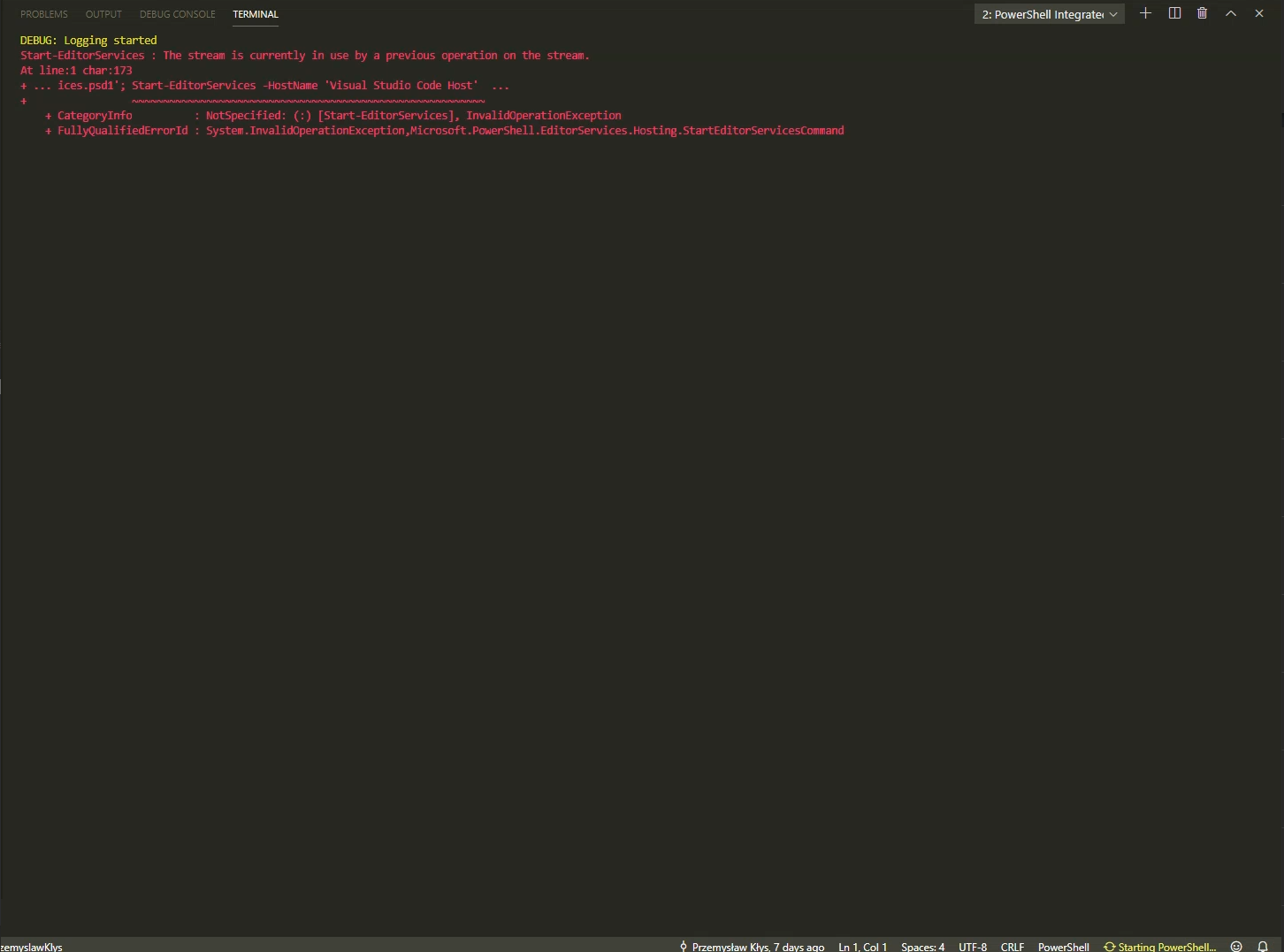
No logs tho as none get created. This one i managed to snap via video. It seems to work on VSCode, but then I tried it on VSCode Insiders (without closing VSCCode) and get this error as above. I will close everything and retry but maybe some conflicts stil?
PrzemyslawKlys
on 3 Dec 2019
Not sure if related:
That one I discovered too (although I found it harder to generate). See if this fixes it:
Do you want me to open an issue?
Not yet, that would just complicate things at the minute. How did you run the script?
rjmholt
on 4 Dec 2019
Nope, still there (standard VSCode)
I don't even get to run the script. It crashes instantly on start - as soon as .ps1 is clicked to load a file. It only happens on vscode insiders. The funny thing is I never use it. Just installed it recently to try and see how it works.
PrzemyslawKlys
on 4 Dec 2019
For the 1st problem it's also important to add the empty line:

otherwise, any output of Write-Host starts somewhere in the middle. After the script is started cursor should be moved one line below without any tabs so write-host can do its job, and after it's done, add one line again I guess.
PrzemyslawKlys
on 4 Dec 2019
- [x] PSReadline F8
@issue - [x] $Profile issue
- [x] Az.Resources Import issue
Great progress! Thanks a million!
bgelens
on 4 Dec 2019
@PrzemyslawKlys
Nope, still there (standard VSCode)
Are you seeing exactly the same error message? The updated one uses quite a different mechanism for logging, so if it's failing it should do so in a different way.
Can you share more information about the issues you're seeing? I still don't have a concrete idea of any of the issues you're hitting.
rjmholt
on 4 Dec 2019
@rjmholt do you mean my 2nd problem or 1st? 1st I can probably give you gif.
The second problem is a bit special because while I know there's new logging and I can see that in production VSCode, in insider VSCode it's not even getting to the logging phase. I was able to take screenshot only because i recorded movie and extracted frame.

StartEditorServices.log:
VScode-PowerShell.log
4.12.2019 18:18:51 [NORMAL] - Language server starting --
4.12.2019 18:18:51 [NORMAL] - exe: C:\WINDOWS\System32\WindowsPowerShell\v1.0\powershell.exe
4.12.2019 18:18:51 [NORMAL] - args: Import-Module 'c:\Users\przemyslaw.klys.vscode-insiders\extensions\ms-vscode.powershell-preview-2019.11.0\modules\PowerShellEditorServices\PowerShellEditorServices.psd1'; Start-EditorServices -HostName 'Visual Studio Code Host' -HostProfileId 'Microsoft.VSCode' -HostVersion '2019.11.0' -AdditionalModules @('PowerShellEditorServices.VSCode') -BundledModulesPath 'c:\Users\przemyslaw.klys.vscode-insiders\extensions\ms-vscode.powershell-preview-2019.11.0\modules' -EnableConsoleRepl -LogLevel 'Diagnostic' -LogPath 'c:\Users\przemyslaw.klys.vscode-insiders\extensions\ms-vscode.powershell-preview-2019.11.0\logs\1575479931-05b57875-ae5a-4f36-8269-ee765f487cd61575479910729\EditorServices.log' -SessionDetailsPath 'c:\Users\przemyslaw.klys.vscode-insiders\extensions\ms-vscode.powershell-preview-2019.11.0\sessions\PSES-VSCode-9632-643711' -FeatureFlags @()
4.12.2019 18:18:52 [NORMAL] - powershell.exe started, pid: 7084
4.12.2019 18:18:52 [NORMAL] - powershell.exe terminated or terminal UI was closed
And that's it. It crashes instantly. No logs nothing.
PrzemyslawKlys
on 4 Dec 2019
@rjmholt cleaned up vscode-insiders and it seems to work now fine. Must have been some hickup during upgrade. Tho after running any script in insiders:

I can also reproduce it in production VSCode but on 5.1 version of PowerShell. It works for 7.0
PrzemyslawKlys
on 4 Dec 2019
@rjmholt that's the static constructor issue we were talking about. Search for RunClassConstructor in the code.
@PrzemyslawKlys doesn't have the PSRL feature turned on and so that shows up...
But that does ask the question... If you don't have the useLegacyReadLine setting turned on, why isn't the PSRL feature being used?
@rjmholt make sure when you're making these vsixes that they have the right version of PSRL in the modules folder... But it also could be do to your change.
 TylerLeonhardt
on 4 Dec 2019
TylerLeonhardt
on 4 Dec 2019
@rjmholt that's the static constructor issue we were talking about. Search for RunClassConstructor in the code.
I reviewed that and only added code to only run it when PSRL is enabled, but will review. Have had PSRL running myself in Win and *nix so far without issue, but will look into it.
rjmholt
on 4 Dec 2019
IIRC, the issue only showed up when launching the debug server.
TylerLeonhardt
on 4 Dec 2019
@PrzemyslawKlys I'm trying out things like F5 here. Is there anything else I should try perhaps?

StartEditorServices.log:
[DEBUG]: Logging started
This is especially odd, since that log call is the last thing that happens in the before block. The next piece of code we should execute is the end block, and the first thing in that is another log statement...
rjmholt
on 4 Dec 2019
For this issue: https://github.com/PowerShell/vscode-powershell/issues/2289
You can try this code:
$Testor = for ($i = 0; $i -lt 10; $i++) {
    $Tes2 = for ($h = 0; $h -lt 10; $h++) {
        'test'
    }
    $Tes2
    'test'

}
$Testor

In old version if you cancel debugging it doesn't return everything to screen. In new version it does.
For moved cursor problem:

Notice how on first run the first line is moved to the right.
For the problem you're reffering to i guess it's non-existent. After cleaning up VScode from earlier versions and making sure any old PS Extensions doesn't exists it seems to work.
PrzemyslawKlys
on 4 Dec 2019

Here's the one with PowerShell 7 vs PowerShell 5.1
PrzemyslawKlys
on 4 Dec 2019
Ok, thanks! I'll keep looking into it
rjmholt
on 4 Dec 2019
Worked with it for over an hour yesterday. Than intellisense froze and the IC didn't except any input anymore (No chars, no enter, no ctrl+c, nothing). Was working so switched to stable extension again. I'll see if I can repro again in future when I have some time in the day and hopefully can capture some logs
bgelens
on 5 Dec 2019
Sounds like a deadlock. Hard to debug on macOS (due to limitations in .NET Core...) unless you've got the source locally
rjmholt
on 5 Dec 2019
I've got this running as my default environment now, so hopefully I'll hit it and be able to resolve it.
The other possibility is that it's the old deadlock from PackageManagement, which should be fixed in the latest PackageManagement version.
rjmholt
on 5 Dec 2019
But if you hit that again, just let me know what you were doing/running at the time
rjmholt
on 5 Dec 2019
@rjmholt did you manage to fix the psreadline problem? I've stopped using preview due to that bug.
PrzemyslawKlys
on 5 Dec 2019
did you manage to fix the psreadline problem?
I didn't hit it myself (and included code to make legacy readline not hit it). But the issue as you see it might be caused by my local module versions in the build if you don't have your own PSReadLine installation. I've refreshed them, but now the module is bigger than 10MB, so you'll have to grab it from here.
rjmholt
on 5 Dec 2019
Same issue on new version.
PrzemyslawKlys
on 5 Dec 2019
@rjmholt
But if you hit that again, just let me know what you were doing/running at the time
I've got PackageManagement 1.4.5 which is the latest (ships with PSv7 Preview 6)
I'm mainly developing modules, running builds which, as a step in the builds, standup local ps repositories to generate nupkg and then remove them again. The rest is a lot of run selection (f8)
I do have a couple of Azure DevOps feeds registered as well which PowerShellGet is not handling all that well but that is another issue all together I think.
I've switched to your build again and will run it during the day tomorrow. Will let you know how it goes
bgelens
on 5 Dec 2019
Same issue on new version.
If you have a PSReadLine module installed locally, you should make sure you upgrade it to 2.0.0-beta.6. You can find the version with gmo -list PSReadLine. As I say, I haven't been able to reproduce it locally.
I've got PackageManagement 1.4.5 which is the latest (ships with PSv7 Preview 6)
...
I've switched to your build again and will run it during the day tomorrow. Will let you know how it goes
Understood, and thanks for giving it a go. It's entirely possible I've goofed in some thread handling, so hopefully if that's the case we can find it.
I've never done this, but it might be possible to collect a core dump on a deadlock using tools like in this blog post and this stack overflow answer.
rjmholt
on 5 Dec 2019
Updated psreadline for PS5 / PS 6 and it works. The one that was installed was beta 3.

It would seem packed version is beta 3, not beta 6. Now it doesn't error out.
PrzemyslawKlys
on 5 Dec 2019
The packed version I show is beta 5, but this suggests our logic to prevent picking up PSReadLine could be flawed.
My hope is that PSReadLine isn't loaded to early for us to make sure the right one is there.
rjmholt
on 5 Dec 2019
It froze again. This time I worked a lot longer in it. At the time of freeze, I see these in the EditorServices.log (a couple of times). Sorry for redaction but don't want to include customer hints
2019-12-06 11:13:29.445 +01:00 [FTL] Failed to handle notification textDocument/documentHighlight
System.IO.FileNotFoundException: Could not find file '/Users/bengelens/OneDrive/Documenten/Projecten/*//Untitled-1'.
File name: '/Users/bengelens/OneDrive/Documenten/Projecten//*/Untitled-1'
at Interop.ThrowExceptionForIoErrno(ErrorInfo errorInfo, String path, Boolean isDirectory, Func2 errorRewriter) at Microsoft.Win32.SafeHandles.SafeFileHandle.Open(String path, OpenFlags flags, Int32 mode) at System.IO.FileStream..ctor(String path, FileMode mode, FileAccess access, FileShare share, Int32 bufferSize, FileOptions options) at System.IO.FileStream..ctor(String path, FileMode mode, FileAccess access) at Microsoft.PowerShell.EditorServices.Services.WorkspaceService.GetFile(String filePath) in C:\Users\Robert Holt\Documents\Dev\Microsoft\PowerShellEditorServices\src\PowerShellEditorServices\Services\Workspace\WorkspaceService.cs:line 152 at Microsoft.PowerShell.EditorServices.Handlers.DocumentHighlightHandler.Handle(DocumentHighlightParams request, CancellationToken cancellationToken) in C:\Users\Robert Holt\Documents\Dev\Microsoft\PowerShellEditorServices\src\PowerShellEditorServices\Services\TextDocument\Handlers\DocumentHighlightHandler.cs:line 59 at OmniSharp.Extensions.LanguageServer.Server.Pipelines.ResolveCommandPipeline2.Handle(TRequest request, CancellationToken cancellationToken, RequestHandlerDelegate1 next) at MediatR.Pipeline.RequestPostProcessorBehavior2.Handle(TRequest request, CancellationToken cancellationToken, RequestHandlerDelegate1 next) at MediatR.Pipeline.RequestPreProcessorBehavior2.Handle(TRequest request, CancellationToken cancellationToken, RequestHandlerDelegate1 next) at OmniSharp.Extensions.JsonRpc.RequestRouterBase1.RouteRequest(TDescriptor descriptor, Request request, CancellationToken token)
There are some hardcoded paths in there that might be part of the issue. Also untitled-1 is not on disk, just in memory, never saved it.
The end of my log looks like this:
2019-12-06 11:16:11.718 +01:00 [DBG] Resolved path: untitled:Untitled-1
2019-12-06 11:16:11.885 +01:00 [DBG] Finding descriptor for textDocument/didChange
2019-12-06 11:16:12.007 +01:00 [DBG] Finding descriptor for textDocument/didChange
2019-12-06 11:16:12.203 +01:00 [DBG] Finding descriptor for textDocument/foldingRange
2019-12-06 11:16:12.258 +01:00 [DBG] Finding descriptor for textDocument/codeLens
2019-12-06 11:16:12.259 +01:00 [DBG] Finding descriptor for textDocument/codeAction
2019-12-06 11:16:12.570 +01:00 [DBG] Finding descriptor for textDocument/didChange
2019-12-06 11:16:12.570 +01:00 [DBG] Finding descriptor for $/cancelRequest
2019-12-06 11:16:12.570 +01:00 [DBG] Finding descriptor for $/cancelRequest
2019-12-06 11:16:12.570 +01:00 [DBG] Found 3 violations
2019-12-06 11:16:12.577 +01:00 [DBG] Found 3 violations
2019-12-06 11:16:12.585 +01:00 [DBG] Found 3 violations
2019-12-06 11:16:12.651 +01:00 [DBG] Finding descriptor for textDocument/didChange
2019-12-06 11:16:12.804 +01:00 [DBG] Finding descriptor for textDocument/didChange
2019-12-06 11:16:12.956 +01:00 [DBG] Finding descriptor for textDocument/didChange
2019-12-06 11:16:12.957 +01:00 [DBG] Finding descriptor for $/cancelRequest
2019-12-06 11:16:12.957 +01:00 [DBG] Finding descriptor for textDocument/completion
2019-12-06 11:16:13.128 +01:00 [DBG] Finding descriptor for textDocument/didChange
2019-12-06 11:16:13.128 +01:00 [DBG] Finding descriptor for $/cancelRequest
2019-12-06 11:16:13.128 +01:00 [DBG] Finding descriptor for textDocument/completion
2019-12-06 11:16:13.306 +01:00 [DBG] Finding descriptor for textDocument/didChange
2019-12-06 11:16:13.306 +01:00 [DBG] Finding descriptor for $/cancelRequest
2019-12-06 11:16:13.306 +01:00 [DBG] Finding descriptor for textDocument/completion
2019-12-06 11:16:13.441 +01:00 [DBG] Finding descriptor for textDocument/didChange
2019-12-06 11:16:13.441 +01:00 [DBG] Finding descriptor for $/cancelRequest
2019-12-06 11:16:13.584 +01:00 [DBG] Finding descriptor for textDocument/didChange
2019-12-06 11:16:13.584 +01:00 [DBG] Finding descriptor for textDocument/completion
2019-12-06 11:16:13.694 +01:00 [DBG] Finding descriptor for textDocument/didChange
2019-12-06 11:16:13.886 +01:00 [DBG] Finding descriptor for textDocument/didChange
2019-12-06 11:16:13.998 +01:00 [DBG] Finding descriptor for textDocument/didChange
2019-12-06 11:16:14.190 +01:00 [DBG] Finding descriptor for textDocument/foldingRange
2019-12-06 11:16:14.235 +01:00 [DBG] Finding descriptor for $/cancelRequest
2019-12-06 11:16:14.236 +01:00 [DBG] Finding descriptor for textDocument/codeLens
2019-12-06 11:16:14.236 +01:00 [DBG] Finding descriptor for textDocument/codeAction
2019-12-06 11:16:15.423 +01:00 [DBG] Finding descriptor for textDocument/documentHighlight
2019-12-06 11:16:15.424 +01:00 [DBG] Finding descriptor for $/cancelRequest
2019-12-06 11:16:15.453 +01:00 [DBG] Finding descriptor for $/cancelRequest
2019-12-06 11:16:15.800 +01:00 [DBG] Finding descriptor for textDocument/codeAction
2019-12-06 11:16:15.800 +01:00 [DBG] Finding descriptor for $/cancelRequest
2019-12-06 11:16:16.438 +01:00 [DBG] Finding descriptor for evaluate
2019-12-06 11:16:22.029 +01:00 [DBG] Finding descriptor for $/cancelRequest
2019-12-06 11:16:23.135 +01:00 [DBG] Finding descriptor for textDocument/hover
2019-12-06 11:16:23.454 +01:00 [DBG] Finding descriptor for textDocument/codeAction
2019-12-06 11:16:23.888 +01:00 [DBG] Finding descriptor for textDocument/codeAction
2019-12-06 11:16:25.186 +01:00 [DBG] Finding descriptor for $/cancelRequest
2019-12-06 11:20:22.433 +01:00 [DBG] Finding descriptor for textDocument/hover
2019-12-06 11:20:22.812 +01:00 [DBG] Finding descriptor for $/cancelRequest
2019-12-06 11:21:32.692 +01:00 [DBG] Finding descriptor for $/cancelRequest
2019-12-06 11:21:32.692 +01:00 [DBG] Finding descriptor for $/cancelRequest
So the freeze occurred around 11:16, so the extension is still trying to do thing at 11:21 and even now at 11:30 it is still writing Finding descriptor for $/cancelRequest
bgelens
on 6 Dec 2019
I actually saw something similar. I pressed F5, nothing happened, I pressed F5 5 times and nothing happened, after 1 minute everything just started working.
PrzemyslawKlys
on 6 Dec 2019
Ah, the hardcoded paths are because error site hints are baked in at compile time. Since it was built on my machine, you're seeing details based on where I built it.
The Fatal log entry is interesting; implies it's a crash, but the server has kept on going. The fatal log entry there looks like it's a bug in how we handle untitled files unrelated to this change (@TylerLeonhardt was suspecting this issue might predate my changes, so it might be unrelated).
Thanks for the info both! Still not sure that the freeze is this crash or something else, but with more use we should be able to get to the bottom of it.
@PrzemyslawKlys, since you're on Windows, if you're able to collect a proc dump with procdump -ma <pid> where <pid> is the PID of the powershell.exe (or pwsh.exe) hosting PSES and send it through next time you hit a freeze, we might be able to work out where the issue lies. You'll probably have to email us a one drive link or similar, since it'll be big.
rjmholt
on 7 Dec 2019
It's not related so I'm happy to open another issue but basically the same issue @bgelens is having. That completions stop working after a while:
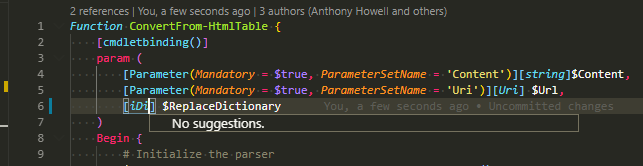
Basically types completion doesn't work for most of the types. Some stuff continues to work (maybe from cache tho).
1575721182-36158a29-cf42-4a53-9043-f84c4e9d58391575721180675.zip
PrzemyslawKlys
on 7 Dec 2019
1575758373-d03e9f29-442a-4ccf-999a-f6b8c03654d31575758309039.zip
Here's a new log, completions stopped working again.
PrzemyslawKlys
on 7 Dec 2019
Just wanted to add:

With preview extensions after completions stop working usually a restart of PowerShell hangs vscode.
PrzemyslawKlys
on 8 Dec 2019
Related issues
 CJHarmath
·
3Comments
CJHarmath
·
3Comments
 keposet
·
3Comments
keposet
·
3Comments
 inthemedium
·
3Comments
inthemedium
·
3Comments
 rs38
·
4Comments
rs38
·
4Comments
 timoline
·
3Comments
timoline
·
3Comments
Most helpful comment
I've made some progress here:
Still work to do (1) investigating and implementing solutions in .NET Framework, and (2) migrating the rest of our startup logic to C#, since I had to rewrite it all to set the load order in stone.