Vscode-powershell: Intelisense defaults to last parameter when hitting CTRL-Space or TAB after '-'
System Details
System Details Output
### VSCode version: 1.39.0-insider 55825e9ad2aa4b4b3f8b2290a54a517bc454a7a5 x64

### VSCode extensions:
[email protected]
[email protected]
[email protected]
[email protected]
[email protected]
[email protected]
[email protected]
[email protected]
[email protected]
[email protected]


### PSES version: 2.0.0.0

### PowerShell version:

Name                           Value
----                           -----
PSVersion                      5.1.18362.145
PSEdition                      Desktop
PSCompatibleVersions           {1.0, 2.0, 3.0, 4.0...}
BuildVersion                   10.0.18362.145
CLRVersion                     4.0.30319.42000
WSManStackVersion              3.0
PSRemotingProtocolVersion      2.3
SerializationVersion           1.1.0.1
Issue Description
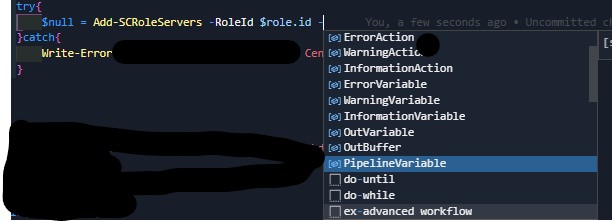
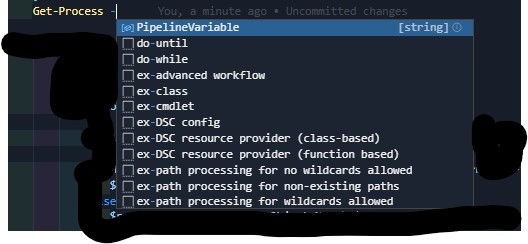
I am experiencing a problem with intellisense when hitting ctrk-space or tab after a hyphen when filling out parameters. This seems to always default to the last one(typically pipelinevariable), which then starts triggering code blocks being inserted when pressing TAB and having to restart typing your parameter.
Expected Behaviour
-- Description of what should be happening --
I believe it should follow the order of the parameters as defined in the underlying function/cmdletso you can tab through them
Actual Behaviour
-- Description of what actually happens --
As described in the issue and seen in the two screen shots (one built in cmdlet and one custom function). Please advise if logs will assist with your troubleshooting
Attached Logs
Follow the instructions in the troubleshooting docs
about capturing and sending logs.
 chughesvf
All 4 comments
@chughesvf thanks for opening this issue, looking at the details it seems this is a vscode bug so there unfortunately isnt much we can do to help...it would be great if you could open an issue in their repo....Thanks!
 SydneyhSmith
on 10 Sep 2019
SydneyhSmith
on 10 Sep 2019
Did anyone create an issue in the VSCode repository? My "search-fu" is failing. Or perhaps a workaround is present? :)
 PhilipHaglund
on 9 Oct 2019
PhilipHaglund
on 9 Oct 2019
@PhilipHaglund it does not appear that anyone has opened the issue in the VSCode repository, feel free to do the honors 😄
SydneyhSmith
on 10 Oct 2019
Add "editor.suggestSelection": "first" to your settings.json file.
This will make the intellisense pop-up always show the first option in the list, and should solve your problem.
 MartinGC94
on 3 Dec 2019
MartinGC94
on 3 Dec 2019
Related issues
 nathan-alden-hp
·
3Comments
nathan-alden-hp
·
3Comments
 guidooliveira
·
3Comments
guidooliveira
·
3Comments
 daviwil
·
3Comments
daviwil
·
3Comments
 TheDanishDynamo
·
3Comments
TheDanishDynamo
·
3Comments
 pcgeek86
·
4Comments
pcgeek86
·
4Comments
Most helpful comment
Add
"editor.suggestSelection": "first"to your settings.json file.This will make the intellisense pop-up always show the first option in the list, and should solve your problem.