Vscode-powershell: VS Code Integrated Terminal issue loading Azure DLL
Hello,
I have some info that I wanted to share in case it's pointing to a bigger issue.
I've experienced, and we've had several people report (GH, Twitter, Slack) that, certain DLLs will not load in the Integrated Shell.
This loading works in all other environments (ISE, powershell.exe).
System.Exception: Could not load file or assembly 'Microsoft.Azure.Services.AppAuthentication' or one of its dependencies. The system cannot find the file specified. ---> System.Exception:
                        Could not load file or assembly 'Microsoft.Azure.Services.AppAuthentication' or one of its dependencies. The system cannot find the file specified. --->
                        System.Management.Automation.MethodInvocationException: Exception calling "Open" with "0" argument(s): "The type initializer for 'System.Data.SqlClient.SqlAuthenticationProviderManager' threw
                        an exception." ---> System.TypeInitializationException: The type initializer for 'System.Data.SqlClient.SqlAuthenticationProviderManager' threw an exception. ---> System.ArgumentException:
                        Failed to instantiate an authentication provider with type 'Microsoft.Azure.Services.AppAuthentication.SqlAppAuthenticationProvider, Microsoft.Azure.Services.AppAuthentication' for
                        'ActiveDirectoryInteractive'. ---> System.IO.FileNotFoundException: Could not load file or assembly 'Microsoft.Azure.Services.AppAuthentication' or one of its dependencies. The system cannot
                        find the file specified.
Then later
Could not load file or assembly 'Microsoft.Azure.Services.AppAuthentication' or one of its dependencies. The system cannot find the file specified
I "fixed" my issue by uninstalling Insiders and installing Stable, but people have reported experiencing this issue in both versions. If a Code instance is broken, the import is always broken. But if the Code instance is not broken, it consistently works.
I believe the Code breaks in this code block:
 if ((Get-ItemProperty "HKLM:SOFTWARE\Microsoft\NET Framework Setup\NDP\v4\Full").Release -ge 461808) {
        Write-Verbose -Message "Loading app.config"
        # Load app.config that supports MFA
        $configpath = "$script:PSModuleRoot\bin\app.config"
        [appdomain]::CurrentDomain.SetData("APP_CONFIG_FILE", $configpath)
        Add-Type -AssemblyName System.Configuration
        # Clear some cache to make sure it loads
        [Configuration.ConfigurationManager].GetField("s_initState", "NonPublic, Static").SetValue($null, 0)
        [Configuration.ConfigurationManager].GetField("s_configSystem", "NonPublic, Static").SetValue($null, $null)
        ([Configuration.ConfigurationManager].Assembly.GetTypes() | Where-Object {$_.FullName -eq "System.Configuration.ClientConfigPaths"})[0].GetField("s_current", "NonPublic, Static").SetValue($null, $null)
    }
I don't know if that is helpful to you at all.
@garethnewman was able to give me some good info from his broken instance:
Environment Information
Visual Studio Code
| Name | Version |
| --- | --- |
| Operating System | Windows_NT x64 6.3.9600 |
| VSCode | 1.36.0-insider|
| PowerShell Extension Version | 2019.5.0 |
PowerShell Information
|Name|Value|
|---|---|
|PSVersion|5.1.14409.1018|
|PSEdition|Desktop|
|PSCompatibleVersions|1.0 2.0 3.0 4.0 5.0 5.1.14409.1018|
|BuildVersion|10.0.14409.1018|
|CLRVersion|4.0.30319.42000|
|WSManStackVersion|3.0|
|PSRemotingProtocolVersion|2.3|
|SerializationVersion|1.1.0.1|
Visual Studio Code Extensions
Visual Studio Code Extensions(Click to Expand)
|Extension|Author|Version|
|---|---|---|
|powershell|ms-vscode|2019.5.0|
|search|dbatools|1.1.3|
|team|ms-vsts|1.149.2|;
For now, we are getting around it basically by not supporting the new functionality, much like we do Core 💔
if ($psVersionTable.Platform -ne 'Unix' -and $PSVersionTable.PSEdition -ne 'Core' -and $host.Name -ne 'Visual Studio Code Host') {
 potatoqualitee
All 40 comments
Got some follow up info
Could not load file or assembly 'Microsoft.Azure.Services.AppAuthentication' or one of its dependencies. The system cannot find the
file specified.
At C:\github\dbatools\internal\functions\flowcontrol\Stop-Function.ps1:221 char:9
+         throw $records[0]
+         ~~~~~~~~~~~~~~~~~
    + CategoryInfo          : NotSpecified: (:) [], Exception
    + FullyQualifiedErrorId : dbatools_Connect-DbaInstance

Exception calling "Open" with "0" argument(s): "The type initializer for 'System.Data.SqlClient.SqlAuthenticationProviderManager'
threw an exception."
At C:\github\dbatools\functions\Connect-DbaInstance.ps1:741 char:29
+ ...                  $server.ConnectionContext.SqlConnectionObject.Open()
+                      ~~~~~~~~~~~~~~~~~~~~~~~~~~~~~~~~~~~~~~~~~~~~~~~~~~~~
    + CategoryInfo          : NotSpecified: (:) [], MethodInvocationException
    + FullyQualifiedErrorId : TypeInitializationException

Could not load file or assembly 'Microsoft.Azure.Services.AppAuthentication' or one of its dependencies. The system cannot find the
file specified.
At C:\github\dbatools\internal\functions\flowcontrol\Stop-Function.ps1:221 char:9
+         throw $records[0]
+         ~~~~~~~~~~~~~~~~~
    + CategoryInfo          : NotSpecified: (:) [], Exception
    + FullyQualifiedErrorId : dbatools_Connect-DbaInstance

Exception calling "Open" with "0" argument(s): "The type initializer for 'System.Data.SqlClient.SqlAuthenticationProviderManager' threw an exception."
Perhaps this has something to do with the sql enhancements in the new .net framework.
When I expanded on that error, it came back around to:
Failed to instantiate an authentication provider with type
                        'Microsoft.Azure.Services.AppAuthentication.SqlAppAuthenticationProvider,
                        Microsoft.Azure.Services.AppAuthentication' for 'ActiveDirectoryInteractive'. --->
                        System.IO.FileNotFoundException: Could not load file or assembly
                        'Microsoft.Azure.Services.AppAuthentication' or one of its dependencies. The system cannot find the file
                        specified.
Hi @potatoqualitee, thanks for the info you've already provided.
We might need some more context here. The code snippets you provide -- are they from dbatools?
You're loading those DLLs with Add-Type -AssemblyName <partial name> right?
Because they don't have a stack trace, I'm not sure how to interpret the error messages, but they look like they're getting a FileNotFoundException.
It might be worth taking a look at fusion logs to see if they capture what's happening here better.
We also need to find out what .NET Framework version you're running, using the same registry key you give in the snippet above.
 rjmholt
on 27 Jun 2019
rjmholt
on 27 Jun 2019
This is plain SMO

But if I don't load dbatools, then it works no problem. here's me in another module
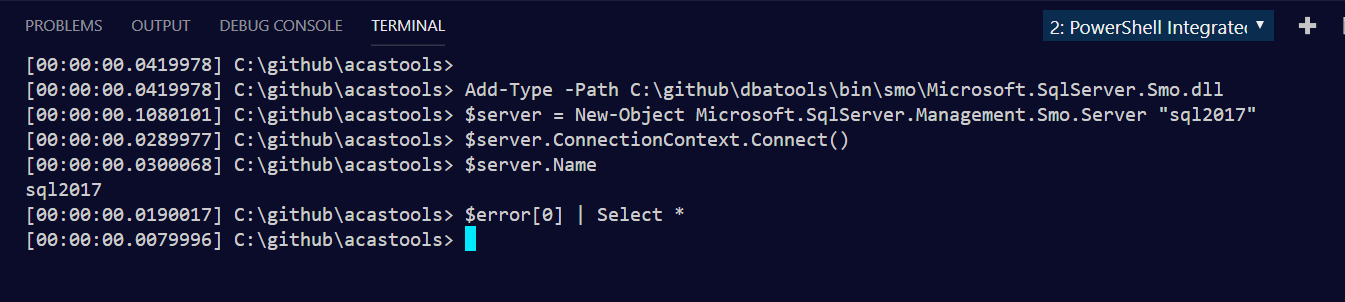
So now I'm gonna dig into what dbatools is loading that is making integrated so upset.
potatoqualitee
on 27 Jun 2019
Sorry was just keeping some notes here for future people who may have the issue. Let me get that info for you, @rjmholt
potatoqualitee
on 27 Jun 2019
The code snippets you provide -- are they from dbatools?
Yes, the snippets are from dbatools
You're loading those DLLs with Add-Type -AssemblyName
right?
No, we load using Add-Type -Path and specify the path to the SMO DLLs provided in our module
Because they don't have a stack trace, I'm not sure how to interpret the error messages, but they look like they're getting a FileNotFoundException.
I'm not sure how to get more info. I don't know where it's trying to get that file in the first place (it was supposed to skip if it detected integrated host) and will begin tracking that down. Note that the file is found when using powershell.exe and with non-Insiders (i finally got it to repro today by installing Insiders)
It might be worth taking a look at fusion logs to see if they capture what's happening here better.
Thank you! I have not used this tool and will take a closer look.
We also need to find out what .NET Framework version you're running, using the same registry key you give in the snippet above.
528049 - aka 4.8
As an aside, today someone fixed their issue by installing a newer version of Insiders. I downloaded it today and I am running into the issue. VS Code regular path is still working fine.
Thanks
potatoqualitee
on 27 Jun 2019
I think a couple of important points will be helpful:
- VSCode is a electron/node application and doesn't know about .NET or PowerShell, so it should have no bearing on .NET loading issues. So changing from VSCode Insiders to Stable shouldn't be causative. The Integrated Console is only affected by the PowerShell extension version.
- The integrated console comes from the PowerShell extension for VSCode and in your case comes from a powershell.exe process started as normal
The difference may lie in assembly dependency loading, but the bug doesn't seem to reproduce consistently enough for that.
Given that you seem to be experiencing a behaviour difference between VSCode Insiders and Stable, could you see if you experience any issues in the VSCode powershell.exe terminal?
rjmholt
on 27 Jun 2019
I'm not sure I understand the initial code snippet for cache clearing you included in the issue description. Is your suspicion that that logic is causing a loading failure later? It's probably worth noting that manipulating private static fields can lead to unstable (sometimes thread-dependent) errors.
rjmholt
on 27 Jun 2019
Thank you for your time and feedback.
So changing from VSCode Insiders to Stable shouldn't be causative.
I'm beginning to see that in my testing. Now I can't get VS Code Insiders to break 😩
but the bug doesn't seem to reproduce consistently enough for that.
Right? And now that VS Code Insiders went from broken to working, I'm super unsure how I'm going to fix this but we got one more complaint in our Slack channel today.
Given that you seem to be experiencing a behaviour difference between VSCode Insiders and Stable, could you see if you experience any issues in the VSCode powershell.exe terminal?
So far, VSCode powershell.exe terminal has had 100% success across both Insiders and Stable. I'll try more to break it tonight.
I'm not sure I understand the initial code snippet for cache clearing you included in the issue description.
I don't know enough about the problem (dlls, loading, etc) to know what is useful and what is not. I can say that now that block is commented out for VS Code Host yet we're still running into the problem.
When I can reproduce the issue, I am unable to delete the Azure-related DLLs in my SMO directory. Now that I can't get it to reproduce, I am able to delete the DLLs in the SMO directory. That suggests these DLLs are in use when they should not be. Is it possible that Code is loading the DLLs even though I tell PowerShell not to?
potatoqualitee
on 27 Jun 2019
that block is commented out for VS Code Host yet we're still running into the problem
Ok, so possibly safe to rule that out.
I am unable to delete the Azure-related DLLs in my SMO directory
Does it look like a permissions error? That suggests the DLLs are loaded, most likely by PowerShell. You might be able to find them in resmon.exe and that should tell you who owns the locks.
Is it possible that Code is loading the DLLs even though I tell PowerShell not to?
Entirely possible, but it depends on how you're telling PowerShell/.NET Framework not to (I didn't catch that part above).
My current theory is that this is caused by a simple .NET Framework DLL loading problem. powershell.exe and powershell_ise.exe both live in the same directory and when a DLL is loaded in .NET Framework (or by Add-Type in Windows PowerShell), .NET Framework looks for those in a certain order. We actually made changes in PowerShell Core to make dependency resolution work better.
So my thinking is that the dependency DLLs don't load properly because PowerShellEditorServices.dll is in play (it's a PowerShell module) and that your dependency loading might depend on more factors than are explicitly accounted for.
With all this said, I'm not a .NET Framework expert. So tagging @SteveL-MSFT, @daxian-dbw and @joeyaiello to see if they can offer any extra insights.
rjmholt
on 27 Jun 2019
@potatoqualitee Next time you run into the issue can you check [Environment]::Is64BitProcess in both the working and failing terminal? Also check that both the stable and insiders versions are the same architecture.
 SeeminglyScience
on 27 Jun 2019
SeeminglyScience
on 27 Jun 2019
@potatoqualitee Since you are using Windows PowerShell, can you please also try do the same operations in the default VSCode PowerShell terminal (not the integrated PowerShell console that comes from the PowerShell VSCode extension)? Just want to know if your module might have the same issue in the default VSCode PS terminal too.
 daxian-dbw
on 27 Jun 2019
daxian-dbw
on 27 Jun 2019
@daxian-dbw from above
So far, VSCode powershell.exe terminal has had 100% success across both Insiders and Stable. I'll try more to break it tonight.
rjmholt
on 27 Jun 2019
@adityapatwardhan
rjmholt
on 27 Jun 2019
@SeeminglyScience - when it fails, [Environment]::Is64BitProcess reports true. When it succeeds, [Environment]::Is64BitProcess reports true.
I've been testing it for about an hour now and can't get it to reliably break, though it does now break in both editions of VS Code.
@daxian-dbw - I have not been able to break powershell.exe in VS Code. I just tried for an hour with no success in breaking it like Integrated has broken.
potatoqualitee
on 27 Jun 2019
I have only had issues with Integrated console. I'm getting it in both vscode insiders and vscode with both installed on the same machine. [Environment]::Is64BitProcess reports true for me although I don't have a working integrated terminal to compare to.
 flagmanchris
on 27 Jun 2019
flagmanchris
on 27 Jun 2019
Chris was also the user that thought it was fixed by updating VS Code insiders but the problem ended up returning.
potatoqualitee
on 27 Jun 2019
It makes me think I imagined it working! .Net version info:
Release       : 461808
Version       : 4.7.03056
PSPath        : Microsoft.PowerShell.Core\Registry::HKEY_LOCAL_MACHINE\SOFTWARE\Microsoft\NET Framework Setup\NDP\v4\Full
.Net 4.7 introduced significant changes to System.Data.SqlClient. Unsure if that means anything to this issue ¯_(ツ)_/¯
potatoqualitee
on 27 Jun 2019
@potatoqualitee @flagmanchris thanks for all the information, we will have to continue to investigate. We will let you know we have more questions...in the meantime if you get a consistent reproduction, let us know
 SydneyhSmith
on 28 Jun 2019
SydneyhSmith
on 28 Jun 2019
If you want even more information, you might be able to capture the problem in a crash dump: https://blogs.msdn.microsoft.com/cobold/2010/03/01/collecting-crash-dumps/
If you send that through to us (upload or email), we can take a look
rjmholt
on 28 Jun 2019
I had a go at creating a dump file using winDBG; not sure if I did it right but I have generated a file at the point of the error. Its around 650MB does that sound right / where should I send it?
flagmanchris
on 29 Jun 2019
Thanks @flagmanchris you can send them to [email protected]
SydneyhSmith
on 1 Jul 2019
Thanks, just sent it through (onedrive link)
flagmanchris
on 1 Jul 2019
:bananadance: thanks to you both!
potatoqualitee
on 1 Jul 2019
Ok had a brief look at the crash dump in Visual Studio. The inner most exception indicates that more information is only available from the Fusion logs.
Can you please enable fusion logs and when the issue reoccurs, send those through to us?
rjmholt
on 2 Jul 2019
You'll need to set a registry key for this
rjmholt
on 2 Jul 2019
I also took a look at the dump, and yes, please enable the Fusion log and run the application again to recollect a dump:
0:015> !do 0000013354a9dc00
Name:        System.String
MethodTable: 00007ffc43dc9808
EEClass:     00007ffc436a6cb8
Size:        732(0x2dc) bytes
File:        C:\WINDOWS\Microsoft.Net\assembly\GAC_64\mscorlib\v4.0_4.0.0.0__b77a5c561934e089\mscorlib.dll
String:      WRN: Assembly binding logging is turned OFF.
To enable assembly bind failure logging, set the registry value [HKLM\Software\Microsoft\Fusion!EnableLog] (DWORD) to 1.
Note: There is some performance penalty associated with assembly bind failure logging.
To turn this feature off, remove the registry value [HKLM\Software\Microsoft\Fusion!EnableLog].
Thanks, I've just collected another crash dump with the fusion logs enabled and emailed a link to the files. @rjmholt I'm not sure about the pdb files question if you could point me in the right direction I'll see what I can do.
flagmanchris
on 3 Jul 2019
Thanks @flagmanchris. The fusion logs you shared doesn't look like generated from yesterday. The timestamp for all Microsoft.Azure.Services.AppAuthentication related log entries are from 3/7/2019, and they all show successful loading from the dbatools module folder C:\Program Files\WindowsPowerShell\Modules\dbatools\bin\libraries\Microsoft.Azure.Services.AppAuthentication.dll.
*** Assembly Binder Log Entry  (03/07/2019 @ 07:06:52) ***

The operation was successful.
Bind result: hr = 0x0. The operation completed successfully.

Assembly manager loaded from:  C:\Windows\Microsoft.NET\Framework64\v4.0.30319\clr.dll
Running under executable  C:\WINDOWS\System32\WindowsPowerShell\v1.0\powershell.exe
--- A detailed error log follows.

=== Pre-bind state information ===
LOG: Where-ref bind. Location = C:\Program Files\WindowsPowerShell\Modules\dbatools\bin\libraries\Microsoft.Azure.Services.AppAuthentication.dll
LOG: Appbase = file:///C:/WINDOWS/System32/WindowsPowerShell/v1.0/
LOG: Initial PrivatePath = NULL
LOG: Dynamic Base = NULL
LOG: Cache Base = NULL
LOG: AppName = powershell.exe
Calling assembly : (Unknown).
===
WRN: Native image will not be probed in LoadFrom context. Native image will only be probed in default load context, like with Assembly.Load().
...
This is what I got when inspecting the _fusionLog field of the FileNotFoundException. It does show the failure (0x80070002 meaning file not found), but no other useful information.
0:011> !do -nofields 000001a557df0190
Name:        System.String
MethodTable: 00007ffc43dc9808
EEClass:     00007ffc436a6cb8
Size:        3122(0xc32) bytes
File:        C:\WINDOWS\Microsoft.Net\assembly\GAC_64\mscorlib\v4.0_4.0.0.0__b77a5c561934e089\mscorlib.dll
String:      Assembly manager loaded from:  C:\Windows\Microsoft.NET\Framework64\v4.0.30319\clr.dll
Running under executable  C:\WINDOWS\System32\WindowsPowerShell\v1.0\powershell.exe
--- A detailed error log follows.

=== Pre-bind state information ===
LOG: DisplayName = Microsoft.Azure.Services.AppAuthentication
 (Partial)
WRN: Partial binding information was supplied for an assembly:
WRN: Assembly Name: Microsoft.Azure.Services.AppAuthentication | Domain ID: 1
WRN: A partial bind occurs when only part of the assembly display name is provided.
WRN: This might result in the binder loading an incorrect assembly.
WRN: It is recommended to provide a fully specified textual identity for the assembly,
WRN: that consists of the simple name, version, culture, and public key token.
WRN: See whitepaper http://go.microsoft.com/fwlink/?LinkId=109270 for more information and common solutions to this issue.
LOG: Appbase = file:///C:/WINDOWS/System32/WindowsPowerShell/v1.0/
LOG: Initial PrivatePath = NULL
Calling assembly : (Unknown).
===
LOG: This bind starts in default load context.
LOG: Using application configuration file: C:\WINDOWS\System32\WindowsPowerShell\v1.0\powershell.exe.Config
LOG: Using host configuration file:
LOG: Using machine configuration file from C:\Windows\Microsoft.NET\Framework64\v4.0.30319\config\machine.config.
LOG: Policy not being applied to reference at this time (private, custom, partial, or location-based assembly bind).
LOG: The same bind was seen before, and was failed with hr = 0x80070002.
Two suspicious things I observed:
- The logs shown in the
FunsionLogsyou shared indicate the successful binding was triggered byAssembly.LoadFrom, whereas the_fusionLogfield in WinDbg indicates the loading was triggered byAssembly.Loadwith a partial assembly nameMicrosoft.Azure.Services.AppAuthentication.
- The exception thrown from
System_Data_ni!System.Data.SqlClient.SqlAuthenticationProviderManager..ctor(System.Data.SqlClient.SqlAuthenticationProviderConfigurationSection)shows an error message:Failed to instantiate an authentication provider with type 'Microsoft.Azure.Services.AppAuthentication.SqlAppAuthenticationProvider, Microsoft.Azure.Services.AppAuthentication' for 'ActiveDirectoryInteractive'.. Note the type name used -- Microsoft.Azure.Services.AppAuthentication.SqlAppAuthenticationProvider, Microsoft.Azure.Services.AppAuthentication. It's explicitly using an incomplete assembly-qualified name.
I looked at the disassembled code of System_Data_ni!System.Data.SqlClient.SqlAuthenticationProviderManager in System.Data.dll. The load exception should happen at here:
try
{
    this._initializer = (SqlAuthenticationInitializer) Activator.CreateInstance(Type.GetType(configSection.InitializerType, true));
    this._initializer.Initialize();
}
catch (Exception ex)
{
    throw SQL.CannotCreateSqlAuthInitializer(configSection.InitializerType, ex);
}
configSection seems coming from a configuration file. Maybe you want to look into the config file to see if the use of an incomplete assembly-qualified type name is intentional.
section = (SqlAuthenticationProviderConfigurationSection) ConfigurationManager.GetSection("SqlAuthenticationProviders");
@flagmanchris is the assembly Microsoft.Azure.Services.AppAuthentication.dll shipped with dbatools module at dbatools\bin\libraries\Microsoft.Azure.Services.AppAuthentication.dll?
The loading failure was triggered by Assembly.Load("Microsoft.Azure.Services.AppAuthentication"). Assembly.Load will never probe the module folder, so it won't find the assembly unless the assembly was already loaded by Assembly.LoadFrom, which sort of conforms to the successful fusion logs you shared. Therefore, I think our investigation should shift a bit to see whether this assembly is supposed to be loaded before hitting this code path (via module manifest or etc.), and why that doesn't happen when running in the integrated console.
daxian-dbw
on 3 Jul 2019
Thanks, hopefully @potatoqualitee can jump in here; the assemblies are shipped with the module but beyond that I am a user that has been able to consistently recreate the issue rather than having a clue what is going on :)
The fusion logs are from this morning, but ther should also be a matching crash dump file.
flagmanchris
on 3 Jul 2019
Also, I wonder if I have confused things a little. The second dump file and fusion logs were generated using an updated version of dbatools which had the dll's moved to a different folder
flagmanchris
on 3 Jul 2019
this gives me some info to go on, i'll see what i can do 👍
potatoqualitee
on 4 Jul 2019
Okay, I tried a couple things and it's still broken. I don't know what to do.
It seems like Integrated Terminal notices app.config and loads it? Would we continue to see these problems if app.config was deleted? Or should I fully qualify the DLL (unsure how to do that besides dynamically writing it) How can I help from a dbatools perspective, @daxian-dbw?
Thank you for your time,
Chrissy
potatoqualitee
on 5 Jul 2019
Seems like we can get it to work consistently when app.config (or even appconfig.txt) is removed. Now i generate the file once, dynamically, in the dbatools temp directory. Unsure what that means for VS Code PowerShell.
potatoqualitee
on 6 Jul 2019
@daxian-dbw for reference, the config file source is here I think.
The integrated console doesn't do any special app.config handling; app.config operates below us at the .NET level and we do as little as possible to deviate from what PowerShell normally does.
I don't know much about config files, but given the way it requires a type like that, I would try explicitly doing Add-Type $PSScriptRoot/bin/libraries/Microsoft.Azure.Services.AppAuthentication.dll at the top of the psm1.
rjmholt
on 6 Jul 2019
Turns out the appconfig thing was a fluke. It's back to broken with app.config not existing.
We used to do Add-Type, but then specifically skipped all references to Microsoft.Azure.Services.AppAuthentication for VS Code Integrated Shell in an attempt to get this to stop happening.
It shouldn't even care about those DLLs now, so I'm really confused.
potatoqualitee
on 7 Jul 2019
Hi all, this should be fixed in the latest version of the extension - can you give it a go?
 TylerLeonhardt
on 22 Apr 2020
TylerLeonhardt
on 22 Apr 2020
Tyler, what was the root cause of this issue?
daxian-dbw
on 22 Apr 2020
Sorry I guess the wording was bit off... But considering our hosting model changed I am curious to see if the issue still persist.
TylerLeonhardt
on 22 Apr 2020
Related issues
 daviwil
·
4Comments
daviwil
·
4Comments
 nathan-alden-hp
·
3Comments
nathan-alden-hp
·
3Comments
 Line40
·
3Comments
Line40
·
3Comments
 itfranck
·
3Comments
itfranck
·
3Comments
 guidooliveira
·
3Comments
guidooliveira
·
3Comments
Most helpful comment
Thanks, just sent it through (onedrive link)