Vscode-powershell: PSCustomObject Accelerator Intellisense Formatting
Details Output
### VSCode version: 1.28.2 7f3ce96ff4729c91352ae6def877e59c561f4850 x64

### VSCode extensions:
[email protected]
[email protected]
[email protected]
[email protected]
[email protected]
[email protected]
[email protected]
[email protected]
[email protected]
[email protected]
[email protected]
[email protected]
[email protected]
[email protected]
[email protected]
[email protected]
[email protected]
[email protected]
[email protected]
[email protected]

### PSES version: 1.9.0.0

### PowerShell version:

Name                           Value
----                           -----
PSVersion                      5.1.17134.228
PSEdition                      Desktop
PSCompatibleVersions           {1.0, 2.0, 3.0, 4.0...}
BuildVersion                   10.0.17134.228
CLRVersion                     4.0.30319.42000
WSManStackVersion              3.0
PSRemotingProtocolVersion      2.3
SerializationVersion           1.1.0.1
Issue Description
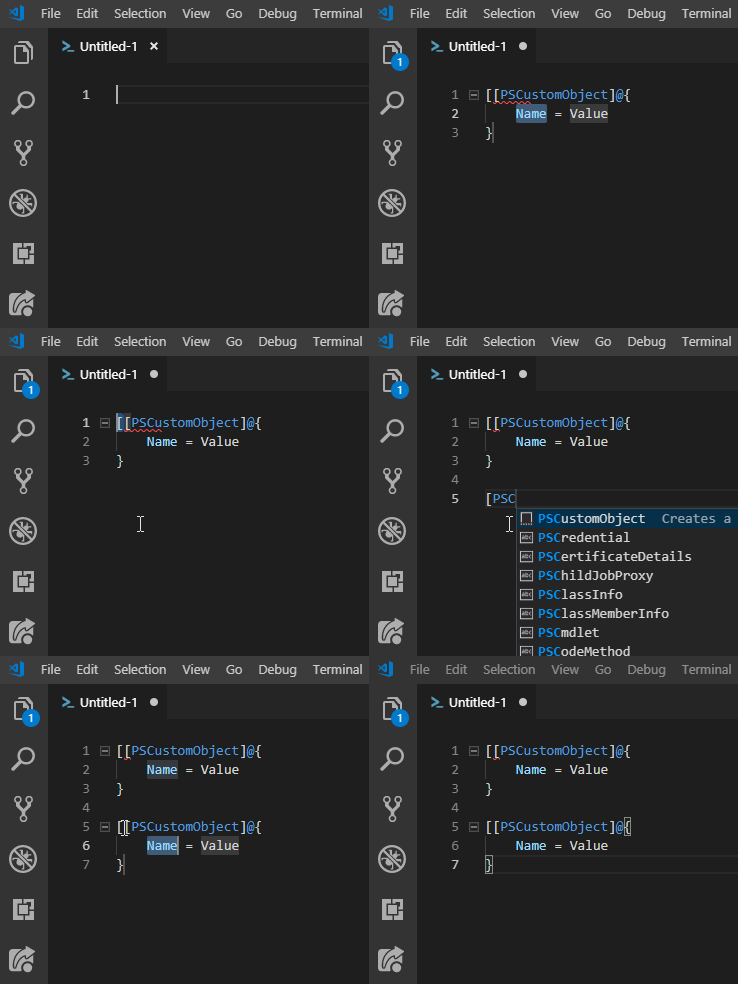
When using the [PSCustomObject] Accelerator, the initial [ is not removed.
Expected Behaviour
I think that the if an initial [ is detected, it should be removed.
Actual Behaviour
The [ is duplicated when using Tab and when selecting the autocomplete option.
I've seen that if I type PSCustomObject, then hit tab or select the option, the bracket is not added - but I naturally begin typing the actual expression. Maybe I'm being a bit too picky.
Attached Files
 mpearon
All 13 comments
I would say that this is a problem with VSCode itself. VSCode should be intelligent enough to notice that you've already started typing the snippet and _finish_ it rather than just pasting the body of the snippet.
Can you open this issue over there? I wouldn't be surprised if it's already an issue.
 TylerLeonhardt
on 30 Oct 2018
TylerLeonhardt
on 30 Oct 2018
Thanks, @TylerLeonhardt! I've opened a ticket there.
mpearon
on 7 Nov 2018
@TylerLeonhardt - I've been bounced around a bit on this one - and accidentally opened a duplicate ( #1807 ) in this repo that I just closed.
The guys in the vsCode repo are saying that the PowerShell extension is where this lives.
mpearon
on 21 Mar 2019
It is true that the snippet lives in this extension but @TylerLeonhardt point is still valid I think. We provide this:
    "PSCustomObject": {
        "prefix": "PSCustomObject",
        "body": [
            "[PSCustomObject]@{",
            "\t${1:Name} = ${2:Value}",
            "}"
        ],
        "description": "Creates a PSCustomObject"
    },
And VSCode takes that and does the rest (expands it and puts it in your editor).
This is what I would recommend, try typing just pscustom<tab> and see how that works for you. That is, don't type the initial [.
BTW if we took out the initial [ then it fixes that problem but creates another:
[PSCustomObject]@{
    Name = Value
}] <<<<-- extra trailing ] because of the brace matching that happens when you type the initial [.
 rkeithhill
on 21 Mar 2019
rkeithhill
on 21 Mar 2019
Thanks for the response, @rkeithhill.
I was trying to find examples of completions that work to shoot back at them. What would be the best way to get them back involved in this discussion? They've killed two of my tickets now.
Edit:
Not complaining - I love the product and the awesome support. :)
mpearon
on 21 Mar 2019
I've commented on one of the vscode issues you've opened. Let's see what they say and if they don't respond, I'll find someone internally.
TylerLeonhardt
on 21 Mar 2019
@TylerLeonhardt - I think they hate us. :(
mpearon
on 27 Mar 2019
Hey, @TylerLeonhardt and @rkeithhill - sorry to be a bother, but as far as I can tell, this is still an issue.
I poked around at the other linked issues, but didn't see any sort of resolution (at least not one that I recognized).
What needs to happen next?
mpearon
on 17 Aug 2020
@mpearon sorry that this has been so hard, Tyler is going to start a new issue (not linked to this one) and we will see where that goes
 SydneyhSmith
on 18 Aug 2020
SydneyhSmith
on 18 Aug 2020
@SydneyhSmith - It's no big deal...just a minor annoyance that a simple press of backspace corrects. :) I really appreciate all of the hard work you guys do to make the PowerShell experience in Code as awesome as it is! :)
mpearon
on 18 Aug 2020
@SydneyhSmith and @TylerLeonhardt - I found the new issue that got created. Is it a terrible idea to link to it in this issue? I don't want to draw a link if you don't want it.
Apologies in advance if the bot puts the Needs: Attention label back on this. :( If it is easier to close this one, I'm totally fine with that.
mpearon
on 20 Aug 2020
Let's just keep an eye on that one. I opened it so I'm subscribed. It's got a TON of +1s now :) hopefully... hopefully... that means we'll get somewhere. But at least it's finally acknowledged as a vscode issue. Only took 2 years... thanks for your patience.
I think we can let this issue be closed.
TylerLeonhardt
on 20 Aug 2020
Awesome! I really appreciate you guys keeping with this one - and all the other support you provide for the community! :)
I'll mark this as closed.
mpearon
on 20 Aug 2020
Related issues
 AWahlqvist
·
3Comments
AWahlqvist
·
3Comments
 TheDanishDynamo
·
3Comments
TheDanishDynamo
·
3Comments
 rs38
·
4Comments
rs38
·
4Comments
 timoline
·
3Comments
timoline
·
3Comments
 bgelens
·
3Comments
bgelens
·
3Comments