Vscode-powershell: Intellisense on Windows: PowerShell cmdlets is not working
System Details
- Operating system name and version: Windows 10 1709
- VS Code version: Version 1.19.3 x64
- PowerShell extension version: 1.5.1
- Output from
$PSVersionTable: See below
Copy / paste the following commands into the PowerShell Integrated Console, and paste the output here:

code -v
code : The term 'code' is not recognized as the name of a cmdlet, function, script file, or operable program. Check the spelling of the name, or if a path was included, verify that the
path is correct and try again.
At line:1 char:1
+ code -v
+ ~~~~
    + CategoryInfo          : ObjectNotFound: (code:String) [], CommandNotFoundException
    + FullyQualifiedErrorId : CommandNotFoundException

$pseditor.EditorServicesVersion
Empty line - nothing was output

code --list-extensions --show-versions
code : The term 'code' is not recognized as the name of a cmdlet, function, script file, or operable program. Check the spelling of the name, or if a path was included, verify that the
path is correct and try again.
At line:1 char:1
+ code --list-extensions --show-versions
+ ~~~~
    + CategoryInfo          : ObjectNotFound: (code:String) [], CommandNotFoundException
    + FullyQualifiedErrorId : CommandNotFoundException

$PSVersionTable
Name                           Value
----                           -----
PSVersion                      5.1.16299.98
PSEdition                      Desktop
PSCompatibleVersions           {1.0, 2.0, 3.0, 4.0...}
BuildVersion                   10.0.16299.98
CLRVersion                     4.0.30319.42000
WSManStackVersion              3.0
PSRemotingProtocolVersion      2.3
SerializationVersion           1.1.0.1
Issue Description
Intellisense for PowerShell cmdlets is not working.
Attached Logs
Logs folder is empty! However if I enable developer tools in Help menu, I can see this:
/C:/Program Files/Microsoft VS Code/resources/app/out/vs/workbench/workbench.main.js:4056 [ms-vscode.PowerShell]Cannot read property 'text' of undefined
e.$onExtensionRuntimeError @ /C:/Program Files/Microsoft VS Code/resources/app/out/vs/workbench/workbench.main.js:4056
/C:/Program Files/Microsoft VS Code/resources/app/out/vs/workbench/workbench.main.js:4056 TypeError: Cannot read property 'text' of undefined
    at HelpCompletionFeature.onEvent (C:\Users\mark\.vscode\extensions\ms-vscode.powershell-1.5.1\out\src\features\HelpCompletion.js:34:100)
    at e.fire (c:\Program Files\Microsoft VS Code\resources\app\out\vs\workbench\node\extensionHostProcess.js:87:238)
    at e.$acceptDirtyStateChanged (c:\Program Files\Microsoft VS Code\resources\app\out\vs\workbench\node\extensionHostProcess.js:432:782)
    at t.e.invoke (c:\Program Files\Microsoft VS Code\resources\app\out\vs\workbench\node\extensionHostProcess.js:516:87)
    at e._invokeHandler (c:\Program Files\Microsoft VS Code\resources\app\out\vs\workbench\node\extensionHostProcess.js:357:580)
    at e._receiveOneMessage (c:\Program Files\Microsoft VS Code\resources\app\out\vs\workbench\node\extensionHostProcess.js:357:270)
    at c:\Program Files\Microsoft VS Code\resources\app\out\vs\workbench\node\extensionHostProcess.js:356:206
    at c:\Program Files\Microsoft VS Code\resources\app\out\vs\workbench\node\extensionHostProcess.js:358:204
    at c:\Program Files\Microsoft VS Code\resources\app\out\vs\workbench\node\extensionHostProcess.js:85:988
    at e.fire (c:\Program Files\Microsoft VS Code\resources\app\out\vs\workbench\node\extensionHostProcess.js:87:218)
e.$onExtensionRuntimeError @ /C:/Program Files/Microsoft VS Code/resources/app/out/vs/workbench/workbench.main.js:4056
/C:/Program Files/Microsoft VS Code/resources/app/out/vs/workbench/workbench.main.js:4056 [ms-vscode.PowerShell]Cannot read property 'text' of undefined
e.$onExtensionRuntimeError @ /C:/Program Files/Microsoft VS Code/resources/app/out/vs/workbench/workbench.main.js:4056
/C:/Program Files/Microsoft VS Code/resources/app/out/vs/workbench/workbench.main.js:4056 TypeError: Cannot read property 'text' of undefined
    at HelpCompletionFeature.onEvent (C:\Users\mark\.vscode\extensions\ms-vscode.powershell-1.5.1\out\src\features\HelpCompletion.js:34:100)
    at e.fire (c:\Program Files\Microsoft VS Code\resources\app\out\vs\workbench\node\extensionHostProcess.js:87:238)
    at e.$acceptDirtyStateChanged (c:\Program Files\Microsoft VS Code\resources\app\out\vs\workbench\node\extensionHostProcess.js:432:782)
    at e.$acceptModelSaved (c:\Program Files\Microsoft VS Code\resources\app\out\vs\workbench\node\extensionHostProcess.js:432:565)
    at t.e.invoke (c:\Program Files\Microsoft VS Code\resources\app\out\vs\workbench\node\extensionHostProcess.js:516:87)
    at e._invokeHandler (c:\Program Files\Microsoft VS Code\resources\app\out\vs\workbench\node\extensionHostProcess.js:357:580)
    at e._receiveOneMessage (c:\Program Files\Microsoft VS Code\resources\app\out\vs\workbench\node\extensionHostProcess.js:357:270)
    at c:\Program Files\Microsoft VS Code\resources\app\out\vs\workbench\node\extensionHostProcess.js:356:206
    at c:\Program Files\Microsoft VS Code\resources\app\out\vs\workbench\node\extensionHostProcess.js:358:204
    at c:\Program Files\Microsoft VS Code\resources\app\out\vs\workbench\node\extensionHostProcess.js:85:988
e.$onExtensionRuntimeError @ /C:/Program Files/Microsoft VS Code/resources/app/out/vs/workbench/workbench.main.js:4056
 markallisongit
All 24 comments
Thanks for the report, @markallisongit! Are you using VSCode Insiders or Stable?
 TylerLeonhardt
on 6 Feb 2018
TylerLeonhardt
on 6 Feb 2018
@tylerl0706 using stable. I am having the exact same problem on my desktop and my laptop with same Windows versions and vscode versions. I built a new Windows 10 1709 VM and installed code with all my extensions, but didn't see the issue.
markallisongit
on 6 Feb 2018
Same issue here on Windows 8.1, Visual Studio Code v1.20.1, PS Extension v1.6.0, and another colleagues using Win10. Tab auto-complete on common PS cmdlets doesn't seem to work... for example get-childitem... but any cmdlet really. I found a similar article in 2016 of this being fixed, but it seems to have returned? Any word on an ETA for a fix?
 tolarianNZ
on 5 Mar 2018
tolarianNZ
on 5 Mar 2018
Very interested to know when this might be fixed. I've got a new laptop and the same issue has appeared there too.
markallisongit
on 24 Mar 2018
Hoping replies via email work. It was user error for me in the end. Even
once you install the PowerShell extension for whatever reason you need to
click Reload. When I did this all works really well now. May not be
everyone's case but hope this helps.
Best regards,
Ryan Pool
On Sat, 24 Mar. 2018, 10:26 pm Mark Allison, notifications@github.com
wrote:
Very interested to know when this might be fixed. I've got a new laptop
and the same issue has appeared there too.—
You are receiving this because you commented.
Reply to this email directly, view it on GitHub
https://github.com/PowerShell/vscode-powershell/issues/1189#issuecomment-375875414,
or mute the thread
https://github.com/notifications/unsubscribe-auth/AfL5AD8_thtLLrG736ZairLJ4s5xKmljks5thi1pgaJpZM4R4kRT
.
tolarianNZ
on 24 Mar 2018
@tolarianNZ no this did not work for me, neither does a reboot nor reinstall of the extension.
markallisongit
on 24 Mar 2018
Ah I almost forgot, you must also save the script as .ps1 before it can
recognise which language to base your code on. Unsaved code won't work.
Best regards,
Ryan Pool
On Sun, 25 Mar. 2018, 5:04 am Mark Allison, notifications@github.com
wrote:
@tolarianNZ https://github.com/tolarianNZ no this did not work for me,
neither does a reboot nor reinstall of the extension.—
You are receiving this because you were mentioned.
Reply to this email directly, view it on GitHub
https://github.com/PowerShell/vscode-powershell/issues/1189#issuecomment-375912849,
or mute the thread
https://github.com/notifications/unsubscribe-auth/AfL5ABE4dCNhuH8bGYGLeeHws2FCm4UFks5thoq_gaJpZM4R4kRT
.
tolarianNZ
on 24 Mar 2018
Actually, you don't have to save it as a .ps1 you can just change the language mode to PowerShell and the extension will start.
You can change this by opening up the command pallet (ctrl(or cmd on Mac)+shift+p) and type "language". It should say something like "Change language mode" and then hit enter and find PowerShell.
TylerLeonhardt
on 24 Mar 2018
This error:
Cannot read property 'text' of undefined
    at HelpCompletionFeature.onEvent (C:\Users\mark\.vscode\extensions\ms-vscode.powershell-1.5.1\out\src\features\HelpCompletion.js:34:100)
has been fixed and will appear in the next drop 1.6.1. However, there are likely many causes of Intellisense not appearing so YMMV.
 rkeithhill
on 25 Mar 2018
rkeithhill
on 25 Mar 2018
@rkeithhill I notice that 1.7.0 has been released but this issue was not included. Any ideas on whether it will appear in the next one?
markallisongit
on 27 Apr 2018
Ah. So you can still reproduce the issue?
Can you set the log level to "diagnostic" and let me know if any logs get generated then? Instructions here if you need them: https://github.com/PowerShell/vscode-powershell#2-capture-verbose-logs-and-send-them-to-us
TylerLeonhardt
on 27 Apr 2018
Hi!
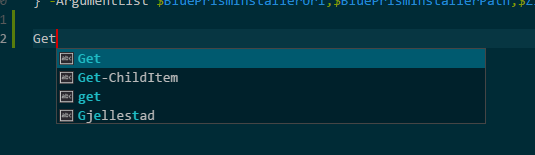
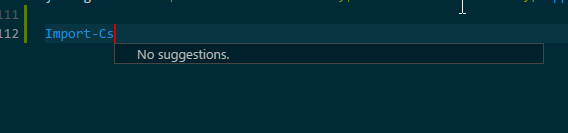
I have the same issue, IntelliSense is not at all working, and it hasn't for many months. What it does is auto-completing what I've written before in that script, and nothing else. I've set the log level to verbose as described in https://github.com/PowerShell/vscode-powershell#2-capture-verbose-logs-and-send-them-to-us, but there's no log files in $HOME.vscode\extensions\ms-vscode.PowerShell-
Today I uninstalled vscode, removed the folder $HOME.vscode, removed all vscode related folders from %appdata% and %programdata%, but nothing works. When will it be fixed, or is it something with my computer? Right now it makes more sense to write powershell scripts in ISE, which is sad.
- Operating system name and version: Windows 10 1803, build 17133
- VS Code version: 1.23.1
- Powershell extension version: 1.7.0
- Output from $PSVersionTable: See below
Name                           Value
----                           -----
PSVersion                      5.1.17133.1
PSEdition                      Desktop
PSCompatibleVersions           {1.0, 2.0, 3.0, 4.0...}
BuildVersion                   10.0.17133.1
CLRVersion                     4.0.30319.42000
WSManStackVersion              3.0
PSRemotingProtocolVersion      2.3
SerializationVersion           1.1.0.1
Picture 1: It only auto-completes things that I've written before in that script.
Picture 2: And nothing else.
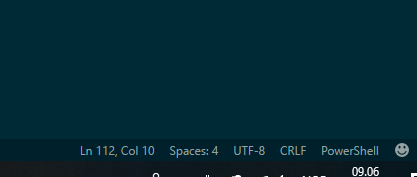
Picture 3: The language is set to PowerShell
 nicolaigj
on 30 May 2018
nicolaigj
on 30 May 2018
@tylerl0706 Yes, I still have the issue and am now using ISE instead but really want to use vscode. The logs folder is empty. I even monitored it with vscode running and nothing got written there. I tried Verbose and Diagnostic levels, and nothing for both.
markallisongit
on 30 May 2018
@nicolaigj based on your screenshot, it looks like the PowerShell extension is not started.
Can you try opening the command pallet (ctrl+shift+p) and running "PowerShell: Restart Current Session"?
Also, could you switch your log level to Diagnostic? That will give us another log file if PowerShell is failing to start.
TylerLeonhardt
on 30 May 2018
@markallisongit if you could also do those steps, that'd be great!
TylerLeonhardt
on 30 May 2018
Hi!
Worked with restart current session! I have to do that every time I open code, the fix wont't persist through restarts of code.
Switched to diagnostic, and is started producing logs, please see attached logs.
Start-EditorServices.log
vscode-powershell.log
EditorServices.log
nicolaigj
on 31 May 2018
@tylerl0706 worked for me too!
markallisongit
on 31 May 2018
It's a bit strange that you needed to run that. The extension should start when you opened a .ps1 or .psm1 or .psd1.
Sometimes people configure VSCode to not start the extension when you open one of these files and I'm wondering if this is the case.
Could you (@nicolaigj + @markallisongit) share the user settings json with us so I can confirm?
TylerLeonhardt
on 5 Jun 2018
I had the same issue and when checking my VSCode settings I had disabled powershell to start automatically:
"powershell.startAutomatically": false
After reverting the change Intellisense started to work.
I disabled it because I didn't want the integrated powershell console to start every time I started code.
 imauriciovargas
on 6 Jun 2018
imauriciovargas
on 6 Jun 2018
@tylerl0706 I had disabled it for the same reason as @imauriciovargas I don't want the PowerShell Window to show when starting vscode, but I do want intellisense. Is there a way to do that?
markallisongit
on 7 Jun 2018
You will need to let the extension start but then can hit the "x" button to close the Integrated Console. NOTE: don't hit the trash icon as that will kill the extension 🙂

(ignore the debug logging 😄 )
Feel free to open an issue to make this configurable.
btw @markallisongit, is the original issue fixed for you (just wondering if we can close this issue)!
TylerLeonhardt
on 7 Jun 2018
Same for me, worked after I set it to true. Don't actually know why I set that setting back then. Thanks, for me this issue can be regarded as closed, but I didn't create the original issue, so it's up to Mark!
nicolaigj
on 8 Jun 2018
@tylerl0706 thanks, the issue can be closed. I'm aware I can close with the "x" button, I'll raise an issue to make that configurable so I don't have to close it every time. Quite often I don't want to see the console appear.
markallisongit
on 8 Jun 2018
Sounds good!
TylerLeonhardt
on 8 Jun 2018
Related issues
 nathan-alden-hp
·
3Comments
nathan-alden-hp
·
3Comments
 inthemedium
·
3Comments
inthemedium
·
3Comments
 guidooliveira
·
3Comments
guidooliveira
·
3Comments
 rs38
·
4Comments
rs38
·
4Comments
 daviwil
·
3Comments
daviwil
·
3Comments