Vscode-powershell: Can not use mouse anymore in Integrated console
System Details
- Operating system name and version: Windows 10 (1703)
- VS Code version: 1.14
- PowerShell extension version: 1.4.1
- Output from
$PSVersionTable:
Name Value
---- -----
PSVersion 5.1.15063.483
PSEdition Desktop
PSCompatibleVersions {1.0, 2.0, 3.0, 4.0...}
BuildVersion 10.0.15063.483
CLRVersion 4.0.30319.42000
WSManStackVersion 3.0
PSRemotingProtocolVersion 2.3
SerializationVersion 1.1.0.1
Copy / paste the below commands into the PowerShell Integrated Terminal, and paste the output here

code -v
$pseditor.EditorServicesVersion
code --list-extensions --show-versions
$PSVersionTable
Issue Description
After VS Code was updated to 1.14 I can not select text using mouse from powershell integrated console. Standard powershell console works fine.
Attached Logs
Follow the instructions in the README
about capturing and sending logs.
 artisticcheese
All 20 comments
So for example you can’t select text and then use Ctrl-C to copy the text?
 PowerSchill
on 13 Jul 2017
PowerSchill
on 13 Jul 2017
Correct. Positioning mouse anywhere inside console and click left button does not start selection process at all, it behaves like I did not click any button.
artisticcheese
on 13 Jul 2017
I was able to duplicate the issue under certain circumstances:
Steps to reproduce the bug
- Open Visual Studio Code.
- Select the version in the bottom right of the status bar.
- Select Restart Current Session
At this point I am unable to select any text as you have described.
- Restarting VSCode does not fix the issue.
- Restarting the session does not fix the issue.
- Killing both the integrated terminal and the regular powershelgl terminal using the trashcan icon and then restarting VSCode does fix the issue.
Attaching log files in case it helps debugging the issue. This was done on a test system with no other extensions installed.
PowerSchill
on 13 Jul 2017
Hey @Tyriar, have any idea why mouse selection would fail to work inside of a console app running in the integrated terminal? Seems to only happen for the PowerShell extension's Integrated Console and not for plain powershell.exe running there.
 daviwil
on 13 Jul 2017
daviwil
on 13 Jul 2017
@daviwil selection is now completely disabled if the shell indicates it's in mouse mode. I saw this reported in VS Code and could not reproduce so it seems to only happen for some setups with the powershell extension.
 Tyriar
on 13 Jul 2017
Tyriar
on 13 Jul 2017
It is very easy to repro if you're using the PowerShell Integrated Console instead of the terminal:

Open VSCode and run the PowerShell: Open Examples Folder command, then open the DebugTest.ps1 file. The PSIC will get initialized within a few seconds of opening the first ps1 file.
 rkeithhill
on 13 Jul 2017
rkeithhill
on 13 Jul 2017
Experiencing the same problem. Any progress or workaround?
 rfresow
on 4 Aug 2017
rfresow
on 4 Aug 2017
Looks like this is fixed now in VS Code 1.15.0, can @rfresow or @rkeithhill confirm whether they see it resolved too?
daviwil
on 15 Aug 2017
No, it's not fixed. I'm on 1.15.0
artisticcheese
on 15 Aug 2017
Interesting... I'm able to repro it based on something @PowerSchill said earlier. It appears that if a powershell.exe terminal gets launched before the PowerShell Integrated Console appears, mouse selection will not work in the Integrated Console. However, if no powershell.exe terminal is opened before the PSIC gets launched, mouse selection works fine.
This definitely seems like an issue in VS Code but I'm not exactly sure what would cause it.
daviwil
on 15 Aug 2017
I'm now using 1.15.0 64b and it's like @daviwil says. I also notice that it takes a long time before PowerShell Integrated is ready.
rfresow
on 15 Aug 2017
After I enlarged the console with the up arrow in:

The mouse selection seems to work again. Even after reducing the size back.
rfresow
on 15 Aug 2017
Confirming that enlarging windows is in fact fixing the issue.
artisticcheese
on 15 Aug 2017
@daviwil could you try running PSIC against the xterm.js demo (on the v3 branch ideally) and see if it repros there? https://github.com/sourcelair/xterm.js/tree/v3#demo
You can set the executable here: https://github.com/sourcelair/xterm.js/blob/f3d375a7a8c4a078f9892b5983d700896eb13174/demo/app.js#L27
Tyriar
on 17 Aug 2017
Tried setting it up to run in the demo page but I can't seem to get past this error:

I think xterm.js is working fine on its own though, the problem only occurs in VS Code if "normal" terminal is opened before another that is opened with createTerminal. If no prior terminal exists in VS Code before the PS Integrated Console appears, the mouse works fine.
daviwil
on 22 Aug 2017
@daviwil weird.
Ok then, in VS Code when you can reproduce the problem could you open devtools, add a breakpoint to this line and see whether mouseEvents is true?
Tyriar
on 22 Aug 2017
Just tried repoing it in 1.15.1, any time I hit a breakpoint on that line (regardless of whether the issue reproes or not), self.mouseEvents is always undefined:
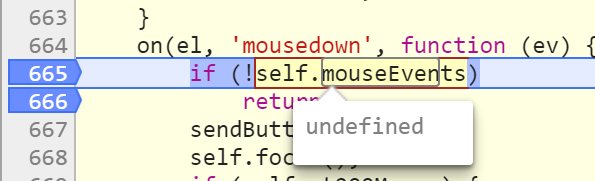
Also in VS Code Insiders (which seems to have a different build of xterm.js judging from the code), I see the same thing, _this.mouseEvents is undefined no matter if mouse events are working or not.
Anything else I can check?
Probably worth mentioning that I can't seem to repro this issue in VS Code running on Linux.
daviwil
on 22 Aug 2017
Hm... Seeing if the event makes it to the SelectionManager would probably be the next step
https://github.com/sourcelair/xterm.js/blob/575c10114be5002b45d4d7842a6f8741ba87f5e3/src/SelectionManager.ts#L318
https://github.com/sourcelair/xterm.js/blob/575c10114be5002b45d4d7842a6f8741ba87f5e3/src/SelectionManager.ts#L453
This is the part of the code that actually does the selection.
Tyriar
on 30 Aug 2017
@artisticcheese was this fixed?
Tyriar
on 22 Mar 2018
Yes, works for me.
artisticcheese
on 22 Mar 2018
Related issues
daviwil
·
4Comments
rkeithhill
·
3Comments
daviwil
·
3Comments
 bgelens
·
3Comments
bgelens
·
3Comments
 timoline
·
3Comments
timoline
·
3Comments