Vscode-powershell: "throw" not offered as keyword in autocompletion
System Details
VSCode Version:
Version 1.11.2
Commit 6eaebe3
Date 2017-04-13T08:03:11.395Z
Shell 1.4.6
Renderer 53.0.2785.143
Node 6.5.0
$PSVersionTable
PSVersion 5.1.15063.138
PSEdition Desktop
PSCompatibleVersions {1.0, 2.0, 3.0, 4.0...}
BuildVersion 10.0.15063.138
CLRVersion 4.0.30319.42000
WSManStackVersion 3.0
PSRemotingProtocolVersion 2.3
SerializationVersion 1.1.0.1
OS Version: 10.0.14393
Issue Description
Just start typing "throw", they keyword is colored properly once typed but does not appear as suggestion in autocompletion:

 carlocardella
All 9 comments
Similar thing is with continue keyword

 iricigor
on 10 May 2017
iricigor
on 10 May 2017
This is because PowerShell doesn't return completion results for either of these keywords. I don't get completions for either of them in the ISE either. We could definitely try to insert them as results, though!
 daviwil
on 15 May 2017
daviwil
on 15 May 2017
Does this need doing for all keywords?
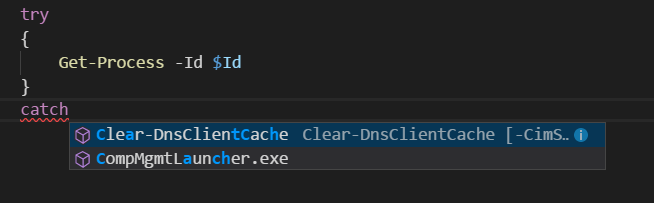
There's nothing in there for try / catch / finally either. This frequently results in me over-writing catch with another cmdlet name instead after pressing enter:
 Cirzen
on 27 Feb 2018
Cirzen
on 27 Feb 2018
Just tested on a .JS file, and the try, catch and finally all work with intellisense.
With .PS1 only the try is recognized. There a simple place to add the catch and finally keywords?
 moymike
on 27 Feb 2018
moymike
on 27 Feb 2018
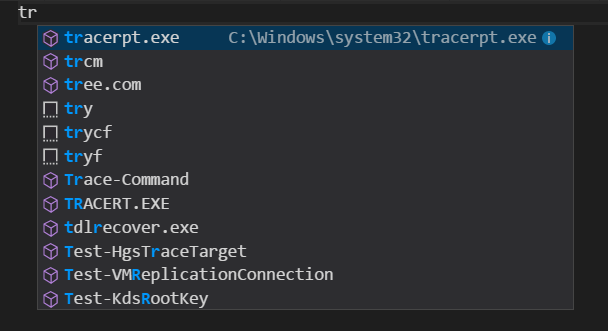
I can only see try as a snippet, not as a known keyword.
Cirzen
on 27 Feb 2018
Okay, you are right, somehow I managed to disable the Powershell extension. Now I am seeing the same thing, just the snippets try, trycf and tryf ... typing catch or finally are not recognized at keywords.
moymike
on 27 Feb 2018
so we have:
throw, continue, try, catch & finally.
I think we should open an issue on PowerShell (https://github.com/powershell/powershell) to see if adding completion results for these keywords is needed.
@SteveL-MSFT, do you have any thoughts on this?
 TylerLeonhardt
on 28 Feb 2018
TylerLeonhardt
on 28 Feb 2018
I think we should open an issue in PowerShell repo rather than special case this for PSEditorServices
 SteveL-MSFT
on 28 Feb 2018
SteveL-MSFT
on 28 Feb 2018
I'm going to close this now that we have https://github.com/PowerShell/PowerShell/issues/7891 over in the PowerShell repo.
TylerLeonhardt
on 11 Mar 2020
Related issues
 AWahlqvist
·
3Comments
AWahlqvist
·
3Comments
 GQnzo
·
3Comments
GQnzo
·
3Comments
 lukegriffith
·
3Comments
lukegriffith
·
3Comments
 MiYanni
·
3Comments
MiYanni
·
3Comments
 bgelens
·
3Comments
bgelens
·
3Comments