Vscode-powershell: ArgumentOutOfRangeException in Integrated Console when entering long input lines that wrap
-- EDIT FROM THE MAINTAINERS --
The PowerShell Preview extension has PSReadLine support and should resolve this issue. If you're experiencing this, please give the preview extension a try. We've committed to delivering this fix in the stable extension release in January 2020.
-- ORIGINAL ISSUE --
An error occurred while reading input:
System.ArgumentOutOfRangeException: The value must be greater than or equal to zero and less than the console's buffer size in that dimension.
Parameter name: top
Actual value was 3000.
   at System.Console.SetCursorPosition(Int32 left, Int32 top)
   at Microsoft.PowerShell.EditorServices.Console.ConsoleReadLine.InsertInput(StringBuilder inputLine, Int32 promptStartCol, Int32 promptStartRow, String inser
tedInput, Int32 cursorIndex, Int32 insertIndex, Int32 replaceLength, Int32 finalCursorIndex)
   at Microsoft.PowerShell.EditorServices.Console.ConsoleReadLine.<ReadLine>d__7.MoveNext()
--- End of stack trace from previous location where exception was thrown ---
   at System.Runtime.ExceptionServices.ExceptionDispatchInfo.Throw()
   at System.Runtime.CompilerServices.TaskAwaiter.HandleNonSuccessAndDebuggerNotification(Task task)
   at Microsoft.PowerShell.EditorServices.Console.ConsoleService.<StartReplLoop>d__21.MoveNext()
 clmcgrath
All 65 comments
clmcgrath
on 28 Apr 2017
Thanks Chris! I'll take a look.
 daviwil
on 15 May 2017
daviwil
on 15 May 2017
Looks like this only happens when the output exceeds the Console.BufferHeight and the user types a line longer than the Console.WindowWidth. PSReadline solves this problem by scrolling the buffer:
The cross-platform implementation of ScrollBuffer is here:
I'll implement the fix for this in June since it isn't a critical issue and only shows up in specific cases. Let me know if it is a big annoyance and I'll prioritize it sooner!
daviwil
on 17 May 2017
Does simply installing psreadline fix this because I have it installed unless the no profile switch added by vscode disables this
clmcgrath
on 18 May 2017
Nah, PSReadline doesn't work inside of the Integrated Console right now. Hoping to get that added in June.
daviwil
on 18 May 2017
Good to hear I miss it lol
On Wed, May 17, 2017, 6:29 PM David Wilson notifications@github.com wrote:
Nah, PSReadline doesn't work inside of the Integrated Console right now.
Hoping to get that added in June.—
You are receiving this because you authored the thread.
Reply to this email directly, view it on GitHub
https://github.com/PowerShell/vscode-powershell/issues/702#issuecomment-302249461,
or mute the thread
https://github.com/notifications/unsubscribe-auth/AAblrPyYUHY-S_pLV7OuSrlE1eXMEXc9ks5r63TigaJpZM4NLx-n
.
clmcgrath
on 18 May 2017
Me too!
daviwil
on 18 May 2017
Any chance of getting this addressed soon? I've ran across it by just pasting a long, single line, command into the PowerShell Integrated Console.
 FireInWinter
on 11 Sep 2017
FireInWinter
on 11 Sep 2017
I just encountered it (for the first time in a while), and figured I'd ping the issue. The scenario is consistent: lots of previous output in the scroll back buffer, and a wrapping line of code at the command prompt.
One crazy workaround is to collapse the left hand pane, effectively making the console wider.
 AspenForester
on 4 Oct 2017
AspenForester
on 4 Oct 2017
Yeah, this still exists...can also confirm while the hiding the side-bar does fix it seems to cause a bit of havoc on the reference point of the text.
Anyway:

 wsmelton
on 16 Oct 2017
wsmelton
on 16 Oct 2017
I actually had to remove posh-git module as I was still going over the buffer limit...hope this can get fixed soon 🙏
wsmelton
on 16 Oct 2017
Try setting $GitPromptSettings.DefaultPromptSuffix = "`n$('>' * ($nestedPromptLevel + 1))" that should split the prompt and help avoid this error.
 rkeithhill
on 17 Oct 2017
rkeithhill
on 17 Oct 2017
Also to us it's a bit more annoying as we're using symbolic links to filshares in our projects and the Integrated Console expands these to the actual path on the fileserver resulting in very long prompts like:
"[bk]Microsoft.PowerShell.Core\FileSystem::\its.au.dk\Fileshares\infrastruktur\TeamWindows_git\bk\PowerShell\IIQ\Attributter>"
- this means that we cannot write much before the error occurs!
 bk147
on 24 Jan 2018
bk147
on 24 Jan 2018
@SeeminglyScience has been working (tirelessly, I might add) on adding PSReadLine support. He's made some incredible progress. This issue will be fixed when that work is done.
 TylerLeonhardt
on 5 Feb 2018
TylerLeonhardt
on 5 Feb 2018
Good to hear 👊
Any ETA on this?
 kerbou
on 8 Feb 2018
kerbou
on 8 Feb 2018
🔜
... but seriously. This won't be in the next release next week 1.6.0... however, we're targeting it to be released in 1.7.0.
TylerLeonhardt
on 15 Feb 2018
Will the solution to #569 also fix this?
 benpiper
on 4 Mar 2018
benpiper
on 4 Mar 2018
Just chiming in a little in case y'all might want to let the fix slip. Still impacted by this right now, and rather missing Powershell ISE.
 correcthorsebattery
on 11 May 2018
correcthorsebattery
on 11 May 2018
I get this about every day or two using my session as a general o365/powershell management window.
 reighnman
on 15 Jun 2018
reighnman
on 15 Jun 2018
I'm developing PowerShell Cmdlet scrripts and keep hitting this when testing longer argument strings.
 carwyn
on 16 Jul 2018
carwyn
on 16 Jul 2018
I'm hitting this regularly as well, and would love to see a fix implemented. Workaround right now is to zoom waaaaay out (Ctrl-), paste in a command I've constructed elsewhere, and then zooming in to a more normal level to do other work.
 mattroyal
on 27 Jul 2018
mattroyal
on 27 Jul 2018
Yes, it's affecting me also.
The workaround provided by mattroyal is fine ! But this is something it has to be fixed.
As for info, in my case (and I see some others), it complains about parameter name 'TOP' and "Actual value was 3000", which is the value I set for $host.ui.rawui.Buffersize.Height. But the problem seems to be related to .Width, so maybe that could lead to finding the bug...
 juancrl
on 26 Nov 2018
juancrl
on 26 Nov 2018
Got similar error message while installing Exchange Server 2016 Cumulative Update 11 from command line.I had to run the setup multiple time and failing at differents steps 9setup is using powershell to run most of the commands).
Finally realized how the rror was created, as I was doing multiple thing at the same time on other servers, I had the screen running the command in a corner with the command prompt re-dimensioned from the default size and set to the automatique redemiension you have when you move the windows to the left or right.
Each time I was doing this after a few minutes the error would occur.
If I left the default command prompte windows size in the same state as when I openned it then therror would not occur.
Hope that help anyone.
 EricBonin
on 12 Feb 2019
EricBonin
on 12 Feb 2019
Got similar error as soon as the cursor hit the limit to the right
An error occurred while reading input:

System.ArgumentOutOfRangeException: The value must be greater than or equal to zero and less than the console's buffer size in that dimension.
Parameter name: top
Actual value was 3000.
   at System.Console.SetCursorPosition(Int32 left, Int32 top)
   at Microsoft.PowerShell.EditorServices.Console.ConsoleReadLine.InsertInput(StringBuilder inputLine, Int32 promptStartCol, Int32 promptStartRow, String insertedInput, Int32 cursorIndex, Int32 insertIndex, Int32 replaceLength, Int32 finalCursorIndex)
   at Microsoft.PowerShell.EditorServices.Console.ConsoleReadLine.<ReadLine>d__8.MoveNext()
--- End of stack trace from previous location where exception was thrown ---
   at System.Runtime.CompilerServices.TaskAwaiter.ThrowForNonSuccess(Task task)
   at System.Runtime.CompilerServices.TaskAwaiter.HandleNonSuccessAndDebuggerNotification(Task task)
   at Microsoft.PowerShell.EditorServices.EditorServicesPSHostUserInterface.<StartReplLoop>d__95.MoveNext()
 elliottn
on 22 Mar 2019
elliottn
on 22 Mar 2019
still happening when trying to paste a very long one-liner command...
 bergmeister
on 28 Mar 2019
bergmeister
on 28 Mar 2019
Has anyone here tried this with the PowerShell Preview extension which has PSReadLine support?
TylerLeonhardt
on 28 Mar 2019
@TylerLeonhardt it does still happen, but only because PSRL has the same bug lzybkr/PSReadLine#633 (the linked issue doesn't describe the exact scenario, I can't find that one but I'm pretty sure there already is one)
As a temporary workaround, using Clear-Host after this happens usually resolves it until the buffer fills up again.
 SeeminglyScience
on 28 Mar 2019
SeeminglyScience
on 28 Mar 2019
Another workaround that makes me feel kind of dirty: launching powershell within the powershell console stops this behavior and other readline wonkiness for me.

 BenJTucker
on 16 May 2019
BenJTucker
on 16 May 2019
@BenJTucker FYI, launching a PowerShell subprocess will mean changes you make in that subprocess are not "integrated"; modules you import and functions, variables, etc that you define in that subprocess won't be picked up by VSCode.
Since PSReadLine does a much better job of handling the finicky business of terminal buffers, we're focusing on enabling that. It's currently available on Windows in the powershell-preview extension
 rjmholt
on 16 May 2019
rjmholt
on 16 May 2019
Any news to this ?
Still a thing with v2019.5.0
 MaBauMeBad
on 26 Aug 2019
MaBauMeBad
on 26 Aug 2019
@mabaumebad, have you tried the insiders extension? It uses PSReadLine, though there are still some issues with PSReadLine support, there is a PR there https://github.com/PowerShell/PSReadLine/pull/979 that seems to take care of the ArgumentOutOfRangeExceptions that are similar to this issue.
 msftrncs
on 26 Aug 2019
msftrncs
on 26 Aug 2019
Yes, the solution to this lies with PSReadLine, which we are integrating into the extension. @daxian-dbw has done great work fixing this there, and we will have that in preview with the next PSReadLine release.
rjmholt
on 27 Aug 2019
what is stopping vscore from just embedding powershell console into the product , like they did with the new terminal ?
clmcgrath
on 27 Aug 2019
@clmcgrath The new terminal is mainly built using C++ and a completely different UI stack. VS-Code is based on typescript/electron, which is completely different, one cannot just embed the new terminal.
bergmeister
on 28 Aug 2019
To add to @bergmeister's response:
- VSCode, being a node/electron application, implements its own terminal UI, called xterm.js, which is cross-platform and designed to work with Windows and *nix console APIs
- Standalone PowerShell (pwsh.exe and powershell.exe) can be run in this terminal and work generally quite well, but you'll still see any bugs in PSReadLine
- Embedding PowerShell into a terminal won't fix the issue, since the problem is that readline functionality we use has a bug in it to do with terminal size. In the stable release, PowerShellEditorServices has its own simple readline function with a bug like this, but until recently PSReadLine had a similar bug, implying that squashing all bugs like this is hard. Rather than duplicate the work of implementing a second readline library for PowerShell in EditorServices, we chose to take PSReadLine as a dependency
- We had some issues getting PSReadLine working seamlessly with EditorServices, because unlike PowerShell we need various threads to work in the background to give you completions while the shell is waiting for your input. However, these issues (being only present on *nix platforms) have been resolved by PowerShell 7
- Given this, our direction forward is to devote our energies into PSReadLine and fix any bugs upstream there
rjmholt
on 28 Aug 2019
@msftrncs Thanks for the reply and work of you all!
Will do it in the upcoming week.
Thank you!
MaBauMeBad
on 29 Aug 2019
Hi Guys,
with the Insider Extension the Problem seems to be gone.
Thank you!
MaBauMeBad
on 4 Sep 2019
If this was fixed, it has returned in VSCode:
Version: 1.39.1 (user setup)
Commit: 88f15d17dca836346e787762685a40bb5cce75a8
Date: 2019-10-10T23:31:28.683Z
Electron: 4.2.10
Chrome: 69.0.3497.128
Node.js: 10.11.0
V8: 6.9.427.31-electron.0
OS: Windows_NT x64 10.0.17763
and vscode-poowershell v2019.9.0
 JeremyLeeCrabtree
on 14 Oct 2019
JeremyLeeCrabtree
on 14 Oct 2019
@JeremyLeeCrabtree have you been using the PowerShell Preview extension which has PSReadLine support?
TylerLeonhardt
on 14 Oct 2019
@TylerLeonhardt no, just the release version. Has it only been fixed in preview so far?
JeremyLeeCrabtree
on 14 Oct 2019
Yes. PSReadLine prevents this bug quite a bit. Give preview a try.
TylerLeonhardt
on 14 Oct 2019
What's the ETA for this issue being resolved in the release version?
 skeeler
on 14 Oct 2019
skeeler
on 14 Oct 2019
@skeeler due to .NET Core 3.0 overhauling their Console APIs, we are going to wait til after PowerShell 7 GA ships to move what is in preview into stable.
The next preview will contain a _huge_ refactor of the codebase that includes some perf/stability fixes. We will then address outstanding issues at that point until 7 is released.
TylerLeonhardt
on 14 Oct 2019
I was running now a powershell script on linux which executes an C# executable (build linux-x64 on .NET core 2.1). There I used the following method to give an status update:
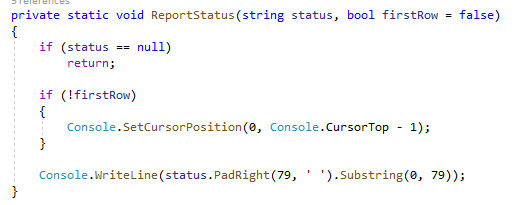
In a linux shell (bash) via remote (use PuTTY) it worked fine, but when I schedule the script as cron job, it breaks with the following error:

I solved it now by changing my function to:
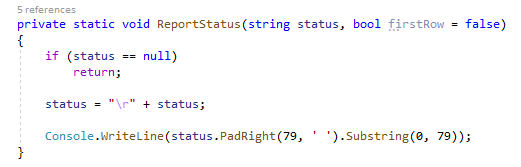
So, I fixed this now for myself - but it shows that powershell does not work well here with the .NET method Console.SetCursorPosition(int left,int top).
PS /home/user> $PSVersionTable

Name                           Value
----                           -----
PSVersion                      6.2.3
PSEdition                      Core
GitCommitId                    6.2.3
OS                             Linux 4.9.0-11-amd64 #1 SMP Debian 4.9.189-3+de…
Platform                       Unix
PSCompatibleVersions           {1.0, 2.0, 3.0, 4.0…}
PSRemotingProtocolVersion      2.3
SerializationVersion           1.1.0.1
WSManStackVersion              3.0
 ice1e0
on 25 Oct 2019
ice1e0
on 25 Oct 2019
@ice1e0 are you saying the C# executable throws an exception?
Does this behavior repro vscode's non integrated console? (in other words, in a terminal inside of vscode that isn't named "PowerShell Integrated Console")
Also, like I said, .NET Core 3.0 totally redid their Console APIs so I would encourage you to also try moving to that and giving it another try.
Since it's a C# executable and you're using System.Console APIs I don't see how this would be a PowerShell extension issue or even a PowerShell issue for that matter as PowerShell is just executing that.
TylerLeonhardt
on 25 Oct 2019
Yeah, the problem is that you can't depend on your application to be the only thing that sets cursor position. In this case it looks like something (maybe us, maybe PSReadLine) is also setting cursor position, probably to 0, 0. So if you try to set the cursor position to 0 - 1, that's the expected error message.
You could either validate cursor position before trying to set it, or do something like Console.SetCursorPosition(0, Math.Max(0, Console.CursorTop - 1)).
SeeminglyScience
on 25 Oct 2019
@TylerLeonhardt I did not try the VSCode integrated console. I used the powershell windows console and debian (installed on Windows 10 as well as on an separate virtual server via PuTTY) and those worked out fine.
But when I tried running it as a cron job, suddenly this error came up. I don't know if it is happening due an application error or an powershell error.
Using .NET 3.0 is for me currently not an option since it has been released just recently (1 month) and is no LTS release.
@SeeminglyScience I see your point, I always thought that when my console application runs, I am the only one changing the cursor until my application ends. But whatever, I found now the solution with "\r" which fits the bill for me (and looks much better in code).
Just thought this case could be of help to get this issue solved.
ice1e0
on 27 Oct 2019
I'm unsure what happened but the PowerShell Integrated Console seems totally broken when you start typing more characters than the current line.
After getting almost the same exception as was originally posted two years ago:
An error occurred while reading input:

System.ArgumentOutOfRangeException: The value must be greater than or equal to zero and less than the console's buffer size in that dimension.
Parameter name: top
Actual value was 22.
   at System.ConsolePal.SetCursorPosition(Int32 left, Int32 top)
   at Microsoft.PowerShell.EditorServices.Console.ConsoleReadLine.InsertInput(StringBuilder inputLine, Int32 promptStartCol, Int32 promptStartRow, String insertedInput, Int32 cursorIndex, Int32 insertIndex, Int32 replaceLength, Int32 finalCursorIndex)
   at Microsoft.PowerShell.EditorServices.Console.ConsoleReadLine.ReadLine(Boolean isCommandLine, CancellationToken cancellationToken)
   at Microsoft.PowerShell.EditorServices.EditorServicesPSHostUserInterface.StartReplLoop(CancellationToken cancellationToken)
I simply restarted the console and I got another error after adding more characters in the beginning of the line, pushing the others onto the next line, removing a single quote from the command and thus making it break like this:
The string is missing the terminator: '.
At line:0 char:0
 mihaipopescu
on 29 Oct 2019
mihaipopescu
on 29 Oct 2019
@mihaipopescu have you been using the PowerShell Preview extension which has PSReadLine support?
TylerLeonhardt
on 29 Oct 2019
@TylerLeonhardt I confirm this doesn't happen with the Preview extension. Thank you!
mihaipopescu
on 30 Oct 2019
the preview version is quite good , i haven't encountered this issue yet in the new extension
clmcgrath
on 30 Oct 2019
Version 2019.11.0 is still doing it for me in VSCode 1.41.0-insider with "PowerShell Integrated Console".
 brianary
on 9 Nov 2019
brianary
on 9 Nov 2019
@brianary to quote @TylerLeonhardt:
have you been using the PowerShell Preview extension which has PSReadLine support?
 corbob
on 10 Nov 2019
corbob
on 10 Nov 2019
Not yet, I assumed the update to the main extension would include that.
I'll give it a try.
On Sat, Nov 9, 2019, 16:53 corbob notifications@github.com wrote:
@brianary https://github.com/brianary to quote @TylerLeonhardt
https://github.com/TylerLeonhardt:have you been using the PowerShell Preview
https://devblogs.microsoft.com/powershell/announcing-the-powershell-preview-extension-in-vscode/
extension which has PSReadLine support?—
You are receiving this because you were mentioned.
Reply to this email directly, view it on GitHub
https://github.com/PowerShell/vscode-powershell/issues/702?email_source=notifications&email_token=AB7SMJYW6XVQKQNRSOVPY4DQS5LOZA5CNFSM4DJPD6T2YY3PNVWWK3TUL52HS4DFVREXG43VMVBW63LNMVXHJKTDN5WW2ZLOORPWSZGOEDUSUFY#issuecomment-552151575,
or unsubscribe
https://github.com/notifications/unsubscribe-auth/AB7SMJ54MME7G6N6U7CS66TQS5LOZANCNFSM4DJPD6TQ
.
brianary
on 10 Nov 2019
Something changed in the most recent release version of this extension ( 2019.12.0 ? in VS Code 1.40.2) and I now see this error multiple times a day. It's really infuriating at this point.
JeremyLeeCrabtree
on 18 Dec 2019
@JeremyLeeCrabtree Are you using the PowerShell Preview extension when seeing the issue?
 daxian-dbw
on 19 Dec 2019
daxian-dbw
on 19 Dec 2019
@daxian-dbw
I specifically said release version. I get that this is fixed in the preview version, but it's now even more broken in the release version. It went from being something I might see rarely, to something I see so often it disrupts my workflow day to day.
JeremyLeeCrabtree
on 19 Dec 2019
vscode:
Версия: 1.41.1 (user setup)
Фиксация: 26076a4de974ead31f97692a0d32f90d735645c0
Дата: 2019-12-18T14:58:56.166Z
Electron: 6.1.5
Chrome: 76.0.3809.146
Node.js: 12.4.0
V8: 7.6.303.31-electron.0
ОС: Windows_NT x64 10.0.18362
Obtained error: When I start python debugging second and all next times I have a System.ArgumentOutOfRangeException error.
How I resolve it: Add "console": "integratedTerminal" to launch.json
Question: I haven't got that error before (without modifying launch.json). What i need to do to resolve it?
I have installed PowerShell extension

and enabled PSReadLine feature

My python launch.json
{
    "version": "0.2.0",
    "configurations": [
        {
            "name": "Python: Current File",
            "type": "python",
            "request": "launch",
            "program": "${file}",
            "args": [
                "--server", "http://jira.somehost.ru", "--fromdate", "30.09.2019", "--todate", "06.10.2019"]
        }
    ]
}
When I run vscode and start python debugging for first time it runs normally and it generates to terminal:
PS C:\Users\SomeUser\Programing\jira> & 'C:\Users\SomeUser\AppData\Local\Programs\Python\Python37\python.exe' 'c:\Users\SomeUser\.vscode\extensions\ms-python.python-2019.11.50794\pythonFiles\ptvsd_launcher.py' '--default' '--client' '--host' 'localhost' '--port' '50837' 'c:\Users\SomeUser\Programing\jira\worklog.py' '--server' 'http://jira.somehost.ru' '--fromdate' '30.09.2019' '--todate' '06.10.2019'
But next time (without restarting vscode) i got that:
PS C:\Users\SomeUser\Programing\jira> cd 'c:\Users\SomeUser\Programing\jira'; ${env:ALLUSERSPROFILE}='C:\ProgramData'; ${env:AMD_ENTRYPOINT}='vs/workbench/services/extensions/node/extensionHostProcess'; ${env:APPDATA}='C:\Users\SomeUser\AppData\Roaming'; ${env:APPLICATION_INSIGHTS_NO_DIAGNOSTIC_CHANNEL}='true'; ${env:ChocolateyInstall}='C:\ProgramData\chocolatey'; ${env:ChocolateyLastPathUpdate}='т фев  7 12:34:28 2019'; ${env:CommonProgramFiles}='C:\Program Files\Common Files'; ${env:CommonProgramFiles(x86)}='C:\Program Files (x86)\Common Files'; ${env:CommonProgramW6432}='C:\Program Files\Common Files'; ${env:COMPUTERNAME}='WKS145'; ${env:ComSpec}='C:\WINDOWS\system32\cmd.exe'; ${env:DEFAULT_PIN}='1234567890'; ${env:DEFAULT_PUK}='87654321'; ${env:DriverData}='C:\Windows\System32\Drivers\DriverData'; ${env:ELECTRON_RUN_AS_NODE}='1'; ${env:FSHARPINSTALLDIR}='C:\Program Files (x86)\Microsoft SDKs\F#\10.1\Framework\v4.0\'; ${env:HOMEDRIVE}='C:'; ${env:HOMEPATH}='\Users\SomeUser'; ${env:IBM_JAVA_OPTIONS}='-Xbootclasspath/a:"C:\Program Files (x86)\Micro Focus\Unified Functional Testing\bin\java_shared\classes\jasmine.jar"'; ${env:JAVA_TOOL_OPTIONS}='-agentlib:jvmhook'; ${env:JCPKCS11_LOG}='4:C:\1\JCPKCS11_LOG.log'; ${env:JCPKCS11_PROXY_DIR}='C:\proxy'; ${env:JC_OS}='Win'; ${env:LIBRARY_PATH}='./jcPKCS11-2.dll'; ${env:LOCALAPPDATA}='C:\Users\SomeUser\AppData\Local'; ${env:LOGONSERVER}='\\EPSILON'; ${env:MSJAVA_ENABLE_MONITORS}='1'; ${env:MSMPI_BIN}='C:\Program Files\Microsoft MPI\Bin\'; ${env:NUMBER_OF_PROCESSORS}='8'; ${env:OneDrive}='C:\Users\SomeUser\OneDrive'; ${env:OS}='Windows_NT'; ${env:PATHEXT}='.COM;.EXE;.BAT;.CMD;.VBS;.VBE;.JS;.JSE;.WSF;.WSH;.MSC'; ${env:PIPE_LOGGING}='true'; ${env:PROCESSOR_ARCHITECTURE}='AMD64'; ${env:PROCESSOR_IDENTIFIER}='Intel64 Family 6 Model 42 Stepping 7, GenuineIntel'; ${env:PROCESSOR_LEVEL}='6'; ${env:PROCESSOR_REVISION}='2a07'; ${env:ProgramData}='C:\ProgramData'; ${env:ProgramFiles}='C:\Program Files'; ${env:ProgramFiles(x86)}='C:\Program Files (x86)'; ${env:ProgramW6432}='C:\Program Files'; ${env:PSModulePath}='C:\Program Files\WindowsPowerShell\Modules;C:\WINDOWS\system32\WindowsPowerShell\v1.0\Modules;C:\Program Files (x86)\Microsoft SQL Server\140\Tools\PowerShell\Modules\'; ${env:PUBLIC}='C:\Users\Public'; ${env:PYTHON_INCLUDE}='C:\Program Files\Python37\include'; ${env:PYTHON_LIB}='C:\Program Files\Python37\libs\python37.lib'; ${env:QT_USE_NATIVE_WINDOWS}='1'; ${env:SESSIONNAME}='Console'; ${env:ST_INSTALL_PATH}='C:\Program Files (x86)\Micro Focus\Unified Functional Testing\'; ${env:SystemDrive}='C:'; ${env:SystemRoot}='C:\WINDOWS'; ${env:TEMP}='C:\Users\SomeUser\AppData\Local\Temp'; ${env:TMP}='C:\Users\SomeUser\AppData\Local\Temp'; ${env:TOKEN_SLOT}='131071'; ${env:USERDNSDOMAIN}='SOMEHOST.RU'; ${env:USERDOMAIN}='SOMEHOST'; ${env:USERDOMAIN_ROAMINGPROFILE}='SOMEHOST'; ${env:USERNAME}='SomeUser'; ${env:USERPROFILE}='C:\Users\SomeUser'; ${env:VERBOSE_LOGGING}='true'; ${env:VSCODE_CWD}='C:\Users\SomeUser\AppData\Local\Programs\Microsoft VS Code'; ${env:VSCODE_HANDLES_UNCAUGHT_ERRORS}='true'; ${env:VSCODE_IPC_HOOK}='\\.\pipe\21d43694254c1a9dff350eeb5372c313-1.41.1-main-sock'; ${env:VSCODE_IPC_HOOK_EXTHOST}='\\.\pipe\vscode-ipc-3e48b518-eaf2-4163-9101-79ba9bd7909d-sock'; ${env:VSCODE_LOGS}='C:\Users\SomeUser\AppData\Roaming\Code\logs\20191220T160036'; ${env:VSCODE_LOG_STACK}='false'; ${env:VSCODE_NLS_CONFIG}='{"locale":"ru","availableLanguages":{"*":"ru"},"_languagePackId":"914e01d542d8c8096c0916d63c250098.ru","_translationsConfigFile":"C:\\Users\\SomeUser\\AppData\\Roaming\\Code\\clp\\914e01d542d8c8096c0916d63c250098.ru\\tcf.json","_cacheRoot":"C:\\Users\\SomeUser\\AppData\\Roaming\\Code\\clp\\914e01d542d8c8096c0916d63c250098.ru","_resolvedLanguagePackCoreLocation":"C:\\Users\\SomeUser\\AppData\\Roaming\\Code\\clp\\914e01d542d8c8096c0916d63c250098.ru\\26076a4de974ead31f97692a0d32f90d735645c0","_corruptedFile":"C:\\Users\\SomeUser\\AppData\\Roaming\\Code\\clp\\914e01d542d8c8096c0916d63c250098.ru\\corrupted.info","_languagePackSupport":true}'; ${env:VSCODE_NODE_CACHED_DATA_DIR}='C:\Users\SomeUser\AppData\Roaming\Code\CachedData\26076a4de974ead31f97692a0d32f90d735645c0'; ${env:VSCODE_PID}='35304'; ${env:windir}='C:\WINDOWS'; ${env:_classload_hook}='jvmhook'; ${env:_JAVA_OPTIONS}='-Xrunjvmhook -Xbootclasspath/a:"C:\Program Files
(x86)\Micro Focus\Unified Functional Testing\bin\java_shared\classes\jasmine.jar"'; ${env:Path}='C:\ProgramData\DockerDesktop\version-bin;C:\Program Files\Docker\Docker\Resources\bin;C:\Program Files (x86)\Intel\iCLS
Client\;C:\Program Files\Intel\iCLS Client\;C:\FkClnt1\USER;C:\FkClnt1\SYSTEM;C:\Program Files\Python37\Scripts\;C:\Program Files\Python37\;C:\Program Files\Microsoft MPI\Bin\;C:\WINDOWS\system32;C:\WINDOWS;C:\WINDOWS\System32\Wbem;C:\WINDOWS\System32\WindowsPowerShell\v1.0\;C:\Program Files\dotnet\;C:\Program Files\Microsoft SQL Server\130\Tools\Binn\;C:\Program Files (x86)\Micro Focus\Unified Functional Testing\bin;C:\WINDOWS\System32\Ope
Произошла ошибка. Сообщите об этой ошибке, указав данные ниже.
Напишите в GitHub: https://github.com/lzybkr/PSReadLine/issues/new
-----------------------------------------------------------------------
Последние клавиши 200:
 . p y ' Space ' - - d e f a u l t ' Space ' - - c l i e n t ' Space ' - - h o s t ' Space ' l o c a l h o s t ' Space ' - - p o r t ' Space ' 5 0 8 4 9 ' Space ' c : \ U s e r s \ A B a u t k i n \ P r o g r a m i n
g \ j i r a \ w o r k l o g . p y ' Space ' - - s e r v e r ' Space ' h t t p : / / j i r a . s o m e h o s t . r u ' Space ' - - f r o m d a t e ' Space ' 3 0 . 0 9 . 2 0 1 9 ' Space ' - - t o d a t e ' Space ' 0 6 . 1 0 . 2 0 1 9 ' Space Enter


Исключение:
System.ArgumentOutOfRangeException: Значение должно быть больше или равно нулю и меньше, чем размер буфера в данной размерности.
Имя параметра: top
Фактическое значение было -1.
   в System.Console.SetCursorPosition(Int32 left, Int32 top)
   в Microsoft.PowerShell.PSConsoleReadLine.ReallyRender(RenderData renderData, String defaultColor)
   в Microsoft.PowerShell.PSConsoleReadLine.ForceRender()
   в Microsoft.PowerShell.PSConsoleReadLine.Insert(Char c)
   в Microsoft.PowerShell.PSConsoleReadLine.SelfInsert(Nullable`1 key, Object arg)
   в Microsoft.PowerShell.PSConsoleReadLine.ProcessOneKey(ConsoleKeyInfo key, Dictionary`2 dispatchTable, Boolean ignoreIfNoAction, Object arg)
   в Microsoft.PowerShell.PSConsoleReadLine.InputLoop()
   в Microsoft.PowerShell.PSConsoleReadLine.ReadLine(Runspace runspace, EngineIntrinsics engineIntrinsics)
-----------------------------------------------------------------------
PS C:\Users\SomeUser\Programing\jira> cd 'c:\Users\SomeUser\Programing\jira'; ${env:ALLUSERSPROFILE}='C:\ProgramData'; ${env:AMD_ENTRYPOINT}='vs/workbench/services/extensions/node/extensionHostProcess'; ${env:APPDATA}='C:\Users\SomeUser\AppData\Roaming'; ${env:APPLICATION_INSIGHTS_NO_DIAGNOSTIC_CHANNEL}='true'; ${env:ChocolateyInstall}='C:\ProgramData\chocolatey'; ${env:ChocolateyLastPathUpdate}='т фев  7 12:34:28 2019'; ${env:CommonProgramFiles}='C:\Program Files\Common Files'; ${env:CommonProgramFiles(x86)}='C:\Program Files (x86)\Common Files'; ${env:CommonProgramW6432}='C:\Program Files\Common Files'; ${env:COMPUTERNAME}='WKS145'; ${env:ComSpec}='C:\WINDOWS\system32\cmd.exe'; ${env:DEFAULT_PIN}='1234567890'; ${env:DEFAULT_PUK}='87654321'; ${env:DriverData}='C:\Windows\System32\Drivers\DriverData'; ${env:ELECTRON_RUN_AS_NODE}='1'; ${env:FSHARPINSTALLDIR}='C:\Program Files (x86)\Microsoft SDKs\F#\10.1\Framework\v4.0\'; ${env:HOMEDRIVE}='C:'; ${env:HOMEPATH}='\Users\SomeUser'; ${env:IBM_JAVA_OPTIONS}='-Xbootclasspath/a:"C:\Program Files (x86)\Micro Focus\Unified Functional Testing\bin\java_shared\classes\jasmine.jar"'; ${env:JAVA_TOOL_OPTIONS}='-agentlib:jvmhook'; ${env:JCPKCS11_LOG}='4:C:\1\JCPKCS11_LOG.log'; ${env:JCPKCS11_PROXY_DIR}='C:\proxy'; ${env:JC_OS}='Win'; ${env:LIBRARY_PATH}='./jcPKCS11-2.dll'; ${env:LOCALAPPDATA}='C:\Users\SomeUser\AppData\Local'; ${env:LOGONSERVER}='\\EPSILON'; ${env:MSJAVA_ENABLE_MONITORS}='1'; ${env:MSMPI_BIN}='C:\Program Files\Microsoft MPI\Bin\'; ${env:NUMBER_OF_PROCESSORS}='8'; ${env:OneDrive}='C:\Users\SomeUser\OneDrive'; ${env:OS}='Windows_NT'; ${env:PATHEXT}='.COM;.EXE;.BAT;.CMD;.VBS;.VBE;.JS;.JSE;.WSF;.WSH;.MSC'; ${env:PIPE_LOGGING}='true'; ${env:PROCESSOR_ARCHITECTURE}='AMD64'; ${env:PROCESSOR_IDENTIFIER}='Intel64 Family 6 Model 42 Stepping 7, GenuineIntel'; ${env:PROCESSOR_LEVEL}='6'; ${env:PROCESSOR_REVISION}='2a07'; ${env:ProgramData}='C:\ProgramData'; ${env:ProgramFiles}='C:\Program Files'; ${env:ProgramFiles(x86)}='C:\Program Files (x86)'; ${env:ProgramW6432}='C:\Program Files'; ${env:PSModulePath}='C:\Program Files\WindowsPowerShell\Modules;C:\WINDOWS\system32\WindowsPowerShell\v1.0\Modules;C:\Program Files (x86)\Microsoft SQL Server\140\Tools\PowerShell\Modules\'; ${env:PUBLIC}='C:\Users\Public'; ${env:PYTHON_INCLUDE}='C:\Program Files\Python37\include'; ${env:PYTHON_LIB}='C:\Program Files\Python37\libs\python37.lib'; ${env:QT_USE_NATIVE_WINDOWS}='1'; ${env:SESSIONNAME}='Console'; ${env:ST_INSTALL_PATH}='C:\Program Files (x86)\Micro Focus\Unified Functional Testing\'; ${env:SystemDrive}='C:'; ${env:SystemRoot}='C:\WINDOWS'; ${env:TEMP}='C:\Users\SomeUser\AppData\Local\Temp'; ${env:TMP}='C:\Users\SomeUser\AppData\Local\Temp'; ${env:TOKEN_SLOT}='131071'; ${env:USERDNSDOMAIN}='SOMEHOST.RU'; ${env:USERDOMAIN}='SOMEHOST'; ${env:USERDOMAIN_ROAMINGPROFILE}='SOMEHOST'; ${env:USERNAME}='SomeUser'; ${env:USERPROFILE}='C:\Users\SomeUser'; ${env:VERBOSE_LOGGING}='true'; ${env:VSCODE_CWD}='C:\Users\SomeUser\AppData\Local\Programs\Microsoft VS Code'; ${env:VSCODE_HANDLES_UNCAUGHT_ERRORS}='true'; ${env:VSCODE_IPC_HOOK}='\\.\pipe\21d43694254c1a9dff350eeb5372c313-1.41.1-main-sock'; ${env:VSCODE_IPC_HOOK_EXTHOST}='\\.\pipe\vscode-ipc-3e48b518-eaf2-4163-9101-79ba9bd7909d-sock'; ${env:VSCODE_LOGS}='C:\Users\SomeUser\AppData\Roaming\Code\logs\20191220T160036'; ${env:VSCODE_LOG_STACK}='false'; ${env:VSCODE_NLS_CONFIG}='{"locale":"ru","availableLanguages":{"*":"ru"},"_languagePackId":"914e01d542d8c8096c0916d63c250098.ru","_translationsConfigFile":"C:\\Users\\SomeUser\\AppData\\Roaming\\Code\\clp\\914e01d542d8c8096c0916d63c250098.ru\\tcf.json","_cacheRoot":"C:\\Users\\SomeUser\\AppData\\Roaming\\Code\\clp\\914e01d542d8c8096c0916d63c250098.ru","_resolvedLanguagePackCoreLocation":"C:\\Users\\SomeUser\\AppData\\Roaming\\Code\\clp\\914e01d542d8c8096c0916d63c250098.ru\\26076a4de974ead31f97692a0d32f90d735645c0","_corruptedFile":"C:\\Users\\SomeUser\\AppData\\Roaming\\Code\\clp\\914e01d542d8c8096c0916d63c250098.ru\\corrupted.info","_languagePackSupport":true}'; ${env:VSCODE_NODE_CACHED_DATA_DIR}='C:\Users\SomeUser\AppData\Roaming\Code\CachedData\26076a4de974ead31f97692a0d32f90d735645c0'; ${env:VSCODE_PID}='35304'; ${env:windir}='C:\WINDOWS'; ${env:_classload_hook}='jvmhook'; ${env:_JAVA_OPTIONS}='-Xrunjvmhook -Xbootclasspath/a:"C:\Program Files
(x86)\Micro Focus\Unified Functional Testing\bin\java_shared\classes\jasmine.jar"'; ${env:Path}='C:\ProgramData\DockerDesktop\version-bin;C:\Program Files\Docker\Docker\Resources\bin;C:\Program Files (x86)\Intel\iCLS
Client\;C:\Program Files\Intel\iCLS Client\;C:\FkClnt1\USER;C:\FkClnt1\SYSTEM;C:\Program Files\Python37\Scripts\;C:\Program Files\Python37\;C:\Program Files\Microsoft MPI\Bin\;C:\WINDOWS\system32;C:\WINDOWS;C:\WINDOWS\System32\Wbem;C:\WINDOWS\System32\WindowsPowerShell\v1.0\;C:\Program Files\dotnet\;C:\Program Files\Microsoft SQL Server\130\Tools\Binn\;C:\Program Files (x86)\Micro Focus\Unified Functional Testing\bin;C:\WINDOWS\System32\OpenSSH\;C:\Program Files\CMake\bin;C:\ProgramData\chocolatey\bin;C:\Program Files (x86)\Microsoft SQL Server\150\DTS\Binn\;C:\Program Files (x86)\Microsoft SQL Server\140\Tools\Binn\;C:\Program Files\Microsoft SQL Server\140\Tools\Binn\;C:\Program Files\Microsoft SQL Server\Client SDK\ODBC\130\Tools\Binn\;C:\Program Files\Microsoft SQL Server\140\DTS\Binn\;C:\Program Files (x86)\Intel\Intel(R) Management Engine Components\DAL;C:\Program Files\Intel\Intel(R) Management Engine Components\DAL;C:\Program Files (x86)\Intel\Intel(R) Management Engine Components\IPT;C:\Program Files\Intel\Intel(R) Management Engine Components\IPT;C:\Program Files\Git\cmd;C:\Program Files\TortoiseGit\bin;C:\Users\SomeUser\AppData\Local\Programs\Python\Python37\Scripts\;C:\Users\SomeUser\AppData\Local\Programs\Python\Python37\;C:\Users\SomeUser\AppData\Local\Programs\Python\Launcher\;C:\Users\SomeUser\AppData\Local\Microsoft\W
Произошла ошибка. Сообщите об этой ошибке, указав данные ниже.
Напишите в GitHub: https://github.com/lzybkr/PSReadLine/issues/new
-----------------------------------------------------------------------
Последние клавиши 200:
 . p y ' Space ' - - d e f a u l t ' Space ' - - c l i e n t ' Space ' - - h o s t ' Space ' l o c a l h o s t ' Space ' - - p o r t ' Space ' 5 0 8 4 9 ' Space ' c : \ U s e r s \ A B a u t k i n \ P r o g r a m i n
g \ j i r a \ w o r k l o g . p y ' Space ' - - s e r v e r ' Space ' h t t p : / / j i r a . s o m e h o s t . r u ' Space ' - - f r o m d a t e ' Space ' 3 0 . 0 9 . 2 0 1 9 ' Space ' - - t o d a t e ' Space ' 0 6 . 1 0 . 2 0 1 9 ' Space Enter


Исключение:
System.ArgumentOutOfRangeException: Значение должно быть больше или равно нулю и меньше, чем размер буфера в данной размерности.
Имя параметра: top
Фактическое значение было -5.
   в System.Console.SetCursorPosition(Int32 left, Int32 top)
   в Microsoft.PowerShell.PSConsoleReadLine.ReallyRender(RenderData renderData, String defaultColor)
   в Microsoft.PowerShell.PSConsoleReadLine.ForceRender()
   в Microsoft.PowerShell.PSConsoleReadLine.Insert(Char c)
   в Microsoft.PowerShell.PSConsoleReadLine.SelfInsert(Nullable`1 key, Object arg)
   в Microsoft.PowerShell.PSConsoleReadLine.ProcessOneKey(ConsoleKeyInfo key, Dictionary`2 dispatchTable, Boolean ignoreIfNoAction, Object arg)
   в Microsoft.PowerShell.PSConsoleReadLine.InputLoop()
   в Microsoft.PowerShell.PSConsoleReadLine.ReadLine(Runspace runspace, EngineIntrinsics engineIntrinsics)
-----------------------------------------------------------------------
PS C:\Users\SomeUser\Programing\jira> cd 'c:\Users\SomeUser\Programing\jira'; ${env:ALLUSERSPROFILE}='C:\ProgramData'; ${env:AMD_ENTRYPOINT}='vs/workbench/services/extensions/node/extensionHostProcess'; ${env:APPDATA}='C:\Users\SomeUser\AppData\Roaming'; ${env:APPLICATION_INSIGHTS_NO_DIAGNOSTIC_CHANNEL}='true'; ${env:ChocolateyInstall}='C:\ProgramData\chocolatey'; ${env:ChocolateyLastPathUpdate}='т фев  7 12:34:28 2019'; ${env:CommonProgramFiles}='C:\Program Files\Common Files'; ${env:CommonProgramFiles(x86)}='C:\Program Files (x86)\Common Files'; ${env:CommonProgramW6432}='C:\Program Files\Common Files'; ${env:COMPUTERNAME}='WKS145'; ${env:ComSpec}='C:\WINDOWS\system32\cmd.exe'; ${env:DEFAULT_PIN}='1234567890'; ${env:DEFAULT_PUK}='87654321'; ${env:DriverData}='C:\Windows\System32\Drivers\DriverData'; ${env:ELECTRON_RUN_AS_NODE}='1'; ${env:FSHARPINSTALLDIR}='C:\Program Files (x86)\Microsoft SDKs\F#\10.1\Framework\v4.0\'; ${env:HOMEDRIVE}='C:'; ${env:HOMEPATH}='\Users\SomeUser'; ${env:IBM_JAVA_OPTIONS}='-Xbootclasspath/a:"C:\Program Files (x86)\Micro Focus\Unified Functional Testing\bin\java_shared\classes\jasmine.jar"'; ${env:JAVA_TOOL_OPTIONS}='-agentlib:jvmhook'; ${env:JCPKCS11_LOG}='4:C:\1\JCPKCS11_LOG.log'; ${env:JCPKCS11_PROXY_DIR}='C:\proxy'; ${env:JC_OS}='Win'; ${env:LIBRARY_PATH}='./jcPKCS11-2.dll'; ${env:LOCALAPPDATA}='C:\Users\SomeUser\AppData\Local'; ${env:LOGONSERVER}='\\EPSILON'; ${env:MSJAVA_ENABLE_MONITORS}='1'; ${env:MSMPI_BIN}='C:\Program Files\Microsoft MPI\Bin\'; ${env:NUMBER_OF_PROCESSORS}='8'; ${env:OneDrive}='C:\Users\SomeUser\OneDrive'; ${env:OS}='Windows_NT'; ${env:PATHEXT}='.COM;.EXE;.BAT;.CMD;.VBS;.VBE;.JS;.JSE;.WSF;.WSH;.MSC'; ${env:PIPE_LOGGING}='true'; ${env:PROCESSOR_ARCHITECTURE}='AMD64'; ${env:PROCESSOR_IDENTIFIER}='Intel64 Family 6 Model 42 Stepping 7, GenuineIntel'; ${env:PROCESSOR_LEVEL}='6'; ${env:PROCESSOR_REVISION}='2a07'; ${env:ProgramData}='C:\ProgramData'; ${env:ProgramFiles}='C:\Program Files'; ${env:ProgramFiles(x86)}='C:\Program Files (x86)'; ${env:ProgramW6432}='C:\Program Files'; ${env:PSModulePath}='C:\Program Files\WindowsPowerShell\Modules;C:\WINDOWS\system32\WindowsPowerShell\v1.0\Modules;C:\Program Files (x86)\Microsoft SQL Server\140\Tools\PowerShell\Modules\'; ${env:PUBLIC}='C:\Users\Public'; ${env:PYTHON_INCLUDE}='C:\Program Files\Python37\include'; ${env:PYTHON_LIB}='C:\Program Files\Python37\libs\python37.lib'; ${env:QT_USE_NATIVE_WINDOWS}='1'; ${env:SESSIONNAME}='Console'; ${env:ST_INSTALL_PATH}='C:\Program Files (x86)\Micro Focus\Unified Functional Testing\'; ${env:SystemDrive}='C:'; ${env:SystemRoot}='C:\WINDOWS'; ${env:TEMP}='C:\Users\SomeUser\AppData\Local\Temp'; ${env:TMP}='C:\Users\SomeUser\AppData\Local\Temp'; ${env:TOKEN_SLOT}='131071'; ${env:USERDNSDOMAIN}='SOMEHOST.RU'; ${env:USERDOMAIN}='SOMEHOST'; ${env:USERDOMAIN_ROAMINGPROFILE}='SOMEHOST'; ${env:USERNAME}='SomeUser'; ${env:USERPROFILE}='C:\Users\SomeUser'; ${env:VERBOSE_LOGGING}='true'; ${env:VSCODE_CWD}='C:\Users\SomeUser\AppData\Local\Programs\Microsoft VS Code'; ${env:VSCODE_HANDLES_UNCAUGHT_ERRORS}='true'; ${env:VSCODE_IPC_HOOK}='\\.\pipe\21d43694254c1a9dff350eeb5372c313-1.41.1-main-sock'; ${env:VSCODE_IPC_HOOK_EXTHOST}='\\.\pipe\vscode-ipc-3e48b518-eaf2-4163-9101-79ba9bd7909d-sock'; ${env:VSCODE_LOGS}='C:\Users\SomeUser\AppData\Roaming\Code\logs\20191220T160036'; ${env:VSCODE_LOG_STACK}='false'; ${env:VSCODE_NLS_CONFIG}='{"locale":"ru","availableLanguages":{"*":"ru"},"_languagePackId":"914e01d542d8c8096c0916d63c250098.ru","_translationsConfigFile":"C:\\Users\\SomeUser\\AppData\\Roaming\\Code\\clp\\914e01d542d8c8096c0916d63c250098.ru\\tcf.json","_cacheRoot":"C:\\Users\\SomeUser\\AppData\\Roaming\\Code\\clp\\914e01d542d8c8096c0916d63c250098.ru","_resolvedLanguagePackCoreLocation":"C:\\Users\\SomeUser\\AppData\\Roaming\\Code\\clp\\914e01d542d8c8096c0916d63c250098.ru\\26076a4de974ead31f97692a0d32f90d735645c0","_corruptedFile":"C:\\Users\\SomeUser\\AppData\\Roaming\\Code\\clp\\914e01d542d8c8096c0916d63c250098.ru\\corrupted.info","_languagePackSupport":true}'; ${env:VSCODE_NODE_CACHED_DATA_DIR}='C:\Users\SomeUser\AppData\Roaming\Code\CachedData\26076a4de974ead31f97692a0d32f90d735645c0'; ${env:VSCODE_PID}='35304'; ${env:windir}='C:\WINDOWS'; ${env:_classload_hook}='jvmhook'; ${env:_JAVA_OPTIONS}='-Xrunjvmhook -Xbootclasspath/a:"C:\Program Files
(x86)\Micro Focus\Unified Functional Testing\bin\java_shared\classes\jasmine.jar"'; ${env:Path}='C:\ProgramData\DockerDesktop\version-bin;C:\Program Files\Docker\Docker\Resources\bin;C:\Program Files (x86)\Intel\iCLS
Client\;C:\Program Files\Intel\iCLS Client\;C:\FkClnt1\USER;C:\FkClnt1\SYSTEM;C:\Program Files\Python37\Scripts\;C:\Program Files\Python37\;C:\Program Files\Microsoft MPI\Bin\;C:\WINDOWS\system32;C:\WINDOWS;C:\WINDOWS\System32\Wbem;C:\WINDOWS\System32\WindowsPowerShell\v1.0\;C:\Program Files\dotnet\;C:\Program Files\Microsoft SQL Server\130\Tools\Binn\;C:\Program Files (x86)\Micro Focus\Unified Functional Testing\bin;C:\WINDOWS\System32\OpenSSH\;C:\Program Files\CMake\bin;C:\ProgramData\chocolatey\bin;C:\Program Files (x86)\Microsoft SQL Server\150\DTS\Binn\;C:\Program Files (x86)\Microsoft SQL Server\140\Tools\Binn\;C:\Program Files\Microsoft SQL Server\140\Tools\Binn\;C:\Program Files\Microsoft SQL Server\Client SDK\ODBC\130\Tools\Binn\;C:\Program Files\Microsoft SQL Server\140\DTS\Binn\;C:\Program Files (x86)\Intel\Intel(R) Management Engine Components\DAL;C:\Program Files\Intel\Intel(R) Management Engine Components\DAL;C:\Program Files (x86)\Intel\Intel(R) Management Engine Components\IPT;C:\Program Files\Intel\Intel(R) Management Engine Components\IPT;C:\Program Files\Git\cmd;C:\Program Files\TortoiseGit\bin;C:\Users\SomeUser\AppData\Local\Programs\Python\Python37\Scripts\;C:\Users\SomeUser\AppData\Local\Programs\Python\Python37\;C:\Users\SomeUser\AppData\Local\Programs\Python\Launcher\;C:\Users\SomeUser\AppData\Local\Microsoft\WindowsApps;C:\Users\SomeUser\AppData\Local\Programs\Microsoft VS Code\bin;C:\Users\SomeUser\Programing\swigwin-3.0.12;;C:\Program Files\OpenCppCoverage;C:\Users\SomeUser\AppData\Local\Pandoc\'; ${env:PYTHONIOENCODING}='UTF-8'; ${env:PYTHONUNBUFFERED}='1'; & 'C:\Users\SomeUser\AppData\Local\Programs\Python\Python37\python.exe' 'c:\Users\SomeUser\.vscode\extensions\ms-python.python-2019.11.50794\pythonFiles\ptvsd_launcher.py' '--default' '--client' '--host' 'localhost' '--port' '50849' 'c:\Users\SomeUser\Programing\jira\worklog.py' '--server' 'http://jira.somehost.ru' '--fromdate' '30.09.2019' '--todate' '06.
Произошла ошибка. Сообщите об этой ошибке, указав данные ниже.
Напишите в GitHub: https://github.com/lzybkr/PSReadLine/issues/new
-----------------------------------------------------------------------
Последние клавиши 200:
 . p y ' Space ' - - d e f a u l t ' Space ' - - c l i e n t ' Space ' - - h o s t ' Space ' l o c a l h o s t ' Space ' - - p o r t ' Space ' 5 0 8 4 9 ' Space ' c : \ U s e r s \ A B a u t k i n \ P r o g r a m i n
g \ j i r a \ w o r k l o g . p y ' Space ' - - s e r v e r ' Space ' h t t p : / / j i r a . s o m e h o s t . r u ' Space ' - - f r o m d a t e ' Space ' 3 0 . 0 9 . 2 0 1 9 ' Space ' - - t o d a t e ' Space ' 0 6 . 1 0 . 2 0 1 9 ' Space Enter


Исключение:
System.ArgumentOutOfRangeException: Значение должно быть больше или равно нулю и меньше, чем размер буфера в данной размерности.
Имя параметра: top
Фактическое значение было -8.
   в System.Console.SetCursorPosition(Int32 left, Int32 top)
   в Microsoft.PowerShell.PSConsoleReadLine.ReallyRender(RenderData renderData, String defaultColor)
   в Microsoft.PowerShell.PSConsoleReadLine.ForceRender()
   в Microsoft.PowerShell.PSConsoleReadLine.Insert(Char c)
   в Microsoft.PowerShell.PSConsoleReadLine.SelfInsert(Nullable`1 key, Object arg)
   в Microsoft.PowerShell.PSConsoleReadLine.ProcessOneKey(ConsoleKeyInfo key, Dictionary`2 dispatchTable, Boolean ignoreIfNoAction, Object arg)
   в Microsoft.PowerShell.PSConsoleReadLine.InputLoop()
   в Microsoft.PowerShell.PSConsoleReadLine.ReadLine(Runspace runspace, EngineIntrinsics engineIntrinsics)
-----------------------------------------------------------------------
PS C:\Users\SomeUser\Programing\jira> cd 'c:\Users\SomeUser\Programing\jira'; ${env:ALLUSERSPROFILE}='C:\ProgramData'; ${env:AMD_ENTRYPOINT}='vs/workbench/services/extensions/node/extensionHostProcess'; ${env:APPDATA}='C:\Users\SomeUser\AppData\Roaming'; ${env:APPLICATION_INSIGHTS_NO_DIAGNOSTIC_CHANNEL}='true'; ${env:ChocolateyInstall}='C:\ProgramData\chocolatey'; ${env:ChocolateyLastPathUpdate}='т фев  7 12:34:28 2019'; ${env:CommonProgramFiles}='C:\Program Files\Common Files'; ${env:CommonProgramFiles(x86)}='C:\Program Files (x86)\Common Files'; ${env:CommonProgramW6432}='C:\Program Files\Common Files'; ${env:COMPUTERNAME}='WKS145'; ${env:ComSpec}='C:\WINDOWS\system32\cmd.exe'; ${env:DEFAULT_PIN}='1234567890'; ${env:DEFAULT_PUK}='87654321'; ${env:DriverData}='C:\Windows\System32\Drivers\DriverData'; ${env:ELECTRON_RUN_AS_NODE}='1'; ${env:FSHARPINSTALLDIR}='C:\Program Files (x86)\Microsoft SDKs\F#\10.1\Framework\v4.0\'; ${env:HOMEDRIVE}='C:'; ${env:HOMEPATH}='\Users\SomeUser'; ${env:IBM_JAVA_OPTIONS}='-Xbootclasspath/a:"C:\Program Files (x86)\Micro Focus\Unified Functional Testing\bin\java_shared\classes\jasmine.jar"'; ${env:JAVA_TOOL_OPTIONS}='-agentlib:jvmhook'; ${env:JCPKCS11_LOG}='4:C:\1\JCPKCS11_LOG.log'; ${env:JCPKCS11_PROXY_DIR}='C:\proxy'; ${env:JC_OS}='Win'; ${env:LIBRARY_PATH}='./jcPKCS11-2.dll'; ${env:LOCALAPPDATA}='C:\Users\SomeUser\AppData\Local'; ${env:LOGONSERVER}='\\EPSILON'; ${env:MSJAVA_ENABLE_MONITORS}='1'; ${env:MSMPI_BIN}='C:\Program Files\Microsoft MPI\Bin\'; ${env:NUMBER_OF_PROCESSORS}='8'; ${env:OneDrive}='C:\Users\SomeUser\OneDrive'; ${env:OS}='Windows_NT'; ${env:PATHEXT}='.COM;.EXE;.BAT;.CMD;.VBS;.VBE;.JS;.JSE;.WSF;.WSH;.MSC'; ${env:PIPE_LOGGING}='true'; ${env:PROCESSOR_ARCHITECTURE}='AMD64'; ${env:PROCESSOR_IDENTIFIER}='Intel64 Family 6 Model 42 Stepping 7, GenuineIntel'; ${env:PROCESSOR_LEVEL}='6'; ${env:PROCESSOR_REVISION}='2a07'; ${env:ProgramData}='C:\ProgramData'; ${env:ProgramFiles}='C:\Program Files'; ${env:ProgramFiles(x86)}='C:\Program Files (x86)'; ${env:ProgramW6432}='C:\Program Files'; ${env:PSModulePath}='C:\Program Files\WindowsPowerShell\Modules;C:\WINDOWS\system32\WindowsPowerShell\v1.0\Modules;C:\Program Files (x86)\Microsoft SQL Server\140\Tools\PowerShell\Modules\'; ${env:PUBLIC}='C:\Users\Public'; ${env:PYTHON_INCLUDE}='C:\Program Files\Python37\include'; ${env:PYTHON_LIB}='C:\Program Files\Python37\libs\python37.lib'; ${env:QT_USE_NATIVE_WINDOWS}='1'; ${env:SESSIONNAME}='Console'; ${env:ST_INSTALL_PATH}='C:\Program Files (x86)\Micro Focus\Unified Functional Testing\'; ${env:SystemDrive}='C:'; ${env:SystemRoot}='C:\WINDOWS'; ${env:TEMP}='C:\Users\SomeUser\AppData\Local\Temp'; ${env:TMP}='C:\Users\SomeUser\AppData\Local\Temp'; ${env:TOKEN_SLOT}='131071'; ${env:USERDNSDOMAIN}='SOMEHOST.RU'; ${env:USERDOMAIN}='SOMEHOST'; ${env:USERDOMAIN_ROAMINGPROFILE}='SOMEHOST'; ${env:USERNAME}='SomeUser'; ${env:USERPROFILE}='C:\Users\SomeUser'; ${env:VERBOSE_LOGGING}='true'; ${env:VSCODE_CWD}='C:\Users\SomeUser\AppData\Local\Programs\Microsoft VS Code'; ${env:VSCODE_HANDLES_UNCAUGHT_ERRORS}='true'; ${env:VSCODE_IPC_HOOK}='\\.\pipe\21d43694254c1a9dff350eeb5372c313-1.41.1-main-sock'; ${env:VSCODE_IPC_HOOK_EXTHOST}='\\.\pipe\vscode-ipc-3e48b518-eaf2-4163-9101-79ba9bd7909d-sock'; ${env:VSCODE_LOGS}='C:\Users\SomeUser\AppData\Roaming\Code\logs\20191220T160036'; ${env:VSCODE_LOG_STACK}='false'; ${env:VSCODE_NLS_CONFIG}='{"locale":"ru","availableLanguages":{"*":"ru"},"_languagePackId":"914e01d542d8c8096c0916d63c250098.ru","_translationsConfigFile":"C:\\Users\\SomeUser\\AppData\\Roaming\\Code\\clp\\914e01d542d8c8096c0916d63c250098.ru\\tcf.json","_cacheRoot":"C:\\Users\\SomeUser\\AppData\\Roaming\\Code\\clp\\914e01d542d8c8096c0916d63c250098.ru","_resolvedLanguagePackCoreLocation":"C:\\Users\\SomeUser\\AppData\\Roaming\\Code\\clp\\914e01d542d8c8096c0916d63c250098.ru\\26076a4de974ead31f97692a0d32f90d735645c0","_corruptedFile":"C:\\Users\\SomeUser\\AppData\\Roaming\\Code\\clp\\914e01d542d8c8096c0916d63c250098.ru\\corrupted.info","_languagePackSupport":true}'; ${env:VSCODE_NODE_CACHED_DATA_DIR}='C:\Users\SomeUser\AppData\Roaming\Code\CachedData\26076a4de974ead31f97692a0d32f90d735645c0'; ${env:VSCODE_PID}='35304'; ${env:windir}='C:\WINDOWS'; ${env:_classload_hook}='jvmhook'; ${env:_JAVA_OPTIONS}='-Xrunjvmhook -Xbootclasspath/a:"C:\Program Files
(x86)\Micro Focus\Unified Functional Testing\bin\java_shared\classes\jasmine.jar"'; ${env:Path}='C:\ProgramData\DockerDesktop\version-bin;C:\Program Files\Docker\Docker\Resources\bin;C:\Program Files (x86)\Intel\iCLS
Client\;C:\Program Files\Intel\iCLS Client\;C:\FkClnt1\USER;C:\FkClnt1\SYSTEM;C:\Program Files\Python37\Scripts\;C:\Program Files\Python37\;C:\Program Files\Microsoft MPI\Bin\;C:\WINDOWS\system32;C:\WINDOWS;C:\WINDOWS\System32\Wbem;C:\WINDOWS\System32\WindowsPowerShell\v1.0\;C:\Program Files\dotnet\;C:\Program Files\Microsoft SQL Server\130\Tools\Binn\;C:\Program Files (x86)\Micro Focus\Unified Functional Testing\bin;C:\WINDOWS\System32\OpenSSH\;C:\Program Files\CMake\bin;C:\ProgramData\chocolatey\bin;C:\Program Files (x86)\Microsoft SQL Server\150\DTS\Binn\;C:\Program Files (x86)\Microsoft SQL Server\140\Tools\Binn\;C:\Program Files\Microsoft SQL Server\140\Tools\Binn\;C:\Program Files\Microsoft SQL Server\Client SDK\ODBC\130\Tools\Binn\;C:\Program Files\Microsoft SQL Server\140\DTS\Binn\;C:\Program Files (x86)\Intel\Intel(R) Management Engine Components\DAL;C:\Program Files\Intel\Intel(R) Management Engine Components\DAL;C:\Program Files (x86)\Intel\Intel(R) Management Engine Components\IPT;C:\Program Files\Intel\Intel(R) Management Engine Components\IPT;C:\Program Files\Git\cmd;C:\Program Files\TortoiseGit\bin;C:\Users\SomeUser\AppData\Local\Programs\Python\Python37\Scripts\;C:\Users\SomeUser\AppData\Local\Programs\Python\Python37\;C:\Users\SomeUser\AppData\Local\Programs\Python\Launcher\;C:\Users\SomeUser\AppData\Local\Microsoft\WindowsApps;C:\Users\SomeUser\AppData\Local\Programs\Microsoft VS Code\bin;C:\Users\SomeUser\Programing\swigwin-3.0.12;;C:\Program Files\OpenCppCoverage;C:\Users\SomeUser\AppData\Local\Pandoc\'; ${env:PYTHONIOENCODING}='UTF-8'; ${env:PYTHONUNBUFFERED}='1'; & 'C:\Users\SomeUser\AppData\Local\Programs\Python\Python37\python.exe' 'c:\Users\SomeUser\.vscode\extensions\ms-python.python-2019.11.50794\pythonFiles\ptvsd_launcher.py' '--default' '--client' '--host' 'localhost' '--port' '50849' 'c:\Users\SomeUser\Programing\jira\worklog.py' '--server' 'http://jira.somehost.ru' '--fromdate' '30.09.2019' '--todate' '06.1
Произошла ошибка. Сообщите об этой ошибке, указав данные ниже.
Напишите в GitHub: https://github.com/lzybkr/PSReadLine/issues/new
-----------------------------------------------------------------------
Последние клавиши 200:
 . p y ' Space ' - - d e f a u l t ' Space ' - - c l i e n t ' Space ' - - h o s t ' Space ' l o c a l h o s t ' Space ' - - p o r t ' Space ' 5 0 8 4 9 ' Space ' c : \ U s e r s \ A B a u t k i n \ P r o g r a m i n
g \ j i r a \ w o r k l o g . p y ' Space ' - - s e r v e r ' Space ' h t t p : / / j i r a . s o m e h o s t . r u ' Space ' - - f r o m d a t e ' Space ' 3 0 . 0 9 . 2 0 1 9 ' Space ' - - t o d a t e ' Space ' 0 6 . 1 0 . 2 0 1 9 ' Space Enter


Исключение:
System.ArgumentOutOfRangeException: Значение должно быть больше или равно нулю и меньше, чем размер буфера в данной размерности.
Имя параметра: top
Фактическое значение было -8.
   в System.Console.SetCursorPosition(Int32 left, Int32 top)
   в Microsoft.PowerShell.PSConsoleReadLine.ReallyRender(RenderData renderData, String defaultColor)
   в Microsoft.PowerShell.PSConsoleReadLine.ForceRender()
   в Microsoft.PowerShell.PSConsoleReadLine.Insert(Char c)
   в Microsoft.PowerShell.PSConsoleReadLine.SelfInsert(Nullable`1 key, Object arg)
   в Microsoft.PowerShell.PSConsoleReadLine.ProcessOneKey(ConsoleKeyInfo key, Dictionary`2 dispatchTable, Boolean ignoreIfNoAction, Object arg)
   в Microsoft.PowerShell.PSConsoleReadLine.InputLoop()
   в Microsoft.PowerShell.PSConsoleReadLine.ReadLine(Runspace runspace, EngineIntrinsics engineIntrinsics)
-----------------------------------------------------------------------
PS C:\Users\SomeUser\Programing\jira> cd 'c:\Users\SomeUser\Programing\jira'; ${env:ALLUSERSPROFILE}='C:\ProgramData'; ${env:AMD_ENTRYPOINT}='vs/workbench/services/extensions/node/extensionHostProcess'; ${env:APPDATA}='C:\Users\SomeUser\AppData\Roaming'; ${env:APPLICATION_INSIGHTS_NO_DIAGNOSTIC_CHANNEL}='true'; ${env:ChocolateyInstall}='C:\ProgramData\chocolatey'; ${env:ChocolateyLastPathUpdate}='т фев  7 12:34:28 2019'; ${env:CommonProgramFiles}='C:\Program Files\Common Files'; ${env:CommonProgramFiles(x86)}='C:\Program Files (x86)\Common Files'; ${env:CommonProgramW6432}='C:\Program Files\Common Files'; ${env:COMPUTERNAME}='WKS145'; ${env:ComSpec}='C:\WINDOWS\system32\cmd.exe'; ${env:DEFAULT_PIN}='1234567890'; ${env:DEFAULT_PUK}='87654321'; ${env:DriverData}='C:\Windows\System32\Drivers\DriverData'; ${env:ELECTRON_RUN_AS_NODE}='1'; ${env:FSHARPINSTALLDIR}='C:\Program Files (x86)\Microsoft SDKs\F#\10.1\Framework\v4.0\'; ${env:HOMEDRIVE}='C:'; ${env:HOMEPATH}='\Users\SomeUser'; ${env:IBM_JAVA_OPTIONS}='-Xbootclasspath/a:"C:\Program Files (x86)\Micro Focus\Unified Functional Testing\bin\java_shared\classes\jasmine.jar"'; ${env:JAVA_TOOL_OPTIONS}='-agentlib:jvmhook'; ${env:JCPKCS11_LOG}='4:C:\1\JCPKCS11_LOG.log'; ${env:JCPKCS11_PROXY_DIR}='C:\proxy'; ${env:JC_OS}='Win'; ${env:LIBRARY_PATH}='./jcPKCS11-2.dll'; ${env:LOCALAPPDATA}='C:\Users\SomeUser\AppData\Local'; ${env:LOGONSERVER}='\\EPSILON'; ${env:MSJAVA_ENABLE_MONITORS}='1'; ${env:MSMPI_BIN}='C:\Program Files\Microsoft MPI\Bin\'; ${env:NUMBER_OF_PROCESSORS}='8'; ${env:OneDrive}='C:\Users\SomeUser\OneDrive'; ${env:OS}='Windows_NT'; ${env:PATHEXT}='.COM;.EXE;.BAT;.CMD;.VBS;.VBE;.JS;.JSE;.WSF;.WSH;.MSC'; ${env:PIPE_LOGGING}='true'; ${env:PROCESSOR_ARCHITECTURE}='AMD64'; ${env:PROCESSOR_IDENTIFIER}='Intel64 Family 6 Model 42 Stepping 7, GenuineIntel'; ${env:PROCESSOR_LEVEL}='6'; ${env:PROCESSOR_REVISION}='2a07'; ${env:ProgramData}='C:\ProgramData'; ${env:ProgramFiles}='C:\Program Files'; ${env:ProgramFiles(x86)}='C:\Program Files (x86)'; ${env:ProgramW6432}='C:\Program Files'; ${env:PSModulePath}='C:\Program Files\WindowsPowerShell\Modules;C:\WINDOWS\system32\WindowsPowerShell\v1.0\Modules;C:\Program Files (x86)\Microsoft SQL Server\140\Tools\PowerShell\Modules\'; ${env:PUBLIC}='C:\Users\Public'; ${env:PYTHON_INCLUDE}='C:\Program Files\Python37\include'; ${env:PYTHON_LIB}='C:\Program Files\Python37\libs\python37.lib'; ${env:QT_USE_NATIVE_WINDOWS}='1'; ${env:SESSIONNAME}='Console'; ${env:ST_INSTALL_PATH}='C:\Program Files (x86)\Micro Focus\Unified Functional Testing\'; ${env:SystemDrive}='C:'; ${env:SystemRoot}='C:\WINDOWS'; ${env:TEMP}='C:\Users\SomeUser\AppData\Local\Temp'; ${env:TMP}='C:\Users\SomeUser\AppData\Local\Temp'; ${env:TOKEN_SLOT}='131071'; ${env:USERDNSDOMAIN}='SOMEHOST.RU'; ${env:USERDOMAIN}='SOMEHOST'; ${env:USERDOMAIN_ROAMINGPROFILE}='SOMEHOST'; ${env:USERNAME}='SomeUser'; ${env:USERPROFILE}='C:\Users\SomeUser'; ${env:VERBOSE_LOGGING}='true'; ${env:VSCODE_CWD}='C:\Users\SomeUser\AppData\Local\Programs\Microsoft VS Code'; ${env:VSCODE_HANDLES_UNCAUGHT_ERRORS}='true'; ${env:VSCODE_IPC_HOOK}='\\.\pipe\21d43694254c1a9dff350eeb5372c313-1.41.1-main-sock'; ${env:VSCODE_IPC_HOOK_EXTHOST}='\\.\pipe\vscode-ipc-3e48b518-eaf2-4163-9101-79ba9bd7909d-sock'; ${env:VSCODE_LOGS}='C:\Users\SomeUser\AppData\Roaming\Code\logs\20191220T160036'; ${env:VSCODE_LOG_STACK}='false'; ${env:VSCODE_NLS_CONFIG}='{"locale":"ru","availableLanguages":{"*":"ru"},"_languagePackId":"914e01d542d8c8096c0916d63c250098.ru","_translationsConfigFile":"C:\\Users\\SomeUser\\AppData\\Roaming\\Code\\clp\\914e01d542d8c8096c0916d63c250098.ru\\tcf.json","_cacheRoot":"C:\\Users\\SomeUser\\AppData\\Roaming\\Code\\clp\\914e01d542d8c8096c0916d63c250098.ru","_resolvedLanguagePackCoreLocation":"C:\\Users\\SomeUser\\AppData\\Roaming\\Code\\clp\\914e01d542d8c8096c0916d63c250098.ru\\26076a4de974ead31f97692a0d32f90d735645c0","_corruptedFile":"C:\\Users\\SomeUser\\AppData\\Roaming\\Code\\clp\\914e01d542d8c8096c0916d63c250098.ru\\corrupted.info","_languagePackSupport":true}'; ${env:VSCODE_NODE_CACHED_DATA_DIR}='C:\Users\SomeUser\AppData\Roaming\Code\CachedData\26076a4de974ead31f97692a0d32f90d735645c0'; ${env:VSCODE_PID}='35304'; ${env:windir}='C:\WINDOWS'; ${env:_classload_hook}='jvmhook'; ${env:_JAVA_OPTIONS}='-Xrunjvmhook -Xbootclasspath/a:"C:\Program Files
(x86)\Micro Focus\Unified Functional Testing\bin\java_shared\classes\jasmine.jar"'; ${env:Path}='C:\ProgramData\DockerDesktop\version-bin;C:\Program Files\Docker\Docker\Resources\bin;C:\Program Files (x86)\Intel\iCLS
Client\;C:\Program Files\Intel\iCLS Client\;C:\FkClnt1\USER;C:\FkClnt1\SYSTEM;C:\Program Files\Python37\Scripts\;C:\Program Files\Python37\;C:\Program Files\Microsoft MPI\Bin\;C:\WINDOWS\system32;C:\WINDOWS;C:\WINDOWS\System32\Wbem;C:\WINDOWS\System32\WindowsPowerShell\v1.0\;C:\Program Files\dotnet\;C:\Program Files\Microsoft SQL Server\130\Tools\Binn\;C:\Program Files (x86)\Micro Focus\Unified Functional Testing\bin;C:\WINDOWS\System32\OpenSSH\;C:\Program Files\CMake\bin;C:\ProgramData\chocolatey\bin;C:\Program Files (x86)\Microsoft SQL Server\150\DTS\Binn\;C:\Program Files (x86)\Microsoft SQL Server\140\Tools\Binn\;C:\Program Files\Microsoft SQL Server\140\Tools\Binn\;C:\Program Files\Microsoft SQL Server\Client SDK\ODBC\130\Tools\Binn\;C:\Program Files\Microsoft SQL Server\140\DTS\Binn\;C:\Program Files (x86)\Intel\Intel(R) Management Engine Components\DAL;C:\Program Files\Intel\Intel(R) Management Engine Components\DAL;C:\Program Files (x86)\Intel\Intel(R) Management Engine Components\IPT;C:\Program Files\Intel\Intel(R) Management Engine Components\IPT;C:\Program Files\Git\cmd;C:\Program Files\TortoiseGit\bin;C:\Users\SomeUser\AppData\Local\Programs\Python\Python37\Scripts\;C:\Users\SomeUser\AppData\Local\Programs\Python\Python37\;C:\Users\SomeUser\AppData\Local\Programs\Python\Launcher\;C:\Users\SomeUser\AppData\Local\Microsoft\WindowsApps;C:\Users\SomeUser\AppData\Local\Programs\Microsoft VS Code\bin;C:\Users\SomeUser\Programing\swigwin-3.0.12;;C:\Program Files\OpenCppCoverage;C:\Users\SomeUser\AppData\Local\Pandoc\'; ${env:PYTHONIOENCODING}='UTF-8'; ${env:PYTHONUNBUFFERED}='1'; & 'C:\Users\SomeUser\AppData\Local\Programs\Python\Python37\python.exe' 'c:\Users\SomeUser\.vscode\extensions\ms-python.python-2019.11.50794\pythonFiles\ptvsd_launcher.py' '--default' '--client' '--host' 'localhost' '--port' '50849' 'c:\Users\SomeUser\Programing\jira\worklog.py' '--server' 'http://jira.somehost.ru' '--fromdate' '30.09.2019' '--todate' '06.10
Произошла ошибка. Сообщите об этой ошибке, указав данные ниже.
Напишите в GitHub: https://github.com/lzybkr/PSReadLine/issues/new
-----------------------------------------------------------------------
Последние клавиши 200:
 . p y ' Space ' - - d e f a u l t ' Space ' - - c l i e n t ' Space ' - - h o s t ' Space ' l o c a l h o s t ' Space ' - - p o r t ' Space ' 5 0 8 4 9 ' Space ' c : \ U s e r s \ A B a u t k i n \ P r o g r a m i n
g \ j i r a \ w o r k l o g . p y ' Space ' - - s e r v e r ' Space ' h t t p : / / j i r a . s o m e h o s t . r u ' Space ' - - f r o m d a t e ' Space ' 3 0 . 0 9 . 2 0 1 9 ' Space ' - - t o d a t e ' Space ' 0 6 . 1 0 . 2 0 1 9 ' Space Enter


Исключение:
System.ArgumentOutOfRangeException: Значение должно быть больше или равно нулю и меньше, чем размер буфера в данной размерности.
Имя параметра: top
Фактическое значение было -8.
   в System.Console.SetCursorPosition(Int32 left, Int32 top)
   в Microsoft.PowerShell.PSConsoleReadLine.ReallyRender(RenderData renderData, String defaultColor)
   в Microsoft.PowerShell.PSConsoleReadLine.ForceRender()
   в Microsoft.PowerShell.PSConsoleReadLine.Insert(Char c)
   в Microsoft.PowerShell.PSConsoleReadLine.SelfInsert(Nullable`1 key, Object arg)
   в Microsoft.PowerShell.PSConsoleReadLine.ProcessOneKey(ConsoleKeyInfo key, Dictionary`2 dispatchTable, Boolean ignoreIfNoAction, Object arg)
   в Microsoft.PowerShell.PSConsoleReadLine.InputLoop()
   в Microsoft.PowerShell.PSConsoleReadLine.ReadLine(Runspace runspace, EngineIntrinsics engineIntrinsics)
-----------------------------------------------------------------------
PS C:\Users\SomeUser\Programing\jira> cd 'c:\Users\SomeUser\Programing\jira'; ${env:ALLUSERSPROFILE}='C:\ProgramData'; ${env:AMD_ENTRYPOINT}='vs/workbench/services/extensions/node/extensionHostProcess'; ${env:APPDATA}='C:\Users\SomeUser\AppData\Roaming'; ${env:APPLICATION_INSIGHTS_NO_DIAGNOSTIC_CHANNEL}='true'; ${env:ChocolateyInstall}='C:\ProgramData\chocolatey'; ${env:ChocolateyLastPathUpdate}='т фев  7 12:34:28 2019'; ${env:CommonProgramFiles}='C:\Program Files\Common Files'; ${env:CommonProgramFiles(x86)}='C:\Program Files (x86)\Common Files'; ${env:CommonProgramW6432}='C:\Program Files\Common Files'; ${env:COMPUTERNAME}='WKS145'; ${env:ComSpec}='C:\WINDOWS\system32\cmd.exe'; ${env:DEFAULT_PIN}='1234567890'; ${env:DEFAULT_PUK}='87654321'; ${env:DriverData}='C:\Windows\System32\Drivers\DriverData'; ${env:ELECTRON_RUN_AS_NODE}='1'; ${env:FSHARPINSTALLDIR}='C:\Program Files (x86)\Microsoft SDKs\F#\10.1\Framework\v4.0\'; ${env:HOMEDRIVE}='C:'; ${env:HOMEPATH}='\Users\SomeUser'; ${env:IBM_JAVA_OPTIONS}='-Xbootclasspath/a:"C:\Program Files (x86)\Micro Focus\Unified Functional Testing\bin\java_shared\classes\jasmine.jar"'; ${env:JAVA_TOOL_OPTIONS}='-agentlib:jvmhook'; ${env:JCPKCS11_LOG}='4:C:\1\JCPKCS11_LOG.log'; ${env:JCPKCS11_PROXY_DIR}='C:\proxy'; ${env:JC_OS}='Win'; ${env:LIBRARY_PATH}='./jcPKCS11-2.dll'; ${env:LOCALAPPDATA}='C:\Users\SomeUser\AppData\Local'; ${env:LOGONSERVER}='\\EPSILON'; ${env:MSJAVA_ENABLE_MONITORS}='1'; ${env:MSMPI_BIN}='C:\Program Files\Microsoft MPI\Bin\'; ${env:NUMBER_OF_PROCESSORS}='8'; ${env:OneDrive}='C:\Users\SomeUser\OneDrive'; ${env:OS}='Windows_NT'; ${env:PATHEXT}='.COM;.EXE;.BAT;.CMD;.VBS;.VBE;.JS;.JSE;.WSF;.WSH;.MSC'; ${env:PIPE_LOGGING}='true'; ${env:PROCESSOR_ARCHITECTURE}='AMD64'; ${env:PROCESSOR_IDENTIFIER}='Intel64 Family 6 Model 42 Stepping 7, GenuineIntel'; ${env:PROCESSOR_LEVEL}='6'; ${env:PROCESSOR_REVISION}='2a07'; ${env:ProgramData}='C:\ProgramData'; ${env:ProgramFiles}='C:\Program Files'; ${env:ProgramFiles(x86)}='C:\Program Files (x86)'; ${env:ProgramW6432}='C:\Program Files'; ${env:PSModulePath}='C:\Program Files\WindowsPowerShell\Modules;C:\WINDOWS\system32\WindowsPowerShell\v1.0\Modules;C:\Program Files (x86)\Microsoft SQL Server\140\Tools\PowerShell\Modules\'; ${env:PUBLIC}='C:\Users\Public'; ${env:PYTHON_INCLUDE}='C:\Program Files\Python37\include'; ${env:PYTHON_LIB}='C:\Program Files\Python37\libs\python37.lib'; ${env:QT_USE_NATIVE_WINDOWS}='1'; ${env:SESSIONNAME}='Console'; ${env:ST_INSTALL_PATH}='C:\Program Files (x86)\Micro Focus\Unified Functional Testing\'; ${env:SystemDrive}='C:'; ${env:SystemRoot}='C:\WINDOWS'; ${env:TEMP}='C:\Users\SomeUser\AppData\Local\Temp'; ${env:TMP}='C:\Users\SomeUser\AppData\Local\Temp'; ${env:TOKEN_SLOT}='131071'; ${env:USERDNSDOMAIN}='SOMEHOST.RU'; ${env:USERDOMAIN}='SOMEHOST'; ${env:USERDOMAIN_ROAMINGPROFILE}='SOMEHOST'; ${env:USERNAME}='SomeUser'; ${env:USERPROFILE}='C:\Users\SomeUser'; ${env:VERBOSE_LOGGING}='true'; ${env:VSCODE_CWD}='C:\Users\SomeUser\AppData\Local\Programs\Microsoft VS Code'; ${env:VSCODE_HANDLES_UNCAUGHT_ERRORS}='true'; ${env:VSCODE_IPC_HOOK}='\\.\pipe\21d43694254c1a9dff350eeb5372c313-1.41.1-main-sock'; ${env:VSCODE_IPC_HOOK_EXTHOST}='\\.\pipe\vscode-ipc-3e48b518-eaf2-4163-9101-79ba9bd7909d-sock'; ${env:VSCODE_LOGS}='C:\Users\SomeUser\AppData\Roaming\Code\logs\20191220T160036'; ${env:VSCODE_LOG_STACK}='false'; ${env:VSCODE_NLS_CONFIG}='{"locale":"ru","availableLanguages":{"*":"ru"},"_languagePackId":"914e01d542d8c8096c0916d63c250098.ru","_translationsConfigFile":"C:\\Users\\SomeUser\\AppData\\Roaming\\Code\\clp\\914e01d542d8c8096c0916d63c250098.ru\\tcf.json","_cacheRoot":"C:\\Users\\SomeUser\\AppData\\Roaming\\Code\\clp\\914e01d542d8c8096c0916d63c250098.ru","_resolvedLanguagePackCoreLocation":"C:\\Users\\SomeUser\\AppData\\Roaming\\Code\\clp\\914e01d542d8c8096c0916d63c250098.ru\\26076a4de974ead31f97692a0d32f90d735645c0","_corruptedFile":"C:\\Users\\SomeUser\\AppData\\Roaming\\Code\\clp\\914e01d542d8c8096c0916d63c250098.ru\\corrupted.info","_languagePackSupport":true}'; ${env:VSCODE_NODE_CACHED_DATA_DIR}='C:\Users\SomeUser\AppData\Roaming\Code\CachedData\26076a4de974ead31f97692a0d32f90d735645c0'; ${env:VSCODE_PID}='35304'; ${env:windir}='C:\WINDOWS'; ${env:_classload_hook}='jvmhook'; ${env:_JAVA_OPTIONS}='-Xrunjvmhook -Xbootclasspath/a:"C:\Program Files
(x86)\Micro Focus\Unified Functional Testing\bin\java_shared\classes\jasmine.jar"'; ${env:Path}='C:\ProgramData\DockerDesktop\version-bin;C:\Program Files\Docker\Docker\Resources\bin;C:\Program Files (x86)\Intel\iCLS
Client\;C:\Program Files\Intel\iCLS Client\;C:\FkClnt1\USER;C:\FkClnt1\SYSTEM;C:\Program Files\Python37\Scripts\;C:\Program Files\Python37\;C:\Program Files\Microsoft MPI\Bin\;C:\WINDOWS\system32;C:\WINDOWS;C:\WINDOWS\System32\Wbem;C:\WINDOWS\System32\WindowsPowerShell\v1.0\;C:\Program Files\dotnet\;C:\Program Files\Microsoft SQL Server\130\Tools\Binn\;C:\Program Files (x86)\Micro Focus\Unified Functional Testing\bin;C:\WINDOWS\System32\OpenSSH\;C:\Program Files\CMake\bin;C:\ProgramData\chocolatey\bin;C:\Program Files (x86)\Microsoft SQL Server\150\DTS\Binn\;C:\Program Files (x86)\Microsoft SQL Server\140\Tools\Binn\;C:\Program Files\Microsoft SQL Server\140\Tools\Binn\;C:\Program Files\Microsoft SQL Server\Client SDK\ODBC\130\Tools\Binn\;C:\Program Files\Microsoft SQL Server\140\DTS\Binn\;C:\Program Files (x86)\Intel\Intel(R) Management Engine Components\DAL;C:\Program Files\Intel\Intel(R) Management Engine Components\DAL;C:\Program Files (x86)\Intel\Intel(R) Management Engine Components\IPT;C:\Program Files\Intel\Intel(R) Management Engine Components\IPT;C:\Program Files\Git\cmd;C:\Program Files\TortoiseGit\bin;C:\Users\SomeUser\AppData\Local\Programs\Python\Python37\Scripts\;C:\Users\SomeUser\AppData\Local\Programs\Python\Python37\;C:\Users\SomeUser\AppData\Local\Programs\Python\Launcher\;C:\Users\SomeUser\AppData\Local\Microsoft\WindowsApps;C:\Users\SomeUser\AppData\Local\Programs\Microsoft VS Code\bin;C:\Users\SomeUser\Programing\swigwin-3.0.12;;C:\Program Files\OpenCppCoverage;C:\Users\SomeUser\AppData\Local\Pandoc\'; ${env:PYTHONIOENCODING}='UTF-8'; ${env:PYTHONUNBUFFERED}='1'; & 'C:\Users\SomeUser\AppData\Local\Programs\Python\Python37\python.exe' 'c:\Users\SomeUser\.vscode\extensions\ms-python.python-2019.11.50794\pythonFiles\ptvsd_launcher.py' '--default' '--client' '--host' 'localhost' '--port' '50849' 'c:\Users\SomeUser\Programing\jira\worklog.py' '--server' 'http://jira.somehost.ru' '--fromdate' '30.09.2019' '--todate' '06.10.
Произошла ошибка. Сообщите об этой ошибке, указав данные ниже.
Напишите в GitHub: https://github.com/lzybkr/PSReadLine/issues/new
-----------------------------------------------------------------------
Последние клавиши 200:
 . p y ' Space ' - - d e f a u l t ' Space ' - - c l i e n t ' Space ' - - h o s t ' Space ' l o c a l h o s t ' Space ' - - p o r t ' Space ' 5 0 8 4 9 ' Space ' c : \ U s e r s \ A B a u t k i n \ P r o g r a m i n
g \ j i r a \ w o r k l o g . p y ' Space ' - - s e r v e r ' Space ' h t t p : / / j i r a . s o m e h o s t . r u ' Space ' - - f r o m d a t e ' Space ' 3 0 . 0 9 . 2 0 1 9 ' Space ' - - t o d a t e ' Space ' 0 6 . 1 0 . 2 0 1 9 ' Space Enter


Исключение:
System.ArgumentOutOfRangeException: Значение должно быть больше или равно нулю и меньше, чем размер буфера в данной размерности.
Имя параметра: top
Фактическое значение было -8.
   в System.Console.SetCursorPosition(Int32 left, Int32 top)
   в Microsoft.PowerShell.PSConsoleReadLine.ReallyRender(RenderData renderData, String defaultColor)
   в Microsoft.PowerShell.PSConsoleReadLine.ForceRender()
   в Microsoft.PowerShell.PSConsoleReadLine.Insert(Char c)
   в Microsoft.PowerShell.PSConsoleReadLine.SelfInsert(Nullable`1 key, Object arg)
   в Microsoft.PowerShell.PSConsoleReadLine.ProcessOneKey(ConsoleKeyInfo key, Dictionary`2 dispatchTable, Boolean ignoreIfNoAction, Object arg)
   в Microsoft.PowerShell.PSConsoleReadLine.InputLoop()
   в Microsoft.PowerShell.PSConsoleReadLine.ReadLine(Runspace runspace, EngineIntrinsics engineIntrinsics)
-----------------------------------------------------------------------
PS C:\Users\SomeUser\Programing\jira> cd 'c:\Users\SomeUser\Programing\jira'; ${env:ALLUSERSPROFILE}='C:\ProgramData'; ${env:AMD_ENTRYPOINT}='vs/workbench/services/extensions/node/extensionHostProcess'; ${env:APPDATA}='C:\Users\SomeUser\AppData\Roaming'; ${env:APPLICATION_INSIGHTS_NO_DIAGNOSTIC_CHANNEL}='true'; ${env:ChocolateyInstall}='C:\ProgramData\chocolatey'; ${env:ChocolateyLastPathUpdate}='т фев  7 12:34:28 2019'; ${env:CommonProgramFiles}='C:\Program Files\Common Files'; ${env:CommonProgramFiles(x86)}='C:\Program Files (x86)\Common Files'; ${env:CommonProgramW6432}='C:\Program Files\Common Files'; ${env:COMPUTERNAME}='WKS145'; ${env:ComSpec}='C:\WINDOWS\system32\cmd.exe'; ${env:DEFAULT_PIN}='1234567890'; ${env:DEFAULT_PUK}='87654321'; ${env:DriverData}='C:\Windows\System32\Drivers\DriverData'; ${env:ELECTRON_RUN_AS_NODE}='1'; ${env:FSHARPINSTALLDIR}='C:\Program Files (x86)\Microsoft SDKs\F#\10.1\Framework\v4.0\'; ${env:HOMEDRIVE}='C:'; ${env:HOMEPATH}='\Users\SomeUser'; ${env:IBM_JAVA_OPTIONS}='-Xbootclasspath/a:"C:\Program Files (x86)\Micro Focus\Unified Functional Testing\bin\java_shared\classes\jasmine.jar"'; ${env:JAVA_TOOL_OPTIONS}='-agentlib:jvmhook'; ${env:JCPKCS11_LOG}='4:C:\1\JCPKCS11_LOG.log'; ${env:JCPKCS11_PROXY_DIR}='C:\proxy'; ${env:JC_OS}='Win'; ${env:LIBRARY_PATH}='./jcPKCS11-2.dll'; ${env:LOCALAPPDATA}='C:\Users\SomeUser\AppData\Local'; ${env:LOGONSERVER}='\\EPSILON'; ${env:MSJAVA_ENABLE_MONITORS}='1'; ${env:MSMPI_BIN}='C:\Program Files\Microsoft MPI\Bin\'; ${env:NUMBER_OF_PROCESSORS}='8'; ${env:OneDrive}='C:\Users\SomeUser\OneDrive'; ${env:OS}='Windows_NT'; ${env:PATHEXT}='.COM;.EXE;.BAT;.CMD;.VBS;.VBE;.JS;.JSE;.WSF;.WSH;.MSC'; ${env:PIPE_LOGGING}='true'; ${env:PROCESSOR_ARCHITECTURE}='AMD64'; ${env:PROCESSOR_IDENTIFIER}='Intel64 Family 6 Model 42 Stepping 7, GenuineIntel'; ${env:PROCESSOR_LEVEL}='6'; ${env:PROCESSOR_REVISION}='2a07'; ${env:ProgramData}='C:\ProgramData'; ${env:ProgramFiles}='C:\Program Files'; ${env:ProgramFiles(x86)}='C:\Program Files (x86)'; ${env:ProgramW6432}='C:\Program Files'; ${env:PSModulePath}='C:\Program Files\WindowsPowerShell\Modules;C:\WINDOWS\system32\WindowsPowerShell\v1.0\Modules;C:\Program Files (x86)\Microsoft SQL Server\140\Tools\PowerShell\Modules\'; ${env:PUBLIC}='C:\Users\Public'; ${env:PYTHON_INCLUDE}='C:\Program Files\Python37\include'; ${env:PYTHON_LIB}='C:\Program Files\Python37\libs\python37.lib'; ${env:QT_USE_NATIVE_WINDOWS}='1'; ${env:SESSIONNAME}='Console'; ${env:ST_INSTALL_PATH}='C:\Program Files (x86)\Micro Focus\Unified Functional Testing\'; ${env:SystemDrive}='C:'; ${env:SystemRoot}='C:\WINDOWS'; ${env:TEMP}='C:\Users\SomeUser\AppData\Local\Temp'; ${env:TMP}='C:\Users\SomeUser\AppData\Local\Temp'; ${env:TOKEN_SLOT}='131071'; ${env:USERDNSDOMAIN}='SOMEHOST.RU'; ${env:USERDOMAIN}='SOMEHOST'; ${env:USERDOMAIN_ROAMINGPROFILE}='SOMEHOST'; ${env:USERNAME}='SomeUser'; ${env:USERPROFILE}='C:\Users\SomeUser'; ${env:VERBOSE_LOGGING}='true'; ${env:VSCODE_CWD}='C:\Users\SomeUser\AppData\Local\Programs\Microsoft VS Code'; ${env:VSCODE_HANDLES_UNCAUGHT_ERRORS}='true'; ${env:VSCODE_IPC_HOOK}='\\.\pipe\21d43694254c1a9dff350eeb5372c313-1.41.1-main-sock'; ${env:VSCODE_IPC_HOOK_EXTHOST}='\\.\pipe\vscode-ipc-3e48b518-eaf2-4163-9101-79ba9bd7909d-sock'; ${env:VSCODE_LOGS}='C:\Users\SomeUser\AppData\Roaming\Code\logs\20191220T160036'; ${env:VSCODE_LOG_STACK}='false'; ${env:VSCODE_NLS_CONFIG}='{"locale":"ru","availableLanguages":{"*":"ru"},"_languagePackId":"914e01d542d8c8096c0916d63c250098.ru","_translationsConfigFile":"C:\\Users\\SomeUser\\AppData\\Roaming\\Code\\clp\\914e01d542d8c8096c0916d63c250098.ru\\tcf.json","_cacheRoot":"C:\\Users\\SomeUser\\AppData\\Roaming\\Code\\clp\\914e01d542d8c8096c0916d63c250098.ru","_resolvedLanguagePackCoreLocation":"C:\\Users\\SomeUser\\AppData\\Roaming\\Code\\clp\\914e01d542d8c8096c0916d63c250098.ru\\26076a4de974ead31f97692a0d32f90d735645c0","_corruptedFile":"C:\\Users\\SomeUser\\AppData\\Roaming\\Code\\clp\\914e01d542d8c8096c0916d63c250098.ru\\corrupted.info","_languagePackSupport":true}'; ${env:VSCODE_NODE_CACHED_DATA_DIR}='C:\Users\SomeUser\AppData\Roaming\Code\CachedData\26076a4de974ead31f97692a0d32f90d735645c0'; ${env:VSCODE_PID}='35304'; ${env:windir}='C:\WINDOWS'; ${env:_classload_hook}='jvmhook'; ${env:_JAVA_OPTIONS}='-Xrunjvmhook -Xbootclasspath/a:"C:\Program Files
(x86)\Micro Focus\Unified Functional Testing\bin\java_shared\classes\jasmine.jar"'; ${env:Path}='C:\ProgramData\DockerDesktop\version-bin;C:\Program Files\Docker\Docker\Resources\bin;C:\Program Files (x86)\Intel\iCLS
Client\;C:\Program Files\Intel\iCLS Client\;C:\FkClnt1\USER;C:\FkClnt1\SYSTEM;C:\Program Files\Python37\Scripts\;C:\Program Files\Python37\;C:\Program Files\Microsoft MPI\Bin\;C:\WINDOWS\system32;C:\WINDOWS;C:\WINDOWS\System32\Wbem;C:\WINDOWS\System32\WindowsPowerShell\v1.0\;C:\Program Files\dotnet\;C:\Program Files\Microsoft SQL Server\130\Tools\Binn\;C:\Program Files (x86)\Micro Focus\Unified Functional Testing\bin;C:\WINDOWS\System32\OpenSSH\;C:\Program Files\CMake\bin;C:\ProgramData\chocolatey\bin;C:\Program Files (x86)\Microsoft SQL Server\150\DTS\Binn\;C:\Program Files (x86)\Microsoft SQL Server\140\Tools\Binn\;C:\Program Files\Microsoft SQL Server\140\Tools\Binn\;C:\Program Files\Microsoft SQL Server\Client SDK\ODBC\130\Tools\Binn\;C:\Program Files\Microsoft SQL Server\140\DTS\Binn\;C:\Program Files (x86)\Intel\Intel(R) Management Engine Components\DAL;C:\Program Files\Intel\Intel(R) Management Engine Components\DAL;C:\Program Files (x86)\Intel\Intel(R) Management Engine Components\IPT;C:\Program Files\Intel\Intel(R) Management Engine Components\IPT;C:\Program Files\Git\cmd;C:\Program Files\TortoiseGit\bin;C:\Users\SomeUser\AppData\Local\Programs\Python\Python37\Scripts\;C:\Users\SomeUser\AppData\Local\Programs\Python\Python37\;C:\Users\SomeUser\AppData\Local\Programs\Python\Launcher\;C:\Users\SomeUser\AppData\Local\Microsoft\WindowsApps;C:\Users\SomeUser\AppData\Local\Programs\Microsoft VS Code\bin;C:\Users\SomeUser\Programing\swigwin-3.0.12;;C:\Program Files\OpenCppCoverage;C:\Users\SomeUser\AppData\Local\Pandoc\'; ${env:PYTHONIOENCODING}='UTF-8'; ${env:PYTHONUNBUFFERED}='1'; & 'C:\Users\SomeUser\AppData\Local\Programs\Python\Python37\python.exe' 'c:\Users\SomeUser\.vscode\extensions\ms-python.python-2019.11.50794\pythonFiles\ptvsd_launcher.py' '--default' '--client' '--host' 'localhost' '--port' '50849' 'c:\Users\SomeUser\Programing\jira\worklog.py' '--server' 'http://jira.somehost.ru' '--fromdate' '30.09.2019' '--todate' '06.10.2
Произошла ошибка. Сообщите об этой ошибке, указав данные ниже.
Напишите в GitHub: https://github.com/lzybkr/PSReadLine/issues/new
-----------------------------------------------------------------------
Последние клавиши 200:
 . p y ' Space ' - - d e f a u l t ' Space ' - - c l i e n t ' Space ' - - h o s t ' Space ' l o c a l h o s t ' Space ' - - p o r t ' Space ' 5 0 8 4 9 ' Space ' c : \ U s e r s \ A B a u t k i n \ P r o g r a m i n
g \ j i r a \ w o r k l o g . p y ' Space ' - - s e r v e r ' Space ' h t t p : / / j i r a . s o m e h o s t . r u ' Space ' - - f r o m d a t e ' Space ' 3 0 . 0 9 . 2 0 1 9 ' Space ' - - t o d a t e ' Space ' 0 6 . 1 0 . 2 0 1 9 ' Space Enter


Исключение:
System.ArgumentOutOfRangeException: Значение должно быть больше или равно нулю и меньше, чем размер буфера в данной размерности.
Имя параметра: top
Фактическое значение было -8.
   в System.Console.SetCursorPosition(Int32 left, Int32 top)
   в Microsoft.PowerShell.PSConsoleReadLine.ReallyRender(RenderData renderData, String defaultColor)
   в Microsoft.PowerShell.PSConsoleReadLine.ForceRender()
   в Microsoft.PowerShell.PSConsoleReadLine.Insert(Char c)
   в Microsoft.PowerShell.PSConsoleReadLine.SelfInsert(Nullable`1 key, Object arg)
   в Microsoft.PowerShell.PSConsoleReadLine.ProcessOneKey(ConsoleKeyInfo key, Dictionary`2 dispatchTable, Boolean ignoreIfNoAction, Object arg)
   в Microsoft.PowerShell.PSConsoleReadLine.InputLoop()
   в Microsoft.PowerShell.PSConsoleReadLine.ReadLine(Runspace runspace, EngineIntrinsics engineIntrinsics)
-----------------------------------------------------------------------
PS C:\Users\SomeUser\Programing\jira> cd 'c:\Users\SomeUser\Programing\jira'; ${env:ALLUSERSPROFILE}='C:\ProgramData'; ${env:AMD_ENTRYPOINT}='vs/workbench/services/extensions/node/extensionHostProcess'; ${env:APPDATA}='C:\Users\SomeUser\AppData\Roaming'; ${env:APPLICATION_INSIGHTS_NO_DIAGNOSTIC_CHANNEL}='true'; ${env:ChocolateyInstall}='C:\ProgramData\chocolatey'; ${env:ChocolateyLastPathUpdate}='т фев  7 12:34:28 2019'; ${env:CommonProgramFiles}='C:\Program Files\Common Files'; ${env:CommonProgramFiles(x86)}='C:\Program Files (x86)\Common Files'; ${env:CommonProgramW6432}='C:\Program Files\Common Files'; ${env:COMPUTERNAME}='WKS145'; ${env:ComSpec}='C:\WINDOWS\system32\cmd.exe'; ${env:DEFAULT_PIN}='1234567890'; ${env:DEFAULT_PUK}='87654321'; ${env:DriverData}='C:\Windows\System32\Drivers\DriverData'; ${env:ELECTRON_RUN_AS_NODE}='1'; ${env:FSHARPINSTALLDIR}='C:\Program Files (x86)\Microsoft SDKs\F#\10.1\Framework\v4.0\'; ${env:HOMEDRIVE}='C:'; ${env:HOMEPATH}='\Users\SomeUser'; ${env:IBM_JAVA_OPTIONS}='-Xbootclasspath/a:"C:\Program Files (x86)\Micro Focus\Unified Functional Testing\bin\java_shared\classes\jasmine.jar"'; ${env:JAVA_TOOL_OPTIONS}='-agentlib:jvmhook'; ${env:JCPKCS11_LOG}='4:C:\1\JCPKCS11_LOG.log'; ${env:JCPKCS11_PROXY_DIR}='C:\proxy'; ${env:JC_OS}='Win'; ${env:LIBRARY_PATH}='./jcPKCS11-2.dll'; ${env:LOCALAPPDATA}='C:\Users\SomeUser\AppData\Local'; ${env:LOGONSERVER}='\\EPSILON'; ${env:MSJAVA_ENABLE_MONITORS}='1'; ${env:MSMPI_BIN}='C:\Program Files\Microsoft MPI\Bin\'; ${env:NUMBER_OF_PROCESSORS}='8'; ${env:OneDrive}='C:\Users\SomeUser\OneDrive'; ${env:OS}='Windows_NT'; ${env:PATHEXT}='.COM;.EXE;.BAT;.CMD;.VBS;.VBE;.JS;.JSE;.WSF;.WSH;.MSC'; ${env:PIPE_LOGGING}='true'; ${env:PROCESSOR_ARCHITECTURE}='AMD64'; ${env:PROCESSOR_IDENTIFIER}='Intel64 Family 6 Model 42 Stepping 7, GenuineIntel'; ${env:PROCESSOR_LEVEL}='6'; ${env:PROCESSOR_REVISION}='2a07'; ${env:ProgramData}='C:\ProgramData'; ${env:ProgramFiles}='C:\Program Files'; ${env:ProgramFiles(x86)}='C:\Program Files (x86)'; ${env:ProgramW6432}='C:\Program Files'; ${env:PSModulePath}='C:\Program Files\WindowsPowerShell\Modules;C:\WINDOWS\system32\WindowsPowerShell\v1.0\Modules;C:\Program Files (x86)\Microsoft SQL Server\140\Tools\PowerShell\Modules\'; ${env:PUBLIC}='C:\Users\Public'; ${env:PYTHON_INCLUDE}='C:\Program Files\Python37\include'; ${env:PYTHON_LIB}='C:\Program Files\Python37\libs\python37.lib'; ${env:QT_USE_NATIVE_WINDOWS}='1'; ${env:SESSIONNAME}='Console'; ${env:ST_INSTALL_PATH}='C:\Program Files (x86)\Micro Focus\Unified Functional Testing\'; ${env:SystemDrive}='C:'; ${env:SystemRoot}='C:\WINDOWS'; ${env:TEMP}='C:\Users\SomeUser\AppData\Local\Temp'; ${env:TMP}='C:\Users\SomeUser\AppData\Local\Temp'; ${env:TOKEN_SLOT}='131071'; ${env:USERDNSDOMAIN}='SOMEHOST.RU'; ${env:USERDOMAIN}='SOMEHOST'; ${env:USERDOMAIN_ROAMINGPROFILE}='SOMEHOST'; ${env:USERNAME}='SomeUser'; ${env:USERPROFILE}='C:\Users\SomeUser'; ${env:VERBOSE_LOGGING}='true'; ${env:VSCODE_CWD}='C:\Users\SomeUser\AppData\Local\Programs\Microsoft VS Code'; ${env:VSCODE_HANDLES_UNCAUGHT_ERRORS}='true'; ${env:VSCODE_IPC_HOOK}='\\.\pipe\21d43694254c1a9dff350eeb5372c313-1.41.1-main-sock'; ${env:VSCODE_IPC_HOOK_EXTHOST}='\\.\pipe\vscode-ipc-3e48b518-eaf2-4163-9101-79ba9bd7909d-sock'; ${env:VSCODE_LOGS}='C:\Users\SomeUser\AppData\Roaming\Code\logs\20191220T160036'; ${env:VSCODE_LOG_STACK}='false'; ${env:VSCODE_NLS_CONFIG}='{"locale":"ru","availableLanguages":{"*":"ru"},"_languagePackId":"914e01d542d8c8096c0916d63c250098.ru","_translationsConfigFile":"C:\\Users\\SomeUser\\AppData\\Roaming\\Code\\clp\\914e01d542d8c8096c0916d63c250098.ru\\tcf.json","_cacheRoot":"C:\\Users\\SomeUser\\AppData\\Roaming\\Code\\clp\\914e01d542d8c8096c0916d63c250098.ru","_resolvedLanguagePackCoreLocation":"C:\\Users\\SomeUser\\AppData\\Roaming\\Code\\clp\\914e01d542d8c8096c0916d63c250098.ru\\26076a4de974ead31f97692a0d32f90d735645c0","_corruptedFile":"C:\\Users\\SomeUser\\AppData\\Roaming\\Code\\clp\\914e01d542d8c8096c0916d63c250098.ru\\corrupted.info","_languagePackSupport":true}'; ${env:VSCODE_NODE_CACHED_DATA_DIR}='C:\Users\SomeUser\AppData\Roaming\Code\CachedData\26076a4de974ead31f97692a0d32f90d735645c0'; ${env:VSCODE_PID}='35304'; ${env:windir}='C:\WINDOWS'; ${env:_classload_hook}='jvmhook'; ${env:_JAVA_OPTIONS}='-Xrunjvmhook -Xbootclasspath/a:"C:\Program Files
(x86)\Micro Focus\Unified Functional Testing\bin\java_shared\classes\jasmine.jar"'; ${env:Path}='C:\ProgramData\DockerDesktop\version-bin;C:\Program Files\Docker\Docker\Resources\bin;C:\Program Files (x86)\Intel\iCLS
Client\;C:\Program Files\Intel\iCLS Client\;C:\FkClnt1\USER;C:\FkClnt1\SYSTEM;C:\Program Files\Python37\Scripts\;C:\Program Files\Python37\;C:\Program Files\Microsoft MPI\Bin\;C:\WINDOWS\system32;C:\WINDOWS;C:\WINDOWS\System32\Wbem;C:\WINDOWS\System32\WindowsPowerShell\v1.0\;C:\Program Files\dotnet\;C:\Program Files\Microsoft SQL Server\130\Tools\Binn\;C:\Program Files (x86)\Micro Focus\Unified Functional Testing\bin;C:\WINDOWS\System32\OpenSSH\;C:\Program Files\CMake\bin;C:\ProgramData\chocolatey\bin;C:\Program Files (x86)\Microsoft SQL Server\150\DTS\Binn\;C:\Program Files (x86)\Microsoft SQL Server\140\Tools\Binn\;C:\Program Files\Microsoft SQL Server\140\Tools\Binn\;C:\Program Files\Microsoft SQL Server\Client SDK\ODBC\130\Tools\Binn\;C:\Program Files\Microsoft SQL Server\140\DTS\Binn\;C:\Program Files (x86)\Intel\Intel(R) Management Engine Components\DAL;C:\Program Files\Intel\Intel(R) Management Engine Components\DAL;C:\Program Files (x86)\Intel\Intel(R) Management Engine Components\IPT;C:\Program Files\Intel\Intel(R) Management Engine Components\IPT;C:\Program Files\Git\cmd;C:\Program Files\TortoiseGit\bin;C:\Users\SomeUser\AppData\Local\Programs\Python\Python37\Scripts\;C:\Users\SomeUser\AppData\Local\Programs\Python\Python37\;C:\Users\SomeUser\AppData\Local\Programs\Python\Launcher\;C:\Users\SomeUser\AppData\Local\Microsoft\WindowsApps;C:\Users\SomeUser\AppData\Local\Programs\Microsoft VS Code\bin;C:\Users\SomeUser\Programing\swigwin-3.0.12;;C:\Program Files\OpenCppCoverage;C:\Users\SomeUser\AppData\Local\Pandoc\'; ${env:PYTHONIOENCODING}='UTF-8'; ${env:PYTHONUNBUFFERED}='1'; & 'C:\Users\SomeUser\AppData\Local\Programs\Python\Python37\python.exe' 'c:\Users\SomeUser\.vscode\extensions\ms-python.python-2019.11.50794\pythonFiles\ptvsd_launcher.py' '--default' '--client' '--host' 'localhost' '--port' '50849' 'c:\Users\SomeUser\Programing\jira\worklog.py' '--server' 'http://jira.somehost.ru' '--fromdate' '30.09.2019' '--todate' '06.10.20
Произошла ошибка. Сообщите об этой ошибке, указав данные ниже.
Напишите в GitHub: https://github.com/lzybkr/PSReadLine/issues/new
-----------------------------------------------------------------------
Последние клавиши 200:
 . p y ' Space ' - - d e f a u l t ' Space ' - - c l i e n t ' Space ' - - h o s t ' Space ' l o c a l h o s t ' Space ' - - p o r t ' Space ' 5 0 8 4 9 ' Space ' c : \ U s e r s \ A B a u t k i n \ P r o g r a m i n
g \ j i r a \ w o r k l o g . p y ' Space ' - - s e r v e r ' Space ' h t t p : / / j i r a . s o m e h o s t . r u ' Space ' - - f r o m d a t e ' Space ' 3 0 . 0 9 . 2 0 1 9 ' Space ' - - t o d a t e ' Space ' 0 6 . 1 0 . 2 0 1 9 ' Space Enter


Исключение:
System.ArgumentOutOfRangeException: Значение должно быть больше или равно нулю и меньше, чем размер буфера в данной размерности.
Имя параметра: top
Фактическое значение было -8.
   в System.Console.SetCursorPosition(Int32 left, Int32 top)
   в Microsoft.PowerShell.PSConsoleReadLine.ReallyRender(RenderData renderData, String defaultColor)
   в Microsoft.PowerShell.PSConsoleReadLine.ForceRender()
   в Microsoft.PowerShell.PSConsoleReadLine.Insert(Char c)
   в Microsoft.PowerShell.PSConsoleReadLine.SelfInsert(Nullable`1 key, Object arg)
   в Microsoft.PowerShell.PSConsoleReadLine.ProcessOneKey(ConsoleKeyInfo key, Dictionary`2 dispatchTable, Boolean ignoreIfNoAction, Object arg)
   в Microsoft.PowerShell.PSConsoleReadLine.InputLoop()
   в Microsoft.PowerShell.PSConsoleReadLine.ReadLine(Runspace runspace, EngineIntrinsics engineIntrinsics)
-----------------------------------------------------------------------
PS C:\Users\SomeUser\Programing\jira> cd 'c:\Users\SomeUser\Programing\jira'; ${env:ALLUSERSPROFILE}='C:\ProgramData'; ${env:AMD_ENTRYPOINT}='vs/workbench/services/extensions/node/extensionHostProcess'; ${env:APPDATA}='C:\Users\SomeUser\AppData\Roaming'; ${env:APPLICATION_INSIGHTS_NO_DIAGNOSTIC_CHANNEL}='true'; ${env:ChocolateyInstall}='C:\ProgramData\chocolatey'; ${env:ChocolateyLastPathUpdate}='т фев  7 12:34:28 2019'; ${env:CommonProgramFiles}='C:\Program Files\Common Files'; ${env:CommonProgramFiles(x86)}='C:\Program Files (x86)\Common Files'; ${env:CommonProgramW6432}='C:\Program Files\Common Files'; ${env:COMPUTERNAME}='WKS145'; ${env:ComSpec}='C:\WINDOWS\system32\cmd.exe'; ${env:DEFAULT_PIN}='1234567890'; ${env:DEFAULT_PUK}='87654321'; ${env:DriverData}='C:\Windows\System32\Drivers\DriverData'; ${env:ELECTRON_RUN_AS_NODE}='1'; ${env:FSHARPINSTALLDIR}='C:\Program Files (x86)\Microsoft SDKs\F#\10.1\Framework\v4.0\'; ${env:HOMEDRIVE}='C:'; ${env:HOMEPATH}='\Users\SomeUser'; ${env:IBM_JAVA_OPTIONS}='-Xbootclasspath/a:"C:\Program Files (x86)\Micro Focus\Unified Functional Testing\bin\java_shared\classes\jasmine.jar"'; ${env:JAVA_TOOL_OPTIONS}='-agentlib:jvmhook'; ${env:JCPKCS11_LOG}='4:C:\1\JCPKCS11_LOG.log'; ${env:JCPKCS11_PROXY_DIR}='C:\proxy'; ${env:JC_OS}='Win'; ${env:LIBRARY_PATH}='./jcPKCS11-2.dll'; ${env:LOCALAPPDATA}='C:\Users\SomeUser\AppData\Local'; ${env:LOGONSERVER}='\\EPSILON'; ${env:MSJAVA_ENABLE_MONITORS}='1'; ${env:MSMPI_BIN}='C:\Program Files\Microsoft MPI\Bin\'; ${env:NUMBER_OF_PROCESSORS}='8'; ${env:OneDrive}='C:\Users\SomeUser\OneDrive'; ${env:OS}='Windows_NT'; ${env:PATHEXT}='.COM;.EXE;.BAT;.CMD;.VBS;.VBE;.JS;.JSE;.WSF;.WSH;.MSC'; ${env:PIPE_LOGGING}='true'; ${env:PROCESSOR_ARCHITECTURE}='AMD64'; ${env:PROCESSOR_IDENTIFIER}='Intel64 Family 6 Model 42 Stepping 7, GenuineIntel'; ${env:PROCESSOR_LEVEL}='6'; ${env:PROCESSOR_REVISION}='2a07'; ${env:ProgramData}='C:\ProgramData'; ${env:ProgramFiles}='C:\Program Files'; ${env:ProgramFiles(x86)}='C:\Program Files (x86)'; ${env:ProgramW6432}='C:\Program Files'; ${env:PSModulePath}='C:\Program Files\WindowsPowerShell\Modules;C:\WINDOWS\system32\WindowsPowerShell\v1.0\Modules;C:\Program Files (x86)\Microsoft SQL Server\140\Tools\PowerShell\Modules\'; ${env:PUBLIC}='C:\Users\Public'; ${env:PYTHON_INCLUDE}='C:\Program Files\Python37\include'; ${env:PYTHON_LIB}='C:\Program Files\Python37\libs\python37.lib'; ${env:QT_USE_NATIVE_WINDOWS}='1'; ${env:SESSIONNAME}='Console'; ${env:ST_INSTALL_PATH}='C:\Program Files (x86)\Micro Focus\Unified Functional Testing\'; ${env:SystemDrive}='C:'; ${env:SystemRoot}='C:\WINDOWS'; ${env:TEMP}='C:\Users\SomeUser\AppData\Local\Temp'; ${env:TMP}='C:\Users\SomeUser\AppData\Local\Temp'; ${env:TOKEN_SLOT}='131071'; ${env:USERDNSDOMAIN}='SOMEHOST.RU'; ${env:USERDOMAIN}='SOMEHOST'; ${env:USERDOMAIN_ROAMINGPROFILE}='SOMEHOST'; ${env:USERNAME}='SomeUser'; ${env:USERPROFILE}='C:\Users\SomeUser'; ${env:VERBOSE_LOGGING}='true'; ${env:VSCODE_CWD}='C:\Users\SomeUser\AppData\Local\Programs\Microsoft VS Code'; ${env:VSCODE_HANDLES_UNCAUGHT_ERRORS}='true'; ${env:VSCODE_IPC_HOOK}='\\.\pipe\21d43694254c1a9dff350eeb5372c313-1.41.1-main-sock'; ${env:VSCODE_IPC_HOOK_EXTHOST}='\\.\pipe\vscode-ipc-3e48b518-eaf2-4163-9101-79ba9bd7909d-sock'; ${env:VSCODE_LOGS}='C:\Users\SomeUser\AppData\Roaming\Code\logs\20191220T160036'; ${env:VSCODE_LOG_STACK}='false'; ${env:VSCODE_NLS_CONFIG}='{"locale":"ru","availableLanguages":{"*":"ru"},"_languagePackId":"914e01d542d8c8096c0916d63c250098.ru","_translationsConfigFile":"C:\\Users\\SomeUser\\AppData\\Roaming\\Code\\clp\\914e01d542d8c8096c0916d63c250098.ru\\tcf.json","_cacheRoot":"C:\\Users\\SomeUser\\AppData\\Roaming\\Code\\clp\\914e01d542d8c8096c0916d63c250098.ru","_resolvedLanguagePackCoreLocation":"C:\\Users\\SomeUser\\AppData\\Roaming\\Code\\clp\\914e01d542d8c8096c0916d63c250098.ru\\26076a4de974ead31f97692a0d32f90d735645c0","_corruptedFile":"C:\\Users\\SomeUser\\AppData\\Roaming\\Code\\clp\\914e01d542d8c8096c0916d63c250098.ru\\corrupted.info","_languagePackSupport":true}'; ${env:VSCODE_NODE_CACHED_DATA_DIR}='C:\Users\SomeUser\AppData\Roaming\Code\CachedData\26076a4de974ead31f97692a0d32f90d735645c0'; ${env:VSCODE_PID}='35304'; ${env:windir}='C:\WINDOWS'; ${env:_classload_hook}='jvmhook'; ${env:_JAVA_OPTIONS}='-Xrunjvmhook -Xbootclasspath/a:"C:\Program Files
(x86)\Micro Focus\Unified Functional Testing\bin\java_shared\classes\jasmine.jar"'; ${env:Path}='C:\ProgramData\DockerDesktop\version-bin;C:\Program Files\Docker\Docker\Resources\bin;C:\Program Files (x86)\Intel\iCLS
Client\;C:\Program Files\Intel\iCLS Client\;C:\FkClnt1\USER;C:\FkClnt1\SYSTEM;C:\Program Files\Python37\Scripts\;C:\Program Files\Python37\;C:\Program Files\Microsoft MPI\Bin\;C:\WINDOWS\system32;C:\WINDOWS;C:\WINDOWS\System32\Wbem;C:\WINDOWS\System32\WindowsPowerShell\v1.0\;C:\Program Files\dotnet\;C:\Program Files\Microsoft SQL Server\130\Tools\Binn\;C:\Program Files (x86)\Micro Focus\Unified Functional Testing\bin;C:\WINDOWS\System32\OpenSSH\;C:\Program Files\CMake\bin;C:\ProgramData\chocolatey\bin;C:\Program Files (x86)\Microsoft SQL Server\150\DTS\Binn\;C:\Program Files (x86)\Microsoft SQL Server\140\Tools\Binn\;C:\Program Files\Microsoft SQL Server\140\Tools\Binn\;C:\Program Files\Microsoft SQL Server\Client SDK\ODBC\130\Tools\Binn\;C:\Program Files\Microsoft SQL Server\140\DTS\Binn\;C:\Program Files (x86)\Intel\Intel(R) Management Engine Components\DAL;C:\Program Files\Intel\Intel(R) Management Engine Components\DAL;C:\Program Files (x86)\Intel\Intel(R) Management Engine Components\IPT;C:\Program Files\Intel\Intel(R) Management Engine Components\IPT;C:\Program Files\Git\cmd;C:\Program Files\TortoiseGit\bin;C:\Users\SomeUser\AppData\Local\Programs\Python\Python37\Scripts\;C:\Users\SomeUser\AppData\Local\Programs\Python\Python37\;C:\Users\SomeUser\AppData\Local\Programs\Python\Launcher\;C:\Users\SomeUser\AppData\Local\Microsoft\WindowsApps;C:\Users\SomeUser\AppData\Local\Programs\Microsoft VS Code\bin;C:\Users\SomeUser\Programing\swigwin-3.0.12;;C:\Program Files\OpenCppCoverage;C:\Users\SomeUser\AppData\Local\Pandoc\'; ${env:PYTHONIOENCODING}='UTF-8'; ${env:PYTHONUNBUFFERED}='1'; & 'C:\Users\SomeUser\AppData\Local\Programs\Python\Python37\python.exe' 'c:\Users\SomeUser\.vscode\extensions\ms-python.python-2019.11.50794\pythonFiles\ptvsd_launcher.py' '--default' '--client' '--host' 'localhost' '--port' '50849' 'c:\Users\SomeUser\Programing\jira\worklog.py' '--server' 'http://jira.somehost.ru' '--fromdate' '30.09.2019' '--todate' '06.10.201
Произошла ошибка. Сообщите об этой ошибке, указав данные ниже.
Напишите в GitHub: https://github.com/lzybkr/PSReadLine/issues/new
-----------------------------------------------------------------------
Последние клавиши 200:
 . p y ' Space ' - - d e f a u l t ' Space ' - - c l i e n t ' Space ' - - h o s t ' Space ' l o c a l h o s t ' Space ' - - p o r t ' Space ' 5 0 8 4 9 ' Space ' c : \ U s e r s \ A B a u t k i n \ P r o g r a m i n
g \ j i r a \ w o r k l o g . p y ' Space ' - - s e r v e r ' Space ' h t t p : / / j i r a . s o m e h o s t . r u ' Space ' - - f r o m d a t e ' Space ' 3 0 . 0 9 . 2 0 1 9 ' Space ' - - t o d a t e ' Space ' 0 6 . 1 0 . 2 0 1 9 ' Space Enter


Исключение:
System.ArgumentOutOfRangeException: Значение должно быть больше или равно нулю и меньше, чем размер буфера в данной размерности.
Имя параметра: top
Фактическое значение было -8.
   в System.Console.SetCursorPosition(Int32 left, Int32 top)
   в Microsoft.PowerShell.PSConsoleReadLine.ReallyRender(RenderData renderData, String defaultColor)
   в Microsoft.PowerShell.PSConsoleReadLine.ForceRender()
   в Microsoft.PowerShell.PSConsoleReadLine.Insert(Char c)
   в Microsoft.PowerShell.PSConsoleReadLine.SelfInsert(Nullable`1 key, Object arg)
   в Microsoft.PowerShell.PSConsoleReadLine.ProcessOneKey(ConsoleKeyInfo key, Dictionary`2 dispatchTable, Boolean ignoreIfNoAction, Object arg)
   в Microsoft.PowerShell.PSConsoleReadLine.InputLoop()
   в Microsoft.PowerShell.PSConsoleReadLine.ReadLine(Runspace runspace, EngineIntrinsics engineIntrinsics)
-----------------------------------------------------------------------
PS C:\Users\SomeUser\Programing\jira> cd 'c:\Users\SomeUser\Programing\jira'; ${env:ALLUSERSPROFILE}='C:\ProgramData'; ${env:AMD_ENTRYPOINT}='vs/workbench/services/extensions/node/extensionHostProcess'; ${env:APPDATA}='C:\Users\SomeUser\AppData\Roaming'; ${env:APPLICATION_INSIGHTS_NO_DIAGNOSTIC_CHANNEL}='true'; ${env:ChocolateyInstall}='C:\ProgramData\chocolatey'; ${env:ChocolateyLastPathUpdate}='т фев  7 12:34:28 2019'; ${env:CommonProgramFiles}='C:\Program Files\Common Files'; ${env:CommonProgramFiles(x86)}='C:\Program Files (x86)\Common Files'; ${env:CommonProgramW6432}='C:\Program Files\Common Files'; ${env:COMPUTERNAME}='WKS145'; ${env:ComSpec}='C:\WINDOWS\system32\cmd.exe'; ${env:DEFAULT_PIN}='1234567890'; ${env:DEFAULT_PUK}='87654321'; ${env:DriverData}='C:\Windows\System32\Drivers\DriverData'; ${env:ELECTRON_RUN_AS_NODE}='1'; ${env:FSHARPINSTALLDIR}='C:\Program Files (x86)\Microsoft SDKs\F#\10.1\Framework\v4.0\'; ${env:HOMEDRIVE}='C:'; ${env:HOMEPATH}='\Users\SomeUser'; ${env:IBM_JAVA_OPTIONS}='-Xbootclasspath/a:"C:\Program Files (x86)\Micro Focus\Unified Functional Testing\bin\java_shared\classes\jasmine.jar"'; ${env:JAVA_TOOL_OPTIONS}='-agentlib:jvmhook'; ${env:JCPKCS11_LOG}='4:C:\1\JCPKCS11_LOG.log'; ${env:JCPKCS11_PROXY_DIR}='C:\proxy'; ${env:JC_OS}='Win'; ${env:LIBRARY_PATH}='./jcPKCS11-2.dll'; ${env:LOCALAPPDATA}='C:\Users\SomeUser\AppData\Local'; ${env:LOGONSERVER}='\\EPSILON'; ${env:MSJAVA_ENABLE_MONITORS}='1'; ${env:MSMPI_BIN}='C:\Program Files\Microsoft MPI\Bin\'; ${env:NUMBER_OF_PROCESSORS}='8'; ${env:OneDrive}='C:\Users\SomeUser\OneDrive'; ${env:OS}='Windows_NT'; ${env:PATHEXT}='.COM;.EXE;.BAT;.CMD;.VBS;.VBE;.JS;.JSE;.WSF;.WSH;.MSC'; ${env:PIPE_LOGGING}='true'; ${env:PROCESSOR_ARCHITECTURE}='AMD64'; ${env:PROCESSOR_IDENTIFIER}='Intel64 Family 6 Model 42 Stepping 7, GenuineIntel'; ${env:PROCESSOR_LEVEL}='6'; ${env:PROCESSOR_REVISION}='2a07'; ${env:ProgramData}='C:\ProgramData'; ${env:ProgramFiles}='C:\Program Files'; ${env:ProgramFiles(x86)}='C:\Program Files (x86)'; ${env:ProgramW6432}='C:\Program Files'; ${env:PSModulePath}='C:\Program Files\WindowsPowerShell\Modules;C:\WINDOWS\system32\WindowsPowerShell\v1.0\Modules;C:\Program Files (x86)\Microsoft SQL Server\140\Tools\PowerShell\Modules\'; ${env:PUBLIC}='C:\Users\Public'; ${env:PYTHON_INCLUDE}='C:\Program Files\Python37\include'; ${env:PYTHON_LIB}='C:\Program Files\Python37\libs\python37.lib'; ${env:QT_USE_NATIVE_WINDOWS}='1'; ${env:SESSIONNAME}='Console'; ${env:ST_INSTALL_PATH}='C:\Program Files (x86)\Micro Focus\Unified Functional Testing\'; ${env:SystemDrive}='C:'; ${env:SystemRoot}='C:\WINDOWS'; ${env:TEMP}='C:\Users\SomeUser\AppData\Local\Temp'; ${env:TMP}='C:\Users\SomeUser\AppData\Local\Temp'; ${env:TOKEN_SLOT}='131071'; ${env:USERDNSDOMAIN}='SOMEHOST.RU'; ${env:USERDOMAIN}='SOMEHOST'; ${env:USERDOMAIN_ROAMINGPROFILE}='SOMEHOST'; ${env:USERNAME}='SomeUser'; ${env:USERPROFILE}='C:\Users\SomeUser'; ${env:VERBOSE_LOGGING}='true'; ${env:VSCODE_CWD}='C:\Users\SomeUser\AppData\Local\Programs\Microsoft VS Code'; ${env:VSCODE_HANDLES_UNCAUGHT_ERRORS}='true'; ${env:VSCODE_IPC_HOOK}='\\.\pipe\21d43694254c1a9dff350eeb5372c313-1.41.1-main-sock'; ${env:VSCODE_IPC_HOOK_EXTHOST}='\\.\pipe\vscode-ipc-3e48b518-eaf2-4163-9101-79ba9bd7909d-sock'; ${env:VSCODE_LOGS}='C:\Users\SomeUser\AppData\Roaming\Code\logs\20191220T160036'; ${env:VSCODE_LOG_STACK}='false'; ${env:VSCODE_NLS_CONFIG}='{"locale":"ru","availableLanguages":{"*":"ru"},"_languagePackId":"914e01d542d8c8096c0916d63c250098.ru","_translationsConfigFile":"C:\\Users\\SomeUser\\AppData\\Roaming\\Code\\clp\\914e01d542d8c8096c0916d63c250098.ru\\tcf.json","_cacheRoot":"C:\\Users\\SomeUser\\AppData\\Roaming\\Code\\clp\\914e01d542d8c8096c0916d63c250098.ru","_resolvedLanguagePackCoreLocation":"C:\\Users\\SomeUser\\AppData\\Roaming\\Code\\clp\\914e01d542d8c8096c0916d63c250098.ru\\26076a4de974ead31f97692a0d32f90d735645c0","_corruptedFile":"C:\\Users\\SomeUser\\AppData\\Roaming\\Code\\clp\\914e01d542d8c8096c0916d63c250098.ru\\corrupted.info","_languagePackSupport":true}'; ${env:VSCODE_NODE_CACHED_DATA_DIR}='C:\Users\SomeUser\AppData\Roaming\Code\CachedData\26076a4de974ead31f97692a0d32f90d735645c0'; ${env:VSCODE_PID}='35304'; ${env:windir}='C:\WINDOWS'; ${env:_classload_hook}='jvmhook'; ${env:_JAVA_OPTIONS}='-Xrunjvmhook -Xbootclasspath/a:"C:\Program Files
(x86)\Micro Focus\Unified Functional Testing\bin\java_shared\classes\jasmine.jar"'; ${env:Path}='C:\ProgramData\DockerDesktop\version-bin;C:\Program Files\Docker\Docker\Resources\bin;C:\Program Files (x86)\Intel\iCLS
Client\;C:\Program Files\Intel\iCLS Client\;C:\FkClnt1\USER;C:\FkClnt1\SYSTEM;C:\Program Files\Python37\Scripts\;C:\Program Files\Python37\;C:\Program Files\Microsoft MPI\Bin\;C:\WINDOWS\system32;C:\WINDOWS;C:\WINDOWS\System32\Wbem;C:\WINDOWS\System32\WindowsPowerShell\v1.0\;C:\Program Files\dotnet\;C:\Program Files\Microsoft SQL Server\130\Tools\Binn\;C:\Program Files (x86)\Micro Focus\Unified Functional Testing\bin;C:\WINDOWS\System32\OpenSSH\;C:\Program Files\CMake\bin;C:\ProgramData\chocolatey\bin;C:\Program Files (x86)\Microsoft SQL Server\150\DTS\Binn\;C:\Program Files (x86)\Microsoft SQL Server\140\Tools\Binn\;C:\Program Files\Microsoft SQL Server\140\Tools\Binn\;C:\Program Files\Microsoft SQL Server\Client SDK\ODBC\130\Tools\Binn\;C:\Program Files\Microsoft SQL Server\140\DTS\Binn\;C:\Program Files (x86)\Intel\Intel(R) Management Engine Components\DAL;C:\Program Files\Intel\Intel(R) Management Engine Components\DAL;C:\Program Files (x86)\Intel\Intel(R) Management Engine Components\IPT;C:\Program Files\Intel\Intel(R) Management Engine Components\IPT;C:\Program Files\Git\cmd;C:\Program Files\TortoiseGit\bin;C:\Users\SomeUser\AppData\Local\Programs\Python\Python37\Scripts\;C:\Users\SomeUser\AppData\Local\Programs\Python\Python37\;C:\Users\SomeUser\AppData\Local\Programs\Python\Launcher\;C:\Users\SomeUser\AppData\Local\Microsoft\WindowsApps;C:\Users\SomeUser\AppData\Local\Programs\Microsoft VS Code\bin;C:\Users\SomeUser\Programing\swigwin-3.0.12;;C:\Program Files\OpenCppCoverage;C:\Users\SomeUser\AppData\Local\Pandoc\'; ${env:PYTHONIOENCODING}='UTF-8'; ${env:PYTHONUNBUFFERED}='1'; & 'C:\Users\SomeUser\AppData\Local\Programs\Python\Python37\python.exe' 'c:\Users\SomeUser\.vscode\extensions\ms-python.python-2019.11.50794\pythonFiles\ptvsd_launcher.py' '--default' '--client' '--host' 'localhost' '--port' '50849' 'c:\Users\SomeUser\Programing\jira\worklog.py' '--server' 'http://jira.somehost.ru' '--fromdate' '30.09.2019' '--todate' '06.10.2019
Произошла ошибка. Сообщите об этой ошибке, указав данные ниже.
Напишите в GitHub: https://github.com/lzybkr/PSReadLine/issues/new
-----------------------------------------------------------------------
Последние клавиши 200:
 . p y ' Space ' - - d e f a u l t ' Space ' - - c l i e n t ' Space ' - - h o s t ' Space ' l o c a l h o s t ' Space ' - - p o r t ' Space ' 5 0 8 4 9 ' Space ' c : \ U s e r s \ A B a u t k i n \ P r o g r a m i n
g \ j i r a \ w o r k l o g . p y ' Space ' - - s e r v e r ' Space ' h t t p : / / j i r a . s o m e h o s t . r u ' Space ' - - f r o m d a t e ' Space ' 3 0 . 0 9 . 2 0 1 9 ' Space ' - - t o d a t e ' Space ' 0 6 . 1 0 . 2 0 1 9 ' Space Enter


Исключение:
System.ArgumentOutOfRangeException: Значение должно быть больше или равно нулю и меньше, чем размер буфера в данной размерности.
Имя параметра: top
Фактическое значение было -8.
   в System.Console.SetCursorPosition(Int32 left, Int32 top)
   в Microsoft.PowerShell.PSConsoleReadLine.ReallyRender(RenderData renderData, String defaultColor)
   в Microsoft.PowerShell.PSConsoleReadLine.ForceRender()
   в Microsoft.PowerShell.PSConsoleReadLine.Insert(Char c)
   в Microsoft.PowerShell.PSConsoleReadLine.SelfInsert(Nullable`1 key, Object arg)
   в Microsoft.PowerShell.PSConsoleReadLine.ProcessOneKey(ConsoleKeyInfo key, Dictionary`2 dispatchTable, Boolean ignoreIfNoAction, Object arg)
   в Microsoft.PowerShell.PSConsoleReadLine.InputLoop()
   в Microsoft.PowerShell.PSConsoleReadLine.ReadLine(Runspace runspace, EngineIntrinsics engineIntrinsics)
-----------------------------------------------------------------------
PS C:\Users\SomeUser\Programing\jira> cd 'c:\Users\SomeUser\Programing\jira'; ${env:ALLUSERSPROFILE}='C:\ProgramData'; ${env:AMD_ENTRYPOINT}='vs/workbench/services/extensions/node/extensionHostProcess'; ${env:APPDATA}='C:\Users\SomeUser\AppData\Roaming'; ${env:APPLICATION_INSIGHTS_NO_DIAGNOSTIC_CHANNEL}='true'; ${env:ChocolateyInstall}='C:\ProgramData\chocolatey'; ${env:ChocolateyLastPathUpdate}='т фев  7 12:34:28 2019'; ${env:CommonProgramFiles}='C:\Program Files\Common Files'; ${env:CommonProgramFiles(x86)}='C:\Program Files (x86)\Common Files'; ${env:CommonProgramW6432}='C:\Program Files\Common Files'; ${env:COMPUTERNAME}='WKS145'; ${env:ComSpec}='C:\WINDOWS\system32\cmd.exe'; ${env:DEFAULT_PIN}='1234567890'; ${env:DEFAULT_PUK}='87654321'; ${env:DriverData}='C:\Windows\System32\Drivers\DriverData'; ${env:ELECTRON_RUN_AS_NODE}='1'; ${env:FSHARPINSTALLDIR}='C:\Program Files (x86)\Microsoft SDKs\F#\10.1\Framework\v4.0\'; ${env:HOMEDRIVE}='C:'; ${env:HOMEPATH}='\Users\SomeUser'; ${env:IBM_JAVA_OPTIONS}='-Xbootclasspath/a:"C:\Program Files (x86)\Micro Focus\Unified Functional Testing\bin\java_shared\classes\jasmine.jar"'; ${env:JAVA_TOOL_OPTIONS}='-agentlib:jvmhook'; ${env:JCPKCS11_LOG}='4:C:\1\JCPKCS11_LOG.log'; ${env:JCPKCS11_PROXY_DIR}='C:\proxy'; ${env:JC_OS}='Win'; ${env:LIBRARY_PATH}='./jcPKCS11-2.dll'; ${env:LOCALAPPDATA}='C:\Users\SomeUser\AppData\Local'; ${env:LOGONSERVER}='\\EPSILON'; ${env:MSJAVA_ENABLE_MONITORS}='1'; ${env:MSMPI_BIN}='C:\Program Files\Microsoft MPI\Bin\'; ${env:NUMBER_OF_PROCESSORS}='8'; ${env:OneDrive}='C:\Users\SomeUser\OneDrive'; ${env:OS}='Windows_NT'; ${env:PATHEXT}='.COM;.EXE;.BAT;.CMD;.VBS;.VBE;.JS;.JSE;.WSF;.WSH;.MSC'; ${env:PIPE_LOGGING}='true'; ${env:PROCESSOR_ARCHITECTURE}='AMD64'; ${env:PROCESSOR_IDENTIFIER}='Intel64 Family 6 Model 42 Stepping 7, GenuineIntel'; ${env:PROCESSOR_LEVEL}='6'; ${env:PROCESSOR_REVISION}='2a07'; ${env:ProgramData}='C:\ProgramData'; ${env:ProgramFiles}='C:\Program Files'; ${env:ProgramFiles(x86)}='C:\Program Files (x86)'; ${env:ProgramW6432}='C:\Program Files'; ${env:PSModulePath}='C:\Program Files\WindowsPowerShell\Modules;C:\WINDOWS\system32\WindowsPowerShell\v1.0\Modules;C:\Program Files (x86)\Microsoft SQL Server\140\Tools\PowerShell\Modules\'; ${env:PUBLIC}='C:\Users\Public'; ${env:PYTHON_INCLUDE}='C:\Program Files\Python37\include'; ${env:PYTHON_LIB}='C:\Program Files\Python37\libs\python37.lib'; ${env:QT_USE_NATIVE_WINDOWS}='1'; ${env:SESSIONNAME}='Console'; ${env:ST_INSTALL_PATH}='C:\Program Files (x86)\Micro Focus\Unified Functional Testing\'; ${env:SystemDrive}='C:'; ${env:SystemRoot}='C:\WINDOWS'; ${env:TEMP}='C:\Users\SomeUser\AppData\Local\Temp'; ${env:TMP}='C:\Users\SomeUser\AppData\Local\Temp'; ${env:TOKEN_SLOT}='131071'; ${env:USERDNSDOMAIN}='SOMEHOST.RU'; ${env:USERDOMAIN}='SOMEHOST'; ${env:USERDOMAIN_ROAMINGPROFILE}='SOMEHOST'; ${env:USERNAME}='SomeUser'; ${env:USERPROFILE}='C:\Users\SomeUser'; ${env:VERBOSE_LOGGING}='true'; ${env:VSCODE_CWD}='C:\Users\SomeUser\AppData\Local\Programs\Microsoft VS Code'; ${env:VSCODE_HANDLES_UNCAUGHT_ERRORS}='true'; ${env:VSCODE_IPC_HOOK}='\\.\pipe\21d43694254c1a9dff350eeb5372c313-1.41.1-main-sock'; ${env:VSCODE_IPC_HOOK_EXTHOST}='\\.\pipe\vscode-ipc-3e48b518-eaf2-4163-9101-79ba9bd7909d-sock'; ${env:VSCODE_LOGS}='C:\Users\SomeUser\AppData\Roaming\Code\logs\20191220T160036'; ${env:VSCODE_LOG_STACK}='false'; ${env:VSCODE_NLS_CONFIG}='{"locale":"ru","availableLanguages":{"*":"ru"},"_languagePackId":"914e01d542d8c8096c0916d63c250098.ru","_translationsConfigFile":"C:\\Users\\SomeUser\\AppData\\Roaming\\Code\\clp\\914e01d542d8c8096c0916d63c250098.ru\\tcf.json","_cacheRoot":"C:\\Users\\SomeUser\\AppData\\Roaming\\Code\\clp\\914e01d542d8c8096c0916d63c250098.ru","_resolvedLanguagePackCoreLocation":"C:\\Users\\SomeUser\\AppData\\Roaming\\Code\\clp\\914e01d542d8c8096c0916d63c250098.ru\\26076a4de974ead31f97692a0d32f90d735645c0","_corruptedFile":"C:\\Users\\SomeUser\\AppData\\Roaming\\Code\\clp\\914e01d542d8c8096c0916d63c250098.ru\\corrupted.info","_languagePackSupport":true}'; ${env:VSCODE_NODE_CACHED_DATA_DIR}='C:\Users\SomeUser\AppData\Roaming\Code\CachedData\26076a4de974ead31f97692a0d32f90d735645c0'; ${env:VSCODE_PID}='35304'; ${env:windir}='C:\WINDOWS'; ${env:_classload_hook}='jvmhook'; ${env:_JAVA_OPTIONS}='-Xrunjvmhook -Xbootclasspath/a:"C:\Program Files
(x86)\Micro Focus\Unified Functional Testing\bin\java_shared\classes\jasmine.jar"'; ${env:Path}='C:\ProgramData\DockerDesktop\version-bin;C:\Program Files\Docker\Docker\Resources\bin;C:\Program Files (x86)\Intel\iCLS
Client\;C:\Program Files\Intel\iCLS Client\;C:\FkClnt1\USER;C:\FkClnt1\SYSTEM;C:\Program Files\Python37\Scripts\;C:\Program Files\Python37\;C:\Program Files\Microsoft MPI\Bin\;C:\WINDOWS\system32;C:\WINDOWS;C:\WINDOWS\System32\Wbem;C:\WINDOWS\System32\WindowsPowerShell\v1.0\;C:\Program Files\dotnet\;C:\Program Files\Microsoft SQL Server\130\Tools\Binn\;C:\Program Files (x86)\Micro Focus\Unified Functional Testing\bin;C:\WINDOWS\System32\OpenSSH\;C:\Program Files\CMake\bin;C:\ProgramData\chocolatey\bin;C:\Program Files (x86)\Microsoft SQL Server\150\DTS\Binn\;C:\Program Files (x86)\Microsoft SQL Server\140\Tools\Binn\;C:\Program Files\Microsoft SQL Server\140\Tools\Binn\;C:\Program Files\Microsoft SQL Server\Client SDK\ODBC\130\Tools\Binn\;C:\Program Files\Microsoft SQL Server\140\DTS\Binn\;C:\Program Files (x86)\Intel\Intel(R) Management Engine Components\DAL;C:\Program Files\Intel\Intel(R) Management Engine Components\DAL;C:\Program Files (x86)\Intel\Intel(R) Management Engine Components\IPT;C:\Program Files\Intel\Intel(R) Management Engine Components\IPT;C:\Program Files\Git\cmd;C:\Program Files\TortoiseGit\bin;C:\Users\SomeUser\AppData\Local\Programs\Python\Python37\Scripts\;C:\Users\SomeUser\AppData\Local\Programs\Python\Python37\;C:\Users\SomeUser\AppData\Local\Programs\Python\Launcher\;C:\Users\SomeUser\AppData\Local\Microsoft\WindowsApps;C:\Users\SomeUser\AppData\Local\Programs\Microsoft VS Code\bin;C:\Users\SomeUser\Programing\swigwin-3.0.12;;C:\Program Files\OpenCppCoverage;C:\Users\SomeUser\AppData\Local\Pandoc\'; ${env:PYTHONIOENCODING}='UTF-8'; ${env:PYTHONUNBUFFERED}='1'; & 'C:\Users\SomeUser\AppData\Local\Programs\Python\Python37\python.exe' 'c:\Users\SomeUser\.vscode\extensions\ms-python.python-2019.11.50794\pythonFiles\ptvsd_launcher.py' '--default' '--client' '--host' 'localhost' '--port' '50849' 'c:\Users\SomeUser\Programing\jira\worklog.py' '--server' 'http://jira.somehost.ru' '--fromdate' '30.09.2019' '--todate' '06.10.2019'
Произошла ошибка. Сообщите об этой ошибке, указав данные ниже.
Напишите в GitHub: https://github.com/lzybkr/PSReadLine/issues/new
-----------------------------------------------------------------------
Последние клавиши 200:
 . p y ' Space ' - - d e f a u l t ' Space ' - - c l i e n t ' Space ' - - h o s t ' Space ' l o c a l h o s t ' Space ' - - p o r t ' Space ' 5 0 8 4 9 ' Space ' c : \ U s e r s \ A B a u t k i n \ P r o g r a m i n
g \ j i r a \ w o r k l o g . p y ' Space ' - - s e r v e r ' Space ' h t t p : / / j i r a . s o m e h o s t . r u ' Space ' - - f r o m d a t e ' Space ' 3 0 . 0 9 . 2 0 1 9 ' Space ' - - t o d a t e ' Space ' 0 6 . 1 0 . 2 0 1 9 ' Space Enter


Исключение:
System.ArgumentOutOfRangeException: Значение должно быть больше или равно нулю и меньше, чем размер буфера в данной размерности.
Имя параметра: top
Фактическое значение было -8.
   в System.Console.SetCursorPosition(Int32 left, Int32 top)
   в Microsoft.PowerShell.PSConsoleReadLine.ReallyRender(RenderData renderData, String defaultColor)
   в Microsoft.PowerShell.PSConsoleReadLine.ForceRender()
   в Microsoft.PowerShell.PSConsoleReadLine.Insert(Char c)
   в Microsoft.PowerShell.PSConsoleReadLine.SelfInsert(Nullable`1 key, Object arg)
   в Microsoft.PowerShell.PSConsoleReadLine.ProcessOneKey(ConsoleKeyInfo key, Dictionary`2 dispatchTable, Boolean ignoreIfNoAction, Object arg)
   в Microsoft.PowerShell.PSConsoleReadLine.InputLoop()
   в Microsoft.PowerShell.PSConsoleReadLine.ReadLine(Runspace runspace, EngineIntrinsics engineIntrinsics)
-----------------------------------------------------------------------
PS C:\Users\SomeUser\Programing\jira> cd 'c:\Users\SomeUser\Programing\jira'; ${env:ALLUSERSPROFILE}='C:\ProgramData'; ${env:AMD_ENTRYPOINT}='vs/workbench/services/extensions/node/extensionHostProcess'; ${env:APPDATA}='C:\Users\SomeUser\AppData\Roaming'; ${env:APPLICATION_INSIGHTS_NO_DIAGNOSTIC_CHANNEL}='true'; ${env:ChocolateyInstall}='C:\ProgramData\chocolatey'; ${env:ChocolateyLastPathUpdate}='т фев  7 12:34:28 2019'; ${env:CommonProgramFiles}='C:\Program Files\Common Files'; ${env:CommonProgramFiles(x86)}='C:\Program Files (x86)\Common Files'; ${env:CommonProgramW6432}='C:\Program Files\Common Files'; ${env:COMPUTERNAME}='WKS145'; ${env:ComSpec}='C:\WINDOWS\system32\cmd.exe'; ${env:DEFAULT_PIN}='1234567890'; ${env:DEFAULT_PUK}='87654321'; ${env:DriverData}='C:\Windows\System32\Drivers\DriverData'; ${env:ELECTRON_RUN_AS_NODE}='1'; ${env:FSHARPINSTALLDIR}='C:\Program Files (x86)\Microsoft SDKs\F#\10.1\Framework\v4.0\'; ${env:HOMEDRIVE}='C:'; ${env:HOMEPATH}='\Users\SomeUser'; ${env:IBM_JAVA_OPTIONS}='-Xbootclasspath/a:"C:\Program Files (x86)\Micro Focus\Unified Functional Testing\bin\java_shared\classes\jasmine.jar"'; ${env:JAVA_TOOL_OPTIONS}='-agentlib:jvmhook'; ${env:JCPKCS11_LOG}='4:C:\1\JCPKCS11_LOG.log'; ${env:JCPKCS11_PROXY_DIR}='C:\proxy'; ${env:JC_OS}='Win'; ${env:LIBRARY_PATH}='./jcPKCS11-2.dll'; ${env:LOCALAPPDATA}='C:\Users\SomeUser\AppData\Local'; ${env:LOGONSERVER}='\\EPSILON'; ${env:MSJAVA_ENABLE_MONITORS}='1'; ${env:MSMPI_BIN}='C:\Program Files\Microsoft MPI\Bin\'; ${env:NUMBER_OF_PROCESSORS}='8'; ${env:OneDrive}='C:\Users\SomeUser\OneDrive'; ${env:OS}='Windows_NT'; ${env:PATHEXT}='.COM;.EXE;.BAT;.CMD;.VBS;.VBE;.JS;.JSE;.WSF;.WSH;.MSC'; ${env:PIPE_LOGGING}='true'; ${env:PROCESSOR_ARCHITECTU\Program Files'; ${env:ProgramFiles(x86)}='C:\Program Files (x86)'; ${env:ProgramW6432}='C:\Program Files'; ${env:PSModulePath}='C:\Program Files\WindowsPowerShell\Modules;C:\WINDOWS\system32\WindowsPowerShell\v1.0\Modules;C:\Program Files (x86)\Microsoft SQL Server\140\Tools\PowerShell\Modules\'; ${env:PUBLIC}='C:\Users\Public'; ${env:PYTHON_INCLUDE}='C:\Program Files\Python37\include'; ${env:PYTHON_LIB}='C:\Program Files\Python37\libs\python37.lib'; ${env:QT_USE_NATIVE_WINDOWS}='1'; ${env:SESSIONNAME}='Console'; ${env:ST_INSTALL_PATH}='C:\Program Files (x86)\Micro Focus\Unified Functional Testing\'; ${env:SystemDrive}='C:'; ${env:SystemRoot}='C:\WINDOWS'; ${env:TEMP}='C:\Users\SomeUser\AppData\Local\Temp'; ${env:TMP}='C:\Users\SomeUser\AppData\Local\Temp'; ${env:TOKEN_SLOT}='131071'; ${env:USERDNSDOMAIN}='SOMEHOST.RU'; ${env:USERDOMAIN}='SOMEHOST'; ${env:USERDOMAIN_ROAMINGPROFILE}='SOMEHOST'; ${env:USERNAME}='SomeUser'; ${env:USERPROFILE}='C:\Users\SomeUser'; ${env:VERBOSE_LOGGING}='true'; ${env:VSCODE_CWD}='C:\Users\SomeUser\AppData\Local\Programs\Microsoft VS Code'; ${env:VSCODE_HANDLES_UNCAUGHT_ERRORS}='true'; ${env:VSCODE_IPC_HOOK}='\\.\pipe\21d43694254c1a9dff350eeb5372c313-1.41.1-main-sock'; ${env:VSCODE_IPC_HOOK_EXTHOST}='\\.\pipe\vscode-ipc-3e48b518-eaf2-4163-9101-79ba9bd7909d-sock'; ${env:VSCODE_LOGS}='C:\Users\SomeUser\AppData\Roaming\Code\logs\20191220T160036'; ${env:VSCODE_LOG_STACK}='false'; ${env:VSCODE_NLS_CONFIG}='{"locale":"ru","availableLanguages":{"*":"ru"},"_languagePackId":"914e01d542d8c8096c0916d63c250098.ru","_translationsConfigFile":"C:\\Users\\SomeUser\\AppData\\Roaming\\Code\\clp\\914e01d542d8c8096c0916d63c250098.ru\\tcf.json","_cacheRoot":"C:\\Users\\SomeUser\\AppData\\Roaming\\Code\\clp\\914e01d542d8c8096c0916d63c250098.ru","_resolvedLanguagePackCoreLocation":"C:\\Users\\SomeUser\\AppData\\Roaming\\Code\\clp\\914e01d542d8c8096c0916d63c250098.ru\\26076a4de974ead31f97692a0d32f90d735645c0","_corruptedFile":"C:\\Users\\SomeUser\\AppData\\Roaming\\Code\\clp\\914e01d542d8c8096c0916d63c250098.ru\\corrupted.info","_languagePackSupport":true}'; ${env:VSCODE_NODE_CACHED_DATA_DIR}='C:\Users\SomeUser\AppData\Roaming\Code\CachedData\26076a4de974ead31f97692a0d32f90d735645c0'; ${env:VSCODE_PID}='35304'; ${env:windir}='C:\WINDOWS'; ${env:_classload_hook}='jvmhook'; ${env:_JAVA_OPTIONS}='-Xrunjvmhook -Xbootclasspath/a:"C:\Program Files
(x86)\Micro Focus\Unified Functional Testing\bin\java_shared\classes\jasmine.jar"'; ${env:Path}='C:\ProgramData\DockerDesktop\version-bin;C:\Program Files\Docker\Docker\Resources\bin;C:\Program Files (x86)\Intel\iCLS
Client\;C:\Program Files\Intel\iCLS Client\;C:\FkClnt1\USER;C:\FkClnt1\SYSTEM;C:\Program Files\Python37\Scripts\;C:\Program Files\Python37\;C:\Program Files\Microsoft MPI\Bin\;C:\WINDOWS\system32;C:\WINDOWS;C:\WINDOWS\System32\Wbem;C:\WINDOWS\System32\WindowsPowerShell\v1.0\;C:\Program Files\dotnet\;C:\Program Files\Microsoft SQL Server\130\Tools\Binn\;C:\Program Files (x86)\Micro Focus\Unified Functional Testing\bin;C:\WINDOWS\System32\OpenSSH\;C:\Program Files\CMake\bin;C:\ProgramData\chocolatey\bin;C:\Program Files (x86)\Microsoft SQL Server\150\DTS\Binn\;C:\Program Files (x86)\Microsoft SQL Server\140\Tools\Binn\;C:\Program Files\Microsoft SQL Server\140\Tools\Binn\;C:\Program Files\Microsoft SQL Server\Client SDK\ODBC\130\Tools\Binn\;C:\Program Files\Microsoft SQL Server\140\DTS\Binn\;C:\Program Files (x86)\Intel\Intel(R) Management Engine Components\DAL;C:\Program Files\Intel\Intel(R) Management Engine Components\DAL;C:\Program Files (x86)\Intel\Intel(R) Management Engine Components\IPT;C:\Program Files\Intel\Intel(R) Management Engine Components\IPT;C:\Program Files\Git\cmd;C:\Program Files\TortoiseGit\bin;C:\Users\SomeUser\AppData\Local\Programs\Python\Python37\Scripts\;C:\Users\SomeUser\AppData\Local\Programs\Python\Python37\;C:\Users\SomeUser\AppData\Local\Programs\Python\Launcher\;C:\Users\SomeUser\AppData\Local\Microsoft\WindowsApps;C:\Users\SomeUser\AppData\Local\Programs\Microsoft VS Code\bin;C:\Users\SomeUser\Programing\swigwin-3.0.12;;C:\Program Files\OpenCppCoverage;C:\Users\SomeUser\AppData\Local\Pandoc\'; ${env:PYTHONIOENCODING}='UTF-8'; ${env:PYTHONUNBUFFERED}='1'; & 'C:\Users\SomeUser\AppData\Local\Programs\Python\Python37\python.exe' 'c:\Users\SomeUser\.vscode\extensions\ms-python.python-2019.11.50794\pythonFiles\ptvsd_launcher.py' '--default' '--client' '--host' 'localhost' '--port' '50849' 'c:\Users\SomeUser\Programing\jira\worklog.py' '--server' 'http://jira.somehost.ru' '--fromdate' '30.09.2019' '--todate' '06.10.2019'
PS C:\Users\SomeUser\Programing\jira>
The only one way how I can fix it is adding "console": "integratedTerminal" to launch.json
new launch.json:
{
    "version": "0.2.0",
    "configurations": [
        {
            "name": "Python: Current File",
            "type": "python",
            "request": "launch",
            "program": "${file}",
            "args": [
                "--server", "http://jira.somehost.ru", "--fromdate", "30.09.2019", "--todate", "06.10.2019"],
            "console": "integratedTerminal"
        }
    ]
}
 Goblenus
on 20 Dec 2019
Goblenus
on 20 Dec 2019
@Goblenus your screenshot is of the PowerShell Stable extension. You want the "PowerShell Preview" extension. It's in the extension marketplace as well.
TylerLeonhardt
on 21 Dec 2019
@Goblenus, you are using an old version of PSReadLine. If you'd update to the latest 2.0.0-rc1 from PowerShellGallery, you will find that you do not need the PowerShell extension for Python (to the best of my knowledge). Even with the PowerShell Preview extension, you will need PSReadLine updated.
See the PSReadLine repository for more info.
msftrncs
on 21 Dec 2019
@msftrncs @TylerLeonhardt I have just installed "PowerShell Preview" extension and check "PSReadLine" flag, but the same bug still happen.

Guys about this mess. I have no idea why I need installed "PowerShell Preview" extension, what is "PSReadLine" feature, I just want to start python debugging. Before it start to happen i haven't got installed "PowerShell Preview" or "PowerShell" extension. My last installation for vscode was "Visual Studio IntelliCode" with "Language Server".
Q1: Why the first start of debugging is everything fine??
Q2: Is i need installed "PowerShell" extension?
Q3: Why was it begin to happen?
One more thing, I have the solution (add "console": "integratedTerminal"), but what i done to make this bug happen.
Goblenus
on 21 Dec 2019
@Goblenus,
Q1, I think it is because in order to step-debug python, the debugger needs to insure that the environment state is exactly the same between runs, so the second time, it is resetting various environment state, and the command, which is pasted in to PowerShell (more on this point) becomes very long, and triggers an issue in older version of PSReadLine.
Q2, as far as I know, you should not need PowerShell Extension, as that is for PowerShell development. However, I think the Python extension expects to utilize PowerShell as the CLI environment for the Python debugger. PowerShell, and its command line input tool, PSReadLine preexist on Windows installations, but the Python extension may require PowerShell Core if being used on a Linux environment.
I cannot understand Q3.
Again, I do not think you need the PowerShell Extension for Python debugging, but I think you would benefit from upgrading PSReadLine to the latest version, and then revert your launch.json file so that it does not have the "console": "integratedTerminal" option.
PowerShell is Microsoft's modern command line interface for Windows, now available on other operating systems as well. PSReadLine is an extension that improves the command line experience providing syntax highlighting, consistent multi-line command handling, enhanced history and more, that was originally a side project and is now a standard component of PowerShell. However, PSReadLine has gone through some issues as it has added more functionality, and most of those issues have only recently been fixed. The issue exception you commented with is one of the issues I know has been fixed in recent versions.
Bottom line. If you are on Windows, become familiar with PowerShell, and upgrade PSReadLine to the current version via the instructions in the PSReadLine repository, and then I think your Python debugging issues will go away.
Alternately, you could try the following in the PowerShell session that performs the debugging, remove-module psreadline and see if that helps or if it makes things worse. Don't worry, its a session level command and does not physically remove PSReadLine, its only removed until the current session ends.
msftrncs
on 22 Dec 2019
Closing as PSReadLine is now available in the PowerShell Preview extension, which resolves this issue, tracking that PSReadLine is not available in the main PowerShell Extension here #1793
 SydneyhSmith
on 6 Feb 2020
SydneyhSmith
on 6 Feb 2020
Hey I am running into this issue every time I input a quotation mark in the integrated terminal in visual studio code, seems to be working fine in the windows powershell
 mmac89
on 10 Oct 2020
mmac89
on 10 Oct 2020
Can you open a new issue @mmac89? We've made some large changes to the code after this issue so what you're seeing is likely different than the cause of this issue.
TylerLeonhardt
on 15 Oct 2020
Related issues
 rs38
·
4Comments
rs38
·
4Comments
 MiYanni
·
3Comments
daviwil
·
3Comments
MiYanni
·
3Comments
daviwil
·
3Comments
 guidooliveira
·
3Comments
daviwil
·
4Comments
guidooliveira
·
3Comments
daviwil
·
4Comments
Most helpful comment
@skeeler due to .NET Core 3.0 overhauling their Console APIs, we are going to wait til after PowerShell 7 GA ships to move what is in preview into stable.
The next preview will contain a _huge_ refactor of the codebase that includes some perf/stability fixes. We will then address outstanding issues at that point until 7 is released.