Vscode-powershell: `$PSScriptRoot` is not populated when running a code block (via F8)
System Details
- Operating system name and version: Windows 10
- VS Code version: 1.10.2
- PowerShell extension version:
- Output from
$PSVersionTable:
PS C:\Source\neo4j-quick-demo> $pseditor.EditorServicesVersion

Major  Minor  Build  Revision
-----  -----  -----  --------
0      11     0      0


PS C:\Source\neo4j-quick-demo>
PS C:\Source\neo4j-quick-demo> code --list-extensions --show-versions
PS C:\Source\neo4j-quick-demo>
PS C:\Source\neo4j-quick-demo> $PSVersionTable

Name                           Value
----                           -----
PSVersion                      5.1.14393.953
PSEdition                      Desktop
PSCompatibleVersions           {1.0, 2.0, 3.0, 4.0...}
BuildVersion                   10.0.14393.953
CLRVersion                     4.0.30319.42000
WSManStackVersion              3.0
PSRemotingProtocolVersion      2.3
SerializationVersion           1.1.0.1
Issue Description
$PSScriptRoot is not populated when running a code block (via F8)
I am trying load DLLs that are in the same directory as the PowerShell script and use $PSScriptRoot to get the location for them.
When running the code in PowerShell it's fine, but using VSCode, when running the code snippet via F8, the variable is not populated.
Repro
- Open VSCode and create a PowerShell (.ps1) file
- Add the following command
Write-Host "$PSScriptRoot\abc" - Select the newly created line and Press F8 to execute the PowerShell in the integrated terminal
Expected result:
<full working path>\abc
e.g. If the script I was editing was in C:\Source I would expect the result to be C:\Source\abc
Actual result:
\abc
 glennsarti
All 60 comments
Thanks for reminding me! I need to get that fixed.
 daviwil
on 30 Mar 2017
daviwil
on 30 Mar 2017
Glad I wasn't going insane (more than usual)
glennsarti
on 30 Mar 2017
One could argue that since F8 simply runs the selected code in global scope, that it is expected that $PSScriptRoot would not be defined. This is how F8 works in ISE i.e.$PSScriptRoot is not defined.
 rkeithhill
on 30 Mar 2017
rkeithhill
on 30 Mar 2017
True, although if the code is being run from a file that exists, and it's a ps1, in my mind there's an expectation that $PSScriptRoot should be discoverable. If I use the PS Debugging (F5) it exists.
I feel I do understand the technicalities here, and yes I can see your argument.
The bigger question in my mind is should the user know the difference? If so, how would VS Code convey that to the user, instead of errors and null values?
glennsarti
on 30 Mar 2017
If I use the PS Debugging (F5) it exists.
Dot sourcing will evaluate $PSScriptRoot and when the file is executed without dot sourcing, it obviously works as well.
The bigger question in my mind is should the user know the difference?
IMO yes, because running script with F8 i.e. in the global session is subtly different than executing the script file or even dot sourcing it. $PSScriptRoot is just on example. Other differences are $PSCommandPath, $MyInvocation, Get-PSCallStack and likely others I haven't thought of. Also, the integrated console global session is "global" to all scripts you are editing. So these values would have to change for the lines of script that are being executed by F8. Which is likely doable except that have you tried to set $PSScriptRoot? It doesn't want to let you set it. :-) Anyway, if you don't appreciate these subtleties, you can get yourself into trouble thinking you have F8'd yourself to a working script when it won't work when invoked normally. All that said, the common stumbling block is likely to be $PSScriptRoot. If this variable can be set in the global scope and setting it doesn't interfere with proper script operation later, it is probably worth setting.
Finally, maybe the F8 feature could be made smart and if you have selected all the text in a script, it would dot source the script rather than execute script directly in the global session. Then, at least $PSScriptRoot and $PSCommandPath would be defined correctly.
rkeithhill
on 30 Mar 2017
I'd be happy if it wasn't supported, but somehow I was warned that "Stuff may not do what you expect" if it saw those tokens in the text.
glennsarti
on 30 Mar 2017
warned that "Stuff may not do what you expect" if it saw those tokens in the text.
We should probably do that if we detect $PSCommandPath, $MyInvocation or Get-PSCallStack in the text. I think those are corner-case enough to not try to "fix up" in the global session.
Now that I think about it, perhaps the F8 mechanism could do the evaluation of $PSScriptRoot and replace it with the full path of the script's parent dir?
rkeithhill
on 30 Mar 2017
Yeah, F8 could just insert the script's parent dir into the session as $PSScriptRoot right before running the snippet. I believe people used to complain that the ISE did not do this. Might be nice to make it work.
However, I've been considering using VS Code's built in Run Selection in Terminal command instead of my own custom F8 implementation. This would mean that I wouldn't be able to do the $PSScriptRoot injection. However, I don't have a good reason to do that other than just removing "unnecessary" code. If the $PSScriptRoot injection is important enough (which it might be for interactive dev workflow) then I can still keep the current F8.
Thoughts?
daviwil
on 30 Mar 2017
ISE has the following property to get the Current File in the Editor:
$psise.CurrentFile
I don't know if you have ported it yet, but that makes it easy to inject into $PSScriptRoot when F8 is run. It always stays up-to-date with new editor tabs and even has path to where Untitled.ps1 would be saved.
This is one of the most annoying things in ISE. It requires special handling and thinking when developing because you need $PSScriptRoot in production and $psise.CurrentFile in testing specific code blocks.
A couple reasons for using F8 is because previous code in script is either dangerous to run multiple times (deleting files) or has performance impacts (large RESTful call or Get-ChildItem -Recurse). So I run a snippet and then test various things on that snippet and would like one "truth" of where the script is located.
 dragonwolf83
on 31 Mar 2017
dragonwolf83
on 31 Mar 2017
Hit this today, Really don't want to have to comment lots of code out to run that file. One might argue I need to factor my code correctly, but rightly or wrongly I expect people to be in this situation and want to F8 a script that tries to run files in relative folders.
 simonsabin
on 13 Nov 2017
simonsabin
on 13 Nov 2017
Fixing this is a little bit more difficult than it may appear. The big problem with this one is that it's basically impossible to set the PSScriptRoot variable manually because it's replaced by the engine in every single scope.
That said, the engine creates the variable based on the ScriptExtent for the command. With the Parser API, you can parse specific input and specify a file source. Here's a proof of concept editor command preserves MyInvocation, PSScriptExtent, and position info for breakpoints.
Register-EditorCommand -Name TestingF8 -DisplayName 'Run selected text and preserve extent' -ScriptBlock {
    [System.Diagnostics.DebuggerHidden()]
    [System.Diagnostics.DebuggerStepThrough()]
    [CmdletBinding()]
    param()
    end {
        function __PSES__GetScriptBlockToInvoke {
            $context = $psEditor.GetEditorContext()
            $extent = $context.SelectedRange | ConvertTo-ScriptExtent

            $newScript = [System.Text.StringBuilder]::new().
                Append([char]' ', $extent.StartOffset - $extent.StartLineNumber - $extent.StartColumnNumber).
                Append([char]"`n", $extent.StartLineNumber - 1).
                Append([char]' ', $extent.StartColumnNumber - 1).
                Append($extent.Text).
                ToString()

            try {
                $errors = $null
                return [System.Management.Automation.Language.Parser]::ParseInput(
                    <# input:    #> $newScript,
                    <# fileName: #> $Context.CurrentFile.Path,
                    <# tokens:   #> [ref] $null,
                    <# errors:   #> [ref] $errors).
                    GetScriptBlock()
            } catch [System.Management.Automation.PSInvalidOperationException] {
                $exception = New-Object System.Management.Automation.ParseException($errors)
                $PSCmdlet.ThrowTerminatingError(
                    (New-Object System.Management.Automation.ErrorRecord(
                        <# exception:     #> $exception,
                        <# errorId:       #> 'RunSelectionParseError',
                        <# errorCategory: #> 'ParserError',
                        <# targetObject:  #> $newScript)))
            }
        }

        try {
            return . (__PSES__GetScriptBlockToInvoke)
        } catch {
            if ($PSItem -is [System.Management.Automation.ErrorRecord]) {
                $PSCmdlet.ThrowTerminatingError($PSItem)
                return
            }

            $PSCmdlet.ThrowTerminatingError(
                (New-Object System.Management.Automation.ErrorRecord(
                    <# exception:     #> $PSItem,
                    <# errorId:       #> 'RunSelectionRuntimeException',
                    <# errorCategory: #> 'NotSpecified',
                    <# targetObject:  #> $null)))
        }
    }
}
 SeeminglyScience
on 17 Jan 2018
SeeminglyScience
on 17 Jan 2018
Very clever solution! If we tried that, one thing we'd want to do is send the EditorContext along with the run selection request so that it doesn't have to be fetched from within PowerShell, saving another round trip. If the editor sends the EditorContext with the request we can take this approach, otherwise go with the original approach.
daviwil
on 17 Jan 2018
I think this must be be related:
- $PSScriptRoot shows an empty string as tooltip when debugging in VS Code,
- when you try to examine it while the script is paused during a debug session, by manually typing in '$PSScripRoot' (or Write-Host $PSScriptRoot or Write-Output $PSScriptRoot) in the integrated console window, an empty string is also returned.
- but when script code using it is executed, either as a whole or line by line when single stepping, the correct path is used.
 lucvdv
on 15 May 2019
lucvdv
on 15 May 2019
@TylerLeonhardt This should probably be retagged as an enhancement, since it's technically working as expected.
The ISE-Compatibility tag should also be removed as ISE does the same thing with F8 (unless I'm missing something) so it's not a user experience compatibility thing.

 JustinGrote
on 17 Apr 2020
JustinGrote
on 17 Apr 2020
I can understand the challenges here, unless anyone has a suitable workaround I would love to see a solution.
In the absence of a workaround can anyone suggest what development practice to follow to avoid the need to use $psscriptroot to access relative paths. I guess with "application code" you don't have a concept of F8 and you generally don't use relative references, they are defined elsewhere in the "project".
Script writing I feel is different, and if you are dot sourcing modules in a relative path, then your only other choice is commenting out code.
Any ideas?
simonsabin
on 19 Apr 2020
@simonsabin if I'm using psscriptroot in my code, I'll set a Breakpoint and use the debugging tool to run either the script itself or a pester test that calls the script, works just fine.
JustinGrote
on 19 Apr 2020
I guess with "application code" you don't have a concept of F8 and you generally don't use relative references, they are defined elsewhere in the "project".
@simonsabin _Maybe?_ My original issue was with "application code" trying to load vendored DLLs. If the code has no concept of where it's running from then loading dependencies becomes very difficult.
I'll set a Breakpoint and use the debugging tool to run either the script itself or a pester test that calls the script, works just fine.
@JustinGrote While this may be a workaround, it's not really feasible to do that for every time you run F8
This should probably be retagged as an enhancement, since it's technically working as expected.
I'm happy with that. It's somewhat trivial to create (I think) a runspace with no script file e.g.
test.ps1
Write-Host "Outside Block ScriptRoot = $PSScriptRoot"

Invoke-Command {
  Write-Host "Inside Block ScriptRoot = $PSScriptRoot"
}

Invoke-Expression 'Write-Host "Inside IEX ScriptRoot = $PSScriptRoot"'
C:\Source\tmp> .\test.ps1
Outside Block ScriptRoot = C:\Source\tmp
Inside Block ScriptRoot = C:\Source\tmp
Inside IEX ScriptRoot =
C:\Source\tmp>
@glennsarti by application code I guess I means compiled code in a project like system.
@JustinGrote Got to agree with @glennsarti that its not a feasible workaround for every time.
Has anyone tried implementing @SeeminglyScience in VS Code
simonsabin
on 20 Apr 2020
Is changing the behavior of $PSScriptRoot a good idea? In the terminal, if you copy/paste something $PSScriptRoot is null. We are going to confuse people.
 PrzemyslawKlys
on 20 Apr 2020
PrzemyslawKlys
on 20 Apr 2020
The current behavior is pretty consistent along Powershell, Powershell ISE and VS Code: $PSScriptRoot is populated only when the code is being executed as a saved script, it is not when it is executed directly in the console.
The only (discrepancy? aberration?) is that F8 -- in ISE as well as Code -- behaves as if you copy the selected text to the clipboard and paste it into the console. Which is not exactly what it does internally (the clipboard isn't changed by F8), but probably very close.
So I think it may not be a bad idea to make F8 behave like a saved script, but only if the change is applied in ISE as well, and not just in Code. Changing it just at one place would create confusion, indeed.
lucvdv
on 20 Apr 2020
I see that anyone developing scripts that require the use of $psscriptroot will benefit from being able to use F8. I don't see anyone that is using $psscriptroot being disadvantaged because they expect the value to be null. The only reasoning would be they are detecting F8 behaviour and doing something about it, this will just mean they don't. However I can't see anyone having done that, given there isn't really a work around.
The current solution I see folks doing is editing the scripts to have the right path or breakpointing and setting the value. Both of which are massively disruptive.
simonsabin
on 20 Apr 2020
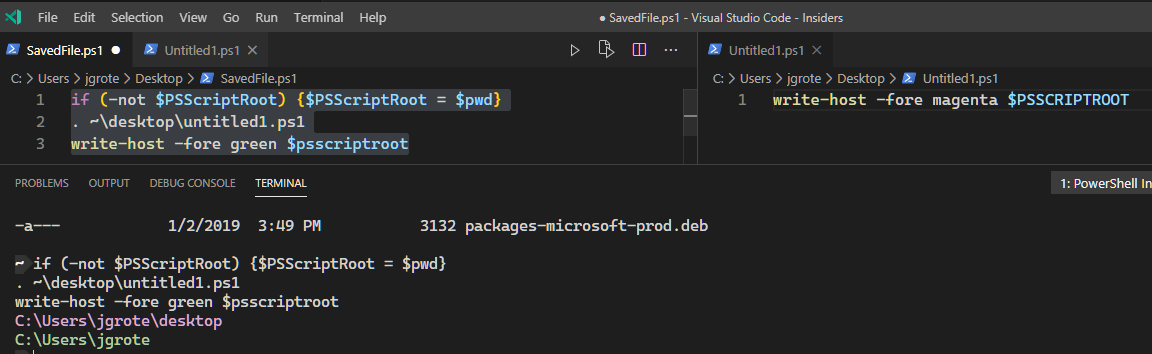
I did a bit more investigation on this
Since this works in an F8 context:
if (-not $PSScriptRoot) {$PSScriptRoot = $pwd}
Maybe it would be possible to add something similar to the F8 code, replacing $pwd with the current file path, and maybe $pwd if it is unsaved.
Seems to generally be fine, and it is preserved in the scope so even if you load a child script/scope that changes PSScriptRoot, it's preserved when it comes back out
JustinGrote
on 20 Apr 2020
@TylerLeonhardt perhaps it is as simple as appending if (-not $PSScriptRoot) {$PSScriptRoot = MyDocumentPathFetchedFromVSCode} to the text fetched from the document?
JustinGrote
on 20 Apr 2020
isn't pwd the terminal directory path and has no correlation to the script you are highlighting code from.
simonsabin
on 20 Apr 2020
@simonsabin well yes I'm just using that as an example because the actual variable would have to be programatically injected by vscode extension because the editor services has no idea what document you have open at the moment. That's why I said replace $pwd with the current file path
If a document is unsaved, should the behavior be to leave it blank or try to be helpful and set it to $pwd? Seems to me the latter, it wouldn't hurt anything.
JustinGrote
on 20 Apr 2020
Interestingly unsaved files still have a path, in ISE they do anyway.
simonsabin
on 20 Apr 2020
VSCode saves them in 'AppData\Roaming\Code - Insiders\Backups' but it's not a .ps1 file and probably not relevant to what someone is trying to do if referencing $PSScriptRoot, which is why I recommended $pwd instead.
JustinGrote
on 20 Apr 2020
Thinking about this a step further. if we are looking at this from a productivity thing, shouldn't one also be looking at the fact one can't debug with F8 I found issue #455 that implied that one could debug with F8 but I've not been able to get it working.
simonsabin
on 20 Apr 2020
psISE.CurrentFile.FullPath uses the $PWD.Path for Untitled files. This makes the most sense to carry over to VSCode rather than using the Backups path for $PSScriptRoot
The full behavior should be:
- If F8 is run from a saved script,
$PSScriptRootis the path to that script. - If F8 is run from an untitled script,
$PSScriptRootuses$PWD.Pathas the path.
dragonwolf83
on 20 Apr 2020
I'd say that 2 would be confusing. the text is not part of a script and thus psscriptroot should be empty. If you want psscriptroot to be populated save the file.
I really can't see where you would be using psscriptroot in an file that isn't saved to disk.
simonsabin
on 20 Apr 2020
@simonsabin If you're not using PSScriptRoot anyways in an unsaved file
it's a moot point, so no reason not to include it for unsaved files if you want to prototype something real quick. It could always be gated behind a preference setting too.
For debugging, what you noted was before the major omnisharp refactor. I'd say debugging F8 on a per-line basis would be very hard, because it's just running commands directly into the terminal, not saving the file and executing it, so there's no way for the debugger to determine if the breakpoints been hit or not.
You can certainly set breakpoints on variables or commands however and it will break into the debugger then, but it won't jump to the line you F8'd, just the current state. You can still step through your remaining lines, but because it wasn't "invoked" from the file directly, it'll load into a PSES temp file and be generally weird.
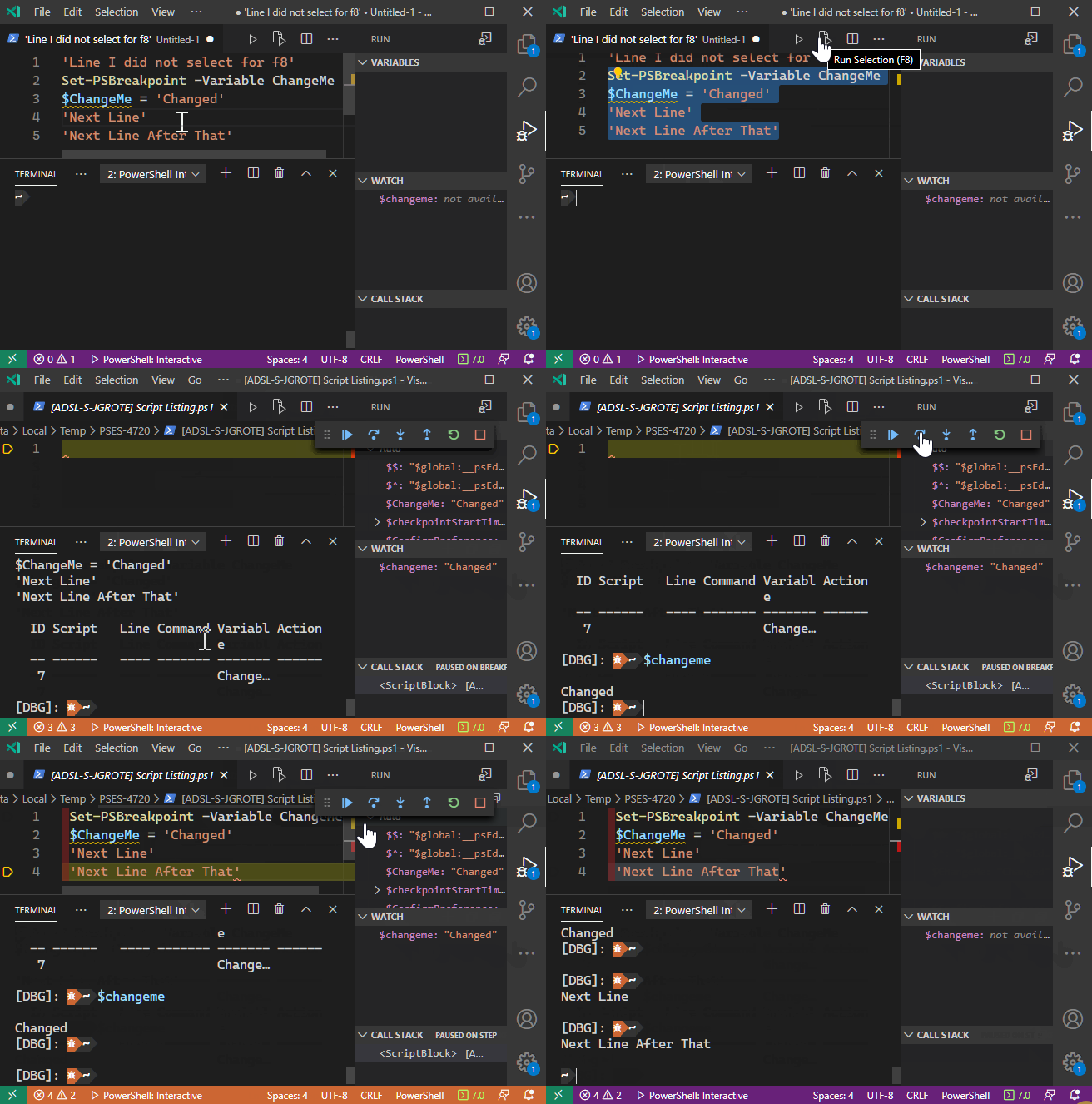
If you need the context you should just debug the current file with F5
JustinGrote
on 20 Apr 2020
I get the wierdness of having to have a temporary file for debugging, I wonder if that was saved to the same folder then psscriptroot would work, but as you say any edits would need to be syncd back with the original content. Nothings impossible, and I'm wondering if there is value in it.
Are there any metrics on F8 usage?
simonsabin
on 20 Apr 2020
For debugging, what you noted was before the major omnisharp refactor. I'd say debugging F8 on a per-line basis would be very hard, because it's just running commands directly into the terminal, not saving the file and executing it, so there's no way for the debugger to determine if the breakpoints been hit or not.
It's possible actually, @TylerLeonhardt and I talked about this awhile ago iirc.
Line breakpoints are based on the file path associated with an AST (e.g. $ast.Extent.File) which can be fudged a bit if you create the scriptblock to be invoked via Parser.ParseInput(string input, string fileName, ...).GetScriptBlock(). The dirty part is having to arbitrarily pad the script extent so that the offsets/line/column all match. This is the same way my example of F8 PSScriptRoot works.
It should even be technically possible for untitled files in the latest PowerShell. That's assuming the change went through that allows a Breakpoint object to be created with an arbitrary file string (e.g. an non-existing or generally invalid path). @TylerLeonhardt you know if that change went through?
SeeminglyScience
on 20 Apr 2020
@SeeminglyScience I was wondering what all the padding was for. Now it makes sense. Seems like an easy change to make
simonsabin
on 20 Apr 2020
Seems like an easy change to make
Well I wouldn't say that necessarily. The concept is easy, implementation is very tricky. It's difficult to get a constructed scriptblock into an instance of the PowerShell class without altering scope or the call stack. On top of that you have to execute the constructed scriptblock, but display the original string. Plus I'm not sure how all that interacts with constrained language mode or applocker whitelists.
Point being, the actual implementation outside of my incredibly hacky example will be quite challenging.
Also adding something like $PSScriptRoot = 'value' automatically is unfortunately very flimsy. That variable is one of the few that is set at every single scope, even the mini psuedo scope that dot sourcing produces. If you for instance run $PSScriptRoot = 'test'; . { $PSScriptRoot }, you'll get an empty string.
SeeminglyScience
on 20 Apr 2020
you know if that change went through?
@SeeminglyScience It did:
 TylerLeonhardt
on 20 Apr 2020
TylerLeonhardt
on 20 Apr 2020
Is this still an issue? Doesn't appear to work with F5 either.
 SqlSusan
on 10 May 2020
SqlSusan
on 10 May 2020
Yes, it is still an issue for F8. I'm not aware that this is an issue when debugging. In fact, I can't repro this using F5.
rkeithhill
on 10 May 2020
Is this still an issue? Doesn't appear to work with F5 either.
Is it possible that you're editing an Untitled/unsaved file @SqlSusan ?
 corbob
on 10 May 2020
corbob
on 10 May 2020
Unfortunately not, it is a saved file, doesn't appear to populate the variable at all, regardless of how I run it. Really annoying bug, pretty much every module I have doesn't work. Keep trying to use VSCode over ISE, but then keep hitting issues like this.
SqlSusan
on 11 May 2020
This seems to be the best workaround I've found so far:
https://www.reddit.com/r/PowerShell/comments/b72t27/path_to_this_script_check_ise_vscode_and_running/
Looks to be a common problem.
SqlSusan
on 11 May 2020
You must be doing something wrong. F5 works with PSSCRIPTROOT without any issue. Maybe you have remapped your keys?
PrzemyslawKlys
on 11 May 2020
nope it does not work can anyone provide debuggin steps ?
 apobekiaris
on 22 May 2020
apobekiaris
on 22 May 2020
nope it does not work can anyone provide debuggin steps ?
@apobekiaris are you referring to F5 or F8? $PSScriptRoot won't work with F8, but should with F5. In the first case, the string of the script is effectively being run in the console. In the second case, the whole script is run by PowerShell, which populates the $PSScriptRoot variable as expected. Fixing this essentially comes down to the extension trying to insert itself into your script to set the $PSScriptRoot variable, so may not be possible to implement -- but that's why F5 exists
 rjmholt
on 22 May 2020
rjmholt
on 22 May 2020
@rjmholt correct f8 does not work and f5 works however f8 most of the times F8 is used so u won't rerun the script from the start
apobekiaris
on 22 May 2020
i also want to say that Run Code works fine so I would surely expect native support from F8
apobekiaris
on 22 May 2020
correct f8 does not work and f5 works however f8 most of the times F8 is used so u won't rerun the script from the start
F8 is definitely more convenient in those scenarios, but when you do that you're running the line, rather than the whole script, so there's no $PSScriptRoot available.
For this I would recommend breaking your script up into functions or separate scripts so that you can call them individually. In particular this is the purpose of functions: reusable code. If you're running the same part of a script over and over, that should be a function that you export to the console with dot-sourcing and called there.
i also want to say that Run Code works fine so I would surely expect native support from F8
Run code is a form of debugging, which runs the whole script, whereby the PowerShell engine sets the $PSScriptRoot automatic variable on each scope push. Running parts of the script with F8 won't do this, since PowerShell cannot jump to a part of the script, meaning the extension must do it, but since $PSScriptRoot is automatically set by PowerShell, the extension can't override it. Unfortunately, you may expect it, but this is not possible.
rjmholt
on 22 May 2020
thnks for the details but i am stiil confused how then when u F* the next script after u run it once u get
write-host "PSScriptRoot=$PSScriptRoot"
Get-Variable PSScriptRoot
Get-Variable PSScriptRoot
PSScriptRoot=

Name                           Value
----                           -----
PSScriptRoot                   C:\Work\eXpandFramework\expand\Support\Build
The PSScriptRoot is there and Get-Variable reports it fine so to my understanding Powershell knows the value of PSScriptRoot on F8 and needs to do nothing special than displaying it
apobekiaris
on 22 May 2020
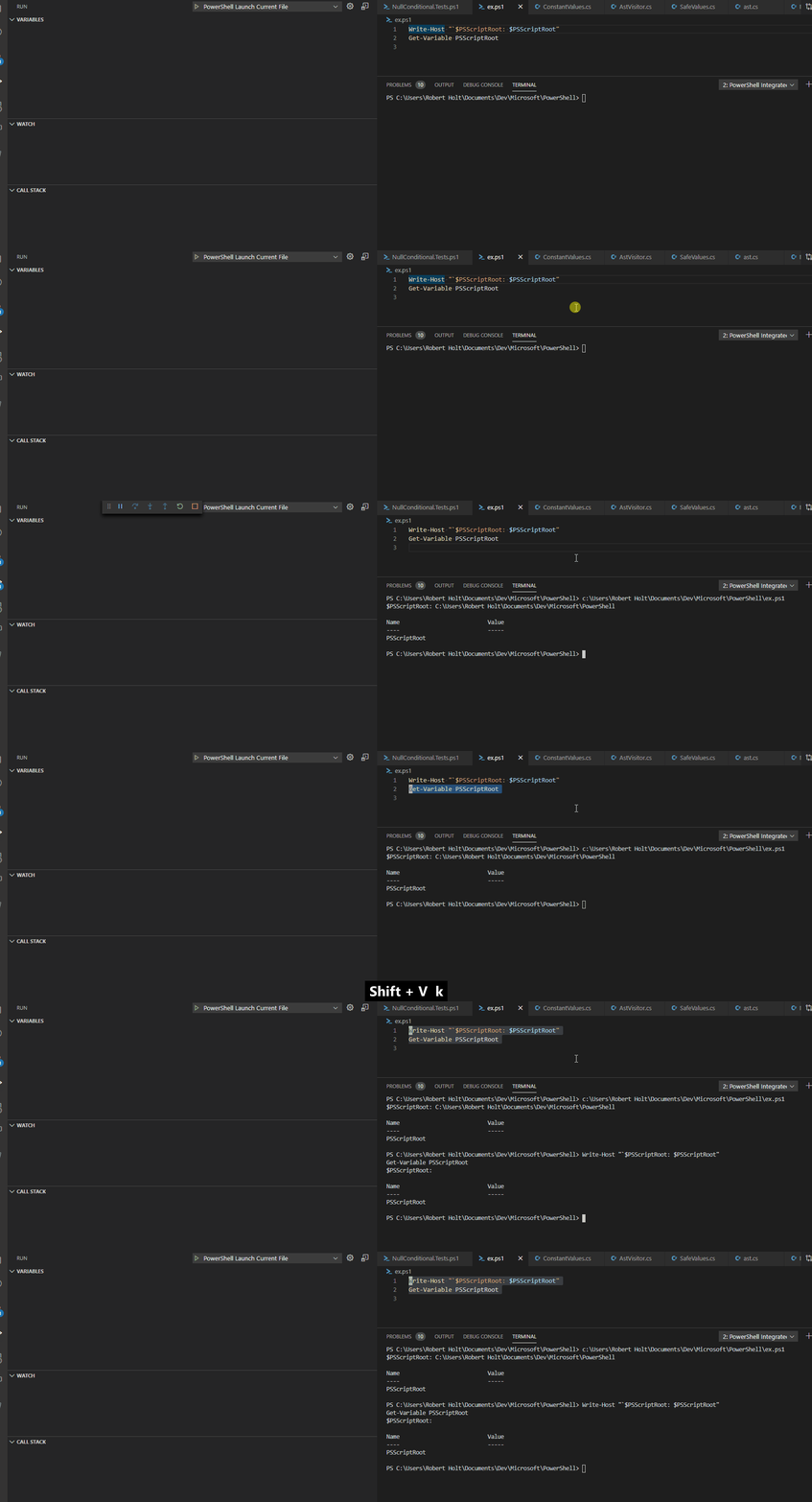
I'm not able to reproduce what you're reporting. Interestingly Get-Variable retrieves no value in either case for me, but does when I run the script from the integrated console though...
rjmholt
on 22 May 2020
I'm not able to reproduce what you're reporting
true in a clean script is not possible however try the next steps:
- Restart the session and F5the two commands and see the output
PSScriptRoot=C:\Work\eXpandFramework\expand\Support\Build

Name                           Value
----                           -----
PSScriptRoot
I could expect a value for PSSriptRoot when Get-Variable reports. Now run F8 to this and note that both calls return emty PSSCriptRoot
PS C:\Dropbox\AutoHotKey> write-host "PSScriptRoot=$PSScriptRoot"
Get-Variable PSScriptRoot
PSScriptRoot=

Name                           Value
----                           -----
PSScriptRoot
- Restarr the session again and F5 but this time import any module e.g
Import-Module PowerShellGet
write-host "PSScriptRoot=$PSScriptRoot"
Get-Variable PSScriptRoot

PSScriptRoot=C:\Work\eXpandFramework\expand\Support\Build

Name                           Value
----                           -----
PSScriptRoot                   C:\Work\eXpandFramework\expand\Support\Build
Now we have different output and the Get-Variable PSScriptRoot has a value and not empty like in #1
finally F8 to it and see that the Get-Variable continues to report a non empty value
PSScriptRoot=

Name                           Value
----                           -----
PSScriptRoot                   C:\Work\eXpandFramework\expand\Support\Build
Get-Variable is showing the $profile location, not the location of the script that you would expect. It's a good thing that doesn't actually populate in $PSScriptRoot. Most likely this is a default value or a side affect of executing profiles on startup.
The most important question is, can the extension make changes to $PSScriptRoot without a new version of PowerShell? Is this something the PSIC can do? The variable is read-only and not changeable to users.
dragonwolf83
on 22 May 2020
can the extension make changes to $PSScriptRoot without a new version of PowerShell?
While it probably could instantiate the variable before the script runs with some effort, it can't prevent PowerShell's changes to it once things are executing. So it would be impossible to guarantee the same functioning.
rjmholt
on 22 May 2020
it can't prevent PowerShell's changes to it once things are executing
this is not clear to me, also note that once u F8 currently u enter a confusion mode as if PSSCriptRoot involved u will have a different behaviour even more if PSSCriptRoot is not visible and hidden in a . sourced script
apobekiaris
on 22 May 2020
I've run into a strange case when using $PSScriptRoot.
In a config.json file, I define some properties:
{
  ...,
  "someProperty": "$someName = ($PSScriptRoot/../<someDir> | Resolve-Path).Path",
  ...
}
then I use Invoke-Expression on that property and I expected it to work, but the $PSScriptRoot is empty and it causes an error.
If I have another Variable with the value of the $PSScriptRoot and I run Invoke-Expression on that, it works.
 vivere-dally
on 4 Mar 2021
vivere-dally
on 4 Mar 2021
I want to load a configuration file co-located with the script. I use F8 a lot, so I can't use $PSScriptRoot directly because it won't be populated. I can use it if it's available and use something else if not. I experimented running the following code in VSCODE and in PSIE using F5 and F8 (of just Get-ScriptPath -Debug). FYI There will be a " {" in the file name if the name has spaces - a bug?
Should it be easier? Or perhaps I'm missing something... I should be not trying to get the path of the script and co-locate configuration files?
Is using Get-PSCallStack viable? I have not really tried it with more nesting.
Code:
function Get-ScriptPath {
    [cmdletbinding()]
    param()

    $t1 = $script:Host.name
    Write-Debug "`$script:Host.name= $t1"

    $t2 = $script:PSScriptRoot
    Write-Debug "`$script:PSScriptRoot = $t2"

    $t3 = $script:PSCommandPath
    Write-Debug "`$script:PSCommandPath = $t3"

    $t4 = $script:MyInvocation.ForEach({ $_.MyCommand.Path })
    Write-Debug "`$script:MyInvocation.MyCommand.Path = $t4"

    $t5 = $script:psEditor.ForEach({ $_.GetEditorContext().CurrentFile.Path })
    Write-Debug "`$script:psEditor.GetEditorContext().CurrentFile.Path = $t5"

    $t6 = $script:psISE.ForEach({ $_.CurrentFile.FullPath })
    Write-Debug "`$script:psISE.CurrentFile.FullPath = $t6"

    $t7 = Get-PSCallStack | Select-object -First 1 -ExpandProperty ScriptName
    Write-Debug "`Get-PSCallStack.ScriptName = $t7"
}
cls
$DebugPreference = 'Continue'
Get-ScriptPath -Debug
Results:
VSCODE F5: Works as expected.
DEBUG: $script:Host.name= Visual Studio Code Host
DEBUG: $script:PSScriptRoot = C:\xxxx\Root\DBA\Management\CMS
DEBUG: $script:PSCommandPath = C:\xxxx\Root\DBA\Management\CMS\Get-ScriptPath.Test.ps1
DEBUG: $script:MyInvocation.MyCommand.Path = C:\xxxx\Root\DBA\Management\CMS\Get-ScriptPath.Test.ps1
DEBUG: $script:psEditor.GetEditorContext().CurrentFile.Path = c:\xxxx\Root\DBA\Management\CMS\Get-ScriptPath.Test.ps1
DEBUG: $script:psISE.CurrentFile.FullPath =
DEBUG: Get-PSCallStack.ScriptName = C:\xxxx\Root\DBA\Management\CMS\Get-ScriptPath.Test.ps1
VSCODE F8: Only the psEditor and call stack have a result.
DEBUG: $script:Host.name= Visual Studio Code Host
DEBUG: $script:PSScriptRoot =
DEBUG: $script:PSCommandPath =
DEBUG: $script:MyInvocation.MyCommand.Path =
DEBUG: $script:psEditor.GetEditorContext().CurrentFile.Path = c:\xxxx\Root\DBA\Management\CMS\Get-ScriptPath.Test.ps1
DEBUG: $script:psISE.CurrentFile.FullPath =
DEBUG: Get-PSCallStack.ScriptName = C:\xxxx\Root\DBA\Management\CMS\Get-ScriptPath.Test.ps1
PSIE F5: Works as expected.
DEBUG: $script:Host.name= Windows PowerShell ISE Host
DEBUG: $script:PSScriptRoot = C:\xxxx\Root\DBA\Management\CMS
DEBUG: $script:PSCommandPath = C:\xxxx\Root\DBA\Management\CMS\Get-ScriptPath.Test.ps1
DEBUG: $script:MyInvocation.MyCommand.Path = C:\xxxx\Root\DBA\Management\CMS\Get-ScriptPath.Test.ps1
DEBUG: $script:psEditor.GetEditorContext().CurrentFile.Path =
DEBUG: $script:psISE.CurrentFile.FullPath = C:\xxxx\Root\DBA\Management\CMS\Get-ScriptPath.Test.ps1
DEBUG: Get-PSCallStack.ScriptName = C:\xxxx\Root\DBA\Management\CMS\Get-ScriptPath.Test.ps1
PSIE F5: Only the psISE and call stack have a result.
DEBUG: $script:Host.name= Windows PowerShell ISE Host
DEBUG: $script:PSScriptRoot =
DEBUG: $script:PSCommandPath =
DEBUG: $script:MyInvocation.MyCommand.Path =
DEBUG: $script:psEditor.GetEditorContext().CurrentFile.Path =
DEBUG: $script:psISE.CurrentFile.FullPath = C:\xxxx\Root\DBA\Management\CMS\Get-ScriptPath.Test.ps1
DEBUG: Get-PSCallStack.ScriptName = C:\xxxx\Root\DBA\Management\CMS\Get-ScriptPath.Test.ps1
 RandyInMarin
on 20 May 2021
RandyInMarin
on 20 May 2021
First draft.
function Get-ScriptPath {
    [cmdletbinding()]
    param()

    if ( $script:PSScriptRoot ) {
        $script:PSScriptRoot
    } elseif ( $script:psEditor ) {
        $script:psEditor.GetEditorContext().CurrentFile.Path | Split-Path -Parent
    } elseif ( $script:psISE ) {
        $script:psISE.CurrentFile.FullPath | Split-Path -Parent
    } else {
        Write-Error 'Failed to resolve or replace $PSScriptRoot.'
        #Get-PSCallStack | Select-object -First 1 -ExpandProperty ScriptName | Split-Path -Parent
    }
}

cls
$DebugPreference = 'Continue'
Get-ScriptPath
UPDATE: Get-PSCallStack does not have the root level ScriptName of interest when nesting and using F8. It appears that each IDE will need to supply the value if using F8. It might work if using F5, but then its a -First 2 and then -Last 1 selection.
Get-PSCallStack | Select-object -First 2 -ExpandProperty ScriptName | Select-object -Last 1
Anyway, this seems like a common, confusing, and difficult issue. It might save a lot a people a lot of effort if it was resolved.
RandyInMarin
on 20 May 2021
A work around is to save the values near the beginning of the script. Run F5 but break if required before running code past this.
The values saved can be used in the remainder of the script even with F8. It's more of a semi-automatic variable. Watch out for the feet.
$root = $PSScriptRoot
$cmd = $PSCommandPath
Write-Debug "`$root = $root"
Write-Debug "`$cmd = $cmd "
# it is now safe to use F8
...
Import-PowerShellDataFile ([io.path]::ChangeExtension($cmd, 'config.psd1'))
Or do your testing by writing it into a pester test and using the run test or debug test codelens rather than f5/f8
JustinGrote
on 21 May 2021
Sure that’s a fine working practice but there is many a time when you’ve got a script you’ve written that doesn’t need testing and doesn’t need splitting into loads of little chunks that you just want to run a little bit of it.
Not being able to use psscriptroot is just annoying.
Simon Sabin
From: Justin Grote @.>
Sent: Friday, May 21, 2021 12:53:37 AM
To: PowerShell/vscode-powershell *@.>
Cc: Simon Sabin @.>; Mention @.*>
Subject: Re: [PowerShell/vscode-powershell] $PSScriptRoot is not populated when running a code block (via F8) (#633)
Or do your testing by writing it into a pester test and using the run test or debug test codelens rather than f5/f8
—
You are receiving this because you were mentioned.
Reply to this email directly, view it on GitHubhttps://github.com/PowerShell/vscode-powershell/issues/633#issuecomment-845556082, or unsubscribehttps://github.com/notifications/unsubscribe-auth/AAJHM22UYXHISLVXTGHFSELTOWOIDANCNFSM4DFXJ4TQ.
simonsabin
on 21 May 2021
Related issues
 Line40
·
3Comments
Line40
·
3Comments
 guidooliveira
·
3Comments
guidooliveira
·
3Comments
 rs38
·
4Comments
rs38
·
4Comments
 TheDanishDynamo
·
3Comments
TheDanishDynamo
·
3Comments
 keposet
·
3Comments
keposet
·
3Comments
Most helpful comment
Yes, it is still an issue for
F8. I'm not aware that this is an issue when debugging. In fact, I can't repro this usingF5.