Vscode-powershell: "Go to Definition" should follow Import-Module references
Please fill in these details so that we can help you!
System Details
- Operating system name and version: win7
- VS Code version: 1.8.1
- PowerShell extension version: 0.8.0
- Output from
$PSVersionTable:
Name                           Value
----                           -----
PSVersion                      5.0.10586.117
PSCompatibleVersions           {1.0, 2.0, 3.0, 4.0...}
BuildVersion                   10.0.10586.117
CLRVersion                     4.0.30319.42000
WSManStackVersion              3.0
PSRemotingProtocolVersion      2.3
SerializationVersion           1.1.0.1
Issue Description
here we have b.psm1
function test2 () {
    Write-Host 2
}
Export-ModuleMember -Function *
and we have a.ps1 to call test2
Import-Module .\b.psm1
function test1 () {
    Write-Host 1
}
test1
test2
it can run successfully, but when I "Go to Definition" of test2 function, it not working
Attached Logs
No logs
 176coding
All 5 comments
Yep, "Go to Definition" currently doesn't follow Import-Module references, that's something we need to add.
 daviwil
on 3 Jan 2017
daviwil
on 3 Jan 2017
To allow for the working-directory being something other than the script path, I use the following:
# Import Include Files
$script_path = $MyInvocation.MyCommand.Path
$dir = Split-Path $script_path
import-module $dir\..\My-Functions.psm1
For me, it is preferable to keep this module with the code that depends on it rather than placing it in the module path (it keeps together all of the code I supply, and simplifies the installation for my customer). Please consider this use-case when looking at enhancing the "Go to Definition" feature.
EDIT: Should probably also note the following method for Powershell 3 and newer:
import-module $PSScriptRoot\..\My-Functions.psm1
 gmckeown
on 6 Feb 2017
gmckeown
on 6 Feb 2017
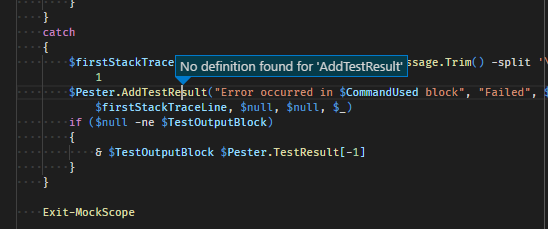
It also needs to handle -AsCustomObject like what Pester uses:
 Jaykul
on 6 Nov 2017
Jaykul
on 6 Nov 2017
@gmckeown:
I found out that it actually works as long as you use a hard coded path or if you use the following most preferably method.
# Import Include Files
$Script_Path = $PSScriptRoot
$Settings_Dir = Join-Path -Path $Global:Scriptpath -ChildPath "..\Settings"
Import-Module $(Join-Path -Path $Settings_Dir -ChildPath "\My-Functions.psm1")

_edit: It seems that it only works if you first run the code in debug. After that you can resolve them from ps1 to psm1 but not back. This is probably related to #499_
Bug is still present in kinda way.
 D0mpie
on 16 Jun 2020
D0mpie
on 16 Jun 2020
@gmckeown:
I found out that it actually works as long as you use a hard coded path or if you use the following most preferably method.
# Import Include Files
$Script_Path = $PSScriptRoot
$Settings_Dir = Join-Path -Path $Global:Scriptpath -ChildPath "..\Settings"
Import-Module $(Join-Path -Path $Settings_Dir -ChildPath "\My-Functions.psm1")
_edit: It seems that it only works if you first run the code in debug. After that you can resolve them from ps1 to psm1 but not back. This is probably related to #499_
Bug is still present in kinda way.
I think this issue can be marked as solved. I found out that it isn't actually a bug. I did some research on the documentation and searched for "How to create a powershell module". There I found out that ..."_Have a PowerShell script with a .psm1 extension. Use the same name for the script and the directory where the script is saved._" as stated in the documentation.
https://docs.microsoft.com/en-us/powershell/scripting/developer/module/how-to-write-a-powershell-script-module?view=powershell-7#create-a-basic-powershell-module
Thus I saved my module in a folder called f.e. "My-Functions" containing the file My-Functions.psm1. I repeated this step for every module I previously made and altered the import-module function as follows:
Import-Module $(Join-Path -Path $Settings_Dir -ChildPath "\My-Functions\My-Functions.psm1")
Starting using this method and therefore follow the guidelines solves this problem in Visual Code.
_Edit: some typos_
D0mpie
on 17 Aug 2020
Related issues
 MiYanni
·
3Comments
MiYanni
·
3Comments
 rs38
·
4Comments
rs38
·
4Comments
 TheDanishDynamo
·
3Comments
TheDanishDynamo
·
3Comments
 inthemedium
·
3Comments
inthemedium
·
3Comments
 lukegriffith
·
3Comments
lukegriffith
·
3Comments
Most helpful comment
@gmckeown:
I found out that it actually works as long as you use a hard coded path or if you use the following most preferably method.
# Import Include Files$Script_Path = $PSScriptRoot$Settings_Dir = Join-Path -Path $Global:Scriptpath -ChildPath "..\Settings"Import-Module $(Join-Path -Path $Settings_Dir -ChildPath "\My-Functions.psm1")_edit: It seems that it only works if you first run the code in debug. After that you can resolve them from ps1 to psm1 but not back. This is probably related to #499_
Bug is still present in kinda way.