Vscode-powershell: Extra Intellisense coming back for argument completers
I'm getting back snippets, and other auto-completion results, along with my custom auto-completion results. I think we should only be returning custom auto-completion results, and not generic items that aren't relevant to the current context.

Happening on VS Code Insiders and release versions.
Cheers,
Trevor Sullivan
https://trevorsullivan.net
https://twitter.com/pcgeek86
 pcgeek86
All 20 comments
Thanks! This could be related to how we're doing IntelliSense a little differently than other languages. I'll have to look into it, but it might be something we can ask VS Code team to help with.
 daviwil
on 28 Apr 2016
daviwil
on 28 Apr 2016
Related to this, parameters that are typed as an enumeration are also including snippets in the Intellisense results. Instead, we should limit the results to the enumeration values.

pcgeek86
on 18 May 2017
@pcgeek86 What completions do you get from PowerShell console / PSReadline for this parameter?
 rkeithhill
on 24 May 2017
rkeithhill
on 24 May 2017

@rkeithhill
pcgeek86
on 24 May 2017
Seems that we're giving snippet completions in some places where they aren't needed. I'll check to see if there's a way to contextually suppress snippet completion items.
daviwil
on 24 May 2017
This broke somewhere between 0.12.2:

and 1.1.0:

rkeithhill
on 24 May 2017
@rkeithhill Isn't that kind of comparing apples and oranges though? Parameter name vs. parameter value.
pcgeek86
on 24 May 2017
Yes. Sorry hands typing - by themselves. Not what I meant to do. :-) Still, same result for 0.12.2 (other than icon):

Note: no scroll bar or extra completion items.
rkeithhill
on 24 May 2017
It is likely that something did break between 0.12.2 and 1.0.0, we changed the version of the language server client in the PowerShell extension and upgraded to the new LSP version in PSES. I bet we forgot to wire something up. Thanks for figuring that out Keith, I'll see if I can find the mismatch.
daviwil
on 24 May 2017
I think something might have changed WRT completion list sorting in VSCode particularly when there is no text to the left of where list appears. In the case above there's a space (not a . or - or ::). See https://github.com/Microsoft/vscode/issues/26096#issuecomment-299833097
rkeithhill
on 25 Jun 2017
@tylerl0706 I'm not sure what level of effort is required to resolve this, but a fix for this issue would help clean up the VSCode-PowerShell experience.
pcgeek86
on 29 Jan 2018
I'm finding this to be a huge issue for me as well.
There are a few things that it does really stupidly.
I apologise if this isn't the right place for it but this issue is part of the intellisense issues I'm seeing.
When for instance using dot notation, it should default to the properties of the object and not to the last used method. This causes me a lot of pain, I'll end up having to scroll up to get to the properties because I use the properties way more often than the methods.
I cant upload screenshots unfortunately but I see the following behavior:
[string]$Var1 = 'Text'
ISE:
$Var.{This will open the intellisense list at the first property of the object}
VSC:
$Var.{This will default to the last used method, which may have been hours ago}
 Kitsune-Fox
on 29 Jul 2019
Kitsune-Fox
on 29 Jul 2019
@TylerLeonhardt I can't reproduce this one on either 5.1 or 7
I can't reproduce any situation where the only thing I don't get is the expected content and snippets, and snippets can be hidden with the editor.snippetsuggestings setting, or (my preference), changed to "bottom"
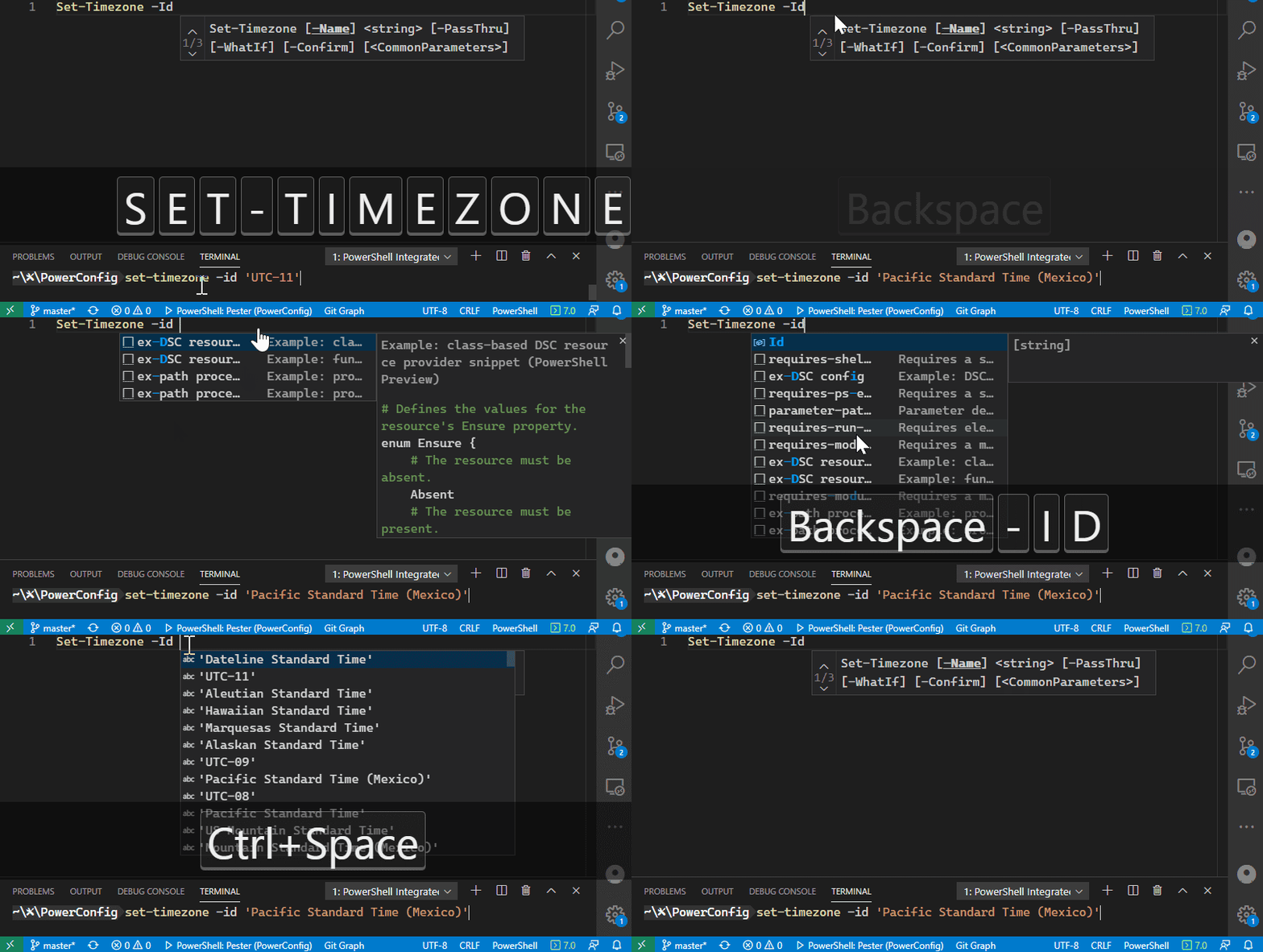
It also works with ArgumentCompleters fine, though there is a bit of problem if a command has multiple parametersets. For instance, given the first argumentcompleter example:
https://docs.microsoft.com/en-us/powershell/module/microsoft.powershell.core/register-argumentcompleter?view=powershell-7
It only works if you "intellisense select" the Id parameter, just typing it won't work:
Environment Information
Visual Studio Code
| Name | Version |
| --- | --- |
| Operating System | Windows_NT x64 10.0.19041 |
| VSCode | 1.45.0-insider|
| PowerShell Extension Version | 2020.4.2 |
PowerShell Information
|Name|Value|
|---|---|
|PSVersion|7.0.0|
|PSEdition|Core|
|GitCommitId|7.0.0|
|OS|Microsoft Windows 10.0.19041|
|Platform|Win32NT|
|PSCompatibleVersions|1.0 2.0 3.0 4.0 5.0 5.1.10032.0 6.0.0 6.1.0 6.2.0 7.0.0|
|PSRemotingProtocolVersion|2.3|
|SerializationVersion|1.1.0.1|
|WSManStackVersion|3.0|
 JustinGrote
on 17 Apr 2020
JustinGrote
on 17 Apr 2020
I believe the original issue is what you see when parameter name/value completion is not working at all. I'd say this one is fixed.
rkeithhill
on 17 Apr 2020
@rkeithhill does it make sense to break out two new issues then if they don't already exist?
- Inconsistent Intellisense if a command has multiple parametersets
- [Feature Request] https://github.com/PowerShell/vscode-powershell/issues/162#issuecomment-515939246 - Add setting preference to disable intellisense "most recent history" suggestion for dot-sourced properties
JustinGrote
on 17 Apr 2020
I believe the original issue is what you see when parameter name/value completion is not working at all. I'd say this one is fixed.
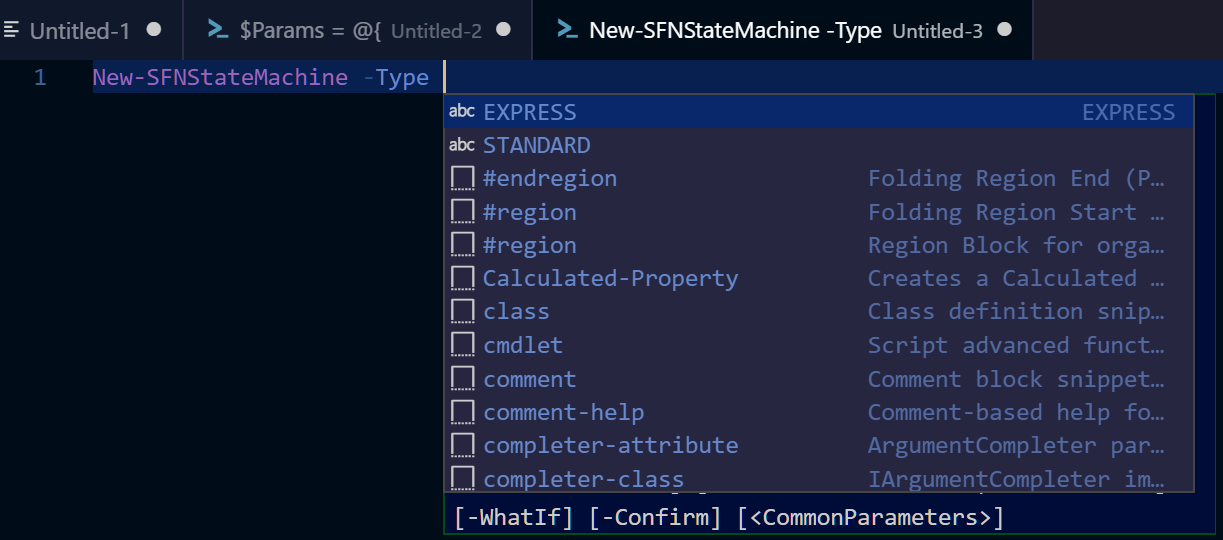
Actually, you'll notice in the original issue report, that I have a custom argument completer / Intellisense handler. Still, the VSCode snippets are being returned alongside my Intellisense results, which is undesirable. I'm still seeing this behavior in PowerShell 7.0 with VSCode on Windows 10.
pcgeek86
on 17 Apr 2020
@pcgeek86 Did you see my comment about turning off the snippets?
This vscode setting: editor.snippetsuggestings
JustinGrote
on 17 Apr 2020
@JustinGrote Thanks, I missed that. I don't want to disable snippets though. I want snippets to show up when I'm not using argument completers, and when I am using argument completers, I don't want snippets to show up and pollute the results.
Also, that would disable snippets for the entire editor, not just PowerShell.
pcgeek86
on 17 Apr 2020
@pcgeek86 understood, this comes from VSCode and not the powershell extension so I don't know if there's a way to do an "if" filter.
I just set my snippetsuggestions to "bottom" and they are always at the bottom even if I select them so they don't get mixed in, is that sufficient? The icon makes it very clear the snippets are separate.
I agree it's a "nice to have" for it to be contextual and it's also subjective, for instance another person might want snippets at the parameter level, say for a snippet that has a parenthesis evaluation of a parameter.
JustinGrote
on 17 Apr 2020
Thanks everyone for the continued interest on this issue and discussion here. Because of the way snippets are provided in VSCode they are not context-aware so unfortunately there isnt anything we can do for this issue from the PowerShell extension side so I am going mark this issue as Resolution-External. The best you can do is make this configuration language specific using the setting Justin provided i.e.
"[powershell]":{
    "editor.snippetSuggestions": "bottom" //or "none"
}
 SydneyhSmith
on 21 Apr 2020
SydneyhSmith
on 21 Apr 2020
Related issues
 timoline
·
3Comments
timoline
·
3Comments
 lukegriffith
·
3Comments
lukegriffith
·
3Comments
 inthemedium
·
3Comments
inthemedium
·
3Comments
 borisimple
·
3Comments
daviwil
·
4Comments
borisimple
·
3Comments
daviwil
·
4Comments