Vscode-php-debug: Variable gets truncated
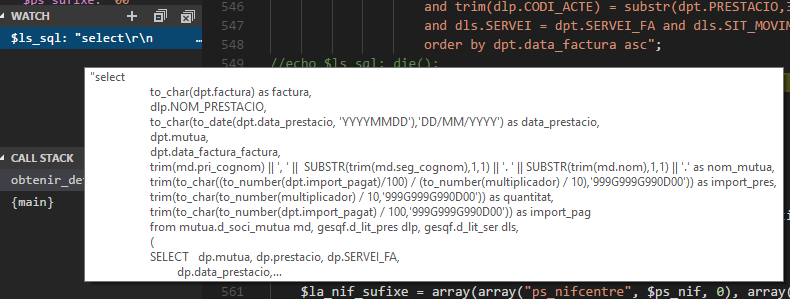
Why do variables get truncated and not show the full value? Is there any way to change this to show the full variable value?
 PipCodeBoy
👍1
All 5 comments
Please refer to the XDebug documentation, the adapter doesn't truncate it, it's XDebug. You can customize XDebug settings through launch.json. They get truncated because else big variables can easily slow down the debugger.
 felixfbecker
on 17 Apr 2018
felixfbecker
on 17 Apr 2018
👍1
And where do I find the parameter to add to launch.json that fixes that?? Thanks
PipCodeBoy
on 18 Apr 2018
👍1
@PipCodeBoy
{
  // Use IntelliSense to learn about possible attributes.
  // Hover to view descriptions of existing attributes.
  // For more information, visit: https://go.microsoft.com/fwlink/?linkid=830387
  "version": "0.2.0",
  "configurations": [
    {
      "name": "Listen for XDebug",
      "type": "php",
      "request": "launch",
      "port": 9000,
      "pathMappings": {
        "/app/": "${workspaceRoot}"
      },
      "xdebugSettings": {
        "max_data": -1,
        "max_children": -1
      }
    },
    {
      "name": "Launch currently open script",
      "type": "php",
      "request": "launch",
      "program": "${file}",
      "cwd": "${fileDirname}",
      "port": 9000
    }
  ]
}
 skippednote
on 11 Jun 2018
skippednote
on 11 Jun 2018
👍11
🚀1
@skippednote That worked but now VSCode is having a hard time displaying 132 attributes 😑

 ww9
on 4 Mar 2020
ww9
on 4 Mar 2020
Same with strings, while I can now copy and paste the value in full with the new settings (thank you for that example by the way). I cannot actually see the data within vscode.
 ccjjmartin
on 26 May 2021
ccjjmartin
on 26 May 2021
Was this page helpful?
0 / 5 - 0 ratings
Related issues
 bilogic
·
7Comments
bilogic
·
7Comments
 QwertyZW
·
9Comments
QwertyZW
·
9Comments
 johnbillion
·
11Comments
johnbillion
·
11Comments
 mitchellnemitz
·
11Comments
johnbillion
·
6Comments
mitchellnemitz
·
11Comments
johnbillion
·
6Comments
Most helpful comment
@PipCodeBoy