Vscode-ng-language-service: Language service not loading with config option "files: []"
Describe the bug
Angular HTML Template syntax validation/completion/intelli-sense are not working.
To Reproduce
Steps to reproduce the behavior:
npm install -g @angular/cli@nextng new angular10examplecd angular10examplenpm iOpen project in VSCode with Angular Language Service extension installed
Expected behavior
Angular HTML template editor should provide validition, syntax checking, completion and "go to definition" functionality. Etc etc.
Logs
Please attach two logs:
- Console output (Go to toolbar --> View --> Output, and copy the contents)
[Info  - 4:28:28 PM] Angular language server process ID: 34506
[Info  - 4:28:28 PM] Using typescript v3.8.3 from /Users/lincoln/.vscode/extensions/angular.ng-template-0.901.9/node_modules/typescript/lib/tsserverlibrary.js
[Info  - 4:28:28 PM] Using @angular/language-service v9.1.9 from /Users/lincoln/.vscode/extensions/angular.ng-template-0.901.9/server/node_modules/@angular/language-service/bundles/language-service.umd.js
[Info  - 4:28:28 PM] Log file: /Users/lincoln/Library/Application Support/Code/logs/20200526T132525/exthost4/Angular.ng-template/nglangsvc.log
[Info  - 4:28:30 PM] Disabling language service for /Users/lincoln/projects/maritlabs/libraries/angular10example/tsconfig.json because it is not an Angular project ('@angular/core/core.d.ts' could not be found). If you believe you are seeing this message in error, please reinstall the packages in your package.json.
[Error - 4:28:30 PM] No config file for /Users/lincoln/projects/maritlabs/libraries/angular10example/src/app/app.component.html
- Log file (Path is printed to the console output at startup)
Screenshots


Additional context
Not sure when this stopped working. It actually hasn't been working for me for about a week, even in my Angular 9 project, and I haven't been able to figure out what's causing the problem, but I've since upgraded to Angular 10 and it's still not working.
 lincolnthree
All 32 comments
I have also tried using TypeScript 3.9.3 from the project TS version.
lincolnthree
on 26 May 2020
I have tried setting angular.nsdk to use the @angular/language-service version 10.0.0-rc1 from the project's node_modules.
lincolnthree
on 26 May 2020
From another workspace:
[Info  - 4:35:45 PM] Angular language server process ID: 34938
[Info  - 4:35:45 PM] Using typescript v3.9.3 from /Users/lincoln/projects/maritlabs/topdecked-unified/node_modules/typescript/lib/tsserverlibrary.js
[Info  - 4:35:45 PM] Using @angular/language-service v10.0.0-rc.0 from /Users/lincoln/projects/maritlabs/topdecked-unified/node_modules/@angular/language-service/bundles/language-service.umd.js
[Info  - 4:35:45 PM] Log file: /Users/lincoln/Library/Application Support/Code/logs/20200526T132525/exthost1/Angular.ng-template/nglangsvc.log
[Info  - 4:35:51 PM] Disabling language service for /Users/lincoln/projects/maritlabs/topdecked-unified/tsconfig.json because it is not an Angular project ('@angular/core/core.d.ts' could not be found). If you believe you are seeing this message in error, please reinstall the packages in your package.json.
[Info  - 4:35:51 PM] Enabling language service for /Users/lincoln/projects/maritlabs/topdecked-unified/tsconfig.app.json.
[Info  - 4:35:51 PM] Enabling language service for /Users/lincoln/projects/maritlabs/topdecked-unified/tsconfig.worker.json.
[Info  - 4:35:51 PM] Disabling language service for /Users/lincoln/projects/maritlabs/topdecked-unified/e2e/tsconfig.e2e.json because it is not an Angular project ('@angular/core/core.d.ts' could not be found). If you believe you are seeing this message in error, please reinstall the packages in your package.json.
[Error - 4:35:51 PM] No config file for /Users/lincoln/projects/maritlabs/topdecked-unified/src/app/pages/home/home.page.htm
And the log file:
exthost.log
lincolnthree
on 26 May 2020
Thanks for the report!
I could not reproduce this with the steps you provided. Could you verify that you've opened VSCode to the root of the project, and the root contains node_modules/@angular/core/core.d.ts?
 ayazhafiz
on 27 May 2020
ayazhafiz
on 27 May 2020
@ayazhafiz You're welcome! Thanks for taking a look.
Hoping I can figure out what's going on here. Been burning a lot of time without these features :/
sharktop:topdecked-unified lincoln$ ls node_modules/@angular/core/core.d.ts
-rw-r--r--  1 lincoln  staff  1258907 May 26 16:20 node_modules/@angular/core/core.d.ts
sharktop:topdecked-unified lincoln$
Same behavior. When run from project directory:
Ran VSCode:
sharktop:topdecked-unified lincoln$ code .
Opened app.component.html, VSCode NGLS Log:
[Info  - 9:04:01 AM] Angular language server process ID: 37826
[Info  - 9:04:01 AM] Using typescript v3.8.3 from /Users/lincoln/.vscode/extensions/angular.ng-template-0.901.9/node_modules/typescript/lib/tsserverlibrary.js
[Info  - 9:04:01 AM] Using @angular/language-service v10.0.0-rc.0 from /Users/lincoln/projects/maritlabs/topdecked-unified/node_modules/@angular/language-service/bundles/language-service.umd.js
[Info  - 9:04:01 AM] Log file: /Users/lincoln/Library/Application Support/Code/logs/20200527T090334/exthost1/Angular.ng-template/nglangsvc.log
[Info  - 9:04:03 AM] Disabling language service for /Users/lincoln/projects/maritlabs/topdecked-unified/tsconfig.json because it is not an Angular project ('@angular/core/core.d.ts' could not be found). If you believe you are seeing this message in error, please reinstall the packages in your package.json.
[Error - 9:04:03 AM] No config file for /Users/lincoln/projects/maritlabs/topdecked-unified/src/app/app.component.html
Completion / etc still not working :/
lincolnthree
on 27 May 2020
These are my other installed extensions, for reference:

lincolnthree
on 27 May 2020
I also should have reported that this is occurring on MacOS.
lincolnthree
on 27 May 2020
What other info should I be looking at / what can I provide to get to the bottom of this?
lincolnthree
on 27 May 2020
My uneducated overview of the log file leads me to believe that there is an issue with the new reference-based tsconfig.json structure in Angular 10 projects causing the language service to fail to resolve typescript and other various other file roots and settings. But that doesn't hold up since you said it worked for you.
Also doesn't explain why it was already failing before the upgrade to Angular 9. Something feels fishy.
Log from the last attempt:
lincolnthree
on 27 May 2020
I've been 'hacking' tsconfig.json a bit to try to get the angular language service to recognize it as an angular project... finally ended up with something a little different:
{
  "extends": "../tsconfig.base.json",
  "files": [],
  "references": [{
      "path": "./tsconfig.app.json"
    },
    {
      "path": "./tsconfig.spec.json"
    },
    {
      "path": "./tsconfig.worker.json"
    }
  ],
  "include": [
    "node_modules"
  ],
  "angularCompilerOptions": {
    "enableIvy": true,
    "fullTemplateTypeCheck": false,
    "skipTemplateCodegen": false,
    "skipTemplates": true,
    "strictInjectionParameters": true,
    "strictMetadataEmit": false
  }
}
[Info  - 9:43:15 AM] Angular language server process ID: 39364
[Info  - 9:43:15 AM] Using typescript v3.9.3 from /Users/lincoln/projects/maritlabs/topdecked-unified/node_modules/typescript/lib/tsserverlibrary.js
[Info  - 9:43:15 AM] Using @angular/language-service v9.1.9 from /Users/lincoln/.vscode/extensions/angular.ng-template-0.901.9/server/node_modules/@angular/language-service/bundles/language-service.umd.js
[Info  - 9:43:15 AM] Log file: /Users/lincoln/Library/Application Support/Code/logs/20200527T093711/exthost1/Angular.ng-template/nglangsvc.log
[Info  - 9:43:32 AM] Enabling language service for /Users/lincoln/projects/maritlabs/topdecked-unified/tsconfig.json.
[Error - 9:43:32 AM] No config file for /Users/lincoln/projects/maritlabs/topdecked-unified/src/app/pages/home/home.page.html
Warning: Can't resolve all parameters for Router in /Users/lincoln/projects/maritlabs/topdecked-unified/node_modules/@angular/router/router.d.ts: ([object Object], [object Object], [object Object], [object Object], [object Object], [object Object], [object Object], ?). This will become an error in Angular v6.x
Warning: Can't resolve all parameters for ɵangular_packages_router_router_o in /Users/lincoln/projects/maritlabs/topdecked-unified/node_modules/@angular/router/router.d.ts: ([object Object], [object Object], ?). This will become an error in Angular v6.x
What did your tsconfig look like originally?
ayazhafiz
on 27 May 2020
The one listed in the log file is the output after the config file is parsed by TS, so it doesn't always line up (e.g. in regard to rootNames)
ayazhafiz
on 27 May 2020
The issue is that files: [] tells TypeScript's tsserver to load a project with no files (other than the config file). This project is passed to the Angular language service. The project is also all the language service has to work with, so if core.d.ts or any TypeScript files can't be found in the project files (as in this case), the language service is disabled.
ayazhafiz
on 27 May 2020
The original is the TS config file that was generated by angular when I created the example project in the reproduction steps listed in the original issue report.
I will post it when I get back to my computer, but I believe you should have it on your computer if you generated the example.
The example that I pasted, which was modified, was purely to try to work around the issue that the language service can't seem to resolve files in the original.
lincolnthree
on 27 May 2020
Original tsconfig.json, as generated:
// This is a "Solution Style" tsconfig.json file, and is used by editors and TypeScript’s language server to improve development experience.
// It is not intended to be used to perform a compilation.
{
  "files": [],
  "references": [
    {
      "path": "./tsconfig.app.json"
    },
    {
      "path": "./tsconfig.spec.json"
    },
    {
      "path": "./e2e/tsconfig.json"
    }
]
}
I guess it's worth noting that the Angular language service does resolve the referenced tsconfig.app.json/etc projects, and does enable language services for those... then subsequently fails to resolve configuration for any HTML files. As seen here: https://github.com/angular/vscode-ng-language-service/issues/793#issuecomment-634265217
This is what prompted me to go down the path of getting the primary tsconfig file to be recognized.
lincolnthree
on 27 May 2020
That being said, I deleted files: [] from the generated tsconfig.json file and the language service has started functioning in html files again. (If it weren't clear, ng new is what generated this file (as did the ng update that I ran in my main project.
Interesting that it's generating a tsconfig file that seems to break the language service, but... you said it worked for you.
Out of curiosity, does your generated tsconfig.json file match what I pasted?
lincolnthree
on 27 May 2020
Failing to find a config for HTML files isn't a big deal, since the config files are only relevant for TS sources.
The relevant validation code:
I think we can fall back on trying to resolve node_modules if the project files are empty (not sure of all the implications of this), but for now removing files: [] is a workaround.
ayazhafiz
on 27 May 2020
(Also thank you for looking into this. At this point my environment is functional, so if you choose to call it resolved, that's fine, but I suspect that others would be running into this as well if my assumptions are correct -- and I'm happy to keep digging.)
lincolnthree
on 27 May 2020
Out of curiosity, does your generated
tsconfig.jsonfile match what I pasted?
It didn't; I probably installed the cli locally when I tried this yesterday, but did it again an hour ago and got the same config you did.
ayazhafiz
on 27 May 2020
Yeah, let's leave this open for now. We don't want the only solution to be deleting a config auto-generated by Angular.
ayazhafiz
on 27 May 2020
Awesome. Glad I could be of assistance! Let me know if there's anything I can do to help.
lincolnthree
on 27 May 2020
Thank you again.
lincolnthree
on 27 May 2020
Uh oh.
One issue I just encountered as a repercussion of deleting "files": []... vscode typescript stops properly resolving source files:

And this issue:
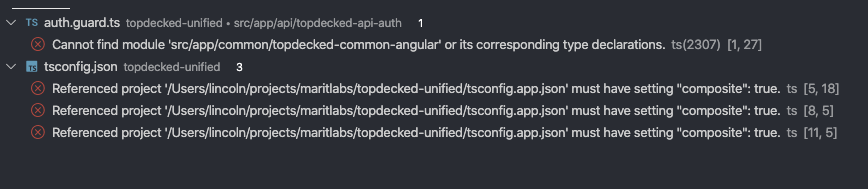
So it seems that this setting is required to get the typescript language service to function properly.
lincolnthree
on 27 May 2020
So we can either have functional typescript or functional angular :/ but not both at the same time.
lincolnthree
on 27 May 2020
Adding the following to files: will at least get things working for the app sources, but I don't know what kind of other impacts this will have:
  "files": [
    "src/main.ts",
    "src/polyfills.ts",
    "src/zone-flags.ts"
  ]
~If anyone wants to contribute a patch to fix this, I think the best way would be to replace the existing Angular project check (https://github.com/angular/vscode-ng-language-service/issues/793#issuecomment-634727597) with an activation event (https://github.com/angular/vscode-ng-language-service/issues/481). One thing to check is that the language service still behaves properly (i.e. just provides TS completions) if a TS-only subfolder is opened in a workspace.~
I was dumb, didn't realize the "solution" config comes with new editor features in ts39. See kyliau's comment at the bottom
ayazhafiz
on 28 May 2020
I might spend some more time on this later, but for anyone who doesn't care about performance or good practices and just wants to use this extension's features (don't thumbs me down for this):
Open this file:
C:\Users\<user>\.vscode\extensions\angular.ng-template-0.901.9\server\node_modules\@angular\language-service\bundles\language-service.umd.jsFind and replace this with an empty string:
if (e_1) throw e_1.error;
Everything will work, but the extension will never properly initialize so you will see an infinite initializing message
Here is the actual error, something is going on with the new structure:
Warning: Can't resolve all parameters for Router in c:/Users/<user>/source/repos/<project>/<project>/ClientApp/node_modules/@angular/router/router.d.ts: ([object Object], [object Object], [object Object], [object Object], [object Object], [object Object], [object Object], ?). This will become an error in Angular v6.x
Warning: Can't resolve all parameters for ɵangular_packages_router_router_o in c:/Users/<user>/source/repos/<project>/<project>/ClientApp/node_modules/@angular/router/router.d.ts: ([object Object], [object Object], ?). This will become an error in Angular v6.x
c:\Users\<user>\.vscode\extensions\angular.ng-template-0.901.9\server\node_modules\@angular\language-service\bundles\language-service.umd.js:30390
                finally { if (e_1) throw e_1.error; }
                                   ^

TypeError: Cannot read property 'kind' of undefined
    at getConditionalFlowTypeOfType (c:\Users\<user>\source\repos\<project>\<project>\ClientApp\node_modules\typescript\lib\tsserverlibrary.js:45510:28)
    at getTypeFromTypeNode (c:\Users\<user>\source\repos\<project>\<project>\ClientApp\node_modules\typescript\lib\tsserverlibrary.js:47396:20)
    at getTypeOfNode (c:\Users\<user>\source\repos\<project>\<project>\ClientApp\node_modules\typescript\lib\tsserverlibrary.js:67279:40)
    at Object.getTypeAtLocation (c:\Users\<user>\source\repos\<project>\<project>\ClientApp\node_modules\typescript\lib\tsserverlibrary.js:35196:31)
    at getTsTypeFromBuiltinType (c:\Users\<user>\.vscode\extensions\angular.ng-template-0.901.9\server\node_modules\@angular\language-service\bundles\language-service.umd.js:28433:28)
    at TypeScriptSymbolQuery.getBuiltinType (c:\Users\<user>\.vscode\extensions\angular.ng-template-0.901.9\server\node_modules\@angular\language-service\bundles\language-service.umd.js:27600:28)
    at AstType.visitLiteralPrimitive (c:\Users\<user>\.vscode\extensions\angular.ng-template-0.901.9\server\node_modules\@angular\language-service\bundles\language-service.umd.js:26298:47)
    at LiteralPrimitive.visit (c:\Users\<user>\.vscode\extensions\angular.ng-template-0.901.9\server\node_modules\@angular\language-service\bundles\language-service.umd.js:7386:28)
    at ASTWithSource.visit (c:\Users\<user>\.vscode\extensions\angular.ng-template-0.901.9\server\node_modules\@angular\language-service\bundles\language-service.umd.js:7542:29)
    at AstType.getDiagnostics (c:\Users\<user>\.vscode\extensions\angular.ng-template-0.901.9\server\node_modules\@angular\language-service\bundles\language-service.umd.js:26031:28)
 c0dybrown
on 28 May 2020
c0dybrown
on 28 May 2020
@c0dybrown this sounds like a separate issue. Please see if #797 solves it; if not, feel free to open a new issue.
ayazhafiz
on 28 May 2020
tldr; Angular extension v0.1000.0-rc.0 has been released and can be downloaded here. If you'd like to try it out, please keep in mind that it has to be installed manually. See here for installation instructions.
- typescript 3.9 introduced "solution-style" tsconfig, and it is not supported by prior ts versions.
latestversion of Angular (v9) and the language service extension uses typescript 3.8.- "solution-style" tsconfig is enabled in Angular CLI in https://github.com/angular/angular-cli/pull/17586.
- In order for this to work, language service extension has to upgrade to both angular v10 and typescript 3.9. We've just released a rc version of the extension that supports this. Since this is rc, the binary is not deployed to visual studio marketplace, so installation has to be done manually.
Hopefully this clears up the confusion why the extension is not working for users who are currently using Angular v10 rc. As always, please let us know if you run into any issues, and thank you for helping us test v10 rc!
 kyliau
on 29 May 2020
kyliau
on 29 May 2020
I'm closing this issue in favor of #824.
kyliau
on 25 Jun 2020
This issue has been automatically locked due to inactivity.
Please file a new issue if you are encountering a similar or related problem.
Read more about our automatic conversation locking policy.
_This action has been performed automatically by a bot._
![angular-automatic-lock-bot[bot] picture](https://avatars.githubusercontent.com/in/40213?v=4&s=40) angular-automatic-lock-bot[bot]
on 25 Jul 2020
angular-automatic-lock-bot[bot]
on 25 Jul 2020
Related issues
 crisz
·
5Comments
crisz
·
5Comments
 JoannaFalkowska
·
3Comments
JoannaFalkowska
·
3Comments
 user3323
·
4Comments
user3323
·
4Comments
 seangwright
·
4Comments
seangwright
·
4Comments
 pfeigl
·
6Comments
pfeigl
·
6Comments
Most helpful comment
tldr; Angular extension v0.1000.0-rc.0 has been released and can be downloaded here. If you'd like to try it out, please keep in mind that it has to be installed manually. See here for installation instructions.
latestversion of Angular (v9) and the language service extension uses typescript 3.8.Hopefully this clears up the confusion why the extension is not working for users who are currently using Angular v10 rc. As always, please let us know if you run into any issues, and thank you for helping us test v10 rc!