Vscode-ng-language-service: @angular/language-service stop to work suggest on HTML template
With latest version of VsCode:
Versione: 1.40.1 (user setup)
Commit: 8795a9889db74563ddd43eb0a897a2384129a619
Data: 2019-11-13T16:49:35.976Z
Electron: 6.1.2
Chrome: 76.0.3809.146
Node.js: 12.4.0
V8: 7.6.303.31-electron.0
OS: Windows_NT x64 10.0.18363
Stop variable suggest on HTML Template
"@angular/compiler-cli": "^8.2.14"
Angular CLI: 8.3.19
Node: 13.0.1
OS: win32 x64
Angular: 8.2.14
... animations, common, compiler, compiler-cli, core, forms
... language-service, platform-browser, platform-browser-dynamic
... router, service-worker

Package                           Version
-----------------------------------------------------------
@angular-devkit/architect         0.803.19
@angular-devkit/build-angular     0.803.19
@angular-devkit/build-optimizer   0.803.19
@angular-devkit/build-webpack     0.803.19
@angular-devkit/core              8.3.19
@angular-devkit/schematics        8.3.19
@angular/cdk                      8.2.3
@angular/cli                      8.3.19
@angular/flex-layout              8.0.0-beta.26
@angular/material                 8.2.3
@angular/pwa                      0.803.19
@ngtools/webpack                  8.3.19
@schematics/angular               8.3.19
@schematics/update                0.803.19
rxjs                              6.5.3
typescript                        3.5.3
webpack                           4.39.2
 Toso82
All 9 comments
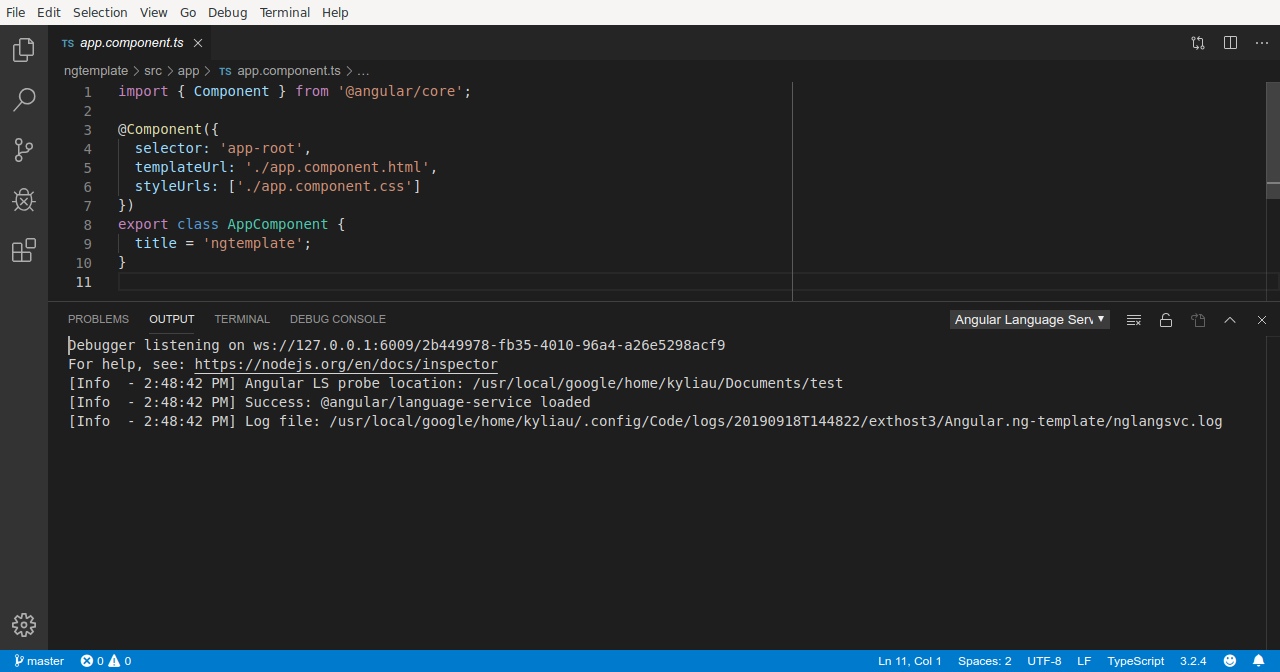
Could you please open the Output console in vscode and paste the first few lines here?
It should look similar to this.
 kyliau
on 14 Nov 2019
kyliau
on 14 Nov 2019
@kyliau
Search path: c:/Users/x/Documents/Progetti/Angular/y/src/app
Config file name: c:/Users/x/Documents/Progetti/Angular/y/tsconfig.json
Angular Language Service: 8.2.14
TypeScript: 3.5.3
getTemplateReferences: 1311ms
Add recursive watcher for: c:/Users/x/Documents/Progetti/Angular/y
Opened configuration file c:/Users/x/Documents/Progetti/Angular/y/tsconfig.json
getTemplateReferences: 0ms
getDiagnostics: 66ms
getDiagnostics: 95ms
getDiagnostics: 113ms
updating project structure from ...
getTemplateReferences: 0ms
updated: ng - 0ms
getCompletions: 95ms
getCompletions: 125ms
getDiagnostics: 10ms
updating project structure from ...
getTemplateReferences: 0ms
updated: ng - 0ms
getDiagnostics: 121ms
getDiagnostics: 129ms
updating project structure from ...
getTemplateReferences: 0ms
updated: ng - 0ms
getDiagnostics: 15ms
Search path: c:/Users/x/Documents/Progetti/Angular/y/src/app
Config file name: c:/Users/x/Documents/Progetti/Angular/y/tsconfig.json
getDiagnostics: 8ms
I seem to be having the same issue, although the autocomplete function in my templates havn't been working for a longer time, hard to say how long exactly.
This seems to be project depended for me, new projects have working autocomplete in templates.
The output for me:
Search path: c:/Source/GeschäftsProzesse/Adressänderung/AngularFrontend/src/app/components/forms/versicherer-informieren-form
No config files found.
Angular Language Service: 8.2.11
TypeScript: 3.5.3
getTemplateReferences: 892ms
Search path: c:/Source/GeschäftsProzesse/Adressänderung/AngularFrontend/src/app/models/backend-objects
No config files found.
getTemplateReferences: 0ms
Angular Language Service: 8.2.11
TypeScript: 3.5.3
getTemplateReferences: 218ms
getCompletions: 21ms
getCompletions: 0ms
getCompletions: 9ms
getCompletions: 7ms
getCompletions: 0ms
getDiagnostics: 2ms
updating project structure from ...
getTemplateReferences: 0ms
getTemplateReferences: 0ms
getTemplateReferences: 0ms
getTemplateReferences: 0ms
updated: ng - 7ms
getDiagnostics: 10ms
getCompletions: 0ms
updating project structure from ...
getTemplateReferences: 0ms
getTemplateReferences: 0ms
getTemplateReferences: 0ms
getTemplateReferences: 0ms
updated: ng - 0ms
getCompletions: 3ms
getDiagnostics: 6ms
updating project structure from ...
getTemplateReferences: 0ms
getTemplateReferences: 0ms
getTemplateReferences: 0ms
getTemplateReferences: 0ms
updated: ng - 11ms
getHoverAt: 0ms
getCompletions: 6ms
getDiagnostics: 8ms
updating project structure from ...
getTemplateReferences: 0ms
getTemplateReferences: 0ms
getTemplateReferences: 0ms
getTemplateReferences: 0ms
updated: ng - 0ms
getHoverAt: 0ms
getHoverAt: 0ms
getHoverAt: 0ms
getHoverAt: 0ms
getHoverAt: 0ms
getHoverAt: 0ms
getCompletions: 12ms
getDiagnostics: 8ms
updating project structure from ...
getTemplateReferences: 0ms
getTemplateReferences: 0ms
getTemplateReferences: 0ms
getTemplateReferences: 0ms
updated: ng - 7ms
getHoverAt: 0ms
getCompletions: 0ms
Version: 1.40.1 (user setup)
Commit: 8795a9889db74563ddd43eb0a897a2384129a619
Date: 2019-11-13T16:49:35.976Z
Electron: 6.1.2
Chrome: 76.0.3809.146
Node.js: 12.4.0
V8: 7.6.303.31-electron.0
OS: Windows_NT x64 10.0.18362
"devDependencies": {
    "@angular-devkit/build-angular": "~0.803.12",
    "@angular/cli": "~8.3.12",
    "@angular/compiler-cli": "~8.2.11",
    "@angular/language-service": "^8.2.11",
    "@types/jasmine": "~3.3.8",
    "@types/jasminewd2": "~2.0.3",
    "@types/node": "~8.9.4",
    "codelyzer": "^5.0.0",
    "jasmine-core": "~3.4.0",
    "jasmine-spec-reporter": "~4.2.1",
    "karma": "~4.1.0",
    "karma-chrome-launcher": "~2.2.0",
    "karma-coverage-istanbul-reporter": "~2.0.1",
    "karma-jasmine": "~2.0.1",
    "karma-jasmine-html-reporter": "^1.4.0",
    "protractor": "~5.4.0",
    "ts-node": "~7.0.0",
    "tslint": "~5.15.0",
    "typescript": "~3.5.3"
  }
 MarvinBerger
on 15 Nov 2019
MarvinBerger
on 15 Nov 2019
Same problem here. Any updates or workarounds?
Here's a little info on which versions I'm using:
Angular CLI: 8.3.19
Node: 10.16.0
OS: win32 x64
Angular: 8.2.14
... animations, common, compiler, compiler-cli, core, forms
... language-service, platform-browser, platform-browser-dynamic
... platform-server, router
Package Version
@angular-devkit/architect 0.803.19
@angular-devkit/build-angular 0.803.19
@angular-devkit/build-optimizer 0.803.19
@angular-devkit/build-webpack 0.803.19
@angular-devkit/core 8.3.19
@angular-devkit/schematics 8.3.19
@angular/cli 8.3.19
@ngtools/webpack 8.3.19
@nguniversal/module-map-ngfactory-loader 8.0.0-rc.1
@schematics/angular 8.3.19
@schematics/update 0.803.19
rxjs 6.5.3
typescript 3.5.3
webpack 4.39.2
 scottjreece
on 19 Nov 2019
scottjreece
on 19 Nov 2019
I found solution for myself!
If project path contain not only EN characters like user Pommes9485 has
:/Source/GeschäftsProzesse/Adressänderung/...
Angular service didnt work at all.
 BAZUKEN
on 22 Nov 2019
BAZUKEN
on 22 Nov 2019
Maybe you can try to install the latest (beta) version of the extension https://github.com/angular/vscode-ng-language-service/releases/tag/v0.900.0-rc.3
This works for me again without problems.
 SteffenKoehler
on 22 Nov 2019
SteffenKoehler
on 22 Nov 2019
Thank you @SteffenKoehler for pointing that out.
We have completely reworked the extension, and next week (Nov. 25) we will publish a new version to the marketplace that solves many fundamental issues like this.
kyliau
on 22 Nov 2019
The new extension is now live. Please download it from https://marketplace.visualstudio.com/items?itemName=Angular.ng-template
I'd like to close this issue for now. Please open a new issue for any lingering bugs, thank you!
kyliau
on 25 Nov 2019
This issue has been automatically locked due to inactivity.
Please file a new issue if you are encountering a similar or related problem.
Read more about our automatic conversation locking policy.
_This action has been performed automatically by a bot._
![angular-automatic-lock-bot[bot] picture](https://avatars.githubusercontent.com/in/40213?v=4&s=40) angular-automatic-lock-bot[bot]
on 17 Feb 2020
angular-automatic-lock-bot[bot]
on 17 Feb 2020
Related issues
 MoazAlkharfan
·
3Comments
MoazAlkharfan
·
3Comments
 seangwright
·
4Comments
seangwright
·
4Comments
 crisz
·
5Comments
crisz
·
5Comments
 daveriedstra
·
3Comments
daveriedstra
·
3Comments
 user3323
·
4Comments
user3323
·
4Comments
Most helpful comment
I seem to be having the same issue, although the autocomplete function in my templates havn't been working for a longer time, hard to say how long exactly.
This seems to be project depended for me, new projects have working autocomplete in templates.
The output for me: