Vscode-ng-language-service: IntelliSense performance problems tsserver blocking
Original from: https://github.com/angular/vscode-ng-language-service/issues/336#issuecomment-498597082
Description:
I recognize performance problems from jump to source or displaying library informations on hovering types and displaying inline docs with pressed CTRL and hovering. While here the debug output from the plugin looks smooth there is invisible blocking time between the Search Path step and the Config file name
My setup:
- Big project with a lot of modules per lazy loading
- Some libraries like DevExtreme, ng-bootstrap, lodash, moment, etc
- Our own internal angular library
- Angular Version 7.2.15
- Angular Language Service Plugin 0.800.0
Reproduction:
- define something like this:
  public gridEditingOptions: DevExpress.ui.dxDataGridOptions['editing'] = {
    mode: 'batch',
    allowUpdating: true,
    allowAdding: true,
    allowDeleting: true,
    startEditAction: 'dblClick',
    selectTextOnEditStart: true,
    useIcons: true
  };
hovering the type goes mostly fast:

now move away hover it again and press and hold CTRL:

Some times it works fast when only hovering, but mostly especially with pressed CTRL it takes some time, but the debug console looks clean.
hover, press CTRL and click to jump to source or press F12: same as 3. sometimes with long blocking time.
With disabled language service it opens up instantly every time, no slow down, memory and cpu load not mentionable
Possible reasone:
After trying to find out where this comes i can only say that i can push the ram and cpu consumption up with a hovering and moveaway loop
- No file open and waited some time so that vscode calmed down:
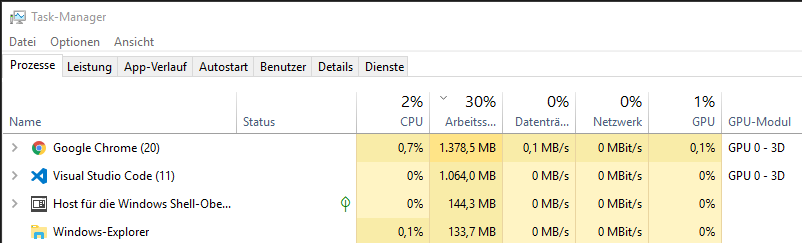
- after hovering i think 20 times... with each step the loading takes a bit longer...

I think the problem is that the duplicate tsserver here blocks each other or the main blocks the angular one or vice versa, but here i can make only assumptions.
 JohnnyDevNull
All 7 comments
Maybe this is fixed with https://github.com/angular/vscode-ng-language-service/issues/338 ?
JohnnyDevNull
on 4 Jun 2019
I had a similar issue and I solved it with changes from this daf0cea commit:
- Share the same DocumentRegistry instance DocumentRegistry between all language services.
- Disabled Angular language service for InferredProjects (projects without tsconfig config file)
- Retain the configured project even I close last opened file from the project. This prevents do not create or remove project on every time I open or close a file.
@JohnnyDevNull, can you try to compile and test extension from this branch.
 andrius-pra
on 1 Aug 2019
andrius-pra
on 1 Aug 2019
@andrius-pra when i try to build your branch i get the following error
$ yarn run compile
yarn run v1.17.3
$ node $(yarn bin)/installServerIntoExtension ../client ./package.json ./tsconfig-build.json && cp yarn.lock ../c
lient/server && tsc -p tsconfig-build.json
internal/modules/cjs/loader.js:583
    throw err;
    ^
 gayanper
on 9 Aug 2019
gayanper
on 9 Aug 2019
@gayanper Compiled and uploaded here.
Disable official extension while testing this build.
andrius-pra
on 9 Aug 2019
@andrius-pra You improvement solved my issue. When can we expect these changes to end up in the master ?
gayanper
on 9 Aug 2019
Great! I will split my changes into smaller PR in coming days and @kyliau will decide if it worth to merge to master.
andrius-pra
on 9 Aug 2019
This issue has been automatically locked due to inactivity.
Please file a new issue if you are encountering a similar or related problem.
Read more about our automatic conversation locking policy.
_This action has been performed automatically by a bot._
![angular-automatic-lock-bot[bot] picture](https://avatars.githubusercontent.com/in/40213?v=4&s=40) angular-automatic-lock-bot[bot]
on 16 Feb 2020
angular-automatic-lock-bot[bot]
on 16 Feb 2020
Related issues
 sheikalthaf
·
5Comments
sheikalthaf
·
5Comments
 mafredri
·
5Comments
mafredri
·
5Comments
 linocatucci
·
5Comments
linocatucci
·
5Comments
 alusev
·
5Comments
alusev
·
5Comments
 fxck
·
6Comments
fxck
·
6Comments
Most helpful comment
@gayanper Compiled and uploaded here.
Disable official extension while testing this build.