Vscode-ng-language-service: Cannot read property 'flags'
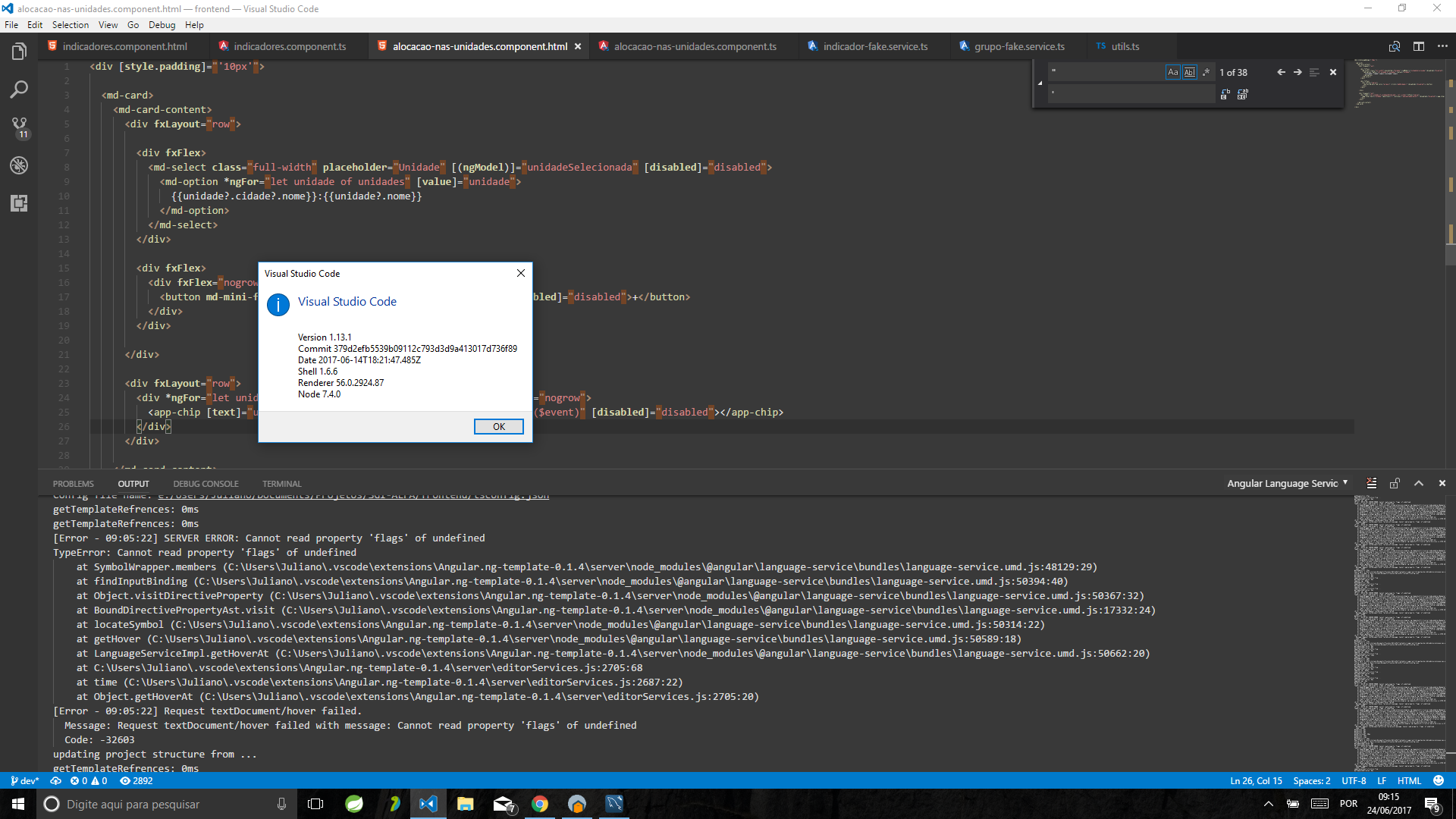
Recently I've been seen this error message very often:
[Error - 09:03:32] SERVER ERROR: Cannot read property 'flags' of undefined
TypeError: Cannot read property 'flags' of undefined
    at SymbolWrapper.members (C:\...\.vscode\extensions\Angular.ng-template-0.1.4\server\node_modules\@angular\language-service\bundles\language-service.umd.js:48129:29)
    at findInputBinding (C:\...\.vscode\extensions\Angular.ng-template-0.1.4\server\node_modules\@angular\language-service\bundles\language-service.umd.js:50394:40)
    at Object.visitDirectiveProperty (C:\...\.vscode\extensions\Angular.ng-template-0.1.4\server\node_modules\@angular\language-service\bundles\language-service.umd.js:50367:32)
    at BoundDirectivePropertyAst.visit (C:\....\.vscode\extensions\Angular.ng-template-0.1.4\server\node_modules\@angular\language-service\bundles\language-service.umd.js:17332:24)
    at locateSymbol (C:\...\.vscode\extensions\Angular.ng-template-0.1.4\server\node_modules\@angular\language-service\bundles\language-service.umd.js:50314:22)
    at getHover (C:\...\.vscode\extensions\Angular.ng-template-0.1.4\server\node_modules\@angular\language-service\bundles\language-service.umd.js:50589:18)
    at LanguageServiceImpl.getHoverAt (C:\...\.vscode\extensions\Angular.ng-template-0.1.4\server\node_modules\@angular\language-service\bundles\language-service.umd.js:50662:20)
    at C:\...\.vscode\extensions\Angular.ng-template-0.1.4\server\editorServices.js:2705:68
    at time (C:\...\.vscode\extensions\Angular.ng-template-0.1.4\server\editorServices.js:2687:22)
    at Object.getHoverAt (C:\...\.vscode\extensions\Angular.ng-template-0.1.4\server\editorServices.js:2705:20)
[Error - 09:03:32] Request textDocument/hover failed.
  Message: Request textDocument/hover failed with message: Cannot read property 'flags' of undefined
  Code: -32603
I'm using 0.1.4 version and:
@angular/cli: 1.1.3
node: 6.10.3
os: win32 x64
@angular/animations: 4.2.4
@angular/common: 4.2.4
@angular/compiler: 4.2.4
@angular/compiler-cli: 4.2.4
@angular/core: 4.2.4
@angular/flex-layout: 2.0.0-beta.8
@angular/forms: 4.2.4
@angular/http: 4.2.4
@angular/language-service: 4.2.4
@angular/material: 2.0.0-beta.7
@angular/platform-browser: 4.2.4
@angular/platform-browser-dynamic: 4.2.4
@angular/platform-server: 4.2.4
@angular/router: 4.2.4
@angular/cli: 1.1.3
 julianobrasil
All 11 comments
Do you have some example code that demonstrates this? There is not enough information in the stack trace to narrow this down.
 chuckjaz
on 25 Jun 2017
chuckjaz
on 25 Jun 2017
Honestly, no. If you wish, close this issue for now, and, if I get more clues, I open a new one. Until now I really don't know whether it happens because of my code, a corrupted VSCode file or a real bug.
julianobrasil
on 25 Jun 2017
Same happens to our project. We also experienced "baseUrl" absolute paths errors(components in templates are not recognized). Maybe those two errros are connected. Can't share code because it's private.
It's especially annoying because vs code is automatically switching views from terminal to output when error occurs.
 marcincichocki
on 26 Jun 2017
marcincichocki
on 26 Jun 2017
@julianobrasil This looks like a real bug to me. Anything you can do to help narrow it down would be appreciated. There should be no way that the symbol could be undefined at that location. Something went wrong to set this up before this stack so the stack doesn't help much.
@marcincichocki Same with you. If you can narrow down what might be causing it I can play around and see if I can reproduce it.
chuckjaz
on 26 Jun 2017
@chuckjaz, the error happens when I hover the mouse pointer over the class attribute or any @angular/flex-layout directive. I tried uninstalling and reinstalling @angular/flex-layout, but it made no difference (worth mention that when I uninstall @angular/flex-layout, the error stops being thrown).
Then I've built a clean angular-cli project trying to reproduce it, and the error wasn't thrown in this case :confounded:. Maybe it's some combination of things, but I couldn't map it.
What else can I do to give you more information?
julianobrasil
on 2 Jul 2017
@chuckjaz, I found something.
1 - If I use "@angular/flex-layout": "^2.0.0-beta.8" in package.json, it installs the 2.0.0-beta.8 and the problem occurs (even if I remove the node_modules folder before npm install).
2 - If I use "@angular/flex-layout": "github:angular/flex-layout-builds", it also installs the 2.0.0-beta.8 (at least it's what ng -v is showing me) but this time the problem goes away and, instead of throwing an error, an explanation popup correctly appears when I hover the mouse pointer over the fxLayout directive:

Although ng -v shows 2.0.0-beta.8 version in both installations, it's clearly not the same @angular/flex-layout version that is installed in the two situations.
Maybe it's not a problem with Language Service at all, but an issue with flex-layout that will be corrected in 2.0.0-beta.9. Anyway something happens in particular scenarios that I couldn't reproduce in a clean angular-cli project.
Closing this issue is up to you.
julianobrasil
on 2 Jul 2017
Tracking in: https://github.com/angular/angular/issues/17965
chuckjaz
on 6 Jul 2017
@julianobrasil I was able to reproduce this. Thanks for your help!
chuckjaz
on 6 Jul 2017
@chuckjaz Any update on this? I see angular/angular#17965 was closed 18 days ago. Would love to not have to disable this extension, but the output errors blasting into existence every time I hover over a template attribute is really wearing on me. :) Hopefully it's just a simple matter of updating the Angular version within this extension. (I think the fix is in the latest release of angular, unless I read it wrong)
 johnbwoodruff
on 25 Jul 2017
johnbwoodruff
on 25 Jul 2017
Closed with 0.1.6
chuckjaz
on 29 Aug 2017
This issue has been automatically locked due to inactivity.
Please file a new issue if you are encountering a similar or related problem.
Read more about our automatic conversation locking policy.
_This action has been performed automatically by a bot._
![angular-automatic-lock-bot[bot] picture](https://avatars.githubusercontent.com/in/40213?v=4&s=40) angular-automatic-lock-bot[bot]
on 14 Feb 2020
angular-automatic-lock-bot[bot]
on 14 Feb 2020
Related issues
 yjaaidi
·
5Comments
yjaaidi
·
5Comments
 linocatucci
·
5Comments
linocatucci
·
5Comments
 mhamri
·
4Comments
mhamri
·
4Comments
 user3323
·
4Comments
user3323
·
4Comments
 seangwright
·
4Comments
seangwright
·
4Comments
Most helpful comment
Closed with 0.1.6