Vscode-neovim: input method settings
Can you please add a settings to change input method like VSCodeVim?
 transtone
All 6 comments
Does something like this work for you? (put into your init.vim, you need im-select binary if you're on win/mac)
autocmd InsertEnter * :!/usr/local/bin/im-select com.apple.keylayout.US
 asvetliakov
on 1 Dec 2019
asvetliakov
on 1 Dec 2019
Does something like this work for you? (put into your init.vim, you need im-select binary if you're on win/mac)
autocmd InsertEnter :!/usr/local/bin/im-select com.apple.keylayout.US
I tried this in windows10, but not work.
autocmd InsertEnter :!notepad
=========================
It must add a * after InsertEnter
finally this works:
autocmd InsertLeave * :!im-select 1033
transtone
on 2 Dec 2019
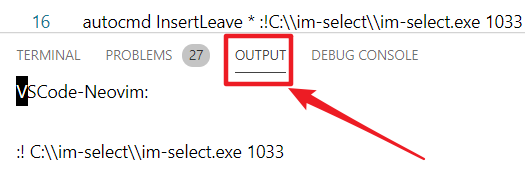
@transtone @asvetliakov when I leave insert mode, it will automatically jump to neovim output pane instead of staying in editor, how could i solve this problem?
 Jackiexiao
on 17 Sep 2020
Jackiexiao
on 17 Sep 2020
@Jackiexiao, could you try it with clear Neovim config?
 Shatur95
on 17 Sep 2020
Shatur95
on 17 Sep 2020
Try
autocmd InsertLeave * :silent !C:\\....
asvetliakov
on 17 Sep 2020
Try
autocmd InsertLeave * :silent !C:\\....
Works! Thx!
Jackiexiao
on 17 Sep 2020
Related issues
 DrakeXiang
·
4Comments
DrakeXiang
·
3Comments
DrakeXiang
·
4Comments
DrakeXiang
·
3Comments
 Liquidmantis
·
3Comments
Liquidmantis
·
3Comments
 erlais
·
3Comments
erlais
·
3Comments
 bogdan0083
·
4Comments
bogdan0083
·
4Comments
Most helpful comment
Try
autocmd InsertLeave * :silent !C:\\....