Vscode-mssql: Single line comments break syntax highlighting
- MSSQL Extension Version: 1.5.0
Visual Studio Code details
Version: 1.34.0 (system setup)
Commit: a622c65b2c713c890fcf4fbf07cf34049d5fe758
Date: 2019-05-15T21:59:37.030Z
Electron: 3.1.8
Chrome: 66.0.3359.181
Node.js: 10.2.0
V8: 6.6.346.32
OS: Windows_NT x64 10.0.17134
Steps to Reproduce:
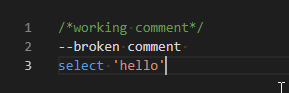
When using single line comments i.e. -- they are not syntax highlighted and often seem to report errors on subsequent lines. /**/ multi-line comments seem to work fine though.
I've tested this connected to LocalDB and Azure SQL DWH.
 AlexKeySmith
All 8 comments
I get the same thing. I have to disable, restart VS Code, enable, and it fixes the issue. It's annoying, I have to do this every time I launch VS Code.
fresh vs code start
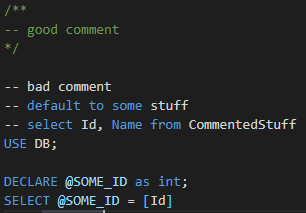
disable/enable plug in

 inspektor99
on 15 Aug 2019
inspektor99
on 15 Aug 2019
I do have the same problem. also other comments from different languages are highligthed instead.
these are "//" and "#"
that can become annoying, if you are writing both c#, python and sql. Then the possibility to confuse them while being in the tunnel is high.
 TarekSalha
on 24 Dec 2019
TarekSalha
on 24 Dec 2019
I can see some improvements with the syntax highligting up until now. However, this specific problem still persists and it would really add a lot of value if it would be fixed. Reason is, that most developers write lots of comments to explain their code. It's hard to distingiush that from real code. Currently, I am copying the code to Data Studio to read it properly.
Here is a good example with distracting code also containing #.
SELECT CustomerPrefix, ShipmentSource, Shipment, SciId, ShipmentAlertingProfileId,
DATEDIFF(MINUTE, MIN(TrackingTime), MAX(TrackingTime)) AS SumStopTime, MAX(TrackingTime) AS TrackingTimeMax,
IIF(DATEDIFF(MINUTE, MIN(TrackingTime), MAX(TrackingTime)) < MAX(Threshold), -- OR SumDistance IS NULL,
MIN(GS4SeverityNumeric), MIN(GS3SeverityNumeric)) AS Severity
INTO #Calculation
FROM Sort
TarekSalha
on 23 Apr 2020
@TarekSalha While it won't help with "#" being highlighted as a comment when it shouldn't be, in order to get comments to display somewhat correctly, I've been using "--//" for one line comments as a workaround to get them colored correctly.
 DavidP-Vitro
on 29 Apr 2020
DavidP-Vitro
on 29 Apr 2020
@TarekSalha While it won't help with "#" being highlighted as a comment when it shouldn't be, in order to get comments to display somewhat correctly, I've been using "--//" for one line comments as a workaround to get them colored correctly.
funny workaround, I will remember it
TarekSalha
on 29 Apr 2020
This might not be an issue with this extension, but rather another extension conflicting and getting precedence. I opened the developer tools console and noticed that the SQL language grammar was being overwritten by the Azure Data Lake Tools extension which provides support for U-SQL programming.

As soon as I disabled that extension, VSCode reloaded the grammar from this extension and the syntax highlighting was correct.
DavidP-Vitro
on 29 Apr 2020
Hi @DavidP-Vitro,
I checked your suggestion and disabling ADL extension solved the problem also for me. The question, that remains is, why is it overwriting the grammar for .sql files? it should work only with .usql files I guess.
TarekSalha
on 30 Apr 2020
Like @DavidP-Vitro correctly pointed out, the issue is that the grammar is getting overwritten by the ADL extension. I'd suggest opening an issue against them.
 abist
on 1 Oct 2020
abist
on 1 Oct 2020
Related issues
 henksandoval
·
6Comments
henksandoval
·
6Comments
 BenWildeman
·
7Comments
BenWildeman
·
7Comments
 GhostBasenji
·
5Comments
GhostBasenji
·
5Comments
 julielerman
·
5Comments
julielerman
·
5Comments
 tqhuy1811
·
4Comments
tqhuy1811
·
4Comments