Vscode-mssql: Error on Connect: Command "extension.connect" not found
- MSSQL Extension Version: 1.2.1
- VSCode Version: 1.18.0
- OS Version: Windows 10 1710
Steps to Reproduce:
- Open SQL-File
- Execute Connect
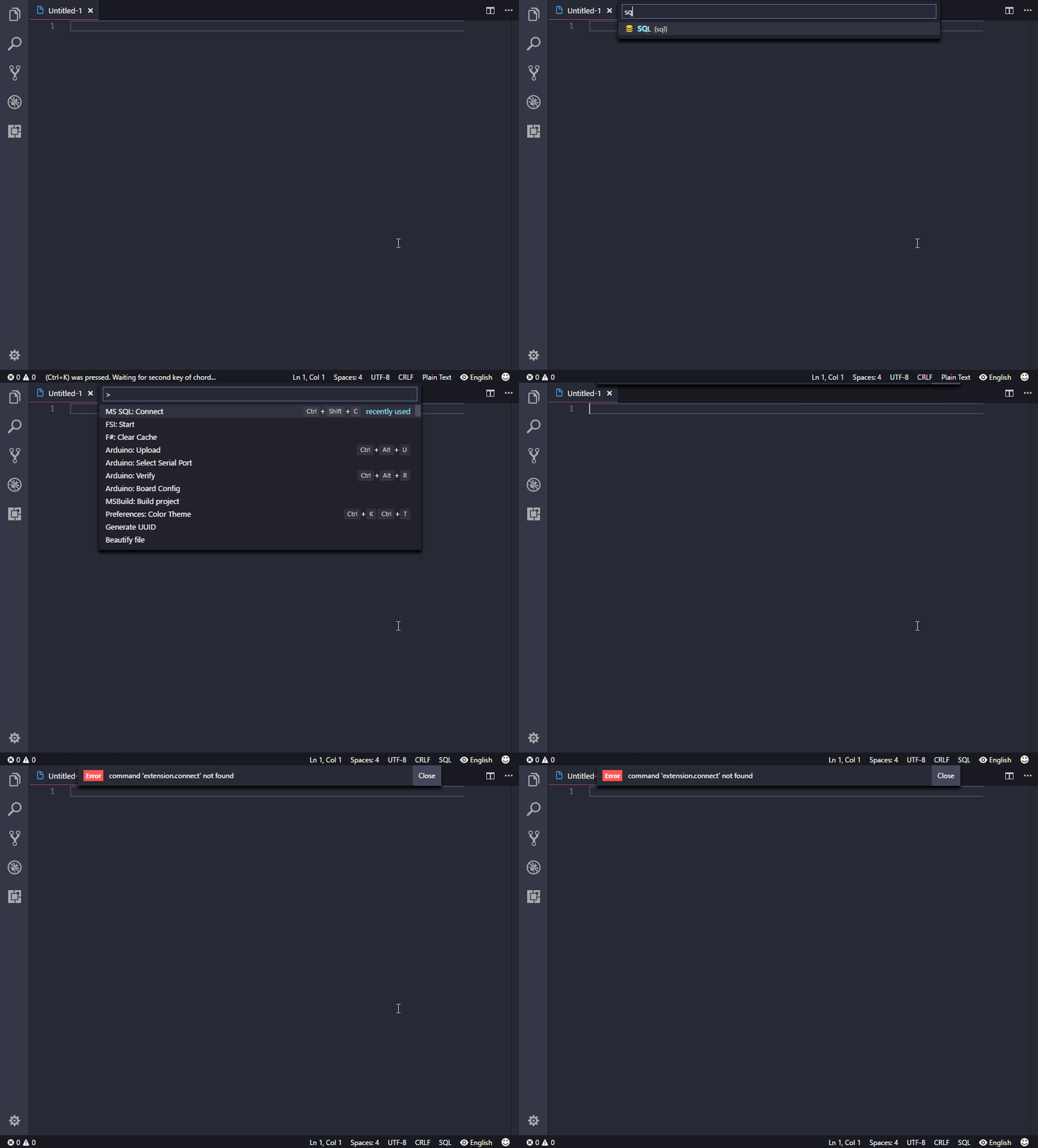
 brase
brase
All 12 comments
@brase have you tried to uninstall and reinstall mssql extension?
@MattIrv could you please investigate what's happening here?
 kburtram
on 9 Nov 2017
kburtram
on 9 Nov 2017
Uninstall -> Reload -> Install -> Reload fixed it.
Thank you!
brase
on 9 Nov 2017
I'm glad to hear it's working now.
Other users have reported this bug in the past, and suggested it might have something to do with conflicts between other extensions (see https://github.com/Microsoft/vscode-mssql/issues/383) but we've never been able to get a consistent repro for it.
Is there any chance you'd be willing to share a list of your installed extensions so that we can get another data point on this? You should be able to get the list by running code --list-extensions from the Windows command prompt or Powershell.
 MattIrv
on 10 Nov 2017
MattIrv
on 10 Nov 2017
I just had this issue, fixed in the same way with a reinstall of the extension. Pretty sure it was working when I originally installed it, then after several Code and extension updates it wasn't working today.
Here are the extensions I have installed:
DotJoshJohnson.xml
eriklynd.json-tools
filipw.scriptcsRunner
mohsen1.prettify-json
ms-mssql.mssql
ms-python.python
ms-toolsai.vscode-ai
ms-vscode.azure-account
ms-vscode.csharp
ms-vscode.PowerShell
PeterJausovec.vscode-docker
PKief.material-icon-theme
 spdjudd
on 14 Nov 2017
spdjudd
on 14 Nov 2017
Sorry, I am a bit late. Here are my installed extensions
2gua.rainbow-brackets
adamvoss.yaml
ban.spellright
codezombiech.gitignore
DavidAnson.vscode-markdownlint
dbaeumer.vscode-eslint
donjayamanne.githistory
DotJoshJohnson.xml
DougFinke.vscode-pandoc
dracula-theme.theme-dracula
EditorConfig.EditorConfig
Equinusocio.vsc-material-theme
espresso3389.genuuid
formulahendry.auto-close-tag
groksrc.ruby
HookyQR.beautify
hoovercj.haskell-linter
Ionide.Ionide-FAKE
Ionide.Ionide-fsharp
Ionide.Ionide-Paket
jcanero.hoogle-vscode
johnpapa.winteriscoming
justusadam.language-haskell
ms-mssql.mssql
ms-vscode.azure-account
ms-vscode.cpptools
ms-vscode.csharp
ms-vscode.PowerShell
msjsdiag.debugger-for-chrome
PeterJausovec.vscode-docker
PKief.material-icon-theme
pprice.better-merge
robinbentley.sass-indented
shardulm94.trailing-spaces
Vans.haskero
vsciot-vscode.vscode-arduino
vscodevim.vim
waderyan.gitblame
I encountered this problem and found this error in dev tools:
[Extension Host] Activating extension `ms-mssql.mssql` failed: Cannot find module 'vscode-nls'
The file that caused it was C:\Users\USERNAME\.vscode\extensions\ms-mssql.mssql-1.2.1\out\src\constants\localizedConstants.js.
Running npm install in the extension folder (C:\Users\USERNAME\.vscode\extensions\ms-mssql.mssql-1.2.1) fixed it for me.
 KuromiAK
on 23 Nov 2017
KuromiAK
on 23 Nov 2017
I've got this same issue. I've tried unistalling/reinstalling and disabling all of my other extensions, but I'm still getting the error.
 grothem
on 5 Mar 2018
grothem
on 5 Mar 2018
I ended up solving this problem by going into %USERPROFILE%\.vscode\extensions and deleting the ms-mssql folder and reinstalling. I tried uninstalling and reinstalling, but after uninstalling, I would go into the extensions folder and it would still be there.
grothem
on 6 Mar 2018
Agreed, 64 bit is broken, had to reinstall 32 bit version in able to connect to database.
 MrDatuPuti
on 12 Apr 2018
MrDatuPuti
on 12 Apr 2018
@grothem
Saved my day. Thank you!!!
 ihavenonickname
on 7 Jun 2018
ihavenonickname
on 7 Jun 2018
For those on linux, deleting the mssql folder from /home/.vscode then reinstalling the extension worked for me.
 SeaDude
on 1 May 2019
SeaDude
on 1 May 2019
- CTRL + SHIFT + P
- Type 'Reload window' in the command palette
- Wait
Initializing SQL tools service for the mssql extension.
Note: mssql commands will be available after installing the service.
Platform: linux, x86_64, name=ubuntu, version=20.04 (Ubuntu16)
Installing SQL tools service to /home/zakarialhacker/.vscode/extensions/ms-mssql.mssql-1.9.0/sqltoolsservice/1.9.0/Ubuntu16.
Downloading https://download.microsoft.com/download/4/1/c/41ceb814-b8d3-4157-9dd0-b4aa0e11484d/microsoft.sqltools.servicelayer-rhel-x64-netcoreapp2.2.tar.gz
(42606 KB) .................... Done!
Installing ...
Done! 475 files unpacked.
Done
the extension worked for me.
 Zakaria-pro
on 18 Jul 2020
Zakaria-pro
on 18 Jul 2020
Related issues
 GabrielDuarteM
·
6Comments
GabrielDuarteM
·
6Comments
 leonardder
·
5Comments
leonardder
·
5Comments
 ransagy
·
8Comments
ransagy
·
8Comments
 tqhuy1811
·
4Comments
tqhuy1811
·
4Comments
 julielerman
·
5Comments
julielerman
·
5Comments
Most helpful comment
Uninstall -> Reload -> Install -> Reload fixed it.
Thank you!