Vscode-mssql: MSSQL 1.1 SQL Tools Service component could not start. After installing v1.1
- MSSQL Extension Version:1.1
- VSCode Version: 1.14.0
- OS Version: OSX 10.11.6
Greetings all!
I recently followed the steps outlined here: https://github.com/Microsoft/vscode-mssql/blob/master/KERBEROS_HELP.md and am currently getting an error after installing mssql-1.1.0.vsix.
The error I am seeing in the SQLToolsService output channel is the following:
dyld: lazy symbol binding failed: Symbol not found: _clock_gettime
  Referenced from: /Users/aUserNAmeThatItotallyJustChanged/.vscode/extensions/ms-mssql.mssql-1.1.0/sqltoolsservice/1.0.0-alpha.45/OSX/libcoreclr.dylib (which was built for Mac OS X 10.12)
  Expected in: /usr/lib/libSystem.B.dylib

dyld: Symbol not found: _clock_gettime
  Referenced from: /Users/aUserNAmeThatItotallyJustChanged/.vscode/extensions/ms-mssql.mssql-1.1.0/sqltoolsservice/1.0.0-alpha.45/OSX/libcoreclr.dylib (which was built for Mac OS X 10.12)
  Expected in: /usr/lib/libSystem.B.dylib

[Error - 11:50:55 AM] Connection to server got closed. Server will not be restarted.
Steps to Reproduce:
Install mssql-1.1.0.vsix using Extensions: Install from VSIX
Choose mssql-1.1.0.vsix downloaded from https://github.com/Microsoft/vscode-mssql/releases/tag/v1.1.0-alpha.1
Reload
SqlToolService Initialization
Receive error here
(obligatory optional steps)
- ???
- Profit
It looks like a similar experience was expressed in https://github.com/Microsoft/vscode-mssql/issues/356 by user xs9627 though he/she didn't report the above mentioned error.
Edit: I'm a little sad that mine was not the 1000th issue opened. :(
Edit 2: Thanks for the swift action kevcunnane!
 fuel-
fuel-
All 12 comments
Just a thanks for showing how to find the vsix for this one! :)
 julielerman
on 13 Jul 2017
julielerman
on 13 Jul 2017
Also, this is interesting. I've been working on my mac for 2 weeks. Am now on windows but accidentally just pulled down the vsix for osx and used it to update mssql on my windows machine it happily installed, did its full setup and I could query databases. I think uninstalled the extension, and downloaded the plain vsix (last one on the list) and it seem to be working well.
julielerman
on 13 Jul 2017
@fuel- thanks for raising this. The problem is that .Net Core 2.0 requires macOS 10.12 and up. This is a design change by them since they now use Apple's native SSL instead of OpenSSL. We had a quick brainstorm and will experiment with falling back to our existing 1.0 tools service (built on .Net Core 1.0) on older macOS versions.
Note that this would mean we'll have limitations for versions on older Macs. Either commands would fail or we'd have feature flags to disable some of the new fixes & improvements on those. Either way we'd recommend upgrading to get the "latest and greatest" version, but since ~18% of our mac userbase hasn't upgraded yet it's worth us trying to get this resolved.
We'll update this thread with the status - ultimately we're going to need to move up to .Net Core 2.0 for integrated auth support and really long term feature support (it opens a lot of APIs to ease us porting more functionality over). If this works though, we can at least keep basic support there for those who update our service.
 kevcunnane
on 13 Jul 2017
kevcunnane
on 13 Jul 2017
@julielerman we put the tools service in an OS-specific subdirectory. If we failed to find the windows version we'd pull it down and use it instead of the macOS one. That's likely why this is working.
kevcunnane
on 13 Jul 2017
aha that makes sense since the vsix is only step one. (Sorry for detracting from the actual issue..)
julielerman
on 13 Jul 2017
@kevcunnane Again thanks for the quick response! You guys are awesome! I'll upgrade to the latest and greatest tonight, give it another shot and post here with results.
Cheers!
fuel-
on 13 Jul 2017
Hey guys!
Just wanted to post a quick update. I updated to Sierra this morning and was able to connect with no problems.
Thanks to everyone's hard work on this, it's a dream come true to be able to do this work inside of VS Code without having to rely on another app!
Cheers!
fuel-
on 14 Jul 2017
"dream come true" Agreed. I love this extension. I already wrote an article on it and am now recording a Pluralsight course about it!
julielerman
on 14 Jul 2017
rut roh... I'm getting this problem on Debian 9 with 1.1.0. It downloads and installs the service but can't start it.
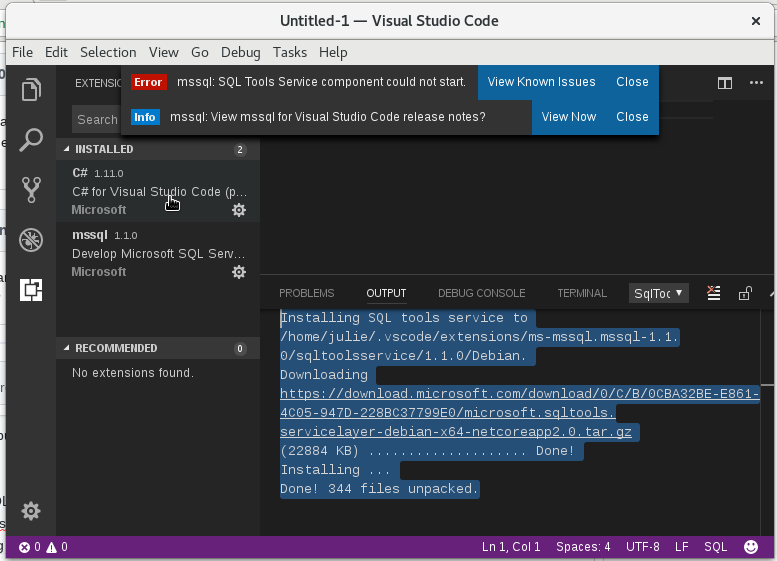
I did not install .net core on this box. Just installed VS Code and then C# and mssql.
I did shut down and reopen vscode to no avail.
Uninstalled mssql cmopletely and reinstalled but it's the same. First time I do anything (e.g. open a SQL file) I get the could not start error message.
SQL Tools Service output window details:
[Error - 6:43:49 PM] Connection to server is erroring. Shutting down server.
[Error - 6:43:49 PM] Connection to server is erroring. Shutting down server.
[Error - 6:43:49 PM] Connection to server is erroring. Shutting down server.
Failed to load /home/julie/.vscode/extensions/ms-mssql.mssql-1.1.0/sqltoolsservice/1.1.0/Debian/libcoreclr.so, error: libunwind.so.8: cannot open shared object file: No such file or directory
Failed to bind to CoreCLR at '/home/julie/.vscode/extensions/ms-mssql.mssql-1.1.0/sqltoolsservice/1.1.0/Debian/libcoreclr.so'
interesting ... Hanselman post brings up this missing file/package (https://www.hanselman.com/blog/TryingNETCoreOnLinuxWithJustATarballWithoutAptget.aspx) but then after it's installed and I start up code again, I get a new message "No usable version of the libssl was found" when trying to connect which leads me to https://github.com/dotnet/coreclr/issues/11417.
I'll create a new issue for all of this.
julielerman
on 4 Aug 2017
Ok. What's strange is that the .Net Core issue mentions this is fixed already in latest .Net Core 2.0. So I hope this is resolved once they have a new version released that we can update to. We are using preview2, so clearly the fix isn't in that yet.
kevcunnane
on 4 Aug 2017
I installed latest .net core from daily build (it wasn't easy but I did it) and I'm now able to connect. Of course using only sql auth because I could not get the linux box set up to authenticate on my DC either. But I sure tried! :)
julielerman
on 4 Aug 2017
Related issues
 ransagy
·
8Comments
ransagy
·
8Comments
 henksandoval
·
6Comments
henksandoval
·
6Comments
 Raymondd
·
4Comments
julielerman
·
5Comments
Raymondd
·
4Comments
julielerman
·
5Comments
 GabrielDuarteM
·
6Comments
GabrielDuarteM
·
6Comments