Vscode-mssql: Extension api: Add support to the runQuery command to pass custom sql
- MSSQL Extension Version: 0.1.5
- VSCode Version: 1.7.2
- OS Version: Mac OS X 10.11.6 (El Capitan)
I would love to write my own extension to run sql snippets and queries. However, at the moment all I can do is rely on the currently highlighted/selected code inside the text editor. I don't see any way to pass a custom sql string to the runQuery command.
Could we add support to the runQuery command to pass custom sql or add another method to enable this?
I'd love to be able to do something like the following inside of a custom extension:
// get current text selection
var selection = editor.selection;
var text = editor.document.getText(selection);

// import mssql api
var mssql = vscode.extensions.getExtension('ms-mssql.mssql');
var importedApi = mssql.exports;

// combine sql snippet with selected text and run
importedApi.runQuery('select top 100 * from ' + text);
 bvogelzang
All 5 comments
This is a good suggestion and could enable scenarios like allowing a user to execute SQL embedded in .cs or .ts files for testing of testing of simple SQL queries embedded in other languages.
@erickangMSFT - I can see this being something that needs a security review before implementation given previous discussions on this matter. We should sync on this to see what is feasible - for instance we could prompt a user once to allow access to other extensions and from then on allow use of the API?
 kevcunnane
on 29 Nov 2016
kevcunnane
on 29 Nov 2016
Hi. Greate feature.
It is planned for implementation ?
 buzzzzer
on 14 Feb 2017
buzzzzer
on 14 Feb 2017
I'm also eager for this implementation. I even not so want to make custom extentions or tasks as just want to add custom SQL Server command to context menu based on selected text. I.e. run SP_HELP on selected table, proc name etc, or run other sp_procs.
 4mitch
on 25 May 2017
4mitch
on 25 May 2017
Yeah this would create the ability to mimic management studio's Query Shortcuts. In VSCode I currently have a keyboard shortcut for adding text like sp_help to a selection, but it would be nice to run it all in one keystroke.
 dylan-azucena
on 25 May 2017
dylan-azucena
on 25 May 2017
Hi , The functionality that @bvogelzang asked for is already available ? , Or is there another way to do that ? ,
I want to do .
"Ctrl + 3 " : SELECT * FROM
SSMS
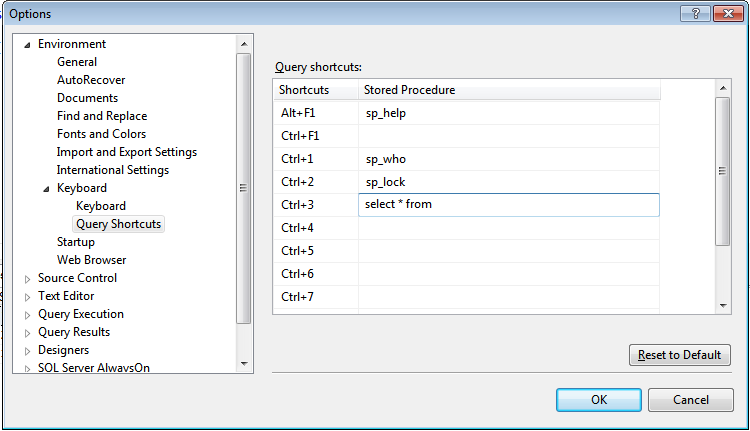
Azure Data Studio

Thank
 ivaxxu
on 12 Nov 2020
ivaxxu
on 12 Nov 2020
Related issues
 haydnlj
·
7Comments
haydnlj
·
7Comments
 ransagy
·
8Comments
ransagy
·
8Comments
 coquagli
·
4Comments
coquagli
·
4Comments
 jasperdunn
·
8Comments
jasperdunn
·
8Comments
 tqhuy1811
·
4Comments
tqhuy1811
·
4Comments
Most helpful comment
Yeah this would create the ability to mimic management studio's Query Shortcuts. In VSCode I currently have a keyboard shortcut for adding text like sp_help to a selection, but it would be nice to run it all in one keystroke.