Vscode-material-icon-theme: [Request] NGRX icons
NGRX icons for reducers, state, actions, effects files would be very nice.
*.actions.ts
*.*reducer.ts for rootReducer.ts feature.reducer.ts root.reducer.ts etc..
*.state.ts
*.effects.ts
possibly use different color iterations of image below?

 Kaffiend
All 23 comments
I like the idea, but do you think that there will be some problems with other libraries like redux?
I mean redux could use the same file names like ngrx?
 PKief
on 14 Jul 2017
PKief
on 14 Jul 2017
i was thinking how you already enable folders and styles, these could be an option as well. So user can pick ngrx or redux version. given there is also a redux implementation as well..
Kaffiend
on 14 Jul 2017

Toggle NGRX Icons
But then again, second thought, they could be included in the angular icons, under the same toggle, as they only apply to angular. and redux could be its own toggle as well if any are added for the same state, action, reducer etc. and would have a different icon.
Or a subset selection of angular like the different folder styles to turn on ngrx..
Kaffiend
on 14 Jul 2017
The subset selection of ngrx after toggling angular icons on seems the most viable
Kaffiend
on 14 Jul 2017
Yes in combination with the angular icons it seems possible.
PKief
on 14 Jul 2017
State icons would probably have to match .state as well not just *.state
Kaffiend
on 14 Jul 2017
It's currently not possible to assign icons to a .state file name. I could only add *.state, same for reducer and so on. There's no possibility to make this in VSCode.
PKief
on 17 Jul 2017
*.state would be fine. That’s the only pattern I use..some people may use rootState.ts or even the index.ts as the root state. But to each their own.
Kaffiend
on 17 Jul 2017
I'm sorry to keep you waiting so long.
But now I can finally suggest you the following color combination for ngrx:
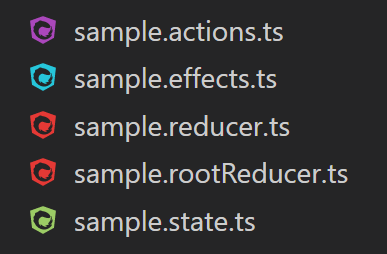
With light background:

The plan is that the icons are deactivated by default (because of possible conflicts with redux), but can be activated through command palette easily.
PKief
on 19 Oct 2017
Looks awesome!
On Oct 19, 2017 3:49 PM, "Philipp Kief" notifications@github.com wrote:
I'm sorry to keep you waiting so long.
But now I can finally suggest you the following color combination for ngrx:
[image: ngrx-icons]
https://user-images.githubusercontent.com/12248527/31789795-9b6f39a0-b513-11e7-9430-c20fbd6e288c.pngWith light background:
[image: ngrx-icons]
https://user-images.githubusercontent.com/12248527/31790155-cbb1986e-b514-11e7-83be-56ce659de2c0.pngThe plan is that the icons are deactivated by default (because of possible
conflicts with redux), but can be activated through command palette easily.—
You are receiving this because you authored the thread.
Reply to this email directly, view it on GitHub
https://github.com/PKief/vscode-material-icon-theme/issues/92#issuecomment-338017284,
or mute the thread
https://github.com/notifications/unsubscribe-auth/AHdrNV0_e8mJpWAph0GAE83mBcxKstmBks5st6fGgaJpZM4OYnRB
.
Kaffiend
on 19 Oct 2017
Folders for ngrx could look like this:
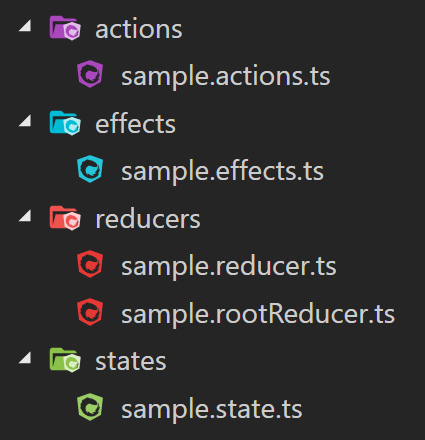
collapsed:
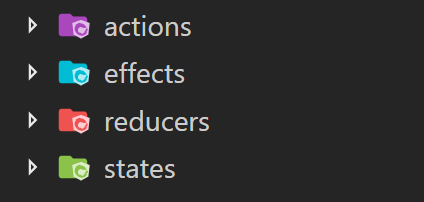
PKief
on 19 Oct 2017
color me impressed! one question, does the states folder match both state and states ??
Kaffiend
on 19 Oct 2017
@Kaffiend currently not, but I can add it if you like. Should I also add singular folder names for "reducer", "effect" and "action" or only for "state"?
PKief
on 19 Oct 2017
state is the only nomenclature i consider fluid by those means. One could consider the state directory as housing the application state files, and one could consider them separate states of modules depending on an individuals liking or perception of the structure
actions and effects the singular term implies only one and thus pointless for a directory in my opinion. though reducer could also fall under the either way direction, one may wish to house the root reducer in a directory and contain all the meta reducers as well.
I hope im explaining clearly.
Kaffiend
on 19 Oct 2017
Thanks for the explanation, I added the "state" folder to the list 👍
PKief
on 19 Oct 2017
Sorry for the late edit. Reducer occurred to me afterwards :)
On Oct 19, 2017 4:31 PM, "Philipp Kief" notifications@github.com wrote:
Thanks for the explanation, I added the "state" folder to the list 👍
—
You are receiving this because you were mentioned.
Reply to this email directly, view it on GitHub
https://github.com/PKief/vscode-material-icon-theme/issues/92#issuecomment-338028995,
or mute the thread
https://github.com/notifications/unsubscribe-auth/AHdrNUiHaJHBvikUEaeYZnzrn8TphnTuks5st7GNgaJpZM4OYnRB
.
Kaffiend
on 19 Oct 2017
No problem ;)
I also added "reducer".
PKief
on 19 Oct 2017
It can be activated through the command palette:

or in the user settings:
"material-icon-theme.activeIconPack": "angular_ngrx",
any chance on an update for entities folder and .entity files?
Kaffiend
on 12 Jan 2018
I'll add it
PKief
on 12 Jan 2018
@Kaffiend The entity icons will look like this:
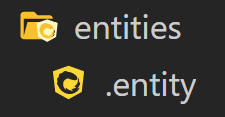
Do you agree with that? Did I understand you right, that there are only ".entity" files? Or did you mean ".entity" as a file ending like "demo.entity"?
In my opinion the yellow / orange color matches perfectly to the other folder icons of ngrx:
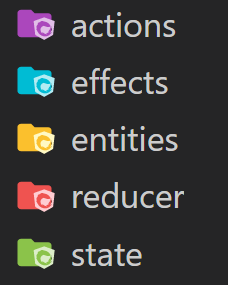
PKief
on 14 Jan 2018
Looks good to me.
On Jan 14, 2018 4:07 PM, "Philipp Kief" notifications@github.com wrote:
@Kaffiend https://github.com/kaffiend The entity icons will look like
this:[image: ngrx entity icons]
https://user-images.githubusercontent.com/12248527/34920686-b2e7a930-f976-11e7-8f1c-1cc2c985e005.pngDo you agree with that? Did I understand you right, that there are only
".entity" files? Or did you mean ".entity" as a file ending like
"demo.entity"?In my opinion the yellow / orange color matches perfectly to the other
folder icons of ngrx:[image: ngrx icons]
https://user-images.githubusercontent.com/12248527/34920715-1e6e567c-f977-11e7-88ce-e2d76fa87df1.png—
You are receiving this because you were mentioned.
Reply to this email directly, view it on GitHub
https://github.com/PKief/vscode-material-icon-theme/issues/92#issuecomment-357542504,
or mute the thread
https://github.com/notifications/unsubscribe-auth/AHdrNSPx_b2xHKO9XrSDrJBlirxd5pNWks5tKmyPgaJpZM4OYnRB
.
Kaffiend
on 15 Jan 2018
Yes you understood me correct 👍
Kaffiend
on 15 Jan 2018
Related issues
 anxorl
·
3Comments
anxorl
·
3Comments
 clankill3r
·
3Comments
clankill3r
·
3Comments
 thomas-tewolde
·
4Comments
thomas-tewolde
·
4Comments
 vvni
·
4Comments
vvni
·
4Comments
 dudeonthehorse
·
3Comments
dudeonthehorse
·
3Comments
Most helpful comment
It can be activated through the command palette:
or in the user settings: