Vscode-markdown: Make Whitespaces at Line Ends Visible
Proposal
Make double whitespaces at line ends visible. So like use a symbol to represent them, or overlay a symbol on top.
In other words, match for '\x20\x20\n'.
This will bring great user experience, especially when the user gets used to this kind of visual interaction.
 Daniel-Chin
All 13 comments
Thanks for the suggestion. I have been using another highlight extension to do this (visualizing the trailing double whitespace). So I'd like to see this feature. (Probably we can include it in the existing "syntax decorations".)
 yzhang-gh
on 8 Jan 2021
yzhang-gh
on 8 Jan 2021
VS Code's
editor.renderWhitespaceeditor.renderControlCharacters
should meet you need.
 Lemmingh
on 8 Jan 2021
Lemmingh
on 8 Jan 2021
Didn't notice VS Code provides a trailing option for editor.renderWhitespace now. But extra decoration can still be helpful because the whitespace is somehow too dim to notice (its color and style/glyph are not designed for this).
yzhang-gh
on 8 Jan 2021
Then, what about
{
    "markdown.extension.theming.decoration.renderTrailingWhitespace": true,
    "markdown.extension.theming.color.editor.trailingWhitespace.background": "#00AA00"
}
Or, define the color under contributes.colors?
{
    "id": "markdown.extension.editor.trailingWhitespace.background",
    "description": "Background color of trailing whitespace characters in the Markdown editor.",
    "defaults": {
        "dark": "diffEditor.insertedTextBackground",
        "light": "diffEditor.insertedTextBackground",
        "highContrast": "#9BB955"
    }
}
Anyway, they must be scoped to application to minimize the complexity of resolving conflicts, since a color theme can contribute editorWhitespace.foreground to control the color of whitespace characters.
Lemmingh
on 9 Jan 2021
Probably we need to try a few different styles so that we pick a relatively good one. My immediate thought is to add a highlighted symbol ↵ (that is why I prefer to use decoration rather than only colors).
yzhang-gh
on 9 Jan 2021
I definitely understand your idea, and I am also in favor of editor decoration, and I do not know there can be solutions other than decoration.
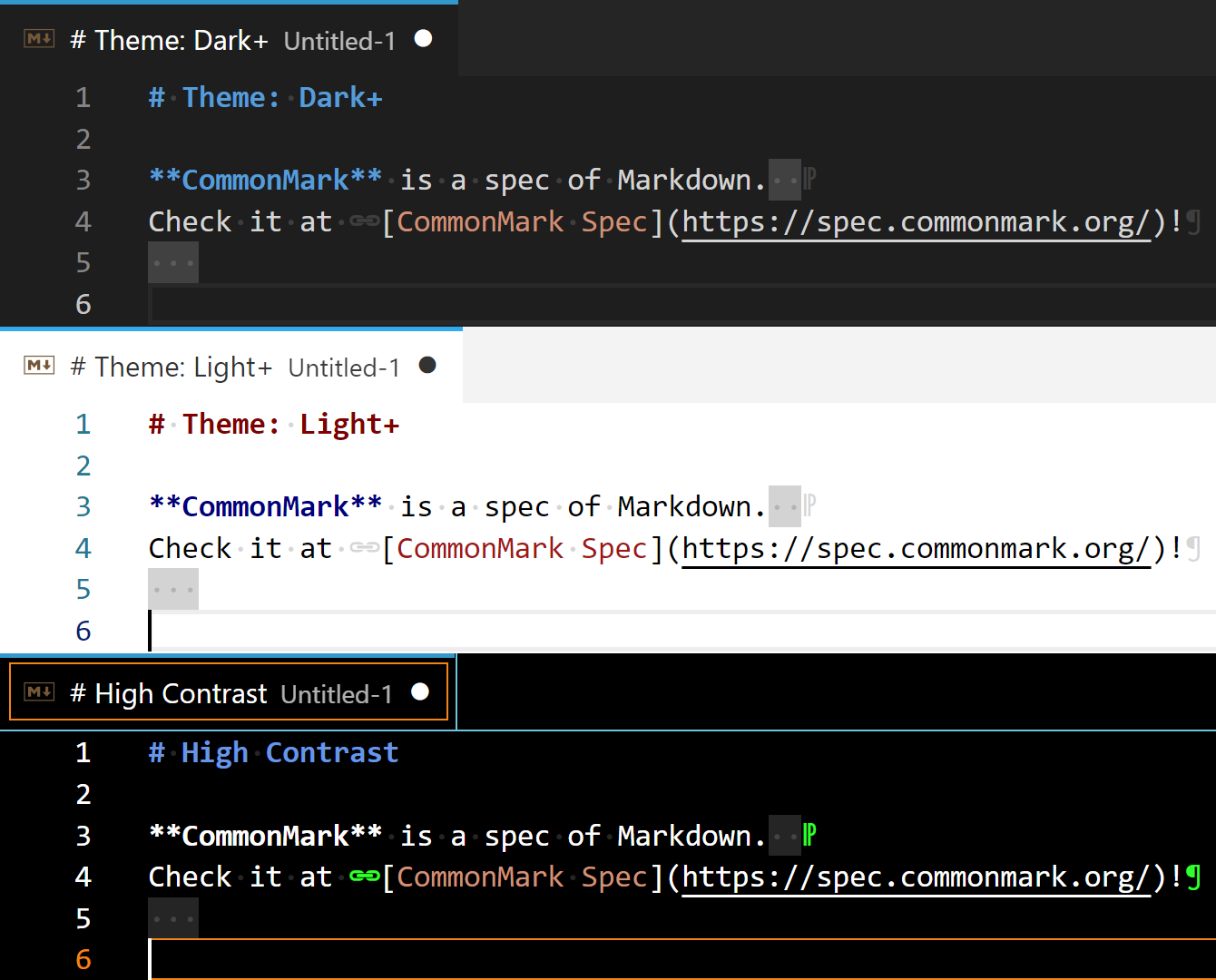
Below is the proto I created yesterday, which looks good to me. Thinking it's too complex and far from production-ready, I posted an extremely simplified piece above.
extension.ts
"use strict";

import * as vscode from "vscode";

//#region Decoration

//#region Constants

// Keys are sorted in alphabetical order.

const colors = {
    "editor.formattingMark.foreground": new vscode.ThemeColor("markdown.extension.editor.formattingMark.foreground"),
    "editor.trailingSpace.background": new vscode.ThemeColor("markdown.extension.editor.trailingSpace.background"),
} as const;

type FontIcon =
    | "downwardsArrow"
    | "downwardsArrowWithCornerLeftwards"
    | "link"
    | "pilcrow"
    | "reversedPilcrow"
    ;

const fontIcons: Readonly<Record<FontIcon, Readonly<vscode.ThemableDecorationAttachmentRenderOptions>>> = {
    "downwardsArrow": {
        contentText: "↓",
        color: colors["editor.formattingMark.foreground"],
    },
    "downwardsArrowWithCornerLeftwards": {
        contentText: "↵",
        color: colors["editor.formattingMark.foreground"],
    },
    "link": {
        contentText: "\u{1F517}\u{FE0E}",
        color: colors["editor.formattingMark.foreground"],
    },
    "pilcrow": {
        contentText: "¶",
        color: colors["editor.formattingMark.foreground"],
    },
    "reversedPilcrow": {
        contentText: "⁋",
        color: colors["editor.formattingMark.foreground"],
    },
};

type DecorationClass =
    | "hardLineBreak"
    | "link"
    | "paragraph"
    | "trailingSpace"
    ;

const decorationStyles: Readonly<Record<DecorationClass, Readonly<vscode.DecorationRenderOptions>>> = {
    "hardLineBreak": {
        after: fontIcons.downwardsArrow,
        rangeBehavior: vscode.DecorationRangeBehavior.ClosedClosed,
    },
    "link": {
        before: fontIcons.link,
        rangeBehavior: vscode.DecorationRangeBehavior.ClosedClosed,
    },
    "paragraph": {
        after: fontIcons.pilcrow,
        rangeBehavior: vscode.DecorationRangeBehavior.ClosedClosed,
    },
    "trailingSpace": {
        backgroundColor: colors["editor.trailingSpace.background"],
    },
};

const supportedDecorationClasses = Object.keys(decorationStyles) as readonly DecorationClass[];

// DecorationClass -> Configuration key
const decorationClassConfigMap: Readonly<Record<DecorationClass, string>> = {
    "hardLineBreak": "markdown.extension.theming.decoration.renderHardLineBreak",
    "link": "markdown.extension.theming.decoration.renderLink",
    "paragraph": "markdown.extension.theming.decoration.renderParagraph",
    "trailingSpace": "markdown.extension.theming.decoration.renderTrailingSpace",
};

//#endregion Constants

//#region Decoration workers

// These implementations are for demonstration only.
/**
 * The registry of decoration workers.
 *
 * A worker analyzes a document, and returns ranges that the decoration applies to.
 * A worker **may** accept a `CancellationToken`, and then must **reject** the promise when the task is cancelled.
 */
const decorationWorkers: Readonly<Record<DecorationClass, (document: vscode.TextDocument, token: vscode.CancellationToken) => Thenable<vscode.Range[]>>> = {
    "hardLineBreak": (document, token) => {
        return new Promise<vscode.Range[]>((resolve, reject): void => {
            token.onCancellationRequested(reject);
            const targetRanges: vscode.Range[] = [];

            for (let i = 0; i < document.lineCount - 1; i++) {
                const line = document.lineAt(i);
                const trailingSpaceLength = line.text.match(/(?<=[^ \t].*) {2,}$/)?.[0].length;

                if (
                    trailingSpaceLength
                    && !document.lineAt(i + 1).isEmptyOrWhitespace
                ) {
                    targetRanges.push(
                        new vscode.Range(line.range.end, line.range.end)
                    );
                }
            }

            resolve(targetRanges);
        });
    },
    "link": async (document) => {
        const targetRanges: vscode.Range[] = Array.from<RegExpMatchArray, vscode.Range>(document.getText().matchAll(/\[[^\]]*?\]\([^\)]*?\)/g), m => {
            const pos = document.positionAt(m.index!);
            return new vscode.Range(pos, pos);
        });

        return targetRanges;
    },
    "paragraph": async (document) => {
        const targetRanges: vscode.Range[] = [];

        for (let i = 0; i < document.lineCount - 1; i++) {
            const line = document.lineAt(i);

            if (
                !line.isEmptyOrWhitespace
                && document.lineAt(i + 1).isEmptyOrWhitespace
                && !/^ {0,3}#{1,6}(?: |\t|$)/.test(line.text)
            ) {
                targetRanges.push(
                    new vscode.Range(line.range.end, line.range.end)
                );
            }
        }

        return targetRanges;
    },
    "trailingSpace": async (document) => {
        const targetRanges: vscode.Range[] = [];

        for (let i = 0; i < document.lineCount; i++) {
            const line = document.lineAt(i);
            const trailingSpaceLength = line.text.match(/ +$/)?.[0].length;

            if (trailingSpaceLength) {
                targetRanges.push(
                    line.range.with(new vscode.Position(i, line.text.length - trailingSpaceLength))
                );
            }
        }

        return targetRanges;
    },
};

//#endregion Decoration workers

//#region Decoration manager

interface IDecorationManager {
    updateDecoration(document: vscode.TextDocument): void;
}

const decorationManager: IDecorationManager = ((): IDecorationManager => {

    /**
     * Decoration type instances **currently in use**.
     *
     * For reliability reasons, do not leak its content out of the manager.
     */
    const decorationHandles = new Map<DecorationClass, vscode.TextEditorDecorationType>();

    let cancellationHandle: vscode.CancellationTokenSource | undefined;

    /**
     * Initializes and queues the decoration tasks.
     * @param document The document.
     */
    function updateDecoration(document: vscode.TextDocument): void {
        // For performance reasons, limit to the active editor.
        const editor = vscode.window.activeTextEditor;
        if (!(document.languageId === "markdown" && editor && editor.document === document)) {
            return;
        }

        // Discard previous tasks in case they are still running.
        if (cancellationHandle) {
            cancellationHandle.cancel();
            cancellationHandle.dispose();
        }
        cancellationHandle = new vscode.CancellationTokenSource();

        // Create new tasks.
        const crtToken = cancellationHandle.token;
        Promise.resolve().then((): void => {
            for (const target of supportedDecorationClasses) {
                if (crtToken.isCancellationRequested) {
                    break;
                }

                if (vscode.workspace.getConfiguration().get<boolean>(decorationClassConfigMap[target])) {
                    // Declare `let handle` here to ensure a new `handle` variable is created each time.
                    let handle = decorationHandles.get(target);
                    if (handle === undefined) {
                        handle = vscode.window.createTextEditorDecorationType(decorationStyles[target]);
                        decorationHandles.set(target, handle);
                    }

                    decorationWorkers[target](document, crtToken).then(targetRanges => {
                        if (!crtToken.isCancellationRequested) {
                            editor.setDecorations(handle!, targetRanges);
                        }
                    }, () => { });
                } else {
                    decorationHandles.get(target)?.dispose();
                    decorationHandles.delete(target);
                }
            }
        });
    }

    return { updateDecoration };
})();

//#endregion Decoration manager

//#endregion Decoration

export function activate(context: vscode.ExtensionContext) {
    console.log('"Playground" is now active!');

    const disposable = [
        vscode.commands.registerCommand("playground.start", () => {
            vscode.window.showInformationMessage('"Playground" is activated!');

            vscode.workspace.onDidChangeTextDocument(e => decorationManager.updateDecoration(e.document));
            vscode.window.onDidChangeActiveTextEditor(e => e === undefined ? void 0 : decorationManager.updateDecoration(e.document));
        }),
    ];

    context.subscriptions.push(...disposable);
}

export function deactivate() { }
package.json "contributes"
{
    "colors": [
        {
            "id": "markdown.extension.editor.formattingMark.foreground",
            "description": "Color of formatting marks (paragraphs, hard line breaks, links, etc.) in the Markdown editor.",
            "defaults": {
                "dark": "editorWhitespace.foreground",
                "light": "editorWhitespace.foreground",
                "highContrast": "diffEditor.insertedTextBorder"
            }
        },
        {
            "id": "markdown.extension.editor.trailingSpace.background",
            "description": "Background color of trailing space (U+0020) characters in the Markdown editor.",
            "defaults": {
                "dark": "diffEditor.diagonalFill",
                "light": "diffEditor.diagonalFill",
                "highContrast": "editorWhitespace.foreground"
            }
        }
    ],
    "configuration": {
        "title": "Lemming's Playground",
        "properties": {
            "markdown.extension.theming.decoration.renderHardLineBreak": {
                "type": "boolean",
                "default": true,
                "scope": "application"
            },
            "markdown.extension.theming.decoration.renderLink": {
                "type": "boolean",
                "default": true,
                "scope": "application"
            },
            "markdown.extension.theming.decoration.renderParagraph": {
                "type": "boolean",
                "default": true,
                "scope": "application"
            },
            "markdown.extension.theming.decoration.renderTrailingSpace": {
                "type": "boolean",
                "default": true,
                "scope": "application"
            }
        }
    },
    "commands": [
        {
            "command": "playground.start",
            "title": "Start Playground ;)"
        }
    ]
}
That will be great 👍. Do you have any screenshots?
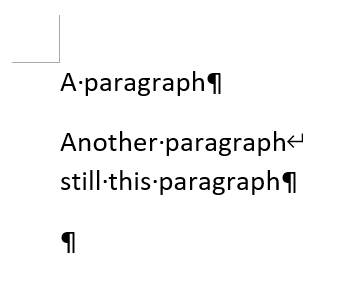
Additionally, do you think it would be better to call it a "soft return"? Just like in Word
yzhang-gh
on 10 Jan 2021
do you think it would be better to call it a "soft return"?
No. I'd like to stick to CommonMark's terms.
Lemmingh
on 10 Jan 2021
Thanks.
I like it that the marker is placed after the whitespace. But I guess we can remove the background color (for whitespace). It looks out of place (distractive).
What is the meaning of reversed pilcrow ⁋? I haven't seen it before and I can only find this
https://www.quora.com/What-is-the-proper-use-of-a-reverse-pilcrow
stick to CommonMark's terms.
Interesting (although to me it is a bit counter-intuitive). Anyway, I'm fine with this 👌.
yzhang-gh
on 10 Jan 2021
we can remove the background color (for whitespace)
Not a problem. Each decoration is controlled by a corresponding setting. We can keep all default to false, and let users choose their favorite combination.
What is the meaning of reversed pilcrow
I didn't pay much attention, just found it by cross-reference.
As you've noted, the Reversed Pilcrow Sign (U+204B) appears to be designed for RTL.
Then, let's pick some new symbols.
What was your plan with these arrows? Use them as in Microsoft Word?
↵(U+21B5) Downwards Arrow with Corner Leftwards↓(U+2193) Downwards Arrow
Lemmingh
on 10 Jan 2021
What was your plan with these arrows? Use them as in Microsoft Word?
Users will feel familiar when they see it (↵), otherwise we need some good reasons why we choose a different one.
yzhang-gh
on 10 Jan 2021
Users will feel familiar
Make sense.
¶for paragraph.↵for hard line break.
I'm a bit hesitant. See the table below.
I installed Arabic and Hebrew language pack to reveal complex script support in Word.
Interestingly, the paragraph mark is always pilcrow (¶) in Office 365 Version 2012 for Windows, even if the paragraph direction is RTL.
Besides, the appearance of formatting marks depends on the preferred authoring language.
| Mark | Others | East Asian |
| ----------------- | ------ | ------------- |
| Paragraph | ¶ | ↵ / ↳ |
| Manual line break | ↵ / ↳ | ↓ |
Lemmingh
on 16 Jan 2021
Besides, the appearance of formatting marks depends on the preferred authoring language.
That's interesting. No wonder why I have a feeling that I have seen ↵ for paragraphs.
I guess we can adopt ¶-↵ first (it will be good enough to use) and I doubt whether there will be many people aware of this difference. The pain point is to provide a visual hint for hard line break which is hard to notice. The rest is just the icing on the cake.
yzhang-gh
on 16 Jan 2021
Related issues
 chuyangliu
·
5Comments
chuyangliu
·
5Comments
 rdhar
·
4Comments
rdhar
·
4Comments
 akshaybabloo
·
3Comments
akshaybabloo
·
3Comments
 smallprogram
·
3Comments
smallprogram
·
3Comments
 lackovic
·
4Comments
lackovic
·
4Comments